

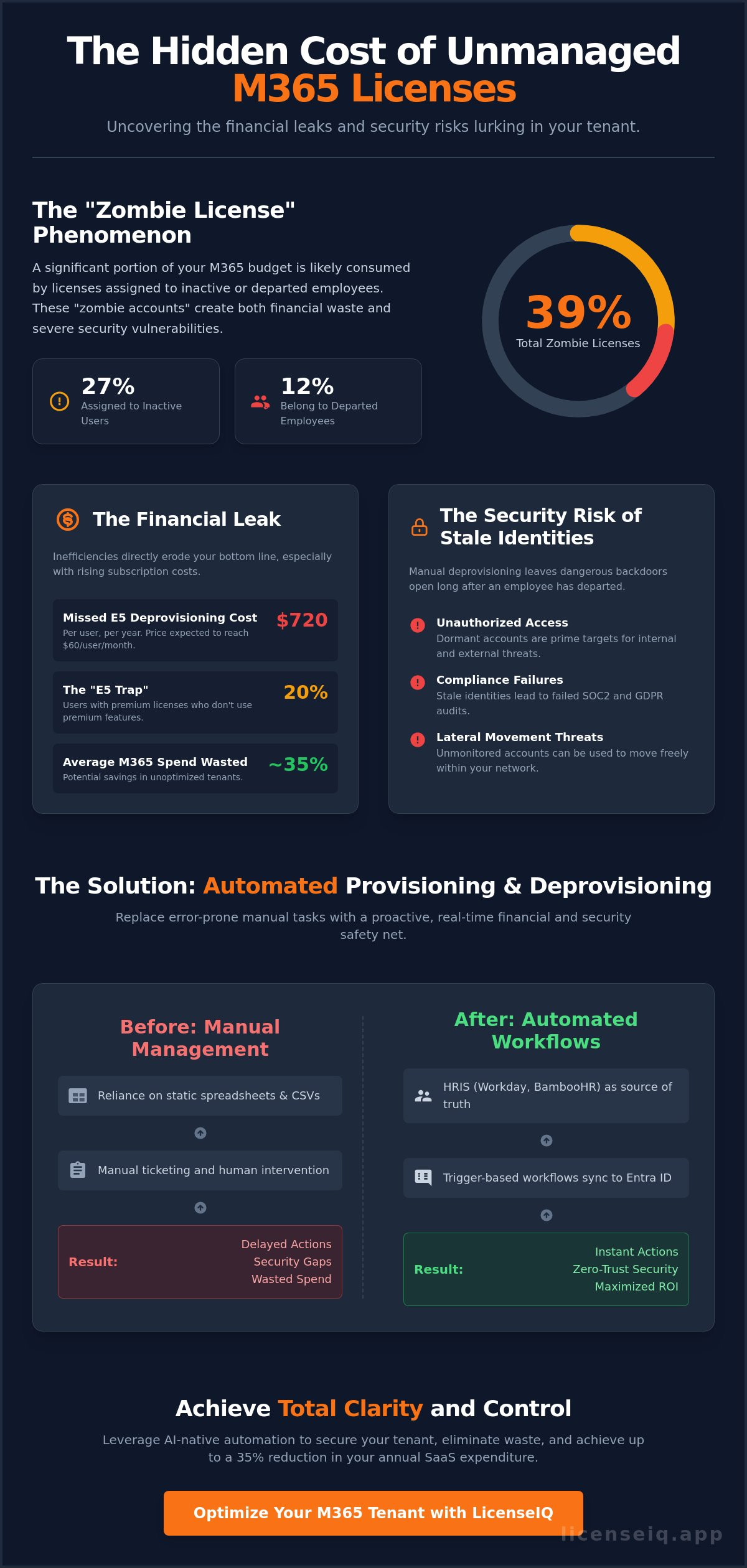
Approximately 27% of Microsoft 365 licenses are currently assigned to inactive users, while another 12% belong to employees who have already left the company. With the July 2026 price increases pushing Microsoft 365 E5 costs to $60 per user, these "zombie accounts" represent a critical financial leak. Manual spreadsheets can't keep pace with these shifting costs or the security risks of orphaned identities. Transitioning to automated m365 license provisioning and deprovisioning is the only way to maintain oversight in a complex operational environment.
You've likely felt the sting of budget bloat from unassigned E5 licenses or the anxiety of a potential security breach from a disabled account that still has active access. It's time to move past reactive administration. This guide provides a roadmap to master AI-native workflows that secure your tenant and slash wasted spend. You'll learn how to achieve zero-touch onboarding and instant license reclamation using the LicenseIQ platform. We'll show you exactly how to leverage a License Health Score to drive a 35% reduction in your annual SaaS expenditure. Let's replace organizational disorder with total clarity.
Key Takeaways
- Eliminate "Zombie Licenses" by establishing a proactive financial safety net that monitors user activity in real time.
- Deploy automated m365 license provisioning and deprovisioning to sync HR systems with Microsoft Entra ID via trigger-based workflows.
- Integrate SaaS FinOps principles to ensure every new user receives a right-sized license based on actual feature requirements.
- Strengthen tenant security by automating account revocation and MFA session termination immediately upon employee departure.
- Optimize your governance strategy using LicenseIQ’s Automated Governance Workflows for rapid, SMB-focused deployment.
The Hidden Cost of Manual M365 License Management
Manual M365 management is a fiscal liability. Relying on static spreadsheets to track thousands of seats leads to invisible waste and mounting security debt. We define automated m365 license provisioning and deprovisioning as a proactive financial safety net. It replaces the error-prone cycle of manual CSV uploads with real-time, AI-native software intelligence. Without this automation, organizations face the "Zombie License" phenomenon. This occurs when you continue paying for users who left the company weeks or even months ago. Verified data indicates that 12% of licenses are typically assigned to disabled or departed employees. Organizations using unoptimized tenants often suffer an average waste of 35% of their total M365 spend. In a climate of rising subscription costs, these inefficiencies directly erode your bottom line.
The Security Risk of Stale Identities
Manual deprovisioning creates dangerous gaps. When an employee departs, license removal often lags behind the actual exit date. These stale identities provide backdoors for unauthorized access. Proper Identity and access management (IAM) requires instant revocation to maintain a secure perimeter. Gaps in this process lead to compliance failures in SOC2 and GDPR audits. Dormant accounts with unmonitored privileged access are prime targets for lateral movement within your network. Security isn't just about firewalls; it's about closing doors the moment they're no longer needed. Automated workflows ensure that access terminates the second an HR status changes, leaving no room for human error.
The Financial Leak: Unassigned vs. Underutilized
Financial waste isn't limited to departed employees. There's a significant difference between unassigned licenses sitting in your tenant and active users who simply don't use what they're given. Many organizations fall into the "E5 Trap." They pay $60 per user for premium plans while employees only use basic Outlook and Word features. Statistics confirm that 20% of E5 users never touch premium tools like Power BI or Defender. Additionally, an average of 27% of M365 licenses are assigned to users who show no activity at all. A single missed deprovisioning for an E5 account costs your organization $720 annually in pure waste. Using the LicenseIQ platform allows you to identify these discrepancies instantly. It transforms provisioning from a clerical task into a strategic financial operation that protects your margins.
How Automated M365 Provisioning and Deprovisioning Works
Modern identity management relies on a seamless handshake between your Human Resources Information System (HRIS) and Microsoft Entra ID. This trigger-based architecture eliminates the delays inherent in manual ticketing systems. In 2026, the System for Cross-domain Identity Management (SCIM) remains the backbone of this exchange. It standardizes how identity data moves between cloud applications, ensuring that user attributes remain consistent across your entire stack. By utilizing automated m365 license provisioning and deprovisioning, organizations can manage the full user lifecycle through standardized CRUD operations. These operations Create, Read, Update, and Delete identity objects based on real-time data rather than static spreadsheets.
Role-Based Access Control (RBAC) sits at the center of this automation. Instead of assigning licenses based on broad guesses, the system uses predefined roles to match users with the exact tools they need. This precision prevents the "E5 Trap" mentioned earlier by ensuring only specific personas receive premium SKUs. Implementing automated governance workflows ensures these transitions happen without human intervention, maintaining a lean and secure tenant at all times.
The Onboarding Workflow: Provisioning for Day One
Efficiency begins the moment a contract is signed. The workflow follows a logical progression:
- Step 1: An HRIS trigger from platforms like Workday or BambooHR signals a new hire event.
- Step 2: The system automatically assigns group memberships in Entra ID based on the user's department and location.
- Step 3: License allocation occurs instantly, tailored to the specific user persona. A field technician receives an F1 license, while a data analyst is provisioned with an E3 or E5.
The Offboarding Workflow: Deprovisioning for Security
Security requires immediate action when an employee leaves the organization. Automation handles the high-risk tasks required to securely offboard employees while maintaining data integrity:
- Step 1: Automated governance tools trigger immediate account disablement the moment the HR status changes to "terminated."
- Step 2: The workflow initiates data preservation protocols, such as converting the user's mailbox to a shared status and moving OneDrive files to a manager's storage.
- Step 3: The system performs license reclamation. It removes the assigned SKU and sends a spend recovery notification to the finance team, ensuring that the seat is available for the next hire or removed from the next billing cycle.
Bridging the Gap Between IT Ops and SaaS FinOps
Provisioning is often treated as a simple ticket to be closed. It isn't. Every new user represents a recurring financial commitment. Automated m365 license provisioning and deprovisioning ensures that every seat matches a specific business need. Traditional IT operations often work in a vacuum, focusing on access rather than cost. SaaS FinOps changes this. It demands that provisioning be informed by real-time usage data. This data-driven approach introduces "Right-Sizing" at the point of entry. You don't give an E5 to a user who only needs web-based apps. You match the license to the persona from day one. This proactive stance prevents SaaS sprawl before it starts. When you automate provisioning and de-provisioning, you align technical access with fiscal health. For a comprehensive view of the entire process, consult our resource on Mastering the Microsoft 365 License Management Lifecycle in 2026.
Automated Governance vs. Manual Audits
Manual audits are a post-mortem. By the time a quarterly review finishes, the data is already three months old. You've already overpaid for dozens of seats. Continuous automated governance replaces these slow cycles. It provides a real-time License Health Score. This metric offers total transparency into your tenant's efficiency. LicenseIQ acts as a persistent digital auditor. It never sleeps. It monitors every license assignment and usage pattern, ensuring that your financial data is always accurate. This visibility turns obscured waste into actionable spend recovery.
Predictive Provisioning: AI-Native Decision Making
AI-native automation takes governance further. It predicts the optimal license tier based on profiles of similar users within your organization. The system uses the Model Context Protocol (MCP) to understand the full environment before assigning a SKU. This reduces friction between IT and Finance. IT gets the automation they need for speed. Finance gets the assurance that no dollar is wasted. The result is an efficient, transparent system that supports growth without inflating the budget. It eliminates the back-and-forth between departments, allowing specialized leadership to focus on high-level strategy rather than license disputes.
Secure Deprovisioning: A Checklist for 2026
Deprovisioning is more than a cost-saving measure. It's a critical security protocol. Many administrators make the mistake of simply removing a license and considering the task complete. This leaves the account active and vulnerable. Effective automated m365 license provisioning and deprovisioning prioritizes total account revocation. You must terminate all active multi-factor authentication (MFA) sessions immediately. This prevents a departed employee from accessing corporate data through a cached token on a personal device. Automation also handles the logistical burden of data preservation. It triggers the transfer of OneDrive files and Outlook data to the appropriate manager without manual intervention. For a step-by-step breakdown of these requirements, review our Office 365 Offboarding Checklist 2026.
The License Reclamation Protocol
Unassigned licenses are the silent killers of an IT budget. They sit dormant in the Microsoft portal, obscured from view until the next billing cycle. Automated workflows identify these orphans and flag them for immediate reclamation. This protocol also applies to users on extended leave. Instead of paying for a full E5 SKU during a three-month sabbatical, the system can automate a temporary downgrade to a lower tier. Security extends beyond the M365 tenant. Your automation must verify the removal of access to third-party SaaS applications tied to M365 Single Sign-On (SSO). This ensures that a former employee's access is severed across the entire corporate ecosystem in seconds.
Data Sovereignty and Compliance
Automation must respect legal and regulatory boundaries. During the deprovisioning process, the system checks for active legal holds before moving or converting any data. This prevents the accidental destruction of evidence. It also streamlines "Right to be Forgotten" requests under GDPR by identifying and purging personal data across the tenant. Every action taken by the system is recorded in immutable logs. These logs provide a transparent audit trail that proves compliance during rigorous security reviews. You don't just need to be secure; you need the data to prove it.
To see how much your organization can save through precise offboarding, explore the LicenseIQ Spend Recovery Dashboard today.
LicenseIQ: AI-Native Automation for SMB M365 Tenants
LicenseIQ simplifies automated m365 license provisioning and deprovisioning for organizations that lack massive IT departments. Enterprise identity and access management (IAM) tools often require months of configuration and specialized consultants. LicenseIQ provides a "Connect in Minutes" advantage. It integrates directly with your tenant to establish Automated Governance Workflows without the need for complex scripting. This speed allows specialized leadership to regain control over their environment immediately. It's an active participant in your company's growth, ensuring that your resources are always monitored by a precise system.
The platform prioritizes financial transparency through the Spend Recovery Dashboard. This tool provides real-time ROI tracking, showing you exactly where capital is being reclaimed. It's no longer enough to just manage access. You must protect your organization's financial health with the same level of vigilance you apply to security. You can Find Your M365 Health Score Now to uncover the obscured waste in your current setup.
Continuous Monitoring and Spend Recovery
LicenseIQ acts as a meticulous digital auditor that never sleeps. It scans every user and license within your tenant to find wasted spend that manual audits miss. This continuous oversight generates your License Health Score. This single metric serves as the cornerstone of your tenant's financial wellness. By identifying unassigned seats and underutilized premium features, the platform provides automated recommendations to reclaim up to 35% of your total M365 subscription spend. This proactive approach ensures your budget is spent on active productivity rather than dormant accounts.
Why SMBs Choose AI-Native Governance
Managing M365 costs shouldn't require an advanced IT degree. Small and medium businesses need actionable insights rather than overwhelming data dumps that lead to analysis paralysis. AI-native governance interprets complex usage patterns and presents clear, declarative solutions. This minimizes cognitive load for managers who need to make rapid decisions. You don't have to guess which licenses to downgrade. The system identifies them for you based on actual usage data. For more strategies on protecting your margins, read our guide on How to Reduce M365 Subscription Costs. It's time to replace organizational disorder with total clarity and move toward a zero-waste M365 environment.
Future-Proof Your M365 Governance Strategy
Manual license management is a liability in an era of rising subscription costs. The 2026 price hikes have turned unassigned seats from a minor oversight into a significant financial leak. Transitioning to automated m365 license provisioning and deprovisioning is the only way to maintain total oversight of your tenant. This approach secures your perimeter against orphaned identities while ensuring your budget supports active productivity. You've seen how automation bridges the gap between IT security and SaaS FinOps. It's time to replace administrative friction with streamlined, AI-native workflows.
LicenseIQ provides the transparency you need to eliminate organizational disorder. Our platform delivers a comprehensive Health Score audit in just five minutes, identifying immediate opportunities for recovery. You don't need a massive enterprise infrastructure to benefit from automated governance. We offer SMBs a precise, easy-to-deploy solution that monitors resources around the clock. Stop letting your budget bleed through inactive accounts and unutilized premium features. It's the most efficient way to protect your margins.
Recover 35% of your M365 spend with LicenseIQ automation. Secure your tenant and optimize your investment today.
Frequently Asked Questions
What is the difference between provisioning and deprovisioning in M365?
Provisioning is the automated process of creating user identities and assigning licenses to ensure new hires have immediate access to tools. Deprovisioning is the strategic revocation of that access and the reclamation of licenses when an employee departs. While provisioning drives day-one productivity, deprovisioning is a critical financial and security action. it ensures your organization stops paying for resources the moment they're no longer required.
Can I automate M365 license assignment based on HR departments?
You can easily automate license assignment by syncing your HRIS with Microsoft Entra ID. Workflows trigger automated m365 license provisioning and deprovisioning based on specific department attributes. This ensures a marketing hire receives an E3 while a developer is provisioned with an E5, eliminating manual errors. It prevents the common mistake of over-provisioning expensive premium licenses to users who only require basic functionality.
What happens to a user's data when they are deprovisioned?
User data is preserved through automated protocols like mailbox conversion and OneDrive file migration. Before a license is reclaimed, the system converts the departing employee’s mailbox to a shared status and moves critical files to a designated manager. This process maintains data sovereignty and compliance. It ensures your business retains intellectual property without keeping a paid license active for a departed user.
How much can I save by automating my M365 license reclamation?
Organizations typically recover up to 35% of their total M365 subscription spend through automated reclamation. These savings come from identifying inactive accounts and right-sizing users who don't utilize premium features like Power BI or Defender. Using a Spend Recovery Dashboard provides real-time visibility into these reclaimed costs. It transforms your M365 tenant into a lean resource that directly supports your organization's financial health.
Does Microsoft Entra ID automate license deprovisioning natively?
Entra ID offers basic group-based licensing, but it lacks the advanced financial governance needed for total spend recovery. It can disable accounts, yet it often fails to reclaim the associated license automatically. Advanced automated m365 license provisioning and deprovisioning requires a governance layer that monitors actual usage data. This ensures licenses aren't just unassigned but are also right-sized or removed to prevent ongoing budget bloat.
What is a "Zombie License" and how do I find them?
A "Zombie License" is a paid subscription assigned to a departed employee or an inactive user. Verified data shows that 12% of licenses are typically assigned to employees who have already left the organization. You find them by scanning for disabled accounts that still hold active SKUs in the portal. LicenseIQ automates this search by generating a Health Score that reveals these hidden costs in minutes.
Is automated provisioning secure for remote employees?
Automation is the most secure method for managing remote staff access. It enforces immediate MFA session termination and account revocation the second an employee is offboarded in your HR system. This eliminates the dangerous security gap where a former staff member might retain access via a cached token on a personal device. It provides specialized leadership with the confidence that their cloud perimeter remains locked.


