

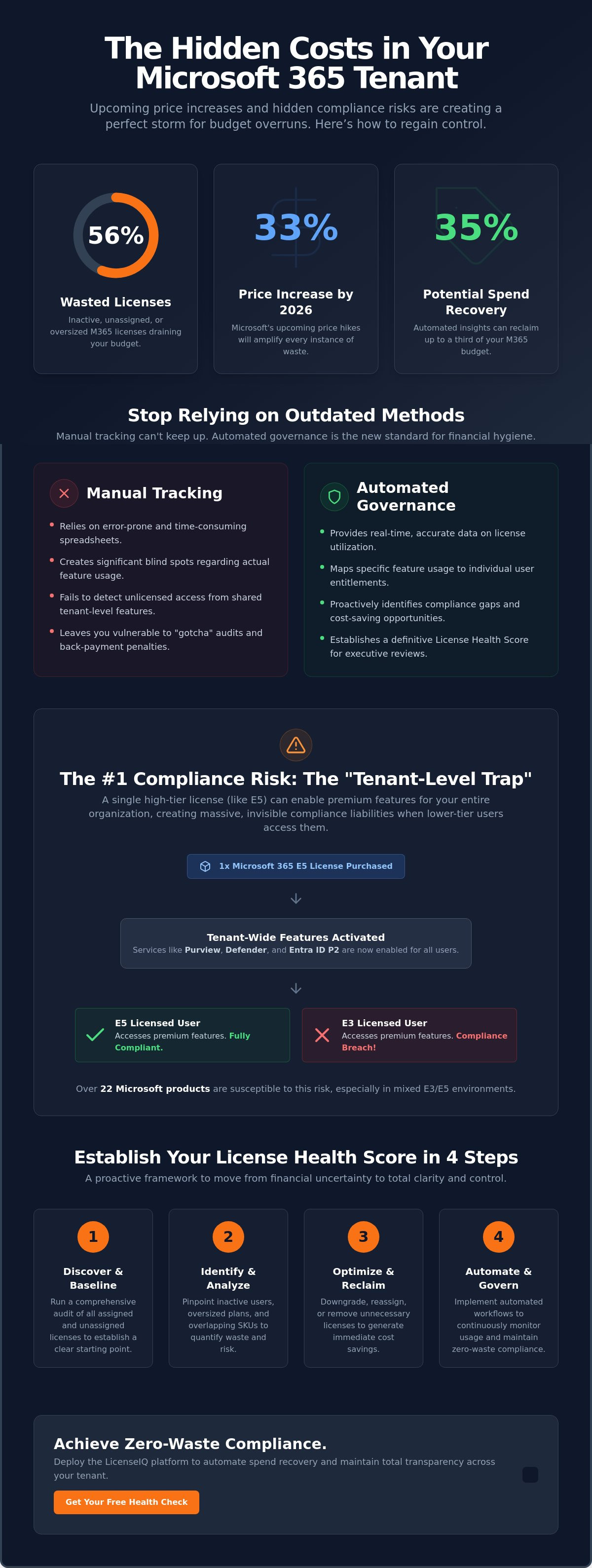
56% of enterprise Microsoft 365 licenses are currently inactive, unassigned, or oversized. With Microsoft implementing price increases of up to 33% on July 1, 2026, these inefficiencies represent a massive drain on your operational budget. You likely suspect your manual tracking is failing to capture the full scope of your tenant's sprawl. It's a common fear among leadership to feel exposed to "gotcha" audits while paying premium rates for seats that haven't been accessed in months.
A precise microsoft 365 license utilization report transforms this organizational disorder into total financial clarity. You'll learn how to identify hidden compliance gaps and recover up to 35% of wasted M365 spend using automated utilization insights. This guide provides a direct roadmap to establish a License Health Score, automate the identification of inactive users, and provide definitive proof of compliance for your next executive review. We'll also break down the impact of the new 2026 pricing tiers and the urgent transition from legacy tools to Microsoft Purview.
Key Takeaways
- Learn how a modern microsoft 365 license utilization report identifies seat misalignment and uncovers unlicensed feature usage before an official audit finds it.
- Understand the "Tenant-Level Trap" where shared features like Defender or Purview can create massive compliance liabilities through unassigned access.
- Replace manual, error-prone spreadsheets with automated governance workflows that provide real-time data accuracy and instant oversight.
- Implement a 4-step framework to establish a License Health Score, providing a definitive baseline for your organization’s financial hygiene.
- Deploy the LicenseIQ platform to automate spend recovery and maintain total transparency across your tenant without requiring specialized technical expertise.
What is a Microsoft 365 License Utilization Report?
A microsoft 365 license utilization report is a precise audit that aligns your active seat count with actual user behavior. It's the difference between knowing you have 500 licenses and knowing that 120 of them haven't been touched in 30 days. In 2026, this distinction is critical for financial survival. Microsoft has shifted toward aggressive, automated tenant audits designed to flag unlicensed feature usage. If your organization relies on legacy Software Asset Management (SAM) tools, you're likely operating with significant blind spots. Static tools fail in the dynamic Microsoft 365 ecosystem because they can't track the rapid sprawl of SaaS applications or the nuances of per-user feature activation in real time.
The Legal vs. Financial Stakes in 2026
Why Native Microsoft Dashboards Aren’t Enough
The M365 Admin Center provides basic usage metrics, but it lacks the depth required for true financial optimization. Native reports often ignore inactive users or fail to highlight overlapping SKUs where a user is double-covered by different plans. These data gaps leave IT leadership guessing. A comprehensive microsoft 365 license utilization report should provide a License Health Score. This metric offers a definitive look at your tenant's hygiene, moving beyond simple "active/inactive" toggles to reveal the actual value extracted from every dollar spent. Platforms like LicenseIQ bridge this gap by providing the visibility that native tools omit. By uncovering obscured details, leadership can make data-driven decisions that eliminate waste and secure the organization’s financial health.
The Tenant-Level Trap: The #1 Compliance Risk
The most dangerous compliance risk in your environment is invisible. It's called the "Tenant-Level Trap." This occurs when a single high-tier license, such as an E5, enables premium features across your entire organization. Features like Microsoft Purview or advanced Defender capabilities often activate at the tenant level rather than for the individual user. While this seems convenient, it creates a massive liability. If a user with a lower-tier license accesses these premium tools, they are technically in a state of "Unlicensed Access."
Microsoft currently identifies over 22 products susceptible to this specific compliance gap. In 2026, the vendor has deployed sophisticated targeting capabilities to detect unauthorized usage. These automated systems scan for users benefiting from security or governance features they haven't paid for. Relying on a basic microsoft 365 license utilization report from native tools won't protect you here. You need a system that maps specific feature usage directly to the entitlement of each individual seat to ensure total transparency.
Commonly Mismanaged Security & Compliance Services
Mixed-license environments, often combining E3 and E5 seats, are the primary breeding ground for accidental non-compliance. High-risk services include Microsoft Defender for Business, Entra ID P2, and Insider Risk Management. These tools frequently utilize global policies that apply to all users by default. This "indirect access" means your E3 users might be using P2-level identity protection without a valid license. Without precise oversight, these shared tenant settings can lead to significant back-payment penalties during a Microsoft audit. Maintaining a high License Health Score requires a granular view of these policy-driven overlaps.
How to Detect Unlicensed Feature Usage
Manual audits of Microsoft 365 admin center usage reports usually fail at scale. These native reports track activity but rarely flag when that activity exceeds a user's licensed rights. Success requires mastering the license management lifecycle to ensure every seat is right-sized for the features it actually consumes. Automated scanning is the only reliable way to correlate live feature usage with specific user entitlements. By using a microsoft 365 license utilization report powered by AI, you can identify these traps in minutes rather than weeks. This proactive approach ensures your security posture remains strong without inviting financial ruin from "gotcha" audits.
Manual Audit vs. Automated Compliance Check
Manual auditing is an exercise in futility. Relying on a legacy approach to generate a microsoft 365 license utilization report takes weeks of tedious spreadsheet work. AI-native tools complete the same task in minutes. Static data is obsolete as soon as you save the file. In a fast-paced SaaS environment, accuracy is a moving target. The cost of error is high. One missed inactive user represents hundreds in wasted annual spend. Multiply that across a mid-sized enterprise, and the financial bleed is staggering. Automation is the only way to achieve Continuous Compliance in 2026. It ensures your tenant remains optimized every day, not just during an annual review.
The Limitations of PowerShell and Spreadsheets
PowerShell scripts are a favorite of technical teams, but they are inherently fragile. These scripts break frequently because they can't keep up with Microsoft's constant SKU updates and price fluctuations. Human error is an ever-present risk in complex license right-sizing tasks. A single typo in a script can lead to accidental de-provisioning or missed waste. IT leadership requires a Spend Recovery Dashboard to visualize this data for non-technical stakeholders. This tool converts complex technical logs into clear financial insights. It allows managers to see exactly where the budget is leaking without needing an IT degree. Total transparency eliminates the friction usually found in budget approvals.
The ROI of AI-Native Software Intelligence
AI-native intelligence represents a shift from simple data collection to proactive governance. It doesn't just show you the mess; it executes the cleanup strategy. The LicenseIQ platform recovers up to 35% of M365 spend by identifying redundant licenses and oversized tiers instantly. This level of oversight is a core component of a broader Microsoft 365 cost optimization strategy. By automating your microsoft 365 license utilization report, you ensure that your tenant remains lean and compliant without constant manual intervention. You move from a reactive posture to a vigilant, results-first approach. This proactive monitoring builds trust with leadership and secures your organization’s financial future.
A 4-Step Framework for a Modern Compliance Audit
Managing a tenant without a structured framework leads to operational chaos. A microsoft 365 license utilization report is only effective if it drives immediate action. This 4-step framework provides the structure needed for a modern compliance audit, ensuring every seat is accounted for and every dollar is justified. It moves your organization from a reactive posture to a state of total transparency.
- Step 1: Discover. Connect your tenant to an automated scanner to map every license and user in minutes. You can't manage what you can't see.
- Step 2: Score. Generate a License Health Score to baseline your current hygiene. This metric provides an instant snapshot of your financial and compliance exposure.
- Step 3: Recover. Identify unassigned licenses and inactive users. Reclamation should happen immediately to stop the budget bleed from "ghost" accounts.
- Step 4: Govern. Implement Automated Governance Workflows to prevent future waste. This step ensures that sprawl doesn't return after your initial cleanup.
Discovering Inactive and Redundant Users
Defining inactivity is the first hurdle for specialized leadership. Most organizations use 30, 60, or 90-day login thresholds to flag accounts for review. Redundancy often hides in plain sight. For example, a user might have an E3 license plus a standalone Visio or Project license they haven't opened in months. These overlapping costs add up quickly across a mid-sized enterprise. Using an Office 365 offboarding checklist ensures that departed employees don't leave behind active licenses that continue to bill. Vigilance in this step is the cornerstone of effective resource monitoring.
Right-Sizing: Matching Licenses to Actual Needs
E5 over-provisioning is a rampant issue in technical operations. Organizations frequently pay for top-tier security and analytics features that 80% of their staff never touch. Right-sizing means matching the license to the user's daily requirements. Downgrading power users to E3 or shifting frontline workers to F-series licenses can save thousands in annual spend. Consult the comprehensive 2026 reference guide on license types to understand which tier fits your specific departments. A data-driven microsoft 365 license utilization report makes these decisions obvious. It replaces guesswork with precise, results-first data that leadership can trust.
Achieving Zero-Waste Compliance with LicenseIQ
Achieving zero-waste compliance isn't a manual task. It requires a system that operates at the speed of your business. LicenseIQ is the AI-native solution designed specifically for SMB license governance. It eliminates the complexity of traditional asset management by providing immediate clarity in complex operational environments. The platform doesn't just list your seats; it delivers a comprehensive microsoft 365 license utilization report that translates technical activity into precise dollar-value recommendations. This results-first approach ensures your core value proposition is never lost in technical complexity.
Most organizations struggle with "ghost" licenses because they lack the tools to see them. LicenseIQ provides a Spend Recovery Dashboard that highlights exactly where your budget is leaking. It identifies redundant licenses and oversized tiers with surgical precision. By using this platform, specialized leadership can make data-driven decisions that immediately impact the financial health of the organization. You don't need a technical degree to uncover obscured details when you have an expert system monitoring your resources. It's about moving from organizational disorder to total transparency.
Instant Visibility: The 5-Minute Audit
Efficiency is the cornerstone of the LicenseIQ platform. Business managers can connect their tenant in minutes to receive a professional-grade audit without waiting on IT tickets. The platform leverages the Model Context Protocol for deep, secure integration, ensuring your data remains protected while the system scans for waste. This isn't a passive tool; it's a proactive problem-solver that identifies risks before they become liabilities. You can see your own data and identify hidden gaps by initiating a LicenseIQ scan right now. The setup is fast-paced and highly structured, mirroring the efficiency of the service itself.
Continuous Governance for Long-Term Savings
One-time audits are insufficient. Your tenant is dynamic, with users joining, leaving, and changing roles every week. A static microsoft 365 license utilization report becomes a historical document the moment it's generated. LicenseIQ solves this through Automated Governance Workflows. These workflows maintain financial accuracy 24/7, acting as a vigilant guardian of your corporate resources. They automatically flag inactive users and unassigned licenses, ensuring you never pay for more than you use. This continuous oversight transforms license management from a recurring headache into a streamlined, automated process. Start your Microsoft 365 license compliance check today to secure your tenant and reclaim your spend.
Secure Your Tenant's Financial Future
The 2026 landscape demands a shift from reactive management to proactive oversight. You've seen how the "Tenant-Level Trap" creates hidden compliance risks and how manual spreadsheets fail to keep pace with Microsoft's dynamic pricing and SKU updates. A comprehensive microsoft 365 license utilization report is no longer just an administrative task; it's a vital instrument for corporate resource protection. Leadership requires total transparency to navigate the significant price increases effective this year and beyond.
You can eliminate organizational disorder and establish a lean, compliant environment starting today. LicenseIQ provides the precision needed to identify inactive users and right-size your subscriptions with absolute confidence. Stop the silent budget erosion and start monitoring your resources with a system that operates with the authority of an expert auditor. By moving beyond static data, you ensure your organization remains agile and financially secure.
Discover your M365 Health Score and recover wasted spend with LicenseIQ. Our AI-native platform allows you to connect and scan your tenant in under 5 minutes. This enables you to save up to 35% on your Microsoft 365 subscriptions through continuous, automated governance and financial accuracy. Secure your organization's growth by reclaiming your wasted cloud budget now.
Frequently Asked Questions
What is the most common M365 compliance mistake?
The most common mistake is failing to account for "unlicensed access" when high-tier features are enabled globally. Many organizations assume that if a feature works for a user, that user is correctly licensed. This is often false in mixed-license environments where an E5 license activates services for E3 users. This creates a significant compliance gap that is easily flagged during an automated vendor audit.
How often should I perform a Microsoft 365 license audit?
You should perform a license audit continuously to keep up with the fast-paced SaaS ecosystem. Static quarterly reviews are no longer sufficient because user roles and seat requirements change weekly. Implementing a real-time microsoft 365 license utilization report ensures your tenant remains lean at all times. This proactive approach prevents the accumulation of "ghost" licenses and oversized subscriptions that drain your budget between traditional manual reviews.
Can Microsoft audit my tenant automatically in 2026?
Yes, Microsoft has deployed sophisticated targeting capabilities to detect unauthorized usage automatically in 2026. These systems monitor tenant-level feature activation and compare it against your purchased entitlements in real time. If discrepancies appear, the vendor can flag your organization for a formal review or demand immediate back-payments. Automated oversight is now a standard part of their ecosystem, making manual spreadsheet tracking both obsolete and dangerous.
What happens if I have more users using a feature than licenses purchased?
Having more users utilizing a feature than licenses purchased puts your organization in a state of non-compliance. This "unlicensed access" results in significant financial liabilities, including retroactive billing at current market rates and potential service disruptions. It also damages your standing during contract renewals. Identifying these gaps early with a microsoft 365 license utilization report is the only way to resolve the conflict before it triggers an expensive penalty or audit.
How much can I realistically save through a license compliance check?
Organizations realistically recover up to 35% of their M365 spend by identifying inactive users and right-sizing oversized licenses. Research indicates that a large portion of enterprise licenses are often underutilized or unassigned. By eliminating these redundancies and moving users to more appropriate tiers, you stop the silent budget erosion. These savings provide immediate ROI and free up resources for more strategic technical operations and growth.
Does LicenseIQ require an IT background to use?
No, LicenseIQ is designed for specialized leadership and business managers, not just IT professionals. The platform provides immediate clarity through a user-friendly Spend Recovery Dashboard. It translates complex technical data into actionable financial insights. You can connect your tenant and receive a comprehensive License Health Score without writing a single line of code or managing complex PowerShell scripts that often break during execution.
Is my data secure during a license compliance scan?
Your data is secure throughout the entire process. LicenseIQ leverages the Model Context Protocol for deep, secure integration with your Microsoft 365 environment. The scan only identifies license metadata and activity thresholds needed for optimization. It doesn't access sensitive corporate content or private communications. This ensures total transparency and security while providing the oversight required to protect your organization's financial and technical resources from unnecessary risks.


