

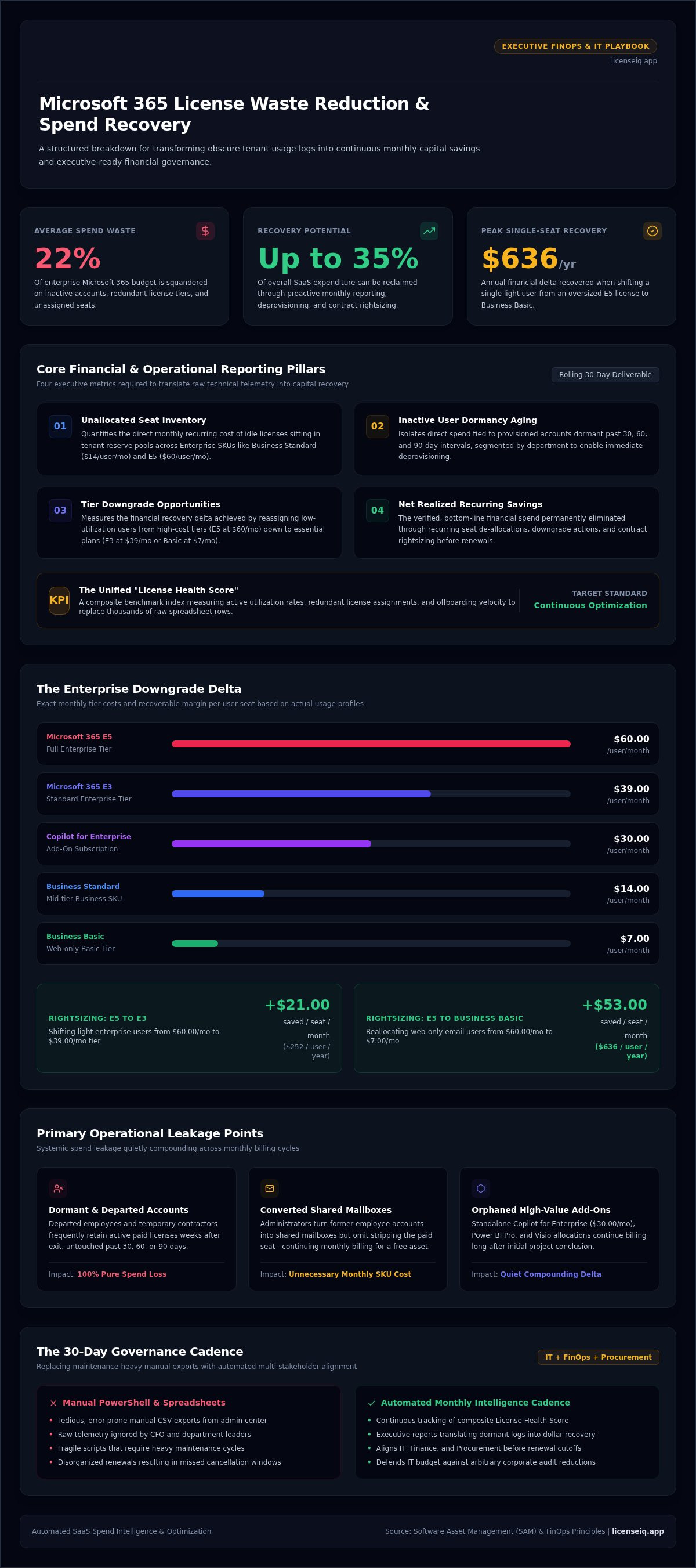
On average, 22% of enterprise Microsoft 365 spend is squandered on inactive accounts, redundant license tiers, and unassigned seats. If you've spent hours pulling manual CSV exports from the admin center only to have department heads ignore your spreadsheets, you know the frustration firsthand. Connecting raw technical usage logs to concrete dollar waste is tedious, complex, and prone to error. That is why establishing an automated microsoft 365 license waste reduction monthly savings report has become essential for proactive IT and FinOps leaders who demand total visibility.
You shouldn't have to battle fragile spreadsheets just to justify software management to your CFO. In this playbook, you'll learn how to build, automate, and act on a monthly reporting system that uncovers hidden waste and recovers up to 35% of your SaaS spend. We'll break down the exact reporting structure, automated discovery workflows, and executive dashboard metrics required to transform obscured tenant logs into continuous capital savings.
Key Takeaways
- Translate obscure tenant usage telemetry into bottom-line financial metrics using a structured monthly reporting format.
- Uncover and reclaim the most common operational leakage points, from unassigned offboarded seats to oversized E5 allocations.
- Implement an executive-ready microsoft 365 license waste reduction monthly savings report to keep cross-functional stakeholders aligned.
- Establish a repeatable 30-day governance rhythm that coordinates IT, finance, and procurement before costly renewal windows close.
- Replace fragile, maintenance-heavy PowerShell scripts with continuous intelligence to track your License Health Score automatically.
Anatomy of an Executive Microsoft 365 Monthly Savings Report
Raw administrative logs fail to move executive leadership. Showing a Chief Financial Officer a list of dormant Entra ID objects or inactive Exchange mailboxes won't secure buy-in for operational cleanup. Instead, a successful microsoft 365 license waste reduction monthly savings report converts abstract activity logs into precise capital recovery figures. It bridges technical administration and financial governance, giving leadership immediate clarity on recurring cloud waste.
Modern cloud finance demands proactive oversight. By establishing an ongoing monthly deliverable aligned with modern Software Asset Management (SAM) principles, IT teams create a rolling 30-day baseline of organizational subscription efficiency. This reporting discipline safeguards your budget against arbitrary cuts during corporate audits; it demonstrates that every provisioned license directly supports active business productivity.
Core Financial and Operational Metrics to Include
Your executive deliverable must replace technical clutter with high-impact cost recovery metrics:
- Unallocated Seat Inventory: The direct monthly cost of idle licenses sitting in your pool, quantified across enterprise SKUs like Business Standard ($14/user/month) or E5 ($60/user/month).
- Inactive User Costs: Direct spend tied to accounts dormant past 30, 60, and 90 days, isolated by department to enable immediate deprovisioning.
- Tier Downgrade Opportunities: The delta recovered by moving light users from high-cost tiers down to basic access, such as shifting an E5 subscriber to an E3 ($39/user/month) or Business Basic ($7/user/month) tier.
- Net Realized Recurring Savings: The verified monthly spend eliminated through de-allocation, downgrade actions, and contract rightsizing.
Establishing Your Organization's License Health Score
Technical telemetry becomes far more actionable when distilled into a single, executive-ready KPI. Tracking a rolling License Health Score provides an immediate visual benchmark of tenant allocation efficiency over time.
This composite index scores your tenant based on active utilization rates, redundant license assignments, and offboarding velocity. Rather than sifting through thousands of rows in a spreadsheet, your steering committee can track monthly score gains as a core operational target. Elevating this score proves that IT operates as a vigilant financial partner, driving continuous optimization across your enterprise cloud stack.
Primary Sources of M365 License Waste Identified in Monthly Audits
Systemic spend leakage rarely happens through a single catastrophic oversight. Instead, small operational blind spots quietly compound across every billing cycle. An actionable microsoft 365 license waste reduction monthly savings report isolates these leakages into distinct financial categories, giving systems administrators and finance teams immediate targets for capital reclamation.
Dormant Accounts and Inactive User Footprints
Accounts that go untouched for 30, 60, or 90 days represent pure financial drain. Departed employees and temporary contractors often retain fully provisioned subscriptions weeks after leaving an organization. Another common culprit is the converted mailbox: administrators frequently turn former employee accounts into shared mailboxes but forget to strip the paid seat, continuing to pay monthly fees for an asset that requires no subscription. Following a verified Office 365 offboarding checklist prevents these orphaned accounts from quietly burning IT capital month after month.
Tier Mismatches and Premium SKU Over-Provisioning
Misaligned subscriptions are often far more expensive than completely inactive accounts. Consider the financial gap across current enterprise tiers:
- The Enterprise Downgrade Delta: Shifting an employee who only uses web email from a $60.00/month Microsoft 365 E5 license to a $39.00/month E3 license reclaims $21.00 per user every month. Moving that same user down to a $7.00/month Business Basic plan recovers $53.00 per month, totaling $636.00 annually for a single seat.
- Orphaned High-Value Add-Ons: Premium add-on licenses frequently sit dormant. Standalone Copilot for Enterprise seats ($30.00/user/month), Power BI Pro subscriptions, and Visio allocations often remain active long after project completion.
Audit your current allocations against our Microsoft 365 license types guide to pinpoint users whose actual daily application footprint falls far below their assigned license tier.
Unassigned Buffer Seats Exceeding Operational Thresholds
Procurement teams regularly purchase spare seat buffers to avoid provisioning bottlenecks during rapid hiring pushes. When headcount plans adjust, these unassigned seats remain on the Microsoft invoice. Paying for a 15% floating buffer of unassigned E3 seats at $39.00 each quickly creates thousands of dollars in annual waste. Pinpointing your tenant's actual onboarding cadence allows you to maintain lean operational margins without funding ghost subscriptions.
If managing these manual reconciliations drains your team's time, you can implement real-time tracking through automated governance workflows to continuously monitor allocation efficiency across all active enterprise SKUs.
Manual Spreadsheets vs. Automated Monthly License Reporting
Relying on manual spreadsheets to police your software budget is a losing battle. While approximately 64% of organizations still operate without automated tools for software licensing, this legacy approach introduces significant operational friction. The lag between identifying an inactive user in a CSV export and actually revoking that license ensures that financial waste continues across multiple billing cycles.
The Hidden Operational Overhead of Manual Script Audits
Engineering teams frequently spend hours stitching together PowerShell scripts, Microsoft Graph queries, and CSV files exported from separate admin consoles. This method creates clear vulnerabilities:
- Maintenance Burden: Microsoft regularly updates API endpoints and PowerShell modules. Scripts break without warning, demanding senior engineering hours just to maintain basic report generation.
- Static Obsolescence: The moment a point-in-time CSV export is downloaded, it is obsolete. Mid-month staffing changes, contractor roll-offs, and department transfers immediately distort the figures.
- Administrative Risk: Manual de-provisioning based on spreadsheet rows carries human error risk. Stripping an active executive mailbox or a critical shared service account disrupts operations and erodes trust.
Crucially, raw scripts only output technical attributes. They cannot map consumption patterns directly to invoice line items. This leaves IT leaders stuck manually calculating cost deltas instead of driving high-level strategy.
Real-Time Telemetry and Automated Governance
Replacing manual exports with continuous tenant telemetry transforms your oversight model. Instead of reacting to an overinflated invoice at the end of the quarter, automated systems monitor user authentication, application usage, and service assignments in real time.
This automated foundation powers an effective microsoft 365 license waste reduction monthly savings report. Rather than dumping raw activity tables on department heads, automated reporting produces clean, auditable financial ledgers that justify immediate seat reclamation. It bridges the communication gap between systems administration and procurement, ensuring that unallocated seats and redundant licenses are reallocated before your next contractual renewal window locks in. Explore comprehensive framework tactics in our M365 cost optimization guide to see how continuous telemetry protects enterprise SaaS margins.
How to Build a 30-Day M365 License Savings Cadence
Treating license management as an annual scramble before contract renewal guarantees continuous spend leakage. Subscription licensing models penalize passive administration. Establishing a structured 30-day rhythm transforms license hygiene into a core operational discipline, uniting IT operations, departmental leadership, and procurement around verifiable cost reduction.
Days 1-10: Automated Discovery and Inactivity Identification
The first phase focuses on complete visibility. Run automated scans across your tenant architecture to baseline user activity and evaluate license distribution:
- Audit every provisioned account across Exchange, Teams, SharePoint, and OneDrive for zero authentication over the trailing 30 days.
- Flag premium enterprise accounts where assigned workloads remain untouched.
- Map consumption data to pinpoint downgrade targets across standard and executive tiers.
Explore our comprehensive Microsoft 365 license optimization guide to set granular utilization thresholds for these initial audits.
Days 11-20: Stakeholder Verification and Re-Harvesting
Data without action produces zero ROI. The middle ten days focus on operational verification and seat reclamation:
- Route automated reclamation prompts directly to department heads to confirm whether dormant accounts represent departures or temporary leaves.
- Convert departing employee accounts into unpaid shared mailboxes to preserve institutional data securely without retaining an assigned paid license.
- Strip unutilized standalone add-ons, such as standalone Copilot seats or Power BI Pro licenses, and reassign them to backlogged user requests.
Days 21-30: Executive Savings Reporting and Subscription Adjustments
The final phase locks in capital recovery. Calculate total recurring savings recovered from downgraded SKUs, harvested add-ons, and reclaimed seats.
Generate your finalized microsoft 365 license waste reduction monthly savings report to deliver exact dollar-value figures to finance leadership. If you manage subscriptions via monthly Cloud Solution Provider (CSP) commitments or face an upcoming New Commerce Experience (NCE) renewal window, adjust your purchased seat totals downward immediately to stop recurring billing waste.
Ready to eliminate manual tracking and enforce this workflow effortlessly? Launch the LicenseIQ Platform to continuously monitor your tenant and automate spend recovery across every monthly cycle.
Automate Monthly M365 Spend Recovery with LicenseIQ
Eliminating SaaS waste shouldn't require maintaining fragile scripts or burning engineering hours on administrative tasks. While manual reporting leaves blind spots, the LicenseIQ Platform provides an AI-native solution that connects directly to your tenant in minutes. It converts chaotic usage logs into a streamlined, automated cost-recovery engine, helping organizations uncover and recover up to 35% on their Microsoft 365 subscriptions.
Instant Discovery and the Spend Recovery Dashboard
Gaining total visibility across enterprise tenants usually takes weeks of cross-departmental coordination. LicenseIQ bypasses this friction by using Model Context Protocol automation to evaluate your complete tenant architecture in minutes. There are no intrusive desktop agents or complex on-premises connectors to configure.
Once connected, the Spend Recovery Dashboard provides immediate financial clarity. The dashboard surfaces itemized, dollar-value recommendations based on active utilization patterns. Instead of scanning endless lines of administrative telemetry, you see the exact financial impact of unassigned seats, idle accounts, and downgrade candidates. It continuously calculates your rolling License Health Score, giving your leadership team an executive KPI that measures portfolio efficiency without any manual data entry.
Continuous Financial Accuracy Through Automated Governance Workflows
Long-term cost containment requires proactive execution. LicenseIQ prevents SaaS spend leakage from quietly recurring between billing periods through native Automated Governance Workflows:
- Autonomous Offboarding Hygiene: Automatically flags departed employees and routes deprovisioning approvals before accounts linger into the next invoice cycle.
- Dynamic SKU Rightsizing: Continuously identifies accounts whose consumption patterns match lower-tier licenses, queuing adjustments before renewal windows close.
- Executive-Ready Deliverables: Generates an audit-ready microsoft 365 license waste reduction monthly savings report at the end of each billing cycle, completely eliminating manual spreadsheet assembly.
Stop letting unmanaged subscriptions drain your cloud budget. Take control of your SaaS spend and streamline your governance model by exploring the LicenseIQ Platform today.
Transform License Waste into Ongoing Capital Recovery
Unchecked SaaS sprawl quietly erodes enterprise IT budgets month after month. Transitioning away from fragile, maintenance-heavy spreadsheets toward a structured cadence protects your bottom line. Establishing an executive-ready microsoft 365 license waste reduction monthly savings report gives leadership complete financial visibility, turning complex administrative logs into undeniable cost-recovery wins.
You don't need brittle script repositories or weeks of manual auditing to secure these results. The LicenseIQ Platform connects to your Microsoft 365 tenant in minutes to uncover instant savings. It tracks your continuous License Health Score and delivers actionable, dollar-value recommendations, empowering organizations to recover up to 35% on their recurring software subscriptions. Recover your wasted spend with the LicenseIQ Platform and turn routine tenant hygiene into an automated competitive advantage.
Frequently Asked Questions
What is a Microsoft 365 license waste reduction monthly savings report?
A microsoft 365 license waste reduction monthly savings report is an executive deliverable that translates technical cloud telemetry into bottom-line cost figures. It tracks unallocated seats, dormant accounts, and over-provisioned subscription tiers on a rolling 30-day basis. IT and finance teams use this report to eliminate recurring billing waste before contract renewals lock in.
How much money can typical businesses save through monthly M365 license audits?
Organizations routinely eliminate substantial software bloat by auditing tenant allocations every month. Research indicates that approximately 22% of enterprise Microsoft 365 expenditure funds unused licenses. Platforms like LicenseIQ discover and recover up to 35% on recurring subscription spend by systematically stripping orphaned seats, rightsizing tiers, and harvesting idle add-ons.
What is the difference between an unassigned license and an inactive user license?
An unassigned license sits in your subscription pool without being attached to any user account, often purchased as an intentional hiring buffer. An inactive user license is actively assigned to an employee or contractor who hasn't logged in for 30, 60, or 90 days. Both generate recurring monthly costs without contributing to actual operational productivity.
How do I identify which users should be downgraded from Microsoft 365 E5 to E3 or Business Standard?
Evaluating downgrade opportunities requires auditing workload consumption across your active directory. Compare user activity against advanced E5 capabilities like Power BI, advanced compliance tools, and phone system integrations. If a staff member only uses Exchange online, Teams chats, and core desktop apps, shifting them to E3 or Business Standard immediately reclaims considerable monthly margin.
Can I generate a monthly savings report using only native Microsoft 365 admin tools?
Native tools provide raw usage data, but they lack financial reporting capabilities. Generating a complete microsoft 365 license waste reduction monthly savings report through native portals requires exporting disjointed CSV files from Entra ID and the admin center, followed by hours of manual spreadsheet formulas. Native tools show technical logins, not actionable procurement ledgers or direct dollar-recovery metrics.
What threshold should I use to define an inactive Microsoft 365 account?
A 30-day inactivity threshold works best for standard employee accounts, while a 14-day threshold suits short-term contractors. Accounts inactive beyond 60 days should trigger automated notifications to department heads. Flagging dormant accounts early allows teams to convert departing mailboxes to shared mailboxes and strip paid licensing before unnecessary billing cycles repeat.
How does automated license governance impact employee access and operational security?
Automated governance improves security while protecting operational continuity. Stale accounts left provisioned create unmonitored entry points that increase organizational attack surfaces. Automated workflows flag and deprovision departed or inactive accounts methodically, preventing unauthorized access while ensuring shared mailboxes and regulatory data remain intact without retaining paid seat licenses.


