

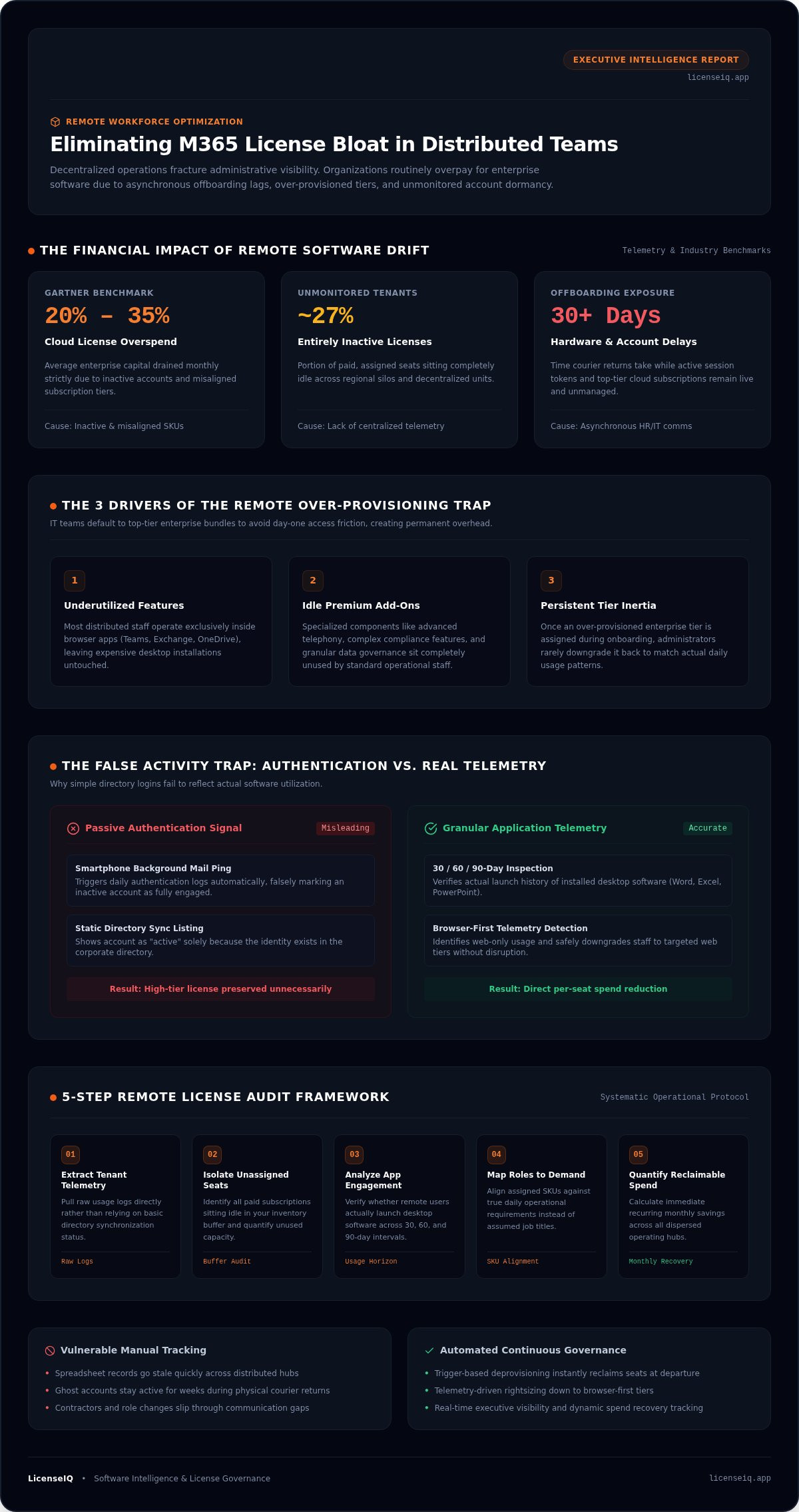
Remote software bloat stems from operational blindness, not inadequate IT budgets. When teams operate across decentralized locations, effective m365 license management for remote workforce operations quickly collapses under disconnected departments and stale tracking sheets. Gartner reports that organizations overspend by 20% to 35% on cloud software licenses due to inactive accounts and misaligned tiers. Paying top-tier rates for remote users who only touch basic web applications drains capital every single month.
You already know the frustration of discovering orphaned licenses running weeks after a remote employee departs. Maintaining control over distributed seats shouldn't require endless spreadsheet updates or guesswork about real app activity. In this guide, you will learn how to eliminate ghost licenses, right-size remote tier assignments, and automate governance across distributed teams. We will examine how to expose dormant seats, establish automated offboarding workflows to reclaim software instantly, and secure continuous executive visibility into your software investment.
Key Takeaways
- Asynchronous team communication frequently conceals ghost accounts, turning basic operational delays into ongoing subscription waste.
- Effective m365 license management for remote workforce scale requires auditing actual application telemetry rather than relying on assumed employee role profiles.
- Downgrading browser-first remote staff to targeted web tiers eliminates excessive per-seat fees without restricting routine day-to-day productivity.
- Trigger-based deprovisioning workflows permanently replace vulnerable manual spreadsheets and reclaim software seats the moment offboarding occurs.
- Modern software intelligence platforms deliver continuous tenant visibility through real-time metrics and dynamic spend recovery tracking.
Why Remote Work Multiplies Microsoft 365 License Bloat
Decentralized operations introduce structural blind spots that physical offices never faced. While the widespread adoption and practice of working from home unlocks global talent, it fractures routine administrative visibility. In unmonitored tenants, roughly 27% of assigned licenses sit entirely inactive. Regional silos create lag between personnel movements and administrative updates. Without centralized oversight, forgotten subscriptions compound quietly across multiple business units.
Spreadsheet-based governance collapses quickly in distributed environments. Lacking daily physical proximity, IT teams lose track of contractors, role adjustments, and project conclusions. This operational friction turns routine license administration into a major financial leak, proving that scalable m365 license management for remote workforce organizations requires continuous telemetry over static records.
The Hidden Cost of Asynchronous Employee Offboarding
Departures in distributed teams rarely trigger immediate administrative cutoffs. When a remote worker leaves, communication gaps between HR departments and systems administrators leave high-tier cloud accounts live for weeks. Physical hardware returns often take a month or more to process via courier, during which active session tokens and software assignments remain untouched. This delay incurs direct subscription losses and exposes sensitive corporate environments. Following an established office 365 offboarding checklist eliminates these dangerous operational gaps before subscription renewals hit.
The Over-Provisioning Trap in Distributed Teams
IT departments frequently default to top-tier enterprise plans simply to prevent initial permission friction. Administrators issue full enterprise bundles out of convenience, ensuring remote hires experience zero software access barriers on day one. This protective habit creates severe financial waste:
- Underutilized features: Most distributed team members operate exclusively inside browser-based applications like Teams, Exchange, and OneDrive, leaving desktop installations untouched.
- Idle premium add-ons: Specialized components like advanced telephony, complex compliance features, and granular data governance add-ons often sit entirely unused by standard operational staff.
- Persistent tier inertia: Once an over-provisioned tier is assigned, administrators rarely downgrade it back down to match true daily usage patterns.
This cycle generates permanent overhead. Maintaining precise m365 license management for remote workforce fleets means provisioning subscriptions based on real operational needs rather than administrative convenience.
How to Audit M365 Licenses for a Remote Workforce: Step-by-Step
A disciplined audit translates obscure tenant telemetry into immediate bottom-line savings. Executing structured m365 license management for remote workforce fleets requires looking past static directory listings and isolating actual software consumption across dispersed teams.
Execute this five-step operational framework to audit your remote seats systematically:
- Extract tenant telemetry: Pull raw usage logs rather than relying on directory synchronization status.
- Isolate unassigned seats: Identify paid subscriptions sitting idle in your inventory buffer.
- Analyze app-level engagement: Verify whether remote users actually interact with installed desktop software.
- Map roles to feature demand: Align assigned SKUs against true daily operational requirements.
- Quantify reclaimable spend: Calculate immediate recurring monthly savings across all operating hubs.
Extracting Real Activity Telemetry Beyond Simple Logins
Passive authentication metrics distort reality. A smartphone checking background mail pings authentication logs daily, making an inactive user appear fully engaged. Meaningful oversight demands granular inspection of user actions across 30, 60, and 90-day intervals.
Identify remote workers who never launch desktop installations of Word, Excel, or PowerPoint. When telemetry reveals an employee relies entirely on web collaboration, keeping them on a top-tier desktop subscription directly conflicts with proven Gartner license rightsizing strategy principles. Real application interaction must dictate license allocation, not corporate assumptions.
Detecting Redundant Add-Ons and Duplicate SKU Allocations
Distributed environments regularly generate software sprawl through isolated departmental provisioning. These overlaps quietly drain capital without delivering added utility:
- Standalone add-ons: Teams Phone, Microsoft Defender, or Power BI licenses frequently linger on dormant accounts long after project handoffs conclude.
- Overlapping SKUs: Legacy standalone tools often remain assigned alongside upgraded enterprise bundles that already include those core capabilities.
- Shared mailbox waste: Shared mailboxes under 50 GB do not require paid user licenses, yet decentralized admins frequently leave expensive premium seats assigned to them.
Pinpointing these overlaps manually across hundreds of remote seats drains administrative hours. Organizations modernizing their approach use LicenseIQ Platform workflows to surface duplicate subscriptions and reclaim unutilized software capital instantly.
Matching Remote Roles to Optimal Microsoft 365 Subscription Tiers
Precision tier allocation stops subscription waste at the source. Effective m365 license management for remote workforce fleets balances real functional requirements against monthly seat expenses. Assigning an enterprise bundle to an employee who only edits spreadsheets in a browser wastes corporate capital. Review our comprehensive guide to microsoft 365 license types to evaluate exact feature boundaries across commercial tiers.
Aligning remote staff to appropriate subscription levels requires distinct operational criteria:
- Task-focused and frontline personnel: Deploy Business Basic ($7.00/user/month) or F3 ($10.00/user/month) for browser-only document access, web Teams, and 50 GB cloud mailboxes.
- Standard remote knowledge workers: Provision Business Standard ($14.00/user/month) or E3 ($39.00/user/month) only when users require installed desktop applications across multiple managed devices.
- High-security and compliance officers: Restrict premium E5 ($60.00/user/month) tiers strictly to personnel requiring Security Copilot integration, advanced eDiscovery, and automated data loss prevention.
- Short-term contractors: Assign month-to-month Business Basic licenses rather than locking temporary project staff into annual enterprise seats.
When Business Basic or F3 Outperforms Enterprise E3 for Remote Staff
Web applications handle modern distributed collaboration without client-side installations. Remote customer support, operations specialists, and external contractors conduct work inside browser tabs. Providing full desktop installs via E3 introduces unneeded local licensing overhead on unmanaged personal endpoints. Business Basic delivers identical core browser collaboration, updated Copilot Chat integration, and time-of-click URL protection in Outlook without the premium desktop price tag.
Strategic Downgrading Without Compromising Remote Endpoint Security
Downgrading productivity suites must never weaken endpoint defense for distributed devices. Organizations often retain expensive E5 tiers solely to maintain identity management and mobile device posture. A modular configuration delivers equal protection at lower expenditure. Pair cost-effective Business Basic seats with Microsoft Defender for Office 365 or standalone Entra identity management.
This hybrid approach secures dispersed laptops and smartphones without overpaying for unused productivity software. Implementing this balance forms the core framework outlined in our practical guide on how to reduce m365 subscription costs. Strategic SKU mapping ensures every assigned dollar matches genuine daily workload execution.
Automating Governance Workflows Across Decentralized Environments
Manual oversight cannot keep pace with distributed personnel changes. Tracking seats through spreadsheets produces friction, administrative blind spots, and costly delays. Sustainable m365 license management for remote workforce scale requires self-executing systems that detect status changes and enforce policy automatically. Rather than waiting for manual audits, organizations need background rules that continually sweep tenants to strip waste before monthly billing cycles reset.
Automated software intelligence platforms transform how IT teams protect corporate capital:
- Instant deprovisioning: Trigger seat revocation the second HR flags an employee departure in central records.
- Inactivity alerts: Notify distributed department managers when assigned enterprise software goes untouched for 45 consecutive days.
- Automated harvesting: Shift recovered licenses into an internal unassigned pool to satisfy new remote hire requests without purchasing net-new seats.
Eliminating the Spreadsheets and PowerShell Script Maintenance Burden
Legacy administration depends heavily on periodic CSV exports and homemade PowerShell automation. This architecture is inherently brittle. Graph API endpoints shift, module requirements change, and script maintenance often rests on a single engineer. When that engineer departs, the organization loses its auditing mechanism entirely. Purpose-built platforms remove this vulnerability by delivering consistent data aggregation without requiring ongoing script refactoring or manual manipulation.
Configuring Policy-Based License Reclamation Triggers
Smart governance balances financial discipline with operational flexibility. You need rules that adapt to temporary conditions like parental leave or medical sabbaticals without creating IT friction. Automated workflows let you set custom grace periods that preserve user state while temporarily downgrading costly premium tiers.
Structuring these automated guardrails aligns directly with proven frameworks for mastering the microsoft 365 license management lifecycle in 2026. By taking the human delay out of offboarding and tier assignments, IT leaders secure operational transparency across every decentralized team.
Stop wasting billable engineering hours on fragile manual audits. Implement continuous Automated Governance Workflows to protect your bottom line from dormant SaaS seats.
Achieving Continuous Spend Recovery with LicenseIQ
Traditional Software Asset Management platforms require months of configuration, third-party consultants, and heavy contract ingestion. Fast-moving distributed organizations need immediate operational answers instead of multi-quarter deployment cycles. Solving modern m365 license management for remote workforce demands requires an AI-native solution built specifically for speed, precision, and continuous oversight.
The LicenseIQ Platform integrates with your Microsoft 365 tenant in minutes using secure Model Context Protocol integrations. It bypasses complex legacy setups to deliver direct financial visibility without disrupting daily IT workflows. By continuously scanning tenant telemetry, the platform isolates unused seats and misaligned SKUs to help organizations reclaim up to 35% on software subscriptions.
Instant Visibility: The License Health Score and Spend Recovery Dashboard
Clarity begins the moment you connect. LicenseIQ immediately calculates your quantifiable License Health Score, exposing obscured operational waste across your entire distributed workforce. You don't have to decipher raw event tables or stitch together disconnected CSV files.
Inside the Spend Recovery Dashboard, leadership gains real-time visibility into software usage:
- Granular spend breakdowns: Pinpoint exact capital drained every month by dormant remote profiles and inactive add-on bundles.
- Departmental telemetry: View clear usage visualizations across dispersed subsidiaries, regional branches, and functional teams.
- Prioritized recommendations: Access ranked optimization steps that pinpoint exactly which accounts to downgrade or deprovision safely.
Continuous Governance for Growing Remote Teams
Licensing control is not a one-time project. As remote headcounts expand into new markets, manual oversight breaks down again. Deploying Automated Governance Workflows ensures policy compliance runs permanently in the background. When remote employees change roles, start extended leave, or leave the company, the system executes reclamation policies automatically without administrative friction.
This systematic oversight keeps subscription allocations lean as your team scales. You retain complete financial control without tasking engineers with weekly audits. Explore our detailed playbook on microsoft 365 license optimization to build a permanent, automated spend recovery model for your distributed business.
Eliminate Remote Subscription Waste and Scale with Confidence
Operational blindness doesn't have to dictate your software budget. Auditing real telemetry instead of static job titles exposes which remote employees thrive on basic web apps, while policy triggers reclaim orphaned seats the moment offboarding occurs. Modernizing your m365 license management for remote workforce operations turns administrative drag into immediate financial recovery.
Manual spreadsheets can't protect your margins as headcounts distribute across regions. LicenseIQ connects securely to your Microsoft 365 tenant in minutes using Model Context Protocol integrations to uncover up to 35% in wasted subscription spend. By deploying continuous Automated Governance Workflows, you eliminate dormant seats and keep licensing lean as your organization grows.
Take the guesswork out of software overhead and secure complete operational clarity. Connect your tenant to LicenseIQ and uncover wasted spend today.
Frequently Asked Questions
How does remote work make Microsoft 365 license management more difficult?
Remote work eliminates physical IT touchpoints and isolates departmental communication. Decentralized hiring and asynchronous offboarding create significant notification lags between HR and IT administrators. Consequently, m365 license management for remote workforce environments suffers from invisible seat accumulation, where departed workers or changed contractor roles quietly hold expensive tier assignments across different regions without central detection.
Can I downgrade an inactive remote user license without deleting their mailbox or OneDrive data?
Yes, you can safely preserve user data while removing or downgrading an assigned license. Converting an active user mailbox into a shared mailbox preserves all email history up to 50 GB without requiring a paid subscription. For OneDrive files, administrators can place litigation holds or delegate access before unassigning the license, ensuring corporate records remain intact during tier transitions.
How do I identify ghost licenses assigned to departed remote employees?
Cross-reference directory account states against central payroll records and HR departure dates. Inactive remote accounts often display disabled Entra ID states while retaining paid subscription allocations. You should also audit sign-in activity and filter for accounts with zero interactive authentications over the past 30 to 60 days. Reclaiming these dormant allocations immediately halts unnecessary monthly billing leaks.
What is the difference between active user sign-ins and actual M365 application usage?
Active sign-in metrics only record authentication tokens, whereas application telemetry tracks real daily productivity. Background mobile device syncs and automated browser refreshes generate positive sign-in timestamps even when users never perform work. Rigorous m365 license management for remote workforce teams measures specific actions, such as editing documents or attending Teams calls, rather than relying on misleading token authentications.
Can automated license management tools accidentally revoke access for productive remote staff?
Reputable systems prevent accidental deallocation through multi-layered verification policies and manager review alerts. Automated Governance Workflows enforce strict thresholds, such as requiring 45 consecutive days of zero workload activity and managerial sign-off, before revoking a seat. Built-in grace periods also protect productive remote employees taking planned parental leaves or medical sabbaticals from losing application access.
How quickly can an organization recover wasted spend on M365 subscriptions?
Spend recovery happens almost immediately after connecting your tenant to an automated intelligence platform. LicenseIQ connects in minutes via Model Context Protocol to generate a baseline License Health Score and pinpoint unassigned seats. Organizations can reclaim up to 35% on software subscriptions by cutting unused monthly add-ons and downgrading misaligned tiers within their first billing cycle.
Why are manual PowerShell scripts insufficient for managing remote M365 licenses?
PowerShell scripts create brittle single-engineer dependencies and lack continuous execution capabilities. Microsoft regularly deprecates command modules, changes Graph API authentication standards, and alters licensing SKU nomenclature, causing custom scripts to fail without warning. Manual scripts also lack interactive visual reporting, requiring engineering hours to format raw CSV outputs instead of providing automated, executive-ready spend recovery insights.


