

M365 EA renewals in 2026 are won or lost on consumption data, not negotiation tactics. With price hikes for Office 365 E3 reaching 13% and the elimination of traditional volume discount tiers, your margin for error has vanished. You likely feel the pressure from leadership to reduce IT spend while fearing a three-year commitment to "shelfware" that plagues most enterprise agreements. It's difficult to justify costs when you lack total transparency into real-time user activity versus assigned licenses.
Mastering m365 consumption forecasting for ea renewal is the only way to reclaim control over your budget and eliminate waste. This guide provides the technical forecasting methods required to secure a precise, data-backed seat count for your renewal quote. We'll show you how to identify redundant E5 licenses and implement automated workflows that maintain an accurate forecast long after the contract is signed. You'll gain a clear roadmap to optimize your license health and protect your organization’s financial resources during the 2026 renewal cycle.
Key Takeaways
- Understand how the 2026 pricing shift from tiered discounts to list rates creates a "rolled forward" financial risk for organizations relying on historical data.
- Master the technical process of m365 consumption forecasting for ea renewal to bridge the gap between assigned licenses and actual user activity.
- Identify and eliminate "shelfware" by uncovering ghost users and inactive accounts that inflate your three-year contract commitment.
- Follow a 5-step recovery roadmap to reclaim unused licenses and optimize your seat count through automated workflows.
- Leverage the LicenseIQ Platform to generate a real-time License Health Score and maintain continuous governance post-renewal.
The 2026 M365 Renewal Trap: Why Historical Data Fails
Microsoft relies on your inertia. When your Microsoft Enterprise Agreement approaches its expiration, the default motion is a "rolled forward" baseline. Microsoft assumes your current seat count is your minimum requirement. This assumption is a financial trap. It ignores the reality of organizational churn, project completions, and inactive accounts. Without precise m365 consumption forecasting for ea renewal, you sign a blank check based on outdated information.
The 2026 landscape has fundamentally shifted. Effective July 1, 2026, list prices for core SKUs like Office 365 E3 and E5 increased to $26 and $41, representing hikes of 13% and 8% respectively. Microsoft 365 E5 also climbed to $60. Simultaneously, Microsoft eliminated built-in volume discount tiers (Levels B, C, and D) as of late 2025. Many organizations now face pricing resets of up to 12% because their legacy discount tiers vanished. Relying on manual spreadsheets from 12 months ago is a liability. You cannot manage a three-year commitment with data that is already decaying.
The Shift from Volume to Value
Microsoft is dismantling the tiered pricing models that once rewarded scale. The focus has moved toward "pricing consistency." This shift removes the safety net for large-scale buyers. If you carry 15% shelfware into your 2026 renewal, you aren't just paying for unused software. You're paying for that waste at a significantly higher unit cost over a 36-month term. Precision is now the only way to protect your IT budget from these compounding costs. Data-driven m365 consumption forecasting for ea renewal ensures every dollar aligns with actual user activity.
The Renewal Anniversary: Your Only Exit
Your EA structure is rigid. You can add licenses at any time through a true-up, but you can only reduce your commitment during the renewal window. Missing this opportunity locks in unnecessary spend for exactly 1,095 days. This "True-up Creep" happens when mid-term license additions for temporary projects become part of your permanent renewal baseline. You must execute a clean-up strategy before the contract is finalized. Use this Office 365 Offboarding Checklist 2026 to identify and reclaim spend from inactive users immediately. Failure to act now guarantees three years of financial leakage.
How to Calculate Your M365 Consumption Forecast
M365 consumption forecasting for ea renewal is the systematic mapping of actual user behavior to the most cost-efficient licensing tier. It moves beyond the static "seat count" and analyzes the utility of every assigned SKU. You can't rely on Microsoft's default reports to tell you what to cut. You need a granular view of how your employees interact with the stack.
The "Assigned vs. Active" gap is your primary lever for cost recovery. Many organizations discover that 10% to 15% of their tenant hasn't logged in for over 90 days. These accounts represent immediate savings. You must categorize users by their last activity date: 30, 60, or 90 days. This data allows you to reclaim licenses before the renewal deadline. If a license isn't active, it shouldn't be in your 2026 contract.
Right-sizing requires a technical audit of specific feature usage. Microsoft 365 E5 is often the default choice for enterprise security, yet many users never touch Power BI Pro or advanced analytics. While CISA's M365 guidance emphasizes implementing secure practices, this doesn't mean every user requires the most expensive license. If a user only needs basic email and document collaboration, an E3 or an F-series license is sufficient. You must also factor in Azure MACC (Microsoft Azure Consumption Commitment) math. If your EA bundles Azure and M365, your m365 consumption forecasting for ea renewal must account for how these spends interact to avoid missed targets.
The Three Pillars of an Accurate Forecast
Precision requires looking at three distinct data layers. The Deployment Baseline identifies what software is actually installed on company hardware. The Entitlement Baseline tracks what you're contractually obligated to pay for. Finally, the Activity Baseline reveals what employees actually use. A forecast that ignores any of these pillars will result in significant overspending. You need all three to build a defensible renewal quote.
Using a License Health Score
Manual audits are obsolete. A License Health Score provides a single numeric value representing the efficiency of your tenant. A Health Score is a real-time metric of license utility vs. cost. It highlights "Red Zone" licenses, which are high-cost SKUs assigned to users with low or no activity. These are your primary targets for immediate downgrade or removal. To gain total clarity on your spend, you can evaluate your License Health Score through the LicenseIQ Platform.
Identifying "Shelfware" and Inactive Usage Patterns
Shelfware is the silent killer of IT budgets. It represents the gap between what you pay for and what your team actually utilizes. In the 2026 pricing climate, carrying even a small percentage of unused licenses is a financial failure. Microsoft 365 E5 now costs $60 per user. You cannot afford waste. Accurate m365 consumption forecasting for ea renewal requires you to hunt for these obscured costs before the contract is signed.
Waste often hides in three specific areas within your tenant:
- Ghost Users: Licenses assigned to offboarded employees that were never reclaimed during the exit process.
- Redundant Licenses: Standalone subscriptions for Project or Visio overlapping with features already bundled in your M365 suite.
- Feature Underutilization: E5 users who haven't triggered an "Advanced Threat Protection" alert or accessed Power BI in over 90 days.
Identifying these patterns requires a move from user-level auditing to feature-level auditing. It isn't enough to know if a user logged in. You must know if they used the premium features that justify their high-cost SKU. If they only use basic email and Word, they're a candidate for a downgrade.
Debunking the Growth Buffer Myth
Leadership often insists on a 10% "just in case" buffer for new hires. This is pre-paid waste. Over a three-year EA term, a 10% buffer for a 1,000-seat organization using M365 E3 ($26/month) costs nearly $94,000 in unused software. Precision in m365 consumption forecasting for ea renewal eliminates the need for these expensive safety nets. Instead, adopt a "Lean Renewal" strategy. Use "Step-Up" licenses to add capacity only when a new hire actually starts. This preserves cash flow and ensures you only pay for active consumption.
Reclaiming Inactive Seats
Standardize your inactivity threshold at 90 days. If an account shows zero activity in three months, it's a prime candidate for reclamation. You can revoke the license to stop the spend without deleting the user's underlying data or mailbox. This process must be systematic rather than manual. Implementing Microsoft 365 License Optimization: The 2026 Guide allows you to automate these triggers. By reclaiming these seats 180 days before your renewal, you enter negotiations with a clean, defensible seat count that reflects reality, not a legacy baseline.
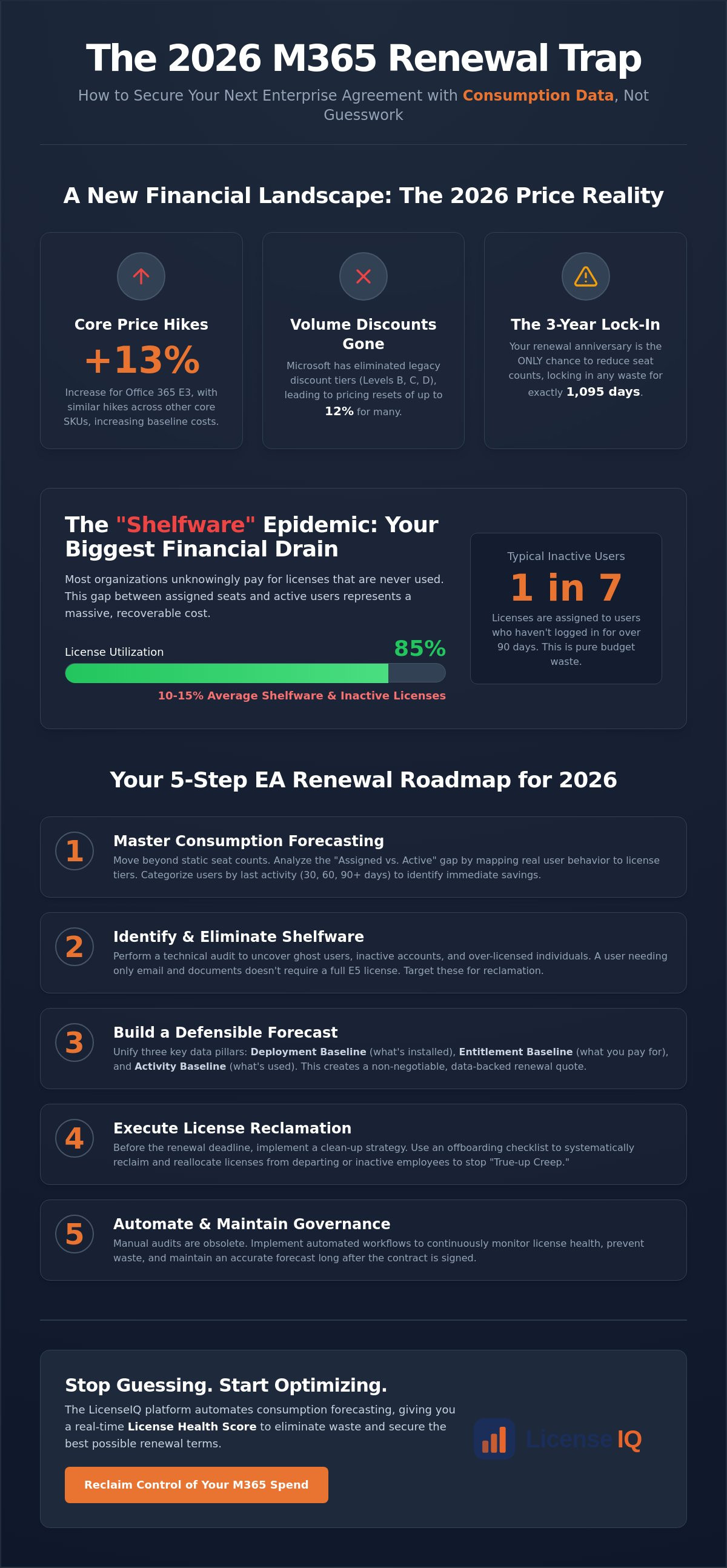
Your 5-Step EA Renewal Roadmap for 2026
Executing a successful renewal requires more than a spreadsheet. You need a structured, timeline-driven approach that prioritizes data over assumptions. Microsoft utilizes its own telemetry to drive your costs upward. You must counter this with a precise internal audit. This 5-step roadmap ensures your organization enters negotiations with total clarity and financial leverage.
- Step 1: Discover. Deploy an AI-native scanner to map every user and license in minutes. This establishes your true baseline, uncovering obscured accounts and redundant SKUs that manual audits miss.
- Step 2: Recover. Execute Automated Governance Workflows to reclaim unused licenses at least six months before your renewal date. Early reclamation prevents these seats from being "rolled forward" into your new contract.
- Step 3: Benchmark. Compare your actual usage patterns against Microsoft’s 2026 list rates and EA volume thresholds. Identifying where your usage falls below tier requirements prevents you from paying for premium features that provide zero utility.
- Step 4: Forecast. Model your three-year seat count based on optimized activity rather than current assignments. This shift transforms m365 consumption forecasting for ea renewal from a manual chore into a strategic advantage.
- Step 5: Negotiate. Present your data-backed seat count to Microsoft. Use your findings to hold your renewal band and resist high-pressure sales tactics designed to inflate your commitment.
Timing Your Renewal Cycle
Success depends on your preparation window. Between months 9 and 12, perform your initial discovery and health check. This provides enough time to see long-term usage trends. At month 6, initiate your first pass of license reclamation and employee offboarding. By month 3, you should finalize your forecast and request your first quote. Starting late forces you to accept Microsoft’s default terms due to time pressure.
Negotiation Levers: Benchmarking and Bench Strength
Data transparency is the only way to counter "E5 pull" sales tactics that prioritize bundling over actual need. When you present third-party data as leverage against Microsoft’s internal reports, you change the power dynamic of the conversation. A high License Health Score proves to your CFO that the IT budget is already optimized and waste has been eliminated. This meticulous oversight builds confidence with leadership and ensures your 2026 renewal aligns with actual business growth.
Optimize your 2026 contract by using the Spend Recovery Dashboard to visualize your potential savings today.
Automating Your Renewal Strategy with LicenseIQ
Manual spreadsheets are the primary cause of budget leakage during an EA renewal. They are static, prone to error, and fail to capture the real-time shifts in user behavior. The LicenseIQ Platform replaces this disorder with a proactive, meticulous digital auditor. By connecting to your tenant in minutes, the system generates an immediate License Health Score. This metric provides specialized leadership with instant clarity on the financial health of their M365 environment. It moves beyond simple seat counts to reveal the actual utility of every license assigned.
Automation is the only way to maintain accuracy in a complex operational environment. LicenseIQ utilizes Automated Governance Workflows to ensure your data remains precise long after the initial audit. This continuous oversight prevents the "True-up Creep" mentioned in previous sections from inflating your costs mid-term. When you use LicenseIQ for m365 consumption forecasting for ea renewal, you aren't just preparing for a single event. You are implementing a permanent system of transparency that identifies and eliminates waste the moment it occurs. It keeps your forecast accurate post-renewal, ensuring you never return to a state of over-provisioning.
The Spend Recovery Dashboard translates these technical details into financial reality. It visualizes the exact dollar value of wasted licenses instantly. This allows general business managers and technical operations teams to align on a results-first strategy for the 2026 renewal. By positioning LicenseIQ as your proactive auditor, you maintain the financial hygiene necessary to scale without unnecessary overhead.
The AI-Native Advantage
Legacy Software Asset Management (SAM) tools are often slow and require months of configuration. LicenseIQ leverages the Model Context Protocol to deliver deep software intelligence at a pace manual tools cannot match. This AI-driven scanning is 10x faster than traditional implementations, allowing you to uncover obscured details in your tenant almost instantly. It doesn't just report data; it provides the technical forecasting methods required to eliminate wasted spend permanently. This speed is vital for organizations that need immediate clarity before a fast-approaching renewal deadline.
Next Steps for Your Organization
Don't wait for the renewal deadline to discover you've been paying for shelfware for three years. Proactive organizations use data-driven insights to secure the best possible terms and eliminate redundant E5 licenses. You can identify up to 35% in potential savings by analyzing your actual usage patterns today. Start with a five-minute audit to find your Health Score and establish a defensible baseline for your 2026 contract. Get your M365 Health Score and start your forecast today to transform your IT department into a lean, optimized strategic asset.
Secure Your 2026 IT Budget with Data Precision
The 2026 renewal landscape offers no room for administrative guesswork. Relying on historical seat counts or legacy discount tiers is a guaranteed path to overspending. You must transition from reactive purchasing to proactive m365 consumption forecasting for ea renewal. By identifying inactive users and eliminating redundant premium SKUs, you reclaim control over your operational costs. Total transparency is your strongest negotiation lever against impending price hikes and the elimination of volume discounts.
Efficiency requires modern tools. Our AI-native scanning connects to your tenant in minutes to provide specific dollar-value recommendations for every user. Organizations using this data-driven approach can recover up to 35% of wasted SaaS spend before signing their next three-year commitment. You don't have to accept "shelfware" as an inevitable cost of doing business. Implement a system of continuous oversight that protects your financial health long after the contract is finalized.
Start your 5-minute M365 license audit with LicenseIQ and enter your renewal negotiations with total confidence. Your organization’s resources deserve the protection of a vigilant, precise system.
Frequently Asked Questions
How early should I start forecasting for my Microsoft EA renewal?
You should begin the process 9 to 12 months before your contract expires. This timeline provides the necessary window to analyze long-term usage trends and execute license reclamation workflows. Starting late limits your negotiation leverage and often forces you to accept Microsoft's default "rolled forward" seat count due to time pressure.
Can I reduce my M365 seat count in the middle of a 3-year EA term?
No, you cannot reduce your committed seat count mid-term. Microsoft Enterprise Agreements allow you to add licenses at any time through true-ups, but reductions are strictly reserved for the renewal anniversary. This restriction makes m365 consumption forecasting for ea renewal critical; any over-provisioning locks your budget into three years of wasted spend without the possibility of a refund.
What is the difference between an M365 assigned license and an active license?
An assigned license is a contractual commitment attached to a specific user identity in your tenant. An active license represents a user who is actually utilizing the software services. Identifying the gap between these two metrics is the foundation of spend recovery, as many organizations pay for "ghost users" who haven't logged in for 90 days or more.
Does LicenseIQ help with E3 to E5 upgrade decisions?
Yes, the platform provides granular feature-level auditing to justify SKU costs. It tracks whether users are actually accessing premium E5 components like Power BI Pro or advanced security analytics. If these tools aren't being utilized, the system recommends maintaining an E3 profile to prevent unnecessary licensing hikes.
How much can I typically save on M365 licenses through forecasting?
Organizations often identify and recover up to 35% of their wasted SaaS spend through diligent forecasting. By eliminating shelfware and right-sizing SKUs based on actual activity, you ensure your 2026 renewal quote reflects actual operational needs rather than inflated historical baselines.
Is M365 consumption forecasting different for SMBs compared to large enterprises?
The technical logic remains consistent, but the strategic focus varies. Large enterprises manage complex SKU overlaps and global tenant requirements. SMBs typically utilize forecasting to drive a "Lean Renewal" strategy, which preserves cash flow by avoiding the expensive 10% "growth buffer" that leadership often requests.
What happens if I over-forecast and buy too many licenses at renewal?
You are contractually obligated to pay for those licenses for the full 1,095-day term. Microsoft does not offer pro-rated credits for reductions made after the renewal window has closed. Accurate m365 consumption forecasting for ea renewal is your only protection against this long-term financial liability.
Can I use LicenseIQ if I have a CSP agreement instead of an EA?
Yes, the LicenseIQ Platform supports both EA and CSP agreements. While CSPs offer more frequent adjustment periods, the need for automated governance and a high License Health Score is universal. Continuous monitoring ensures you aren't overpaying for unused features regardless of your specific purchasing channel.


