

Most enterprises over-provision their frontline staff by as much as 30%, funneling capital into features that remain untouched. The choice between microsoft 365 f1 vs f3 is not merely a feature checklist; it is a fundamental divide between content consumption and content creation. While your operations team needs tools that work, your finance department requires a license structure that eliminates waste. It's easy to default to the more expensive option to avoid "access denied" tickets, but that security comes at a steep premium in 2026.
You understand that managing thousands of licenses across multiple shifts is a high-stakes balancing act. The confusion over "read-only" versus "edit" access often results in expensive F3 licenses being assigned to users who never open a Power App. This guide clarifies the microsoft 365 f1 vs f3 landscape to help you reclaim your budget. We will examine the 2026 storage increases, the "Windows Enterprise Gap," and the specific automation rights that justify the $10.00 price point. By the end, you'll have a data-driven strategy to optimize your frontline productivity and secure your bottom line.
Key Takeaways
- Distinguish between "view-only" and "full-edit" access to ensure workers have necessary tools without inflating license costs.
- Navigate the microsoft 365 f1 vs f3 divide by evaluating the necessity of the 2GB Exchange mailbox and Windows Enterprise security for specific roles.
- Evaluate your automation needs, as Power Apps and Power Automate rights are reserved for F3 users and are essential for digitizing manual checklists.
- Uncover "ghost" F3 users through a License Health Score to reclaim up to 35% of your frontline licensing budget.
- Deploy automated governance workflows to ensure license assignments mirror actual usage patterns and eliminate organizational disorder.
What are Microsoft 365 F-Series Licenses? The 2026 Frontline Landscape
Microsoft's Frontline (F) series serves the "deskless" workforce. These licenses target employees who spend their shifts on the move rather than behind a monitor. While Enterprise (E) plans cater to knowledge workers who create complex data, the F-series prioritizes consumption and secure communication. In 2026, price hikes of up to 33% have turned the microsoft 365 f1 vs f3 choice into a critical budget audit. Organizations can no longer afford the "safety net" of over-provisioning expensive licenses to users who only need basic access.
Defining the 2026 Frontline Worker
The F1 vs F3 Hierarchy at a Glance
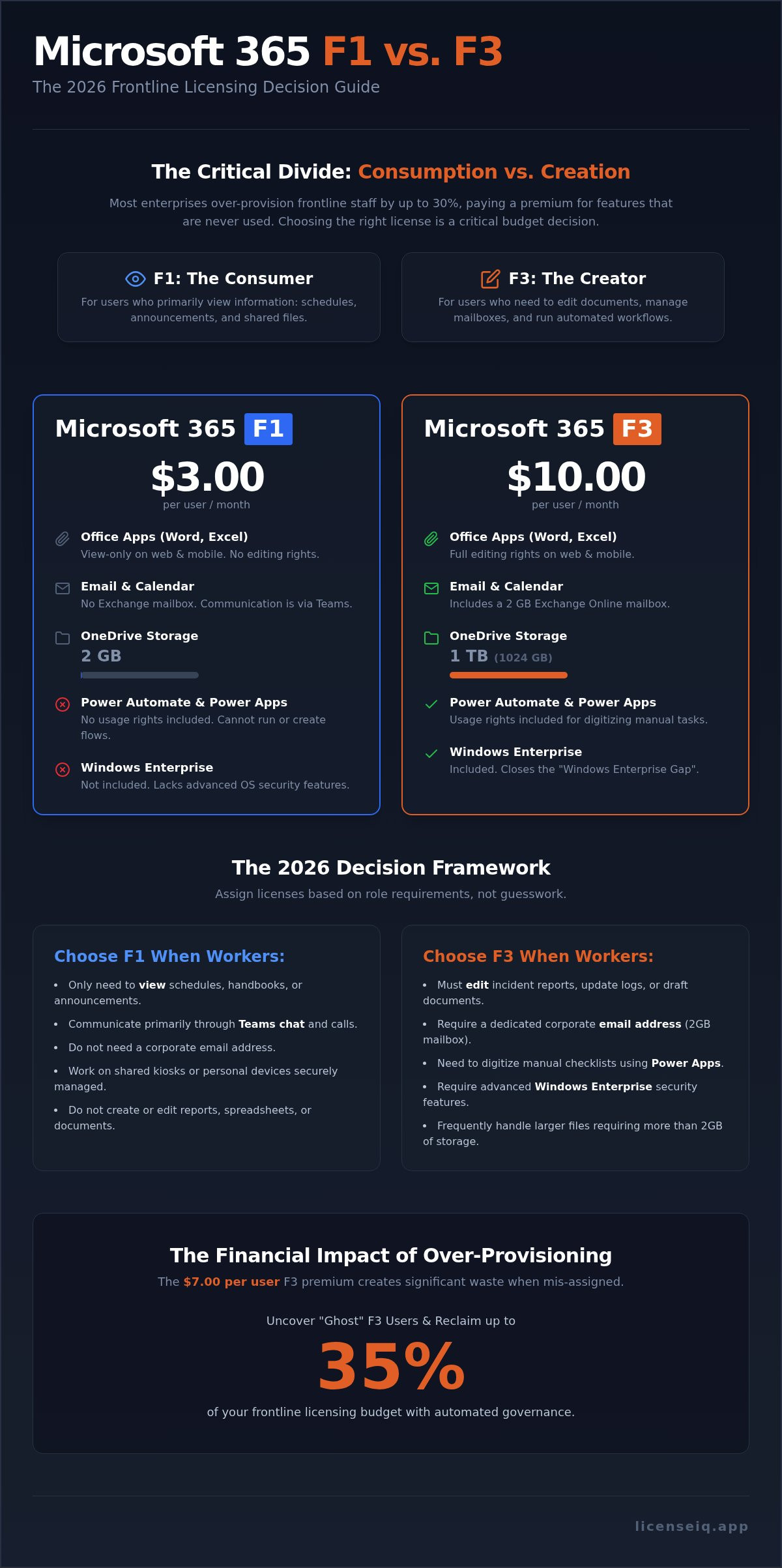
The hierarchy is defined by the "Consumption vs. Creation" divide. F1 provides a secure digital identity. It's the most cost-effective way to bring a worker into the Microsoft ecosystem. F3 is the full-featured productivity suite. It enables mobile workers to act as creators rather than just passive recipients of information. Understanding where each fits within the Microsoft 365 License Types is vital for operational transparency.
- F1: Best for "Identity-only" users. They read announcements, check Teams chat, and view shared files without needing to edit them.
- F3: Designed for "Productivity" users. They edit documents, manage small mailboxes, and run automated workflows on the floor.
The financial stakes are high. As of July 2026, F1 costs $3.00 per user while F3 is $10.00. This $7.00 monthly gap per user adds up rapidly across a workforce of thousands. Over-provisioning F3 licenses to users who only require F1 features creates significant, avoidable waste. Precision in license assignment is the only way to maintain fiscal health in a high-inflation software market. You must audit actual usage patterns to ensure your license spend aligns with real-world requirements.
F1 vs F3: Detailed Comparison of Core Productivity Apps
The technical gap between microsoft 365 f1 vs f3 centers on the ability to manipulate data rather than just view it. While both tiers provide access to the same ecosystem, the functional permissions differ significantly. Choosing the wrong tier leads to one of two outcomes: either your workers are blocked from completing essential tasks, or you are paying a 233% premium for editing rights that never get used. Precision in this comparison is the baseline for operational efficiency.
The 'Read-Only' Reality of Microsoft 365 F1
Microsoft 365 F1 is an 'Identity and Consumption' license. It's designed for the worker who needs to stay informed but doesn't need to author content. Under this plan, Office apps like Word, Excel, and PowerPoint are restricted to view-only mode on both web and mobile platforms. A retail associate can open a PDF handbook or view a shift schedule, but they cannot update a stock spreadsheet or draft a report.
The email limitations are equally rigid. Per the 2026 specifications, F1 licenses do not include an Exchange mailbox. Communication is funneled through Microsoft Teams, making it an ideal choice for roles that rely on instant messaging rather than formal email. Storage is also capped at 2GB for OneDrive, which is sufficient for viewing documents but insufficient for users who need to upload high-resolution media or large logs. If your workers only need to "check in" and "check out," F1 provides the necessary security perimeter without the overhead of unused tools.
When F3 Productivity is Mandatory
F3 is the minimum requirement for any frontline worker who creates or modifies documentation. This tier grants full editing rights for Office web and mobile apps. If a floor supervisor needs to edit a safety incident report or a maintenance tech must update a shared Excel log, F3 is the only viable option. Beyond editing, F3 introduces a 2GB Exchange Online mailbox, allowing for a dedicated corporate email address that F1 lacks.
The storage jump in F3 is substantial, moving from the 2GB F1 limit to a 1TB standard. This accommodates managers who handle complex reports or workers who must archive site photos and videos. To ensure you aren't over-allocating these resources, you can use the Spend Recovery Dashboard to audit actual usage. If an employee has an F3 license but hasn't edited a document in 90 days, they are a prime candidate for a downgrade to F1. This proactive oversight prevents "license creep" and keeps your M365 spend lean and purposeful.
Security, Automation, and the Windows Enterprise Gap
While productivity apps define the user experience, the back-end infrastructure creates the real value gap in microsoft 365 f1 vs f3. F3 includes Windows 11 Enterprise. This isn't just an operating system upgrade. It provides enterprise-grade security and device management that F1 lacks. For organizations with a large, distributed workforce, this inclusion is the "hidden" driver that justifies the higher price point. It enables advanced layers of protection like Credential Guard and BitLocker, which are essential for securing shared devices in high-traffic environments.
Endpoint management is consistent across both tiers through Microsoft Intune. You can manage mobile devices and enforce security policies regardless of which frontline license you choose. However, the lack of Windows Enterprise in F1 means your IT team can't leverage the full suite of OS-level security features. If your frontline workers handle sensitive customer data or financial transactions, the security gap becomes a liability that F1 cannot bridge.
Power Platform: Automating the Frontline
F1 users are locked out of the Power Platform. If your strategy involves digitizing paper checklists or building custom mobile inventory tools, F3 is your entry point. It provides rights to Power Apps and Power Automate. This allows workers to trigger automated workflows directly from the shop floor or the warehouse. In high-volume logistics, this automation eliminates manual data entry errors and accelerates task completion. Assigning F3 to a worker who only uses Teams is a waste, but denying it to a worker who could automate a four-hour manual process is an even costlier mistake.
Security and Compliance Differences
Security also extends to the end of the employee lifecycle. Proper oversight ensures that access is revoked and licenses are reclaimed immediately when a worker leaves. Review our Secure Offboarding Checklist to understand how to protect your data while recovering license costs. Managing these transitions with precision prevents security vulnerabilities and stops "license leakage" from draining your operational budget. Vigilant monitoring of these high-value licenses ensures you only pay for the security you actually use.
The 2026 Decision Framework: Which Plan Should You Choose?
The July 2026 price adjustments have widened the financial gap between microsoft 365 f1 vs f3 to $7.00 per user, per month. For a workforce of 5,000 frontline employees, defaulting to F3 when F1 suffices results in $420,000 of annual wasted spend. You need a decision framework that prioritizes actual role requirements over "just in case" provisioning. Precision here is the difference between a lean operational budget and significant capital leakage.
When to Stick with Microsoft 365 F1
Microsoft 365 F1 is the definitive choice for the "Connected Worker." These employees primarily consume information. Retail associates who only check shift schedules or read corporate announcements via Teams don't need document editing rights. Warehouse staff using shared kiosks for basic inventory check-ins or safety briefings similarly don't require personal mailboxes. By utilizing F1, you secure their digital identity and provide corporate communication channels at the $3.00 entry point. This strategy establishes a secure baseline while eliminating the cost of productivity tools that would otherwise sit idle.
When the F3 Upgrade is Non-Negotiable
The transition to F3 is mandatory when a worker moves from consumption to creation. Frontline supervisors are prime candidates for this tier. They require full email authority to manage shift handovers and editing rights to modify schedules or safety reports. Field technicians also require F3 to document repairs or edit technical manuals on mobile devices. Additionally, if your environment relies on Windows Virtual Desktop or requires the enhanced security features of Windows 11 Enterprise, F3 is the only viable path. It functions as a "Mobile Creator" license that empowers leadership and technical roles on the floor.
Most large organizations find the highest ROI in a "Hybrid Shift" strategy. You don't have to lock your entire workforce into a single tier. Assign F1 to general floor staff and reserve F3 for supervisors and specialists who trigger automated workflows or manage complex data. Moving 1,000 "ghost" users from F3 to F1 recovers $84,000 in your annual budget immediately. To identify these specific savings opportunities, you can use the LicenseIQ Platform to analyze actual user behavior. This data-driven oversight replaces administrative guesswork with financial precision, ensuring your 2026 budget supports active utility rather than dormant software seats.
Optimizing Frontline Spend: How LicenseIQ Eliminates F-Series Waste
Manual oversight of thousands of frontline workers is a logistical impossibility. It leads to organizational disorder and massive capital leakage. Most companies over-provision because they lack visibility into actual feature consumption. This is where the microsoft 365 f1 vs f3 decision becomes a data problem rather than a policy one. LicenseIQ acts as your proactive digital auditor. It uncovers obscured details in your tenant to reveal exactly where capital is being drained by inactive or over-licensed accounts.
The Spend Recovery Dashboard provides immediate clarity. It highlights "Ghost Users" who possess F3 creation rights but only exhibit F1 consumption patterns. By identifying these discrepancies, you can reallocate resources with surgical precision. This isn't about cutting tools; it's about eliminating the 30% of spend that provides zero operational value. Vigilant monitoring ensures your financial health remains a priority as your workforce scales.
The 5-Minute Frontline Audit
Connecting LicenseIQ to your M365 tenant takes minutes. The platform immediately scans for redundant licenses and inactive accounts that haven't checked in for 30, 60, or 90 days. It evaluates every user against their assigned microsoft 365 f1 vs f3 tier to see if they've touched a Power App or edited a document. The system then generates a License Health Score to provide an immediate snapshot of your licensing efficiency. This Health Score acts as a financial thermometer for IT, signaling exactly when your frontline spend has become feverish and inefficient.
Right-Sizing the Future
Frontline environments are characterized by high turnover and shifting roles. Without Automated Governance Workflows, license creep is inevitable as new hires are added and former employees aren't properly offboarded. LicenseIQ provides continuous monitoring to ensure every worker starts and stays on the correct tier. It's not a one-time fix. It's a persistent oversight system that ensures your tenant remains lean.
Integrating LicenseIQ with a broader Optimization Strategy allows you to recover up to 35% of your M365 spend. Data-driven decision-making replaces administrative guesswork. You gain total clarity, transforming your tenant from a source of waste into a model of operational transparency. Secure your resources and empower your workforce by paying only for the utility you actually use.
Secure Your 2026 Frontline Strategy
The 2026 pricing landscape leaves no room for licensing guesswork. Success requires a precise understanding of the microsoft 365 f1 vs f3 divide to ensure your spend matches actual utility. You must align F1 with consumption-focused workers and reserve F3 for those who create data or require advanced Windows Enterprise security. Defaulting to higher tiers without verifiable usage data is an expensive operational error that drains your budget and complicates your IT environment.
Precision is your best defense against organizational disorder. By implementing a system of continuous oversight, you transform your frontline tenant into a lean, high-performance environment. You can now discover how much your frontline licenses are wasting with a LicenseIQ scan. This automated audit takes minutes to complete and provides a real-time License Health Score. It identifies up to 35% in potential savings while ensuring your workforce has exactly what they need to succeed. Take control of your corporate resources today. A transparent approach to license management protects your bottom line and secures your operational future.
Frequently Asked Questions
Can F1 users edit Word or Excel documents in 2026?
No, Microsoft 365 F1 users are restricted to view-only access for Office web and mobile apps. If your workforce needs to modify spreadsheets or update reports, you must assign an F3 license. This functional divide ensures you don't pay for creation rights where only consumption is required. It's a critical distinction that prevents over-spending on basic roles.
What happens to a user's data when downgrading from F3 to F1?
Downgrading triggers the removal of the Exchange mailbox and a sharp reduction in OneDrive capacity. Since F1 doesn't include a mailbox, all existing email data is purged unless it's archived beforehand. Storage also drops from 1TB to 2GB. Any data exceeding this threshold must be relocated to prevent data loss. Meticulous planning is essential before executing these transitions.
Is Microsoft Teams included in both F1 and F3 plans?
Yes, Teams is the primary communication hub for both tiers, though Microsoft now offers versions without Teams to meet European competition requirements. For most global organizations, the standard microsoft 365 f1 vs f3 bundles include full Teams functionality. This allows all frontline staff to participate in corporate chats and video calls regardless of their license level.
Can I mix F1 and F3 licenses within the same Microsoft 365 tenant?
You can absolutely mix license types within a single tenant to match specific job roles. Most efficient organizations use a hybrid approach; they assign F1 to general staff and F3 to supervisors or technicians. This flexibility is the cornerstone of a successful spend recovery strategy. It allows you to tailor your software investment to the actual needs of each shift.
Does Microsoft 365 F1 include a mailbox?
No, the F1 license does not include an Exchange mailbox. It relies on Microsoft Teams for all corporate communication and identity management. If a role requires a dedicated corporate email address for external communication, the F3 license is the minimum requirement for frontline workers. This is one of the most common reasons for an intentional F3 upgrade.
How does LicenseIQ identify which users should be moved from F3 to F1?
The LicenseIQ platform scans your tenant to detect users who pay for F3 creation rights but only perform F1 consumption tasks. It monitors specific behaviors like document editing, mailbox activity, and storage utilization. If a worker hasn't used their creation rights in 90 days, the system recommends a downgrade. This proactive audit ensures your microsoft 365 f1 vs f3 distribution remains lean and efficient.
Is Power BI included in the F3 license?
No, Power BI is not part of the F3 productivity suite. While F3 grants rights to use Power Apps and Power Automate for frontline automation, Power BI requires a separate Pro or Premium license. You should only purchase these add-ons for workers who need to perform advanced data analysis. Defaulting to these high-cost licenses for every worker creates significant, avoidable waste.
What is the storage limit for OneDrive in the F1 plan?
The storage limit for Microsoft 365 F1 is 2GB per user. This is sufficient for viewing manuals and shift schedules but isn't designed for heavy file storage. Users requiring more space for media or complex project files should be moved to the F3 tier to access the 1TB storage standard. Monitoring these limits prevents "access denied" tickets and keeps your operations running smoothly.


