

Organizations with more than 2,400 seats are currently facing a 13% price increase for the exact same licenses they held last year. This surge stems from the removal of programmatic volume discounts and the July 2026 price adjustments for core suites like Office 365 E3 and E5. You likely suspect that a significant portion of your subscription remains underutilized; yet the complexity of your tenant makes a manual audit nearly impossible. You need total clarity before you sign a three-year commitment that could lock in millions in avoidable waste.
This article provides a data-driven microsoft 365 enterprise agreement renewal checklist designed to turn the tide in your favor. You'll learn how to eliminate inactive licenses, navigate the new CSP requirements for mid-sized organizations, and maximize your negotiation leverage using real-time usage metrics. We will examine the specific feature shifts in E3 and E5 suites and provide a repeatable framework to lower your total contract value. It's time to stop guessing and start auditing with precision. By the end of this guide, you will have a clear roadmap to secure a lean, efficient, and cost-effective agreement for 2026.
Key Takeaways
- Analyze the impact of the 2025 programmatic discount removals to understand how the July 2026 price increases specifically affect your total contract value.
- Execute a microsoft 365 enterprise agreement renewal checklist that prioritizes deep usage discovery to identify inactive users and redundant licenses six months before your expiration date.
- Right-size your environment by evaluating the E3 vs. E5 split and identifying candidates for lower-cost Frontline licenses to eliminate over-provisioning.
- Transform your negotiation strategy by using hard-data waste reports as leverage to secure custom discounts that offset the loss of traditional volume tiers.
- Deploy automated governance workflows to maintain financial transparency and prevent license sprawl throughout the duration of your new three-year commitment.
The 2026 Microsoft Enterprise Agreement Landscape: What Has Changed?
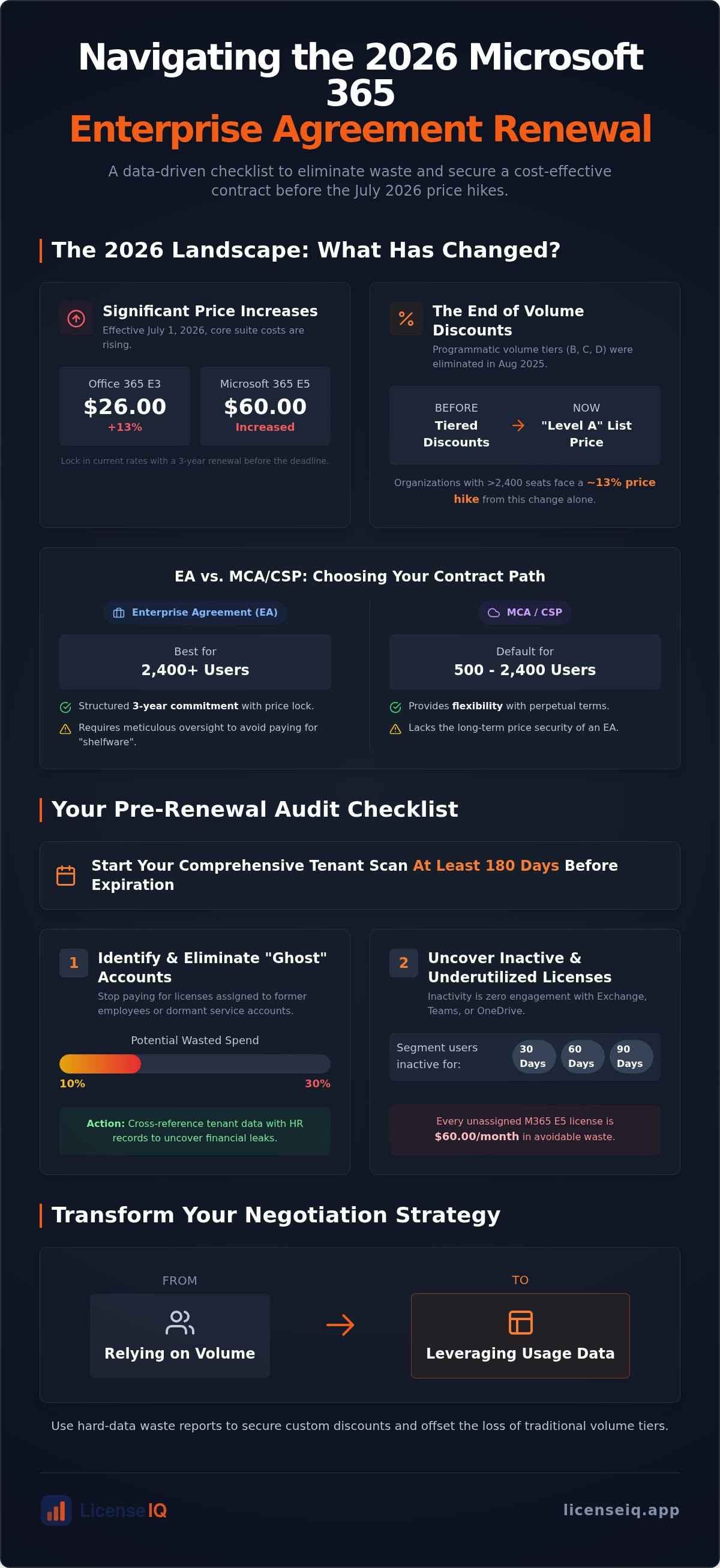
The 2026 renewal cycle is fundamentally different from previous years. Microsoft has overhauled its pricing structure, making traditional negotiation tactics obsolete. Your microsoft 365 enterprise agreement renewal checklist must now account for the most significant price updates since 2022. As of July 1, 2026, costs for Office 365 E3 have climbed 13% to $26.00, while Microsoft 365 E5 has risen to $60.00. These shifts aren't just about inflation. They represent a tactical pivot in how Microsoft values its cloud ecosystem and security features.
The 3-year price lock remains your primary defense against these rising costs. Organizations renewing before the July 1, 2026 deadline can secure current rates for the next three years. This is a high-stakes decision. Failing to lock in rates now exposes your budget to future adjustments and the compounding effects of the 2025 programmatic changes. This environment demands total clarity before you sign.
The Death of Automatic Volume Discounts
Microsoft eliminated programmatic volume tiers for online services in August 2025. Previously, Levels B, C, and D provided predictable discounts for larger seat counts. Today, "Level A" list pricing is the baseline for everyone. You might see a price hike of roughly 13% for the same licenses simply because your previous volume discount vanished. Volume no longer guarantees a lower unit price. To counter this, you must pivot from administrative compliance to aggressive usage discovery. Your primary negotiation lever is no longer how many seats you buy. It's how many seats you can prove you actually need using a Spend Recovery Dashboard.
EA vs. MCA: Deciding Your Contract Path
The Microsoft Enterprise Agreement remains the standard for organizations with over 2,400 users. However, Microsoft is actively pushing mid-sized organizations with 500 to 2,400 users toward the Cloud Solution Provider (CSP) model and the Microsoft Customer Agreement (MCA). This transition began in January 2025 and is now the default for smaller fleets.
- EA: Offers a structured 3-year commitment with a fixed price lock. It requires meticulous oversight to avoid paying for "shelfware."
- MCA/CSP: Provides perpetual terms and more flexibility but lacks the long-term price security of an EA.
Choosing the wrong path leads to organizational disorder. Long-term commitments without automated governance are a liability. If you don't monitor license health in real-time, you're signing a blank check for three years. Proactive organizations use the LicenseIQ Platform to verify their exact needs and finalize their microsoft 365 enterprise agreement renewal checklist with data-driven confidence.
Step 1: The Pre-Renewal Audit and Usage Discovery
Relying on the Microsoft Licensing Statement (MLS) is a strategic error when preparing your microsoft 365 enterprise agreement renewal checklist. The MLS reflects your historical purchases, not your current consumption. A robust audit must prioritize a comprehensive tenant scan at least 180 days before expiration. This six-month window is critical. It provides the operational runway needed to reallocate resources and validate usage trends before entering high-stakes negotiations.
Your primary objective is identifying "ghost" accounts. These are licenses assigned to former employees or legacy service accounts that remain active in the system but dormant in reality. Cross-referencing your tenant data with HR records uncovers these financial leaks immediately. Once identified, assign a License Health Score to your distribution to quantify the risk. Organizations that skip this step often carry 10% to 30% in wasted spend into their next three-year term, a mistake that becomes significantly more expensive with the July 2026 price hikes.
Uncovering Inactive and Underutilized Accounts
Inactivity is defined by zero engagement with Exchange, Teams, or OneDrive over a specific period. You must segment users who haven't logged in for 30, 60, or 90 days to determine their necessity. Every unassigned M365 E5 license sitting idle represents $60.00 in monthly waste under the current pricing structure. Tracking these patterns is essential for Mastering the M365 License Management Lifecycle. Proactive oversight ensures you only pay for active participants.
Identifying Redundant and Overlapping Licenses
Redundancy often hides in complex environments where users are over-provisioned with overlapping SKUs. Audit your tenant for individuals holding a comprehensive suite like E3 alongside standalone subscriptions for Visio or Project that they no longer use. Double-licensing is another common culprit. This occurs when a single user is covered by both user-based and device-based entitlements for the same workload. Identifying these overlaps provides the hard data needed for effective 2026 negotiation levers.
By quantifying the total dollar value of redundant licenses, you shift the power dynamic away from Microsoft's sales reps. In many enterprise environments, the total annual value of redundant and overlapping licenses exceeds $100,000, representing a massive recovery opportunity. You can identify these discrepancies in minutes, entering your renewal meeting with a precise list of required seats rather than a vague estimate.
Step 2: License Right-Sizing and Tier Optimization
Once you have identified inactive accounts, the next phase of your microsoft 365 enterprise agreement renewal checklist is right-sizing. This process involves aligning specific user needs with the most cost-effective license tier. Many organizations default to a "one size fits all" approach, often over-provisioning users with expensive E5 seats when an E3 or even an F-series license would suffice. With Microsoft 365 E5 pricing rising to $60.00 per user, the cost of over-provisioning has never been higher. You must move from a platform commitment to a consumption-based model.
A successful optimization strategy requires a "Target State" seat count. This is a projected inventory based on actual feature engagement rather than historical precedent. By analyzing which users require advanced security, analytics, or telephony, you can build a mix-and-match environment that avoids the "Platform Commitment" trap. This ensures your budget is spent on active value rather than idle capabilities. Precision in this phase is what separates a routine renewal from a strategic cost-recovery event.
The E3 to E5 Value Gap Analysis
The price gap between E3 and E5 is significant. You must evaluate who actually utilizes high-tier features such as Power BI Pro, Advanced Audit, or the Microsoft 365 Phone System. In many environments, less than 20% of E5 users engage with these advanced tools. Downgrading these underutilizers to M365 E3 ($39.00) provides immediate savings without sacrificing core productivity or basic security. For a detailed breakdown of these tactics, see our guide on How to Reduce M365 Subscription Costs. This level of oversight prevents massive budget leakage across your three-year term.
Leveraging F-Series Licenses for Deskless Workers
Frontline workers often represent a hidden opportunity for spend recovery. Many employees in retail, manufacturing, or field service don't require the full suite of desktop applications included in an E3 license. Shifting just 10% of your workforce from E3 to F3 licenses can significantly lower your total contract value. F-series licenses provide essential mobile and web access, Teams collaboration, and security at a fraction of the cost. You should challenge the assumption that every office-based role requires a full E3 seat. Many administrative or part-time roles are perfectly served by the web-only capabilities of the F-series, allowing you to reclaim capital for other strategic initiatives.
Step 3: Tactical Negotiation and Agreement Finalization
Negotiation in 2026 isn't about relationships; it's about hard data. Your microsoft 365 enterprise agreement renewal checklist must culminate in a comprehensive "Waste Report" that serves as your primary leverage. When you meet with your Microsoft representative, present the exact dollar value of the inactive and redundant licenses you've identified. This shifts the conversation from historical purchases to actual consumption. Microsoft's priority is maintaining Total Contract Value (TCV), but your priority is financial accuracy. Use your usage discovery to demand custom discounts that offset the loss of old programmatic tiers.
For organizations that require expert support during the bidding process, RightCostIQ provides professional RFP management and negotiation assistance to ensure that your data-driven audit results in the best possible procurement outcomes.
Finalizing the agreement also requires a precise review of "True-up" terms. These terms must align with your projected growth or contraction over the next 36 months. If you expect a workforce reduction, ensure your contract doesn't lock you into a floor that prevents seat reclamation. Conversely, if you're growing, use your current audit to lock in 2026 rates before further inflationary adjustments occur. Precision here prevents the anxiety of future audits and ensures your resources remain under your total control.
Countering the "Level A" Price Baseline
Since Microsoft removed programmatic discounts, Level A list pricing is the new baseline for every organization. To beat this, you need strategic timing and competitive benchmarks. Microsoft's fiscal year ends on June 30. Initiating your renewal during this window often provides access to discretionary discounts as sales teams work to meet annual quotas. Presenting a documented usage report is the only credible weapon against Level A list pricing in a post-volume discount market. Don't accept list pricing as an inevitability. Use your data to prove that a lower seat count at a better rate is the only logical path forward.
Software Assurance: Value vs. Maintenance
Software Assurance (SA) line items deserve intense scrutiny. You're paying for benefits like Training Vouchers, the Home Use Program, and version rights. Audit these benefits to see if your team actually uses them. If your organization has fully transitioned to a cloud-first strategy, the version-rights value for on-premises licenses may be zero. You should identify specific legacy licenses with SA that can be retired rather than renewed. This eliminates "maintenance" costs for technology you've already outgrown.
Don't enter these high-stakes talks with manual spreadsheets that are months out of date. You can generate a real-time Spend Recovery Dashboard to arm yourself with the hard data required to win your next negotiation and secure your organization's financial health.
Automating the Renewal Cycle with LicenseIQ
Completing a microsoft 365 enterprise agreement renewal checklist manually is a high-risk endeavor. Traditional audits rely on static snapshots that become obsolete the moment a user departs or a new license is provisioned. You need a system that offers total clarity in real-time. The LicenseIQ Platform connects to your tenant in minutes. It provides an instant License Health Score that quantifies your current efficiency and highlights immediate recovery opportunities. This score allows you to benchmark your progress and prioritize high-waste areas before the negotiation begins. It acts as an active participant in your company’s growth, not just a passive reporting tool.
From Manual Spreadsheets to Automated Intelligence
Manual audits are notoriously error-prone. They often miss unassigned licenses that the Microsoft Admin Center obscures within complex nested groups or legacy distribution lists. LicenseIQ uses AI-native intelligence to uncover these obscured details. It identifies up to 35% in wasted spend that manual methods typically overlook. This level of oversight is essential for M365 License Optimization: The 2026 Guide. By replacing spreadsheets with automated intelligence, you eliminate the risk of human error during the most critical financial event of your three-year cycle. This ensures every seat on your microsoft 365 enterprise agreement renewal checklist is backed by verified, real-time consumption data.
Continuous Spend Recovery
The value of your renewal shouldn't degrade over time. Deploying Automated Governance Workflows ensures your tenant remains clean long after the contract is signed. These workflows monitor for new waste the moment a user is offboarded. They provide proactive alerts for "Ghost Licenses" before they appear on your next invoice. You can use the Spend Recovery Dashboard to monitor the ROI of your new EA throughout its entire three-year life. This dashboard provides a specific dollar-value recommendation for optimization at any given moment. This proactive approach prepares you for your next True-up with zero manual effort. It transforms a stressful administrative task into a streamlined, repeatable process that protects your bottom line and ensures financial accuracy.
Stop reacting to Microsoft’s pricing updates and start controlling your environment. You can start your 5-minute M365 audit with LicenseIQ today to secure immediate financial transparency and stop avoidable waste.
Secure Your 2026 Microsoft Strategy
The July 2026 price hikes and the elimination of programmatic volume discounts have changed the rules of the game. You can't rely on historical volume to secure favorable rates anymore. Success now depends on your ability to prove actual consumption and eliminate redundant seats before you sign a new three-year commitment. By following this microsoft 365 enterprise agreement renewal checklist, you've moved from administrative guesswork to data-driven precision.
You don't have to tackle this audit alone. LicenseIQ provides a no-code integration that connects to your tenant in minutes. It identifies up to 35% in wasted license spend and deploys AI-native automated governance workflows to keep your environment clean post-renewal. This level of transparency ensures your organization's financial health is protected throughout the entire contract lifecycle. Take control of your resources and enter your next negotiation with total confidence.
Just as you strive for precision in your corporate infrastructure, many leaders find that a bespoke approach to lifestyle management, such as the services offered by iVipp, provides the support needed to maintain focus on high-stakes strategic initiatives.
Run a Free 5-Minute M365 Audit Before Your Renewal
Frequently Asked Questions
What is the most common mistake in Microsoft EA renewals?
The most frequent error is treating the Microsoft Licensing Statement (MLS) as a usage report. The MLS only confirms what you purchased in the past; it doesn't reflect what your employees actually use today. Relying on this document leads to renewing "shelfware" and overpaying for inactive seats. You must validate actual engagement across Teams, Exchange, and OneDrive before signing your next commitment.
How early should I start the Microsoft 365 EA renewal process?
You should initiate your renewal strategy at least 180 days before your current agreement expires. This six-month window provides enough time to run a deep tenant audit and execute your microsoft 365 enterprise agreement renewal checklist. Starting early allows you to identify waste and align stakeholders, ensuring you enter negotiations with data-driven leverage rather than rushing to meet a deadline.
Can I reduce my seat count during a 3-year Enterprise Agreement?
You generally cannot reduce your seat count below the established "floor" during the three-year term. However, you can adjust your totals during the annual True-up or the final renewal window. This restriction makes your initial microsoft 365 enterprise agreement renewal checklist critical. Setting a lean baseline at the start of the term prevents your organization from paying for redundant licenses for 36 months.
What happened to Microsoft automatic volume discounts (Levels B, C, D)?
Microsoft eliminated these programmatic volume tiers for online services in August 2025. Previously, larger seat counts triggered automatic discounts. Now, every organization starts at "Level A" list pricing regardless of their size. This shift means you must now use hard usage data to negotiate custom discounts. Volume no longer guarantees a lower unit price; only proven efficiency provides negotiation leverage.
Is it better to move from an EA to a Microsoft Customer Agreement (MCA)?
The choice depends on your seat count and need for price stability. The EA offers a three-year price lock, which is vital for organizations with over 2,400 users facing the July 2026 price hikes. The MCA or CSP model provides more flexibility for mid-sized organizations with 500 to 2,400 users. Larger enterprises typically prefer the EA for long-term financial predictability and structured governance.
How does LicenseIQ identify wasted M365 spend compared to a manual audit?
LicenseIQ replaces manual spreadsheets with an AI-native platform that connects to your tenant in minutes. It identifies inactive users and redundant licenses that manual audits often miss. The system provides a real-time Spend Recovery Dashboard and a License Health Score. This automation uncovers up to 35% in wasted spend by analyzing actual feature consumption rather than just login timestamps.
What is a Microsoft Licensing Statement (MLS) and do I need it for renewal?
The MLS is the official record of your historical license purchases and entitlements. You need it to understand your baseline, but it's insufficient for a modern renewal. A successful audit pairs the MLS with real-time usage data to find discrepancies. Understanding what you own is only the first step; knowing what you actually use is what drives total contract value reduction.
Can I mix E3 and E5 licenses in the same Enterprise Agreement?
Yes, you can mix and match license tiers to align with specific departmental needs. This "right-sizing" strategy is a cornerstone of cost recovery. You should assign E5 licenses only to users who require advanced security or Power BI Pro. Moving the remainder of your workforce to E3 or F3 licenses prevents the massive budget leakage associated with a "one size fits all" licensing approach.


