

44% of Microsoft 365 licenses are currently underutilized or oversized for the actual needs of the workforce. With the July 2026 price increases pushing Microsoft 365 E3 costs to $40.95 per user, every idle seat represents a direct hit to your operational bottom line. You likely feel the pressure of rising subscription costs and the lack of visibility into whether your team actually uses those premium E5 features.
Managing a complex tenant shouldn't feel like guesswork. You deserve total clarity over your digital resources and a system that proactively eliminates waste. If you are searching for how to improve m365 license health score metrics, you have come to the right place. We provide the expertise needed to transform a cluttered environment into a high-performance asset.
This article reveals the exact tactical steps to achieve 95% license utilization and maximize your ROI. You will learn how to implement automated governance workflows, use the LicenseIQ Spend Recovery Dashboard for immediate seat reclamation, and produce clear reports for leadership. It's time to stop overpaying and start optimizing.
Key Takeaways
- Define the License Health Score as your primary KPI for financial efficiency, moving beyond standard security-centric dashboards.
- Pinpoint the specific drivers of license waste, including inactive users and redundant E5 feature assignments that inflate monthly costs.
- Discover the tactical steps for how to improve m365 license health score performance by automating your offboarding and reclamation processes.
- Eliminate the "set it and forget it" mentality by replacing manual spreadsheets with real-time audit data during annual renewals.
- Deploy the LicenseIQ Spend Recovery Dashboard to establish a "clean" tenant with 95% utilization and clear reporting for your leadership team.
What is a Microsoft 365 License Health Score?
A License Health Score is a specialized metric designed to quantify the efficiency of your cloud software investment. While What is Microsoft 365? describes the broad ecosystem of productivity tools, the Health Score focuses specifically on the financial hygiene of your tenant. It tracks the gap between licensed capacity and actual user consumption. A perfect 100% score indicates that every dollar spent aligns with an active, necessary user requirement. If you're investigating how to improve m365 license health score results, you're likely dealing with the 44% of licenses that are underutilized or oversized.
The difference between security and financial health
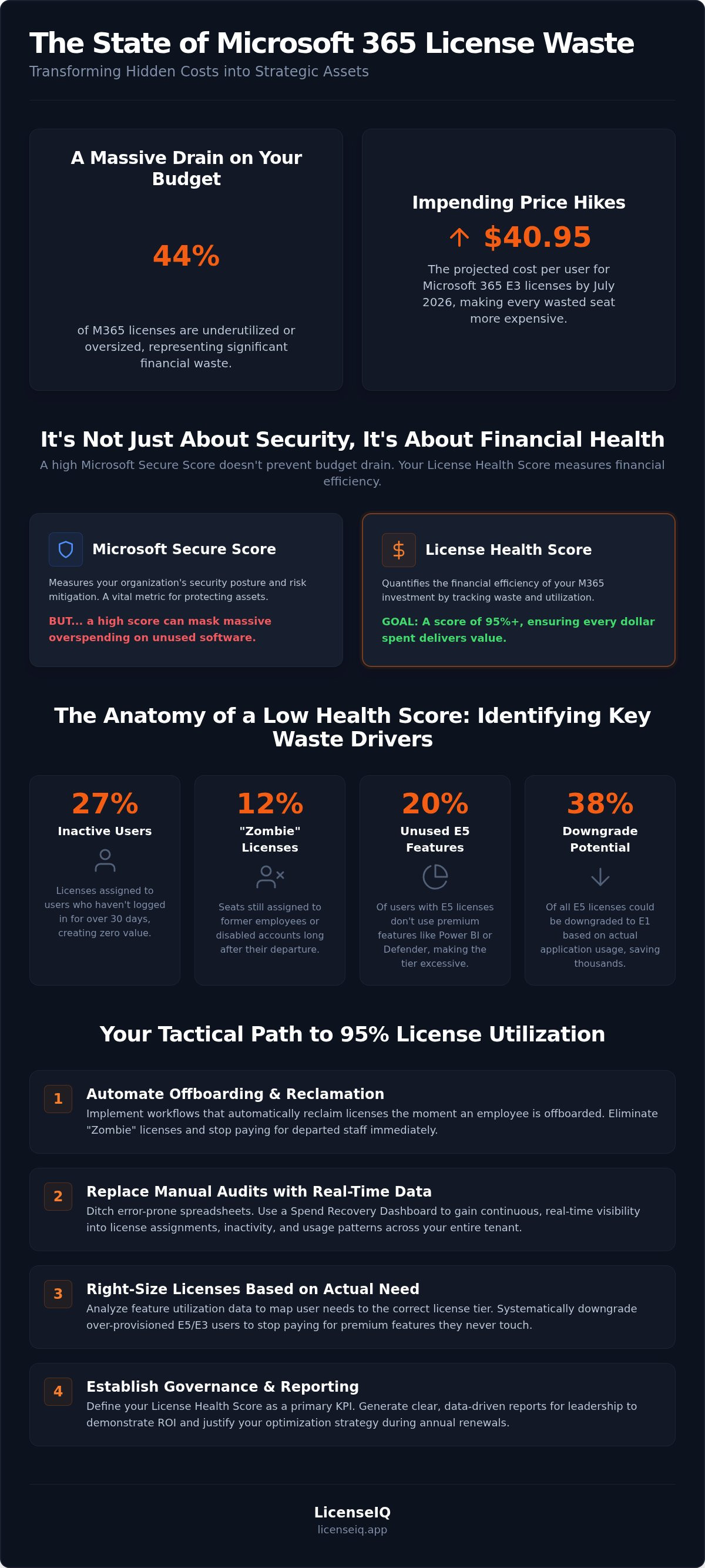
Many IT leaders confuse the Microsoft Secure Score with license health. While platforms like TrustCyber are essential for converting technical configuration data into a business-oriented Cyber Risk Score, a secure tenant doesn't guarantee fiscal responsibility. You can have a perfectly hardened environment that's simultaneously draining your 2026 IT budget through "Zombie Licenses." These are seats assigned to former employees or service accounts that remain active in your billing cycle despite being disabled. Research shows that 12% of licenses are often still assigned to departed staff. High security doesn't excuse high waste.
Key metrics that drive your score
Your score relies on three primary pillars: inactivity, redundancy, and tier alignment. We analyze user activity rates across 30, 60, and 90-day windows to determine if a license is truly necessary. If a user hasn't touched a premium E5 feature in three months, they're a prime candidate for a downgrade. Understanding how to improve m365 license health score performance requires looking at these specific data points:
- Unassigned licenses: Paid seats sitting in your inventory with no user attached.
- Inactive assignments: Licenses held by users who haven't logged in for over 30 days.
- Feature utilization: High-tier licenses (like M365 E5) where the user only utilizes entry-level tools.
By monitoring these variables through the LicenseIQ Platform, you gain a vigilant auditor that never sleeps. This proactive oversight ensures your resources remain lean and your operational environment stays clear of disorder. Establishing this baseline is essential before tackling the upcoming July 2026 price increases.
The Anatomy of a Low Health Score: Identifying Waste
A low Health Score isn't a random occurrence. It's the direct result of obscured details and unmanaged growth within your tenant. Inactive users are the primary contributors to this degradation. Verified data shows that 27% of Microsoft 365 licenses are assigned to individuals who haven't logged in for over 30 days. This inactivity drains your budget without providing any operational value. When you ignore these idle seats, your score drops, signaling a lack of financial oversight.
Shadow IT also plays a critical role in score decay. When departments assign licenses without central governance, you lose visibility into the true cost of your environment. This lack of transparency leads to redundant assignments. For example, many organizations pay for an E3 license while also maintaining a standalone Visio or Project subscription for the same user. This "Overlap Waste" is a hallmark of a disorganized tenant. Over-provisioning for temporary or seasonal staff further compounds the issue, as organizations often fail to scale down after a project ends. Understanding how to improve m365 license health score metrics requires a relentless focus on these hidden inefficiencies.
Detecting inactive and orphaned accounts
Orphaned accounts represent a significant security risk and a total financial loss. Roughly 12% of licenses remain assigned to disabled or former employee accounts long after they've left the company. Identifying these users requires a meticulous audit of your Active Directory against your billing records. License Reclamation is the process of recovering these costs by identifying and revoking unneeded seats. Using a Spend Recovery Dashboard allows you to visualize these orphaned accounts in minutes rather than hours of manual spreadsheet work.
Evaluating license tier redundancy
Tier alignment is the next frontier of optimization. Data indicates that 20% of users with E5 licenses don't use the premium Power BI or Defender features included in that tier. Even more striking, separate analyses found that 38% of E5 licenses could be downgraded to E1 based on actual app usage. You must map user personas to their specific functional requirements to stop paying for features that remain untouched. This ensures your high-tier investments are reserved for the power users who actually need them. Learning how to improve m365 license health score values starts with this granular level of feature analysis.
Tactical Steps to Improve Your License Health Score
Improving your score requires a shift from manual tracking to automated enforcement. You cannot effectively manage what you do not measure. By following a structured framework, you can reclaim up to 35% of your SaaS budget. When determining how to improve m365 license health score metrics, you must move from passive observation to active enforcement. These five steps provide a direct roadmap to a clean, optimized tenant.
- Step 1: Perform a comprehensive tenant scan. Connect your environment to the LicenseIQ Platform to establish your baseline score immediately.
- Step 2: Automate the offboarding workflow. Deploy Automated Governance Workflows that reclaim licenses the moment an account is disabled in Active Directory.
- Step 3: Downsize inactive users. Shift users who haven't logged in for 30 days to "Shared" licenses or lower-cost tiers to preserve data without the premium price tag.
- Step 4: Consolidate standalone add-ons. Identify users with multiple individual SKUs, such as standalone Visio or Project licenses, and move them into comprehensive bundles.
- Step 5: Implement continuous monitoring. Set up real-time alerts to prevent score decay as your organization scales or hires new staff.
Right-sizing: Moving from E5 to E3 or Business Premium
Tier alignment is your most powerful lever for cost recovery. Many organizations default to M365 E5 for all users, yet 38% of those users could function perfectly on an E1 or Business Premium plan. You should downgrade users who don't utilize premium security features like Microsoft Security Copilot or Cloud PKI. Use data-driven insights to justify these changes to stakeholders by showing actual usage gaps. For a detailed breakdown of what each tier offers, consult our guide on Microsoft 365 License Types. This ensures you only pay for the features your team actually employs.
Automating the reclamation lifecycle
Manual spreadsheets are a liability in 2026. They're static, prone to error, and outdated the moment they're saved. Modern governance requires setting up triggers for inactivity alerts. If a user remains inactive for 60 days, the system should automatically notify IT and initiate a reclamation workflow. This is especially vital in "Mix and Match" environments where various license types are active across different departments. Automation ensures that how to improve m365 license health score performance isn't just a one-time project. It becomes a continuous state of operational excellence that protects your bottom line from subscription creep.
Common Pitfalls in M365 License Management
Avoid the "set it and forget it" trap. Subscription management requires constant vigilance, not passive observation. Many organizations treat M365 as a fixed utility. They pay the invoice without questioning the actual utilization. This creates a culture of cost blindness. When you fail to audit your tenant before annual renewals, you likely over-provision based on outdated headcounts. Bulk-buying licenses without a precise scan is a primary reason why leadership asks how to improve m365 license health score results during budget reviews.
Timing is everything. Ignoring the grace period for license reclamation after an employee departs is a common financial leak. You pay for seats that sit idle while the reclamation window closes. Additionally, a lack of communication between IT and Finance prevents the organization from realizing actual savings. IT might identify waste, but if Finance doesn't adjust the procurement strategy, the budget remains bloated. Understanding how to improve m365 license health score performance means acknowledging that manual processes are your biggest liability.
The hidden costs of manual auditing
Manual auditing is a drain on your most valuable resource: time. Calculating the labor cost of an IT manager spending hours in the admin center reveals a harsh truth. Human error in license assignment leads to an immediate financial impact that often goes unnoticed for months. Spreadsheets are static; your tenant is dynamic. By the time a manual audit is finished, the data is already stale. You can't maintain a high score with tools that can't keep pace with your growth.
Overlooking offboarding security risks
Financial waste and security risk are two sides of the same coin. Orphaned licenses often become entry points for breaches. If an account remains licensed after a user departs, it maintains a footprint that attackers can exploit. Linking financial health to security hygiene is a core requirement for modern governance. Use our Office 365 Offboarding Checklist to ensure no account is left behind. This proactive oversight protects your resources while simultaneously cleaning up your license environment.
Stop guessing and start governing. You can establish total oversight in minutes. Connect your tenant to the LicenseIQ Platform to identify and fix these pitfalls today.
Optimizing Your Score with LicenseIQ
LicenseIQ functions as a proactive, digital auditor for your Microsoft environment. It replaces the inherent disorder of manual tracking with a vigilant, precise system. By connecting to your tenant in minutes, the LicenseIQ Platform identifies inactive users and redundant licenses with total clarity. This immediate oversight is the most efficient answer for specialized leadership wondering how to improve m365 license health score metrics without increasing their administrative workload.
The platform uses AI-native software intelligence to calculate a comprehensive License Health Score. This score serves as the definitive KPI for your M365 FinOps strategy. It does more than just flag underutilization; it provides the execution layer through Automated Governance Workflows. These workflows remove the manual burden from your IT team by reclaiming seats automatically based on predefined triggers. By integrating these actionable AI insights, organizations can achieve a 35% reduction in their total M365 spend.
Real-time visibility into every license
Transparency is the cornerstone of effective asset management. The Spend Recovery Dashboard scans every user and seat to uncover obscured details that manual audits miss. It provides specific, dollar-value recommendations for every optimization opportunity. You will know exactly what you save by actioning tier downgrades or removing orphaned accounts. This level of detail empowers you to make data-driven decisions that protect corporate resources. You can secure a free health check on the LicenseIQ Homepage to establish your baseline today.
Continuous governance for 2026 and beyond
Operational efficiency requires moving away from the outdated "set it and forget it" mentality. Annual audits are a relic of the past. They cannot account for the dynamic nature of 2026 subscription models and the frequent price adjustments implemented by Microsoft. Continuous governance ensures financial accuracy across your entire organization every single day. This vigilant approach identifies waste the moment it occurs, preventing score decay before it impacts your budget. It transforms your tenant from a source of organizational disorder into a high-utilization asset. LicenseIQ turns organizational disorder into total financial clarity.
Take Control of Your M365 Financial Health
You now possess the tactical steps to eliminate organizational disorder within your tenant. Shifting from manual spreadsheets to automated precision is the only way to combat the 2026 price increases effectively. By identifying inactive users and aligning license tiers with actual feature usage, you protect your bottom line from unnecessary drain. Learning how to improve m365 license health score performance is the first step toward achieving a lean, high-utilization environment.
Total clarity is only a few clicks away. The LicenseIQ Platform connects to your tenant in minutes to provide immediate oversight. You can deploy AI-native governance workflows to recover up to 35% of wasted SaaS spend and maintain a "clean" tenant without the administrative burden. It's time to replace guesswork with data-driven precision.
Get your free M365 License Health Score in 5 minutes with LicenseIQ. Take command of your digital resources and ensure every dollar spent drives measurable value for your organization.
Frequently Asked Questions
How is a License Health Score different from a Microsoft Secure Score?
The License Health Score focuses on financial efficiency and ROI while the Microsoft Secure Score measures security hardening. A high secure score doesn't prevent financial waste. You can have a perfectly secure tenant that's bleeding money through underutilized premium tiers. The Health Score provides the fiscal oversight necessary to justify your 2026 IT budget and eliminate organizational disorder.
Can I improve my score without changing my users’ license types?
Yes, you can improve your score by eliminating unassigned licenses and reclaiming seats from departed employees. These actions increase utilization without affecting active user tiers. If you want to know how to improve m365 license health score results quickly, start by revoking licenses from accounts disabled in Active Directory. This immediately reduces waste and increases your percentage of active assignments.
How often should I audit my M365 licenses to maintain a high score?
You should move toward continuous, real-time monitoring rather than periodic audits. Manual monthly checks are often outdated the moment they're completed due to staff turnover and project shifts. Automated platforms provide a persistent License Health Score that alerts you to waste as it occurs. This proactive approach ensures your financial hygiene remains high throughout the entire subscription lifecycle and prevents score decay.
What is the most common reason for a low license health score?
Inactive users represent the most common reason for a degraded score. Research indicates that 27% of M365 licenses are assigned to users who haven't logged in for over 30 days. Orphaned accounts from former employees contribute another 12% to this waste. Identifying these obscured details is essential for any organization looking for how to improve m365 license health score performance in 2026.
Does a high health score improve my tenant’s security?
Yes, a high health score directly correlates with better security hygiene. Orphaned licenses assigned to departed employees are prime targets for attackers who exploit unmonitored accounts. By reclaiming these licenses, you close potential entry points and reduce your attack surface. A clean tenant is both financially efficient and operationally secure, providing total clarity and confidence for your administrative team.
Is it possible to automate the improvement of my license health score?
Automation is the most effective way to maintain a high score. You can implement Automated Governance Workflows that trigger license reclamation based on specific inactivity thresholds. This removes the manual burden from your IT department and ensures consistent enforcement of your FinOps policies. Automation turns a complex administrative task into a streamlined, background process that protects your corporate resources and maximizes ROI.
Will removing an inactive license delete the user’s data?
Revoking a license doesn't immediately delete a user's data, but it does remove their access to the applications. You should convert user mailboxes to shared mailboxes and move OneDrive files to a central repository before reclamation. This ensures data retention while eliminating the recurring subscription cost. Proper offboarding procedures allow you to recover spend without risking critical corporate information or operational continuity.
How much can a typical SMB save by improving their health score?
A typical organization can recover up to 35% of their total M365 spend by optimizing their license health. This is achieved by identifying the 44% of licenses that are currently underutilized or oversized for the user's actual needs. For an SMB, these savings can be redirected into higher-value initiatives or used to offset the July 2026 price increases. Precision in license management translates directly to financial security.


