

Approximately 44% of Microsoft 365 licenses are currently underutilized or oversized. If you're wondering why your organization pays significantly more than the base seat price, the answer lies within your tenant configuration. Managing microsoft 365 hidden fees is not about disputing surprise invoice charges. It is about identifying and eliminating structural governance leaks that drain your capital.
You already know the operational friction of unpredictable invoice spikes. Ambiguous tier changes, rigid annual commitments under the New Commerce Experience, and paying full monthly prices for inactive former employee accounts create continuous financial waste. Without absolute visibility, redundant add-ons and overlapping security tools compound the issue, leaving your budget exposed.
This guide uncovers every hidden fee, contractual trap, and licensing leak inflating your Microsoft 365 invoice. We establish a structured process to audit your entire tenant, eliminate operational disorder, and reclaim up to 35% of wasted SaaS spend before your next contract renewal.
Key Takeaways
- Understand why published sticker prices rarely match your final enterprise invoice due to structural overhead and tier misalignments.
- Identify the rigid contractual traps within the New Commerce Experience that quietly compound your recurring IT expenditure.
- Uncover how default standardization policies trigger microsoft 365 hidden fees by over-provisioning advanced tiers for dormant or low-need users.
- Establish a precise four-step audit process to isolate inactive accounts and reclaim wasted capital across your entire tenant.
- Transition from error-prone manual spreadsheets to automated governance workflows that proactively intercept cost leaks before renewal.
The True Cost of Microsoft 365: Beyond the Sticker Price
Evaluating your enterprise software invoice requires looking beyond the basic per-user list price. True operational transparency reveals that Microsoft 365 commercial plans carry structural overhead that rarely appears on standard marketing pages. IT leaders frequently face compounding line-item inflation driven by tier misalignments, unassigned seats, and subtle compliance penalties. Passive invoice approval turns these minor oversights into permanent financial leaks.
Unmonitored cloud environments naturally accrue cost sprawl within twelve operational months. When organizations scale up teams or adjust departmental structures, provisioning workflows move quickly while decommissioning processes lag behind. Paying these invoices without deep system visibility drains your strategic IT budget. It redirects capital away from infrastructure innovation toward unused software capacity.
Published License Rates vs. Invoiced Reality
Marketing materials show clean, predictable per-seat pricing. Your actual enterprise invoice tells a different story. Base tiers often lack the advanced security, data retention, and identity governance features required by modern compliance frameworks. To bridge this gap, administrators must purchase supplementary security add-ons. This specialized bundling instantly inflates your baseline commitment. Because monthly billing variance can be highly granular, these incremental changes easily slip past internal accounts payable controls.
The Scope of Unmonitored Cloud Licensing Sprawl
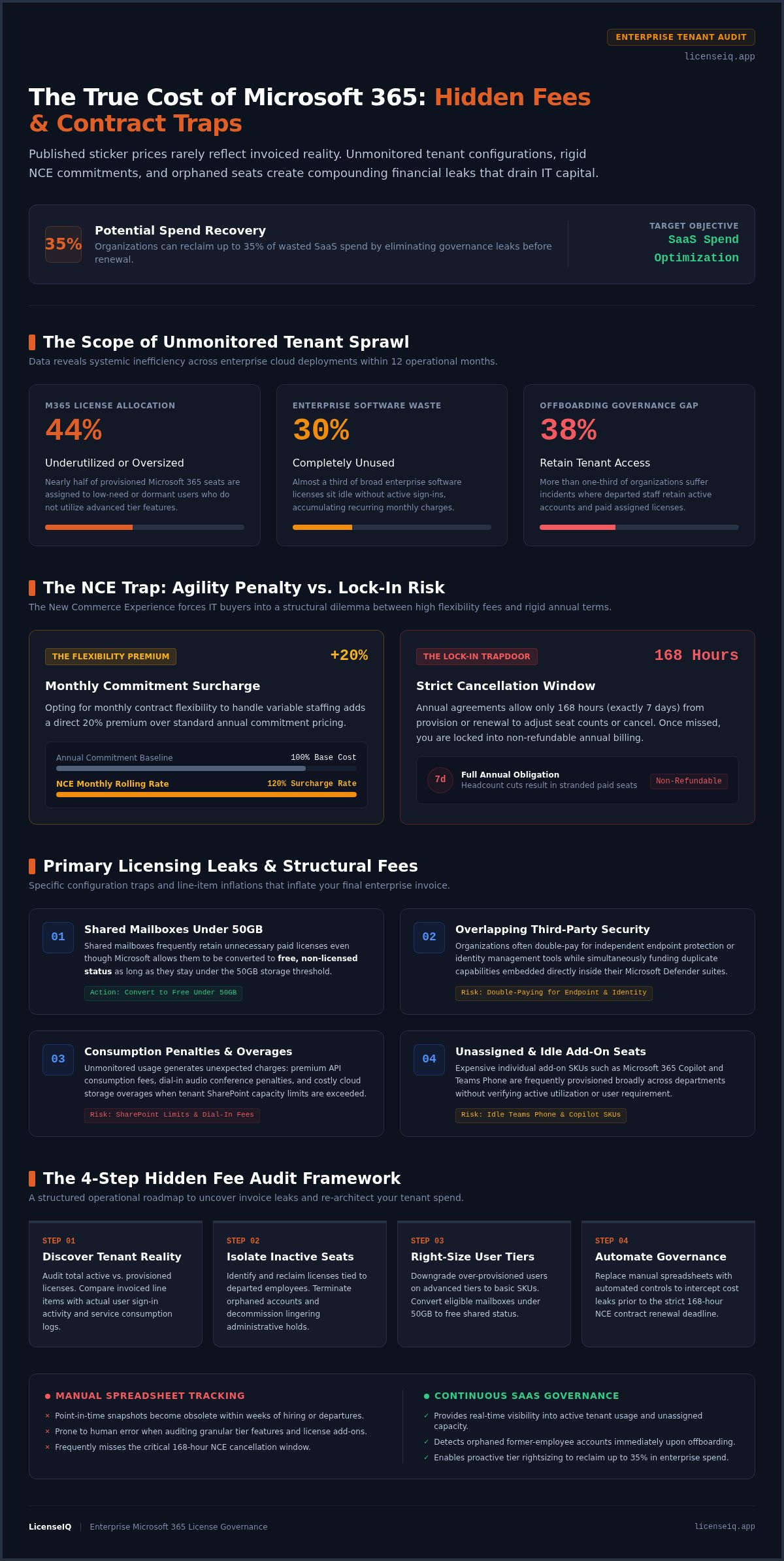
Software waste represents a massive, unaddressed cost center. Industry data indicates that 30% of enterprise software licenses sit completely unused, while approximately 44% of Microsoft 365 seats are underutilized or oversized. When team expansions slow down, unassigned licenses remain active on your tenant, quietly incurring charges. Implementing a rigorous microsoft 365 license optimization strategy helps organizations intercept this waste. Tracking these architectural leaks manually is incredibly difficult, but establishing continuous visibility ensures you only pay for what your team actually utilizes.
The 5 Biggest Hidden Fees and Contract Traps in Microsoft 365
Structural billing mechanisms quietly compound internal IT expenditure behind the scenes. Beyond basic user tiers, organizations frequently face unexpected consumption charges. These include premium API consumption fees, dial-in audio penalties, and unexpected cloud storage overage rates when SharePoint limits are exceeded. Organizations seeking to audit and modernize their overall communication stack often rely on enterprise IT and telecom providers like ITSthe1 Solutions to ensure connectivity and cloud services remain cost-effective. Identifying these micro-transactions is critical to stopping microsoft 365 hidden fees from eroding your operating margins.
The NCE Flexibility Premium and Cancellation Windows
The Microsoft New Commerce Experience (NCE) introduced rigid structural constraints that penalize agile businesses. Choosing monthly flexibility incurs a steep 20% premium surcharge compared to annual commitments. However, avoiding this premium by signing an annual contract triggers a different trap: a strict 168-hour cancellation window. Missing this narrow framework locks your organization into the full annual cost. If you experience midterm headcount reductions, you're stuck with stranded, non-refundable annual seat commitments for the remainder of the term.
Orphaned Accounts and Offboarding Waste
Persistent license allocations attached to departed employees represent pure financial waste. Research shows that 38% of organizations suffer from governance incidents where former employees retain tenant access, which directly correlates with active, unrecovered subscriptions. Similarly, shared mailboxes frequently retain unnecessary paid licenses when they could be converted to free, non-licensed status under 50GB. To secure your data and stop this specific capital drain, review our comprehensive office 365 offboarding checklist.
Redundant Add-Ons and Overlapping Capabilities
Expensive feature overlaps between Microsoft tiers and standalone third-party security tools silently inflate budgets. Many organizations pay for independent endpoint protection or identity management solutions while simultaneously funding duplicate capabilities within their Microsoft Defender suite. Individual add-ons like Teams Phone and Microsoft 365 Copilot are also assigned to users without active utilization. You can map out these structural redundancies by consulting our microsoft 365 license types guide. To instantly expose these compounding anomalies across your entire tenant, organizations can deploy the LicenseIQ Platform to establish total operational transparency and stop paying for overlapping licenses before the next renewal cycle.
License Over-Provisioning: The Cost of Buying the Wrong Tiers
Default corporate standardization policies inadvertently trigger massive software waste. IT departments frequently assign identical top-tier subscriptions to every user to simplify administrative provisioning. This blanket approach drives severe microsoft 365 hidden fees by purchasing capabilities that most employees never touch. Data indicates that less than a third of users actually tap into all available enterprise capabilities, meaning organizations routinely overpay for basic daily tasks.
Mapping actual worker tasks directly to license capabilities yields immediate financial upside. The table below outlines the cost disparities across standard 2026 license tiers, highlighting the financial stakes of over-provisioning:
| License Tier | Monthly Cost (Per User) | Target Persona / Core Focus |
|---|---|---|
| Microsoft 365 E5 | $60.00 | Executives / Advanced Security & Compliance Teams |
| Microsoft 365 E3 | $39.00 | Standard Knowledge Workers / Enterprise Staff |
| Microsoft 365 Business Premium | $22.00 | SMB Power Users (Up to 300 seats maximum) |
| Microsoft 365 F3 | $10.00 | Frontline Personnel / Mobile & Deskless Workers |
The Enterprise E5 vs. E3 Misallocation Trap
Organizations frequently pay a heavy premium for features like Advanced eDiscovery and premium compliance assessments that general staff do not require. Upgrading an entire tenant to Microsoft 365 E5 at $60 per user/month when Microsoft 365 E3 at $39 per user/month suffices creates an unnecessary balance sheet risk. This single misallocation wastes $21 per user every month. To execute targeted downgrades without losing critical operational features, follow our structured guide to reduce m365 subscription costs.
Role-Based Persona Alignment vs. Blanket Licensing
Optimizing your tenant requires categorizing corporate staff into distinct personas based on empirical software utilization data. Knowledge workers may require standard desktop apps, but non-technical deskless employees typically only need mobile or web-only access. Moving frontline personnel to economical options like Microsoft 365 F3 at $10 per user/month immediately cuts seat costs. You can build a flexible, mixed-tier tenant that matches actual usage without sacrificing essential security controls across your infrastructure.
How to Conduct a Microsoft 365 Hidden Fee Audit in 4 Steps
Manual license tracking is a reactive, error-prone process. You need a proactive framework to identify microsoft 365 hidden fees before they compound into significant budget deficits. Following a structured audit allows you to move from guesswork to data-driven governance. Execute these four steps to secure your tenant and reclaim wasted capital.
- Step 1: Extract a comprehensive inventory of all assigned, unassigned, and suspended subscription licenses across every active tenant.
- Step 2: Cross-reference your license list with Microsoft Entra ID sign-in activity to isolate dormant users who haven't authenticated in over ninety days.
- Step 3: Analyze add-on consumption logs to identify premium features, such as Power BI Pro or Copilot, that are assigned but remain unused.
- Step 4: Reconcile your findings against Cloud Solution Provider (CSP) or Enterprise Agreement contracts to align seat counts with true internal demand before your next renewal.
Isolating Inactive Accounts and Dormant Mailboxes
Reviewing Microsoft Entra ID logs is the most efficient way to pinpoint accounts without authentications within ninety days. These dormant accounts represent immediate cost recovery opportunities. When employees leave the organization, don't simply disable the account and leave the license attached. Convert ex-employee mailboxes to unlicensed shared mailboxes. As long as the storage capacity remains under 50GB, you retain the data securely without paying the recurring monthly fee. This allows you to strip premium licenses from disabled accounts while preserving historical corporate data.
Analyzing Add-On Attach Rates and Renewal Timelines
Inspect usage logs for standalone add-ons like Teams Phone, Power BI Pro, and Power Automate Premium. These tools often carry high per-user costs that go unnoticed when bundled into a larger invoice. Map every renewal expiration date across your direct Microsoft agreements and distributor contracts. You must formulate an optimization plan at least thirty days prior to your contract cancellation cutoff dates. Under NCE terms, missing this window locks you into redundant costs for the remainder of the term. Establish a real-time License Health Score and automate these audit steps by deploying the LicenseIQ Platform to protect your budget from recurring waste.
Eliminating Hidden Fees: Manual Audits vs. Continuous SaaS Governance
Static oversight is the primary driver of persistent microsoft 365 hidden fees. Relying on periodic, reactive reviews allows waste to accumulate unchecked between audit cycles. IT leaders must shift from manual reconciliation to continuous governance to secure their operational budgets. Establishing persistent visibility replaces administrative panic with data-driven confidence.
The Latency and Pitfalls of Spreadsheet-Based Tracking
Static license spreadsheets become obsolete within days of completion. In a dynamic enterprise environment, new hires join, personnel depart, and departmental needs shift in real-time. A manual file cannot keep pace with these fluctuations. Human errors during data entry lead to seat creep and inadvertent contract auto-renewals that lock in waste for another year. Reconciling administrative portal invoices manually wastes hundreds of internal engineering hours annually. This time represents a significant hidden cost itself. Redirecting your team from administrative archaeology toward strategic infrastructure growth requires a fundamental change in how you monitor tenant health.
Continuous Spend Governance with LicenseIQ
Modern software intelligence provides the only permanent resolution to billing disorder. The LicenseIQ Platform connects to your Microsoft 365 tenant in minutes to deliver an immediate License Health Score. This proprietary benchmark evaluates your tenant spend efficiency and identifies exactly where capital is leaking. It transforms complex licensing data into actionable dollar-value recommendations instantly.
Instead of relying on manual intervention, you can deploy Automated Governance Workflows to discover and recover wasted software spend seamlessly. These workflows proactively intercept new cost leaks before they reach your next invoice. By identifying inactive accounts and right-sizing over-provisioned tiers, organizations can reclaim up to 35% of their recurring SaaS expenditure. Visit LicenseIQ to establish total operational transparency and ensure your resources are monitored by a vigilant, precise system. Stop paying for software your team doesn't use and start reinvesting that capital into strategic innovation.
Reclaim Your IT Budget for 2026
Managing microsoft 365 hidden fees requires more than occasional spreadsheet updates. You've seen how structural misalignments, orphaned accounts, and rigid NCE contracts quietly drain your capital. Transitioning from reactive audits to continuous, automated oversight is the only way to safeguard your resources against perpetual seat creep and redundant add-ons. Passive invoice approval isn't a viable strategy for specialized leadership in complex operational environments.
LicenseIQ connects to your environment in minutes to deliver an instant License Health Score and specific dollar-value savings recommendations. By deploying Automated Governance Workflows powered by the Model Context Protocol, you can automatically uncover up to 35% wasted spend across your entire Microsoft 365 environment. This meticulous approach turns organizational disorder into total clarity, ensuring your financial health remains a top priority.
Audit your tenant and eliminate hidden M365 fees with LicenseIQ to establish total operational transparency today. Taking control of your licensing architecture ensures that every dollar spent directly supports your organization's growth and innovation.
Frequently Asked Questions
What are the most common Microsoft 365 hidden fees?
The most frequent microsoft 365 hidden fees include unassigned seat costs, premium security add-ons, and excessive cloud storage overage rates. Organizations often pay for top-tier features like Advanced eDiscovery or Microsoft Purview that remain entirely unused by the general workforce. Dial-in audio conferencing penalties and premium API consumption charges also quietly inflate monthly invoices. Without continuous monitoring, these structural overhead costs compound into significant budget deficits that bypass standard accounts payable controls.
How does the Microsoft New Commerce Experience (NCE) increase licensing costs?
The Microsoft New Commerce Experience (NCE) increases costs by imposing a 20% price premium on customers who require monthly billing flexibility. Choosing an annual commitment avoids this surcharge but introduces a rigid 168-hour cancellation window. If you miss this narrow timeframe, you're legally committed to the full annual cost of every seat. This prevents organizations from reducing seat counts during midterm headcount reductions, resulting in non-refundable expenditures for inactive users.
Can an organization mix and match Microsoft 365 license tiers?
Organizations can definitely mix and match license tiers within a single tenant to better align costs with actual worker requirements. You don't need to assign the same expensive suite to every employee. For example, deskless workers can thrive on economical F-series plans while standard knowledge workers utilize E3 licenses. Reserving E5 tiers exclusively for executives or security personnel prevents massive over-provisioning waste. This role-based approach ensures you only pay for the specific capabilities your team utilizes.
What happens to Microsoft licenses when an employee leaves the company?
When an employee leaves, their assigned Microsoft license remains active and continues to incur recurring monthly charges until an administrator manually reclaims it. Simply disabling the account in Entra ID doesn't stop the billing cycle. To preserve historical data without additional cost, you should convert the ex-employee's mailbox to a shared mailbox under 50GB. This allows you to strip the paid license immediately while maintaining secure access to corporate information for compliance.
Is there a penalty fee for downgrading Microsoft 365 licenses mid-contract?
Microsoft doesn't charge a literal penalty fee for downgrading, but NCE contract terms effectively make mid-contract downgrades financially impossible. Once you commit to a specific tier under an annual agreement, you're obligated to pay for that tier for the remainder of the twelve-month term. You cannot reduce seat counts or move to a lower-priced plan until the renewal window opens. This lack of agility makes proactive right-sizing before your next contract renewal absolutely critical.
How do shared mailboxes create hidden subscription costs?
Shared mailboxes create hidden costs when administrators fail to remove the paid license after conversion. While Microsoft provides these mailboxes for free up to 50GB, exceeding this storage limit or attaching premium add-ons triggers unexpected subscription requirements. Many organizations inadvertently pay for full licenses on dozens of shared mailboxes that could operate at zero cost. Establishing automated governance workflows helps identify these specific misconfigurations and recovers the associated spend instantly across your entire tenant.
How much money can companies typically save by optimizing Microsoft licenses?
Companies typically reclaim up to 35% of their recurring software spend by implementing a structured microsoft 365 hidden fees audit. Identifying inactive accounts, right-sizing over-provisioned tiers, and eliminating redundant security add-ons provides immediate dollar-value recovery. Using a specialized platform to generate a License Health Score allows IT leaders to benchmark their efficiency against industry standards. This level of transparency ensures that every dollar in the IT budget supports active, necessary operations rather than structural waste.


