

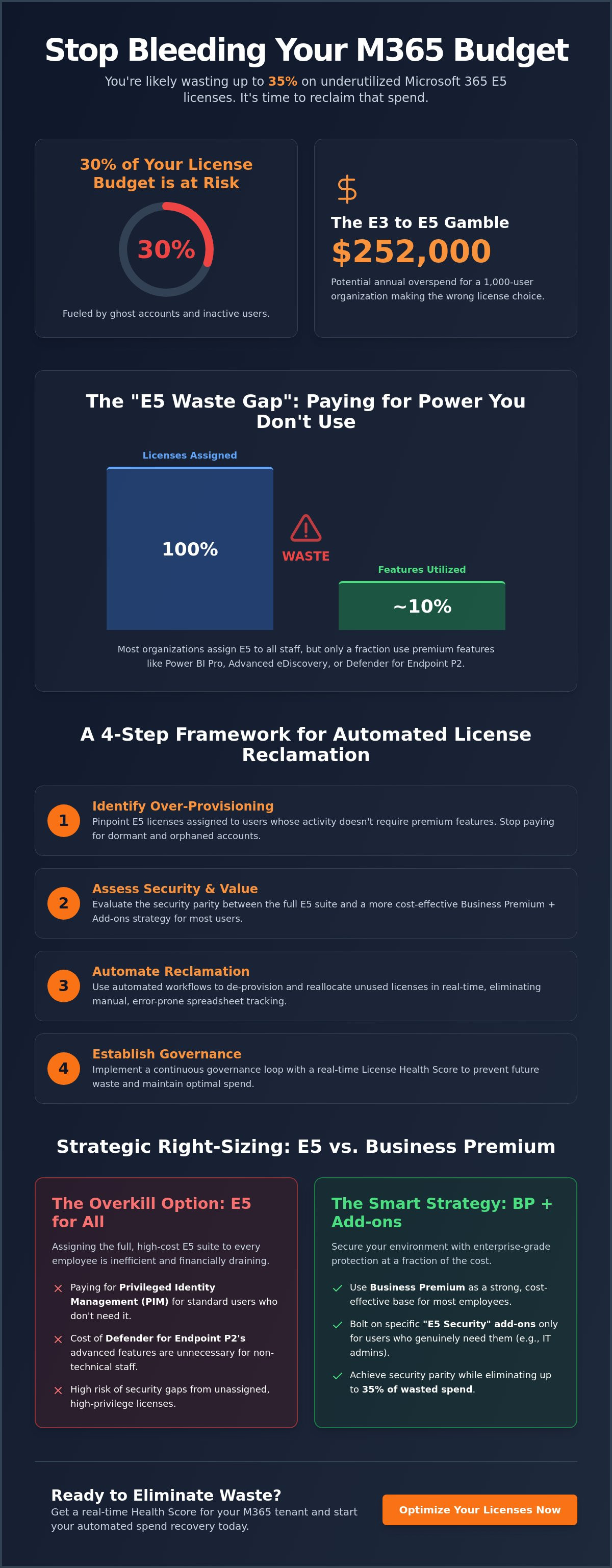
30% of your Microsoft 365 license budget is likely fueling ghost accounts and inactive users. For a 1,000-user organization, choosing the wrong path from E3 to E5 can cost $252,000 annually. You know your current manual spreadsheets can't keep up with the July 2026 price hikes. It's frustrating to pay $60 per user while wondering if you're over-licensed or leaving security gaps. Effective microsoft 365 e5 license optimization for smb requires more than a yearly audit; it demands real-time oversight.
We understand the pressure to maintain enterprise-grade security without bleeding capital. You shouldn't have to choose between a secure tenant and a healthy bottom line. This guide provides a blueprint to eliminate up to 35% of wasted spend through automated AI-driven governance. We'll show you how to generate a clear Health Score, automate the reclamation of inactive seats, and determine if Business Premium add-ons offer a better ROI for your specific operational needs.
Key Takeaways
- Stop capital leakage by identifying over-provisioned E5 licenses that no longer align with active user requirements.
- Implement a data-driven strategy for microsoft 365 e5 license optimization for smb to recapture up to 35% of wasted subscription costs.
- Assess the security parity between E5 and Business Premium to right-size your environment for the 2026 pricing landscape.
- Leverage the LicenseIQ Platform to automate the discovery and reclamation of orphaned accounts through a centralized Spend Recovery Dashboard.
- Establish a permanent governance loop using a real-time License Health Score to prevent future organizational disorder.
The Hidden Cost of Underutilized Microsoft 365 E5 Licenses
Precision is the cornerstone of financial health. In the context of Microsoft 365 plans, microsoft 365 e5 license optimization for smb isn't just about reducing a bill. It's the strategic alignment of premium features with actual user activity. Most SMBs over-provision E5 licenses during their initial cloud migration or after a security scare. They prioritize total coverage but lack the granular tools to monitor ongoing consumption. This creates the E5 Waste Gap. You're likely paying for Power BI Pro, advanced eDiscovery, or Defender for Endpoint P2 for employees who only require basic email and document collaboration.
We solve this through the implementation of a License Health Score. This metric provides an immediate, data-driven snapshot of your tenant efficiency. It calculates the delta between your total license spend and the actual feature utilization across your workforce. If your score is low, you're hemorrhaging capital on high-tier capabilities that provide zero operational value. High-performing organizations use this score to justify their IT spend to leadership, proving that every license is a calculated investment rather than a generic expense.
Why E5 Waste is an SMB Silent Killer
Waste compounds quickly. A handful of unused E5 licenses might seem negligible on a monthly statement, but they erode annual margins significantly. This is how SaaS sprawl begins. Unmonitored enterprise licenses accumulate over time, often surviving employee offboarding or departmental shifts. When a user leaves, their license often remains active in your tenant, costing your company $60 every month without any return. Beyond the financial drain, these unassigned but active high-privilege licenses present a massive security risk. They're invisible targets that increase your attack surface. Meticulous oversight ensures every dollar spent on microsoft 365 e5 license optimization for smb serves a specific defensive or analytical purpose.
The 2026 State of M365 Licensing
The licensing landscape shifted on July 1, 2026. With the deeper integration of Copilot and the bundling of advanced security features into lower tiers like Business Premium, the E5 value proposition has changed. You can't rely on manual spreadsheets to track these dynamic changes anymore. Cloud environments move too fast for static tracking. Manual audits are obsolete because they're snapshots of the past, not insights for the future. Proactive leaders now use automated governance to maintain total transparency in their operational environment. For a deeper dive into modern strategies, consult our 2026 Guide to Automated Spend Recovery. This shift toward automation ensures your resources are monitored by a vigilant system that never sleeps.
Evaluating E5 Security and Compliance: What SMBs Actually Use
Strategic microsoft 365 e5 license optimization for smb relies on a brutal assessment of feature consumption. Microsoft bundles three massive pillars into the E5 SKU: Advanced Security, Compliance, and Analytical tools. Most organizations suffer from the "Usage vs. Assignment" paradox. They assign the license to 100% of their staff, but only 10% utilize the high-value components. This disconnect turns a security investment into a financial liability. You must distinguish between what your users are entitled to use and what they actually touch every day.
The perceived value of Entra ID Plan 2 often drives E5 adoption. While features like Privileged Identity Management (PIM) are vital for IT administrators, they provide zero benefit to a standard marketing or sales user. Paying for Plan 2 across your entire workforce is inefficient when only a fraction of users require identity governance. Proactive managers are now pivoting toward "E5 Security" add-ons. These allow you to bolt enterprise-grade protection onto a Business Premium base, securing your environment without the bloated cost of the full E5 suite. You can monitor these discrepancies in real-time using a Spend Recovery Dashboard to ensure your security budget is working at peak efficiency.
Security Features: Entra ID P2 and Defender
- Privileged Identity Management (PIM): High-risk accounts need just-in-time access. Standard users don't. Limit these assignments to your technical core to reduce costs immediately.
- Defender for Endpoint Plan 2: Evaluate if non-technical staff require the advanced automated investigation and remediation found in Plan 2. As of July 2026, Defender for Office 365 Plan 1 is included in Business Premium, covering the essential needs of most SMB employees.
- Redundant Spending: SMBs often pay for third-party security tools that overlap with E5 capabilities. Consolidate your stack to eliminate double-billing for the same protection.
Analytical and Voice Tools: Power BI and Teams Phone
A common mistake is assigning the full E5 license solely to provide Power BI Pro access. If your users only need to view and interact with reports, the full SKU is overkill. Similarly, Teams Phone System is often underutilized in hybrid environments where mobile devices or legacy systems remain the primary communication channel. Analyze your call logs. If the usage data doesn't justify the seat cost, you're overpaying. E5 optimization is the process of matching feature consumption to license cost. It requires a relentless focus on data-driven decision-making to maintain total transparency within your organization.
E5 vs. Business Premium: Strategic Right-Sizing for 2026
The 300-user cap is your first strategic filter. For organizations below this threshold, Business Premium remains the most aggressive cost-saving alternative to E5. Effective microsoft 365 e5 license optimization for smb requires moving past the "all-or-nothing" mindset. You don't need to license your entire staff at the highest tier to maintain a robust security posture. In the 2026 landscape, the gap between these tiers has narrowed for the average user, making strategic downgrades a primary lever for spend recovery.
We advocate for a "Mixed-Mode" licensing strategy. This approach assigns high-tier E5 licenses only to the personas that require them, such as IT administrators or executive leadership. The rest of your workforce operates on Business Premium. This hybrid model maximizes ROI by ensuring you only pay for the advanced governance and analytical tools where they're actively utilized. It eliminates the financial bloat of over-provisioning while maintaining total operational transparency.
The Business Premium Sweet Spot
Approximately 90% of SMB employees only require the core productivity and security features found in Business Premium. As of the July 2026 update, Business Premium includes Microsoft Defender for Office 365 Plan 1, providing essential protection like Safe Links and Safe Attachments. Downgrading a single user from E5 to Business Premium recovers $38 per month. For a 200-user firm, right-sizing just half of your staff results in over $45,000 in annual savings. For a detailed breakdown of feature sets, consult our M365 License Types guide to verify tier-specific details.
When E5 is Non-Negotiable
Certain "Trigger Features" make E5 mandatory for specific subsets of your organization. If your business operates under strict HIPAA or GDPR mandates, the advanced compliance tools in E5 are essential. Use the following checklist to identify who truly needs the upgrade:
- Legal and Compliance Officers: Require eDiscovery Premium and Content Search for regulatory audits.
- IT Administrators: Need Privileged Identity Management (PIM) and Entra ID Plan 2 to govern tenant access.
- Data Analysts: Require Power BI Pro for publishing and sharing organizational reports.
- High-Risk Personas: Users handling sensitive financial data benefit from Insider Risk Management and advanced Data Loss Prevention (DLP).
By categorizing users into these personas, you can apply automated workflows to ensure license assignments match actual functional requirements. This meticulous oversight prevents organizational disorder and keeps your financial health in check.
A 4-Step Framework for Automated E5 License Reclamation
Manual license management is a recipe for financial disorder. To achieve true microsoft 365 e5 license optimization for smb, you must transition from reactive audits to proactive automation. Most organizations fail because they treat reclamation as a one-time event. We've developed a four-step framework that transforms your tenant into a lean, high-performance environment. This process replaces human error with algorithmic precision, ensuring your resources are always aligned with actual usage.
- Step 1: Discover. Connect your tenant to a central management platform. Scan every license, group assignment, and user profile in minutes to establish a baseline.
- Step 2: Analyze. Identify inactive users across 30, 60, and 90-day intervals. Pinpoint redundant E5 assignments where users are paying for premium features they never access.
- Step 3: Recover. Execute Automated Governance Workflows to reclaim unassigned or inactive licenses. This step shifts users to lower tiers or removes licenses entirely based on predefined logic.
- Step 4: Monitor. Establish continuous oversight. Set alerts for "license creep" to ensure that new, unoptimized spend doesn't accumulate after your initial recovery.
Ready to stop the bleed? Deploy our Automated Governance Workflows to secure your tenant and recover your budget today.
Identifying Inactive E5 Users
In a modern SaaS environment, an "inactive" user isn't just someone who hasn't logged in. True inactivity includes a lack of mail traffic, file interactions, or Teams activity. There's a critical difference between a disabled account and an unassigned license. A disabled account often still holds an expensive E5 seat, costing your company $60 every month for zero utility. We suggest a strict 30-day lookback period for high-cost E5 licenses. If a user hasn't utilized premium pillars like Power BI or advanced compliance tools in a month, they're a prime candidate for a downgrade. This granular oversight is the only way to maintain a high License Health Score.
Automating the Offboarding Loop
Improper offboarding is the primary source of "zombie" E5 licenses. When an employee leaves, IT often disables the account but forgets to unassign the license. These orphaned seats hide in your tenant for months, quietly draining your budget. You can reclaim this spend without losing critical user data or mailbox access by converting the mailbox to a shared state before unassigning the license. Use our Office 365 Offboarding Checklist to standardize this process. Automation ensures that every departure triggers an immediate license recovery, preventing organizational waste from becoming a permanent fixture of your balance sheet.
Scaling SMB Governance with LicenseIQ’s Automated Workflows
Precision in financial management requires advanced software intelligence. LicenseIQ Platform serves as the AI-native engine that brings total transparency to your operational environment. It's designed specifically for leadership that values efficiency and data-driven decision-making. Achieving sustainable microsoft 365 e5 license optimization for smb requires the right technology to uncover hidden costs. By consolidating your licensing data into a single source of truth, we eliminate the organizational disorder that plagues manual tracking.
The License Health Score is the centerpiece of our Spend Recovery Dashboard. This metric provides an immediate executive report on tenant efficiency. It doesn't just show you who has a license; it reveals who is actually using the premium features you're paying for. Our platform automates the discovery of the 35% wasted spend typical in SMB environments. We utilize the Model Context Protocol to ensure seamless tenant integration. This technology allows for rapid, high-accuracy scanning that identifies obscured details without manual intervention.
AI-Native Spend Recovery
LicenseIQ provides specific dollar-value recommendations for every optimization opportunity. You'll see the exact financial impact of every proposed change before you execute it. Our "5-Minute Audit" capability replaces weeks of tedious spreadsheet work with a single automated scan. This speed allows you to take immediate action against budget leakage. If you're ready to reclaim your capital, follow our guide to reduce M365 subscription costs today.
Continuous Governance vs. Annual Audits
Traditional annual audits are reactive and insufficient for dynamic cloud environments. They capture waste only after it has already drained your resources for months. LicenseIQ shifts your strategy to continuous governance. It's a "set and forget" system that monitors your resources with a vigilant eye. This proactive approach ensures that microsoft 365 e5 license optimization for smb isn't a one-time project but a permanent standard of hygiene. The long-term ROI of maintaining total clarity far exceeds the cost of a tiered monthly subscription. Stop guessing and start governing. Start your 5-minute M365 audit at LicenseIQ to recover your spend now.
Secure Your Budget and Reclaim Operational Clarity
Effective microsoft 365 e5 license optimization for smb requires moving beyond manual tracking and static audits. You've seen how underutilized features and orphaned accounts create a massive waste gap that drains your annual IT budget. By implementing a continuous governance loop, you ensure your resources are always aligned with your workforce's actual needs. This precision doesn't just save money. It strengthens your security posture by eliminating high-privilege ghost accounts that increase your attack surface.
Scan your tenant and recover wasted E5 spend with LicenseIQ. Your path to total financial hygiene starts here.
Frequently Asked Questions
Is Microsoft 365 E5 worth it for a small business under 300 users?
E5 is worth the investment only for specific personas or strict compliance requirements. While it offers advanced eDiscovery and identity governance, most SMB staff are better served by Business Premium. You should only assign E5 to users who actively utilize its analytical or high-tier security pillars. A mixed-mode strategy ensures you don't pay for enterprise features that provide zero operational value to your standard workforce.
How much can an SMB typically save by optimizing E5 licenses?
Most organizations recover up to 35% of their wasted subscription spend through automated governance. For a 1,000-user firm, choosing the correct license path can prevent an annual loss of $252,000. These savings come from identifying inactive accounts and right-sizing users to appropriate tiers. Effective microsoft 365 e5 license optimization for smb provides immediate financial relief and improves your total margin health.
What is the most common reason for wasted spend on M365 E5?
The primary driver of waste is over-provisioning during initial setup or migration. SMBs often assign the full E5 suite to every employee to ensure total coverage, regardless of actual job needs. Poor offboarding processes also create "zombie" licenses that remain active for former employees. These orphaned seats quietly drain capital every month because manual spreadsheets fail to track them in real-time.
Can I mix E5 and Business Premium licenses in the same tenant?
You can absolutely mix different license tiers within a single tenant. This approach is a core component of microsoft 365 e5 license optimization for smb. It allows you to provide premium tools to IT admins and compliance officers while keeping standard users on cost-effective plans. This hybrid model maintains enterprise-grade security across the organization while maximizing your total return on investment.
How often should an SMB conduct a Microsoft 365 license audit?
Annual audits are insufficient for dynamic cloud environments. You should move to a continuous governance model that monitors your tenant in real-time. Monthly reviews are the minimum standard required to prevent license creep and ensure new waste doesn't accumulate. Automated systems allow for this persistent oversight without increasing your team's manual workload, keeping your financial health score consistently high.
What happens to user data if I downgrade an E5 license to E3 or Business Premium?
Core data such as emails and OneDrive files remain intact during a downgrade. However, you will lose access to premium features like Power BI Pro and advanced eDiscovery content. You must convert mailboxes to a shared state or export sensitive compliance data before executing the change. Proper planning ensures you recover spend without compromising your organization's historical data or regulatory standing.
Does E5 optimization impact my security posture?
Strategic optimization often improves your security posture rather than weakening it. It forces you to remove high-privilege licenses from inactive accounts, which reduces your total attack surface. By utilizing E5 Security add-ons for Business Premium users, you maintain enterprise-grade protection while eliminating the cost of unused analytical tools. Total transparency ensures your budget supports active defenses instead of idle subscriptions.
How does LicenseIQ identify inactive Microsoft 365 users?
The platform connects to your tenant via the Model Context Protocol to analyze granular usage data. It tracks more than just login timestamps; it monitors active mail traffic, Teams interactions, and file activity. This deep analysis identifies users who are technically logged in but aren't utilizing the premium E5 components assigned to them. This precision allows for automated reclamation workflows that target waste with surgical accuracy.


