

A license count isn’t a cost-control strategy. Microsoft 365 spend management software should help you identify licenses that may be unused or redundant, connect those findings to financial impact, and support decisions about what to do next. When assignments, activity data, and subscription costs sit in separate places, even a careful review can miss potential waste. By the next audit, the picture may have changed.
You need more than another dashboard. Look for recommendations that leaders can assess and defend, plus a clear process for moving from a flagged opportunity to a documented decision. The right platform can help your team prioritize reviews using license and usage data, while reducing the manual work needed to keep oversight current.
This guide explains how spend management software can surface license issues, what to evaluate before choosing a solution, and how to build ongoing cost oversight. You’ll learn to assess data quality, recommendation transparency, and governance workflows, then see how Microsoft 365-specific visibility can support repeatable decisions. The goal is practical: find opportunities, validate them, and keep license management aligned with your organization’s needs.
Key Takeaways
- Use microsoft 365 spend management software to connect license and usage data with the potential financial impact of changes.
- Compare platforms on data coverage, recommendation evidence, workflow controls, reporting, and monitoring cadence.
- Begin with a limited review: define the scope, confirm authorized access, and record baseline findings before making changes.
- Assign IT and finance owners to validate recommendations, approve license decisions, and document follow-up.
- Assess whether LicenseIQ’s Microsoft 365 focus, License Health Score, Spend Recovery Dashboard, and Automated Governance Workflows fit your oversight needs.
What Microsoft 365 spend management software does beyond tracking subscription spend
Microsoft 365 spend management software helps organizations review license assignments and usage, relate them to subscription spend, and govern decisions about license changes. Rather than showing only a total, it connects licenses to users and activity signals so teams can assess whether assignments appear aligned with current business needs.
This is a focused part of Software asset management (SAM), the broader practice of managing software assets, costs, and risks. It also differs from a vendor directory, procurement system, or general SaaS inventory. Those tools can help track suppliers, purchases, or applications across an organization. Microsoft 365 spend management focuses on the relationship between tenant users, license assignments, usage signals, and the financial implications of potential changes.
Which Microsoft 365 spend problems can software help uncover?
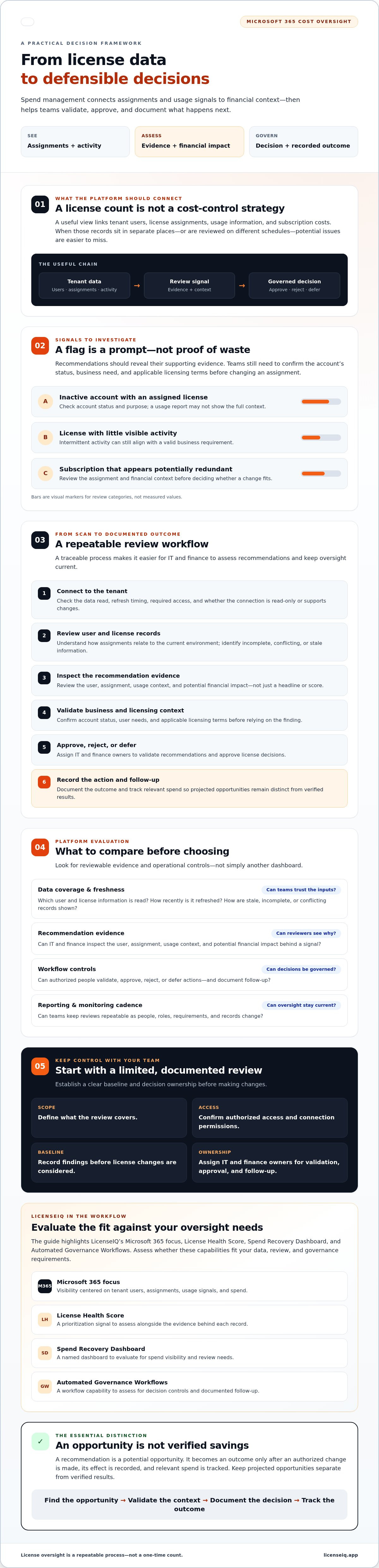
Review signals may include inactive accounts with assigned licenses, licenses with little visible activity, or subscriptions that appear potentially redundant. These are reasons to investigate, not proof of waste. A user may have a valid business need despite intermittent activity. An account that appears inactive may also have a status or purpose that a usage report doesn’t show.
The challenge is reconciliation. User records, license assignments, usage information, and financial records may live in different systems or be reviewed on different schedules. Manual checks become harder to repeat as people, roles, and requirements change. Before changing an assignment, confirm the account’s status, the user’s business needs, and the applicable licensing terms.
Spend visibility versus license optimization
Spend visibility shows what the organization is paying for. License analysis adds context by connecting that spend to users, assignments, and possible next steps, such as reviewing an apparently unused assignment or checking whether a different license is appropriate. Strong recommendations show their supporting evidence, so IT and finance can assess the reasoning instead of relying on a headline or score.
A recommendation isn’t realized savings. It becomes an outcome only after an authorized change is made, its effect is recorded, and the relevant spend is tracked. Keep projected opportunities separate from verified results. For broader context on moving from analysis to repeatable action, see Microsoft 365 License Optimization: The 2026 Guide to Automated Spend Recovery.
How Microsoft 365 spend management software turns tenant data into recommendations
Useful recommendations depend on a traceable process, not just a scan. Microsoft 365 spend management software should help teams move from tenant data to a reviewed decision, then record the result. The process typically includes connecting to the tenant, reviewing user and license records, identifying a potential action, validating its business and financial context, securing approval, and documenting the outcome.
What happens during a Microsoft 365 tenant scan?
A scan reviews relevant user and license information to show how assignments relate to the current environment. Before evaluating a platform, check which data it reads, how recently that data was refreshed, what access it requires, and whether the connection is read-only or supports changes. Connector and permission models can vary between products.
Ask how the platform flags incomplete, conflicting, or stale records. If an employee’s status is outdated or an assignment isn’t reflected consistently across records, investigate before relying on a recommendation. Clear data-quality indicators help administrators distinguish findings they can assess from items that need follow-up.
From license health signals to governance workflows
A health score can help teams prioritize records for review, but it shouldn’t replace the evidence behind each signal. A useful workflow lets an administrator inspect the user, assignment, usage context, and potential financial impact, then document whether to approve, reject, or defer the proposed action.
For example, a flagged license might prompt an administrator to confirm the user’s account status and business requirements. If a change is appropriate, an authorized person approves it, the assignment is updated through the organization’s process, and the outcome is recorded for follow-up. During evaluation, verify which steps the platform automates and which require administrator approval. LicenseIQ offers a License Health Score and Automated Governance Workflows. Confirm the current workflow behavior and approval controls as part of your review.
Monitoring can help teams spot changes to assignments or usage patterns between spreadsheet reviews, rather than relying only on periodic audits. Check how often information refreshes and how the platform records decisions and outcomes. Keep a projected opportunity distinct from a completed result: A verified savings opportunity is an approved, completed license action with measured financial impact.
To see how Microsoft 365-specific license intelligence can support this process, explore LicenseIQ’s license management platform.
How to compare Microsoft 365 spend management software
Compare tools against the decisions your team needs to make, not the length of a feature list. Strong microsoft 365 spend management software connects user and license records to relevant activity and potential financial impact, then gives reviewers enough context to assess each recommendation. Start with the essentials below. Consider advanced automation only after the evidence and oversight requirements are met.
| Capability | Essential question | Priority |
|---|---|---|
| Data coverage | Can you see users, assigned licenses, relevant activity signals, and when the data was refreshed? | Essential |
| Recommendation evidence | Does each suggestion show its rationale, assumptions, date, and current status? | Essential |
| Workflow controls | Can reviewers distinguish suggested actions from changes that require approval or can be automated? | Essential |
| Reporting | Can IT and finance understand the potential financial impact and track decisions? | Essential |
| Monitoring cadence | Can the team review changes between manual audit cycles? | Essential |
| Advanced automation | Do automated steps address a confirmed need, with suitable oversight? | Optional |
Which data, reports, and recommendations should buyers inspect?
Ask to review a sample recommendation from initial signal through proposed action. Check that it identifies the affected user and assignment, explains the activity evidence, and states how any financial estimate was calculated. Confirm that the report shows the data date and whether the recommendation is open, reviewed, approved, or closed. A dashboard should make decisions clearer, not just add charts or scores.
Before approving a license change, require the affected account and assignment, current activity evidence, a stated rationale and assumptions, validation of the licensing need, financial impact, and recorded approval.
How should teams assess automation, oversight, and fit?
Ask vendors to distinguish recommendations from actions the platform can execute, and clarify where administrator approval is required. Check whether the decision trail records who reviewed the finding, what they decided, and what follow-up occurred. Test a sample recommendation against the account status, the user’s actual licensing needs, and the assumptions behind its financial estimate. For a complementary manual validation approach, consult How to Conduct a Microsoft 365 License Audit.
How to implement spend management without losing control of license decisions
Roll out microsoft 365 spend management software with a controlled first review, not an immediate organization-wide change. Define which users, license types, or business units are in scope. Confirm authorized access and record baseline findings, including which records were reviewed and any known data gaps. This gives IT and finance a reference for follow-up without treating every flagged assignment as a saving.
What should teams verify before connecting a tenant?
Before authorizing a connection, review the platform’s stated permissions, data handling, access controls, and retention terms. Ask your Microsoft 365 administrator and security reviewers to assess the connection process and confirm that its access matches the intended review. Don’t rely on a general assurance. Request current, substantiated evidence for security or compliance claims, and clarify what data the platform reads and how it is handled.
Keep decision rights with designated staff. A practical division of responsibility is for IT to validate account and license details, the relevant business owner to confirm user need, and an authorized approver to decide whether a change proceeds. Finance can review the assumptions behind the estimated impact and reconcile completed changes with spend records.
How can teams make recommendations auditable?
For each recommendation, record the supporting evidence, business owner, decision and approver, implementation date, and measured outcome. This creates a useful audit trail when a recommendation is rejected, deferred, or completed. Set a recurring review cadence based on how often staffing and subscription needs change, rather than assuming one schedule suits every organization.
Track measures that show both process and outcome: flagged assignments reviewed, actions approved, and verified spend changes. Keep forecast savings, recommended savings, and realized savings separate. A forecast is an estimate; a recommendation is a proposed action; realized savings should reflect a completed change and its measured financial impact. This prevents potential savings from being presented as money already recovered.
Connect license oversight to employee lifecycle controls, too. For example, an offboarding process can prompt a review of account status and assigned licenses, while administrators retain control over any changes. A complementary reference is Office 365 Offboarding Checklist 2026: Secure Data and Reclaim Spend.
For a platform designed to support Microsoft 365 license visibility and governance workflows, explore LicenseIQ’s spend management platform.
When LicenseIQ fits a Microsoft 365 spend management workflow
LicenseIQ may fit organizations seeking Microsoft 365-specific visibility, clear evidence behind recommendations, review workflows that suit their approval process, and ongoing license oversight. Designed for SMBs, it provides license intelligence and governance support rather than a broad vendor directory or procurement system. Fit depends on whether its data, recommendations, and workflow controls match your tenant scope and how your team makes license decisions.
What LicenseIQ’s stated capabilities are designed to address
LicenseIQ connects to a Microsoft 365 tenant to scan users and licenses. Its License Health Score can help direct attention to records that warrant review. The Spend Recovery Dashboard and dollar-value recommendations can help teams assess potential optimization opportunities. Treat these as inputs for review, not proof that an assignment is wasteful or that savings have been achieved.
Before acting on a recommendation, check the supporting user and license information, the assumptions behind its financial estimate, and whether the data reflects your current tenant. Confirm how Automated Governance Workflows handle suggested actions, administrator approval, and completed changes. LicenseIQ states that its platform can identify potential savings of up to 35%. Treat this as a potential, not guaranteed, outcome. Before using the claim in a business case, verify the evidence, scope, and calculation behind it.
A practical next step for evaluating the platform
Assess the platform against your operating requirements. Ask what tenant data it reviews, what access the connection requires, and how current the information is. Clarify which workflow steps are recommendations and which can be automated, where approval is required, and how decisions are recorded. Then compare a sample recommendation with your license records, account status, business context, and financial assumptions.
Start with a defined scope and named reviewers. For example, have an administrator validate the tenant record, a business owner confirm the user’s needs, and an authorized approver decide whether to proceed. Check that reports answer the questions your IT and finance teams need to resolve. If the evidence and controls support your process, LicenseIQ may fit your microsoft 365 spend management software needs in an SMB environment.
Explore Microsoft 365 spend management with LicenseIQ.
Build a clearer, more consistent approach to license spend
Effective microsoft 365 spend management software does more than report subscription totals. It connects license and usage information to evidence-based recommendations, then helps teams review, approve, and track decisions. Choose a platform that fits your tenant scope and oversight process, and keep potential savings separate from changes that have been completed and measured.
LicenseIQ is an AI-native platform designed for SMBs. It provides a License Health Score and specific dollar-value recommendations to help teams prioritize license reviews. Before adopting any platform, confirm its data access requirements, recommendation evidence, and governance controls. If you’re evaluating LicenseIQ, check the current tenant connection process, including its stated connection time, and determine which actions require administrator approval.
Start with a focused review and clear ownership across IT and finance. A consistent process can turn scattered license data into decisions your organization can validate and monitor. Explore Microsoft 365 spend management with LicenseIQ and assess whether its capabilities align with your team’s needs. With the right evidence and oversight, you can make more confident license decisions and maintain cost visibility.
Frequently Asked Questions
What is Microsoft 365 spend management software?
Microsoft 365 spend management software helps organizations review license assignments, identify records that may warrant attention, and oversee related subscription decisions. Depending on the platform, it may connect user and license information with activity signals, financial estimates, reports, and governance workflows. Check what data a tool uses and how it supports validation. A dashboard can reveal potential opportunities, but it can’t guarantee savings or replace administrator judgment.
How can software identify unused Microsoft 365 licenses?
Software can compare license assignments with available user and activity information to flag accounts for review. A flag is a signal, not proof that a license is unnecessary. Someone may use a license intermittently, be on leave, or have requirements that aren’t visible in activity data. Administrators should confirm account status, business need, and applicable licensing terms before changing an assignment, then document approved actions and their outcomes.
Can Microsoft 365 spend management software automatically remove licenses?
Capabilities vary by platform and configuration. Some tools present recommendations for an administrator to review; others may support governance actions under defined controls. Before connecting a tenant, ask which actions are automated, what permissions they require, and where approval is needed. Confirm how decisions and changes are recorded. Test the workflow with clear accountability in place, and don’t enable automatic changes until your team understands and approves the process.
How much can a company save with Microsoft 365 spend management software?
There’s no single savings amount that applies to every organization. Results depend on license assignments, user changes, subscription terms, and whether recommendations are appropriate and completed. LicenseIQ states that its platform can identify potential savings of up to 35%, but that claim isn’t a guarantee or a typical outcome. Ask how the estimate is calculated, what baseline it uses, and how projected opportunities are distinguished from measured savings.
Is Microsoft 365 spend management software the same as a license audit?
No. A license audit is a review process that can be conducted manually or supported by software. Spend management software may help teams review license records, prioritize potential issues, and track decisions between audits. Coverage and monitoring vary by platform. Check which users, assignments, usage signals, and financial details the tool includes. Use it to support a structured review, not to replace administrators’ responsibility to validate findings.
What should I check before connecting a spend management platform to my Microsoft 365 tenant?
Review the platform’s requested permissions, data collection, access controls, retention practices, and connection method with your Microsoft 365 administrator and security team. Confirm whether it can make changes or only provide recommendations, and clarify the approval process. Ask how complete and current the data is. Treat security or compliance statements as claims to verify, and request current evidence before relying on them in your assessment.
How often should Microsoft 365 license spend be reviewed?
Choose a review cadence that reflects changes in staffing, roles, and subscription management needs. Periodic reviews can provide a consistent control, while ongoing monitoring may help surface changes between review dates. Assign an owner and define how recommendations move through validation, approval, implementation, and financial confirmation. Track reviewed assignments and completed actions so the process stays accountable and your team can distinguish potential opportunities from verified outcomes.


