

What if your next software renewal includes subscriptions nobody uses? A software license management platform should help make that waste visible before it becomes a recurring expense. But license and user records often sit across disconnected systems, and manual reviews can become outdated as people or roles change.
That challenge has become harder to ignore for Microsoft 365 customers. Price increases for most commercial plans took effect July 1, 2026, making clear license visibility more valuable at renewal time. A platform can help, but feature counts alone won’t tell you whether it fits your environment or supports ongoing oversight.
This guide explains which capabilities to look for, what limitations to check, and how to build a practical evaluation checklist for business and technical needs. It also clarifies where LicenseIQ fits: the platform focuses on Microsoft 365 governance for SMBs, using license visibility, a License Health Score, and dollar-value recommendations to help prioritize optimization. You’ll leave with a clearer way to compare options and establish manageable, continuous license oversight.
Key Takeaways
- Assess a software license management platform by its data quality, recommendations, workflow controls, and reporting, not by feature count alone.
- Distinguish observed usage from platform recommendations, and decide which actions need human review and approval.
- Plan a staged rollout with clear owners across IT, finance, procurement, and business teams so findings lead to accountable decisions.
- Use a focused Microsoft 365 governance tool when it matches your needs, and check whether you also need broader multi-vendor inventory coverage.
- Compare LicenseIQ’s Microsoft 365 focus and governance capabilities with your requirements before deciding whether it fits your operating model.
What Is a Software License Management Platform, and What Problem Does It Solve?
A software license management platform brings software, users, entitlements, usage, and governance information into a view teams can use to review and manage licenses. It helps organizations compare what they’ve purchased with what’s assigned and how those licenses are being used.
That comparison matters because the records often live in separate systems. Procurement may hold purchase details, IT may manage user assignments, and application data may show usage. When those records don’t align, teams can miss unused subscriptions, redundant assignments, or users who need a different license. Spreadsheets can also become outdated when employees leave or change roles.
License management is one part of the broader discipline of Software asset management (SAM), which covers organizational practices for managing software assets. IT asset management can extend further, tracking hardware and other technology assets across their lifecycle. SaaS spend management may focus on subscription costs and vendor oversight. These areas overlap, but they aren’t interchangeable. Platform capabilities and vendor coverage vary, so check which applications, data sources, and workflows a tool actually supports.
Which license-management problems can a platform address?
The core gap is between purchased entitlements, assigned users, and actual usage. For example, an organization may assign a license to an employee, then find that the employee’s role has changed or the account is no longer active. Without current records and a review process, that assignment may continue unnoticed.
A platform can bring relevant data together and flag mismatches for investigation. Treat potential savings as a hypothesis, not a promised outcome. Validate each recommendation against current usage, business needs, contract terms, and the effort required to make a change.
How is license management different from SaaS management?
SaaS management may span application discovery, user access, usage, and vendor oversight. License management takes a more focused view of entitlements, assignments, and opportunities to align licenses with actual needs. Product boundaries differ, so confirm which vendors a platform covers, how it gathers data, and whether its workflows support your review and approval process.
How a Software License Management Platform Turns Data Into Governance
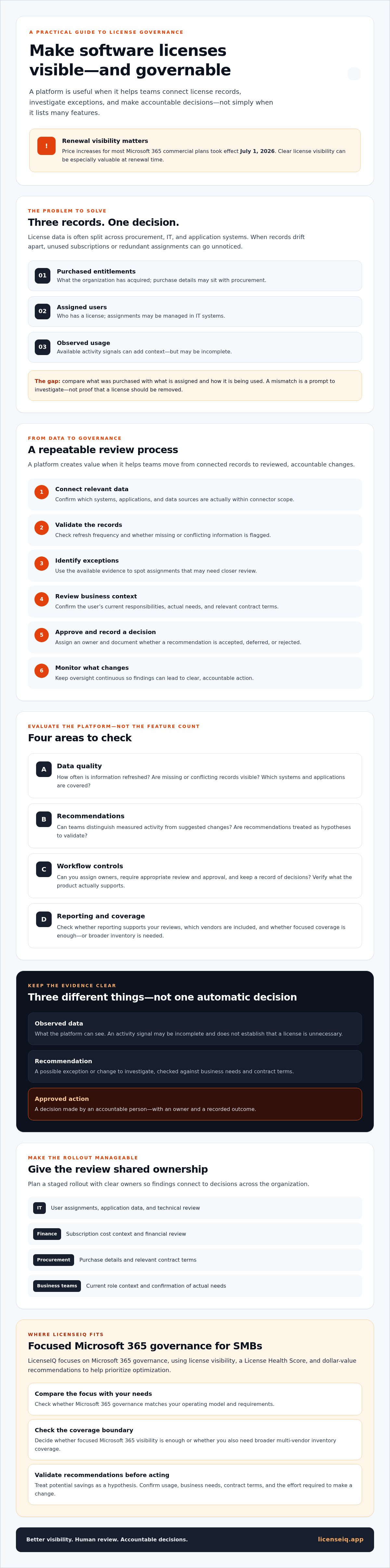
A software license management platform creates value when it turns visibility into a repeatable decision process. The sequence is practical: connect relevant data, validate records, identify exceptions, review findings, approve actions, and monitor what changes. Each step matters. A recommendation based on incomplete or outdated records can create as much confusion as a spreadsheet no one maintains.
What data should a platform make visible?
Start with the evidence needed to understand each assignment: user identity, assigned license, available activity signals, and relevant subscription details. Then check the platform’s data quality. Ask how often information refreshes, whether missing or conflicting records are flagged, and which systems and applications are within connector scope. Don’t assume a platform can access every data source or capture every signal. Verify its current documentation, permissions, and data-handling practices before relying on its findings.
A user-level view can connect an assignment to its business context. For example, an account with little recorded activity may warrant review, but that signal alone doesn’t prove the license is unnecessary. The employee may need occasional access for their role, or the activity data may be incomplete. Visibility starts the investigation; it doesn’t replace it.
How do recommendations become governed actions?
Keep three things distinct: observed data describes what the platform can see; recommendations identify exceptions or possible changes; and approved actions reflect a decision by an accountable person. For each finding, assign an owner to confirm the user’s current responsibilities, check business needs, and record whether the recommendation is accepted, deferred, or rejected.
Use approval steps, action ownership, and decision records as evaluation criteria. Don’t assume every product provides these controls or that recommendations should trigger automatic changes. This matters beyond day-to-day IT operations: discussions of strategic software procurement illustrate why purchasing and oversight deserve clear accountability.
Governance is a control loop, not a one-time cleanup. After an approved change, monitor assignments and usage again, then review new exceptions as employees join, leave, or change roles. This gives IT, finance, procurement, and business owners a defined way to revisit decisions before records drift. Visibility becomes repeatable governance when validated findings lead to owned decisions, documented actions, and ongoing review.
For a focused Microsoft 365 governance example, explore the LicenseIQ platform.
How to Compare Software License Management Platforms Without Buying on Feature Count
A long feature list can obscure the questions that matter: Does the platform cover your software environment? Can you trace a recommendation to reliable data? Can your team review and act on findings consistently? Compare products against your operating needs, not the size of their feature menus.
Use this matrix to structure a demo or vendor review:
| Evaluation area | What to verify | Priority question |
|---|---|---|
| Scope | Supported vendors, applications, and license types | Does it cover the software you need to govern? |
| Data freshness | How often records refresh and how gaps are flagged | Can you tell whether the information is current and complete? |
| Recommendation evidence | Source data, reasoning, and assumptions behind each finding | Can IT and finance validate the proposed impact? |
| Workflow controls | Review, approval, ownership, and decision tracking | Can findings move through your process with accountability? |
| Reporting | Views for assignments, exceptions, and potential financial impact | Can teams understand what needs attention and why? |
Which platform capabilities matter most to SMBs?
For a smaller team, prioritize usable visibility, clear findings, manageable setup, and defined ownership for follow-up. Reports should help IT understand license assignments and help finance assess the assumptions behind potential savings. Treat any savings estimate as a hypothesis to test against your own records, not a guaranteed result. Ask which steps remain manual and which the product can actually automate.
Optional capabilities depend on your operating model. A business managing a focused set of applications may not need the same breadth as a large organization with complex vendor rules and dedicated asset-management staff. Match scope to need. LicenseIQ, for example, focuses on Microsoft 365 rather than acting as a universal multi-vendor inventory platform. For a deeper Microsoft-specific framework, see the Microsoft 365 license optimization guide.
What should a platform demo prove?
Ask the vendor to walk through a sample finding from source data to recommendation. Request the logic and assumptions behind its estimated impact. Then test how it handles outdated, missing, or ambiguous user and license records. A useful demo should make uncertainty visible, not just show a polished dashboard.
Before selecting a product, confirm its supported environment, connection steps, security documentation, and limitations in writing. Also clarify who reviews findings and what approval is required before changes are made. The right platform is one your team can trust, govern, and sustain.
How to Evaluate, Implement, and Measure a License Management Platform
A controlled rollout gives you evidence before you expand a new process. Start by defining which applications, users, and license types are in scope. Establish a baseline of current assignments and record how decisions are made today. A software license management platform can surface findings, but your team still needs to validate them and decide what to change.
- Define scope: Choose the environment and license categories the team will review.
- Baseline assignments: Capture current records and note gaps or data-quality concerns.
- Validate findings: Check recommendations against user needs and business context.
- Review actions: Approve changes, assign owners, and track the outcome.
Set accountability before acting. IT can validate assignments and technical implications; finance can confirm how to interpret potential spend changes; procurement can check relevant purchasing terms; and business owners can confirm whether access remains necessary. Clear roles help prevent a recommendation from becoming an unreviewed change.
How can teams start with a low-risk pilot?
Choose a bounded group or Microsoft 365 tenant scope with a named owner. Agree on baseline measures and approval rules before changing assignments. Then manually review a sample of recommendations. Document valid exceptions, false positives, and missing context. Use those findings to refine the review process before expanding the pilot.
Which outcomes should teams measure?
Keep realized results separate from estimates. Track validated reclaimed licenses, confirmed changes in spend, and unresolved recommendations as distinct measures. Record potential opportunities separately from avoided future waste, since neither should count as realized savings until the relevant change is confirmed.
Also track how long reviews take, how many approved actions are completed, and how often findings are delayed by outdated or incomplete data. These measures show whether the process is functioning without assuming unverified productivity gains. Revisit the results regularly, checking data freshness, exception patterns, decisions, and outcomes so the baseline stays useful as users and roles change.
For additional Microsoft 365-specific ideas, read the Microsoft 365 cost reduction playbook. To explore a focused Microsoft 365 governance option, review the LicenseIQ platform.
Where LicenseIQ Fits: Focused Microsoft 365 License Governance for SMBs
A broad platform may suit organizations that need to govern many vendors and application types. A focused tool may be a better match when the immediate need is clearer oversight of Microsoft 365 licenses and users. LicenseIQ is designed for SMBs and focuses on Microsoft 365 license optimization. It isn’t a universal multi-vendor inventory platform, and it doesn’t resell Microsoft licenses.
LicenseIQ scans Microsoft 365 users and licenses, provides a License Health Score, and surfaces dollar-value optimization recommendations through its dashboard. Its automated governance workflows support ongoing oversight rather than relying only on occasional manual reviews. As with any software license management platform, treat findings as inputs for review, not automatic proof that an assignment should change.
When is a focused Microsoft 365 platform a good fit?
Consider a focused platform if your team needs visibility into Microsoft 365 users, license assignments, and potential waste without requiring one tool to cover unrelated vendors. If Google Workspace optimization or broader multi-vendor coverage is essential, evaluate a solution that explicitly supports those environments. Before proceeding, compare the platform’s access requirements, security information, workflow scope, and reporting with your own requirements.
LicenseIQ describes potential savings of up to 35%. That figure is not a guarantee or an independently verified result. Ask for the supporting evidence, assumptions, and conditions, then assess any opportunity against your organization’s actual assignments, usage, and purchasing terms. A recommendation’s estimated value is not the same as confirmed, realized savings.
What should teams confirm before getting started?
Review the current tenant connection steps, required permissions, data handling, and security documentation with the vendor. Confirm what the scan can and can’t observe, how recommendations are calculated, and what context your team should validate. Ask how findings move into governed actions, including who reviews them and how your organization records decisions.
These checks help establish fit before you connect a tenant or act on a recommendation. If Microsoft 365 governance is within scope, explore LicenseIQ’s Microsoft 365 governance and compare its capabilities with your evaluation criteria.
Build License Oversight Into Your Operating Rhythm
Start your buying decision with fit, not feature count. Choose a software license management platform that covers the software you need to govern, makes its findings understandable, and supports accountable review. Measure confirmed changes separately from estimated opportunities so you can judge results using clear evidence.
For SMBs focused on Microsoft 365, LicenseIQ offers a License Health Score and specific dollar-value recommendations to help prioritize review. The company states potential savings of up to 35%, but that figure isn’t guaranteed. Ask for the supporting evidence and conditions, and validate any opportunity against your own data.
If Microsoft 365 governance is your priority, explore LicenseIQ’s Microsoft 365 governance platform against your requirements. Start with clear scope, verify the details, and build oversight your team can sustain.
Frequently Asked Questions
What is a software license management platform?
A software license management platform helps organizations track software entitlements, user assignments, and usage so they can govern licenses more effectively. It can bring license and user information together, flag potential mismatches, and support review of those findings. Coverage differs by product, so confirm which vendors and applications are included. A focused platform may address one environment well without providing a complete inventory across every software provider.
How does a software license management platform work?
A software license management platform gathers relevant license and user information from supported sources, then presents records and potential exceptions for review. For example, it may flag an assigned license for a user whose recorded activity appears low. That signal is a reason to investigate, not automatic proof the license is unnecessary. Teams should validate the data, confirm business context, and approve any changes through their own process.
Can a license management platform reduce software costs?
It can help identify potential cost reductions by surfacing unused, redundant, or mismatched assignments. Actual savings depend on accurate data, business needs, purchasing terms, and whether approved changes affect spend. LicenseIQ states that businesses may save up to 35%, but this is not a guaranteed or independently verified result. Ask for the evidence and conditions behind any savings claim, and distinguish confirmed spend changes from estimated opportunities.
Is software license management the same as SaaS management?
No. Software license management focuses on entitlements, assignments, usage, and license optimization. SaaS management may cover a wider set of tasks, such as discovering applications, managing access, reviewing usage, and overseeing vendors. The categories can overlap, and product scope varies. Before choosing a tool, map your requirements and verify which applications, vendors, data sources, and workflows it supports rather than relying on a category label alone.
What should I look for in a software license management platform?
Look for coverage of the software you actually use, transparent data freshness, and recommendations you can trace to source information and assumptions. Check how the platform flags incomplete records and whether your team can review, approve, and track actions. Ask for a demonstration using a sample finding. Confirm connection steps, permissions, data handling, security documentation, reporting, and which tasks remain manual before making a decision.
Does LicenseIQ manage licenses for Google Workspace?
No. LicenseIQ focuses on Microsoft 365 license governance and does not provide Google Workspace optimization. Its capabilities include scanning Microsoft 365 users and licenses, a License Health Score, dollar-value recommendations, and automated governance workflows. If your organization needs Google Workspace coverage, evaluate a platform that explicitly supports it. Confirm each candidate’s supported environment and workflow scope before connecting data or relying on its recommendations.


