

The SaaS cost management solution that finds the most subscriptions isn’t necessarily the one that saves you the most. Savings come from confirming which licenses are unused or mismatched, then turning that evidence into a reviewed, governed action.
When subscription ownership is spread across teams, recurring spend can be hard to verify. Usage data may exist, but without a reliable process, it doesn’t automatically lead to savings. You need to know who holds each license, what evidence shows how it’s used, and who can approve a change.
This guide compares SaaS cost management solutions and the problems they address, then explains what to evaluate: coverage, usage insight, workflows, and fit with your organization’s scale and governance needs. You’ll learn how to prioritize cost actions using evidence rather than assumptions, and when a focused Microsoft 365 option may be more appropriate than a broad SaaS management platform. For SMBs seeking license-level visibility and governance in Microsoft 365, we’ll also explain where LicenseIQ fits, without presenting it as a universal SaaS solution.
Key Takeaways
- Separate spend visibility, license optimization, renewal oversight, and governance to pinpoint what your organization actually needs.
- Evaluate SaaS cost management solutions by how well they move from discovery to prioritized, measurable action.
- Before acting, check whether recommendations identify the affected license, user context, and potential financial impact.
- Compare broad SaaS coverage with focused license-level detail to find the right fit for your application scope and workflows.
- For Microsoft 365 license visibility and governance, assess how LicenseIQ’s tenant scan, License Health Score, and dollar-value recommendations align with your needs.
What SaaS Cost Management Solutions Actually Control
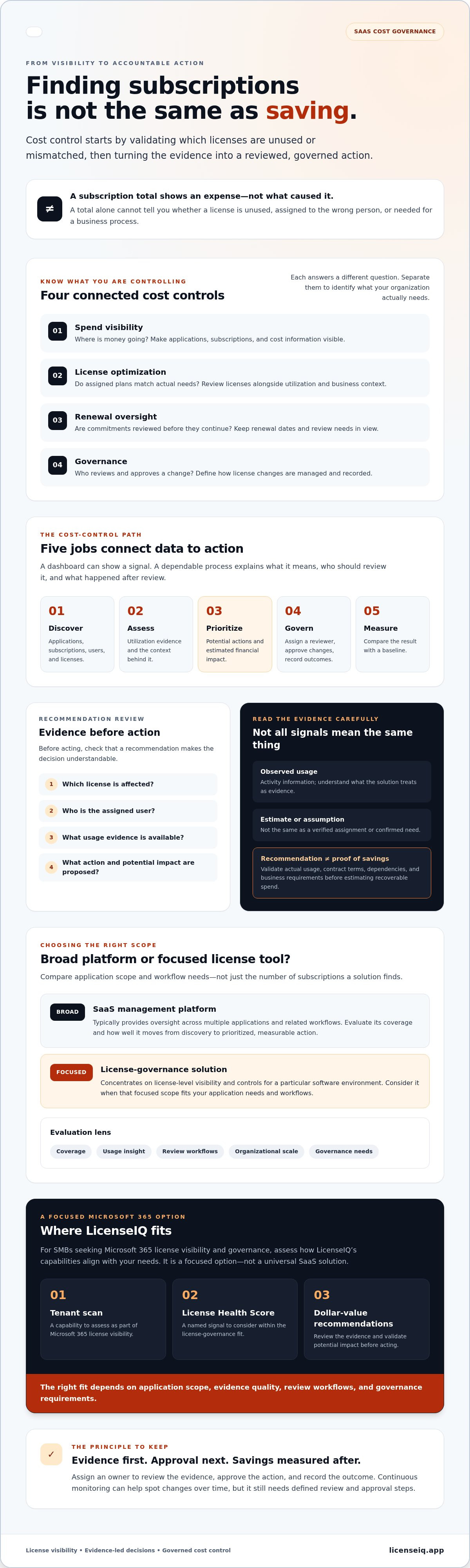
SaaS cost management is the work of finding, validating, and controlling recurring software spend. It starts with identifying the applications and subscriptions the organization pays for, then checking whether access and costs still fit business needs. The category includes several related controls, but each addresses a different question: spend visibility shows where money goes, license optimization checks whether assigned plans match actual needs, renewal oversight helps teams review commitments before they continue, and governance defines how changes are approved and managed.
A subscription total shows an expense, but not what caused it. One invoice may cover multiple teams, users, and license types. Without that detail, a large total won’t tell you whether a license is unused, assigned to the wrong person, or needed for a business process. A SaaS management platform typically provides oversight across multiple applications and related workflows. A focused license-governance solution concentrates on license-level visibility and controls for a particular software environment.
The underlying model matters, too. Software as a Service (SaaS) describes software delivered as a service, commonly through recurring subscriptions. Managing its costs means checking both the subscription and the usage context, not just recording the invoice.
What data should a SaaS cost management solution make visible?
Look for a connected view of applications, subscriptions, users, assigned licenses, and utilization. Check how each data point is labeled: observed usage is different from an estimate, an assumption is different from a verified assignment, and a recommendation is not proof that a change is safe. Those distinctions help reviewers judge the evidence before acting.
Finance may need subscription totals, renewal dates, and cost trends for planning. IT may need user-level assignments, utilization signals, and the operational context behind each license. Both teams need consistent underlying records, even if their dashboards emphasize different decisions. During an evaluation, trace a sample license from its assigned user to the available usage information and the cost attributed to it.
Why visibility alone does not recover software spend
Finding a potentially unused license is a starting point, not authorization to remove it. Confirm the user’s role, business need, contract terms, and any dependencies first. Assign an owner to review the evidence, approve the action, and record the outcome. This turns a finding into an accountable cost-control step without treating a recommendation as guaranteed savings.
A one-time audit is a snapshot. Continuous monitoring can help teams spot changes in assignments or utilization over time, but it still needs defined review and approval steps. Validate usage and contract conditions before estimating recoverable spend. Then compare the result with a baseline to assess whether the action actually reduced costs.
Which SaaS Cost Management Capabilities Turn Data into Action?
Useful SaaS cost management solutions connect five buyer jobs: discover applications and licenses, assess utilization, prioritize potential actions, govern changes, and measure outcomes. A dashboard can show a signal. A dependable cost-control process also explains what the signal means, who should review it, and what happened after review.
Start with the evidence behind each recommendation. It should identify the affected license and user, explain the proposed action, and show the potential financial impact while distinguishing an estimate from a verified saving. For Microsoft-specific guidance, see this Microsoft 365 License Optimization guide.
How to assess discovery, utilization, and financial recommendations
Check exactly which applications, users, and license assignments the solution can inspect. Coverage can vary, so confirm whether the data comes from connected systems, imported records, or manual inputs. Ask how the platform defines utilization, which activity it treats as evidence, and whether your team can review that evidence before accepting a recommendation.
Prioritization should help teams focus, not overstate certainty. A useful recommendation connects a specific license and user to a possible action, then explains how its financial impact was estimated. Treat that figure as a prompt for validation, not a guaranteed saving. Contract terms, actual usage, and business requirements can all affect whether a change is appropriate.
How governance workflows make cost controls repeatable
Alerts and dashboards surface issues. Workflows help teams resolve them consistently. Evaluate whether a proposed change can be assigned to an owner, routed for review and approval, and documented with its outcome. The process should make exceptions visible so a license isn’t changed before its business context has been checked.
Ask what happens after the initial review. Ongoing monitoring can flag changed assignments or utilization for another assessment, while clear ownership helps prevent findings from sitting unattended. Confirm which steps the solution automates and which require human review. That distinction matters for accountability and prevents an automated signal from being mistaken for authorization to remove access.
For SMBs focused on Microsoft 365 license visibility, recommendations, and ongoing governance, explore LicenseIQ’s Microsoft 365 license governance as one focused option. The right capabilities are the ones that turn evidence into reviewed action, then let your team measure what changed.
Broad SaaS Management Platform or Focused License Tool?
The right choice depends on where you need visibility and how your team will act on it. Broad SaaS cost management solutions can support oversight across many applications and access processes. A focused license tool can provide more targeted insight into a defined platform. Neither approach is automatically better. Match the scope to your application landscape and the decisions your team needs to make.
| Evaluation area | Broad SaaS management platform | Focused license tool |
|---|---|---|
| Application scope | Designed for oversight across multiple applications | Concentrates on a defined software environment |
| License detail | May vary by application, integration, and configuration | Prioritizes license-level insight in its supported environment |
| Workflow depth | May address varied access and application processes | Centers workflows on the target platform’s license governance |
| Buyer profile | Organizations coordinating oversight across many tools | Teams prioritizing actionable insight in a specific platform |
When a broad SaaS management platform may fit
Consider a broader platform if teams need cross-application discovery, centralized oversight, and workflows that span different tools or access processes. Before choosing, verify which integrations and data sources are supported and whether they expose the detail your teams need. Also separate the platform’s advertised breadth from the capabilities included in the configuration you’re evaluating. A long feature list doesn’t confirm that every function applies to your environment.
When a focused Microsoft 365 license solution may fit
A focused solution may suit an SMB whose immediate priority is understanding Microsoft 365 users, assigned licenses, activity, and recurring spend. It can direct attention to license-level opportunities without trying to cover every application in the company. It won’t replace company-wide SaaS discovery, so pair it with a separate inventory process if broader application oversight is also a requirement. To compare license options, consult this Microsoft 365 license types reference.
Make the decision against a short list of current needs: applications in scope, level of license detail, required workflows, and who will own follow-up. Then test those needs against actual integrations and available configuration. For SMBs seeking Microsoft 365 license visibility and governance, review LicenseIQ’s Microsoft 365 license governance as a focused option, not a substitute for a universal SaaS management platform.
How to Evaluate SaaS Cost Management Solutions Before Choosing
Evaluate SaaS cost management solutions against the work your team needs to complete, not just the feature list. Use a structured process, then ask vendors to demonstrate it with representative data. A live workflow can show whether the platform supports your decisions, governance, and measurement needs.
- Define scope. Specify the applications, subscriptions, users, and teams you need to cover. Clarify whether the priority is company-wide discovery, license-level insight in a defined platform, or both.
- Inspect the data. Ask what sources the solution uses, which records it can access, and how it distinguishes observed information from estimates or assumptions.
- Test recommendations. Request examples that connect a detected signal to a specific license, user context, proposed action, and estimated financial impact. Check whether your team can verify the evidence.
- Validate governance. Confirm how recommendations are assigned, reviewed, approved, and recorded. Ask how exceptions are handled before access or licenses change.
- Measure outcomes. Document a baseline before implementation. Track completed license changes separately from projected or recommended savings, using a consistent measurement period.
For Microsoft 365-specific cost questions, use this M365 subscription cost playbook as a practical reference alongside your evaluation.
What to ask during a platform demonstration
Go beyond a feature tour. Ask what tenant permissions and data access the connection requires, what setup steps are involved, and which data the platform can inspect. Then request a walkthrough from signal to recommendation, decision, and recorded outcome. Have the vendor show how reviewers can inspect supporting evidence and flag exceptions before a change is made.
Use a scenario that reflects your organization’s processes, such as reviewing a license assignment that appears inconsistent with usage. Observe whether the platform makes the next responsible step clear, including who needs to review it. Confirm which actions are automated and which depend on human judgment.
How to measure value without overstating savings
Set a baseline before changes begin. Record the current spend and measurement period, then compare like with like. Keep completed license changes distinct from possible savings shown in recommendations. A projected amount is not a verified reduction; validate any change against billing and contract details.
Include operational effort in the assessment. Consider whether teams use the workflow, how much review it requires, and whether ongoing oversight remains practical. If Microsoft 365 license governance is your priority, explore LicenseIQ’s license governance platform as a focused option for license visibility and recommendations.
Where LicenseIQ Fits: Microsoft 365 Cost Governance for SMBs
LicenseIQ is a focused option for SMBs that need clearer oversight of Microsoft 365 licenses, users, and recurring spend. It connects to a Microsoft 365 tenant to scan license and user information, then surfaces a License Health Score and dollar-value optimization recommendations. This makes it relevant when the priority is actionable license insight within Microsoft 365, rather than discovery across every SaaS application in the organization.
It’s one specialized choice among SaaS cost management solutions, not a universal SaaS management platform. LicenseIQ doesn’t resell Microsoft licenses or optimize Google Workspace. Teams that need organization-wide application discovery should assess that requirement separately.
What LicenseIQ helps an SMB team review
License and user scan results can help teams investigate possible inactive users, redundant assignments, or other license optimization opportunities. Treat these as signals for review, not automatic proof that a license should be removed. A user may have a valid business need that isn’t evident from utilization data alone.
Dollar-value recommendations can help teams prioritize which opportunities to assess first. Before acting, validate the relevant user context, current usage, and contract conditions. The potential financial impact is a basis for investigation, not a guaranteed saving.
The License Health Score offers another view of license health, but buyers should ask how it’s calculated and what inputs affect it. Don’t infer a specific meaning from the score without confirming its methodology. Also clarify which governance steps are automated and which require a person to review and approve a change.
How to decide whether a focused solution is the right next step
Start with the work you need to control. If your immediate challenge is understanding Microsoft 365 assignments, assessing recommendations, and supporting ongoing license governance, a focused platform may fit. If you need a single inventory across many different SaaS applications, confirm how that broader requirement will be covered instead of assuming a Microsoft-specific tool provides it.
Set expectations for human oversight. Establish who reviews a recommendation, how exceptions are handled, and who approves any license or access change. Automated governance workflows can support a repeatable process, but your team should verify how those workflows operate before relying on them.
LicenseIQ states potential subscription savings of up to 35%. Treat that as a company-reported potential, not a promised outcome; savings depend on the organization’s licenses, usage, and actions taken. Confirm the supporting evidence and calculation method before using the figure in a business case. To assess whether its Microsoft 365 focus matches your requirements, explore LicenseIQ’s platform.
Turn SaaS Spend Insight into Governed Action
The strongest SaaS cost management solutions do more than surface subscription totals. Choose based on your application scope, the quality of license-level evidence, and whether teams can review and govern recommended changes. Set a baseline, then measure verified outcomes rather than treating projected savings as results.
For SMBs focused on Microsoft 365, LicenseIQ connects to a tenant to scan license and user information. Its License Health Score and dollar-value recommendations can help identify opportunities for review, while automated governance workflows support ongoing oversight. Recommendations still need to be assessed in context, and the right approach depends on your organization’s requirements.
If Microsoft 365 license visibility and governance are your priority, explore LicenseIQ’s Microsoft 365 license governance platform. Clear evidence and accountable workflows can help your team make more confident cost decisions.
Frequently Asked Questions
What does a SaaS cost management solution do?
A SaaS cost management solution helps an organization find, validate, and control recurring software spend. It can bring subscription and license information into view, highlight potential mismatches between assignments and usage, and support reviews of renewals or proposed changes. The best SaaS cost management solutions also help teams govern actions and measure outcomes. Recommendations are starting points for review, not proof that a license can safely be removed or that savings are guaranteed.
How do SaaS cost management platforms identify unused licenses?
Platforms may compare assigned-license records with available activity or utilization signals from connected data sources. Exact coverage and indicators vary by tool, so ask what it can inspect and how it defines inactivity. Then validate a flagged assignment with the user’s manager or license owner. A quiet account may still support a business need, and an alert alone shouldn’t trigger license removal.
What is the difference between SaaS management and SaaS cost management?
SaaS management generally covers oversight of applications and related processes, which may include discovery, access, ownership, and governance. SaaS cost management focuses specifically on understanding and controlling recurring software spend, including subscriptions and license utilization. The areas overlap, but their scope differs. A broad platform may support organization-wide application oversight, while a focused cost tool may provide deeper insight into spending for a defined software environment.
Can a SaaS cost management solution reduce Microsoft 365 license spend?
It can help identify Microsoft 365 license optimization opportunities, but actual spend reduction depends on evidence, contract terms, and approved actions. LicenseIQ connects to a Microsoft 365 tenant to scan users and licenses, then surfaces a License Health Score and dollar-value recommendations. Teams should verify the score’s methodology, review each recommendation in context, and confirm any change in billing. LicenseIQ doesn’t resell Microsoft licenses.
How do I measure the ROI of a SaaS cost management solution?
Set a documented baseline before making changes, then compare verified spend reductions over a consistent period. Separate completed license changes from projected savings in recommendations. For a fuller ROI view, account for the solution’s cost and the internal effort required to review, approve, and maintain governance actions. Confirm savings against billing and contract details, and avoid attributing unrelated spend changes to the platform.
Do small businesses need a SaaS management platform?
Not every small business needs a broad platform. The right choice depends on the number of applications in scope, how difficult it is to track subscriptions and owners, and the governance work the team needs to manage. A smaller organization focused on Microsoft 365 license oversight may prefer a focused tool. If application discovery across the wider business is the priority, assess broader coverage and supported integrations.
Does LicenseIQ manage software beyond Microsoft 365?
No. LicenseIQ focuses on Microsoft 365 license visibility, optimization recommendations, and governance for SMBs. It doesn’t provide Google Workspace optimization or serve as a universal SaaS management platform. If your requirements include discovering and controlling subscriptions across other applications, evaluate a separate solution or process for that coverage. Confirm each tool’s supported data sources and workflows before deciding how to manage your full software environment.


