

On July 1, 2026, the monthly cost for Microsoft 365 E5 climbs to $60 per user, but the real financial drain isn't the sticker price. Most organizations lose up to 35% of their licensing budget to feature rot and the hidden administrative overhead required to manage complex security SKUs. You likely recognize that E5 offers unparalleled protection, yet quantifying its actual ROI remains a persistent challenge for financial leadership. It's difficult to justify a premium spend when critical tools like Defender for Identity or Advanced eDiscovery remain underutilized or entirely untouched by your workforce.
This article delivers a precise strategy for microsoft 365 e5 cost reduction by revealing the true operational cost of your environment. You'll learn how to implement a rigorous TCO framework that accounts for the removal of Enterprise Agreement volume discounts and the recent 5% price hike. We'll preview how automated governance can instantly reclaim inactive licenses and provide the data-driven clarity you need to either justify your current spend or execute a strategic downgrade. It's time to transition from passive payment to active oversight of your digital resources.
Key Takeaways
- Calculate the true Total Cost of Ownership by shifting from per-user pricing to utilization-based metrics that account for administrative labor and integration.
- Identify the precise financial threshold where bundling features into an E5 license becomes more cost-effective than maintaining individual E3 add-ons.
- Execute a data-driven microsoft 365 e5 cost reduction by deploying automated workflows that instantly reclaim licenses from inactive or "zombie" users.
- Quantify the ROI of Microsoft Purview and Defender to justify premium spend through reduced legal risk and consolidated security operations.
- Use a Spend Recovery Dashboard to visualize hidden waste and maintain a high License Health Score through continuous, proactive oversight.
What is the Total Cost of Ownership for Microsoft 365 E5?
Calculating the true cost of Microsoft 365 E5 requires looking far beyond the monthly invoice. Most IT leaders focus on the per-user subscription fee, yet the financial impact includes administrative labor, configuration, and integration. In unmonitored environments, organizations often face a 35% waste factor due to premium features that are paid for but never deployed. Achieving meaningful microsoft 365 e5 cost reduction starts with acknowledging that a license is only valuable when it's actively utilized by your workforce. Passive ownership is a luxury that 2026 budgets simply can't afford.
The Total Cost of Ownership (TCO) serves as the definitive metric for assessing the health of your Microsoft ecosystem. It accounts for every dollar spent from procurement through the entire lifecycle of the service. For 2026, budgets must shift from simple per-user counts to per-utilization metrics. This transition is critical because the base price for E5 rises to $60 per user on July 1, 2026. If you're paying for premium security features while maintaining third-party contracts for the same capabilities, your TCO is unnecessarily inflated. True clarity comes from seeing the obscured details of your operational spend.
Direct vs. Indirect E5 Costs
Direct costs are easy to track; they're the sticker price on your Microsoft agreement. However, indirect costs often eclipse the baseline fee. Administrative overhead is a significant factor. Managing the complexities of Microsoft Purview or the Defender suite requires specialized IT hours. If your team spends 20 hours a week manually adjusting security policies, that labor must be added to the license price. Additionally, training and adoption costs are essential. Employees who don't know how to use Power BI or advanced collaboration tools represent a failed investment in the E5 stack. Without high utilization, the premium price point becomes a liability rather than an asset.
The Cost of Governance Gaps
Financial leakage occurs when licenses remain assigned to departed employees or inactive accounts. This "zombie" spend is a primary target for microsoft 365 e5 cost reduction strategies. Redundancy is another silent drain on corporate resources. Many firms pay for E5's compliance stack while keeping legacy archiving tools active. This overlap creates technical debt and doubles your security spend without doubling your protection. The removal of Enterprise Agreement volume discounts in November 2025 has made these gaps even more expensive for large organizations heading into 2026. Microsoft 365 E5 TCO is a holistic measure of license efficiency that balances direct subscription fees against the operational costs of management and the financial risks of underutilization.
Quantifying the Components of M365 E5 Cost Reduction
To achieve meaningful microsoft 365 e5 cost reduction, you must dissect the license into its functional components. E5 is not merely a productivity suite. It represents a massive consolidation of security, compliance, and analytics tools. Organizations often fail to realize savings because they treat E5 as an upgrade to Office rather than a replacement for their entire security stack. If you maintain third-party contracts for endpoint protection or email filtering while holding E5 entitlements, you are paying twice for the same defense. Consolidation is the only path to a positive ROI.
The financial value of E5 lies in its ability to offset specialized point solutions. Microsoft Defender for Endpoint and Defender for Office 365 Plan 2 provide robust protection that can replace legacy vendors. Similarly, Microsoft Purview reduces legal spend by automating complex eDiscovery and data loss prevention tasks. When these features are fully deployed, the $60 per user price point becomes a cost-saving measure. When they remain unconfigured, that same price point represents significant budget leakage. Monitoring these metrics manually is inefficient. A Spend Recovery Dashboard provides the visibility needed to stop these leaks immediately.
The Security and Compliance Premium
Security is the primary driver of E5 adoption. It is often a security purchase disguised as a productivity one. However, the labor cost of managing advanced eDiscovery and Purview policies is high. If your IT team lacks the bandwidth to configure these tools, you are paying for "shelfware." This unconfigured software provides zero protection and zero financial return. You must evaluate the following risks:
- Redundant Tooling: Maintaining active subscriptions for external security vendors alongside E5.
- Configuration Gaps: Paying for premium Defender features that your team hasn't yet deployed.
- Administrative Bloat: The hidden hours spent on manual compliance reporting that Purview could automate.
Productivity and Analytics Overhead
Power BI Pro is a core component of the E5 bundle, yet it frequently sits idle. Tracking active versus assigned users is vital for financial health. If an employee never views or builds a report, the analytical portion of their E5 license is wasted. Teams Phone offers another opportunity for savings. By replacing legacy PBX systems with Teams Phone, you eliminate separate carrier contracts and hardware maintenance fees. You must compare these implementation costs against your legacy subscription savings to find the true break-even point. Effective microsoft 365 e5 cost reduction requires a relentless focus on these obscured details to ensure every feature drives measurable business value.
Microsoft 365 E3 vs. E5: A TCO Comparison Framework
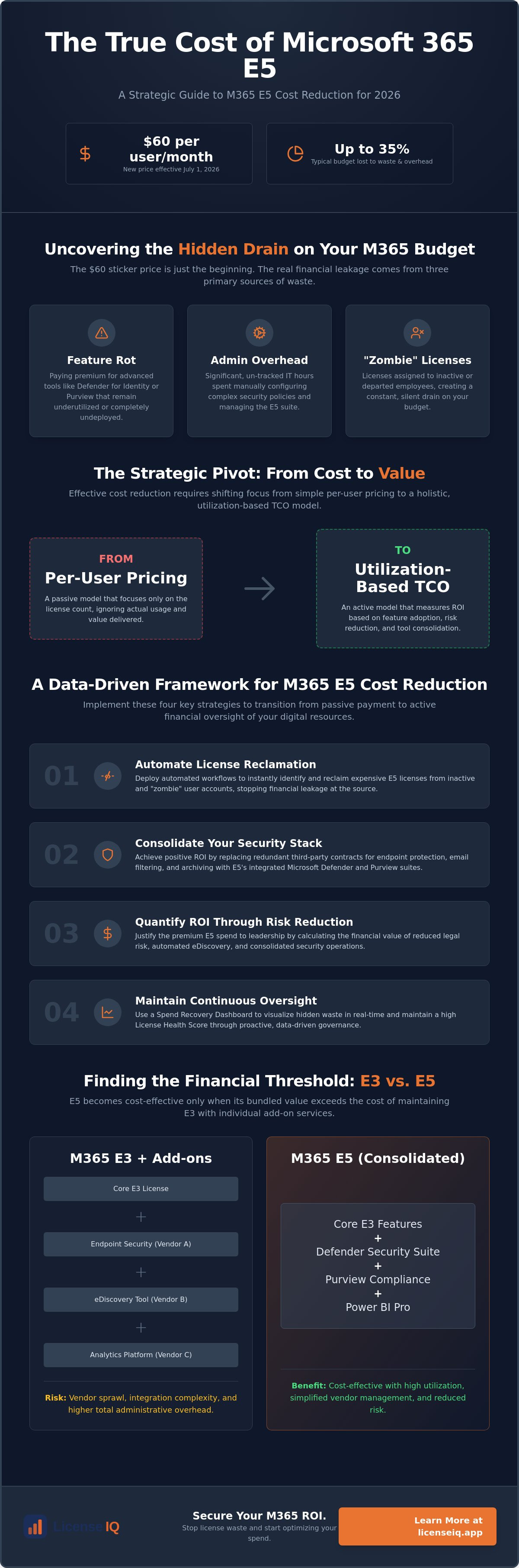
Choosing between E3 and E5 is a financial calculation, not a feature preference. With E3 pricing rising to $39 and E5 reaching $60 in July 2026, the $21 gap is your primary decision point. If your organization requires both the E5 Security and E5 Compliance add-ons, the combined cost of E3 plus these extensions typically exceeds the unified E5 sticker price. This is the "Step-Up" math that drives microsoft 365 e5 cost reduction. You must also account for the operational complexity of E3. Managing disparate security tools manually increases labor costs; E5’s automated protection suite reduces them by consolidating oversight into a single pane of glass.
Before committing to a global upgrade, analyze the License Health Score of your current environment. It’s often more efficient to maintain a mixed-tenant strategy than to move every user to the highest tier. For a deeper dive into whether the additional features justify the price hike, see our guide on Microsoft 365 E3 vs. E5: Is the Upgrade Worth It? to compare specific entitlements against your operational needs.
The Break-Even Point for E5 Upgrades
The primary financial justification for E5 is vendor consolidation. By folding standalone endpoint protection, identity management, and cloud access security brokers (CASB) into a single SKU, you eliminate overlapping invoices from third-party vendors. However, many organizations overpay by assigning E5 to 100% of their staff. If half your workforce only uses basic productivity apps, you are subsidizing features that will never be activated. The real savings come from identifying exactly where the $21 premium generates a return through reduced third-party software spend and lower manual governance requirements.
Mixed-Tenant Strategies
A precise financial strategy for 2026 involves right-sizing licenses to job functions. High-risk roles and executives may require the full E5 security stack, but frontline workers often thrive on F-series licenses. These frontline plans avoid the premium costs of enterprise tiers while maintaining essential connectivity. By mixing E3, E5, and F-series licenses, you eliminate the waste associated with "one-size-fits-all" procurement. This approach ensures your resources are monitored and assigned with surgical precision, protecting your corporate resources from unnecessary budget depletion. Achieving microsoft 365 e5 cost reduction requires this level of granular transparency to ensure you aren't paying for "zombie" entitlements that serve no functional purpose.
Controlling E5 Spend: A 2026 Governance Framework
Passive management is the primary enemy of fiscal health in the Microsoft ecosystem. While previous sections detailed the components of TCO, achieving microsoft 365 e5 cost reduction requires an active governance framework that operates in real time. The era of the "set and forget" license is over. With the July 2026 price increases, every unassigned or underutilized E5 seat represents a direct hit to your bottom line. You must transition from periodic reviews to continuous, automated oversight to protect your corporate resources.
The Inactive User Problem
Inactive users are the most significant driver of budget waste. In a dynamic enterprise environment, employees transition, depart, or change roles frequently. If a user hasn't accessed E5-specific features like Power BI or Defender for 30 days, that license should be flagged for immediate reclamation. This prevents the accumulation of "zombie" licenses that drain $60 per month without providing value. Shadow IT also complicates this landscape; when employees bypass E5 features for third-party alternatives, your organization pays for redundancy. Automated workflows reduce TCO by 15-20%. To optimize these transitions, follow a structured Office 365 Offboarding Checklist 2026 to ensure no spend is left behind.
Continuous Monitoring vs. Annual Audits
The annual audit is an obsolete relic of on-premises software management. In the era of dynamic SaaS subscriptions, a yearly check-in only reveals waste after it has already cost you thousands. You need immediate visibility to make data-driven decisions. Implementing a real-time Spend Recovery Dashboard allows you to see the exact dollar value of your optimization efforts at any moment. This level of transparency transforms IT from a cost center into a strategic partner. Establishing a License Health Score as a primary KPI for your leadership team ensures that efficiency remains a priority throughout the fiscal year. Stop guessing about your license efficiency and start monitoring it with precision by deploying Automated Governance Workflows today.
AI-native software intelligence is now a requirement for modern financial management. These systems scan your tenant for obscured details that manual audits miss, such as partially used feature sets or overlapping entitlements. By automating the identification and reclamation process, you ensure that your microsoft 365 e5 cost reduction strategy is proactive rather than reactive. This meticulous approach builds trust with stakeholders and guarantees that your technical operations remain lean and focused on growth.
Just as AI is used to optimize internal software spend, it is also being deployed to maximize external brand reach, where an AI SEO agency Singapore can help organizations maintain a competitive edge in search visibility.
Secure Your M365 ROI with LicenseIQ
LicenseIQ connects to your Microsoft 365 tenant in minutes. It immediately begins scanning for E5 waste with surgical precision. For SMBs, the complexity of managing premium security and analytics features is an operational burden that often leads to financial leakage. LicenseIQ removes this weight by providing the clarity needed to execute a microsoft 365 e5 cost reduction strategy that actually sticks. You gain total oversight of your corporate resources through a single, vigilant platform that never stops monitoring your spend.
The platform doesn't just identify problems; it provides the infrastructure for permanent resolution. By using the Spend Recovery Dashboard, you can visualize the exact dollar value of every optimization in real time. This level of transparency is essential for justifying your technical budget to stakeholders. It transforms your IT department from a cost center into a lean, data-driven participant in the company's growth. With the 2026 price increases looming, having a precise system in place is the only way to protect your bottom line from unnecessary depletion.
Immediate Insights with the License Health Score
Establishing a baseline of your efficiency is critical before your next renewal cycle. The License Health Score identifies redundant security and analytics spend automatically. It uncovers obscured details that manual audits miss, such as partially used feature sets or overlapping entitlements. You move from guessing about your utilization to governing it with AI-native software intelligence. This proactive oversight ensures your resources are always optimized. It protects your budget from the July 2026 price hikes by revealing exactly where your money goes. A high Health Score is your primary KPI for demonstrating operational excellence.
Automated Spend Recovery in Action
Manual spreadsheets are a liability in a dynamic technical environment. They're slow, prone to error, and outdated the moment they're saved. Automated Governance Workflows reclaim licenses from inactive users without manual IT intervention. This process stops "zombie" spend instantly, ensuring that you only pay for what your team actually uses. This results-first approach allows organizations to recover up to 35% of their total subscription spend. It's time to secure your ROI and maintain a lean, efficient operation. Discover your M365 Health Score today at LicenseIQ.app and take total control of your financial health. By automating the identification and reclamation process, you ensure that your microsoft 365 e5 cost reduction efforts are proactive, meticulous, and permanent.
Master Your 2026 Microsoft 365 Budget Strategy
Managing Microsoft 365 E5 requires shifting from passive procurement to active, data-driven governance. The true Total Cost of Ownership extends far beyond the $60 sticker price. It includes administrative complexity and feature underutilization. By quantifying the value of your security stack and implementing a mixed-tenant framework, you transform technical debt into operational efficiency. Realizing a permanent microsoft 365 e5 cost reduction is no longer a manual task for IT. It's a strategic mandate for financial leadership.
LicenseIQ provides the precision needed to secure your ROI. The platform connects to your tenant in minutes to uncover obscured details. You can discover up to 35% wasted spend and deploy AI-native governance workflows to keep your TCO low permanently. Stop guessing about your license health. Start governing with total clarity by using a system designed for meticulous digital auditing.
Start your 5-minute M365 audit with LicenseIQ and ensure your corporate resources are working as hard as your team. Your path to total operational transparency starts now.
Frequently Asked Questions
What is the primary difference between M365 E5 price and TCO?
The primary difference lies in visibility. While the sticker price is a fixed monthly fee, the Total Cost of Ownership (TCO) accounts for the administrative labor required to manage security policies and the financial impact of feature underutilization. If your IT team spends hours on manual configuration, those labor costs must be added to your baseline. TCO provides a complete view of your investment's efficiency rather than just the procurement cost.
How much can a company save by optimizing M365 E5 licenses?
Organizations frequently recover up to 35% of their licensing budget through precise optimization. These savings come from identifying "zombie" accounts and eliminating third-party security tools that overlap with E5 entitlements. By focusing on microsoft 365 e5 cost reduction, you ensure that your spend aligns with actual employee activity. This proactive approach prevents budget depletion from features that remain unconfigured or unused by your workforce.
Does the M365 E5 TCO include the cost of Microsoft Sentinel?
Microsoft 365 E5 doesn't include the full cost of Microsoft Sentinel, as Sentinel is a consumption-based service. However, E5 licenses provide specific data ingestion grants for certain log types, which significantly reduces the overall Sentinel bill. You must factor these offsets into your TCO calculations to understand the total financial impact of your security operations center. Sentinel costs remain dynamic based on your organization's data volume.
What are the hidden costs of upgrading from E3 to E5?
Upgrading involves more than a simple SKU swap. Hidden costs include the specialized IT labor needed to deploy Advanced eDiscovery and Purview data loss prevention policies. You also face the financial burden of overlapping contracts if you don't immediately sunset legacy third-party security vendors. Training your staff to utilize new analytics and collaboration tools is another indirect expense that impacts your initial return on investment.
How often should I conduct a Microsoft 365 license audit for TCO purposes?
Annual audits are insufficient for modern SaaS environments. You should implement continuous monitoring to capture savings from employee turnover and role changes as they happen. Waiting for a yearly review allows months of "zombie" license spend to accumulate. Real-time oversight ensures your License Health Score remains high and your budget stays protected from the financial friction of manual, periodic checks.
Can I reduce my E5 TCO by mixing license types?
Mixing license types is a highly effective strategy for microsoft 365 e5 cost reduction. You don't need to assign the premium E5 tier to your entire workforce. By reserving E5 for high-risk roles and using E3 or F-series licenses for frontline workers, you right-size your spend to actual job requirements. This surgical approach eliminates the waste associated with broad, one-size-fits-all licensing agreements.
What is a good License Health Score for a mid-market company?
A License Health Score above 90% indicates a highly optimized environment with minimal waste. For most mid-market companies, a score below 75% reveals significant financial leakage from inactive accounts or redundant tools. Maintaining a high score requires constant vigilance and the use of automated governance. It serves as a vital KPI for IT leadership to demonstrate fiscal responsibility and operational transparency to stakeholders.
How does automated offboarding impact the total cost of ownership?
Automated offboarding eliminates the "zombie" license spend that occurs during manual transition periods. When a staff member departs, automated workflows reclaim the license immediately rather than waiting for a ticket to be processed. This precision reduces TCO by ensuring you never pay for a seat that isn't tied to an active contributor. It removes human error and provides immediate financial clarity for your technical operations.


