

56% of enterprise Microsoft 365 licenses are currently inactive, underutilized, or unassigned. Organizations lose an average of $7.4 million annually to these invisible leaks. You likely struggle with opaque invoices that defy manual auditing. It's a common pain to pay for premium E5 features that employees never actually touch. Understanding microsoft 365 license optimization vs cost management is no longer a semantic choice; it's a critical financial strategy in 2026. With E3 prices rising to $39 and E5 reaching $60 per user, passive oversight has become a liability.
We agree that your IT budget should drive growth, not subsidize waste. This guide distinguishes between basic reporting and active spend recovery to help you reclaim up to 35% of your tenant budget. You'll learn to identify redundant licenses through a quantifiable Health Score. We also preview automated workflows that prevent license sprawl from returning to your environment. By the end, you'll have a precise framework to convert obscured data into immediate operational clarity and financial security.
Key Takeaways
- Distinguish between microsoft 365 license optimization vs cost management to transform your role from a passive reporter to an active spend recovery expert.
- Identify why standard cost reports fail to catch "Ghost Users" and how disabled accounts continue to drain your IT budget without intervention.
- Utilize a Spend Recovery Dashboard to visualize the specific dollar-value recovery recommendations hidden within your raw usage data.
- Benchmark your tenant efficiency using a License Health Score to provide the CIO and CFO with a quantifiable metric for organizational health.
- Deploy Automated Governance Workflows to eliminate manual auditing and maintain continuous financial hygiene across your M365 environment.
Defining Microsoft 365 Cost Management and License Optimization
The distinction between microsoft 365 license optimization vs cost management is the difference between observing a leak and fixing the pipe. Cost management is a reactive accounting function. It tells you how much Microsoft charged you last month. License optimization is a proactive operational discipline. It ensures you only pay for what your employees actually use. In 2026, mistaking one for the other leads to significant budget drain.
What is M365 Cost Management?
Cost management focuses on the logistics of payment. It involves budgeting, forecasting, and reconciling invoices against your department's ledger. This process provides a "rear-view mirror" perspective. You see the financial impact of decisions made months ago. Most organizations rely on the Microsoft 365 Admin Center or manual spreadsheets for this oversight. While necessary for the CFO, it lacks the depth required to stop waste before it occurs. It documents the spend without questioning the value.
What is M365 License Optimization?
License optimization is the engine of spend recovery. It uses real-time data to align license counts with actual feature engagement. This process identifies specific opportunities to reduce overhead. It uncovers licenses tied to offboarded employees and flags E5 users who ignore premium features. Optimization transforms raw usage data into a quantifiable License Health Score. It moves beyond visibility to provide a clear roadmap for reclaiming up to 35% of your subscription budget.
In 2026, the stakes for your IT budget have never been higher. Microsoft 365 E3 prices increased to $39 per month in July. E5 plans now cost $60. With 56% of enterprise licenses currently underutilized or unassigned, passive management is a liability. Modern FinOps requires a shift from tracking spend to recovering it. You need a system that identifies redundant tiers and "Ghost Users" automatically. Visibility shows you the problem. Optimization provides the solution.
Success requires moving away from opaque invoices that are difficult to audit manually. A proactive approach uses a Spend Recovery Dashboard to bridge the gap between technical usage and financial health. By focusing on right-sizing, you ensure that every dollar spent on the LicenseIQ Platform or your broader tenant directly supports employee productivity. This clarity is the cornerstone of a secure and efficient digital environment.
The Limitations of Traditional Cost Management
Traditional cost management is a diagnostic tool with no treatment plan. It identifies the total spend but obscures the granular waste. You see the invoice total, yet you cannot see the specific users driving it. This is the primary friction point in the microsoft 365 license optimization vs cost management debate. Reporting confirms the expense; optimization recovers the capital. Relying solely on reporting leaves your organization vulnerable to invisible budget leaks.
The Reporting Gap in Standard Admin Portals
Most IT leaders rely on the Microsoft 365 Admin Center for oversight. These reports provide high-level usage data but fail to cross-reference activity with SKU costs. You might see that a user is active, but you won't see that they are using only 5% of their E5 features. This lack of insight prevents immediate spend recovery. To build a more resilient financial strategy, you must look beyond basic totals and embrace Microsoft 365 cost optimization techniques that target specific inefficiencies.
One of the most persistent drains is the "Ghost User." When an employee leaves, their account is often disabled in Entra ID, but the license remains assigned. Microsoft continues to bill for these inactive seats every month. Manual auditing rarely catches these at scale. Without automated oversight, these dormant licenses account for a significant portion of the $7.4 million that organizations lose annually to underutilized subscriptions. Knowing you are overspending is only half the battle; remediation is what secures your budget.
SaaS Sprawl and the Velocity of Waste
Organizational changes happen faster than manual spreadsheets can track. During rapid hiring or restructuring, unassigned licenses accumulate quickly. Premium add-ons like Copilot, which costs $30 per user per month for enterprise plans, often go unmonitored after the initial project ends. Manual management cannot keep pace with the velocity of automated subscription renewals. This creates a state of organizational disorder where waste is accepted as a cost of doing business.
Manual audits are not just slow; they are expensive. When a senior IT admin spends ten hours cross-referencing CSV files, the labor cost often offsets the savings. This inefficiency is a silent killer of IT productivity. A dedicated Spend Recovery Dashboard provides the necessary transparency to stop this sprawl in its tracks. It replaces guesswork with data-driven decision-making, ensuring that your resources remain under the watch of a vigilant and precise system.
Why License Optimization is the Engine of Spend Recovery
Optimization converts dormant data into recovered capital. While management tracks the bill, optimization interrogates the value of every individual seat. This is the functional core of microsoft 365 license optimization vs cost management. You stop paying for the potential of access and start paying for the reality of usage. This shift identifies specific dollar-value recovery recommendations that standard reporting tools consistently overlook. It transforms your IT department from a cost center into a source of operational efficiency.
Identifying Inactive and Redundant Users
Waste often hides in plain sight within your tenant. Automated scanning identifies users who have not logged into the environment for 30, 60, or 90 days. These accounts represent immediate savings. Redundancy is another silent drain, where a single user carries multiple overlapping plans across different departments. This often happens during mergers or rapid scaling phases. To secure your perimeter while reclaiming this spend, follow our Office 365 offboarding checklist. It ensures that every departure becomes an opportunity for financial hygiene and data security.
Right-Sizing Tiers Based on Feature Adoption
Many organizations default to E5 licenses for their perceived security benefits. However, 38% of enterprise E5 licenses are oversized based on actual usage patterns. Optimization analyzes behavioral data to see if users engage with advanced analytics or premium security features. If they don't, moving them to E3 or F-series plans reduces costs without impacting productivity. License right-sizing is the alignment of cost to actual employee needs. This precision eliminates the "security tax" paid on underutilized premium tiers, especially as E5 prices rise to $60 per user.
A critical component of this strategy is the License Health Score. This metric provides a standardized benchmark for tenant efficiency, allowing you to track improvement over time. It moves the conversation from vague "cost-cutting" to quantifiable "spend recovery." By using the LicenseIQ Platform, you gain a vigilant auditor that monitors these patterns continuously. You no longer guess where the waste is. You see it, you quantify it, and you remove it. This proactive approach ensures your 2026 budget remains focused on growth rather than maintenance, providing total clarity in a complex operational environment.
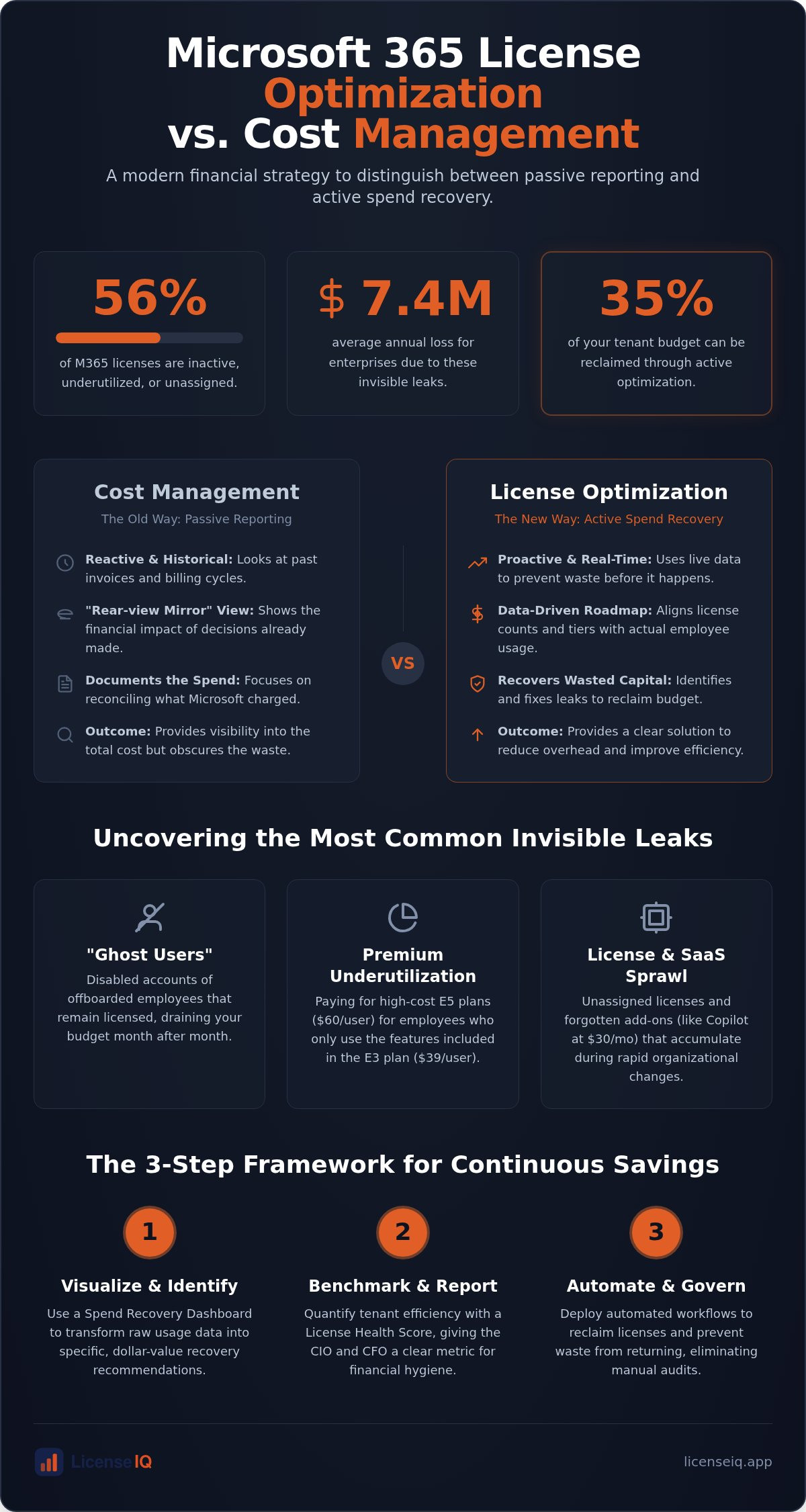
Side-by-Side Comparison: Optimization vs. Management
Clarity in technical operations requires a clear distinction between these two disciplines. Cost management satisfies the CFO's need for fiscal predictability. License optimization satisfies the CIO's need for operational agility. While they share a financial ecosystem, their functional outputs differ significantly. Understanding microsoft 365 license optimization vs cost management is the first step toward reclaiming wasted resources. One provides a record of your spend; the other provides a mechanism for its recovery.
Functional Comparison Table
The following table outlines the operational differences between passive oversight and active intervention. Effective IT leadership requires mastering the Microsoft 365 license management lifecycle by integrating both approaches into a unified strategy.
| Feature | Cost Management | License Optimization |
|---|---|---|
| Primary Goal | Budget Reconciliation | Spend Recovery |
| Action Level | Informational (Reporting) | Transactional (Right-sizing) |
| Frequency | Monthly or Quarterly | Continuous and Real-time |
| Typical Savings | Administrative only | Up to 35% of budget |
| Core Output | Historical Invoices | Actionable Recommendations |
The Synergy of Both Approaches
The ROI difference is stark. Passive tracking creates a meticulous record of your waste. Active optimization identifies "downgrade" opportunities and unassigned seats to stop the bleeding immediately. In a mature FinOps environment, you use management to set the boundaries and optimization to maximize the value within them. This dual approach ensures your organization remains lean, secure, and financially healthy. To start reclaiming your budget today, analyze your tenant efficiency with the LicenseIQ Platform and convert obscured data into immediate savings.
Implementing Automated Governance for Continuous Savings
One-time audits are historical snapshots that age instantly. To maintain a lean environment, you must move from periodic checks to a state of continuous financial hygiene. This is where the functional gap in microsoft 365 license optimization vs cost management becomes most apparent. Management tracks the baseline, but automated governance enforces the standard. Relying on manual intervention ensures that waste will return as soon as your attention shifts elsewhere. Modern IT leadership requires a system that remains vigilant even when you aren't watching.
The Benefits of Automated Workflows
Manual oversight cannot scale with the speed of a growing organization. While some suggest using complex PowerShell scripts for automation, these require constant maintenance and high-level technical expertise. Automated Governance Workflows provide a more resilient solution. They eliminate the need for manual IT intervention by executing repetitive tasks with precision. This proactive approach ensures your resources are always aligned with actual usage patterns.
- Instant Offboarding: Automatically unassign licenses from users the moment they leave the organization, preventing "Ghost User" spend.
- Billing Triggers: Set automated alerts to flag new unassigned licenses before the next subscription renewal cycle.
Getting Started with LicenseIQ
Transitioning to an AI-native platform provides immediate clarity in complex operational environments. The LicenseIQ Platform connects to your tenant in minutes for an instant scan of your entire M365 ecosystem. This process generates a quantifiable License Health Score without requiring complex configuration or specialized scripts. It provides the total transparency needed to distinguish your organization as a disciplined guardian of corporate resources.
Use the Spend Recovery Dashboard to present these findings to executive leadership. It converts technical usage data into a clear financial narrative, making your savings goals achievable and visible. You no longer need to guess which tiers are oversized or which users are redundant. The system identifies the waste, and the workflows remove it. This level of operational transparency is the cornerstone of effective digital auditing in 2026. Start your 5-minute M365 audit with LicenseIQ today to reclaim your budget and secure your digital environment.
Secure Your Budget with Active Spend Recovery
Managing a Microsoft 365 environment in 2026 requires more than just tracking monthly invoices. You've seen how the distinction between microsoft 365 license optimization vs cost management defines the difference between passive reporting and active spend recovery. Cost management provides the visibility your finance team needs. License optimization provides the precision your IT department requires to eliminate redundant tiers and "Ghost Users" forever. This strategic shift ensures that every dollar spent aligns directly with actual employee engagement levels.
Transitioning to a proactive strategy secures your resources against rising subscription costs. By implementing AI-native Automated Governance Workflows, you ensure that waste never accumulates in your tenant again. You can connect to your system in minutes to gain instant insights and reclaim up to 35% of your M365 subscription spend. It's time to move beyond manual audits and embrace total operational clarity. Discover your M365 Health Score and start recovering spend with LicenseIQ today. Your organization’s financial health deserves a vigilant and precise system that stays one step ahead of license sprawl.
Frequently Asked Questions
Is Microsoft 365 cost management included in the standard admin portal?
Yes, basic cost management features are available in the Microsoft 365 Admin Center. These tools provide historical billing data and subscription totals for reconciliation. However, they lack the granular usage insights required for deep spend recovery. You see the total spend but not the specific waste driving it. This reporting provides a rear-view mirror perspective rather than a proactive solution for eliminating unassigned seats.
Can I automate M365 license optimization without using PowerShell?
You can automate this process using the LicenseIQ Platform. While PowerShell scripts are a common manual alternative, they require constant maintenance and deep technical expertise. AI-native Automated Governance Workflows handle these tasks without custom code. This eliminates the risk of script errors while maintaining continuous financial hygiene. You gain the benefits of automation without the administrative burden of managing complex scripts or manual CSV exports.
How much can a typical SMB save through license optimization?
SMBs typically recover up to 35% of their total subscription spend. This is achieved by identifying inactive accounts and right-sizing oversized E5 licenses that employees don't use. Given that 56% of enterprise licenses are often underutilized, the potential for spend recovery is substantial. These savings provide immediate capital for other strategic IT initiatives. It transforms your IT budget from a drain into a source of growth capital.
What happens to user data when I unassign or downgrade a license?
Data retention depends on the specific action taken. Microsoft typically retains unassigned user data for 30 days before permanent deletion occurs. Downgrading a license may result in the loss of access to specific premium features, such as advanced security or analytics. You must ensure data is backed up or archived before removing a license to maintain compliance. Always verify your specific retention policies before executing transactional changes in your tenant.
How often should I perform a Microsoft 365 license audit?
Manual audits should occur monthly, but automated scanning provides superior results. Continuous monitoring is necessary to keep pace with rapid hiring and offboarding cycles. Real-time oversight prevents unassigned licenses from accumulating between billing cycles. This persistent vigilance is a core pillar of microsoft 365 license optimization vs cost management. Automated systems ensure you never pay for a seat that has already been vacated by a former employee.
Is there a difference between license right-sizing and license optimization?
Right-sizing is a specific tactic within the broader discipline of license optimization. Right-sizing focuses on matching a user’s license tier to their actual feature engagement levels. Optimization includes right-sizing but also identifies inactive users, removes redundant licenses, and enforces automated governance. It is a comprehensive strategy for total tenant efficiency. While right-sizing cuts the cost of a single seat, optimization secures the entire environment against waste.
What is a good License Health Score for a healthy M365 tenant?
A score above 90 indicates a highly efficient tenant with minimal waste. Scores below 70 suggest significant opportunities for immediate spend recovery. This metric provides a quantifiable benchmark for your optimization efforts. It allows you to track progress and demonstrate financial stewardship to executive leadership through the Spend Recovery Dashboard. A high score confirms that your resources are being monitored by a vigilant and precise system.


