

22% of your Microsoft 365 budget is likely being funneled into dormant licenses and unassigned "shelfware" that provides zero operational value. It's a staggering figure that highlights a critical lack of oversight in most enterprise environments. You've likely spent days buried in manual spreadsheets, attempting to reconcile opaque billing statements while suspecting that many users don't need the premium E5 features you're funding. Effective microsoft 365 spend management isn't just about cutting costs; it's about reclaiming control over your technical operations.
We understand that manual license audits are a drain on leadership resources and often lead to outdated data. This guide shows you how to automate your license lifecycle to recover up to 35% of your annual spend. You'll learn how to implement automated governance workflows that identify inactive users and redundant add-ons in real-time. We'll preview how a License Health Score provides immediate clarity on your SaaS ROI, transforming your billing from a source of confusion into a precise, monitored asset.
Key Takeaways
- Identify the primary drivers of financial waste, focusing on inactive user accounts and redundant licensing tiers that inflate your overhead.
- Execute a 5-step strategy for microsoft 365 spend management that replaces manual spreadsheet audits with precise, automated governance.
- Utilize the License Health Score as a primary KPI to monitor the financial health of your technical operations and ensure maximum SaaS ROI.
- Deploy automated workflows to immediately reclaim licenses from disabled users and eliminate "shelfware" before your next billing cycle.
- Connect the LicenseIQ Platform in minutes to uncover obscured details and generate actionable dollar-value recommendations for optimization.
What is Microsoft 365 Spend Management in 2026?
Effective microsoft 365 spend management is the proactive oversight of SaaS subscription costs to ensure every dollar spent correlates to active user value. It moves beyond simply paying an invoice. In 2026, it represents a shift from passive observation to meticulous, real-time auditing of your digital environment. A "set it and forget it" approach currently leads to roughly 35% waste in SMB budgets, primarily through unassigned licenses and redundant features. This financial leak is often invisible to leadership until a specialized audit is performed.
Modern management requires AI-native software intelligence rather than manual tracking. You need a vigilant system that monitors utilization rates and identifies redundant seat counts before they impact your bottom line. We use the License Health Score as a primary KPI to measure the financial health of your technical operations. This metric provides immediate clarity on whether your resources are optimized or leaking capital. By tracking these metrics, organizations can transition from reactive troubleshooting to a proactive, data-driven strategy that prioritizes operational transparency.
The Difference Between Expense Management and License Optimization
The High Cost of Inaction: Why 2026 Demands Efficiency
The financial landscape has shifted rapidly. Enterprise Microsoft 365 E3 and E5 license costs have risen by as much as 20-30% due to reduced volume discounts and bundled plans. Ignoring these costs isn't just a budget oversight; it's a security risk. Inactive licenses often represent unmanaged accounts that increase your attack surface. microsoft 365 spend management provides CFO-level transparency by uncovering these obscured details. Automated visibility ensures your organization remains lean, secure, and financially disciplined. It allows leadership to make confident decisions based on real-time data rather than months-old spreadsheets.
Identifying the 3 Main Sources of M365 Waste
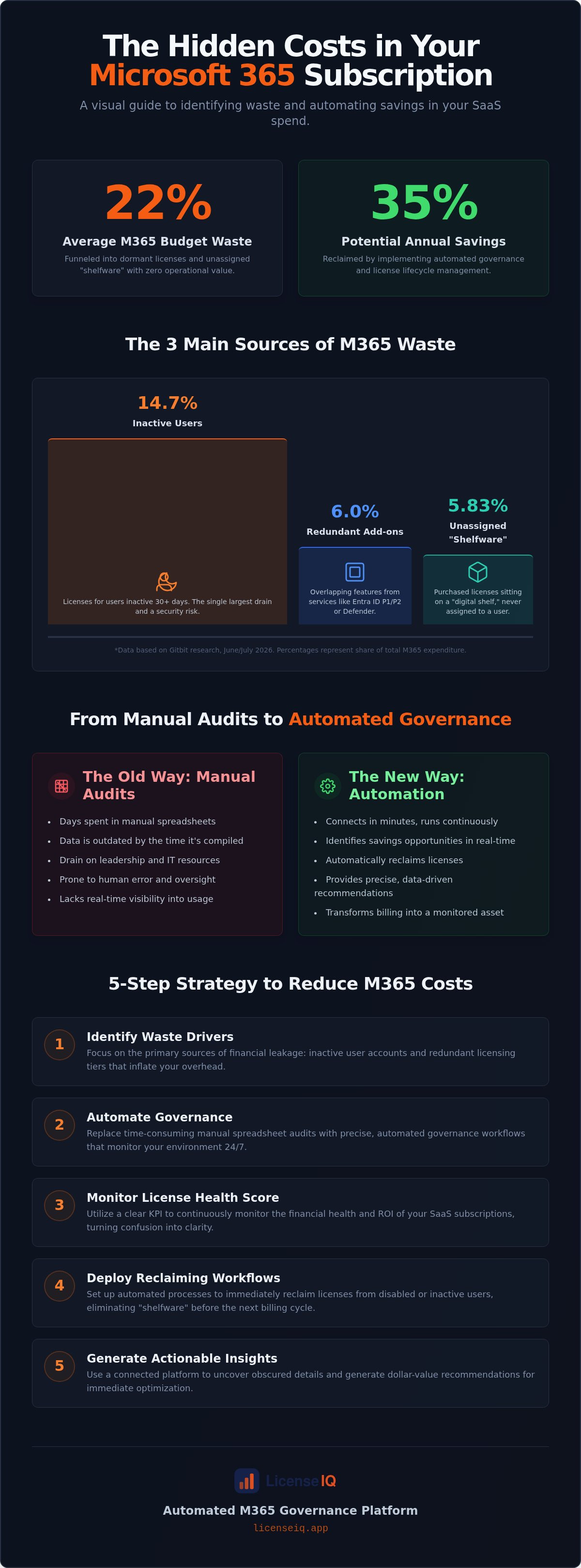
Effective microsoft 365 spend management requires pinpointing exactly where capital leaks occur. Research from June 2026 by Gitbit indicates that organizations waste approximately 22% of their total M365 spend on unused licenses. This waste isn't accidental; it's a byproduct of rapid scaling and poor offboarding processes. You're likely paying for "ghost licenses" left over from old projects or seasonal hiring surges. These unassigned seats, or shelfware, account for 5.83% of total M365 capital waste, sitting dormant while your monthly subscription costs climb.
Beyond unassigned inventory, redundant licensing creates a significant financial drag. This occurs when users have overlapping features across different plan tiers or supplementary add-ons that provide no incremental value. For instance, unassigned volume from services like Microsoft Entra ID P1/P2 or Microsoft Defender for Endpoint accounts for another 6.0% of waste. You can gain immediate clarity on these obscured details by using a Spend Recovery Dashboard to visualize exactly where your budget is being underutilized.
The Inactive User Problem
Dormant license assignments represent the largest single drain on your technical budget. These are active licenses assigned to users who haven't accessed Outlook, Teams, or OneDrive in 30 days or more. According to Gitbit data from July 2026, these "zombie accounts" account for 14.7% of total M365 expenditure. Reclaiming spend from departed employees and contractors is a manual nightmare that often gets overlooked. It's not just a financial issue. These unmanaged accounts increase your security risk by maintaining active entry points that no one is monitoring. Automation ensures these licenses are recovered the moment inactivity thresholds are met.
License Right-Sizing: E5 vs. E3 vs. Business Premium
Over-licensing is the most subtle form of waste in modern operations. Many organizations default to E5 plans for all employees, yet they pay for advanced security and analytical features that most staff never touch. You must match license capabilities to actual employee job functions. For instance, frontline workers often only require F-series licenses, which are significantly more cost-effective than Enterprise tiers. Identifying users who only need "Frontline" access can save thousands monthly. For a detailed breakdown of these tiers, consult our Microsoft 365 License Types Guide. Right-sizing ensures your microsoft 365 spend management strategy is built on precision rather than convenience.
Manual Audits vs. Automated Governance Workflows
Manual license audits represent a significant operational bottleneck. Relying on Excel spreadsheets for microsoft 365 spend management is a reactive strategy that fails to keep pace with modern technical environments. By the time a manual audit is completed, the data is already obsolete; new users have joined, others have left, and license assignments have shifted. This point-in-time approach leaves your organization vulnerable to sustained financial waste. It forces specialized leadership to waste hours on data entry rather than strategic oversight.
Automated Governance Workflows provide the necessary transition to continuous, real-time monitoring. Instead of periodic checks, these systems act as a vigilant digital auditor that is always one step ahead. AI-native platforms, such as the LicenseIQ Platform, connect to your tenant in under five minutes. This rapid connection provides immediate clarity without the need for complex configuration. It replaces organizational disorder with a precise system that monitors every seat and subscription tier with relentless accuracy.
The ROI of Automation in SaaS Management
Human error during employee offboarding and seat reclamation is a primary driver of budget leakage. Manual processes often miss the subtle details of license deprovisioning when a contractor leaves or a project ends. Automated workflows eliminate this risk by instantly identifying and recovering licenses based on pre-defined activity thresholds. When you compare the minimal cost of a management platform against the recurring loss of up to 35% of your SaaS budget, the financial decision is clear. You can Calculate the ROI of Spend Management to visualize the exact impact on your organization's financial health.
Real-Time Visibility via the Spend Recovery Dashboard
Moving from "I think we are overspending" to "I know we are saving $X" requires a centralized source of truth. The Spend Recovery Dashboard provides a clear, dollar-value figure of your potential savings. It uncovers obscured details that manual reports miss, such as unassigned seat spikes or license sprawl after a merger. By setting up automated alerts, leadership receives immediate notification of budget anomalies. This transparency ensures that your microsoft 365 spend management strategy remains data-driven and focused on the elimination of waste. It transforms your billing from a complex liability into a manageable, optimized asset.
A 5-Step Strategy to Reduce M365 Subscription Costs
Implementing a structured microsoft 365 spend management framework ensures your technical budget remains lean and high-performing. Follow these five steps to transition from organizational disorder to total clarity. This process replaces guesswork with data-driven decision-making, allowing you to reclaim capital for high-growth initiatives.
- Step 1: Connect your tenant for a 5-minute health scan. Use the LicenseIQ Platform to gain an immediate overview of your subscription health. This rapid connection provides a dollar-value recommendation for optimization without complex configuration.
- Step 2: Identify and disable inactive user accounts immediately. Focus on "zombie accounts" that haven't logged in for 30 days. Reclaiming these licenses is the fastest way to reduce your monthly bill.
- Step 3: Right-size premium licenses based on actual feature usage. Analyze who actually uses E5 security or analytical tools. Downgrade underutilized accounts to E3 or Business Premium tiers to align costs with reality.
- Step 4: Consolidate redundant licenses from legacy projects. Harvest unassigned seats left over from completed initiatives or seasonal hiring. Eliminate "shelfware" before your next billing cycle.
- Step 5: Implement automated offboarding to prevent future waste. Establish Automated Governance Workflows that trigger license reclamation the moment an employee departure is recorded.
To begin your optimization journey, you can connect your tenant for a free health scan and see exactly where your budget is leaking.
Optimizing the Offboarding Process
Manual offboarding is a primary source of financial waste. You must integrate license reclamation directly into your HR exit workflow to ensure no seat is left active after an employee departs. Automating this process allows for the secure transfer of data before license deletion, protecting corporate resources while stopping the billing clock. For a step-by-step guide on securing your environment, consult our Office 365 Offboarding Checklist. This integration ensures that your technical operations and human resources remain perfectly synchronized.
Continuous Monitoring for Long-Term Hygiene
Cost optimization is a monthly discipline, not a yearly event. You need a vigilant system that treats the License Health Score as a core IT KPI. This metric provides a real-time snapshot of your operational efficiency, alerting leadership to spikes in unassigned seats or "Shadow IT" license sprawl. Regular monitoring prevents the slow accumulation of waste that typically occurs between manual audits. By maintaining this high level of oversight, you ensure that your microsoft 365 spend management strategy remains proactive and your resources stay fully optimized.
Leveraging LicenseIQ for Automated M365 Governance
LicenseIQ functions as a vigilant digital auditor, providing the oversight necessary for modern microsoft 365 spend management. The platform utilizes the Model Context Protocol to bridge the gap between your technical environment and actionable financial intelligence. This AI-native approach removes the cognitive load of manual oversight, allowing leadership to focus on growth rather than spreadsheets. It transforms your tenant from a source of obscured costs into a precisely monitored asset.
The setup process is engineered for immediate impact. You can connect your tenant in under five minutes without complex configuration or long-term implementation cycles. Once connected, the system performs a meticulous scan of your license lifecycle, identifying every inactive user and redundant subscription tier. This rapid deployment ensures that you begin recovering capital almost immediately, moving your organization toward a state of total operational transparency.
Your primary KPI for this transition is the License Health Score. This metric provides a clear, data-driven snapshot of your SaaS ROI for executive reporting. High scores indicate a lean, fully optimized environment where every license correlates to active user value. Lower scores signal immediate opportunities for capital recovery. By activating Automated Governance Workflows, you can maintain 0% waste indefinitely. These workflows monitor your tenant around the clock, reclaiming licenses the moment they fall below utilization thresholds.
AI-Native Insights for SMB Leadership
LicenseIQ delivers direct, declarative recommendations that eliminate ambiguity. Instead of vague reports, you receive specific instructions such as "Downgrade User X to save $Y." This high level of clarity is essential for specialized leadership who require immediate answers in complex operational environments. We maintain a security-first approach, ensuring that our system monitors your resources without compromising data integrity. The platform audits license mapping and utilization patterns without needing access to your sensitive corporate communications.
Getting Started with Spend Recovery
The path from organizational disorder to total clarity begins with a single scan. By identifying "shelfware" and "zombie accounts," you can immediately implement a more disciplined microsoft 365 spend management strategy. Most organizations uncover enough waste in their first scan to justify the platform's implementation several times over. You can run your first scan today to see a dollar-value recommendation for your specific environment. Stop overpaying for features your team doesn't use and start reinvesting that capital where it matters most.
Recover your wasted M365 spend with LicenseIQ
Reclaim Your Technical Budget Today
Achieving total clarity in your SaaS environment is no longer a manual burden. By implementing a proactive strategy for microsoft 365 spend management, you replace organizational disorder with precise, data-driven oversight. You've seen how identifying dormant licenses and right-sizing premium tiers can immediately impact your bottom line. Transitioning to automated governance workflows ensures your resources are monitored by a vigilant system that's always one step ahead.
Maintaining a high License Health Score is the primary KPI for your technical and financial health. It provides the executive transparency needed to justify every dollar of your SaaS budget. You can save up to 35% on subscriptions by simply connecting your tenant and letting the AI-native platform uncover obscured details. This shift from reactive spreadsheets to proactive software intelligence secures your resources and optimizes your ROI. It's the most efficient way to ensure your company stays lean and competitive.
Discover and recover your wasted M365 spend in 5 minutes
Take control of your digital environment today.
Frequently Asked Questions
How much can I typically save with Microsoft 365 spend management?
You can recover up to 35% of your annual subscription spend through meticulous optimization. This is achieved by identifying inactive users and eliminating redundant licenses that provide zero operational value. Most organizations currently waste a significant portion of their budget on unused seats. Implementing a structured management approach ensures every license correlates to active user value, transforming your tenant into a lean, financially disciplined asset.
Is it safe to connect an automated tool like LicenseIQ to my M365 tenant?
Yes, the platform uses a security-first approach to monitor utilization without compromising data integrity. The connection focuses on license mapping and activity metadata rather than the content of your corporate communications. This allows for meticulous auditing while maintaining total privacy. You retain full control over the permissions granted, ensuring that your technical operations remain secure and compliant with internal governance standards.
What is the difference between an unassigned license and an inactive user?
An unassigned license is purchased inventory that isn't provisioned to any user, while an inactive user holds a provisioned license but hasn't logged in for 30 or more days. Unassigned licenses are often referred to as "shelfware" and represent a common source of waste. Inactive users, or "zombie accounts," also drain expenditure. Both require distinct reclamation strategies within your microsoft 365 spend management framework.
Can I manage M365 costs without using third-party software?
You can conduct manual audits using Excel, but the hidden labor costs often exceed the potential savings. Manual tracking is a reactive process that produces obsolete data by the time the spreadsheet is finished. It lacks the real-time visibility needed to catch license sprawl as it happens. Automated tools provide a continuous, vigilant digital auditor that's always one step ahead, ensuring 0% waste without draining leadership resources.
How often should I conduct a Microsoft 365 license audit?
You should move away from periodic audits in favor of continuous, real-time monitoring. Monthly disciplines are better than yearly events, but automated governance ensures your environment is audited every hour. This prevents the slow accumulation of waste that typically occurs between manual checks. Maintaining this level of oversight ensures your technical budget remains fully optimized and your License Health Score stays within a high-performance range.
Does LicenseIQ help with offboarding employees securely?
Yes, the platform uses Automated Governance Workflows to integrate license reclamation directly into your HR exit process. This ensures that licenses are recovered the moment an employee departure is recorded. It prevents the financial leak of "zombie accounts" while allowing for the secure transfer of data before license deletion. This synchronization between technical operations and human resources is vital for maintaining a secure and financially healthy organization.
What is a good License Health Score for an SMB?
A high-performing SMB should target a License Health Score of 95% or higher. A score in this range indicates that nearly every provisioned license is actively utilized and correctly right-sized. Scores below 80% suggest significant organizational disorder and immediate opportunities for capital recovery. Monitoring this score as a core IT KPI provides leadership with a clear, data-driven snapshot of their SaaS ROI and operational efficiency.
Can I automate the downgrade of licenses from E5 to E3?
Yes, you can utilize the platform to generate direct, declarative recommendations for license downgrades. The system analyzes actual feature usage to identify users who don't require premium security or analytical tools. Once identified, these accounts can be adjusted through automated workflows to align costs with reality. This precise right-sizing is a cornerstone of effective microsoft 365 spend management, ensuring you never pay for features your team doesn't use.


