
Most organizations are currently throwing away 30% of their Microsoft 365 budget on licenses that users never touch. You likely feel the pressure from leadership to slash SaaS spend while your IT team struggles to audit feature utilization manually. It's frustrating to see license sprawl and shadow IT eat into your margins without a clear way to stop the bleed. This guide provides a data-driven framework for microsoft 365 e5 license optimization, ensuring you only pay for the high-tier features your team actually requires.
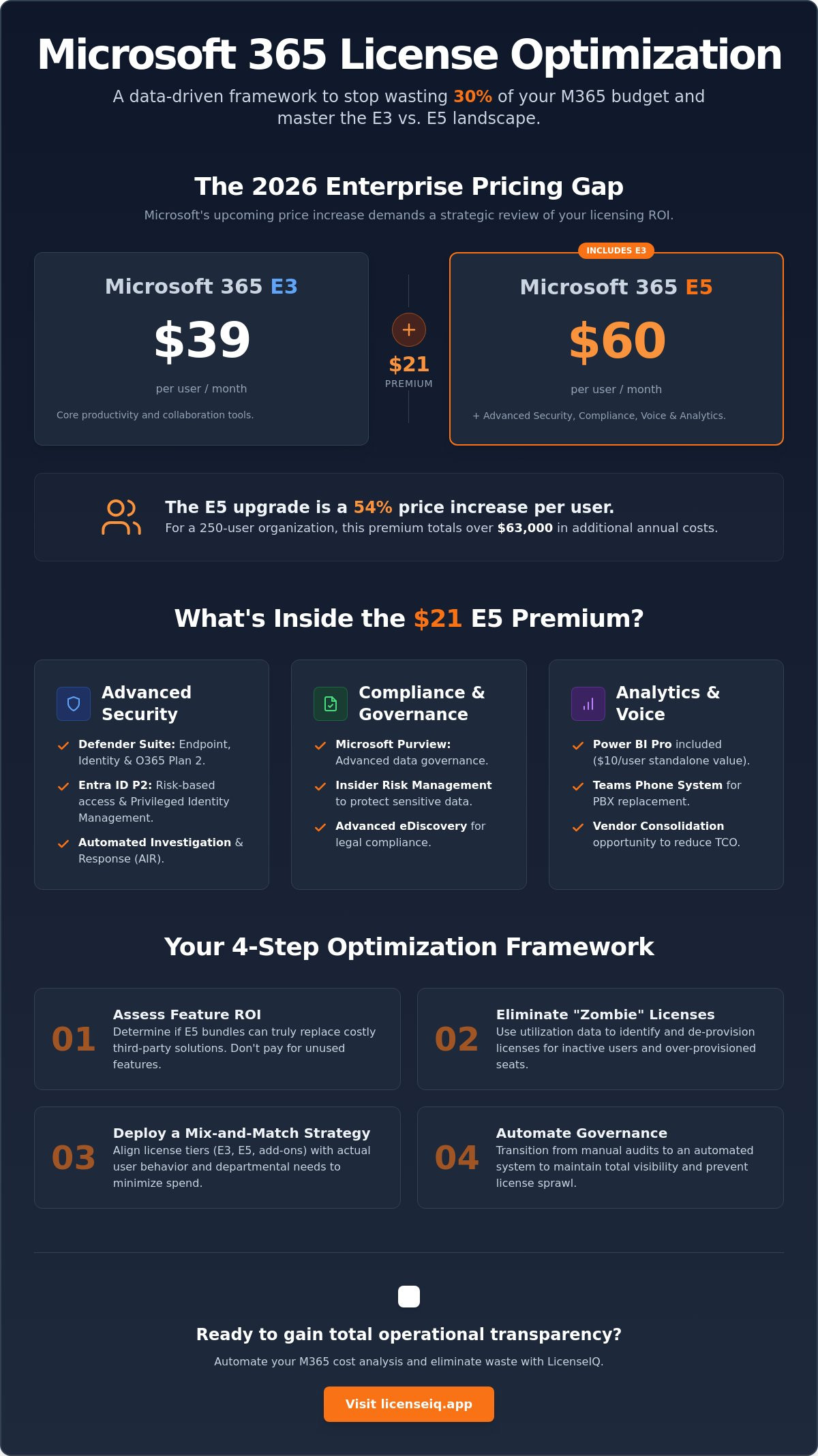
With the July 2026 price increase pushing E3 to $39 and E5 to $60, the $21 gap requires a cold, hard look at ROI. We'll analyze whether new inclusions like Security Copilot justify the cost or if a mix-and-match strategy is your fastest path to a reduced monthly bill. You'll gain a clear cost-benefit framework to eliminate waste and validate your licensing decisions with precision. It's time to move past guesswork and secure your organization's financial health through total operational transparency.
Key Takeaways
- Analyze the 2026 pricing landscape to manage the $21 premium between E3 and E5 tiers with financial precision.
- Assess the ROI of E5 security and compliance bundles to determine if they can replace costly third-party solutions.
- Apply microsoft 365 e5 license optimization strategies to identify and eliminate "zombie" licenses and over-provisioned seats.
- Establish a mix-and-match strategy that aligns license tiers with actual user behavior to minimize monthly spend.
- Transition to automated governance to maintain total visibility over your digital resources and eliminate license sprawl.
The Microsoft 365 Enterprise Pricing Landscape in 2026
The 2026 pricing landscape for Microsoft enterprise licenses is defined by a significant cost gap that demands executive attention. Microsoft 365 E3 is currently priced at approximately $36 per user per month. In contrast, the Microsoft 365 E5 license sits at approximately $57 per user per month. This $21 premium reflects the inclusion of advanced security, compliance, and analytical tools. Both enterprise tiers require an annual commitment for organizations to access the most efficient pricing structures. These tiers are specifically engineered for large-scale operations that demand robust governance and data protection beyond basic productivity apps.
Understanding the Cumulative Model
The E5 license follows a cumulative architecture. It includes every productivity tool found in E3 and adds a layer of advanced security and compliance modules. Microsoft encourages the "All-in" E5 strategy to drive security consolidation across the Microsoft 365 ecosystem. This approach aims to replace multiple third-party vendors with a single, integrated stack. In the 2026 stack, we also see the emergence of the E7 tier. This new tier targets organizations that require hyper-automated AI governance and autonomous security agents beyond standard E5 capabilities. It positions itself as the ultimate tier for companies managing massive, sensitive datasets with minimal human oversight.
The $21 Premium: A Baseline Comparison
The financial weight of the E5 upgrade is substantial when viewed at scale. For a company with 250 users, the total annual cost difference between E3 and E5 exceeds $60,000. This is not a marginal expense; it is a major strategic investment that requires a clear return on capital. The E3-to-E5 cost delta is a 58% price increase. Achieving a positive ROI depends on identifying the exact break-even point for security and analytics features. If your organization doesn't utilize advanced eDiscovery or automated risk management tools, you are essentially subsidizing Microsoft's development costs without receiving operational value. You must verify that the cost of the individual add-ons you actually use would exceed the $21 premium before committing to a full upgrade.
Successful microsoft 365 e5 license optimization starts with a clear understanding of these price points. You must audit your technical requirements against these costs to prevent license sprawl. Many organizations over-provision E5 seats because they lack the visibility to see which users actually interact with advanced security features. This lack of transparency leads to "zombie" licenses that drain your budget every month. By analyzing user behavior, you can determine if a user requires the full $57 seat or if the $36 E3 license provides sufficient coverage. Precision in licensing ensures that your SaaS spend remains aligned with your actual operational needs.
Breaking Down the E5 Value Proposition: Security, Compliance, and Voice
The E5 tier functions as a comprehensive toolkit for organizations aiming to harden their digital perimeter while streamlining operations. It integrates Defender for Endpoint, Identity, and Office 365 Plan 2, providing a unified security posture. Beyond protection, it introduces Microsoft Purview for advanced governance, Insider Risk Management, and eDiscovery. It also includes Power BI Pro, which carries a $10 standalone value, and Teams Phone System for PBX replacement. These features define the $21 premium mentioned previously. If your organization relies on fragmented third-party tools for these functions, the E5 bundle offers a clear path toward vendor consolidation.
Security and Identity Management
Moving from E3 to E5 upgrades your identity infrastructure from Entra ID P1 to P2. This transition enables risk-based conditional access and Privileged Identity Management (PIM). These tools ensure that high-level access is only granted when necessary and under strict verification. Adhering to CISA cloud security guidance requires this level of granular control to mitigate modern identity-based threats. Additionally, E5 provides Automated Investigation and Response (AIR) within the Defender suite. This automation reduces the security tax of third-party vendors by handling routine alerts without manual IT intervention. It allows your security team to focus on high-priority threats rather than chasing false positives.
Analytics and Voice Integration
Power BI Pro is a core inclusion that often goes underutilized in many enterprise environments. If your analysts are already paying for standalone data visualization tools, E5 allows you to consolidate those costs immediately. Teams Phone System offers another consolidation opportunity by moving PBX costs into your existing M365 license. For organizations requiring advanced AI-powered automation for their contact center operations, Nexdial provides specialized predictive and power dialers that complement basic cloud telephony. For regulated industries like finance or healthcare, advanced eDiscovery is non-negotiable for legal and compliance oversight. It allows for precise data harvesting and legal hold management that basic E3 features cannot match. This reduces the time and legal risk associated with regulatory audits and internal investigations.
The challenge lies in determining if your workforce actually interacts with these high-value modules. Without oversight, you risk paying for a premium security suite that remains dormant. Effective microsoft 365 e5 license optimization requires a clear view of feature engagement across your entire tenant. You can quickly audit your license health to see if your E5 investment is driving real operational value or just inflating your monthly spend. Transparency is the only way to ensure you aren't over-provisioning advanced tools for users who only need standard productivity apps. Precision in licensing ensures that your security posture is robust without being financially wasteful.
The ROI Calculus: When Does the E5 Upgrade Save Money?
Calculating the return on an E5 investment requires looking beyond the monthly subscription fee. You must evaluate how the bundle offsets existing costs in your technology stack. Organizations often see immediate ROI by replacing standalone subscriptions for Slack, Zoom, or CrowdStrike with integrated Microsoft equivalents. This consolidation eliminates redundant billing and simplifies vendor management. A detailed Microsoft 365 E5 vs E3 cost analysis reveals that the premium is often lower than the combined cost of these best-of-breed tools. Additionally, E5 mitigates financial risk by providing advanced threat protection that can prevent a data breach, which carries an average cost in the millions.
The most significant barrier to ROI is the "zombie license." These are premium E5 seats assigned to inactive users or employees who only require basic E3 features. Paying $57 per month for a user who never touches Power BI or advanced security modules is pure waste. Effective microsoft 365 e5 license optimization targets these obscured details to recover trapped capital. By reducing IT administrative overhead through unified governance, you free up your team for higher-value projects. Productivity gains also emerge as automated compliance tools handle tasks that previously required manual oversight.
Tool Consolidation vs. Best-of-Breed
Deciding between Microsoft's integrated suite and third-party EDR solutions is a strategic pivot. Microsoft Defender for Endpoint provides deep integration that standalone tools struggle to match. However, you must audit your actual utilization. If your data analysts only number a dozen, buying E5 for 500 users just to get Power BI is a poor financial move. Standalone Power BI licenses for that subset are far more efficient. E5 ROI is only realized if third-party tools are decommissioned. Retaining a legacy security vendor while paying for E5 creates a "double tax" on your IT budget that serves no operational purpose.
Compliance as a Cost-Saver
Advanced compliance features serve as a vital guardian of corporate resources. Tools like advanced eDiscovery and audit logs significantly reduce legal spend during litigation or regulatory inquiries. They allow your legal team to harvest data with precision, avoiding the broad, expensive searches required in E3. Automating data retention also ensures you remain compliant with industry regulations, helping you avoid heavy fines. To start recovering your spend, you need a clear baseline of your current environment. You can learn How to Conduct a Microsoft 365 License Audit to identify exactly where your budget is leaking. This proactive oversight is the cornerstone of microsoft 365 e5 license optimization.
The Hidden Cost of Waste: Why Features Do Not Equal Value
The $21 premium between E3 and E5 only provides value if your team actually uses the advanced tools. Many organizations fall into the E5 trap. They pay for premium capabilities that remain dormant in their tenant for months. Features do not equal value. If a user never opens Power BI or utilizes advanced eDiscovery, that $57 monthly spend is a sunk cost. This waste often stems from a lack of oversight into actual feature engagement across the workforce.
Zombie licenses represent another major drain on corporate resources. These are E5 seats still assigned to offboarded employees or inactive service accounts. Because Microsoft doesn't automatically flag these for deletion, they continue to inflate your monthly invoice indefinitely. Redundant licensing also occurs when users hold multiple project-based seats that overlap with their core enterprise license. Shadow IT compounds this issue. You might pay for E5's advanced security while your teams continue to use unsanctioned third-party tools. This creates a "double tax" on your budget that microsoft 365 e5 license optimization is designed to eliminate.
Mix-and-Match: The Smart Alternative
Quantifying Your License Health Score
Total clarity requires a concrete metric to track efficiency. We define a License Health Score as the ratio of assigned licenses to active feature usage. A low score indicates significant SaaS sprawl and license waste within your environment. You must monitor this score to ensure your M365 ecosystem remains lean and focused. Implementing a 2026 strategy for spend recovery allows you to reclaim these wasted funds systematically.
Effective microsoft 365 e5 license optimization is about more than just reducing seat counts. It's about ensuring every dollar spent contributes to your operational goals. You can start by viewing your real-time data on a Spend Recovery Dashboard to identify immediate savings opportunities. Stop paying for the potential of features and start paying for their performance. Precision in your licensing strategy is the only way to protect your organization's financial health.
Automating Your M365 Cost Analysis with LicenseIQ
Manual audits are obsolete before the spreadsheet is even saved. In a dynamic enterprise environment, user roles and license requirements shift daily. The LicenseIQ Platform solves this by connecting to your tenant in minutes to scan every user and license. This deep-dive scan uncovers the zombie seats and redundant features discussed earlier. By applying AI-native intelligence, the system identifies exactly where you are over-licensed. You can recover up to 35% of your M365 spend without the friction of manual data entry. Our Automated Governance Workflows then handle reclamation and offboarding instantly, ensuring your budget stays lean.
From Manual Audits to Continuous Governance
Static spreadsheets fail because they cannot track real-time feature utilization. They provide a snapshot of the past rather than a roadmap for the future. The Spend Recovery Dashboard replaces this guesswork with real-time, dollar-value recommendations. It highlights exactly how much capital is trapped in underutilized E5 seats. This visibility allows you to transition from reactive cleanup to proactive oversight. You can Automate your M365 governance with LicenseIQ to maintain a perpetual state of optimization. This continuous approach ensures that license sprawl never takes root in your organization again. It transforms IT from a cost center into a driver of financial efficiency.
Securing the Renewal: Data-Driven Negotiation
The most critical moment for microsoft 365 e5 license optimization occurs during your Enterprise Agreement (EA) renewal. Microsoft often pushes for 100% E5 adoption, but you don't have to accept a one-size-fits-all contract. Use the granular data from LicenseIQ to negotiate from a position of strength. By proving widespread underutilization, you can justify downgrading specific user groups to E3 or even F-series licenses. This evidence-based strategy prevents you from over-committing to another three-year cycle of waste. You gain the leverage needed to secure a contract that reflects your actual operational needs rather than Microsoft's sales targets.
Total transparency is the cornerstone of a healthy technical operation. You no longer have to wonder if you are overpaying for premium features that your team ignores. With a clear License Health Score, you can validate your spending and protect your corporate resources with precision. It's time to eliminate the disorder of manual licensing and embrace a vigilant, automated system. Get your free M365 Health Score today and start your journey toward total spend recovery. Stop the bleed and ensure your M365 investment delivers the maximum possible ROI.
Secure Your Financial Health Through Automated Oversight
The $21 premium for Microsoft 365 E5 is a strategic investment that requires rigorous validation. You've seen how the 2026 pricing landscape makes precision mandatory to avoid significant budget leaks. Success depends on retiring redundant third-party tools and matching license tiers to actual user behavior. A blanket E5 rollout often results in expensive underutilization that drains corporate resources without adding security value. By adopting a mix-and-match approach, you ensure that only the users who require advanced governance and analytics hold the premium seats.
Continuous microsoft 365 e5 license optimization is no longer possible through manual spreadsheets. You need a vigilant system that monitors your digital resources in real time. LicenseIQ provides AI-native software intelligence that connects to your tenant in minutes for instant insights. This platform allows you to save up to 35% on software subscriptions by identifying and reclaiming wasted spend automatically. Don't let license sprawl compromise your operational transparency. Discover and recover wasted M365 spend with LicenseIQ today. Total clarity is the only way to protect your organization's growth and financial future.
Frequently Asked Questions
How much does Microsoft 365 E5 cost compared to E3 in 2026?
As of July 1, 2026, Microsoft 365 E5 costs $60 per user per month. Microsoft 365 E3 is priced at $39 per user per month. This creates a $21 monthly premium that you must justify through feature utilization. Organizations often find that this cost difference results in significant waste if high-tier security and compliance tools remain inactive for the majority of the workforce.
Can I have some users on E3 and others on E5?
You can absolutely implement a mix and match strategy across your organization. This hybrid approach is the most effective method for microsoft 365 e5 license optimization. Assign E5 seats to executives, IT staff, and compliance officers while keeping the general workforce on E3. This prevents you from overpaying for advanced features that standard employees don't require for their daily tasks.
Does M365 E5 include Microsoft Copilot?
Microsoft 365 Copilot is not included in the E5 license fee. It remains a separate add-on priced at $30 per user per month. While an E3 or E5 license is a technical prerequisite for purchasing Copilot, the AI tool adds its own significant cost to your monthly SaaS budget. You should audit your user groups to ensure you only assign this add-on to high-impact roles.
What is the main security difference between E3 and E5?
The primary difference lies in advanced identity protection and automated threat response. E5 upgrades you to Entra ID P2 for risk-based conditional access and includes the full Defender XDR suite. These tools provide Automated Investigation and Response capabilities that basic E3 security lacks. This automation reduces the manual burden on your security team by handling routine alerts without human intervention.
Is Power BI Pro included in the E3 license?
Power BI Pro is not included in the Microsoft 365 E3 license. It is a core feature of the E5 tier, providing a $10 standalone value within the bundle. If your E3 users require data visualization, you must purchase individual add-ons. You should calculate whether buying separate licenses for a small group is more efficient than upgrading your entire tenant to the premium tier.
How can I find out if my employees are actually using their E5 features?
You can identify feature utilization by calculating your License Health Score. This metric compares assigned licenses against actual engagement with tools like Power BI or advanced eDiscovery. Manual audits are often outdated by the time they are finished. Automated microsoft 365 e5 license optimization provides a real-time view of which users are interacting with their premium modules and which are holding inactive seats.
What happens to my data if I downgrade from E5 to E3?
Downgrading from E5 to E3 removes your access to advanced governance and security modules. You will lose features like long-term audit logs, automated data retention, and risk-based conditional access. While your core data remains intact, the sophisticated tools used to monitor and protect that data will be disabled. You must ensure your compliance requirements are met before removing these high-tier protections.
Can LicenseIQ help me recover money on my current M365 subscription?
LicenseIQ identifies obscured details in your tenant to stop budget leaks immediately. Our Spend Recovery Dashboard highlights zombie licenses and over-provisioned seats that often account for 30% of total spend. By automating your governance, you can reclaim wasted capital and redirect those resources toward growth. The platform connects in minutes to provide total clarity on your digital resources and improve your financial health.


