

Over 56% of Microsoft 365 licenses are currently inactive, underutilized, or completely unassigned. For most organizations, this represents a massive, invisible leak in the annual budget. Achieving consistent m365 cost savings for smbs has become even more challenging following the July 2026 price increases for Business Basic and Standard plans. You shouldn't have to pay for "ghost" licenses or features your team never touches.
It's frustrating to watch your SaaS spend climb while manual auditing consumes dozens of IT hours every month. You know the waste is there, but the complexity of Microsoft’s licensing tiers makes it difficult to pin down. This article provides a clear strategy to identify that hidden waste and implement automated workflows that slash subscription costs by up to 35%.
We'll provide a precise roadmap to reclaim your budget through automated license governance and a better software Health Score. You'll learn how to transition from reactive manual tracking to a proactive, data-driven system that protects your financial health while maintaining peak productivity.
Key Takeaways
- Reclaim up to 35% of your Microsoft 365 budget by identifying and eliminating "ghost" licenses and inactive users in minutes.
- Replace labor-intensive manual auditing with automated governance workflows to maintain a lean tenant as your organization scales.
- Leverage a Spend Recovery Dashboard to gain immediate visibility into redundant licensing tiers and obscured operational waste.
- Follow a proven 5-step playbook to achieve sustainable m365 cost savings for smbs without compromising security or productivity.
- Optimize your License Health Score to ensure every subscription dollar aligns with actual feature utilization and organizational growth.
The Hidden Crisis of M365 Spend: Why SMBs Overpay
The Microsoft 365 platform is the operational backbone for most modern businesses. However, for small and medium-sized organizations, it's often a significant source of financial leakage. As teams scale, the gap between paid subscriptions and actual usage tends to widen. This isn't just a minor administrative oversight; it's a structural failure in how software is procured and monitored. Achieving m365 cost savings for smbs requires moving beyond simple seat counts to a model of total spend recovery.
The 35% Waste Phenomenon
Recent data indicates that over 56% of licenses are inactive, underutilized, or unassigned. This creates a scenario where companies pay for premium features that no one actually touches. SaaS waste is the silent tax on SMB growth, siphoning capital that should fund expansion or innovation. For a 25-user business on Business Premium, opting for monthly billing instead of annual commitments can cost an extra $1,320 per year. This waste typically originates from three specific areas:
- Unassigned licenses sitting in the tenant "just in case" new hires arrive.
- Inactive accounts belonging to former employees or contractors.
- Oversized plans where users only require basic cloud access but hold full desktop licenses.
Why Traditional Audits Are Obsolete
Manual tracking fails the moment a company grows past 20 employees. Monthly spreadsheet exports from the M365 Admin Center are static snapshots of a dynamic environment. They don't show real-time usage patterns or identify "zombie" accounts that pose severe security risks. We know that 91% of all cyberattacks start with an email, and abandoned accounts are prime targets for exploitation. Relying on manual audits leaves your budget and your data vulnerable. For a deeper look at modernizing this process, consult our Microsoft 365 License Optimization Guide.
Effective m365 cost savings for smbs depend on financial transparency. This is where the License Health Score becomes vital. It provides an immediate, clear metric to judge tenant efficiency. Traditional license management is a passive exercise in compliance. Spend recovery is a proactive pursuit of efficiency. This metric transforms obscured technical data into actionable financial intelligence. It ensures your software strategy is based on hard data rather than administrative guesswork.
Identifying the Silent Killers of Your IT Budget
Identifying waste requires more than a cursory glance at your monthly bill. Most SMBs lose significant capital to "ghost" licenses that remain active long after they've lost their utility. These are the silent killers of your IT budget. To achieve sustainable m365 cost savings for smbs, you must pinpoint exactly where your subscription dollars are stalling. This process starts with uncovering obscured details in your tenant usage data.
Unassigned licenses represent forgotten inventory sitting in your tenant. These are often purchased during a hiring surge and never reclaimed when roles remain unfilled. Duplicate identities also drain resources. This happens when a single user has multiple accounts consuming separate licenses, often due to fragmented onboarding or testing processes. Every redundant seat is a direct hit to your bottom line.
The Inactive User Audit
In 2026, inactivity is defined by more than just a lack of logins. A user might sign in to check a single email but never touch the desktop applications you're paying for. If an account shows zero app engagement over a 90-day period, that license is a candidate for reclamation. You should also identify users who only use web-based apps. Keeping them on a full desktop license is an inefficient use of funds. Reclaiming these seats immediately improves your License Health Score.
Right-Sizing: Matching Tiers to Actual Usage
SMBs often over-provision by selecting enterprise-level E5 licenses when Business Premium ($22.00 per user) offers identical security benefits for their scale. There is a massive financial gap between what a user is "licensed for" and what they are actually "using." For example, a user might only need Microsoft Teams for communication but currently holds a full Office suite license. Mixing and matching license types allows you to tailor spend to individual needs rather than applying a blanket, expensive tier across the entire company. Consult our M365 License Types Reference Guide to find the most efficient tier for every role in your organization.
Manual Tracking vs. Automated Governance Workflows
Manual tracking is a legacy approach that fails to keep pace with modern technical operations. It relies on point-in-time snapshots that are outdated the moment they're exported from the admin center. To capture m365 cost savings for smbs, you need a system that offers continuous oversight rather than sporadic check-ins. Automated governance workflows transform license management from a tedious chore into a strategic advantage.
The Cost of Manual Governance
IT Managers often spend at least 4 hours every month cross-referencing CSV files with payroll lists to catch discrepancies. This "hidden" labor cost is a significant drain on high-value technical resources. Human error is an inherent risk in these manual audits. IT teams frequently over-provision licenses "just to be safe" because they lack the data-driven confidence to cut unneeded seats. This cautious overspending adds up to thousands in wasted capital over a single fiscal year.
Our Spend Recovery Dashboard removes this administrative friction. It provides instant, accurate reporting that replaces hours of spreadsheet manipulation. You gain immediate clarity on your software spend without taxing your IT staff's time. This shift from manual to automated reporting ensures that your financial health is monitored by a vigilant system rather than a distracted human. It provides the transparency required to make rapid, confident decisions about your resource allocation.
The AI-Native Advantage
AI-native platforms discover subtle patterns of waste that spreadsheets simply miss. They analyze engagement across the entire tenant, identifying underutilized features and redundant seats in real-time. By utilizing the Model Context Protocol, the system can execute automated license changes based on your specific business rules. This technology ensures that m365 cost savings for smbs become a permanent fixture of your operational environment rather than a one-time cleanup project.
Automated offboarding acts as a vital security and financial safeguard. It ensures that when an employee leaves, their license is reclaimed immediately; this prevents "zombie" accounts from lingering for months. This proactive stance distinguishes a well-run organization from one stuck in organizational disorder. For a deeper analysis of these efficiencies, see LicenseIQ vs Manual Tracking and how it streamlines the entire management lifecycle.
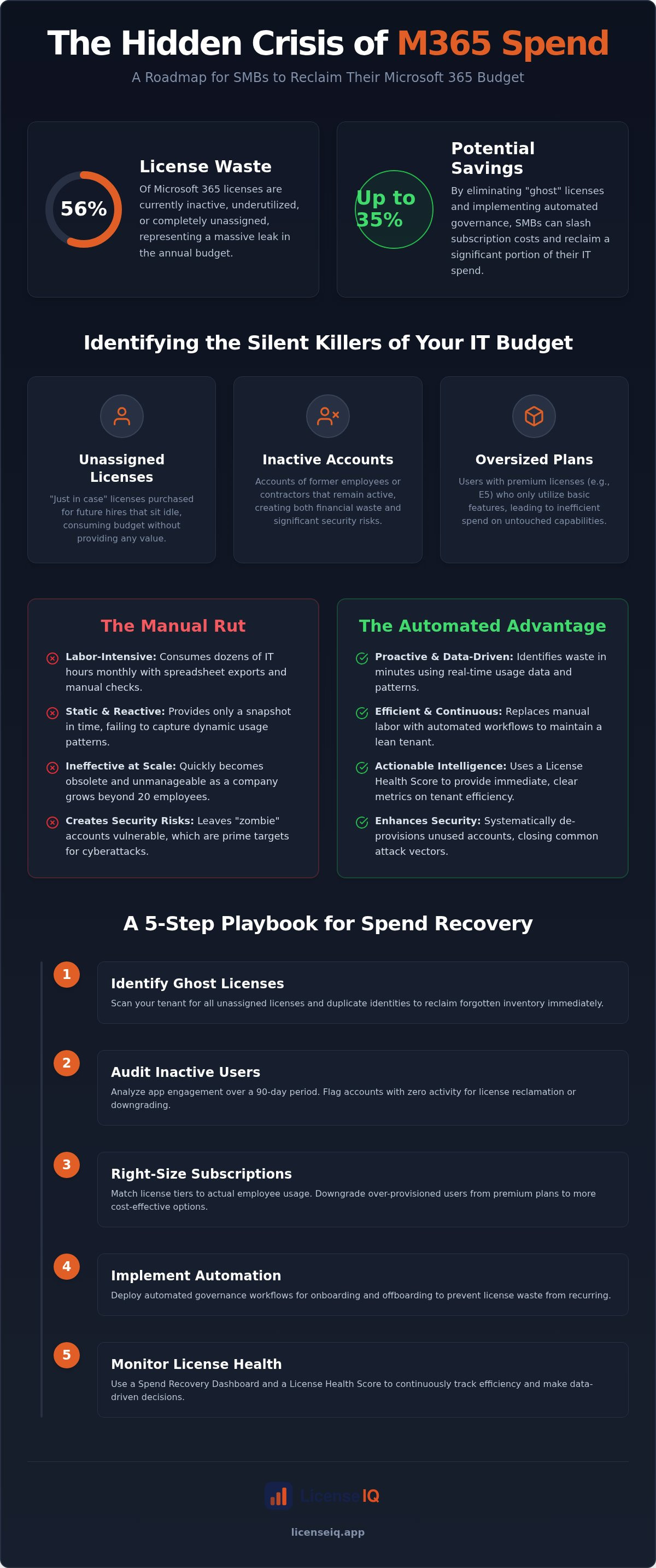
A 5-Step Playbook for M365 Spend Recovery
Transitioning from a bloated tenant to a lean, efficient environment requires a structured execution plan. You need a repeatable process to ensure your subscription spend aligns with actual headcount and activity. This 5-step playbook provides the technical roadmap for sustainable m365 cost savings for smbs. Stop guessing where your budget goes; start managing it with surgical precision.
- Step 1: Baseline Discovery. Connect your tenant to a scanning tool to map every active, inactive, and unassigned license in minutes.
- Step 2: Priority Review. Analyze your License Health Score to identify the most expensive waste first, such as unassigned E5 or Premium seats.
- Step 3: Automated Reclamation. Trigger workflows to strip licenses from accounts showing zero engagement over the last 90 days.
- Step 4: Tier Optimization. Move users from high-cost tiers like Business Premium ($22.00) to Business Standard ($14.00) or Basic ($7.00) based on their actual app utilization.
- Step 5: Lifecycle Governance. Implement permanent workflows that automatically handle license provisioning and deprovisioning for every new hire or departure.
The 5-Minute Audit
You don't need days of manual data entry to find savings. An initial scan provides an immediate dollar-value estimate of potential budget recovery. Focus first on the "low-hanging fruit" by reclaiming unassigned licenses that sit idle in your inventory. Setting up a Spend Recovery Dashboard allows you to visualize these savings in real-time, providing the financial transparency your leadership team requires. Start your 5-minute audit with LicenseIQ to uncover these obscured details today.
Implementing Continuous Governance
Temporary cleanups are ineffective because waste naturally re-accumulates as your business scales. You must define specific triggers for automated license reclamation to keep the tenant optimized. For example, an account with no login activity for 30 days should trigger a notification, while 90 days of inactivity should trigger an automatic license removal. Clear communication with employees is essential to ensure these changes don't cause friction. Providing a grace period or a simple request process for reclaimed licenses keeps productivity high while costs stay low. For a secure transition, follow our Office 365 Offboarding Checklist to protect your data while you reclaim your spend. This proactive stance ensures that m365 cost savings for smbs remain a permanent part of your operational strategy.
Maximizing ROI with LicenseIQ: The SMB Advantage
LicenseIQ is not a passive monitoring tool. It is a proactive digital auditor designed specifically to capture m365 cost savings for smbs through continuous oversight. Most organizations view software subscriptions as an unavoidable, rising cost. We transform that perspective by treating your Microsoft 365 tenant as a strategic investment that requires active optimization. Because the platform identifies waste that often exceeds its own cost, it effectively pays for itself within the first few billing cycles.
Scalability is a primary challenge for growing businesses. A manual process that works for 10 employees inevitably breaks when you reach 50, 100, or 200+ users. LicenseIQ ensures that your governance capabilities scale alongside your headcount without requiring additional IT staff. You maintain total oversight of every seat and every dollar, regardless of how fast your organization expands. This transition from "IT spend" to "strategic investment" allows leadership to allocate capital toward innovation rather than administrative waste.
Automating Financial Accuracy
Precision is the cornerstone of our platform's efficiency. By leveraging the Model Context Protocol, LicenseIQ executes automated governance workflows with surgical accuracy. You no longer have to wait for the monthly Microsoft invoice to understand your financial position or discover overspending. Our system provides real-time insights into your actual utilization versus your subscription commitments. LicenseIQ acts as a vigilant guardian of corporate resources by ensuring every license aligns with a verified business need. This proactive monitoring replaces organizational disorder with absolute data-driven clarity.
Getting Started with Spend Recovery
Speed to value is critical for specialized leadership. You can connect your tenant to the LicenseIQ platform in minutes to receive an immediate baseline scan of your environment. This rapid deployment moves your organization from a lack of insight to total clarity almost instantly. You gain access to the Spend Recovery Dashboard, which highlights high-priority recommendations to reclaim your budget. Don't let your resources continue to leak through unassigned seats or "ghost" accounts. Discover your M365 Health Score with LicenseIQ and take the first step toward permanent spend recovery today.
Secure Your Financial Future with Automated Governance
Reclaiming your IT budget is no longer a manual, labor-intensive task. You've identified how "ghost" licenses and inactive accounts drain resources and obscure your true operational costs. By shifting to automated governance, you eliminate human error and ensure every subscription dollar aligns with actual user activity. This proactive approach is the only way to maintain permanent m365 cost savings for smbs as your organization scales toward 2027 and beyond.
LicenseIQ provides the total clarity required to manage complex technical environments with confidence. Our AI-native platform identifies up to 35% waste in minutes and implements continuous monitoring to prevent future sprawl. You can finally stop overpaying for underutilized features and start redirecting those funds into your company's core growth. Don't let obscured details compromise your financial health when a precise solution is available.
Recover your wasted M365 spend with LicenseIQ and transform your IT department from a cost center into a strategic asset. Total transparency is within reach. You have the tools and the playbook; now it's time to take control of your software spend and build a more efficient business.
Frequently Asked Questions
How much can an average SMB save on Microsoft 365 licenses?
An average SMB can reclaim up to 35% of their subscription budget by identifying inactive or unassigned seats. Research involving over five million workers indicates that 56% of licenses are often underutilized, oversized, or unassigned. By using automated tools to scan your environment, you uncover these hidden costs in minutes. These m365 cost savings for smbs directly impact your bottom line by stopping the recurring spend on "ghost" licenses that provide no operational value.
Is it safe to automate M365 license reclamation?
Automation is entirely safe when guided by specific business rules and triggers. You define the parameters, such as reclaiming a license only after 90 days of zero application engagement. This ensures that essential users remain active while removing accounts belonging to former employees or contractors. Automated governance workflows provide a consistent, error-free layer of oversight that manual auditing cannot match. It also secures your tenant by closing abandoned accounts that are often targets for cyberattacks.
What is a License Health Score and why does it matter?
The License Health Score is a proprietary metric that measures the overall efficiency of your software spend. It analyzes the ratio of assigned licenses to actual feature utilization across your entire tenant. A high score indicates that your subscriptions are lean and perfectly aligned with your actual headcount. This score provides specialized leadership with immediate clarity on financial hygiene. It transforms complex technical data into an actionable KPI that CFOs and IT managers can track with confidence.
Can I downgrade M365 licenses without losing user data?
You can downgrade licenses without losing user data by following a structured transition process. Moving a user from Business Premium ($22.00) to Business Standard ($14.00), for example, changes their feature access but leaves their mailbox and OneDrive files intact. It's critical to verify that the new tier supports the specific security applications the user requires. Using usage data to right-size tiers ensures you stop paying for enterprise-level features that your staff never utilizes during their daily operations.
How long does it take to see cost savings after an audit?
Financial gains are often visible within the first billing cycle after an audit is completed. A 5-minute scan identifies unassigned licenses that you can cancel or reassign immediately to avoid new charges. Permanent m365 cost savings for smbs accrue as you implement automated workflows to handle ongoing departures and role changes. The Spend Recovery Dashboard provides a real-time view of these gains, allowing you to track ROI from the moment you connect your tenant to the platform.
Does LicenseIQ replace my current Microsoft reseller?
LicenseIQ does not replace your current Microsoft reseller and does not provide direct license reselling services. Instead, it acts as an independent software intelligence layer that monitors your tenant for efficiency. Your reseller handles the transaction and procurement, while our platform provides the data-driven insights needed to tell that reseller exactly what to buy. This distinction ensures you have an unbiased digital auditor focused solely on the financial health of your organization rather than sales commissions.
What happens to a user’s mailbox when their license is reclaimed?
When a license is reclaimed, the user's mailbox data is typically retained by Microsoft for a 30-day grace period before permanent deletion. To preserve data longer, you should convert the mailbox to a Shared Mailbox or apply a litigation hold before removing the license. Automated workflows can be configured to handle these preservation steps as part of the offboarding process. This ensures your organization remains compliant and retains essential records while stopping the recurring subscription cost immediately.
How often should an SMB perform a Microsoft 365 license audit?
You should move away from periodic audits in favor of continuous, real-time monitoring. While traditional manual reviews are performed quarterly or before annual renewals, this approach allows waste to accumulate for months. An AI-native platform provides 24/7 oversight, catching unassigned licenses the moment they become idle. Maintaining this level of vigilance ensures that your software spend remains lean and your License Health Score stays high throughout the entire fiscal year without taxing your IT resources.


