

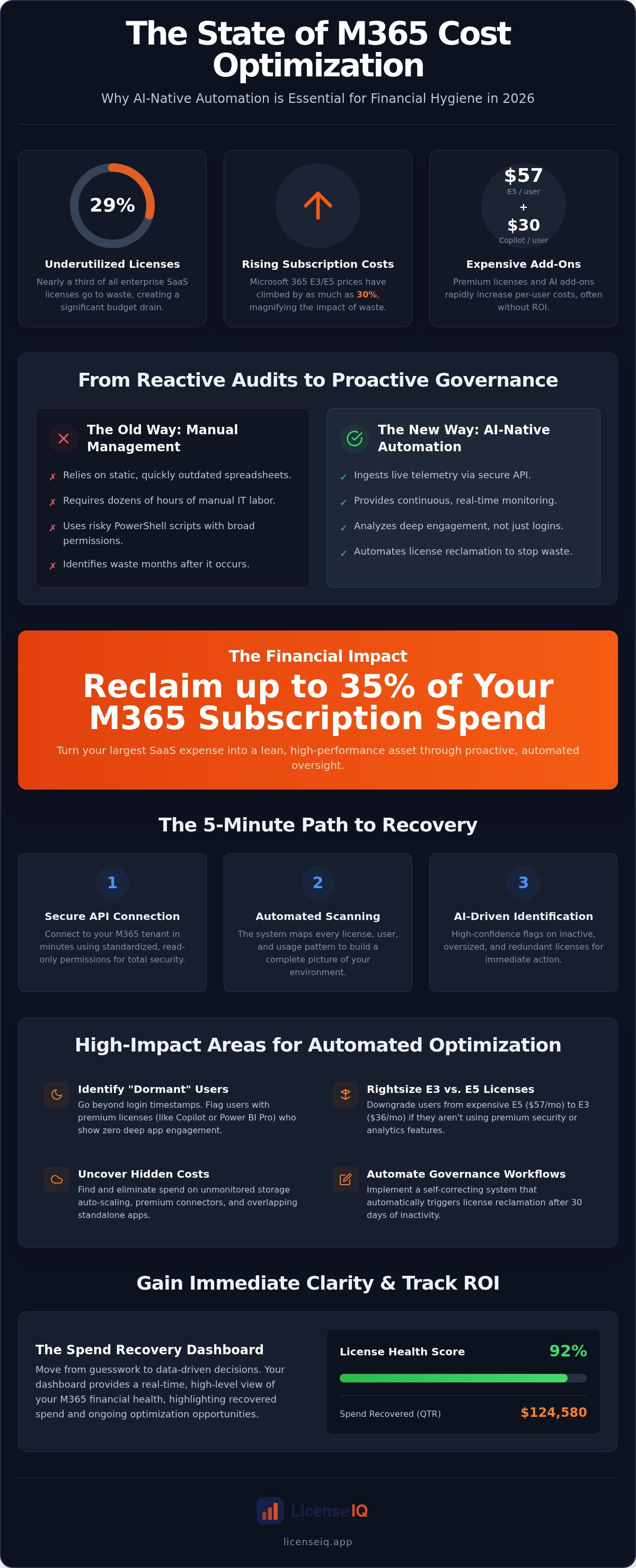
Nearly 29% of enterprise SaaS licenses are currently underutilized, yet Microsoft 365 E3 and E5 costs have climbed by as much as 30% recently. For IT leaders and CFOs, this creates a massive gap between budget allocation and actual utility. You already know that manual spreadsheets can't keep pace with the constant flux of employee offboarding and license assignments. By the time your manual audit is finished, the data is already obsolete. With E5 licenses reaching $57 per user and Copilot add-ons adding another $30 monthly, the cost of administrative oversight has never been higher.
Transitioning to automated microsoft 365 cost optimization allows you to stop the financial bleeding and reclaim up to 35% of your subscription spend. LicenseIQ provides the proactive oversight needed to maintain continuous financial hygiene without the manual burden. This 2026 guide explains how to eliminate tedious audits and secure immediate ROI through AI-native automation. You'll discover how to leverage the Spend Recovery Dashboard and automated governance workflows to identify hidden waste. We will walk through the specific steps to achieve total transparency and turn your Microsoft 365 environment into a lean, high-performance asset.
Key Takeaways
- Stop relying on static spreadsheets that become obsolete during hiring cycles. Learn why automated microsoft 365 cost optimization is the only way to maintain continuous financial hygiene in 2026.
- Identify "dormant" users through deep engagement analytics rather than simple login timestamps. This level of oversight ensures you only pay for licenses that actively drive value.
- Recover up to 35% of your subscription spend by rightsizing the E3/E5 divide and eliminating wasted Copilot add-ons. Precise monitoring uncovers hidden costs in premium connectors and agents.
- Implement Automated Governance Workflows to trigger license reclamation after 30 days of inactivity. This proactive approach replaces manual audits with a self-correcting system.
- Gain immediate clarity through the Spend Recovery Dashboard. Use your License Health Score to track ROI and maintain a lean, optimized tenant in real-time.
The Hidden Drain: Why Manual M365 Management Fails in 2026
Automated microsoft 365 cost optimization is not a one-time project. It is a continuous software intelligence process that monitors usage patterns in real-time. In 2026, manual spreadsheets are obsolete before you even click save. Organizations currently face a 29% underutilization rate for SaaS licenses according to CloudNuro data. This gap exists because manual tracking cannot keep pace with rapid hiring cycles and workforce transitions. When license management relies on human intervention, waste becomes an inevitable byproduct of operational speed.
The financial leak often comes from "Quiet Climbers." These are obscured costs that bypass standard budget reviews. Common examples include:
- Licenses still assigned to disabled accounts or offboarded employees.
- Overlapping bundles where users hold both a premium suite and standalone add-ons.
- Unmonitored storage auto-scaling that triggers expensive overage tiers.
- Premium add-on consumption, such as $30/month Copilot seats, assigned to users who haven't opened the app in weeks.
The Problem with PowerShell and Script-Based Audits
Many IT teams rely on custom PowerShell scripts to identify inactive users. This approach is a "point-in-time" solution. It ignores the daily fluctuations of a modern enterprise. Scripts also introduce significant security risks. They often require broad M365 Admin permissions that remain active and vulnerable. Beyond security, the labor cost is staggering. IT staff spend dozens of hours every month on manual reconciliation. This is time stolen from high-value infrastructure projects that actually drive growth.
SMB Vulnerability to Microsoft 365 Waste
Small and medium businesses are disproportionately affected by license sprawl. The price gap between Microsoft 365 E3 ($36/user) and E5 ($57/user) is over $20 per month. Without automated microsoft 365 cost optimization, SMBs often default to the highest tier for everyone to avoid "feature gaps." This "just in case" licensing strategy creates massive financial friction. Most smaller organizations lack a dedicated FinOps role to police these costs. Every dollar lost to a redundant license is a dollar removed from the security or hardware budget. LicenseIQ provides the oversight these organizations need to maintain a lean, high-performance tenant without hiring additional headcount.
How AI-Native Automation Transforms Spend Recovery
AI-native automation replaces the guesswork of manual audits with surgical precision. Traditional methods rely on static data exports that are outdated by the time they're reviewed. In contrast, 2026-era automated microsoft 365 cost optimization leverages secure tenant API connections to ingest live telemetry. This connection allows the system to monitor every license assignment and usage event across your organization without manual intervention. It's a fundamental shift from reactive reporting to proactive financial management.
AI identifies "dormant" users by looking far beyond simple login timestamps. A user might open Outlook daily but never touch the expensive Copilot features or Power BI Pro connectors assigned to them. AI-native tools analyze deep app-specific engagement to determine if a user actually needs their current license tier. By utilizing the Model Context Protocol, the platform executes complex governance workflows that bridge the gap between identifying waste and reclaiming it. This transition from insight to actionable recovery happens in minutes, not months.
From Discovery to Recovery: The 5-Minute Audit
The path to spend recovery is structured for speed and security. You don't need to write complex scripts or wait for quarterly reviews. The process follows three distinct phases:
- Step 1: Secure API Connection – Connect to your M365 tenant in minutes using standardized, read-only permissions.
- Step 2: Automated Scanning – The system maps every license, user account, and usage pattern across the entire ecosystem.
- Step 3: AI-Driven Identification – The platform flags wasted spend from inactive, redundant, or oversized licenses with high confidence.
The Power of Continuous Monitoring
Periodic audits provide a temporary fix, but they don't stop "waste creep." This phenomenon occurs when new licenses are provisioned without oversight immediately following a manual cleanup. Continuous monitoring is the backbone of automated microsoft 365 cost optimization, preventing the inevitable drift toward over-licensing. It provides 24/7 vigilant oversight, ensuring your environment stays lean as your headcount fluctuates. The License Health Score is a real-time metric that quantifies your license hygiene and financial efficiency at any given moment. You can achieve this level of transparency by integrating the LicenseIQ Platform into your existing IT stack.
High-Impact Areas for Automated Optimization
Identifying where your budget is leaking requires a granular look at license tiers and add-on consumption. In 2026, the financial delta between license types is a primary target for recovery. Microsoft 365 E5 costs $57 per user, while E3 sits at $36 per user. This $21 monthly difference represents a massive optimization opportunity for users who don't utilize E5's advanced analytics or eDiscovery tools. Automated microsoft 365 cost optimization provides the visibility needed to execute a precise mix-and-match strategy across your entire tenant.
Premium add-ons often represent the highest "speed of waste." Microsoft Copilot agents add $30 per user monthly, yet engagement rates often drop after the initial deployment phase. Without continuous monitoring, these high-cost seats remain active and unutilized. Similarly, Power Platform connectors can trigger unexpected costs if not governed by automated usage thresholds. Identifying these quiet climbers is essential for maintaining a lean IT budget.
Right-Sizing Tiers: E3 vs. E5
Most organizations default to E5 for all knowledge workers to simplify administration. This results in significant over-licensing. A robust framework for rightsizing involves auditing for specific E5 feature usage, such as Power BI Pro or advanced security workloads. Downgrading a single user from E5 to E3 saves $252 annually. For a mid-sized firm with 500 users, rightsizing even 20% of the workforce recovers over $25,000 in annual spend. For a deeper dive into these options, consult the Microsoft 365 License Types: The Comprehensive 2026 Reference Guide.
Reclaiming Inactive and Offboarded Licenses
Ghost licenses are unassigned seats that renew every month without providing value. These often accumulate after bulk purchases or headcount reductions. Automation detects "sign-in disabled" accounts that still hold paid license assignments. This is a common oversight during manual offboarding. Removing these licenses does more than save money; it closes security gaps by ensuring former employees no longer have dormant access points. Implementing a standardized process is vital. You can find more details in the Office 365 Offboarding Checklist 2026: Secure Data and Reclaim Spend. Transitioning deskless employees to the "Frontline Worker" (F3) tier offers another high-impact win, providing mobile-first access at a fraction of the cost of full desktop suites.
Building a Sustainable Governance Workflow
Automated Governance Workflows represent the final evolution of modern M365 management. It's no longer enough to just identify waste; you must build a self-correcting system that prevents its return. This end-state ensures that every license assignment is backed by active usage data. By integrating cost optimization into the standard IT lifecycle, you transform a manual chore into a persistent operational advantage. The system acts as a vigilant guardian, ensuring your financial resources are always directed toward productive assets.
A sustainable workflow relies on clear communication. Before any automated license change occurs, the system triggers stakeholder notifications. This allows department heads or individual users to justify the retention of a license if a specific project requires it. This transparency builds trust between IT and the wider organization, turning automated microsoft 365 cost optimization into a collaborative effort rather than a restrictive policy. It ensures that no essential tool is removed by mistake while still enforcing strict financial hygiene.
Setting Your Optimization Thresholds
The effectiveness of your governance depends on the precision of your thresholds. Most organizations start by setting a 30-day inactivity trigger for premium add-ons like Copilot or Power BI Pro. However, a one-size-fits-all approach is rarely optimal. You must determine "inactivity" based on job roles and specific department needs. Seasonal workers or contractors might require shorter windows, while specialized technical roles may need longer periods between active sessions. Striking the right balance between aggressive reclamation and user productivity ensures that automated microsoft 365 cost optimization never disrupts essential business operations.
Reporting and Transparency for Stakeholders
Financial clarity is the cornerstone of effective governance. Use the Spend Recovery Dashboard to provide CFOs with an immediate view of realized savings and current license health. This centralized hub eliminates the need for manual data mining during budget reviews. Automating monthly savings reports for executive leadership demonstrates the ongoing value of your IT strategy. To understand the broader financial impact, read our guide on Calculating the ROI of a SaaS Spend Management Tool.
Maintaining this level of oversight manually is impossible in high-growth environments. Deploying Automated Governance Workflows through a dedicated platform ensures your organization remains lean and secure by default.
Maximize Your M365 ROI with LicenseIQ
LicenseIQ provides the precision required to eliminate waste across your entire tenant. It's the AI-native solution designed specifically for SMBs who need enterprise-grade oversight without the associated complexity. By connecting directly to your environment, the platform identifies inactive or redundant licenses to reclaim up to 35% of your subscription spend. You don't have to guess where your budget goes. Total transparency is now the default state of your operations. Implementing automated microsoft 365 cost optimization through LicenseIQ ensures your financial hygiene is maintained around the clock.
The Spend Recovery Dashboard serves as the primary interface for financial leadership. It translates complex technical telemetry into clear, actionable data for the CFO. Central to this experience is the License Health Score. This metric benchmarks your organizational efficiency in real-time. It tells you exactly how much of your investment is driving value versus how much is sitting dormant. The score doesn't just show you what's wrong; it provides a roadmap for what's right. By maintaining a high score, you signal to stakeholders that IT resources are being managed with meticulous care.
The AI-Native Advantage
Manual audits are a snapshot of the past. LicenseIQ uses continuous software intelligence to monitor usage patterns as they happen. This proactive approach outperforms manual scripts because it never stops looking for optimization opportunities. Traditional tools often require manual data entry or complex configuration. LicenseIQ removes these barriers by connecting in minutes and delivering insights almost instantly. Once you deploy the LicenseIQ Platform, your organization benefits from "set and forget" automated governance workflows. The system handles license reclamation automatically, ensuring you never overpay for a license again.
Getting Started: Your Spend Recovery Roadmap
Taking control of your budget doesn't require a long implementation cycle. The process begins with a 5-minute tenant scan. This initial report provides immediate clarity on your current waste levels and highlights quick wins for recovery. From there, the platform helps you transition from expensive monthly tiers to discounted annual subscriptions where usage is stable. This strategic shift maximizes your ROI while maintaining the flexibility your business needs. Beyond simple reporting, automated microsoft 365 cost optimization is about taking control of your organization’s digital future. Start your free M365 license audit with LicenseIQ today.
Secure Your Digital Resources for 2026
Manual license management is no longer a viable strategy for specialized leadership. Static spreadsheets and periodic audits leave your organization vulnerable to significant financial waste and operational disorder. By transitioning to AI-native oversight, you replace obscured costs with total clarity. The shift from reactive reporting to proactive governance ensures that every dollar spent on your Microsoft ecosystem is an investment in actual utility. automated microsoft 365 cost optimization is the only way to maintain financial hygiene in high-growth environments. It allows you to focus on strategic initiatives while a vigilant system manages the technical details.
LicenseIQ provides the tools to reclaim your budget and establish a self-correcting governance model. You can connect your tenant in minutes to uncover hidden savings and save up to 35% on your subscriptions. Take the first step toward a lean, high-performance tenant today. Recover your wasted M365 spend in 5 minutes with LicenseIQ. It's time to transform your license management from a manual burden into a precise financial asset. You have the power to secure your organization's digital health for years to come.
Frequently Asked Questions
What is automated Microsoft 365 cost optimization?
It is a continuous software intelligence process that monitors license usage in real-time. Unlike manual audits, it uses AI to identify underutilized seats and redundant add-ons automatically. This ensures your tenant remains lean without constant human intervention. It transforms license management from a reactive chore into a proactive financial strategy. This process maintains permanent operational transparency and efficiency across your entire digital ecosystem.
How much can I save by automating my M365 license management?
Organizations typically reclaim up to 35% of their Microsoft 365 subscription spend. These savings come from identifying inactive users, right-sizing E5 tiers to E3, and removing forgotten premium add-ons like Copilot or Power BI. By eliminating ghost licenses that renew every month, you secure immediate ROI. The specific dollar value of your recovery depends on your current tenant size and your existing license hygiene levels.
Is it safe to give an automated tool access to my M365 tenant?
Security is a primary priority for 2026-era optimization platforms. LicenseIQ uses secure, read-only API connections to ingest telemetry without requiring broad administrative passwords. This method follows the principle of least privilege, ensuring the system only sees the data necessary for cost analysis. By removing the need for custom PowerShell scripts with persistent permissions, automation actually reduces the overall security risk to your organization's infrastructure.
What is the difference between a manual audit and automated governance?
A manual audit is a static, point-in-time snapshot that is often obsolete by the time it is finished. It relies on spreadsheets and human reconciliation. Automated governance is a persistent, self-correcting system. It uses automated microsoft 365 cost optimization to monitor usage 24/7. While an audit finds past waste, governance prevents future waste by enforcing license reclamation workflows as soon as inactivity thresholds are met.
Can I automate the downgrade of E5 licenses to E3?
Yes, you can set specific governance workflows to identify users who don't utilize E5-exclusive features like advanced security or analytics. Once the system detects a lack of engagement with these premium tools over a set period, it flags the user for a downgrade. This precise mix and match strategy ensures you only pay for high-tier features where they're actively driving value for the business.
How does LicenseIQ identify inactive users?
The platform looks far beyond simple login timestamps. It analyzes deep engagement telemetry across specific applications to determine if a user is truly active. For example, a user might sign in to the tenant but never open their assigned Copilot agent. LicenseIQ identifies these discrepancies, providing a more accurate picture of utility than traditional methods. This data-driven approach ensures that license reclamation is always based on actual productivity.
Does automated optimization work for Microsoft 365 storage costs?
Automated tools monitor storage consumption across SharePoint, OneDrive, and Exchange to prevent expensive overage charges. By identifying unmonitored storage auto-scaling, the system alerts you before costs spiral out of control. It provides the oversight needed to manage data retention policies more effectively. This ensures your storage budget is spent on active, necessary data rather than redundant backups or abandoned employee files.
How long does it take to see results from an automated spend recovery tool?
You'll see actionable results within minutes of connecting your tenant. The initial scan provides an immediate License Health Score and a detailed list of wasted spend. Moving from insight to recovery happens almost instantly as the platform identifies redundant seats for immediate removal. Most organizations realize significant financial recovery within the first billing cycle after deploying automated microsoft 365 cost optimization workflows.


