

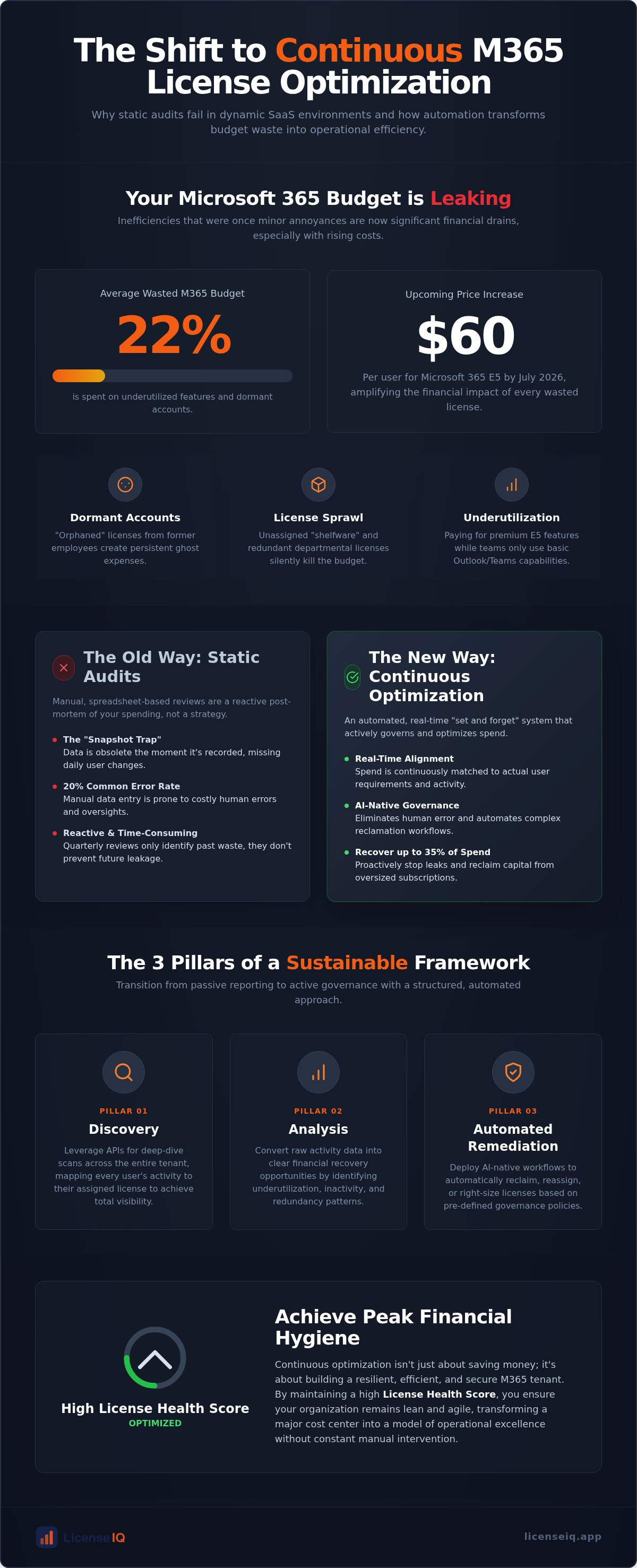
Approximately 22% of your Microsoft 365 budget is currently wasted on underutilized features and dormant accounts. With the July 2026 price increases pushing Microsoft 365 E5 costs to $60 per user, these inefficiencies are no longer just administrative annoyances; they're significant financial leaks. Manual spreadsheets can't keep pace with modern SaaS sprawl or the "orphaned" licenses left behind by former employees. To secure your budget, you need a shift toward continuous license optimization that replaces reactive auditing with persistent, automated oversight.
You likely recognize that your current visibility into feature adoption is insufficient. Paying for premium E5 capabilities while your team stays on basic tools is an avoidable drain on corporate resources. This article outlines a strategy to transition from manual cleanup to a "set and forget" governance system. You'll learn how to leverage the LicenseIQ platform to recover up to 35% of your spend through automated workflows. We'll explore how a real-time Spend Recovery Dashboard and a definitive License Health Score can transform your tenant from a source of waste into a model of operational efficiency.
Key Takeaways
- Identify why static audits fail in dynamic SaaS environments and how the "snapshot trap" leads to immediate data obsolescence.
- Transition to continuous license optimization to align your Microsoft 365 spend with actual user requirements in real-time.
- Eliminate the 20% error rate common in manual spreadsheets by deploying AI-native Automated Governance Workflows.
- Establish a sustainable financial framework by defining clear "Inactivity" and "Underutilization" policies for your organization.
- Maintain a high License Health Score to ensure your tenant remains lean and secure without constant manual intervention.
Why Static License Audits Fail in a Dynamic SaaS Environment
Static license audits are a post-mortem exercise. They provide a historical record of what you spent, not a proactive strategy for what you should spend. In a dynamic SaaS environment, an audit is outdated the moment you hit "save" on your spreadsheet. This "Snapshot Trap" is the primary reason organizations consistently overpay for Microsoft 365. Effective Software Asset Management (SAM) requires real-time data, yet most IT teams rely on quarterly reviews that miss the daily fluctuations of employee turnover and usage patterns.
The Microsoft 365 Admin Center offers a wealth of data, but it lacks actionable optimization logic. It tells you a user has an E5 license, but it doesn't flag that the user hasn't opened Power BI or used Advanced Threat Protection in months. Without continuous license optimization, you're paying a premium for features that remain dormant. This gap between raw data and financial insight creates "license leakage," where capital drains out of the organization through redundant or oversized subscriptions. You need a system that doesn't just report numbers but interprets them against your business goals.
The High Cost of Inactive Users
Inactivity is a nuanced metric. It extends far beyond a simple "last login" date. A user might log in to Outlook daily but never touch the high-value E5 features you're paying for. Orphaned accounts are particularly dangerous during high-turnover periods. When an employee leaves, their license often remains assigned, creating a "ghost" expense that persists for months. To prevent this, your workflow must include a rigorous Office 365 Offboarding Checklist 2026. Failure to reclaim these licenses immediately results in a direct hit to your bottom line. It's about maintaining financial hygiene through every stage of the employee lifecycle.
License Sprawl: The Silent Budget Killer
License sprawl occurs when unassigned licenses accumulate in your tenant unnoticed. IT managers often over-provision "just in case" to avoid onboarding delays, but this safety net quickly becomes a financial burden. Shelfware represents pure waste. Additionally, Shadow IT licenses purchased by individual departments bypass central procurement, leading to overlapping primary licenses. You might have a user covered by a corporate E3 plan while their department pays for a separate standalone license for a specific tool already included in their suite. Continuous license optimization identifies these overlaps, allowing you to consolidate spend and eliminate redundant inventory. Total visibility is the only cure for this type of organizational disorder.
Defining Continuous License Optimization: Beyond Mere Visibility
Continuous license optimization is the automated, real-time alignment of software spend with actual user requirements. It represents a fundamental shift from passive reporting to active governance. In the 2026 landscape, the complexity of Microsoft 365 SKUs makes manual oversight impossible. You need a system that functions as a vigilant digital auditor, ensuring your financial resources aren't wasted on unused features. This proactive approach is a vital component of modern Cloud Cost Management, where the goal is total transparency and the elimination of organizational disorder.
This strategy rests on three technical pillars: Discovery, Analysis, and Automated Remediation. We're moving beyond the simple question of "What do we have?" to the more critical question of "What do we actually need?" AI-native intelligence now handles the heavy lifting. By using the Model Context Protocol (MCP), optimization platforms can bridge the gap between raw data and decisive action. This ensures that your licensing environment remains lean, even as your workforce scales or shifts.
The Discovery Phase: Scanning the Tenant
Discovery is the foundation of any recovery strategy. It involves leveraging APIs for deep-dive user activity scans across your entire tenant. In today's operational environment, "minutes to connect" is the new benchmark for IT efficiency. A rapid scan uncovers the obscured details of user behavior, mapping every individual to their specific tier, from Business Basic to high-end Enterprise plans. This phase provides the immediate clarity required to stop budget leaks before they compound.
The Analysis Phase: Identifying Recovery Opportunities
Analysis converts raw activity data into financial insight. This is where you identify right-sizing opportunities, such as downgrading a user from E5 to E3 because they haven't utilized Security Copilot or advanced analytics in months. It also flags redundant "Add-on" licenses, such as extra mailbox storage or standalone security features that overlap with your primary suite. By calculating the potential recovery in real dollar values, you can prioritize actions that offer the highest ROI. Many organizations find they can recover up to 35% of their M365 spend by simply aligning their subscriptions with actual feature utilization.
Manual Spreadsheets vs. AI-Native Governance Workflows
Manual license management is a liability. Relying on the human factor for complex Microsoft 365 environments typically leads to a 15-20% error rate in license counts. These inaccuracies aren't just administrative; they're financial leaks. While traditional reporting tools offer decision-support, they still require a human to interpret data and execute changes. Continuous license optimization eliminates this bottleneck by moving from manual oversight to AI-native governance.
The Failure of Manual Tracking
Shared spreadsheets are notoriously unreliable. Version control issues lead to conflicting data. The sheer volume of users makes granular feature tracking impossible. Humans can't effectively monitor 1,000+ users to see who isn't using Security Copilot or Power BI. Beyond the waste, delayed license reclamation creates security risks. Dormant accounts are prime targets for cyberattacks. Manual systems leave these doors open for weeks. Overwhelmed IT teams simply can't keep up with the churn.
The Rise of Automated Governance Workflows
AI-native platforms utilize the Model Context Protocol (MCP) to bridge the gap between activity data and executive action. This technology allows for continuous license optimization that works while you sleep. Automated Governance Workflows trigger specific actions based on your custom inactivity thresholds. If a user hasn't accessed a premium E5 feature in 30 days, the system can automatically flag them for a downgrade. This ensures your tenant remains lean and secure without manual effort.
Efficiency gains are undeniable. A manual audit consumes 40 hours of labor. An automated scan finishes in 5 minutes. Automating approvals ensures persistent financial hygiene. You don't need constant IT intervention. This shift from decision-support to automated governance transforms IT from a cost center into a driver of fiscal health. You can monitor this progress in real-time through the LicenseIQ Platform, which provides total transparency into your spend recovery potential.
How to Build a Sustainable Continuous Optimization Framework
A sustainable framework is your blueprint for persistent capital recovery. It moves your IT team from reactive firefighting to proactive governance. Implementing continuous license optimization requires a structured, multi-step approach that aligns technical activity with financial objectives. Without a defined framework, optimization efforts remain sporadic and lose momentum as your tenant grows.
First, establish a baseline. You can't manage what you don't measure. Conduct a comprehensive Microsoft 365 license optimization audit to identify immediate waste and provide a clear roadmap for reclamation. Once you have a baseline, define your "Inactivity" and "Underutilization" policies. Implement real-time monitoring to catch unassigned licenses before they appear on your next bill. Automate the offboarding and reclamation cycle to ensure "license leakage" stops immediately. Finally, review your License Health Score weekly. This metric serves as your single source of truth for financial accuracy and operational efficiency.
Setting Your Optimization Thresholds
Efficiency requires balance. You don't want to strip licenses from power users, but you shouldn't pay for shelfware. Set thresholds that trigger alerts for high-cost tiers like M365 E5. For example, if a user shows 30 days of zero feature usage, they're a prime candidate for a downgrade. Customizing these alerts ensures you're only paying for what's actually used. This is the core of continuous license optimization. It protects your budget while ensuring every employee has the tools they need to stay productive.
Integrating with Procurement and HR
Successful governance requires cross-departmental alignment. License management isn't just an IT task; it's a financial necessity. Align your reclamation triggers with HR offboarding data to ensure the Microsoft 365 license management lifecycle remains a closed loop. Provide Finance with real-time spend recovery reports to prove ROI. This transparency builds trust and eliminates organizational disorder. To start building your own automated framework, you can connect your tenant to the LicenseIQ Platform and see your recovery potential in minutes.
Automating Your M365 Financial Hygiene with LicenseIQ
LicenseIQ delivers the precision required for modern Microsoft 365 environments. It's an AI-native platform designed to eliminate the friction of manual auditing. By implementing continuous license optimization through LicenseIQ, you gain an active participant in your organization's financial health. The system scans your tenant in minutes. It identifies every inactive user and redundant license without the complexity of traditional enterprise ITAM tools. This efficiency allows specialized leadership to maintain total oversight with minimal effort.
The cornerstone of the platform is the License Health Score. This single metric provides immediate clarity regarding your financial accuracy. It moves beyond raw data to offer a definitive grade on your tenant's hygiene. A low score signals urgent waste, while a high score confirms your resources are fully optimized. This transparency allows leadership to monitor fiscal health with total confidence. It's the most effective way to ensure your resources are being monitored by a vigilant and precise system.
The Spend Recovery Dashboard
The Spend Recovery Dashboard visualizes every dollar lost to orphaned or oversized seats. It converts technical activity into financial insight. You can generate executive-ready reports that prove ROI and document your transition to a "Clean Tenant" status. This visibility ensures that no detail remains obscured. You'll see exactly how much capital has been reclaimed through automated oversight. It's about replacing organizational disorder with data-driven transparency that Finance and IT can both trust.
AI-Driven Recommendations
LicenseIQ provides granular, actionable advice. The platform suggests specific license swaps, such as moving frontline workers from a premium E5 plan to a more appropriate F3 license based on actual usage patterns. These recommendations are powered by the Model Context Protocol (MCP), which ensures total data privacy while maximizing efficiency. This targeted approach is essential for the reduction of M365 subscription costs across your entire tenant.
SMBs choose LicenseIQ because it replaces chaos with meticulous control. The 5-minute setup means you don't have to wait months for results. You get immediate access to Automated Governance Workflows that recover spend instantly. By utilizing continuous license optimization, you ensure that your M365 environment remains lean and secure. It's a proactive, tech-savvy solution that works while your team focuses on growth, acting as a relentless guardian of your corporate resources.
Secure Your Budget for 2026 and Beyond
Reactive auditing is no longer a viable strategy for managing Microsoft 365. The complexity of modern SKU variations and the speed of organizational change demand a more precise approach. By adopting continuous license optimization, you replace manual guesswork with automated governance that protects your bottom line. You've seen how shifting from spreadsheets to AI-native workflows converts obscured activity data into immediate capital recovery.
Total transparency is the cornerstone of a lean IT environment. Maintaining a high License Health Score ensures your resources are always aligned with actual user needs. Don't let your budget drain through inactive accounts or redundant features. Take control of your tenant's financial hygiene today. It's time to move toward a proactive system that monitors your resources with relentless precision.
Discover your Spend Recovery potential with a 5-minute LicenseIQ scan. You can save up to 35% on M365 subscriptions and receive your License Health Score in minutes using AI-native Automated Governance Workflows. Efficiency is within reach.
Frequently Asked Questions
What is the difference between license management and continuous license optimization?
Traditional license management is a periodic, manual process focused on inventory tracking. Continuous license optimization is an automated, real-time workflow that aligns subscriptions with actual feature usage. While management tracks what you own, optimization ensures you only pay for what you use. It replaces the "snapshot trap" of static audits with a persistent governance loop. This identifies waste as it happens, ensuring your tenant remains lean and financially accurate.
How much can a typical SMB save through continuous M365 optimization?
Most organizations can recover up to 35% of their Microsoft 365 spend by eliminating underutilized features and orphaned accounts. Wasted expenditure often stems from dormant license assignments and unassigned inventory left in the tenant. By right-sizing users from premium tiers like E5 to more appropriate Business or E3 plans, SMBs see an immediate ROI. This reclaimed capital can then be redirected toward strategic growth initiatives or critical operational needs.
Is it safe to connect an AI-native tool like LicenseIQ to my Microsoft 365 tenant?
Yes, LicenseIQ uses secure API integrations and the Model Context Protocol (MCP) to ensure total data privacy. The platform acts as a digital auditor, scanning activity metadata without accessing sensitive email content or files. This connection takes only minutes to establish. It provides a secure environment where your resources are monitored by a vigilant system. This ensures your tenant remains optimized and compliant without compromising your organization's security posture.
What is a "License Health Score" and how is it calculated?
The License Health Score is a single metric that grades your tenant's financial accuracy. It's calculated by analyzing the ratio of active feature usage against your current license assignments. Factors include inactive accounts, unassigned "shelfware," and redundant overlapping licenses. A higher score indicates a "Clean Tenant" status where waste is minimized. This score provides specialized leadership with immediate clarity into their operational efficiency and the overall financial health of their subscriptions.
Can continuous optimization help with Microsoft 365 audit defense?
Persistent oversight is the best defense against vendor audits. Continuous license optimization ensures you maintain a precise, real-time record of your license allocation and usage history. By proactively managing your tenant, you eliminate the risk of non-compliance or over-provisioning. This level of meticulous documentation provides total transparency. It allows you to approach audits with confidence, knowing your licensing environment is already optimized, accurately reported, and fully aligned with your requirements.
How does continuous optimization handle "Mix and Match" license tiers?
The system excels at navigating complex SKU variations. It analyzes individual user behavior to determine if a "Mix and Match" strategy, such as combining E3 with specific security add-ons, is more cost-effective than a blanket E5 rollout. By identifying these opportunities, the platform suggests the most efficient tier for every employee. This prevents the "just-in-case" over-provisioning that often leads to significant budget leaks in organizations with a diverse workforce.
Does automating license reclamation affect user data or emails?
Automated Governance Workflows focus on subscription assignment, not data deletion. Reclaiming or downgrading a license does not delete a user's mailbox or files; it simply changes the service plan associated with the account. However, it's essential to align these workflows with your organization's data retention policies. The platform provides the oversight needed to ensure that license removal occurs only when it's safe and financially beneficial, without disrupting your core business data.
How often should I review my continuous optimization reports?
While the system operates automatically, you should review your Spend Recovery Dashboard and Health Score weekly. This frequency allows you to monitor the momentum of your savings and address any new anomalies quickly. Regular reviews ensure your governance policies remain aligned with evolving business needs. This consistent oversight transforms license management from a quarterly chore into a streamlined, five-minute task that maintains peak financial hygiene and operational transparency for your organization.


