

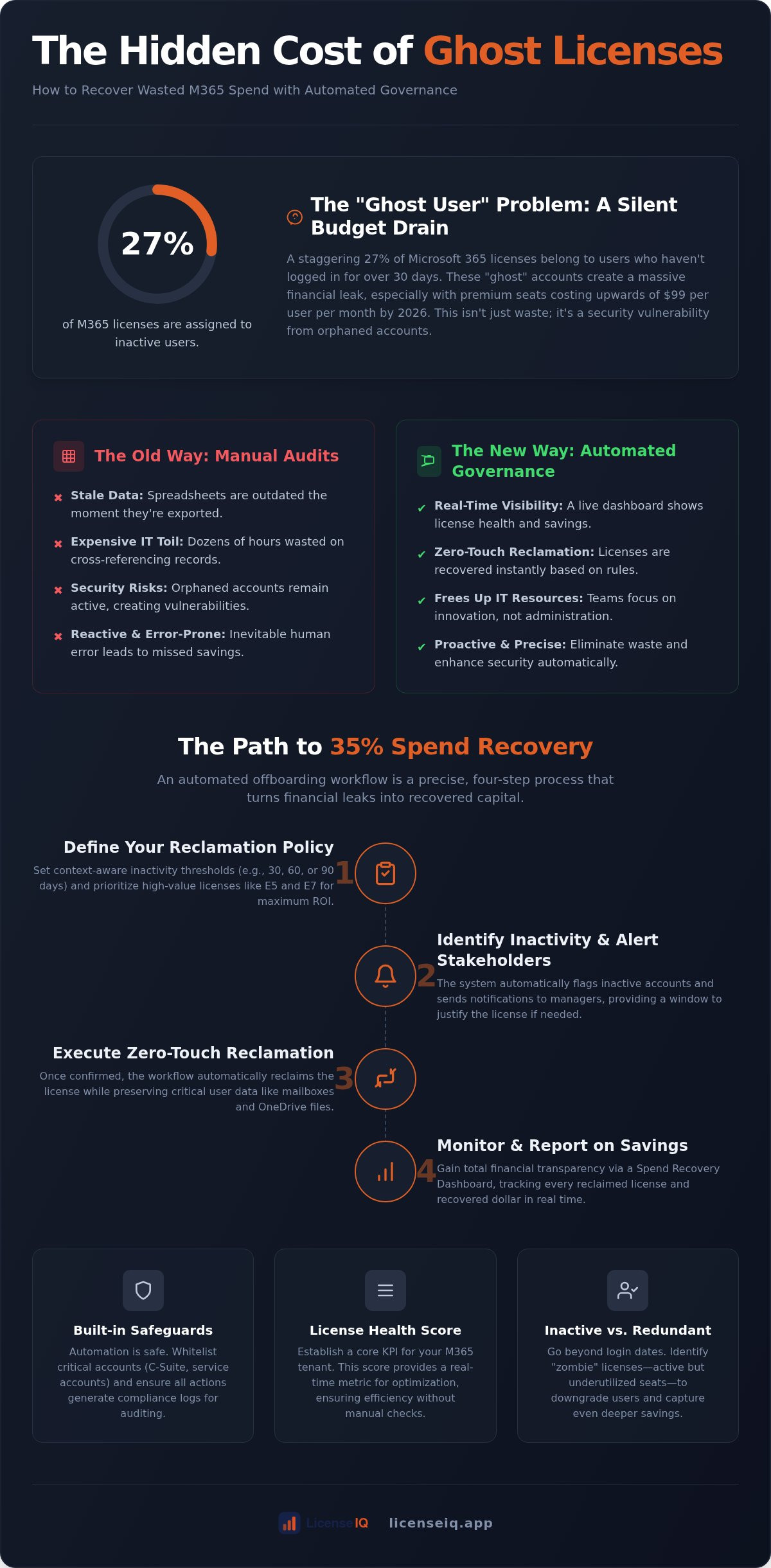
27% of your Microsoft 365 licenses are currently assigned to users who haven't logged in for over 30 days. In a 2026 environment where an E5 seat costs $60 per month and the E7 plan reaches $99, these "ghost" accounts represent a massive financial leak. Implementing an automated m365 offboarding workflow is no longer just a convenience; it's a critical financial necessity. Manual audits consume hours of expensive IT time and leave your organization vulnerable to security risks from orphaned accounts. This inefficiency drains your budget and distracts your team from high-value technical operations.
You likely agree that managing licenses through spreadsheets is a poor use of specialized leadership. We're here to change that. Discover how to eliminate manual toil and recover up to 35% of your Microsoft 365 budget through automated governance. This guide previews the shift to zero-touch reclamation and real-time visibility via a spend recovery dashboard. We'll outline a path to continuous financial accuracy that replaces organizational disorder with total operational clarity. It's time to stop paying for what you don't use and start monitoring your resources with precision.
Key Takeaways
- Identify and eliminate "ghost" accounts that drain up to 35% of your software budget through proactive license repossession.
- Transition from manual, error-prone audits to a zero-touch automated m365 offboarding workflow to reclaim expensive E5 and E7 seats instantly.
- Implement context-aware inactivity thresholds that trigger governance actions based on 30, 60, or 90-day usage patterns.
- Establish your License Health Score as a core KPI to ensure your M365 tenant remains optimized without manual intervention.
- Gain total financial transparency by monitoring every reclamation opportunity and recovered dollar through a centralized Spend Recovery Dashboard.
The Hidden Cost of Manual License Management in 2026
License reclamation is the proactive repossession of unused software seats to prevent capital leakage. In the 2026 Microsoft ecosystem, where an E7 license costs $99 per user every month, point-in-time blindness is a direct hit to your bottom line. Manual audits fail because they rely on stale data. By the time an IT manager exports a report, the information is already decaying. This creates a gap where SaaS sprawl thrives, leading to a fragmented environment where costs escalate without oversight. To counter this, the License Health Score has emerged as the new standard for operational efficiency, providing a real-time metric for tenant optimization.
Why Spreadsheets Are a Financial Liability
Static documents are the enemies of precision. M365 reports are often outdated within 24 hours of export, rendering spreadsheet-based Software Asset Management ineffective. This lag leads to the "Ghost User" problem: orphaned accounts that remain active and billed long after an employee departs. When offboarding is incomplete, the organization pays for premium features that nobody uses. License reclamation serves as a proactive financial safeguard that ensures every dollar spent aligns with an active, productive user. Without an automated m365 offboarding workflow, you're essentially guessing your monthly spend rather than controlling it.
The Opportunity Cost of IT Toil
Manual seat reassignment is a high-cost activity that yields low strategic value. IT professionals often spend dozens of hours each month cross-referencing HR logs with Entra ID records. This toil doesn't just waste salary; it prevents your team from focusing on strategic growth and security architecture. Shifting from reactive cleanup to automated governance changes the internal narrative from cleaning up the mess to maintaining a lean system. An automated m365 offboarding workflow replaces manual intervention with a vigilant, precise system that reclaims licenses the moment a user becomes inactive. This transition ensures that your technical resources are invested in innovation rather than administrative overhead.
Defining Your Automated M365 Reclamation Policy
Effective governance starts with a clear set of rules. You can't apply a single threshold to every department without creating friction. For most users, a 30 day inactivity window is a standard trigger for reclamation. However, seasonal employees or specific projects might require 60 or 90 day buffers. Your automated m365 offboarding workflow must distinguish between high value E5 waste and basic Business Standard seats. Recovering an E5 license at $60 per month offers a significantly higher ROI than a $14 per month seat. While automation drives efficiency, exceptions are non negotiable. Service accounts, C suite members, and accounts under legal hold must be whitelisted to prevent operational disruption. Integrating these rules into a comprehensive Office 365 offboarding checklist ensures that data security and spend recovery happen simultaneously.
Identifying Inactive vs. Redundant Licenses
An unused license is straightforward, but a redundant one is subtle. A user might sign in daily but only use web based apps, making their premium E5 license redundant. Triggers should look beyond the Last Sign in Date and analyze actual activity logs. We call these zombie licenses. They show technical activity but deliver no business value. By setting granular triggers, you can downgrade or reclaim seats based on actual usage patterns. To see how your current tenant scores against these metrics, you can run a quick scan of your environment to identify immediate savings.
Building Safeguards into the Automation
Security and continuity require safeguards. Never revoke a license without a notification workflow. Alerting a department manager five days before reclamation provides a window to justify the seat. This soft reclamation approach prevents accidental lockouts while maintaining financial discipline. Following the foundational steps in Microsoft's offboarding process ensures that mailbox data and OneDrive files are preserved before the license is pulled. Finally, every action in your automated m365 offboarding workflow must generate a compliance log. These audit trails are vital for future financial reviews and internal security audits. They provide the transparency needed to prove that your automation is both precise and secure.
PowerShell vs. AI-Native Governance: Choosing Your Method
Choosing between legacy scripting and AI-native platforms is a choice between manual maintenance and autonomous oversight. PowerShell is the traditional tool for automated license removal with PowerShell, but it places the entire burden of upkeep on your IT team. Modern governance requires more than just basic scheduled tasks that run at fixed intervals. It demands a system that understands the nuances of Mastering the M365 License Management Lifecycle. Without intelligence, your automation is just a blunt instrument that can cause as much friction as it solves.
The PowerShell Trap: Why Scripts Break
Scripts are inherently fragile. Microsoft frequently updates the Graph API, and these changes can break custom integrations without warning. This creates a relentless maintenance cycle for your engineers, who must constantly debug and update code just to keep the status quo. Beyond maintenance, there's the issue of security. Storing high-privilege credentials in local environments or script repositories introduces unnecessary risks to your tenant. CLI-based tools also lack the visual financial reporting required for executive oversight. You might reclaim a seat, but you won't see the real-time impact on your budget or your overall License Health Score. This lack of transparency makes it impossible to quantify the success of your automated m365 offboarding workflow to leadership.
The AI Advantage: Model Context Protocol
AI-native governance uses the Model Context Protocol to discover complex patterns of waste that static scripts simply miss. While a basic script looks for a "Last Sign-In" date, AI identifies users who are over-provisioned based on their actual application interactions. It recognizes if an E5 user is only accessing basic web apps and suggests a downgrade instantly. This isn't a snapshot taken once a week; it's continuous monitoring that provides total clarity. A 5-minute connection to your tenant replaces the weeks of custom build time required for traditional workflows. Implementing an automated m365 offboarding workflow through an AI platform ensures that your resources are monitored by a vigilant system that adapts to your environment. This speed and precision allow you to start recovering spend immediately rather than spending months building the tools to do so.
Implementing the Automated Reclamation Workflow
Deploying a governance system requires a structured approach that moves from discovery to autonomous action. It begins by establishing a secure bridge between your M365 tenant and the intelligence platform. Once the connection is live, the system executes an initial scan to establish a baseline License Health Score. This score serves as your primary metric for success, quantifying existing waste and identifying immediate recovery targets. By configuring an automated m365 offboarding workflow, you replace the reactive chaos of manual auditing with a proactive, vigilant system that maintains financial hygiene 24/7.
Step 1: Establishing Secure Connectivity
Security is the cornerstone of effective governance. You connect your M365 tenant via secure Microsoft Graph authentication, ensuring all interactions remain within the trusted Microsoft ecosystem. You can choose between read-only permissions for initial discovery or read-write permissions for active reclamation. During the tenant-wide scan, the system prioritizes data privacy by analyzing usage metadata rather than sensitive file content. A 5-minute audit replaces a week of manual work. This rapid connectivity provides immediate clarity, allowing you to see exactly where your budget is leaking without a lengthy implementation phase.
Step 2: Configuring the Governance Loop
Once connectivity is established, you must map users to their respective departments to provide the necessary context for reclamation. This mapping ensures that a developer's usage patterns aren't judged by the same criteria as a sales executive's. Instead of simple license removal, your automated m365 offboarding workflow can execute a strategic downgrade path. For example, the system can automatically transition an inactive E5 user to an E3 or F3 seat to preserve data while cutting costs. Integrating this governance loop with your HRIS allows for real-time employee status updates, ensuring that offboarding triggers the moment a departure is finalized.
All reclamation activities are centralized within the Spend Recovery Dashboard. This interface provides a granular view of every dollar recovered, allowing you to review recommendations or set the system to run on autopilot. Continuous monitoring prevents the accumulation of "ghost" accounts and ensures that your License Health Score remains high. To see these workflows in action and uncover obscured savings in your tenant, connect your environment to the LicenseIQ Platform for an instant assessment.
Recovering 35% of Spend with LicenseIQ’s Automated Workflows
LicenseIQ transforms obscured data into tangible financial returns. While manual audits identify names, this platform identifies currency. By implementing an automated m365 offboarding workflow, you can achieve up to 35% savings in your first 30 days. This isn't a theoretical projection; it's the result of real-time detection of idle E5 seats and orphaned accounts. Every reclamation opportunity is presented with a specific dollar value. This allows you to prioritize high-impact actions that immediately improve the financial health of your organization. You gain immediate clarity into where your budget is being wasted and how to stop it.
Actionable Insights Over Raw Data
Leadership doesn't need more spreadsheets; they need answers. The Spend Recovery Dashboard moves the conversation from "who is inactive?" to "how much can we save today?". This shift provides the transparency required for CFO level reporting, turning IT from a cost center into a source of efficiency. Your License Health Score acts as a benchmark, allowing you to track organizational progress against industry standards. It offers a visual narrative of your optimization journey. For a deeper dive into these strategies, see our guide on How to Reduce M365 Subscription Costs.
Continuous Financial Accuracy
Maintaining a lean tenant is a monthly hygiene task, not an annual event. An automated m365 offboarding workflow ensures that as your organization grows, your administrative overhead remains flat. You can scale your M365 footprint with the confidence that your resources are being monitored by a vigilant system. This relentless focus on data driven decision making eliminates the "subscription creep" that typically plagues expanding SMBs. It's about total clarity and the permanent elimination of waste. You no longer need to fear the next Microsoft price increase when you're only paying for what is actually used. This proactive stance ensures your company remains agile and financially disciplined.
Start your 5-minute M365 audit with LicenseIQ today.
Master Your Microsoft 365 Budget with Autonomous Oversight
Transitioning from manual audits to an automated m365 offboarding workflow replaces organizational disorder with total financial clarity. Legacy scripts fail to keep pace with Microsoft's evolving API landscape, leaving your tenant vulnerable to "ghost" accounts and budget leakage. Modern governance demands a proactive system that monitors application interactions in real time. By implementing AI-native automation powered by the Model Context Protocol, you ensure every license is a productive asset rather than a sunk cost.
The path to a leaner tenant is clear and immediate. You can stop the cycle of manual IT toil and start managing your resources with the precision of a digital auditor. Our real-time Spend Recovery Dashboard allows you to benchmark your progress and maintain continuous financial accuracy without manual intervention. It's time to reclaim your budget and reinvest those savings into strategic growth. Get Your Free M365 Health Score in 5 Minutes and discover how to save up to 35% on your Microsoft 365 subscriptions today. Your optimized environment is just a scan away.
Frequently Asked Questions
What is automated license reclamation for Microsoft 365?
It is the programmatic process of identifying and repossessing unused or underutilized software seats without manual IT intervention. By connecting directly to your tenant, an automated m365 offboarding workflow detects departed employees or inactive accounts and revokes their licenses. This ensures your organization only pays for active users. It eliminates the financial leakage caused by ghost accounts that often persist for months after an employee leaves.
How much can a company save by automating M365 license reclamation?
Organizations typically recover up to 35% of their total Microsoft 365 subscription spend within the first 30 days of implementation. These savings come from identifying disabled users and rightsizing over-provisioned seats. In a 2026 environment where premium E7 seats reach $99 per month, even small scale reclamation efforts yield significant capital returns. This process directly improves your overall License Health Score by eliminating waste.
Is it safe to automate the removal of Microsoft 365 licenses?
Yes, it is safe when you implement context-aware safeguards and notification loops. Modern governance platforms use read-write permissions via secure Microsoft Graph authentication to execute changes. By setting grace periods and alerting managers before a license is revoked, you prevent accidental service disruptions. This ensures your automated m365 offboarding workflow remains precise and secure. It maintains financial health while protecting essential user access.
How do you identify inactive users in Microsoft 365 automatically?
Identification occurs by analyzing metadata such as Last Sign-in Date, application activity logs, and Entra ID status. AI-native tools go beyond simple sign-in checks by evaluating specific application interactions to detect zombie users who log in but don't utilize premium features. This deep analysis provides a granular view of true engagement. It allows you to establish context-aware inactivity thresholds for different departments or roles.
Can I automate downgrading from E5 to E3 licenses?
Yes, you can automate strategic downgrades to optimize costs without removing access entirely. If a user with an E5 license only utilizes features available in an E3 or Business Premium plan, the system triggers an automatic right-sizing action. This method preserves essential data and functionality while instantly reducing your monthly bill. It is a highly effective strategy for managing users who are over-provisioned for their actual requirements.
What happens to user data when a license is reclaimed?
User data in OneDrive and Exchange is typically preserved for a standard 30-day grace period by Microsoft before permanent deletion. To ensure long-term security, your offboarding workflow should include steps to move files to a shared location or convert mailboxes to shared mailboxes before the license is pulled. This follows official best practices for data retention. It allows you to stop paying for premium seats immediately.
Does automated reclamation work for SMBs or just enterprises?
Automated reclamation is specifically beneficial for SMBs that lack the large IT teams required for manual auditing. While enterprises have higher seat counts, SMBs often feel the financial impact of wasted spend more acutely. AI-native platforms connect in minutes, providing small businesses with enterprise-grade governance. You get a real-time Spend Recovery Dashboard without the need for deep technical expertise or custom PowerShell maintenance.
How often should I run an automated license reclamation workflow?
You should run reclamation workflows continuously to maintain permanent financial hygiene. Unlike manual audits that happen quarterly or annually, an automated system provides constant oversight. It detects departures and inactivity the moment they occur. This ensures that your License Health Score remains high at all times. Relentless monitoring prevents the accumulation of waste and ensures your software budget always aligns with your actual workforce requirements.


