

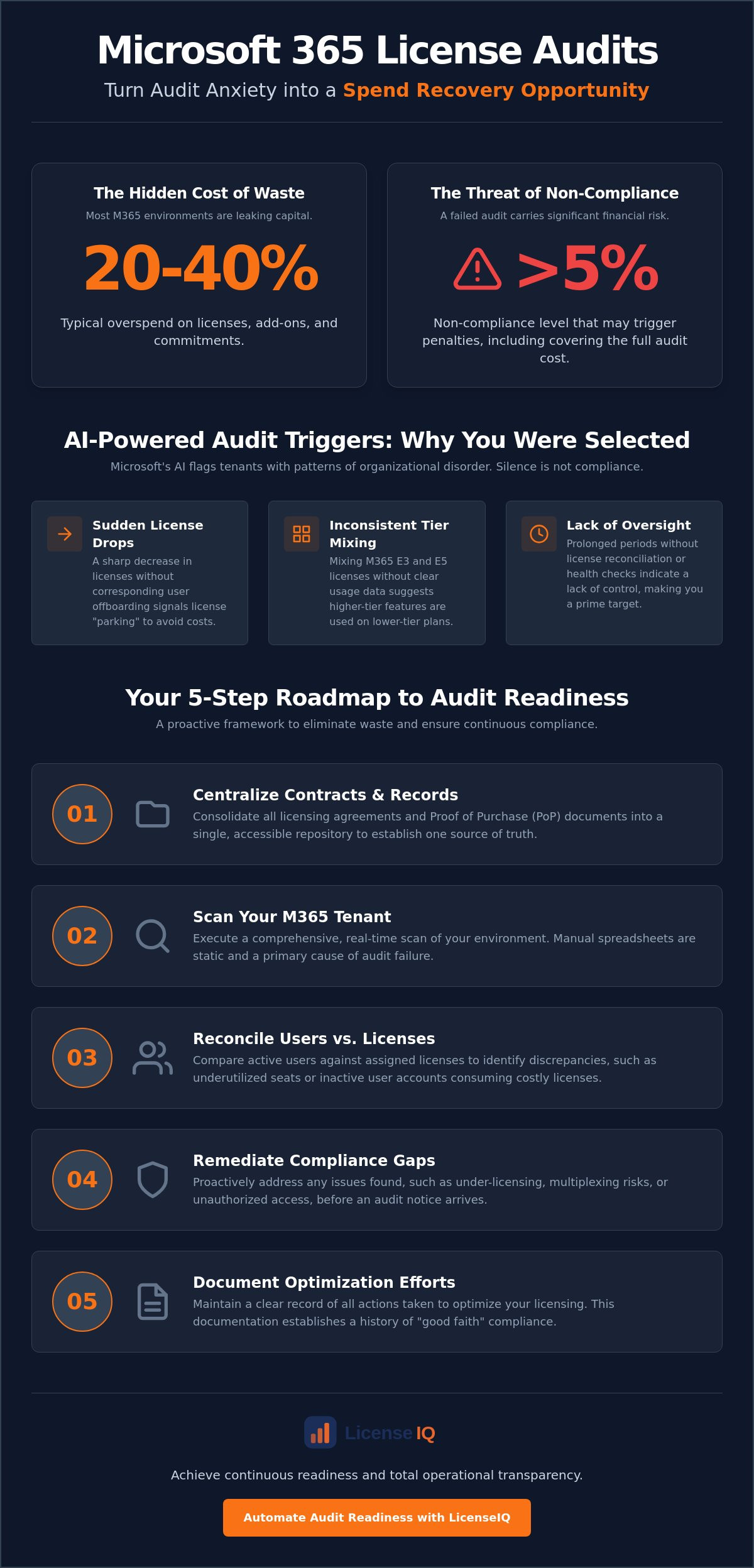
Most mid-sized Microsoft 365 environments overspend by 20% to 40% on licenses, add-ons, and commitments. While the fear of a 5% non-compliance penalty is real, the hidden cost of licensing waste is often a greater threat to your bottom line. Successfully preparing for a microsoft license audit isn't just about defensive compliance. It's a strategic financial hygiene practice that uncovers obscured details and recovers wasted capital.
Managing the July 2026 price hikes and complex M365 tiers often feels like a full-time administrative burden. You need clarity, not more manual data collection. This article promises to turn your audit anxiety into a spend recovery opportunity. We'll provide a roadmap to achieve zero compliance findings while reducing licensing waste through automated oversight. You'll discover how to transition from organizational disorder to a state of total operational transparency. By the end of this guide, you'll have a strategy to ensure your resources are monitored by a precise and vigilant system, requiring minimal IT effort.
Key Takeaways
- Identify how Microsoft’s new AI-native algorithms use telemetry to trigger audits based on licensing anomalies and usage patterns.
- Implement a 5-step framework for preparing for a microsoft license audit that prioritizes contract centralization and real-time tenant scanning.
- Transform compliance requirements into a spend recovery opportunity by identifying underutilized seats and optimizing M365 license tiers.
- Avoid significant financial penalties by addressing hidden risks like multiplexing and the inaccuracy of manual, estimated data collection.
- Achieve continuous readiness using the License Health Score to maintain total operational transparency and financial hygiene.
Understanding the Microsoft License Audit Landscape in 2026
A Microsoft license audit is a formal verification of your software usage against your legal agreements. It's no longer a manual process of counting seats. In 2026, Microsoft uses AI-native algorithms to trigger audits based on specific licensing anomalies found in your tenant telemetry. SMBs are no longer under the radar. Automated scanning tools have made it cost-effective for Microsoft to monitor organizations of all sizes with surgical precision. This shift means that silence from Microsoft isn't a sign of compliance; it's often just the quiet before an automated trigger fires.
Success in preparing for a microsoft license audit requires understanding the two primary types of reviews. A Software Asset Management (SAM) engagement is often presented as a voluntary, helpful service. While it aims to provide clarity, it also serves as a data-gathering exercise for Microsoft. In contrast, a formal Legal Audit is mandatory and conducted by independent third-party firms like Deloitte or KPMG. These firms are compensated by Microsoft, which creates a natural incentive for them to find discrepancies. Implementing robust Software Asset Management practices is your first line of defense against these high-stakes reviews. If an audit finds non-compliance of more than 5%, your organization may be required to cover the full cost of the audit itself.
The 2026 Audit Triggers: Why You Were Selected
Microsoft's AI systems look for patterns that suggest organizational disorder or potential non-compliance. A sudden drop in license counts without corresponding user offboarding is a major red flag. This often signals that a company is attempting to "park" licenses to avoid costs. Inconsistent mixing of M365 E3 and E5 licenses across a tenant also attracts attention. Without clear usage data, Microsoft assumes you're using higher-tier features on lower-tier licenses. Prolonged periods without a license reconciliation or a formal health check suggest a lack of oversight, making your organization a prime candidate for a deeper look. These triggers are calculated to identify hidden waste and compliance gaps before you even realize they exist.
Your Rights vs. Microsoft’s Contractual Power
Your relationship with Microsoft is governed by the Microsoft Business and Services Agreement (MBSA). This contract contains a specific audit clause that grants Microsoft the right to verify your compliance. You're typically entitled to a 30-day notice period before a formal audit begins. It's vital to understand what data Microsoft is legally entitled to see. They can verify deployment and usage data, but they don't have a blank check to access your proprietary business information. Knowing these boundaries is essential when preparing for a microsoft license audit. Total clarity on your contractual obligations prevents over-disclosure and protects your corporate resources.
By maintaining a vigilant system of oversight, you can turn these threats into spend recovery opportunities. Organizations that proactively monitor their status via the LicenseIQ Platform aren't just compliant; they're efficient. They eliminate the waste that AI triggers often target, ensuring that every dollar spent on licensing is backed by verified usage and total operational transparency.
A 5-Step Framework for Preparing for a Microsoft License Audit
Audit readiness is not a defensive posture. It is a structured operational process designed to eliminate financial waste and ensure contractual compliance. Organizations must move beyond reactive scrambling and adopt a proactive framework. This five-step approach ensures your environment is optimized before a formal notice arrives. It transforms the burden of preparing for a microsoft license audit into a disciplined exercise in resource management.
- Step 1: Centralize all licensing contracts and Purchase Records (PoP) into a single repository.
- Step 2: Execute a comprehensive scan of your current M365 tenant to capture real-time usage data.
- Step 3: Reconcile active users against assigned license seats to identify discrepancies.
- Step 4: Remediate compliance gaps by addressing under-licensing or unauthorized access.
- Step 5: Document all optimization efforts to establish a record of "good faith" compliance.
Step 1 & 2: Establishing Your Source of Truth
Manual spreadsheets are the primary cause of audit failure. They are static, prone to human error, and become obsolete the moment they are saved. Effective data collection requires a live connection to your environment. You must scan for unassigned licenses and "Shadow IT" where departments procure software outside central IT oversight. For organizations managing global agreements, consolidating multiple tenants into a single visibility layer is mandatory. This creates the transparency needed to navigate an Essential Guide to Handling a Microsoft License Audit. Total clarity on your entitlements prevents Microsoft from making assumptions based on incomplete data.
Step 3 & 4: Bridging the Compliance Gap
Financial waste often hides within premium license tiers. Organizations frequently assign high-cost M365 E5 licenses to inactive users or deskless workers who only require basic F1 or F3 functionality. This mismatch is a primary target for automated scanning. You must also address "multiplexing" risks. This occurs when users access Microsoft data indirectly through third-party applications without individual licenses. Identifying these risks early allows you to reallocate resources through automated governance workflows. A reconciliation report serves as the primary document for your audit defense by proving your current usage aligns with your purchased entitlements.
Documenting these steps provides a clear audit trail. If Microsoft identifies minor discrepancies, a history of active optimization proves your commitment to compliance. This "good faith" record can be the difference between a simple correction and a significant financial penalty. By treating audit prep as financial hygiene, you secure your organization’s resources and eliminate the risk of service disruptions.
Turning Audit Prep into Spend Recovery
Shift your focus from fear to fiscal discipline. While most leaders view preparing for a microsoft license audit as a threat, it's actually the ideal window for microsoft 365 license optimization. SMBs frequently uncover waste exceeding 30% during the pre-audit scan. This isn't just about avoiding penalties. It's about reclaiming capital that's currently leaking out of your IT budget. By identifying these obscured details, you turn a compliance hurdle into a spend recovery event.
We measure this efficiency through a License Health Score. Compliance ensures you aren't under-licensed, but hygiene ensures you aren't over-paying. A high score indicates that every seat is assigned to an active user on the correct tier. This proactive oversight creates a sense of security. It ensures your resources are being monitored by a precise system. It's a results-first approach that ensures your core value proposition is never lost in technical complexity.
Identifying Redundant and Inactive Licenses
"Zombie" accounts are a primary source of organizational disorder. These are licenses assigned to former employees, vendors, or contractors who no longer have access to your systems. Using a standardized office 365 offboarding checklist eliminates these risks immediately. You should also audit service accounts and test environments. These often hold active licenses long after a project ends. Reclaiming these seats provides instant spend recovery and improves your overall financial health. This meticulous approach prevents future audit triggers and ensures operational transparency.
Right-Sizing: M365 E3 vs. E5 Analysis
Many organizations pay for premium E5 licenses when E3 features satisfy their operational needs. Right-sizing is a critical component of preparing for a microsoft license audit because it eliminates the financial bloat that attracts scrutiny. With Microsoft 365 E3 prices increasing to $39 and E5 to $60 in July 2026, the cost of over-licensing is higher than ever. You must analyze which users actually utilize premium security, compliance, or voice features. Implementing a "Mix and Match" strategy allows you to assign specific microsoft 365 license types to the correct personas. Downgrading surplus licenses before an auditor arrives generates a measurable ROI. It simplifies your compliance posture while protecting your corporate resources. Using a Spend Recovery Dashboard allows you to track these savings in real-time, providing immediate clarity in a complex operational environment.
Common Audit Pitfalls and How to Avoid Them
Organizations often fail audits not because of intentional non-compliance, but due to operational negligence. Relying on "estimated" data is a primary tactical error. Manual inventory tracking cannot keep pace with the dynamic nature of M365 environments. Successful preparing for a microsoft license audit requires real-time tenant scans that capture every active entitlement. Without this precision, you're essentially guessing your compliance status during a high-stakes financial review. Guesswork is not a defense strategy.
Multiplexing remains a silent budget killer. This occurs when users access Microsoft data through third-party applications or pooled connections. Microsoft's stricter January 2026 telemetry-based enforcement for Dynamics 365 proves they can now track these indirect access points with surgical accuracy. If you don't account for these connections, you face significant financial penalties. Additionally, ignoring the microsoft 365 license management lifecycle leads to organizational disorder. A final common mistake is over-disclosure. Providing more data than the auditor requested creates new avenues for scrutiny. Limit your responses to the specific scope of the audit to protect your corporate resources.
The Danger of the "Self-Verification" Trap
Microsoft’s request for "Self-Verification" is rarely a casual check. It's often a precursor to a formal, third-party audit. Admitting non-compliance in this report without a pre-existing remediation plan is a major risk. You essentially hand Microsoft the evidence they need to trigger a full investigation. Use automated governance to validate your findings before submission. This ensures your self-verification report is accurate, defensible, and backed by hard data. Total transparency with your own data is the only way to maintain security when facing the auditor.
Managing the Auditor Relationship
Control the flow of information. You should never allow an auditor direct access to your live tenant. This allows them to "fish" for discrepancies outside the original audit scope. Instead, provide data-backed reports that answer specific queries. Establish a single point of contact for all communications. This prevents conflicting messages and ensures a unified defense. When an auditor makes incorrect assumptions, push back with telemetry-driven evidence. By preparing for a microsoft license audit with precise documentation, you shift the power dynamic back in your favor. Proactive oversight turns a potential penalty into a controlled administrative task.
Stop guessing your compliance status. Use the LicenseIQ Platform to identify and remediate pitfalls before they become costly liabilities.
Automating Audit Readiness with LicenseIQ
Manual preparation is a relic of organizational disorder. In an era of AI-driven triggers, you need an AI-native solution. The LicenseIQ Platform serves as the vigilant guardian of your M365 resources. It replaces reactive fire drills with continuous, automated oversight. By integrating directly with your tenant, it provides immediate clarity in complex operational environments. This is the results-first approach specialized leadership requires to protect corporate capital.
At the center of this system is the License Health Score. This is a real-time metric that measures both your compliance status and your spending efficiency. It removes the guesswork from preparing for a microsoft license audit. A high score confirms that your resources are being monitored by a precise system. It ensures you eliminate waste and secure your perimeter against telemetry-based triggers. You gain total transparency without the administrative burden of manual spreadsheets. This system identifies obscured details before they become financial liabilities.
Continuous Monitoring vs. Reactive Auditing
Connect your tenant in minutes to establish a baseline compliance scan. This replaces the time-consuming manual data collection that often leads to errors. Automated Governance Workflows then take over. They perpetually scan for inactive users and unassigned licenses that drain your budget. These workflows provide dollar-value recommendations for immediate M365 cost optimization. You don't wait for an auditor to find discrepancies. You find and fix them yourself. This proactive stance ensures your financial health is never compromised by hidden licensing anomalies. It turns a potential threat into a structured process of spend recovery.
Generating Audit-Ready Reports in Seconds
Recover up to 35% of your M365 spend and stay audit-ready with LicenseIQ.
Secure Your Financial Future with Continuous Compliance
Microsoft's shift toward AI-driven telemetry means that organizational disorder is now a visible liability. Successfully preparing for a microsoft license audit requires a shift from reactive defense to proactive governance. You've learned that compliance is merely the baseline; the real victory lies in reclaiming the capital typically lost to licensing waste. By implementing a structured framework and avoiding the trap of over-disclosure, you transform a legal threat into a spend recovery opportunity.
Total operational transparency is no longer optional for specialized leadership. AI-native Automated Governance Workflows provide the oversight needed to maintain a high License Health Score without manual IT effort. You can secure your perimeter and optimize your environment simultaneously. Connect to your tenant in minutes to uncover obscured details and eliminate the redundant accounts draining your resources. It's time to replace administrative burden with a vigilant system of digital guardianship.
Take control of your Microsoft ecosystem today. Scan your M365 tenant for free and get your Health Score at LicenseIQ to identify how you can save up to 35% on M365 subscriptions. You can build a more resilient, efficient, and secure organization starting right now.
Frequently Asked Questions
How long does a Microsoft license audit typically take?
A Microsoft license audit typically lasts between three and six months from the initial notification to the final settlement. The duration depends heavily on the complexity of your environment and the speed of your data collection. Organizations that maintain continuous oversight can shorten this timeline by providing precise, audit-ready reports the moment the request arrives.
What is the penalty for Microsoft license non-compliance?
The primary penalty for non-compliance is the requirement to purchase missing licenses at current retail prices, often without your standard volume discounts. If the audit identifies a discrepancy of more than 5%, your organization may also be forced to cover the full cost of the third-party auditor. Successfully preparing for a microsoft license audit prevents these unbudgeted expenses by identifying gaps early.
Can I refuse a Microsoft license audit?
You cannot legally refuse a formal audit if you've signed a Microsoft Business and Services Agreement (MBSA). This contract grants Microsoft the right to verify your compliance. While you can negotiate the specific audit window or the scope of the review, total refusal is a breach of contract that can lead to legal action or the termination of your software services.
What is a Microsoft SAM engagement vs. a formal audit?
A SAM engagement is a voluntary, collaborative review designed to help you optimize your environment. A formal audit is a mandatory, legally-binding investigation conducted by independent firms like Deloitte or KPMG. It's important to note that data shared during a "friendly" SAM engagement is often used by Microsoft to trigger a formal audit if discrepancies are found.
How much does it cost to prepare for a Microsoft audit?
Does Microsoft audit small businesses?
Microsoft frequently audits small businesses because AI-native scanning makes it cost-effective to monitor smaller tenants. In 2026, no organization is "under the radar." Automated telemetry identifies licensing anomalies regardless of company size. SMBs are often targeted because they are less likely to have dedicated compliance teams, making them more prone to accidental non-compliance.
How often does Microsoft conduct license audits?
Microsoft typically conducts formal audits every three to five years for most organizations. However, the 2026 shift toward AI-driven triggers means audits can now occur more frequently if your tenant shows usage anomalies. Maintaining a high License Health Score is essential for preparing for a microsoft license audit and ensuring you don't attract unnecessary attention from Microsoft’s automated scanning systems.


