

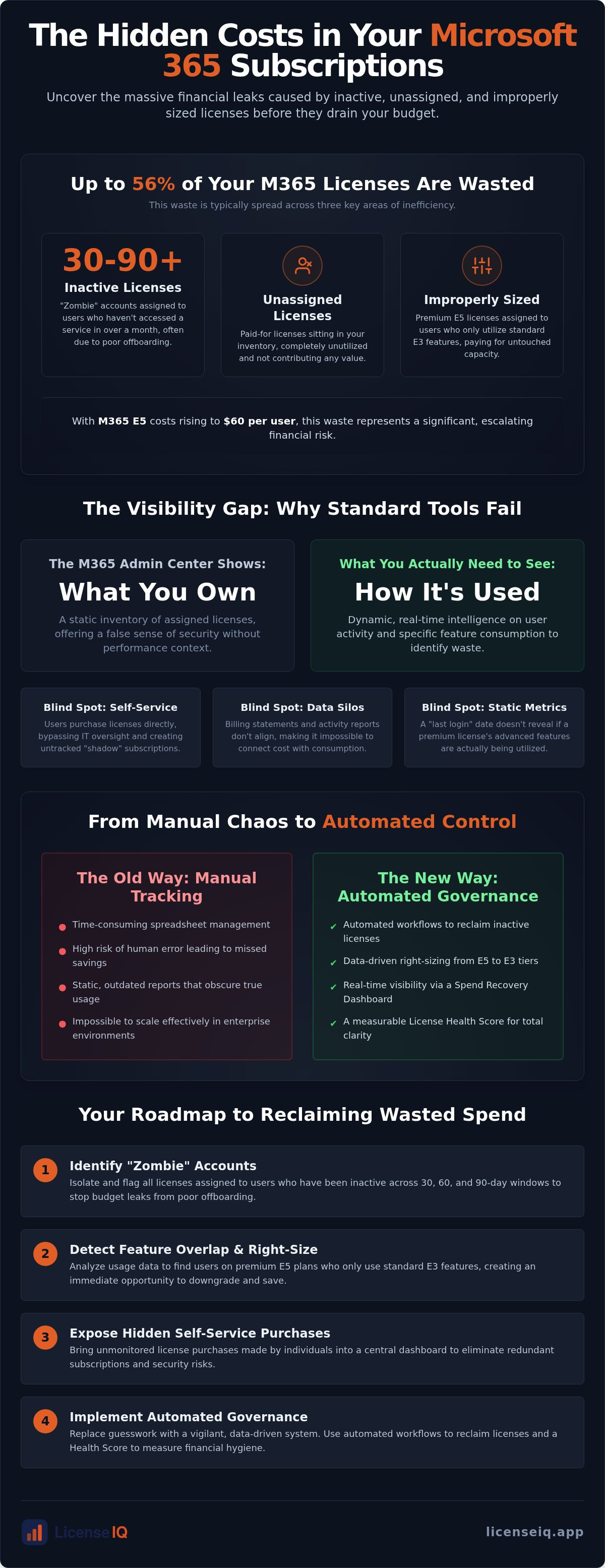
Research indicates that up to 56% of enterprise Microsoft 365 licenses are currently inactive, unassigned, or improperly sized. With the July 2026 price increases pushing Microsoft 365 E5 costs to $60 per user, these inefficiencies represent a massive financial leak. You're likely feeling the pressure of an escalating bill that lacks transparency. Most IT leaders face significant challenges in microsoft 365 license management, specifically when trying to map actual user activity against rising subscription costs.
It's frustrating to watch "zombie" licenses accumulate because of manual offboarding or unmonitored self-service purchases. We'll show you how to resolve these visibility gaps and reclaim your budget. This article provides a clear roadmap to transition from administrative chaos to total oversight. You'll learn how to implement automated workflows that reclaim inactive seats and establish a measurable Health Score for your SaaS governance. By the end, you'll have the framework to turn your Microsoft 365 environment into a lean, high-performance asset that stops draining your resources. It's time to replace guesswork with a vigilant, data-driven system that protects your bottom line.
Key Takeaways
- Identify hidden self-service purchases that bypass standard IT oversight and inflate your monthly subscription costs.
- Solve the most persistent challenges in microsoft 365 license management by isolating "zombie" accounts and inactive users across 30, 60, and 90-day windows.
- Detect feature overlap where users are assigned premium E5 tiers despite only utilizing standard E3-level application sets.
- Replace outdated manual tracking with Automated Governance Workflows to reclaim licenses efficiently while eliminating the risk of human error.
- Use a Spend Recovery Dashboard and a License Health Score to transform complex data into clear, actionable financial hygiene metrics.
The Visibility Gap: Why the Microsoft 365 Admin Center Isn’t Enough
The Microsoft 365 Admin Center offers a false sense of security. It provides a list of users and assigned licenses, but it lacks a cohesive management strategy. You see what you own, but you don't see how those assets are actually performing. This disconnect is one of the primary challenges in microsoft 365 license management. Without a clear correlation between cost and consumption, your budget remains vulnerable to invisible leaks. Effective Software Asset Management (SAM) requires more than a static inventory; it demands a vigilant audit of every active subscription to ensure every dollar spent drives value.
Data fragmentation further complicates the issue. Billing statements and activity reports rarely align in manual systems. One report shows a license is assigned; another shows it hasn't been touched in months. This obscurity isn't just an administrative headache. It's a compounding cost. Invisible waste grows over quarterly and annual cycles, often reaching a point where significant portions of the total spend provide zero value to the organization. When billing data and activity reports exist in silos, transparency is impossible.
The Problem with Self-Service Purchases
Microsoft's ecosystem allows individual users to purchase licenses directly through their corporate accounts. These self-service purchases often bypass IT oversight entirely. They create a massive blind spot where redundant subscriptions live in the shadows. You can't unassign what you can't see. Beyond the financial waste, these unmanaged subscriptions introduce security risks by operating outside of established corporate governance protocols. It's a recipe for organizational disorder that drains resources every billing cycle without appearing on your primary dashboard.
Static Reports vs. Dynamic Intelligence
Standard M365 reports focus on presence, not productivity. A "last login" date doesn't tell you if a user actually needs an E5 license or if they're just checking email. These static metrics are often misleading. They suggest a license is active when it's actually underutilized or redundant. To find real savings, you need dynamic intelligence that monitors specific feature usage in real time. The LicenseIQ platform bridges this gap by providing the oversight that standard tools hide. It transforms fragmented data into a clear Spend Recovery Dashboard, allowing you to move from passive observation to proactive governance. By identifying these gaps, you can resolve the most persistent challenges in microsoft 365 license management and reclaim your budget instantly.
Identifying Inactive Users and Redundant License Tiers
Visibility is the first step, but recovery requires surgical precision. Identifying waste is among the most difficult challenges in microsoft 365 license management because the data is often buried under layers of administrative noise. Organizations frequently pay for premium capacity that remains untouched. Nearly 40% of firms struggling with software license compliance find that their biggest financial leaks come from accounts that shouldn't exist or tiers that don't match actual work patterns.
Zombie accounts represent a silent drain on corporate capital. These are licenses assigned to users who haven't accessed a service in 30, 60, or 90 days. Often, these are offboarding leaks. When an employee leaves, their license should be reclaimed instantly. Instead, many accounts linger for months, quietly consuming budget. Beyond simple login timestamps, true inactivity metrics must analyze specific application usage to ensure you aren't paying for "ghost" users who only exist on your billing statement.
The High Cost of Inactive Users
Inactivity is a spectrum. A user might log in to check email but never touch the advanced security or analytics tools included in their premium subscription. This creates a high monthly burn rate. For enterprise environments, the cost of unassigned or unused licenses can reach thousands of dollars per month. To stop this leak, follow a structured Office 365 Offboarding Checklist 2026 to secure data and reclaim spend immediately after a user departs. Every day a zombie account remains active is a day of guaranteed financial waste.
Right-Sizing: E3 vs. E5 Optimization
Feature overlap is a pervasive issue. Many organizations default to Microsoft 365 E5 for all staff, even though a significant percentage only requires E3-level functionality. With E5 prices reaching $60 per user as of July 2026, the cost of this over-provisioning is substantial. A "Step-Down" strategy involves moving users to more appropriate tiers like F3 or Business Basic based on their actual feature usage. Data-driven insights allow you to justify these license downgrades to stakeholders by proving that productivity won't be impacted. By analyzing which features are actually in use, you can solve the core challenges in microsoft 365 license management and align your spend with reality. You can audit your tenant in minutes to see exactly where these redundant tiers are hiding.
Manual Spreadsheets vs. Automated Governance Workflows
Relying on manual spreadsheets is a high-stakes gamble. The "Spreadsheet Trap" occurs because static data becomes obsolete the moment you save the file. In a modern enterprise, users join, move, and leave daily. Manual tracking cannot match this velocity. This inefficiency is one of the core challenges in microsoft 365 license management, leading to "zombie" licenses that drain budgets for months. When an organization exceeds 50 users, manual governance fails to scale, resulting in fragmented oversight and financial leaks.
IT teams often resort to manual audits to find savings, but this introduces significant risk. Human error during these audits can lead to unassigning critical licenses by mistake, causing immediate operational downtime. Accuracy is paramount when evaluating software licensing costs. Automated systems eliminate this risk by applying logic-based rules that ensure every action is data-driven and precise. AI-native governance ensures continuous financial accuracy without the need for constant manual intervention. This same principle of using AI to replace manual tasks can be applied to employee training; for example, you can learn more about Spacewize to discover how to transform static documents into interactive e-learning courses within minutes.
Many administrators use custom PowerShell scripts to bridge the gap. While better than spreadsheets, scripts carry hidden labor costs. They require constant maintenance to keep up with Microsoft’s evolving API changes. Manual scripts often fail to address the complex challenges in microsoft 365 license management because they don't account for the financial impact of licensing tiers. They can tell you if a user is active, but they don't calculate the specific spend recovery potential. Transitioning to automated governance moves the focus from "running code" to "reclaiming capital."
Continuous Monitoring: The New Standard for 2026
Quarterly audits are no longer sufficient. By the time you find a wasted license, you've already paid for three months of inactivity. Continuous monitoring is the only way to maintain financial hygiene in 2026. Mastering the Microsoft 365 License Management Lifecycle requires real-time oversight that manual processes cannot provide. Using the Model Context Protocol, the LicenseIQ platform automates these workflows, identifying and reclaiming inactive seats in minutes. This proactive stance ensures your Health Score remains high and your budget remains protected against the hidden costs of organizational disorder.
5 Steps to Audit and Recover Wasted M365 Spend
Stop guessing and start recovering. Effective financial hygiene requires a structured approach to eliminate the waste hidden in your tenant. By following these five steps, you can navigate the most common challenges in microsoft 365 license management and reclaim up to 35% of your subscription spend. This process moves you from administrative observation to active resource protection.
- Step 1: Connect your tenant to an intelligence platform for a baseline scan.
- Step 2: Identify and terminate "zombie" licenses held by inactive users.
- Step 3: Audit premium license tiers (E5/G5) against actual feature usage.
- Step 4: Consolidate redundant licenses and eliminate self-service sprawl.
- Step 5: Implement automated governance to prevent waste from returning.
Step 1 & 2: Establishing Your Baseline
Establishing a baseline shouldn't take weeks. You can perform a comprehensive audit in five minutes without specialized IT degrees. The goal is to identify the "low-hanging fruit" of immediate spend recovery. Focus first on users who haven't logged in for 30 days or more. These "zombie" accounts are pure financial waste. You can reduce M365 subscription costs by terminating these licenses immediately, providing an instant win for your IT budget.
Next, move to Step 3 and 4 by scrutinizing your highest-cost tiers. With Microsoft 365 E5 prices reaching $60 per user as of July 2026, every unused premium seat is a significant drain. Audit these against actual feature usage. Many users assigned E5 only utilize E3-level applications. Consolidate these tiers and eliminate self-service purchases that have bypassed your oversight. These overlapping subscriptions are frequent challenges in microsoft 365 license management that often go undetected in the standard Admin Center.
Step 5: Ensuring Long-Term Financial Hygiene
Audit results are only temporary unless you automate the oversight. Step 5 is about making your savings permanent. Set up real-time alerts for new inactive users or unassigned licenses that linger in your inventory. Automate your offboarding process to reclaim licenses the moment an employee departs. This ensures your License Health Score remains high and prevents "zombie" accounts from accumulating again. A recurring spend recovery cadence, powered by Automated Governance Workflows, keeps your organization lean and financially transparent. Start your 5-minute spend recovery audit today to see exactly how much you can reclaim.
Achieving Total Clarity with LicenseIQ’s Spend Recovery Dashboard
Implementation is zero-friction. The platform connects to your tenant in minutes to discover wasted spend, providing enterprise-grade intelligence tailored for SMBs. This speed is a direct solution to the common objection that audits take too much time. By centralizing obscured details into a single, proactive interface, you move from organizational disorder to total transparency. For organizations managing complex digital transformations, this approach mirrors the efficiency brought by expert SAP implementation partners who specialize in streamlining enterprise ecosystems. Similarly, IT firms can leverage MSPPro to deliver this level of automated oversight and managed service excellence to their own clients. Every recommendation is actionable, allowing you to reclaim your budget with a few clicks rather than manual data entry.
The License Health Score is your primary indicator of operational transparency. It's a vigilant metric that monitors the gap between assigned licenses and actual user engagement. Several factors contribute to this score, including the presence of zombie accounts, unassigned licenses, and premium tier over-provisioning. By centralizing these details, the platform provides a proactive status report on your financial hygiene. You can use this metric to justify budget decisions and prove to stakeholders that IT resources are being managed with meticulous precision. For those in education who need similar real-time visibility into engagement, you can check out Rise to track student performance and analytics. Achieving a perfect score is possible through Automated Governance Workflows that ensure these challenges in microsoft 365 license management never return.
Manual audits are expensive and prone to error. When you compare the cost of the platform against the potential 35% savings on subscriptions, the ROI is immediate and measurable. LicenseIQ acts as an active participant in your company's growth by ensuring every dollar spent on software is a dollar invested in productivity. It functions as a digital auditor that's always one step ahead, protecting your bottom line against the rising costs of the Microsoft ecosystem. This relentless focus on data-driven decision-making turns your M365 environment from a cost center into a lean, high-performance asset. Recover your wasted M365 spend with LicenseIQ today and secure your organization's financial health.
Securing Your Cloud Budget for Long-Term Growth
Financial hygiene in the Microsoft ecosystem isn't a one-time event; it's a continuous state of vigilance. Relying on manual spreadsheets or the limited insights of the standard Admin Center leaves your organization vulnerable to invisible waste. You've seen how "zombie" accounts and redundant premium tiers can drain resources without oversight. Transitioning to a proactive model is the only way to solve the recurring challenges in microsoft 365 license management and protect your bottom line. By establishing a baseline and automating reclamation, you turn administrative disorder into operational transparency.
Leveraging AI-native automated governance workflows allows you to maintain a high License Health Score with zero manual effort. This precision ensures your resources are always aligned with actual user activity, providing instant financial accuracy. You can save up to 35% on software subscriptions by eliminating the gaps that standard tools hide. It's time to replace guesswork with a system that acts as a dedicated guardian of your corporate resources. Take control of your tenant and ensure your growth isn't hampered by avoidable inefficiencies.
Discover and recover wasted M365 spend in minutes with LicenseIQ
Frequently Asked Questions
What are the biggest challenges in Microsoft 365 license management?
The primary hurdles involve a lack of visibility into actual user activity and the unchecked proliferation of self-service purchases. Many IT leaders struggle to reconcile monthly billing statements with real-world consumption patterns. These challenges in microsoft 365 license management lead to "zombie" accounts and redundant premium tiers that inflate budgets. Without a centralized view, organizations often pay for capacity they don't need, resulting in significant financial waste.
How do I find unassigned Microsoft 365 licenses?
You can locate unassigned licenses through the Microsoft 365 Admin Center under the "Billing" and "Licenses" tab. However, this view only shows what is technically available, not what is being wasted. To truly optimize, you need to identify licenses assigned to inactive users or former employees. Professional governance tools provide a deeper scan, highlighting seats that have been paid for but haven't been utilized for 30 days or longer.
Can I see which users are not using their assigned M365 licenses?
Yes, the Admin Center provides usage reports, but they are often static and difficult to interpret for financial recovery. These reports show last login dates, but they don't correlate that data with the cost of the specific license tier. A more efficient approach involves using a specialized dashboard that flags users with low engagement. This allows you to differentiate between a user who checks email and one who requires premium features.
What is the risk of manual Microsoft 365 license tracking?
Manual tracking relies on spreadsheets that are outdated the moment they're saved. The primary risk is human error, which can lead to accidental deletion of critical user data or the retention of expensive "zombie" licenses. As organizations grow beyond 50 users, manual audits become impossible to maintain. This lack of real-time oversight ensures that challenges in microsoft 365 license management remain unresolved and costly for the organization.
How much can a company save by optimizing Microsoft 365 licenses?
Organizations can typically save up to 35% on their annual subscription costs by implementing proactive optimization. This is achieved by reclaiming licenses from inactive users, rightsizing tiers from E5 to E3, and eliminating redundant self-service purchases. Given that enterprise licenses like M365 E5 now cost $60 per user as of July 2026, even a small percentage of recovered seats translates into substantial capital that can be reinvested into growth.
What is a Microsoft 365 License Health Score?
A License Health Score is a proprietary metric that measures organizational efficiency by comparing assigned licenses to actual usage. It provides an instant status report on your financial hygiene. A high score indicates that your tenant is lean and optimized, while a low score suggests significant waste from inactive accounts or unmanaged sprawl. This score serves as a vital benchmark for leadership to monitor the long-term health of their SaaS governance.
How does automated offboarding save money on M365?
Automated offboarding ensures that licenses are reclaimed the instant an employee departs. Manual processes often result in "ghost" accounts that remain active and billable for months after a user has left the company. By using Automated Governance Workflows, you eliminate this lag time. The system identifies departing users and immediately returns their licenses to the available pool, preventing unnecessary monthly charges from accumulating on your billing statement without oversight.
Why are self-service purchases a challenge for IT admins?
Self-service purchases allow individual users to buy licenses directly, often bypassing IT oversight and corporate procurement protocols. These subscriptions are difficult to track because they don't always appear in the primary Admin Center views. They lead to redundant spending where a user might have both a corporate-assigned license and a personal one. This sprawl creates a "shadow IT" environment that complicates auditing and inflates the total cost of ownership.


