

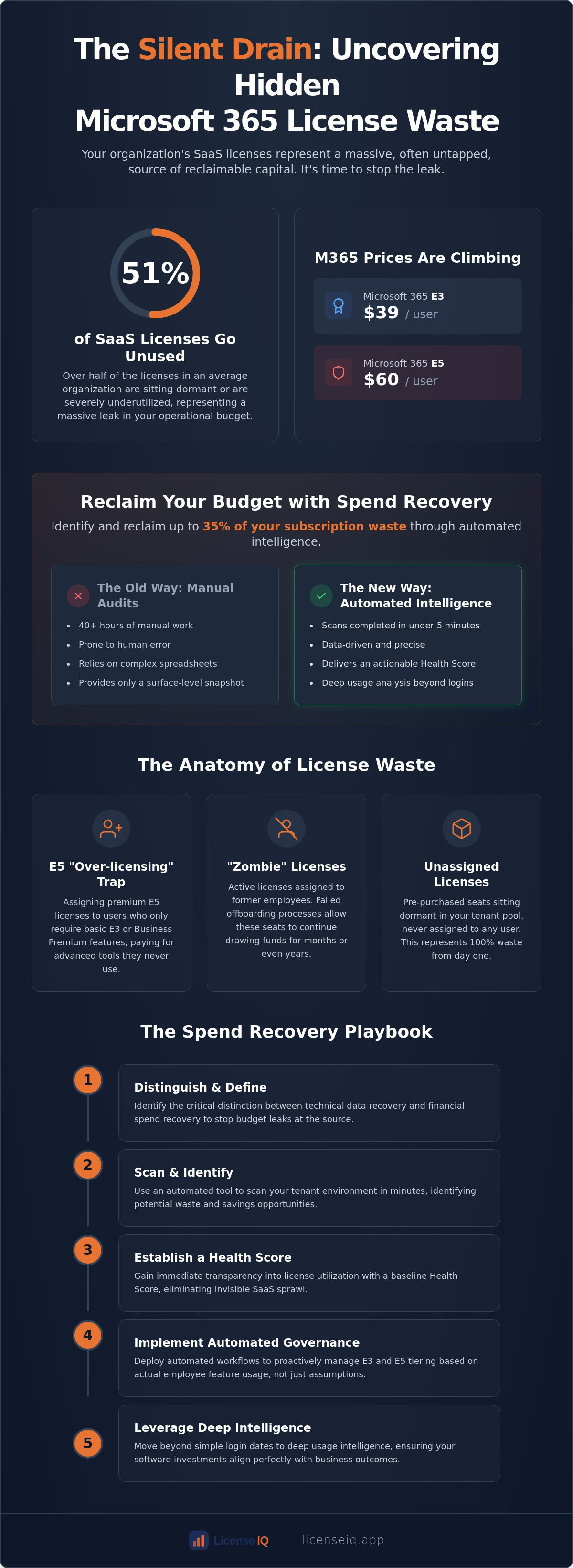
Over 51% of SaaS licenses in the average organization are currently sitting unused or underutilized. With Microsoft 365 E3 and E5 prices rising to $39 and $60 per user this year, that dormant capital represents a massive leak in your operational budget. You're likely struggling with invisible SaaS sprawl and the complexity of tracking inactive users across various departments. It's frustrating to manage high-tier license costs when you lack total transparency into actual consumption patterns.
You can stop this financial drain today. By utilizing a specialized microsoft 365 spend recovery tool, you'll identify and reclaim up to 35% of your subscription waste through automated intelligence. This technology transforms organizational disorder into a precise, data-driven strategy for financial health. We'll show you how to generate an immediate dollar-value report of potential savings, deploy automated workflows to harvest licenses, and maintain a continuous monitoring system. It's time to move beyond manual audits and embrace a proactive approach to license hygiene that protects your corporate resources in real time.
Key Takeaways
- Identify the critical distinction between technical data recovery and financial spend recovery to stop budget leaks at the source.
- Discover how a microsoft 365 spend recovery tool identifies up to 35% waste by scanning tenant environments in minutes.
- Establish a baseline Health Score to gain immediate transparency into license utilization and eliminate invisible SaaS sprawl.
- Implement automated governance workflows to proactively manage E3 and E5 tiering based on actual employee feature usage.
- Move beyond simple login dates to deep usage intelligence that ensures your software investments align with business outcomes.
The Hidden Cost of SaaS Sprawl: Why You Need a Microsoft 365 Spend Recovery Tool
Spend recovery is the strategic process of identifying and reclaiming capital locked in underutilized software licenses. It's a high-priority FinOps function that transforms wasted budget back into working capital. For most SMBs, Microsoft 365 represents the single largest source of SaaS waste. The sheer scale of the platform, combined with complex licensing rules, creates an environment where financial leaks are inevitable. Deploying a dedicated microsoft 365 spend recovery tool is the only way to gain the visibility required to stop these losses.
The "Silent Drain" on your budget occurs when licenses are treated as a fixed utility rather than a dynamic asset. Inactive users, redundant feature tiers, and unassigned seats accumulate silently over time. While Microsoft focuses on technical uptime and data security, they don't provide the financial hygiene tools necessary to optimize your spend. This gap leaves IT leaders guessing about their actual needs while the monthly bill continues to climb. Modern financial health requires a shift from passive observation to active oversight.
The Anatomy of License Waste in 2026
License waste typically manifests in three distinct ways. First is the E5 "Over-licensing" trap. Many organizations assign E5 seats to every user, even though a significant portion of the workforce only requires E3 or basic Business Premium features. Second, "Zombie Licenses" persist when offboarding processes fail to revoke access for former employees. These licenses continue to draw funds for months or years. Finally, unassigned licenses sit dormant in your tenant pool. These are pre-purchased seats that were never assigned to a user, representing 100% waste from day one. Recent data shows that up to 53% of SaaS licenses remain underutilized, making this a critical area for optimization.
Implementing a robust strategy depends on your understanding of Software Asset Management (SAM). This discipline ensures that your software footprint aligns with your actual operational requirements. Without a structured SAM approach, your organization remains vulnerable to sprawl and unnecessary price increases.
Why Manual Audits Fail IT Leaders
Manual audits are too slow for the pace of modern business. IT managers often waste 40 hours or more running PowerShell scripts and cross-referencing departmental spreadsheets. This manual approach is riddled with human error. It's nearly impossible to manually distinguish between a truly inactive user and one who uses specific apps infrequently. Standard Microsoft Admin Center reports provide a snapshot of usage, but they don't offer the actionable intelligence needed to reclaim capital. Automated intelligence platforms, such as learn more, solve this by delivering a comprehensive Health Score in under five minutes. You get immediate clarity without the administrative burden of traditional auditing.
The Mechanics of Spend Recovery: How Intelligence Platforms Uncover Waste
Modern spend recovery begins with a secure, read-only API connection to your Microsoft 365 tenant. Unlike manual audits that rely on static exports, a professional microsoft 365 spend recovery tool performs a deep-tier scan in under five minutes. This process bypasses the limitations of the standard admin center by pulling granular telemetry directly from the source. It establishes a baseline by mapping every assigned license against actual service consumption across your entire organization.
Intelligence platforms don't just look at whether a license is assigned; they evaluate the intensity of that assignment. Recent data on license waste suggests that even active organizations struggle with significant app sprawl and unoptimized investments. By using a microsoft 365 spend recovery tool, leadership gains a License Health Score. This single metric provides an instant financial assessment of your tenant's efficiency. It highlights exactly where capital is being deployed effectively and where it's being burned on dormant features.
Usage Pattern Analysis: Beyond the Last Login
Simple "last login" dates are deceptive. A user might open Outlook daily but never touch the premium security features or advanced analytics included in an E5 license. Intelligence platforms track active engagement across Teams, SharePoint, and specialized desktop applications to uncover "Shadow Users." These are employees who possess high-tier licenses but only utilize basic functionality that a lower-cost tier would cover. Active Usage is the definitive metric of financial ROI, measuring the direct conversion of license capital into employee productivity. Identifying these discrepancies allows IT leaders to stop paying for potential and start paying for performance.
The Role of AI in License Right-Sizing
AI-native platforms utilize machine learning to predict which users are candidates for downgrades without impacting their workflow. For example, the system can identify users who only access email and basic document editing, suggesting a shift to F-series licenses. These automated recommendations are based on department-wide usage benchmarks and historical trends. This precision auditing ensures your organization remains compliant while drastically reducing monthly overhead. Once the initial cleanup is complete, Automated Governance Workflows maintain long-term hygiene by flagging new waste the moment it appears. You can establish your baseline health score today to see how these mechanics apply to your specific tenant environment.
Financial Spend Recovery vs. Data Recovery: Knowing the Difference
In the Microsoft ecosystem, the word "recovery" often triggers thoughts of restored files or crashed systems. This technical tunnel vision is a costly mistake for executive leadership. While Microsoft Backup tools focus on restoring data after a loss, a microsoft 365 spend recovery tool focuses on restoring your budget from ongoing waste. These are two fundamentally different disciplines. One is a reactive safeguard against disaster; the other is a proactive strategy for financial hygiene.
Data recovery is the traditional domain of IT Admins. Their priority is uptime, security, and disaster mitigation. Spend recovery, however, is a FinOps function. it serves the CFO and finance leadership by providing total transparency into where every dollar of subscription capital is actually going. Confusing these two roles leads to systems that are technically sound but financially bloated. You can't fix a budget leak with a file backup solution.
The FinOps Perspective: Reclaiming Capital
Think of spend recovery as a "found money" initiative for your IT department. By identifying the 35% waste common in many tenants, you're effectively increasing your available budget without requesting new funds from the board. This reclaimed capital allows you to finance new digital transformation projects or upgrade security infrastructure that was previously out of reach. It's a strategic move that aligns software costs with actual business value rather than just headcount. For a deeper dive into these tactics, explore our guide on Microsoft 365 Cost Optimization. It outlines how to turn these insights into a continuous cycle of financial improvement.
When to Use Which Tool
Distinguishing between these tools is vital for operational clarity. You need both to maintain a healthy tenant, but they serve different masters and solve different problems. Use technical backup tools for ransomware protection, accidental file deletions, and disaster recovery. These are your insurance policies against sudden data loss. In contrast, use a microsoft 365 spend recovery tool for subscription optimization, license tiering, and budget forecasting. These are your digital auditors.
A comprehensive Microsoft 365 strategy requires both technical and financial recovery. Relying solely on technical tools ensures your data is safe, but it doesn't prevent your budget from being drained by "zombie licenses" or redundant E5 seats. True operational excellence happens when you protect your data and your capital with equal vigilance. By separating these functions, you ensure that IT maintains the infrastructure while Finance maintains the efficiency.
The Spend Recovery Playbook: 5 Steps to Reclaiming Your M365 Budget
Reclaiming your budget requires a structured execution strategy. It isn't a one-time project but a repeatable cycle of financial optimization. By following a disciplined playbook, you can transform your Microsoft 365 environment from a cost center into an efficient asset. This process moves beyond simple observation and into the realm of active capital management.
The ROI of using a microsoft 365 spend recovery tool is calculated by a simple formula: (Unused Licenses x License Price) + (Downgrade Potential x Price Delta) = Total Recoverable Capital. For example, reclaiming just 50 underutilized E5 licenses at the current $60 monthly rate yields $36,000 in annual savings. This framework provides the concrete financial data CFOs require to justify optimization efforts.
- Step 1: Perform an instant tenant scan to establish a baseline Health Score.
- Step 2: Segment users by license tier and actual feature utilization to identify downgrade candidates.
- Step 3: Identify "Low-Hanging Fruit" such as completely inactive users and unassigned licenses.
- Step 4: Execute automated reclamation workflows for offboarded employees to stop immediate leaks.
- Step 5: Implement continuous monitoring to prevent waste from returning as your headcount scales.
Executing the 5-Minute Audit
Connecting your tenant is a secure, low-friction process. You don't need a complex IT project or months of consulting. By using a secure API connection, you gain immediate transparency. The resulting Health Score acts as your primary metric for financial health. A low score indicates significant obscured waste, while a high score confirms your resources are aligned with your needs. You can learn the specifics in our guide on How to Conduct a Microsoft 365 License Audit.
Automating the Offboarding Lifecycle
Offboarding is the primary point of license leakage in most SMBs. When an employee leaves, their license often remains active in the tenant pool, drawing funds indefinitely. You must set up triggers to reclaim these licenses the moment an HR status changes. Automated workflows eliminate the human error associated with manual offboarding. This ensures that "Zombie Licenses" never have the chance to impact your bottom line. For a step-by-step framework, refer to our Office 365 Offboarding Checklist 2026. To see these steps in action, start your first automated scan and uncover your hidden savings now.
LicenseIQ: The Proactive Guardian of Your Microsoft 365 Financial Health
LicenseIQ is the AI-native platform designed specifically to bridge the gap between technical administration and financial efficiency. While generic tools focus on data backup, this specialized microsoft 365 spend recovery tool targets the root cause of budget erosion. It operates as a meticulous digital auditor, scanning your tenant to uncover the 35% of subscription waste that typically remains hidden from view. By integrating directly into your ecosystem, it provides the oversight necessary to maintain total operational transparency.
The platform replaces guesswork with precision data. It empowers specialized leadership to make informed decisions without wading through technical complexity. You gain immediate clarity on your financial health, ensuring that every dollar spent on licensing contributes directly to your organization's growth. LicenseIQ doesn't just report on waste; it provides the infrastructure to eliminate it permanently.
Instant Visibility with the LicenseIQ Platform
Transparency is the cornerstone of effective management. The LicenseIQ Platform connects to your tenant in minutes, delivering immediate dollar-value insights through the Spend Recovery Dashboard. This interface is built for non-technical managers who need to understand their financial position at a glance. You'll see your License Health Score, a primary metric that benchmarks your current efficiency against industry standards. This score transforms complex licensing data into an actionable roadmap for capital reclamation. You can start your 5-minute audit at LicenseIQ to see exactly where your budget is leaking.
Future-Proofing Your IT Budget
Static audits are obsolete the moment they're completed. LicenseIQ utilizes the Model Context Protocol to drive advanced Automated Governance Workflows. This technology ensures that your tenant remains optimized as your headcount fluctuates. The system moves your organization from periodic checks to a state of "Continuous Compliance." It acts as a vigilant guardian, flagging unassigned licenses and redundant E5 tiers in real time. This proactive approach prevents SaaS sprawl from returning, securing your financial health for the long term. For the 2026 IT leader, LicenseIQ is the essential microsoft 365 spend recovery tool that ensures resources are always aligned with operational reality.
Take Control of Your Subscription Capital
LicenseIQ stands as your vigilant guardian in this complex operational environment. Our platform delivers a comprehensive Health Score and actionable insights in under five minutes. You can save up to 35% on your M365 subscription while maintaining continuous compliance through AI-native automated governance workflows. Don't let underutilized resources stall your growth. Recover your wasted M365 spend with LicenseIQ and establish total transparency today. Your organization's financial health is within your reach.
Frequently Asked Questions
What is a Microsoft 365 spend recovery tool?
A microsoft 365 spend recovery tool is an AI-native platform that analyzes tenant telemetry to identify financial waste. It moves beyond simple user lists to evaluate actual feature consumption across your entire organization. By pinpointing unutilized licenses and redundant tiers, it empowers leadership to reclaim capital that would otherwise be lost to SaaS sprawl. This proactive approach ensures your software investment directly aligns with your operational reality.
How much can a company typically save using spend recovery software?
Most organizations identify up to 35% in subscription waste during their initial scan. These savings are achieved by eliminating unassigned licenses and right-sizing users who are over-licensed for their actual daily tasks. The exact dollar amount depends on your current license mix and the duration of your unmonitored sprawl. Reclaiming this capital allows you to fund new digital initiatives without increasing your total budget.
Is it safe to connect a third-party tool to my Microsoft 365 tenant?
Connecting a reputable platform is secure when it utilizes read-only API permissions via Microsoft Graph. This architecture allows the tool to monitor usage patterns without ever touching your sensitive data or private communications. It's a standard practice for specialized digital auditors to ensure operational transparency. This method maintains your security posture while providing the granular data needed for financial oversight.
Can I recover money from licenses used by former employees?
You reclaim capital by identifying and revoking licenses still assigned to offboarded employees. While you can't usually get refunds for previous months, you stop the leak immediately. The tool flags these "zombie" accounts so you can return the seats to your pool and avoid purchasing new ones for future hires. This automation ensures that employee turnover doesn't lead to a permanent increase in your monthly subscription costs.
How does spend recovery differ from a standard Microsoft 365 backup?
Spend recovery is a FinOps strategy focused on budget optimization, while backup is a technical safeguard for data integrity. Backup tools exist to restore files after accidental deletion or ransomware attacks. A microsoft 365 spend recovery tool exists to restore your budget by ensuring you only pay for what your team actually uses. It's the difference between protecting your data and protecting your capital; both are vital for a healthy organization.
What is a License Health Score?
The License Health Score is a primary metric that provides instant clarity on your tenant's financial efficiency. It calculates the alignment between your total license investment and the actual engagement levels of your users. A high score confirms your resources are perfectly optimized, while a low score signals immediate opportunities for spend recovery. This score allows you to benchmark your organization's hygiene and track progress as you implement reclamation workflows.
Does a spend recovery tool help with E3 to E5 downgrades?
The platform identifies users who possess premium E5 licenses but only utilize basic E3 functionality. By analyzing deep telemetry, the tool provides automated recommendations for downgrades based on actual engagement with advanced security and analytics tools. This ensures you aren't paying for premium features that your staff never touches. It's a precision approach that reduces monthly overhead without impacting employee productivity or organizational compliance.
How long does it take to see results from a spend recovery audit?
You gain total visibility into your potential savings in under five minutes. The platform performs a rapid tenant scan to generate an immediate Spend Recovery Dashboard. This speed allows you to move from a lack of insight to total clarity without the administrative burden of a manual audit. It provides a low-friction entry point for busy IT leaders who need to establish a baseline and start reclaiming capital immediately.


