

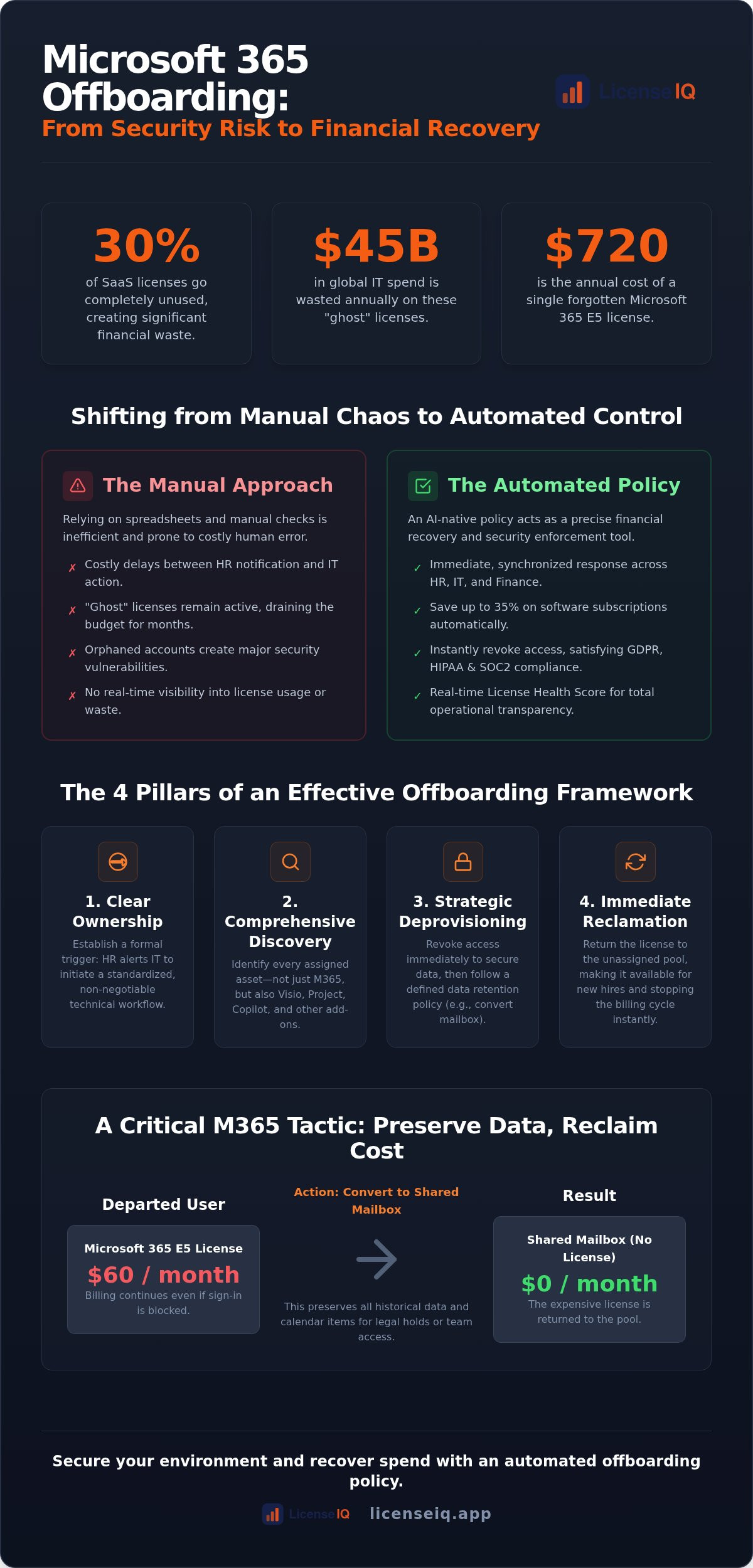
Did you know that up to 30% of SaaS licenses go completely unused, accounting for over $45 billion in global waste? With Microsoft 365 E5 seats now costing $60 per user, a single overlooked account drains $720 from your annual budget. Most organizations still rely on manual spreadsheets to track departures, but these systems inevitably fail. A modern microsoft 365 offboarding policy must do more than just revoke access; it must act as a precise financial recovery tool.
You likely recognize the security risks and financial drag of "ghost" licenses. It's frustrating to pay for resources that provide zero value to your operations. This guide provides the framework for reclaiming that spend and securing your environment through a robust, AI-native policy. We will explore how automated governance workflows and a real-time License Health Score replace manual checks. This approach ensures your organization saves up to 35% on subscriptions while maintaining total operational transparency and security.
Key Takeaways
- Establish a formal framework to deprovision users and reclaim software spend to combat the complexities of 2026 SaaS sprawl.
- Master the core components of a microsoft 365 offboarding policy to ensure every assigned license and add-on is identified and recovered.
- Replace inefficient manual spreadsheets with AI-native governance workflows for real-time oversight and enhanced environment security.
- Standardize the transition from HR notification to technical execution to eliminate costly delays in the license recovery process.
- Leverage the License Health Score to instantly audit your tenant and benchmark the financial effectiveness of your offboarding protocols.
What is a Microsoft 365 Offboarding Policy and Why is it Critical in 2026?
A microsoft 365 offboarding policy is a formal framework designed to deprovision users and reclaim software spend with surgical precision. It isn't merely a checklist for deleting accounts. It's a strategic operation that ensures every license, add-on, and cloud resource associated with a departing employee is accounted for and repurposed or retired. Without this policy, your organization operates with blind spots that compromise both your budget and your data integrity.
The Employee offboarding process has become exponentially more complex. In 2026, the average company manages 106 separate SaaS applications. Manual tracking is no longer a viable option for even small to mid-sized businesses. This complexity often leads to "ghost licenses," which are active, paid subscriptions that continue to incur costs long after an employee has left. A robust policy serves as the critical bridge between HR, IT, and Finance, ensuring that a departure alert from HR triggers an immediate, synchronized response across your entire technical stack.
The Financial Impact of Improper Offboarding
Unused Microsoft 365 licenses represent the single largest source of wasted IT spend in the modern enterprise. Many administrators mistakenly believe that blocking a user's sign-in stops the billing cycle. It doesn't. Microsoft continues to charge for the assigned license until it's manually unassigned or the seat is removed from the tenant. Research indicates that 25% to 30% of SaaS licenses go unused, contributing to $45 billion in global waste. For a typical 500-seat M365 tenant, failing to reclaim just 20% of licenses can lead to over $72,000 in annual losses based on 2026 E5 pricing levels. This cost of inaction is a direct hit to your bottom line that compounds every month.
Security Risks vs. Financial Hygiene
Financial waste is only half the problem. Orphaned accounts are prime entry points for credential-based data breaches, as they often lack active oversight. A comprehensive microsoft 365 offboarding policy ensures that access is revoked across all Entra ID (formerly Azure AD) integrated apps immediately. This proactive stance is essential for satisfying GDPR, HIPAA, and SOC2 compliance requirements, which demand strict control over user access. You must balance the need for immediate revocation with long-term data retention. A well-defined policy dictates when to convert mailboxes to shared resources or how long to retain OneDrive files before permanent deletion, ensuring you remain compliant without paying for unnecessary premium seats.
The Core Components of an Effective Offboarding Framework
A successful microsoft 365 offboarding policy is defined by its ability to turn off the financial tap instantly. It moves your organization from a reactive posture to a proactive governance model. This framework requires four essential pillars: clear ownership, comprehensive discovery, strategic deprovisioning, and immediate license reclamation. Without these components, your offboarding process remains a series of disconnected tasks rather than an enforceable corporate policy.
Ownership must be established at the start. HR triggers the departure alert, but IT executes the technical steps. Clear accountability prevents licenses from sitting idle for months while departments wait for confirmation. Once triggered, you must enter the Discovery Phase. This involves identifying every specific license and add-on assigned to the user. You aren't just looking for the main subscription; you're hunting for Visio, Project, and Copilot licenses that often remain hidden in the user profile.
You must also distinguish between deprovisioning and deletion. Deletion is a final act that can lead to data loss. Deprovisioning is a strategic pause. It allows you to secure the data while cutting the associated costs. The final goal is license reclamation. Moving a seat back to the "unassigned" pool allows your organization to reuse that resource for the next hire. This eliminates the need to purchase new licenses while existing ones remain "ghosted" in your tenant.
Microsoft 365 Specific Reclamation Tactics
High-cost tiers like E3 ($39/mo) and E5 ($60/mo) demand immediate action. Leaving an E5 license active for a former employee for just one quarter wastes $180 per user. To preserve data without the cost, convert mailboxes to "Shared" status. This preserves all historical emails and allows colleagues to access them without requiring an active license. For deeper insights into managing these tiers, consult our Microsoft 365 license optimization guide.
Role-Based Access Control (RBAC) Updates
Security hygiene requires updating permissions immediately upon departure. Remove the user from sensitive Entra ID groups and specific SharePoint permissions to prevent unauthorized access. If your team uses legacy applications that lack modern SSO integration, you must rotate shared passwords manually. A final health check of the user's entire software footprint ensures no secondary SaaS assignments remain active. You can use a Spend Recovery Dashboard to verify these actions were successful across your entire tenant and identify any remaining gaps in your microsoft 365 offboarding policy.
Automated Governance: Shifting from Manual to AI-Native Policies
Manual spreadsheets are the leading cause of microsoft 365 offboarding policy failure in 2026. These documents are static, siloed, and inherently prone to human error. They simply cannot keep pace with the rapid growth of modern SaaS ecosystems. Nearly 90% of IT professionals now state that automation is the only way to manage SaaS operations effectively. Just as MD Ride Zero streamlines on-demand transportation booking for modern businesses, AI-native platforms solve license complexities by providing real-time visibility into user activity and utility. Automated workflows ensure zero lag time between an HR notification and license reclamation. This immediate response stops the billing cycle on the same day an employee departs. Continuous monitoring also prevents "policy drift," a scenario where old, inactive accounts resurface in billing due to administrative oversights or temporary project re-activations.
Leveraging the Model Context Protocol (MCP)
The Model Context Protocol (MCP) allows AI agents to securely scan and optimize M365 tenants in minutes. This open standard for AI integration enables a vigilant digital auditor to enforce your policy automatically. It tracks every login and application interaction to determine if a high-cost license is truly necessary. This process is vital for maintaining a high License Health Score, which serves as a benchmark for your operational efficiency. Automation also mitigates the risks associated with the human element, which is involved in 74% of data breaches. By automating the revocation of credentials and session tokens, you close security gaps that manual processes often miss.
Real-Time Spend Recovery Dashboards
Real-time Spend Recovery Dashboards transform administrative tasks into strategic financial insights. Visualizing recovered dollars is now a primary KPI for the modern IT department. These dashboards provide a clear, live view of how much capital has been saved by reclaiming E5, E3, or Copilot licenses. They generate audit-ready reports for Finance stakeholders, proving the ROI of your automated governance efforts. Using LicenseIQ to manage your microsoft 365 offboarding policy ensures total operational transparency. It replaces guesswork with data-driven decision-making, ensuring your organization never pays for more than it actually consumes.
Step-by-Step Implementation of Your SaaS Offboarding Policy
Executing a microsoft 365 offboarding policy requires a disciplined, chronological approach. You must move from the initial HR trigger to final license reclamation without administrative friction. This process ensures that security gaps are closed and financial waste is eliminated before the next billing cycle begins. Follow these five steps to standardize your deprovisioning workflow.
- Step 1: HR Notification. Standardize your departure alert system to trigger IT workflows immediately. This notification serves as the official authorization to begin the deprovisioning process.
- Step 2: Inventory Scan. Identify every active M365 license, from basic Business Standard seats to high-cost Copilot add-ons. You must also scan for third-party SaaS assignments integrated via Entra ID.
- Step 3: Access Revocation. Cut login capabilities and revoke all active session tokens within 24 hours. This rapid response is your primary defense against unauthorized data access.
- Step 4: Data Transfer. Move critical OneDrive files and Exchange mailboxes to a designated manager or a secure archive. This preserves institutional knowledge without maintaining an active, paid license.
- Step 5: License Right-Sizing. Reclaim the license for the unassigned pool or downgrade the seat to a lower tier if data retention requirements allow.
Coordinating HR and IT Workflows
Successful policy enforcement depends on a "Single Source of Truth" for employee status. When HR and IT systems are siloed, licenses often remain active for weeks after a person leaves. You must establish separate protocols for voluntary and involuntary terminations. Involuntary departures require immediate, synchronized access cuts, while voluntary exits may allow for a phased data transition. For a detailed breakdown of these technical maneuvers, refer to our Office 365 offboarding checklist. You can also deploy Automated Governance Workflows to bridge the gap between HR systems and your M365 tenant automatically.
Post-Offboarding Audit and Review
A policy is only as effective as its last audit. Conduct monthly reviews of orphaned accounts to catch "shadow" SaaS subscriptions that may have bypassed initial checks. These reviews help you identify shifting software usage patterns and allow you to update your microsoft 365 offboarding policy to reflect new department needs. Always verify license reclamation directly in the Microsoft 365 billing portal to ensure that unassigned seats are reflected in your monthly invoice. This final verification step confirms that your administrative actions have translated into actual bottom-line savings.
Scaling Policy Enforcement with LicenseIQ
LicenseIQ operationalizes your microsoft 365 offboarding policy by providing a vigilant digital auditor that never sleeps. It connects to your M365 tenant in minutes for an instant, comprehensive audit. This initial scan establishes your License Health Score, providing an immediate baseline for current policy effectiveness. You no longer have to guess where the waste is; the system uncovers it for you. By automating the identification of inactive users and redundant seats, our platform helps organizations recover up to 35% of their monthly software spend. These actionable insights turn vague administrative goals into specific, dollar-value savings that impact your bottom line immediately.
The platform uses the Model Context Protocol to scan for obscured details that traditional tools overlook. It doesn't just check if an account is "active." It analyzes depth of usage across the entire E5 or E3 suite. This ensures that every reclaimed license is backed by data, giving you the confidence to deprovision seats without disrupting essential operations. Our Spend Recovery Dashboard provides the transparency needed to track these savings in real time, making it the central hub for your financial hygiene efforts.
The 5-Minute Audit for SMBs
IT leaders in small to mid-sized businesses often struggle to prove ROI to the board without complex, expensive tools. LicenseIQ simplifies this by identifying inactive users that manual audits and spreadsheets consistently miss. It eliminates the need for specialized IT asset management degrees or dedicated departments for license hygiene. You get total clarity into your environment's financial health without the manual labor. This speed allows you to present a clear recovery plan to leadership within the same hour you connect your tenant. By removing the "human element" from the discovery phase, you ensure that no ghost license remains on the payroll.
Ensuring Continuous Financial Accuracy
A static policy is a failing policy. You must move from "one-off" audits to a state of perpetual software governance. LicenseIQ provides Automated Governance Workflows that monitor the Microsoft 365 license management lifecycle in real time. This continuous oversight ensures that as employees join and leave, your license count remains perfectly aligned with your actual needs. It prevents the slow accumulation of "ghost" licenses that typically occurs over a standard fiscal year. This proactive stance distinguishes your organization as a leader in operational efficiency. Start your automated spend recovery today with LicenseIQ and secure your organization's financial future.
Secure Your Bottom Line with Proactive Governance
Transitioning to an AI-native microsoft 365 offboarding policy is no longer optional in a landscape defined by rising license costs and SaaS sprawl. You've seen how manual spreadsheets leave thousands in unrecovered spend on the table every year. By shifting to a framework that prioritizes license reclamation and real-time oversight, you transform a routine IT task into a high-impact financial strategy. This proactive approach ensures that your organization remains secure while maintaining peak financial hygiene.
LicenseIQ provides the AI-native intelligence needed to stop the bleed. Our platform enables SMBs to deploy automated governance workflows that identify inactive users and recover up to 35% of wasted subscription spend. You can connect your tenant in minutes to uncover obscured details that manual audits consistently miss. Don't let your budget disappear into orphaned accounts and ghost licenses. It's time to replace organizational disorder with total operational transparency and reclaim your resources.
Discover your wasted M365 spend in 5 minutes with LicenseIQ
Take control of your tenant today and ensure every dollar in your budget drives actual value for your organization's growth.
Frequently Asked Questions
What is the biggest risk of not having a SaaS offboarding policy?
The biggest risks are security breaches and financial waste. Orphaned accounts are prime targets for credential misuse, while "ghost" licenses drain your budget every month. Without a formal microsoft 365 offboarding policy, your organization pays for resources that offer zero value. This lack of oversight compromises your data integrity and prevents your finance department from maintaining an accurate software budget, leading to significant operational disorder.
How quickly should a license be reclaimed after an employee leaves?
You should reclaim the license within 24 hours of an employee's departure. This immediate action stops the Microsoft billing cycle and prevents unnecessary charges for high-cost tiers like E5 or Copilot. Rapid reclamation also ensures that access is revoked across all Entra ID integrated applications. Delaying this process for even a few days across multiple departures can result in thousands of dollars in unrecovered spend annually.
Can I reclaim a Microsoft 365 license without losing the user's data?
Yes, you can preserve data without paying for an active subscription. Converting a departing user's mailbox to a "Shared Mailbox" status allows you to retain all historical emails without a recurring cost. You must also move OneDrive files to a manager's account or a secure archive before unassigning the license. This strategy is a core part of an effective microsoft 365 offboarding policy, balancing data retention needs with strict financial hygiene.
How much money can a SaaS license offboarding policy actually save?
Who should be responsible for executing the offboarding policy?
Responsibility is shared between HR and IT departments. HR acts as the trigger by providing immediate notification of an employee's status change. IT then executes the technical steps of revoking access and reclaiming licenses. Establishing a clear workflow between these two groups is essential for a successful microsoft 365 offboarding policy. This coordination prevents administrative delays that lead to security gaps and prolonged financial waste in your Microsoft tenant.
What is an orphaned account and why is it dangerous?
An orphaned account is an active user profile that no longer has a corresponding employee in the organization. These accounts are dangerous because they lack active monitoring and often retain access to sensitive corporate data. They serve as ideal entry points for attackers using stolen credentials. Effective offboarding ensures these accounts are identified and deprovisioned immediately, closing the gap between a person's physical departure and their digital exit.
How does AI-native automation improve offboarding workflows?
AI-native automation provides continuous monitoring and instant execution that manual processes cannot match. It uses protocols like MCP to scan for underutilized licenses and inactive accounts in real time. This technology removes the human error inherent in manual tracking and ensures your policy is enforced consistently. Automation allows your IT team to focus on growth while a vigilant digital auditor maintains your organization's financial health and environmental security.


