

Unused software licenses are the invisible tax on your 2026 IT budget. This waste represents a direct failure in resource optimization. Reclaiming unused power bi licenses is often stalled by opaque admin portals or the valid fear of revoking access for a high-priority user. You need a lean environment. Manual PowerShell scripts are unreliable and frequently time out before providing actionable data.
Managing a complex tenant requires more than just a spreadsheet. You feel the constant pressure to cut costs without compromising essential analytics tools. We promise to provide a structured framework to recover up to 35% of your Power BI budget. This guide previews a complete reclamation workflow designed for the modern landscape. You will learn to identify inactive users and implement automated governance that maintains a high License Health Score. Move from manual oversight to a proactive system of spend recovery that protects your financial health.
Key Takeaways
- Define specific inactivity thresholds to isolate "zombie" licenses that cost $14.00 per month without providing value.
- Execute a five-step audit process for reclaiming unused power bi licenses that balances cost recovery with user productivity.
- Evaluate the high operational costs of manual audits versus the precision of automated governance workflows.
- Use a real-time License Health Score to gain visibility into tenant waste and recover up to 35% of your subscription budget.
The Financial Impact of "Zombie" Power BI Licenses in 2026
A "Zombie" license is a paid seat that produces no value. In the context of Power BI, these are licenses assigned to users who haven't interacted with a report or dashboard in 30, 60, or 90 days. They haunt your tenant, quietly draining resources while providing zero insight. Effective Software Asset Management (SAM) dictates that every subscription must justify its cost through active utilization. When licenses sit dormant, they represent a failure in operational oversight.
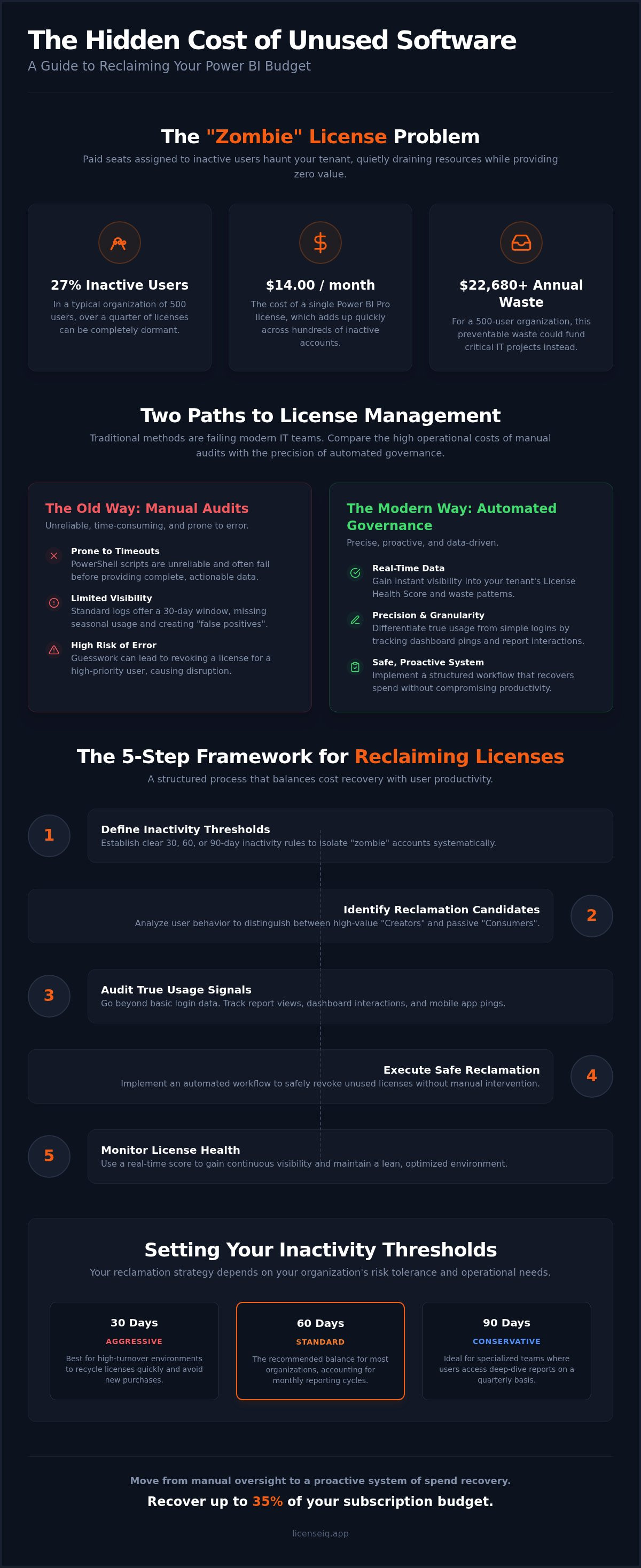
The leak starts small but scales aggressively. A single Power BI Pro license costs $14.00 per month. For an organization with 500 users where 27% are inactive, this equates to a monthly loss of $1,890. Over a fiscal year, that is $22,680 in preventable waste. This often stems from the "Pro Trap," where users are assigned creator-level licenses despite only needing to view shared reports. Reclaiming unused power bi licenses is no longer a luxury; it's a financial necessity. Modern FinOps teams now prioritize real-time reclamation over the traditional, slow-moving annual audit to maintain a lean budget.
The Hidden Costs of Inactive Analytics Users
Wasted spend is only the surface issue. Every dollar tied up in a dormant Power BI seat is an opportunity cost. That capital could fund advanced AI tools or essential cybersecurity upgrades. Beyond the balance sheet, inactive accounts pose a significant security risk. Dormant users often retain high-level data access, making them prime targets for credential harvesting. Additionally, failing to revoke access for offboarded employees or contractors creates a compliance nightmare during regulatory audits. Total visibility into your License Health Score is the only way to mitigate these risks effectively.
Why Manual Tracking Fails the Modern IT Team
Relying on standard Microsoft Purview logs is a losing strategy. These logs typically offer a limited 30-day visibility window. If a user logs in once a month but never clicks a report, they appear "active" in basic reports. This is the "False Positive" problem. IT teams often struggle to differentiate between usage and adoption. Usage represents the baseline act of opening a report, while adoption is defined by the consistent, data-driven interactions that generate measurable ROI for the business. Without deeper signals like dashboard pings or mobile app interactions, reclaiming unused power bi licenses becomes a guessing game that risks alienating VIP users who may have seasonal needs.
Identifying Candidates for License Reclamation
Identifying targets for cost recovery requires a granular look at user behavior. You can't rely on a single metric. Effective reclaiming unused power bi licenses starts with defining what "active" actually means for your business. Technical signals like report views, dashboard interactions, and mobile app pings provide a clearer picture than simple login timestamps. Organizations that implement rigorous software management can achieve significant savings by eliminating redundant or underutilized seats.
Distinguish between "Creators" and "Consumers" to right-size your tiers. A Power BI Pro license ($14.00/month) or a Premium Per User (PPU) license ($24.00/month) is often assigned to users who only need to view data. If your organization uses capacity-based licensing, such as the newer Microsoft Fabric F-SKUs, these individual licenses are likely redundant for those who don't build reports. PPU licenses are particularly prone to waste. They're often bundled into E5 subscriptions or assigned for specific features that a user may only use once. This creates a silent drain on the analytics budget.
Technical Methods for Auditing Activity
The Microsoft 365 Admin Center offers basic usage reports. These provide a starting point but often lack the historical depth needed for a precise audit. Many IT admins leverage PowerShell for bulk usage data extraction. Using the Power BI Management module allows you to pull audit logs, but the process is manual and prone to script timeouts. A more proactive method is assessing your environment's vitality through a Spend Recovery Dashboard. This approach moves beyond raw data to provide immediate clarity on which seats drive value.
Setting Your Inactivity Thresholds
Your reclamation strategy depends on your specific operational risk tolerance. Use a structured approach to categorize users based on their engagement history.
- 30 Days (Aggressive): Best for high-turnover environments where licenses must be recycled quickly to avoid new purchases.
- 60 Days (Standard): The recommended approach for most SMBs, providing enough time to account for monthly reporting cycles.
- 90 Days (Conservative): Suitable for specialized analytics teams where users might only access deep-dive reports quarterly.
Establishing these clear boundaries ensures that reclaiming unused power bi licenses remains a data-driven process. It prevents the frustration of revoking access for a user who was simply out on extended leave or working on a long-term project. This meticulous categorization is the foundation of a proactive governance strategy.
The 5-Step Framework for Reclaiming Power BI Licenses
Executing a successful recovery strategy requires a repeatable, data-driven process. Moving from identification to action ensures that reclaiming unused power bi licenses doesn't disrupt critical business intelligence operations. This framework balances financial hygiene with user productivity by following five distinct stages.
- Step 1: Discovery. Scan your tenant for all Power BI licenses and subscriptions. Isolate users who haven't met your established activity thresholds.
- Step 2: Validation. Cross-reference this usage data with HR records or department heads. This prevents accidental removal for employees on leave or those who recently transitioned into roles requiring creator access.
- Step 3: Communication. Send a "Soft Touch" notification. Informing users that their license is under review for reallocation gives them a final window to justify their need for Pro or PPU features.
- Step 4: Execution. Remove the license from the inactive account. This seat moves immediately into your "Unassigned" pool, ready for a new user without incurring additional costs.
- Step 5: Monitoring. Track the user for 14 days after removal. If they immediately request access back, evaluate if they were a "False Negative" or if they simply need a different license tier.
Communication Templates for License Recovery
Direct communication prevents friction with specialized leadership. Use a "Use it or Lose it" template for users with zero activity over 60 days. This email should be short and declarative. For users caught in the "Pro Trap," send a "Downgrade Notification." Explain that they are moving from a Pro license to a Free or Viewer tier because their current activity doesn't require creator tools. Managing VIP or "Just in Case" hoarders requires a results-first approach. Show them the data. Most managers will yield when presented with clear evidence of zero utilization over a 90-day period.
Managing the "Unassigned" License Pool
Reclaiming a license only stops the waste if you manage the resulting unassigned pool. An unassigned license still costs $14.00 per month if it remains in your tenant. You must cancel these excess seats at your next Microsoft 365 renewal date to realize the full savings. Real-time tracking of the "Dollar Value" of these reclaimed seats provides immediate clarity for CFOs. Integrating this into a broader strategy for reducing M365 subscription costs ensures your organization remains lean and agile. Total transparency in this pool is the cornerstone of effective reclaiming unused power bi licenses.
Manual vs. Automated Governance: Which is Right for You?
Choosing a methodology for reclaiming unused power bi licenses is a strategic decision between administrative labor and financial precision. Most IT departments rely on manual spreadsheets, custom scripts, or automated platforms. Each has a specific impact on your operational overhead. Manual processes often cost more in salary hours than they save in license fees. True efficiency requires a system that identifies waste without constant human intervention.
Manual spreadsheets are the primary cause of organizational disorder. They are static, prone to human error, and obsolete the moment they are saved. Custom scripts offer more power but create technical debt. These scripts require ongoing maintenance as Microsoft updates its APIs. If the original developer leaves your organization, the script becomes a liability. Automated governance platforms provide the only path to continuous oversight, ensuring your budget remains optimized every day of the year.
The Hidden Friction of Manual Audits
Manual audits consume hours that your team should spend on strategic IT projects. Navigating the Microsoft 365 admin portal to extract usage data is a tedious, repetitive task. This friction often leads to audits being skipped, allowing "zombie" licenses to accumulate for months. You can see the full breakdown of LicenseIQ vs. manual tracking to understand the true cost of labor. Relying on outdated data risks revoking access for active users, creating unnecessary support tickets and internal friction.
Why 2026 Favors AI-Native Software Intelligence
The standard for 2026 is predictive spend recovery. Real-time License Health Scores replace the need for quarterly audits. These systems use Model Context Protocol to bridge the gap between usage data and governance actions. Instead of reacting to a high invoice, you can identify waste before the billing cycle ends. This proactive approach ensures your tenant remains lean. You move from being a passive observer to an active participant in your company's financial health. To eliminate manual script fatigue, you should implement Automated Governance Workflows that handle the heavy lifting for you.
Comparing the cost of labor to the cost of waste is a vital exercise for specialized leadership. If an IT manager spends five hours a month on manual audits, the labor cost likely exceeds the value of a few reclaimed Pro seats. Automation shifts this balance. It provides total clarity and security, reassuring you that your resources are monitored by a vigilant and precise system. Reclaiming unused power bi licenses through automation is the only way to achieve a 100% ROI on your governance efforts.
Automating Power BI Spend Recovery with LicenseIQ
Eliminating administrative friction requires a platform designed for immediate action. You can connect your Microsoft 365 tenant to LicenseIQ in minutes to initiate a comprehensive scan of your environment. The system immediately identifies "Zombie" users who have ceased interacting with your analytics assets. By reclaiming unused power bi licenses through an automated platform, you remove the technical barriers of manual scripts and REST APIs that often stall SMB leadership.
The platform provides a specific dollar-value recommendation for every underutilized seat. It doesn't just show you who is inactive; it calculates the precise impact on your monthly spend. You can implement Automated Governance Workflows to handle the entire reclamation lifecycle on autopilot. This ensures your organization recovers up to 35% of subscription costs without requiring constant manual oversight. You gain the confidence that your resources are being monitored by a vigilant and precise system.
Discover and Recover in 5 Minutes
Speed is a critical factor in spend recovery. LicenseIQ scans your tenant to highlight users who haven't met activity thresholds within your chosen 30, 60, or 90-day window. You can visualize this data through the Spend Recovery Dashboard, which transforms complex logs into clear financial insights. This visibility allows you to check your SaaS license health score and identify exactly where your budget is leaking. The platform uncovers obscured details that standard admin portals often miss, providing total transparency for your IT and finance teams.
Continuous Accuracy for SMBs
A "set and forget" approach to license governance is the gold standard for modern technical operations. LicenseIQ maintains your License Health Score by continuously auditing your environment. If a user stops using their Pro or PPU license, the system flags them for recovery before the next billing cycle. This proactive stance ensures you only pay for the tools your team actually uses. It secures your 2026 analytics budget by preventing the slow accumulation of waste that typically follows rapid organizational growth.
Security and efficiency go hand in hand. By automating the removal of inactive users, you also reduce the attack surface of your tenant. You move from a state of organizational disorder to total clarity. The platform acts as an active participant in your company's growth by focusing relentlessly on data-driven decision-making. Start your automated Power BI audit with LicenseIQ to begin reclaiming unused power bi licenses today. Secure your financial health with a system that is always one step ahead.
Future-Proof Your Analytics Budget
Maintaining a lean tenant requires a shift from reactive annual audits to continuous oversight. You've learned that identifying "zombie" licenses and establishing clear inactivity thresholds are vital for financial health. Moving beyond manual spreadsheets eliminates human error and technical debt. Reclaiming unused power bi licenses is the most direct path to optimizing your M365 spend in 2026. This strategy ensures your resources support active creators rather than dormant accounts. It transforms your IT department from a cost center into a driver of operational efficiency.
Precision in governance is now accessible without manual script fatigue. You can scan your tenant in minutes to identify up to 35% in wasted spend. Our platform provides the transparency needed to secure your organization's resources. Recover your wasted Power BI spend with LicenseIQ and implement automated governance workflows for M365 today. Take control of your digital environment and drive sustainable growth with total clarity. Your data-driven future starts with a clean tenant.
Frequently Asked Questions
Will removing a Power BI Pro license delete the user’s reports or data?
No. Removing a license only affects the user's access rights to specific creator features. All dashboards, reports, and datasets remain intact within their respective workspaces. This allows for safe reallocation without the risk of data loss. The content is simply locked until a new Pro or PPU license is assigned to the owner or a new owner is designated.
How can I see who is actually using their Power BI license in my tenant?
You can access basic usage reports within the Microsoft 365 Admin Center to see last activity dates. For deeper insights, you must track specific interactions such as report clicks, dashboard views, and mobile app pings. These signals provide the clarity needed for reclaiming unused power bi licenses without guessing. High-level logs only show if a user logged in, not if they derived value from the tool.
What is the difference between a Power BI Pro and a Power BI Free license?
A Pro license is required to publish and share reports, while a Free license is for personal analysis or viewing reports in a Premium capacity. Many organizations over-assign Pro seats to users who only need to view shared data. Identifying these viewers is the first step in reclaiming unused power bi licenses to right-size your environment. This prevents you from paying for creator features that remain untouched.
Can I automate the removal of Power BI licenses for inactive users?
Automation is possible through custom scripts or specialized platforms like LicenseIQ. While PowerShell is a common manual route, it often lacks the reliability and error-handling of a dedicated system. Automated Governance Workflows use real-time data to handle reclamation on autopilot. This ensures your tenant remains lean with zero manual effort, allowing your IT team to focus on higher-value strategic projects.
What happens if I reclaim a license and the user needs it again later?
You can reassign a license from your unassigned pool instantly through the admin portal. The user’s previous content, workspace permissions, and personal settings remain linked to their account. This flexibility supports a Just-in-Time licensing model that prioritizes active utilization over permanent assignment. It ensures that no user is permanently blocked from the tools they need to perform their duties.
How much can I save by reclaiming unused Power BI licenses?
Most organizations identify up to 35% in wasted spend by auditing their tenant for inactive seats. By reclaiming unused power bi licenses, you eliminate the Pro Trap and ensure you only pay for active creators. This recovery significantly improves your overall software ROI. The saved capital can then be reallocated to fund advanced AI tools or essential cybersecurity upgrades for the coming year.
What is a good "License Health Score" for a Power BI environment?
A score of 90% or higher indicates a highly optimized environment where resources are used efficiently. This means 9 out of 10 paid licenses are actively driving business value through regular report interaction. Monitoring this KPI provides the oversight necessary to prevent zombie licenses from accumulating over time. A lower score suggests that your governance process requires more frequent or automated audits to maintain financial hygiene.
Is there a way to track Power BI usage beyond the 30-day Microsoft log limit?
Native logs are limited to 30 days, so you must ingest audit data into a persistent storage solution or a platform like LicenseIQ. This long-term visibility is essential for identifying seasonal users who may only access deep-dive reports once a quarter. It ensures your reclamation decisions are based on comprehensive historical data rather than a short-term snapshot. This prevents the False Negative problem where active but infrequent users lose access.


