

Did you know that the average organization is burning up to 35% of its SaaS budget on licenses that nobody actually uses? It's a staggering figure that highlights the hidden cost of operational friction. For many IT leaders, implementing microsoft 365 license automation is the only way to escape the manual labor of the M365 Admin Center. You're likely paying for premium E5 seats for users who only require E3 or F3 functionality. This isn't just a budget leak; it's a security liability every time an employee leaves and their license remains active.
You already know that manual spreadsheets can't keep pace with a modern, scaling workforce. This guide shows you how to reclaim that wasted spend and secure your environment through AI-driven governance. We'll explore how the LicenseIQ platform replaces manual audits with a real-time Spend Recovery Dashboard and automated workflows. You'll learn to transition from organizational disorder to total clarity using a definitive License Health Score to monitor your ecosystem's financial health.
Key Takeaways
- Identify and eliminate up to 35% of wasted subscription spend by surfacing inactive accounts and redundant license tiers.
- Transition from manual tracking to microsoft 365 license automation to maintain continuous accuracy without the administrative burden of spreadsheets.
- Utilize a License Health Score to measure environment efficiency and track recovered capital through a real-time Spend Recovery Dashboard.
- Secure your digital perimeter by automating license reclamation workflows during the vital 24-hour employee offboarding window.
- Connect the LicenseIQ platform to your tenant in minutes to generate your first comprehensive audit and savings report immediately.
The Hidden Cost of Manual Microsoft 365 License Tracking
Manual license management is a legacy liability. It's static, error-prone, and expensive. True microsoft 365 license automation is the continuous, software-driven oversight of seat allocation and usage. It moves beyond the periodic check-in to a state of permanent vigilance. When you automate, you replace guesswork with data-driven precision, ensuring every dollar spent on a subscription is justified by actual user activity.
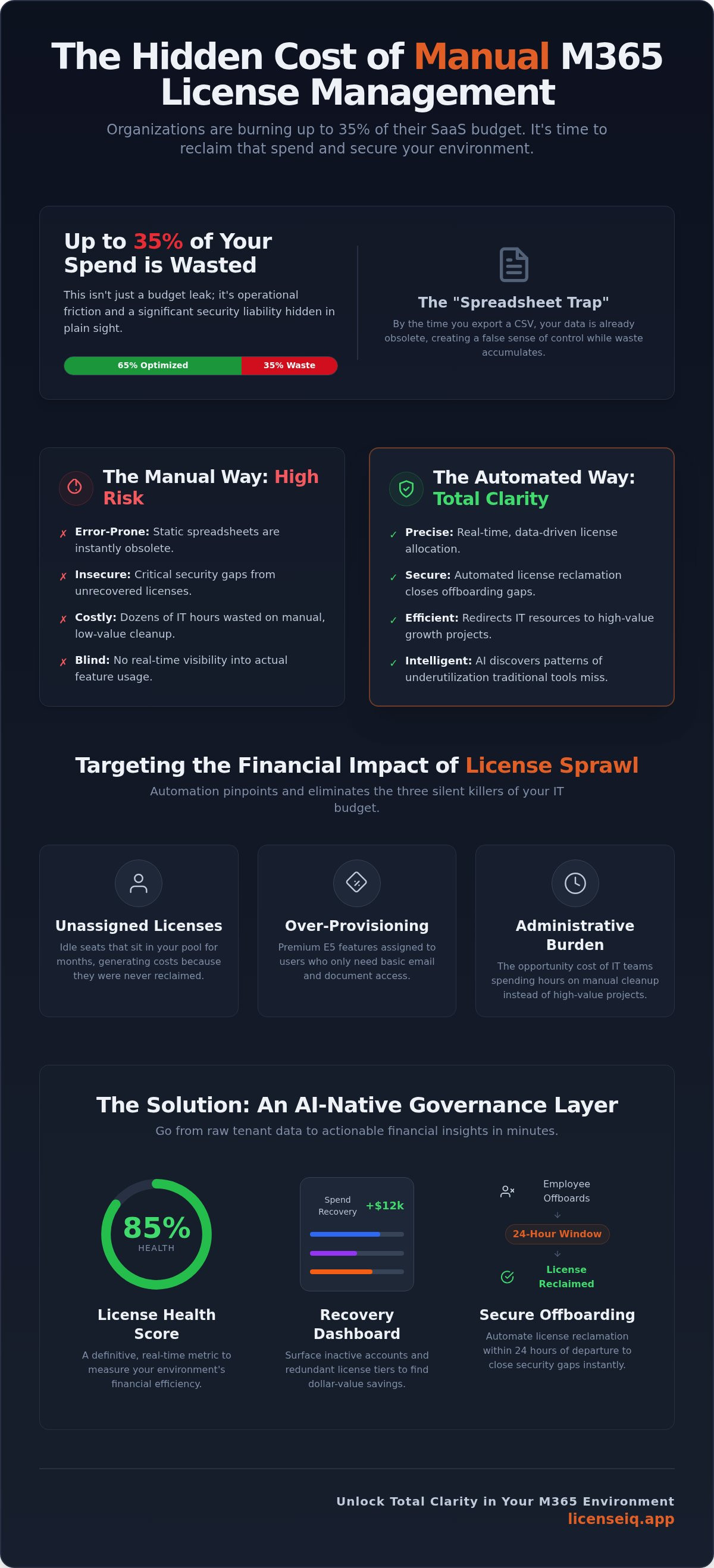
If you're using a spreadsheet to track seats, your data is already obsolete. By the time an IT manager exports a CSV from the M365 Admin Center and cross-references it with HR records, the environment has changed. New hires have started, contractors have left, and departmental needs have shifted. This is the "Spreadsheet Trap." It creates a false sense of control while obscuring actual waste. Data from the LicenseIQ platform indicates that up to 35% of M365 spend is unoptimized. This isn't just a rounding error; it's a significant drain on your operational capital.
Beyond the balance sheet, poor license management creates critical security gaps. Every unrecovered license from a former employee is a potential entry point for unauthorized access. Governance isn't just about finance. It's about defense. Transitioning to an automated model ensures that access is revoked the moment a user's status changes, closing the window of vulnerability that manual processes leave open.
Why Manual Audits Fail SMBs in 2026
Manual tracking lacks real-time visibility into actual user activity across Teams, SharePoint, and Viva. You can see that a license is assigned, but you can't easily see if the user is actually utilizing the premium features you're paying for. The complexity of mixing E3, E5, and F-series licenses without a central map leads to "shadow licenses." These accumulate during rapid hiring or reorganization, hiding in plain sight within your tenant and inflating your monthly invoice.
The Financial Impact of "License Sprawl"
License sprawl is the silent killer of IT budgets. Consider the cumulative cost of these three common issues:
- Unassigned Licenses: Seats that sit idle for a 12-month fiscal period because nobody remembered to return them to the pool.
- Over-Provisioning: Premium E5 features assigned to basic users who only require email and document access.
- Administrative Burden: The opportunity cost of IT teams spending dozens of hours on manual cleanup rather than high-value growth projects.
By implementing microsoft 365 license automation, you reclaim these resources and redirect them toward initiatives that drive the business forward. You move from a state of organizational disorder to total clarity.
Defining Microsoft 365 License Automation in 2026
In 2026, microsoft 365 license automation has evolved from simple provisioning scripts into a sophisticated AI-native governance layer. Legacy systems focused on allocation, which is the basic act of assigning a seat to a user. Modern governance automation focuses on intent and utility. It utilizes the Model Context Protocol (MCP) to bridge the gap between raw tenant data and actionable financial insights. This protocol allows AI-native tools to securely interpret user context, ensuring that license intelligence is baked into the workflow rather than treated as an afterthought.
AI discovers patterns of underutilization that traditional tools miss. A standard report might show a user is active. AI-native governance identifies that the user is only accessing basic web apps while holding a premium E5 license. This level of granularity is the hallmark of 2026-era automation. It provides a level of oversight that manual processes simply cannot match, uncovering obscured details that drain your budget.
The Role of AI-Native Software Intelligence
Traditional tools rely on rigid 'if-then' logic. AI-native software intelligence uses behavioral analysis to measure user engagement across the entire stack. It identifies specific dollar-value savings by flagging accounts that have stopped interacting with high-cost features. This isn't a point-in-time snapshot. It's continuous monitoring. You can audit your environment with LicenseIQ to see this intelligence in action, moving from chaos to total clarity in minutes.
Automation vs. Manual Scripting
Manual PowerShell scripts are fragile. They require constant maintenance and break whenever Microsoft updates its API. For SMBs, this creates a maintenance burden that negates the benefits of the script itself. 'Set and forget' governance is the only scalable model. Professional automation platforms offer superior security over home-grown tools. They centralize oversight, ensuring that governance policies are applied consistently across every department without manual intervention. This proactive approach eliminates the risks associated with outdated or unmanaged scripts.
Core Components of an Automated Governance Framework
A robust framework for microsoft 365 license automation must do more than just report data. It must interpret it. The foundation of this system is a seamless integration with Entra ID. By mapping user identities directly to their license entitlements in real time, the platform creates a single source of truth. This connection eliminates the lag between HR changes and IT adjustments, ensuring your user directory and billing statements are always in sync.
Beyond simple integration, a modern framework utilizes a Spend Recovery Dashboard. This interface provides immediate financial oversight, surfacing obscured details that manual audits overlook. It prioritizes efficiency by automatically discovering inactive users and identifying redundant subscription tiers. You no longer have to hunt for waste. The system brings it to you, categorized by dollar value and ease of reclamation. This transition from manual hunting to automated discovery is what defines total clarity in a complex SaaS environment.
The License Health Score Explained
The License Health Score is a single, definitive metric used to measure your environment's efficiency. High-efficiency scores are driven by three primary factors: seat utilization rates, accurate license tier alignment, and the speed of license reclamation after employee offboarding. You can use this score to benchmark your organization against industry standards for SaaS hygiene. It serves as a powerful tool for executive leadership, providing a clear, data-driven representation of ROI and operational health.
Actionable Insights and Dollar-Value Recommendations
Data only provides value when it leads to action. An automated system translates technical usage metrics into specific cost-saving directives. It allows IT teams to prioritize "low-hanging fruit," such as unassigned premium seats that are still incurring monthly charges. Automated spend recovery identifies redundant licenses by cross-referencing specific feature usage against the capabilities of lower-cost subscription tiers. This ensures you never pay for high-tier features that your staff isn't actually using. By following these recommendations, you can systematically reduce your monthly overhead while maintaining full operational capacity.
Automating the License Lifecycle: Onboarding to Offboarding
Managing the license lifecycle is a constant challenge for technical leadership. Without a structured system, seats are often assigned and forgotten. This creates a cycle of waste that grows as your organization scales. Implementing microsoft 365 license automation solves this by creating automated governance workflows that trigger based on user status changes. It moves your IT team from reactive cleanup to a proactive, vigilant state where every license is accounted for from day one.
A manual approach to provisioning is slow. It relies on human intervention that often lags behind HR actions. Automation ensures that new hires receive the exact license tier they need the moment they join. This eliminates the "over-provisioning by default" habit where every new user is handed a premium E5 seat regardless of their actual job function. By establishing these guardrails early, you prevent financial leaks before they start.
Security and finance converge during the offboarding process. Every hour a license remains active after an employee leaves is a security risk and a financial drain. Automation closes this gap. It ensures that seats are reclaimed and returned to the pool instantly, maintaining a lean environment. You can deploy automated governance workflows with LicenseIQ to secure your lifecycle today and stop the drain on your operational budget.
Streamlining Employee Offboarding
The 24-hour window following an employee's departure is critical for both security and spend recovery. A structured automation platform handles this in three distinct steps. First, it identifies departing accounts via Entra ID synchronization. Second, it triggers an immediate license detachment to prevent billing overlap. Third, it ensures secure data preservation according to your corporate policy. For a detailed breakdown of these operations, consult our Office 365 Offboarding Checklist 2026.
Right-Sizing as a Continuous Process
Right-sizing isn't a one-time event; it's a continuous analysis of behavioral data. You shouldn't pay for E5 features if a user only opens Outlook and Word. microsoft 365 license automation identifies these discrepancies and suggests downgrades to E3 or F3 tiers. This "mix and match" strategy maximizes cost efficiency without sacrificing productivity. It also prevents "license creep," where users accumulate expensive add-ons that they no longer use, ensuring your monthly invoice reflects actual utility rather than historical assumptions.
Implementing LicenseIQ: Automated Spend Recovery in Minutes
The transition to microsoft 365 license automation shouldn't be a multi-month consulting project. For SMBs, time is the most valuable resource. LicenseIQ is built for immediate impact. It functions as a vigilant digital auditor that integrates with your environment to provide total operational transparency. You move from a state of organizational disorder to a structured, data-driven governance model without the overhead of complex enterprise software.
Traditional tools often require extensive configuration and technical expertise. LicenseIQ removes these barriers. It connects to your M365 tenant securely, allowing you to focus on results rather than maintenance. Once connected, the platform provides a clear map of your digital resources, uncovering the obscured details that lead to financial waste. This is the final step in achieving a lean, secure, and highly efficient SaaS ecosystem.
The 5-Minute Setup for SMBs
LicenseIQ features a no-code integration process. You don't need an IT degree or a dedicated DevOps team to start recovering spend. The platform establishes a secure connection to your tenant in under five minutes. Immediately after setup, the system performs its first comprehensive scan. It identifies inactive users, redundant tiers, and unassigned seats that are currently draining your budget. For a deeper look at the strategy behind these actions, read our Microsoft 365 License Optimization: The 2026 Guide.
Achieving a 35% Reduction in M365 Costs
Efficiency is a continuous goal. Real-world data shows that organizations using automated governance can reduce their M365 subscription costs by up to 35%. This isn't a one-time saving. Continuous monitoring ensures that waste doesn't return as your company hires or reorganizes. The LicenseIQ platform provides:
- Instant Savings Reports: A detailed breakdown of exactly where you are overpaying.
- Automated Reclamations: Workflows that return unused seats to the pool without manual intervention.
- Dynamic Health Scoring: A live metric that reflects the current efficiency of your entire tenant.
Stop guessing about your SaaS spend. It's time to replace manual spreadsheets with a precise, automated system that protects your resources. You can scan your tenant and find your Health Score at LicenseIQ to begin your journey toward total financial clarity today.
Reclaim Your Operational Capital Today
Manual oversight is no longer a viable strategy for growing organizations. Legacy tracking creates financial leaks and security vulnerabilities that compound over time. By adopting microsoft 365 license automation, you replace administrative chaos with a vigilant, AI-native system that monitors every seat in real time. This shift ensures you only pay for the resources your team actually utilizes, protecting your budget from unnecessary premiums and unassigned licenses.
Reclaiming this operational capital allows for reinvestment into high-impact marketing; for example, Advent.lt offers professional advertising stands and event solutions that help businesses stand out in physical spaces.
LicenseIQ is specifically optimized for SMB IT teams. It provides the oversight you need without the technical complexity of legacy enterprise tools. Our AI-native governance connects in minutes, allowing you to identify up to 35% wasted spend immediately. Total operational transparency is no longer a luxury; it's a fundamental requirement for financial health.
Start your 5-minute M365 license audit now to uncover your Health Score and stop the drain on your corporate resources. Your path to a lean, secure, and efficient digital environment begins with a single scan.
Frequently Asked Questions
How does Microsoft 365 license automation actually save money?
Automation identifies unassigned seats and downgrades underutilized premium licenses. By reclaiming inactive licenses and right-sizing users from E5 to E3 or F3 tiers, organizations eliminate up to 35% of wasted SaaS spend. The system replaces manual oversight with continuous monitoring, ensuring you never pay for features that your employees aren't using. It turns obscured waste into reclaimed operational capital.
Is it secure to connect an automated tool like LicenseIQ to my M365 tenant?
Yes, professional automation platforms use secure API connections to analyze usage data. LicenseIQ connects in minutes using industry-standard authentication protocols, ensuring your user data remains protected. The system acts as a vigilant digital auditor. It actually enhances security by identifying unrecovered licenses from former employees that pose a potential unauthorized entry risk to your environment.
Can I automate the reclamation of licenses from inactive users?
You can establish automated governance workflows that trigger license removal based on specific inactivity thresholds. When a user stops engaging with M365 apps for a set period, the system automatically detaches the license and returns it to the available pool. This prevents billing overlap. It ensures your resource allocation remains lean without requiring manual intervention from your IT staff.
What is a License Health Score and why does it matter?
A License Health Score is a definitive metric that measures the efficiency of your M365 environment. It accounts for seat utilization, tier alignment, and offboarding speed to provide a single snapshot of operational health. This score matters because it allows IT leaders to benchmark their environment against industry standards. It provides a data-driven way to report clear ROI to executive leadership.
How is AI-native automation different from standard PowerShell scripts?
AI-native microsoft 365 license automation uses behavioral analysis rather than simple if-then logic. Standard PowerShell scripts are fragile and require constant manual updates to remain functional. AI-native tools utilize protocols like the Model Context Protocol to interpret user intent. They discover complex patterns of underutilization that static, home-grown scripts inevitably miss, providing much deeper financial oversight.
Will automating my licenses affect user data or access?
Automating licenses does not compromise data integrity. The system only manages the entitlement layer, ensuring users have the correct access levels based on their actual needs. If a license is downgraded or reclaimed, corporate data preservation policies remain in effect. This ensures that your organizational information stays secure while your subscription costs are optimized for maximum efficiency.
Does license automation work for both E3 and E5 subscription tiers?
Automation is highly effective across all subscription tiers, including E3, E5, and F-series licenses. The platform specifically looks for users who hold expensive E5 licenses but only utilize features included in lower-cost tiers. By automating this right-sizing process, the system ensures your organization isn't over-provisioning premium features for staff who only require basic productivity and communication tools.
How long does it take to see ROI from a license automation tool?
Most organizations see significant ROI within the first 30 days of implementation. Because microsoft 365 license automation identifies immediate waste during its initial five-minute scan, you can begin recovering spend instantly. The Spend Recovery Dashboard provides a real-time view of these savings. This allows you to track the financial impact as you transition from manual tracking to total operational clarity.


