

Over 30% of your Microsoft 365 budget is likely vanishing into unassigned inventory and dormant accounts right now. With the July 2026 price increases pushing Microsoft 365 E5 seats to $60 per month, these zombie licenses from former employees are no longer just a minor oversight; they are a direct threat to your bottom line. You probably feel the constant pressure from leadership to justify every dollar of SaaS spend while struggling with opaque billing cycles that mask true utilization. It's a common challenge for technical operations, but it's one that requires a precise, data-driven solution to ensure your microsoft 365 license roi remains positive.
We understand that manually auditing thousands of seats is a recipe for error and exhaustion. This article provides a clear roadmap to stop the leak by using AI-driven automated governance. You'll discover how to calculate a real-time License Health Score that translates technical usage into a clear dollar value for your next budget meeting. We will explore how to deploy Automated Governance Workflows that reclaim underutilized assets and provide the transparency needed to protect your organization's resources. By the end of this guide, you will have the tools to transform your Microsoft environment from a black box of expenses into a streamlined, high-performance asset.
Key Takeaways
- Calculate your true microsoft 365 license roi by shifting focus from sticker prices to a Total Cost of Ownership (TCO) framework that accounts for reclaimed spend.
- Eliminate the "Snapshot Fallacy" of manual audits by moving away from static spreadsheets that fail to capture real-time usage intensity.
- Identify and terminate unassigned inventory and licenses with 90+ days of inactivity to immediately recover up to 35% of wasted software spend.
- Deploy Automated Governance Workflows to create a self-funding license management system that operates with digital precision.
- Leverage a real-time License Health Score to provide leadership with immediate, dollar-value transparency into your organization's financial health.
The Reality of Microsoft 365 License ROI in 2026
Traditional IT management treats subscriptions as fixed costs. In 2026, this approach is obsolete. The true Return on Investment (ROI) of your technology stack isn't found on a vendor invoice. It's the ratio of business value generated against every dollar spent on licenses. Focusing solely on the sticker price of a Microsoft 365 E5 or E3 plan is a deceptive metric. It ignores the friction of underutilization and the silent drain of unassigned seats. To achieve a high microsoft 365 license roi, you must move beyond basic license management into the era of software intelligence.
The 2026 benchmark is clear: the average organization wastes 35% of its Microsoft 365 budget. This isn't just a minor oversight. It's a structural failure in how licenses are assigned and monitored. Software intelligence platforms provide the visibility needed to correct these imbalances in minutes rather than months. By shifting your focus from procurement to performance, you transform a monthly expense into a strategic asset.
Quantitative vs. Qualitative ROI
The Hidden Costs of "Zombie" Licenses
Zombie Licenses represent an avoidable 20-35% budget drain caused by dormant accounts and unassigned inventory. These accounts often belong to former employees or contractors who no longer require access. Beyond the financial impact, these licenses create significant security vulnerabilities. Every zombie account is an unmonitored entry point into your tenant. Organizations using the LicenseIQ Platform gain immediate oversight of these risks. You can't secure what you don't track, and you shouldn't pay for what you don't secure. Eliminating these ghosts provides a self-funding mechanism for better governance tools.
- Direct savings: Immediate recovery of unassigned license costs.
- Operational efficiency: Automated workflows replace manual seat tracking.
- Security posture: Removing dormant accounts closes potential attack vectors.
Calculating Your True M365 Return: A Financial Framework
Calculating ROI requires looking past the monthly per-user fee. You must account for the Total Cost of Ownership (TCO). This includes the subscription price, the cost of administration, and the hidden expense of redundancy. A report from the U.S. Government Accountability Office highlighted the massive scale of wasted software spend due to a lack of oversight. To solve this, you need a precise formula for your microsoft 365 license roi: (Value of Reclaimed Spend + Productivity Gain) / Total Subscription Cost. If you aren't tracking reclaimed spend from dormant accounts, your ROI figure is incomplete.
Redundancy is a silent killer of financial health. Many organizations operate dual-platform environments, often paying for third-party tools that duplicate Microsoft features. This overlap creates significant waste. You might be paying for separate video conferencing or project management tools while already holding equivalent licenses. Eliminating these duplicates is a primary step in our guide on how to reduce M365 subscription costs. Common areas of tool overlap include:
- Paying for Zoom or Webex when Teams is fully deployed.
- Maintaining Asana or Trello subscriptions when Planner provides the same utility.
- Using Dropbox or Box despite having enterprise-grade OneDrive and SharePoint storage.
M365 E3 vs. E5: Is the ROI Justified?
The jump from a $39 E3 license to a $60 E5 license represents a significant investment. This "Security Premium" is only justified if you actively use the advanced compliance, eDiscovery, and threat protection features. For standard users, E5 is often an "over-licensing" trap that inflates your budget without adding value. A better strategy involves mixing and matching tiers. Assign E5 to high-risk or power users and keep the general workforce on E3. This approach lowers your average cost per user while maintaining a robust security posture across the tenant.
Indirect Costs: The Administrative Overhead
Don't ignore the "IT Tax." This is the cumulative cost of your team spending hours in the Microsoft 365 Admin Center. Manual offboarding is prone to error; a single forgotten license reclamation costs $720 annually at the E5 level. The real cost isn't just the money. It's the opportunity cost. Every hour spent on administrative drudgery is an hour not spent on strategic digital transformation. You can gain immediate clarity on these hidden expenses by reviewing your Spend Recovery Dashboard. Moving from manual oversight to automated precision is the only way to protect your resources in 2026.
Why Manual License Audits Destroy Your ROI
Manual audits are a silent killer of your microsoft 365 license roi. They rely on reactive data and human intervention, both of which fail to keep pace with a dynamic cloud environment. Most IT teams treat license reclamation as a "Friday afternoon" task. The reality is that this delay leads to compounding waste. By the time an administrator identifies an unused seat, the organization has already paid for weeks of idle service. This friction creates a culture where IT "gets to it later," while the budget continues to leak.
The "Snapshot Fallacy" is the primary driver of this inefficiency. A monthly spreadsheet is always 30 days behind the actual state of your tenant. Licenses are assigned, users move roles, and employees depart daily. Relying on a static report means you're making financial decisions based on old news. This lack of agility is why many organizations struggle to maintain a healthy microsoft 365 license roi over time. You can read more about moving beyond these limitations in our comparison of LicenseIQ vs. Manual Tracking.
Data silos within the Microsoft Admin Center further obscure the truth. Usage reports are scattered across different portals, making it nearly impossible to see the full picture of usage intensity. Without a unified view, you're forced to guess which users are actually deriving value from their assigned tiers and which ones are simply idling on expensive plans.
The 5-Minute Audit vs. The 5-Day Project
Traditional audits are grueling five-day projects involving cross-referencing HR records with active directory logs. AI-native discovery changes the math. By connecting to your tenant via API, platforms like LicenseIQ provide real-time spend recovery insights in minutes. This immediate visibility allows you to establish a License Health Score as a baseline. Instead of a manual user-by-user review, you get an automated diagnostic of your entire environment. This shift from manual labor to digital oversight ensures that your resources are always optimized, not just once a month.
The Problem with Native Microsoft Reports
Native Microsoft reports often rely on "Last Sign-in" as a primary metric, but this is a poor indicator for license right-sizing. A user might sign in to Outlook daily but never touch the advanced security or analytics features that justify an E5 license. This is the difference between an "inactive" user and an "underutilized" one. Furthermore, native tools struggle with the complexity of tracking delegated permissions and shared mailboxes. These often hide licenses that are no longer needed but remain attached to the tenant, quietly draining your budget without appearing on a basic activity report.
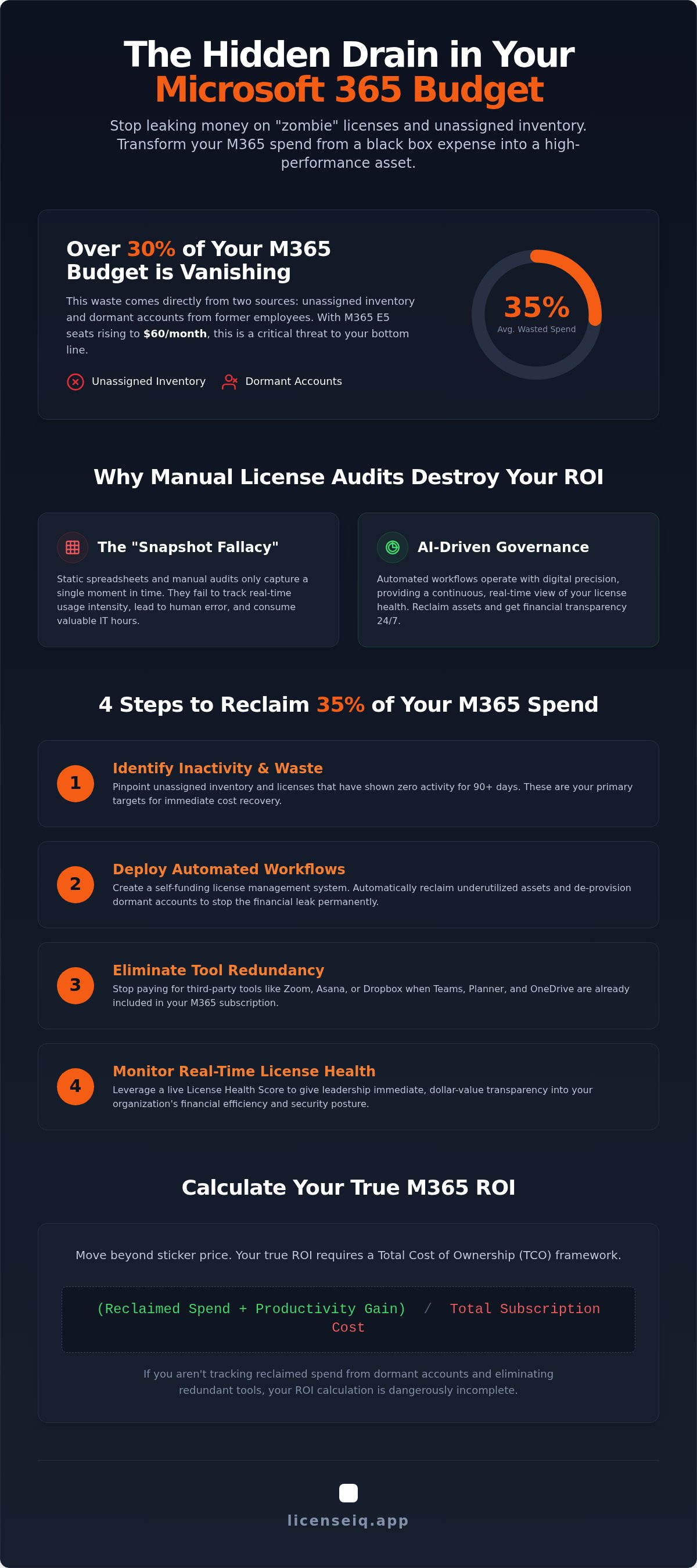
4 Steps to Reclaim 35% of Your M365 Spend
Stopping a 35% budget leak requires an aggressive, structured approach. You can't wait for a quarterly review to fix these issues. Follow these four steps to maximize your microsoft 365 license roi immediately. Each step targets a specific area of waste that often goes unnoticed in standard administrative portals.
- Step 1: Terminate unassigned licenses. These "shelfware" assets provide zero value. They often accumulate during hiring lulls or after bulk purchasing agreements. Identify and remove them to stop the immediate drain.
- Step 2: Reclaim licenses from inactive users. If an account shows zero usage for 90 days, reclaim the seat. These "zombie" licenses aren't just financial leaks; they are security vulnerabilities. Stale accounts with high-level permissions are primary targets for credential harvesting.
- Step 3: Down-tier underutilized users. Not every employee requires the $60 per month E5 tier. Use intensity data to identify users who only utilize basic productivity apps and move them to a more appropriate plan.
- Step 4: Consolidate third-party SaaS. Audit your environment for redundant applications. If your team has access to Teams, OneDrive, and Planner, you should not be paying for separate Zoom, Dropbox, or Asana subscriptions.
Automating the Offboarding Lifecycle
Incomplete offboarding is the primary source of license waste in the enterprise. When an employee leaves, their license often remains active and assigned to a disabled account for months. This creates a silent, compounding expense. You must establish a protocol that triggers automatic license reclamation the moment an account is disabled in your directory. For a comprehensive list of steps to secure your environment, follow our Office 365 Offboarding Checklist. Automation ensures that no seat is forgotten and every dollar is accounted for during personnel transitions.
Right-Sizing: Matching Licenses to Actual Roles
Right-sizing is the process of aligning a user's license tier with their actual job requirements. Many organizations "over-license" by default to avoid provisioning friction. This is an expensive mistake. Moving 100 users from M365 E5 ($60) to E3 ($39) saves your organization $2,100 every single month. That is $25,200 in annual savings from a single adjustment. For frontline workers who only need mobile or web access, moving to an F-series license like M365 F3 ($10) can save even more. Use usage intensity data to justify these downgrades. When you show that a user hasn't opened an advanced security or analytics app in six months, the decision to down-tier becomes a data-driven financial win. You can reclaim your budget today by deploying these automated workflows.
Maximizing ROI with LicenseIQ’s Automated Governance
Achieving a peak microsoft 365 license roi requires more than a one-time cleanup. It demands a vigilant, AI-native system that monitors your environment around the clock. The LicenseIQ Platform provides this oversight through a suite of tools designed to eliminate waste and enforce financial discipline. By moving from reactive manual checks to proactive digital auditing, you ensure that your resources are always optimized for maximum value.
The LicenseIQ Health Score acts as your primary KPI. It provides a real-time pulse on your software investment, translating complex usage data into a single, actionable metric. This transparency is powered by Automated Governance Workflows. By utilizing the Model Context Protocol, these workflows operate with a level of precision that manual audits cannot match. They don't just identify waste; they act on it. Every dollar you reclaim is tracked in the Spend Recovery Dashboard, providing IT leadership with immediate proof of ROI for the next budget meeting. This continuous monitoring stops "SaaS Sprawl" before it can degrade your margins.
How LicenseIQ Pays for Itself
LicenseIQ operates on a self-funding model. For most organizations, the reclaimed spend identified in the first month exceeds the annual subscription cost of the platform. This removes the financial risk of deployment. Beyond direct license savings, LicenseIQ identifies redundant third-party tools that duplicate your existing Microsoft 365 features to save an additional 10-15% on your annual software expenditure. This automation reduces the heavy burden on IT leadership for financial reporting. You can now rely on precise, automated data rather than labor-intensive manual collection.
Getting Started: Your First Spend Recovery Scan
Security and speed are the cornerstones of the onboarding process. You can connect your tenant to the platform via API in under five minutes. There is no lengthy configuration or complex training required. Once connected, the system immediately generates a list of actionable recommendations for immediate spend recovery. You gain total clarity on your environment without the five-day project traditionally associated with license audits. This immediate insight allows you to protect your corporate resources and maximize your microsoft 365 license roi starting today.
Start your automated M365 audit with LicenseIQ today.
Secure Your Financial Future with Automated Oversight
Static spreadsheets and manual tracking are no longer viable given the rising subscription costs and complex usage patterns of 2026. You've seen how failing to reclaim "zombie" licenses from former employees creates a persistent leak in your operational budget. By shifting to a model of software intelligence, you transform your Microsoft environment into a lean, high-performance asset. This proactive approach ensures your microsoft 365 license roi remains a point of strength during your next leadership review. It's time to replace guesswork with the precision of a digital auditor.
You can stop the budget drain in minutes, not days. LicenseIQ provides the immediate clarity required to protect your organization's resources through AI-native Automated Governance Workflows. With a setup time of under five minutes, you gain a real-time Health Score that identifies exactly where your spend can be recovered. This visibility allows you to save on subscriptions while maintaining a robust security posture. Stop wasting your M365 budget, get your Health Score now. Start building a more transparent and financially secure digital ecosystem today.
Frequently Asked Questions
What is a good ROI for a Microsoft 365 investment?
A strong return is defined by high feature utilization and minimal waste. Organizations should aim for a utilization rate of at least 90% across their assigned tiers. High value deployments, such as Copilot, can yield a 691% first-year ROI when properly managed. Your total return must account for reclaimed IT hours, eliminated third-party redundancies, and the total value of recovered budget from dormant accounts.
How much can an SMB typically save on M365 licenses?
Small and medium businesses can typically recover up to 35% of their total software expenditure. This waste often stems from unassigned "shelfware" and licenses still attached to former employees. With the 2026 price increases, these savings represent a vital portion of the annual IT budget. Consolidating redundant third-party applications for storage or video conferencing adds another 10% to 15% in potential financial recovery.
Is it better to have M365 E3 or E5 for maximum ROI?
The tier that aligns most closely with your actual usage intensity provides the best microsoft 365 license roi. E5 is the correct choice for organizations that actively utilize advanced compliance and automated threat protection features. However, paying for E5 for a user who only needs basic productivity tools creates significant waste. A mixed-tier environment usually provides the highest overall financial health score for the organization.
How do I find unassigned Microsoft 365 licenses?
You can view unassigned inventory in the Microsoft 365 Admin Center under the Billing and Licenses tab. However, native reports frequently overlook licenses attached to disabled accounts or those obscured by complex group-based assignments. Automated discovery tools identify these hidden costs in minutes. Tracking these unassigned assets is the first step toward stopping the budget leak and reclaiming your corporate resources for more strategic projects.
What are the risks of downgrading a Microsoft 365 license?
The primary risk is the loss of advanced security and compliance features, such as Entra ID Plan 2 or eDiscovery. Users may also lose access to specific high-tier applications like Power BI Pro. It is essential to review usage intensity data before making any changes. This data-driven approach ensures that essential workflows remain intact while you optimize your microsoft 365 license roi and eliminate unnecessary expenses.
Can I automate the reclamation of licenses from former employees?
Yes, you can use Automated Governance Workflows to manage the entire license lifecycle. These workflows trigger immediate reclamation as soon as an account is disabled in your directory. This eliminates the "Snapshot Fallacy" associated with manual monthly audits. Automation ensures that you never pay for a "zombie" seat, maintaining a lean and efficient tenant without requiring constant manual intervention from your IT team.
How does a Health Score help with SaaS spend management?
A License Health Score serves as a real-time pulse on your software investment. It translates technical metrics into a clear dollar-value rating for leadership. This transparency allows IT managers to justify their spending with data-backed proof during budget meetings. The score acts as a primary KPI, identifying underutilization and potential waste before they become significant financial liabilities for the company. Beyond the office, technology is also helping individuals manage complex health schedules; for example, you can learn more about RxCalendar to see how mobile apps improve medication adherence.
No, modern optimization platforms are designed for both specialized leadership and general business managers. The interface simplifies complex administrative tasks into clear, actionable recommendations. You can connect your tenant in under five minutes and gain immediate visibility into your spending. These tools provide the oversight of a digital auditor, making complex license management straightforward and manageable for any business leader.


