

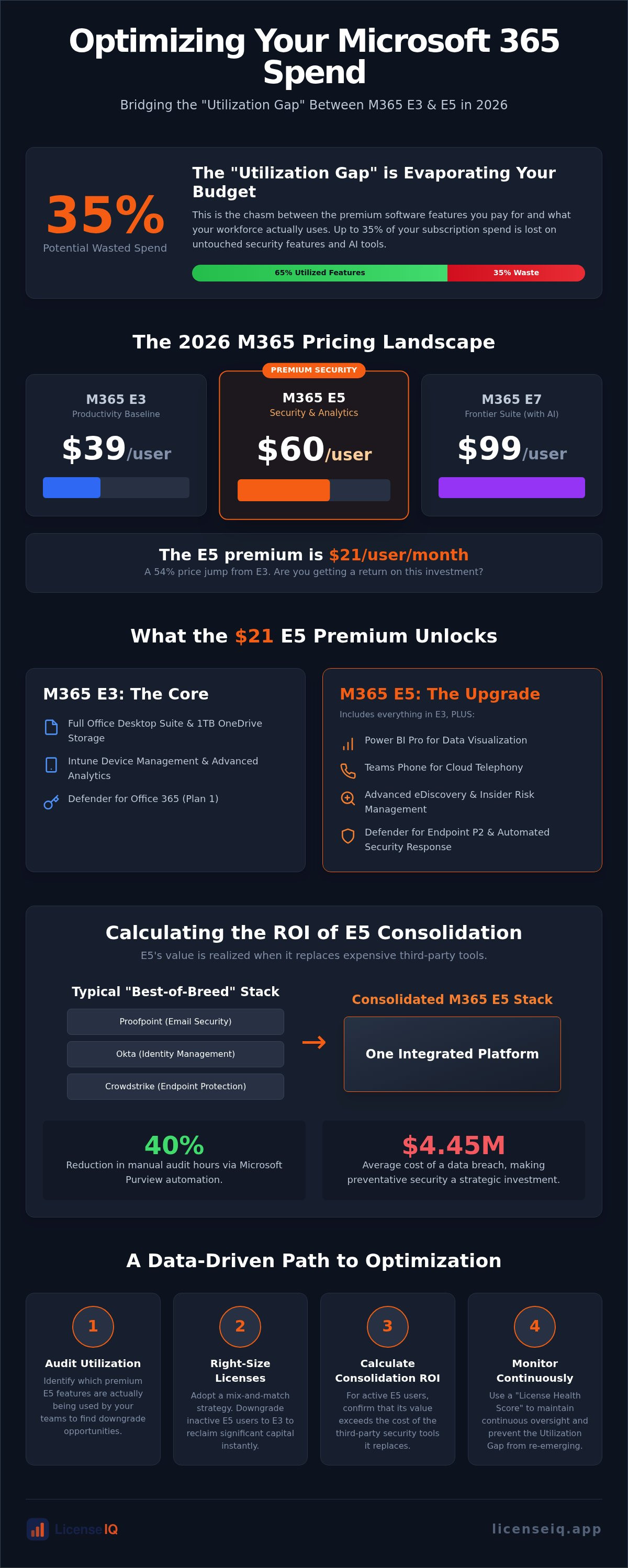
Up to 35% of your Microsoft subscription spend is likely evaporating into the "Utilization Gap" right now. With Microsoft 365 E5 prices rising to $60 per user in July 2026, the financial stakes of over-licensing have never been higher. You probably suspect that your organization is paying for premium security features and AI tools that remain largely untouched by your workforce. It's a common operational blind spot that turns software budgets into black holes.
We'll show you how to bridge this gap with a data-driven analysis of the current M365 ecosystem. This guide helps you determine when to downgrade office 365 license e5 to e3 to recover capital and when the $21 per user premium for E5 actually delivers a measurable ROI through consolidated security. We'll break down the latest 2026 pricing for E3, E5, and the new E7 Frontier Suite. You'll gain a clear framework to audit your feature adoption and use a License Health Score to eliminate waste. It's time to stop guessing and start optimizing your digital resources with surgical precision.
Key Takeaways
- Compare the updated 2026 MSRP for M365 E3 and E5 to establish a precise baseline for your annual software budget.
- Identify the specific utilization triggers that indicate when to downgrade office 365 license e5 to e3 to reclaim significant capital.
- Quantify the ROI of E5 by evaluating its ability to replace expensive third-party security and compliance vendors.
- Adopt a mix-and-match licensing strategy that combines E-series and F-series plans to align costs with actual user requirements.
- Utilize a License Health Score to maintain continuous oversight and eliminate the "Utilization Gap" in your tenant.
The 2026 Microsoft 365 Pricing Structure: E3 vs. E5 Breakdown
Microsoft finalized its latest price adjustments on July 1, 2026, fundamentally altering the Microsoft 365 subscription model for enterprise customers. Microsoft 365 E3 now costs $39.00 per user per month, representing an 8% increase. Microsoft 365 E5 has climbed to $60.00, a 5% rise from previous rates. This $21 monthly delta creates a 54% price gap between the two tiers. If your organization isn't fully utilizing the E5 security and analytics stack, you're essentially paying a premium for shelfware. Precision in licensing is no longer optional; it's a financial necessity.
The landscape grew more complex on May 1, 2026, with the launch of the Microsoft 365 E7 Frontier Suite. Priced at $99.00 per user, E7 bundles the full E5 suite with Copilot and Agent 365. This shift positions E5 as the middle-tier option, making the decision to downgrade office 365 license e5 to e3 a common strategy for departments that don't require generative AI or advanced telephony. Managing these tiers requires a vigilant system that tracks actual feature adoption rather than just seat counts.
Operational costs are also influenced by commitment terms and decoupled licensing. Decoupled "No Teams" SKUs are now standard, offering a slight discount for organizations using alternative communication platforms. However, the largest hidden cost is the 20% premium applied to monthly commitments over annual contracts. If you lack the governance to forecast seat requirements, you're likely paying this flexibility tax across your entire tenant. Using the LicenseIQ Platform allows you to identify these inefficiencies before your next renewal window closes.
M365 E3: The Productivity Baseline
M365 E3 serves as the foundational core for modern enterprise operations. It includes the full Office desktop suite, 1TB of OneDrive storage, and essential Intune device management. As of 2026, Microsoft added Defender for Office 365 Plan 1 and Intune Advanced Analytics to this tier to bolster its value. While it provides a robust productivity environment, its security features remain manual. It's the ideal choice for organizations that prefer a best-of-breed approach using third-party security vendors for endpoint protection and identity management.
M365 E5: The Premium Security & Analytics Jump
M365 E5 justifies its $60 price point through deep integration and automated oversight. The $21 premium over E3 grants access to Power BI Pro for data visualization, Teams Phone for cloud-based telephony, and Advanced eDiscovery for legal compliance. The security uplift is significant, featuring Defender for Endpoint Plan 2 and Malicious OAuth protection. These tools offer automated investigation and response capabilities that E3 lacks. However, the value of E5 is zero if these features aren't deployed. If your Spend Recovery Dashboard shows low adoption for Power BI or Teams Phone, you have a data-backed reason to downgrade office 365 license e5 to e3 and reclaim your budget.
Security and Compliance: Calculating the ROI of E5 Consolidation
Microsoft 365 E5 is often marketed as a security upgrade, but it's more accurately a vendor consolidation play. Organizations can potentially replace standalone tools like Okta, Crowdstrike, or Proofpoint with Microsoft's integrated stack. To better understand how to protect your infrastructure during such transitions, you can learn more about Kumo IT Security. The average cost of a data breach reached $4.45 million in 2023, according to industry research, making the $60 monthly E5 fee a strategic investment if it prevents a single incident. However, if your team continues to pay for third-party security while holding E5 seats, you're doubling your spend. This overlap is a primary trigger to downgrade office 365 license e5 to e3 for users who don't require high-tier protection.
Realizing E5 value requires migrating from legacy systems to Entra ID P2 and Defender for Endpoint Plan 2. This transition eliminates multiple monthly invoices but introduces costs in migration labor and team retraining. To find your break-even point, you must compare the $21 per user premium against the combined cost of your existing security subscriptions. Effective licensing optimization strategies involve auditing which users actually benefit from advanced XDR capabilities versus those who only need the productivity basics found in E3.
Compliance as a Cost Center
Microsoft Purview in the E5 tier automates data lifecycle management and insider risk oversight. This automation can reduce manual audit hours by up to 40%, freeing up your IT and legal teams for higher-value tasks. In legal-heavy industries, eDiscovery Premium significantly reduces outside counsel fees by enabling in-place data review and advanced culling, directly offsetting the higher E5 subscription cost. Automated sensitivity labeling also prevents costly data exfiltration by securing files based on content rather than user discretion.
If your audit reveals that these compliance tools remain unconfigured, you're paying for protection you don't have. Identifying these gaps is the first step toward reclaiming your budget. You can use the Spend Recovery Dashboard to see exactly which premium security features are active across your tenant. Don't let your E5 investment turn into shelfware through lack of oversight. Precision in license management ensures every dollar spent contributes to your organization's security posture.
The Utilization Gap: Identifying Wasted Spend in E5 Upgrades
The true cost of your Microsoft tenant isn't the MSRP; it's the delta between what you pay for and what your team actually uses. This "Utilization Gap" represents the financial waste created when organizations pay for Tier-1 licenses while only deploying Tier-2 features. While E5 offers an impressive security and analytics stack, industry data suggests that up to 35% of these premium capabilities often go completely unused. This misalignment turns your software budget into a liability. A Gartner analysis on E3 vs. E5 value highlights that leaders must scrutinize adoption metrics before committing to the $60 per user price point. If your workforce doesn't actively use Power BI Pro or Teams Phone System, you're subsidizing shelfware.
Spotting Underutilized Premium Features
Identifying which employees require the full E5 suite requires more than a cursory glance at seat counts. It demands a systematic review of the Microsoft 365 license management lifecycle to track real-time adoption. "Just-in-case" licensing is a common trap where IT departments assign E5 seats to avoid future friction, yet many of these users never touch advanced features. For these segments, the choice to downgrade office 365 license e5 to e3 can immediately recover $21 per user per month without impacting productivity. Precision in seat assignment ensures you aren't paying for premium security tools that remain unconfigured and inactive.
The Financial Impact of Inactive Accounts
Inactive accounts and "ghost" users represent a silent drain on corporate resources. Industry reports suggest that the average SMB wastes between 20% and 30% of their M365 budget on licenses assigned to departed employees or unmonitored service accounts. Manual audits often fail to catch this sprawl because they lack the real-time visibility needed to track login frequency across the entire suite. Implementing a rigorous Office 365 offboarding checklist is essential to stop this leakage at the source and maintain a lean tenant.
Relying on a static feature list to justify your spend is a tactical error. You need a dynamic License Health Score that reflects actual engagement. This metric provides the transparency required to execute a downgrade office 365 license e5 to e3 with total confidence. By focusing on spend recovery rather than just cost management, you ensure that your capital is invested in tools that drive operational growth rather than collecting digital dust.
Strategic Right-Sizing: Why a Mix-and-Match Approach Wins
Standardizing on a single license tier is a costly administrative shortcut. While Microsoft encourages uniform E5 deployment to simplify management, this approach forces you to pay for premium features that 80% of your staff will never touch. Strategic right-sizing involves assigning licenses based on actual functional requirements rather than organizational convenience. You can achieve significant ROI by reducing M365 subscription costs through a tiered licensing model that aligns precisely with user behavior.
The F-Series alternative offers the most dramatic savings for specific worker profiles. Using F3 licenses for frontline staff can save up to 70% compared to the cost of an E3 license. These users typically only require mobile-first productivity and basic web access, making the $60 E5 price point entirely unjustifiable. Implementing a mixed environment allows you to reserve high-cost licenses for power users while maintaining a lean budget for the rest of the workforce.
Designing a Hybrid Licensing Persona
Success starts with defining clear user personas based on risk and utility. Executives and legal teams often require E5 for advanced Purview compliance and eDiscovery tools. Standard information workers typically thrive on E3, utilizing the full desktop suite and basic security. Frontline workers, who may only need email and Teams access on shared devices, are perfect candidates for F-series plans. Maintaining security parity is the primary challenge here. You must ensure that when you downgrade office 365 license e5 to e3 for certain groups, your underlying Entra ID and Defender policies remain robust across all personas.
The Math of Right-Sizing
Data-backed decisions prevent budget leakage. Consider a 500-user firm that historically licensed every employee on E5. By shifting 350 users to E3 and 50 frontline workers to F3, the organization recovers approximately $80,000 per year in wasted spend. This isn't a one-time fix; it requires continuous re-evaluation as roles evolve and project requirements shift. Refer to our comprehensive guide on Microsoft 365 license types to map your specific personas to the most cost-effective 2026 tiers.
Managing a mixed environment manually often leads to license sprawl and governance gaps. Automated oversight is the only way to sustain these savings without increasing your IT team's workload. You can use the LicenseIQ Platform to automate these governance workflows and ensure your right-sizing strategy stays optimized as your headcount fluctuates. Stop paying for premium features that don't contribute to your bottom line.
Automating Your Cost Analysis with LicenseIQ
Manual license management is a liability. It creates organizational disorder and drains your capital through obscured details. You need immediate clarity to protect your company's financial health. Connecting the LicenseIQ Platform to your tenant provides this oversight in minutes. It doesn't just manage costs; it recovers spend by identifying the exact delta between your paid licenses and actual feature utilization.
The License Health Score serves as your primary metric for financial accuracy. It provides a real-time assessment of your tenant's efficiency. A low score indicates that you are paying for premium shelfware. This data provides the financial justification needed to downgrade office 365 license e5 to e3 for specific user groups. By using a vigilant and precise system, you ensure that every dollar in your budget supports active productivity rather than digital dust.
From Manual Audits to Automated Oversight
Static spreadsheets are the enemy of effective cost control. They are slow, error-prone, and obsolete the moment they are saved. Microsoft billing cycles and user roles change too rapidly for manual tracking to keep pace. Continuous monitoring replaces point-in-time audits with proactive governance. Automated Governance Workflows eliminate the manual spreadsheet grind by flagging redundant licenses the moment they become inactive. This system handles the entire license lifecycle, ensuring that offboarded users don't remain a silent drain on your resources. It allows you to downgrade office 365 license e5 to e3 with total confidence, backed by actual usage data.
Getting Started with Your Spend Recovery Dashboard
The Spend Recovery Dashboard translates complex technical logs into actionable financial strategy. You can visualize your potential savings in under five minutes. The platform provides specific dollar-value recommendations for every user, removing the guesswork from licensing decisions. If the system detects a user on an E5 plan who never utilizes Power BI or advanced compliance tools, you can implement the right-sizing recommendation with a single click. This level of transparency distinguishes a vital guardian of corporate resources from a passive administrative tool. Discover your M365 Health Score with LicenseIQ and stop paying for features your team doesn't use.
Secure Your Financial Health with Precision Licensing
The 2026 Microsoft 365 pricing structure leaves no room for administrative waste. You've seen how the $21 premium for E5 only delivers value through active utilization and vendor consolidation. Organizations failing to monitor these details are essentially subsidizing shelfware. By adopting hybrid licensing and identifying your Utilization Gap, you can reclaim capital without compromising security.
Data-driven oversight is the only way to sustain savings as headcount fluctuates. Whether you need to downgrade office 365 license e5 to e3 for underutilized seats or upgrade power users to the E7 suite, decisions must be backed by real-time metrics. Manual spreadsheets cannot provide the vigilance required in complex environments. You need a system that works as hard as your team to protect corporate resources.
It's time to transform licensing from a fixed cost into a strategic asset. Our AI-native intelligence provides a comprehensive Health Score analysis in minutes to guide your right-sizing journey. Scan your tenant and recover wasted spend with LicenseIQ to save up to 35% on M365 costs. You have the tools to achieve total transparency today.
Frequently Asked Questions
How much can I save by switching from M365 E5 to E3?
You can save exactly $21.00 per user, per month. Based on the July 2026 MSRP, Microsoft 365 E5 costs $60.00 while E3 is priced at $39.00. For an organization with 500 users, this strategic shift recovers $126,000 in annual spend. You must ensure that target users do not require Power BI Pro or advanced telephony before you downgrade office 365 license e5 to e3 to reclaim these resources.
What are the main security risks of downgrading to M365 E3?
The primary risk is the loss of automated investigation and response capabilities found in Defender for Endpoint Plan 2. E5 provides automated remediation and Malicious OAuth protection that E3 lacks. Downgrading also removes advanced Purview compliance tools like Insider Risk Management. Organizations in regulated sectors must verify they have third-party alternatives or manual processes in place to mitigate these specific security vulnerabilities before changing tiers.
Can I mix and match E3 and E5 licenses in the same tenant?
Yes, Microsoft supports assigning different license tiers to different users within a single tenant. This hybrid approach is the most efficient method to align software costs with actual job requirements. You can reserve E5 for high-risk executives while moving the general workforce to E3. This strategy prevents your organization from paying for premium features that remain unused by the majority of your staff.
Is Power BI included in Microsoft 365 E3?
No, Power BI Pro is not included in the Microsoft 365 E3 license. It remains a core component of the E5 tier. If E3 users require advanced data visualization, you must purchase Power BI Pro as a standalone add-on or maintain their E5 status. Auditing actual Power BI engagement is a critical step in determining if you should downgrade office 365 license e5 to e3 for specific departments.
What is the E7 license mentioned in 2026 pricing guides?
LicenseIQ uses AI-native intelligence to scan your tenant for login activity and feature engagement across the entire suite. It identifies users who haven't accessed their accounts or those who aren't utilizing premium features like Teams Phone. This automated oversight provides a precise dollar-value recovery recommendation in minutes. It allows you to eliminate waste and identify ghost accounts without the errors associated with manual spreadsheet audits.
Does Microsoft 365 E5 include a phone system?
Yes, Microsoft 365 E5 includes the Teams Phone System, providing cloud-based PBX capabilities. This feature allows organizations to consolidate their communication stack and eliminate third-party telephony costs. If your organization uses an alternative VoIP provider, this E5 feature becomes expensive shelfware. Identifying this lack of adoption is a clear signal that your organization is over-licensed and should consider a more cost-effective licensing tier.
What is the ROI of using an automated license governance tool?
Automated governance tools like LicenseIQ typically recover up to 35% of wasted subscription spend. By providing a real-time License Health Score and automating the offboarding process, these tools eliminate the "Utilization Gap" found in manual environments. The ROI is realized through immediate spend recovery and the elimination of manual labor hours previously spent on complex administrative tasks and monthly billing reconciliations.


