

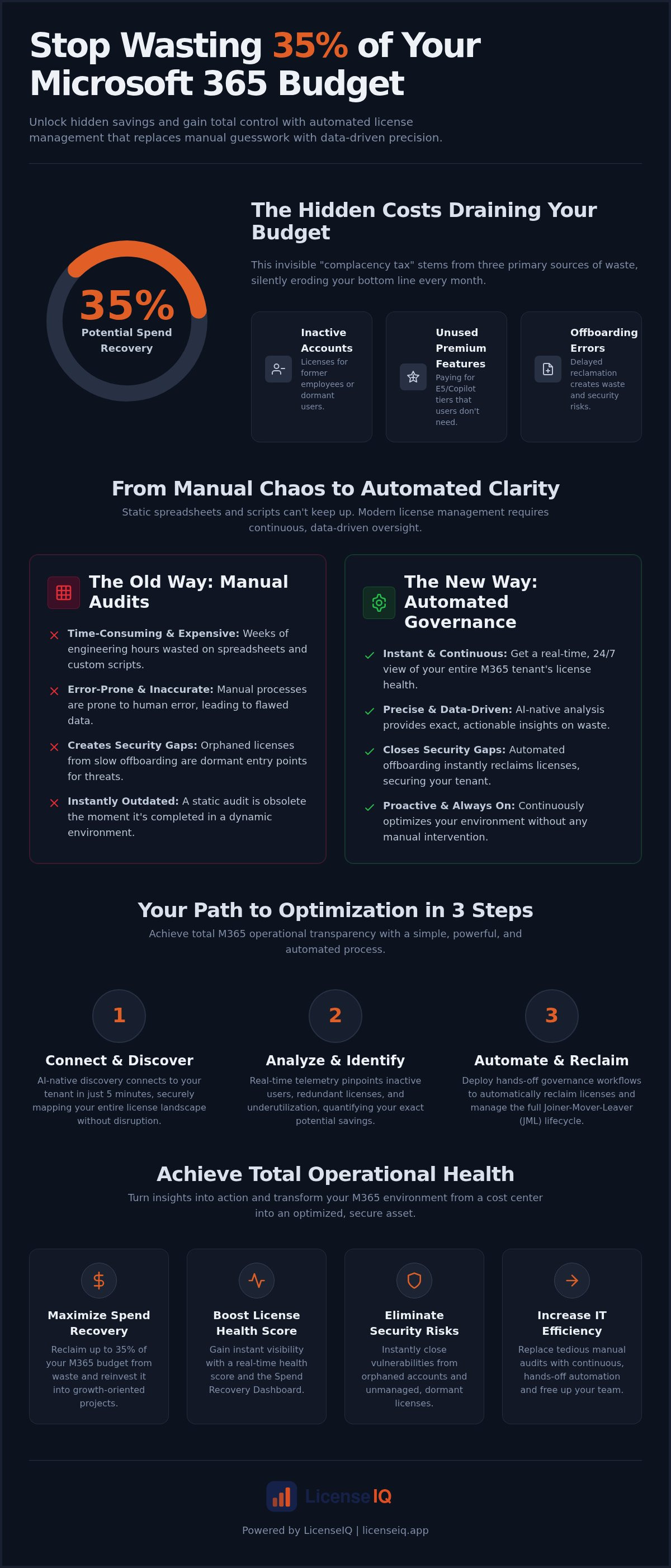
35% of your Microsoft 365 budget is likely funding licenses that nobody uses. This invisible waste stems from inactive accounts, unutilized E5 features, and manual offboarding errors that leave your tenant cluttered. Implementing automated m365 license management is the only way to stop these financial leaks without wasting weeks on spreadsheets. You've likely felt the frustration of paying for premium seats while your actual utilization remains obscured.
We know that specialized leadership requires immediate clarity and total oversight of corporate resources. This article explores how the LicenseIQ Platform secures your budget and boosts your License Health Score in minutes. You'll learn to use AI-native automation to eliminate waste and gain a precise dollar-value report of your potential savings via the Spend Recovery Dashboard.
We'll preview how to deploy continuous, hands-off governance workflows that act as a vigilant auditor for your organization. By the end, you'll have a clear path to total operational transparency and a leaner, more efficient M365 environment. It's time to replace manual effort with precise, data-driven automation.
Key Takeaways
- Stop the complacency tax by identifying hidden SaaS sprawl and reclaiming up to 35% of your subscription spend.
- Deploy automated m365 license management to replace error-prone manual spreadsheets with precise, AI-native governance.
- Gain instant visibility into inactive users and redundant license tiers through the Spend Recovery Dashboard.
- Automate critical offboarding and provisioning workflows to ensure every seat delivers maximum value.
- Achieve a high License Health Score with a platform that connects to your tenant in just five minutes.
The Financial Impact of Manual M365 License Management
Every month, organizations pay a "complacency tax" on their Microsoft 365 environment. This tax is the silent delta between your monthly invoice and the actual value your team extracts from the software. It's not a fixed fee but a variable drain on capital caused by oversight. When you rely on manual processes, you're essentially guessing your way through your SaaS budget. You pay for premium E5 seats while users only access basic email, or you fund licenses for contractors who left the company months ago. This lack of precision directly erodes your bottom line.
Modern financial hygiene requires a sophisticated approach to Software Asset Management (SAM). Without a structured framework, small and mid-sized businesses (SMBs) often succumb to "SaaS sprawl." This occurs when redundant modules and specialized add-ons accumulate across the tenant without central oversight. Automated m365 license management replaces this disorder with total clarity. It transforms your tenant from a black box of expenses into a transparent, optimized asset.
The Reality of SaaS Sprawl in 2026
Manual Audits vs. Automated Oversight
Static spreadsheets are financial anchors. They fail to track real-time user activity, leaving you blind to license underutilization. Many IT teams attempt to bridge this gap with custom PowerShell scripts, but this creates a new hidden cost. Highly skilled engineers spend hours writing and debugging scripts instead of focusing on growth-oriented projects. This manual labor is expensive and inherently prone to human error.
Manual offboarding is the most frequent cause of wasted spend. When an employee leaves, the license reclamation process often stalls. These "orphaned" licenses continue to draw funds for months. Beyond the financial loss, they represent a significant security risk. Unmanaged licenses provide a dormant entry point for unauthorized access. Transitioning to automated m365 license management closes these gaps instantly. It ensures that every seat is accounted for, active, and secure. Proactive governance isn't just about saving money; it's about maintaining a vigilant and precise operational environment.
How Automated License Governance Workflows Function
Modern automated m365 license management doesn't rely on brittle, custom-coded scripts. Instead, it uses AI-native software intelligence to map the entire tenant architecture. This shift allows for a level of precision that manual auditing cannot match. By analyzing real-time telemetry, the system identifies exactly where capital is being deployed and where it's being wasted. This shift toward AI-native software intelligence is also revolutionizing other specialized fields; for example, RAMS AI uses similar technology to automate complex safety documentation for construction professionals.
Connecting to a complex Microsoft 365 tenant used to take days of API configuration. AI-native platforms now achieve this in minutes. The system performs a non-invasive scan of user interactions, license assignments, and service usage. It monitors every heartbeat of the tenant to build a comprehensive map of your SaaS environment.
The Model Context Protocol (MCP) serves as a standardized bridge that allows AI-native systems to securely access and interpret complex tenant data with full operational context. This protocol ensures the AI understands the "why" behind user activity, not just the "what." It moves beyond simple login counts to analyze feature-level utilization. This deep insight is what drives significant savings across the organization.
Automated Governance Workflows Explained
Once discovery is complete, the platform transitions from observation to active governance. You can set specific policies for license reclamation based on your company's risk appetite. For instance, if a user hasn't accessed an E5-exclusive feature in 30 days, the workflow can automatically trigger a downgrade recommendation.
These workflows are particularly effective during the Joiner-Mover-Leaver (JML) lifecycle. When an employee departs, the system detects the change in your HR directory or Entra ID. It immediately reclaims the license, preventing the "orphaned" seat problem described earlier. This ensures your strategy remains proactive rather than reactive when using the LicenseIQ Platform.
The result is a shift from raw data to actionable, dollar-value recommendations. You no longer need to interpret complex usage reports. The system provides a clear roadmap for cost recovery. Implementing automated m365 license management ensures your licensing always aligns with actual business needs, securing your budget without requiring constant manual intervention.
Identifying M365 Waste: Inactive Users and Redundant Tiers
Visibility is the first step toward financial recovery. The Spend Recovery Dashboard provides an immediate, dollar-value breakdown of inefficiencies within your tenant. It exposes the "low-hanging fruit" of cost recovery: inactive users. These are accounts that remain licensed despite zero activity over 30, 60, or 90 days. Without automated m365 license management, these ghost accounts continue to inflate your monthly invoice. The platform identifies these accounts by scanning for last login dates and service usage across all modules, ensuring you don't pay for empty seats.
Beyond inactive accounts, unassigned SKUs represent significant capital tied up in unused inventory. It's common for organizations to over-provision licenses during growth phases and then fail to return them to the global pool. The dashboard highlights these redundant licenses instantly. It allows you to shrink your subscription commitment to match your actual headcount with precision. You stop paying for "just in case" seats that never get filled, protecting your budget from unnecessary bloat.
The License Health Score Metric
The License Health Score is a vital metric that quantifies the efficiency of your M365 environment. It benchmarks your tenant against industry standards, providing a clear 0 to 100 rating of your fiscal hygiene. A low score indicates high waste and poor governance. Leadership teams value this metric because it translates technical overhead into a tangible performance indicator. You can use this score to justify budget reallocations or to prove the ROI of your optimization efforts to the board. It turns a complex IT problem into a simple financial goal.
Comparing License Tiers for Optimization
Right-sizing is the process of aligning a user's license tier with their actual feature utilization. Many organizations default to E5 for all employees. However, data often shows that only a small fraction of the workforce actually uses advanced security or analytics features. Automated m365 license management analyzes feature-level telemetry to identify candidates for downgrades to E3 or F-series licenses. This isn't about cutting tools; it's about paying for the right ones.
Frontline workers often don't need the full desktop suite. Moving them to F-series licenses can slash costs while maintaining essential connectivity and security. For a deeper dive into the specific features of each tier, consult our Microsoft 365 License Types: The Comprehensive 2026 Reference Guide. This granular approach ensures you only pay for the capabilities your team actually uses. It eliminates the "one-size-fits-all" mentality that drains corporate resources.
Implementing Automated Offboarding and Provisioning
Offboarding is the primary point where financial waste enters your Microsoft 365 environment. Manual processes fail because they rely on fragmented communication between HR and IT departments. When a technician waits for a ticket to arrive, the organization continues to pay for a seat that is already vacant. Automated m365 license management eliminates this lag by synchronizing your license state with your actual workforce in real-time. This precision ensures that your subscription spend never outpaces your active headcount.
Beyond the financial drain, manual offboarding creates significant security vulnerabilities. An active license for a former employee is an unmonitored gateway into your corporate data. Automated workflows close these gaps the moment a user is disabled in your directory. For a comprehensive strategy on securing your tenant during transitions, consult our Office 365 Offboarding Checklist 2026: Secure Data and Reclaim Spend. This proactive approach protects both your capital and your intellectual property.
Automating the Leaver Workflow
Orphaned accounts are silent budget killers that linger on invoices for months. Automated workflows identify these accounts instantly by monitoring status changes in your identity provider. The system reclaims the license and returns it to the available pool for future use. It also manages data retention requirements, ensuring that mailbox content or OneDrive files are preserved according to your compliance policies before the license is fully stripped. This ensures you don't lose vital information during the reclamation process.
Smart Provisioning for New Hires
Provisioning is the first opportunity to prevent budget bloat. Many organizations fall into the "default to E5" trap, assigning the most expensive license to every new hire to avoid administrative friction. This creates immediate, unnecessary overhead. Automated m365 license management allows you to implement role-based provisioning templates. A frontline employee receives an F-series license, while a specialized analyst gets the E5 they require. This maintains a lean license pool and allows for rapid, cost-effective scaling as your team grows.
By moving from manual assignments to automated governance, you ensure that every license delivers maximum value from day one. You can deploy these automated governance workflows to gain total control over your Joiner-Mover-Leaver lifecycle. This transition replaces organizational disorder with a meticulous, data-driven system that guards your resources around the clock.
Continuous Optimization with LicenseIQ
LicenseIQ transforms your tenant management from a complex burden into a strategic advantage. While traditional tools often require weeks of configuration, our platform connects to your environment in minutes. It immediately begins delivering insights through the Spend Recovery Dashboard. This tool acts as your 24/7 financial monitor, scanning for the deep-seated inefficiencies that manual audits miss. You move from reactive troubleshooting to a state of permanent software intelligence.
Instant Visibility for SMB Leaders
Specialized leadership requires immediate clarity without technical jargon. We developed the "5-Minute Audit" concept to provide this transparency for SMB managers. You receive a report of dollar-value recommendations that you can present for CFO approval instantly. No IT degree is required to interpret these findings. This level of oversight is a cornerstone for Mastering the Microsoft 365 License Management Lifecycle in 2026.
Implementing automated m365 license management allows you to reclaim up to 35% of your subscription spend. The platform doesn't just aggregate data; it provides a definitive roadmap for cost recovery. It identifies the specific seats that are underutilized, allowing for precise adjustments. Your resources are monitored by a vigilant system that ensures every dollar is accounted for.
The Future of AI-Native Governance
Scaling your M365 environment shouldn't force you to scale your administrative overhead. LicenseIQ acts as a proactive guardian, managing the tedious tasks of governance so your team can focus on high-impact projects. It embodies the traits of a meticulous digital auditor that stays one step ahead of organizational disorder. You achieve total operational transparency through a system designed for maximum efficiency.
The transition to AI-native governance is the only way to maintain financial hygiene in a modern SaaS ecosystem. You gain the security of knowing your budget is protected by data-driven decision-making. Don't let invisible waste continue to drain your corporate resources. Take the first step toward total clarity and Optimize your M365 tenant with LicenseIQ today to secure your financial health.
Securing Your Budget with Software Intelligence
Manual oversight is no longer a viable strategy for specialized leadership. We've explored how orphaned accounts and redundant license tiers create a persistent complacency tax that drains your capital. Transitioning to automated m365 license management replaces this organizational disorder with total clarity and meticulous operational hygiene. You don't have to settle for obscured details or reactive auditing when a proactive guardian is available.
By leveraging an AI-native Spend Recovery Dashboard, you gain the ability to uncover hidden waste in minutes rather than weeks. This system provides continuous License Health Score monitoring to ensure your tenant remains lean and efficient as you scale. You can save up to 35% on your subscriptions by making data-driven decisions that align with actual feature utilization. It's time to replace manual effort with a vigilant, precise system that protects your financial health 24/7.
Start your 5-minute M365 audit with LicenseIQ and transform your tenant into a high-performance asset. Take control of your corporate resources today and achieve the transparency your organization deserves.
Frequently Asked Questions
How does automated M365 license management actually save money?
It eliminates the complacency tax by identifying inactive users and redundant tiers in real-time. By using automated m365 license management, you stop paying for seats that aren't being used or are over-provisioned. The system converts raw usage data into actionable dollar-value recommendations. It ensures your subscription commitment matches your actual headcount exactly, protecting your budget from silent inflation and human error during the offboarding process.
Can I automate license reclamation for inactive users without losing their data?
Yes, you can configure workflows to manage data retention before a license is fully stripped. The platform identifies inactive accounts while ensuring compliance with your specific data policies. It preserves mailbox content and OneDrive files as a prerequisite to reclamation. This approach allows you to recover costs without risking intellectual property. You maintain total operational transparency while the system handles the tedious task of safe license recycling.
Is automated governance secure for my Microsoft 365 tenant?
Automated governance actually increases security by eliminating orphaned accounts that serve as unmonitored entry points. It uses secure protocols to scan your environment without requiring invasive API configurations. By instantly de-provisioning licenses during employee departures, the system closes security gaps that manual processes often miss. You gain the confidence of knowing a vigilant auditor is monitoring your resources 24/7 to prevent unauthorized access and data leaks.
What is a License Health Score and how is it calculated?
A License Health Score is a metric that quantifies the efficiency of your tenant by benchmarking it against industry standards. It calculates a rating based on factors like license utilization, the number of inactive users, and the alignment of feature tiers with actual activity. A high score indicates a lean, optimized environment. This score gives leadership a clear, data-driven indicator of fiscal hygiene and helps justify budget reallocations to the board.
How long does it take to set up an automated license management tool?
Setting up the LicenseIQ Platform takes just minutes. Unlike traditional enterprise tools that require complex, weeks-long configurations, our AI-native system connects to your tenant almost instantly. It immediately begins scanning for waste and populates the Spend Recovery Dashboard with real-time insights. This rapid deployment allows SMB leaders to conduct a 5-minute audit and start reclaiming their SaaS spend without requiring significant technical overhead or an IT degree.
Does LicenseIQ work for small businesses with fewer than 100 users?
Small businesses often face the highest relative waste from SaaS sprawl. Even with fewer than 100 users, manual tracking is prone to errors that inflate budgets. Automated m365 license management provides SMBs with the same level of oversight and precision as enterprise-scale organizations. It allows smaller teams to remain lean and scale their M365 environment without adding administrative headcount or complex technical burdens to their existing staff.
What is the difference between license management and license optimization?
License management is the basic administrative task of assigning and tracking seats. License optimization is a proactive strategy that ensures every assigned license delivers maximum value. Optimization analyzes feature-level telemetry to determine if a user actually needs a premium tier like E5 or if an E3 or F-series license is sufficient. It focuses on the financial health of the organization by aligning costs with actual business requirements and specific usage patterns.
Can I track Copilot and other AI add-on spend automatically?
Yes, the platform monitors high-cost AI tools like Copilot to ensure they are delivering ROI. AI add-ons significantly increase per-user costs, making precise utilization tracking essential for budget security. The Spend Recovery Dashboard identifies users who have been assigned these premium features but aren't actively using them. This level of oversight prevents your budget from being drained by unutilized AI modules, ensuring your technology investments are always data-driven and efficient.


