

A clean license inventory won’t move a mailbox, and a tenant migration won’t show you which subscriptions are underused. That distinction is central to m365 license management for mergers and acquisitions. Microsoft 365 subscription licenses are tenant-bound, so they can’t simply be transferred between companies’ tenants. During coexistence, some users may need licenses in both environments, creating duplicate exposure while teams work to preserve access.
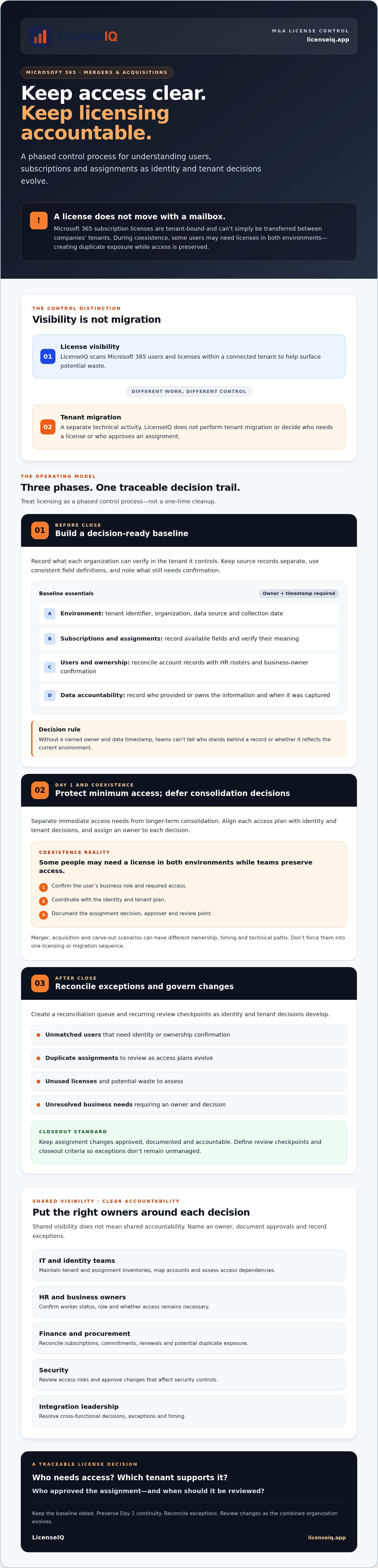
You need Day 1 continuity and a clear view of users, subscriptions, and assignments before duplicate licensing becomes an unmanaged cost. Treat licensing as a phased control process, not a one-time cleanup. This guide explains how to build a decision-ready baseline during pre-close diligence, plan for Day 1, and set post-close review checkpoints as identity and tenant decisions evolve.
It also clarifies the difference between license visibility and migration. LicenseIQ scans Microsoft 365 users and licenses within a connected tenant to help surface potential waste; it doesn’t perform tenant migration. Use that distinction to coordinate decisions, protect business access, and establish accountable license governance after close.
Key Takeaways
- Build a dated baseline of tenants, subscriptions, license assignments, user status, and business owners so decisions rely on traceable data.
- Use m365 license management for mergers and acquisitions as a phased control process, aligning access plans with identity and tenant decisions.
- Separate Day 1 minimum-access needs from longer-term consolidation, and assign an owner to each decision.
- Create a post-close reconciliation queue for unmatched users, duplicate assignments, unused licenses, and unresolved business needs.
- Set recurring review checkpoints and closeout criteria to keep assignment changes approved, documented, and accountable.
Why M365 License Management Becomes an M&A Control Issue
M&A license management is the coordinated process of identifying users, reviewing subscriptions and assignments, maintaining required access, and governing changes as organizational boundaries shift. It provides the control layer. Tenant migration is a separate technical activity: it moves or reorganizes workloads and identities, but it doesn’t determine who needs a license, who approves an assignment, or when duplicate coverage can end.
This distinction matters because Microsoft 365 combines services, identities, and subscription entitlements in a configurable environment. A foundational overview of the Microsoft 365 suite can help clarify the breadth of services involved. In a transaction, reconcile license decisions with both the user’s business role and the identity and tenant plan. A person may appear in both environments, have different accounts, or rely on services that aren’t yet available in the planned target environment.
What changes when two Microsoft 365 environments meet?
Records rarely line up automatically. One organization may have active users with clear owners; the other may have stale accounts, overlapping services, or assignments with no documented business reason. Identity and tenant decisions shape where a user signs in and which environment supports their work. They don’t determine the right subscription or approve its assignment. Subscription and assignment options depend on current Microsoft terms and each tenant’s configuration, so verify them before making changes.
The control plan also depends on the transaction. A merger may involve two operating environments that need coordinated access while the combined organization decides what to standardize. An acquisition may require the buyer to preserve the acquired team’s access while making its own identity and tenant decisions. A carve-out may need to separate users and services from a parent environment. These scenarios can have different ownership, timing, and technical paths, so don’t force them into one migration or licensing sequence.
Which teams own the licensing decisions?
Shared visibility doesn’t mean shared accountability. Name an owner for each decision and document approvals and exceptions, so teams can act on a clear record rather than informal assumptions.
- IT and identity teams: maintain tenant and assignment inventories, map accounts, and assess access dependencies.
- HR and business owners: confirm worker status, role, and whether access remains necessary.
- Finance and procurement: reconcile subscriptions, commitments, renewals, and potential duplicate exposure.
- Security: review access risks and approve changes that affect security controls.
- Integration leadership: resolve cross-functional decisions, exceptions, and timing.
For a repeatable operating model beyond the transaction, connect this work to the broader Microsoft 365 license management lifecycle. Strong m365 license management for mergers and acquisitions makes each change traceable: who needs access, which tenant supports it, who approved the assignment, and when the decision should be reviewed.
Build a Reliable M365 License Baseline Before Close
A useful baseline starts with evidence, not assumptions about access to the other organization’s tenant. Before close, each company can document the environment it controls, record what it can verify, and identify what still needs confirmation. This gives integration leaders a decision-ready view without implying that either party can inspect the other tenant.
An inventory is decision-ready only when its owner and data timestamp are recorded. Without them, teams can’t tell who stands behind a record or whether it still reflects the current environment.
What to include in the M365 inventory
Build the baseline in a consistent order. Use the same field definitions across both organizations, but keep each tenant’s source records separate:
- Identify the environment: record the tenant identifier, organization, data source, collection date, and the person or team authorized to provide the data.
- Capture subscriptions and assignments: document subscription types and assigned licenses using fields available in the organization’s current admin tools. Verify those fields and their meaning before comparing records.
- Map users and ownership: reconcile account records with HR rosters and business-owner confirmation. Capture user status, business owner, and known service requirements.
- Classify findings: label each item as a confirmed fact, estimated exposure, unresolved exception, or decision requiring legal or Microsoft review.
Flag inactive accounts, possible duplicates, records without owners, and unmatched users for investigation. These are review candidates, not automatic license-removal targets. An account that appears inactive may still support a business need or depend on a separate access decision.
How to assess data quality and access constraints
Keep a separate exception log for missing records, uncertain user matches, and data that couldn’t be validated. Record which tenant each source represents, who authorized its use, when it was collected, and what limitations apply. If the other company’s data isn’t available before close, mark the gap and assign an owner and follow-up checkpoint instead of treating an estimate as confirmed.
Use a Microsoft 365 license types guide to align terminology, but don’t treat product labels as transaction decisions. The right assignment depends on verified user needs, tenant configuration, and current Microsoft terms. M365 license management for mergers and acquisitions works best when the baseline makes both known facts and unknowns visible.
After close, connected-tenant license visibility can support ongoing review, but it doesn’t replace pre-close diligence. Explore the LicenseIQ platform for license visibility as one possible input to that review; confirm current access and setup details before relying on it.
Coordinate Day 1 Access with License and Tenant Decisions
Day 1 planning is about maintaining approved access to essential work, not completing every licensing or tenant decision at once. Separate the minimum access employees need at close from later consolidation and optimization. This gives teams room to protect continuity while they verify tenant dependencies, subscription terms, and the intended operating model.
What belongs in a Day 1 readiness plan?
Identify critical user groups, essential workloads, and the identity, security, and data dependencies required to support them. For each access decision, document the responsible owner, supporting evidence, exception approval, and review date. IT, security, data, licensing, and business leads should agree on a shared readiness decision rather than maintain separate assumptions.
Temporary arrangements need an end point. Record when each exception will be reviewed and who can renew or close it. Don’t treat a temporary assignment as a permanent entitlement simply because it supports Day 1 continuity.
How do merger, acquisition, and carve-out scenarios differ?
The desired operating model changes the questions to resolve. A merger may prioritize a future shared environment; an acquisition may preserve the acquired organization’s access while the buyer evaluates integration; a carve-out may require a separated group to maintain the services it needs. These are planning distinctions, not fixed technical paths. Verify tenant, subscription, and contractual requirements against current Microsoft guidance and the relevant agreements before approving changes.
| Scenario | Dependency | Accountable owner | Evidence | Unresolved question |
|---|---|---|---|---|
| Merger | Whether teams need access across both environments | Integration lead with IT and business owners | Critical-user and workload list | Which operating model and tenant plan are approved? |
| Acquisition | Continuity for acquired users and services | Acquiring organization’s IT owner | Access requirements and verified subscription records | Which temporary arrangements require review? |
| Carve-out | Which users and services must remain available to the separated group | Separation lead with security and business owners | Approved scope and dependency map | What contractual or tenant conditions must be confirmed? |
Use this table as a decision log, not as authorization to transfer subscriptions, reassign licenses, or consolidate tenants. Confirm current Microsoft terms and configuration first. For broader optimization concepts, consult a Microsoft 365 license optimization guide, then apply those ideas only after continuity requirements are clear. M365 license management for mergers and acquisitions should sequence decisions: approve minimum access, track dependencies and exceptions, then review longer-term consolidation.
Once the operating model is established, ongoing license visibility can help teams investigate assignments and potential waste. Explore LicenseIQ’s license visibility platform as an input to post-close review, not as a tenant-migration solution.
Reconcile Assignments and Control Exceptions After Close
Once the combined organization can compare its records, turn discrepancies into a managed reconciliation queue. Group cases by issue so reviewers can assign an owner, request evidence, and track each decision instead of making changes based on an incomplete match.
- Unmatched users: confirm identity, employment status, and business owner before linking accounts or changing access.
- Possible duplicate assignments: determine whether the user needs access in both environments and document the reason.
- Potentially unused licenses: validate account activity and service dependencies before considering reassignment.
- Unresolved business needs: route the request to the relevant business owner and decision-maker.
Investigate exceptions before changing access or subscription assignments. A record that looks redundant may support a required service, while a user match may be uncertain. Require business-owner confirmation and the appropriate IT, finance, security, or procurement approval before implementing a change.
How to prioritize license exceptions safely
Set review priority using four factors: business criticality, evidence for the current assignment, user status, and confidence in the data. A high-impact account with uncertain identity should go to IT and the business owner first. A possible cost issue with incomplete subscription records belongs with finance or procurement for validation. Don’t automate reclamation while identity, retention, or service dependencies remain unresolved.
For every case, keep a durable record of the decision, evidence reviewed, accountable owner, approval, effective date, and follow-up action. If a change is deferred, document why and when it returns for review. This creates an audit trail and prevents closed items from quietly becoming permanent exceptions.
What to measure through integration
Use a small set of measures to show whether reconciliation is advancing:
- Inventory coverage: how much of the expected user and assignment data has been reviewed.
- Exception status: open items by category, owner, and age.
- Review completion: assignments checked and decisions recorded.
- Subscription exposure: documented exposure over time, based on verified records.
These measures track control and progress, not a predetermined savings outcome. For broader spend-management practices, connect the reconciliation process to a Microsoft 365 cost optimization strategy. M365 license management for mergers and acquisitions becomes more accountable when each exception has evidence, an owner, and a recorded outcome.
To support ongoing review, explore LicenseIQ’s license visibility platform. It scans users and licenses in a connected tenant and surfaces recommendations for investigation. Confirm current access and setup details before use.
Sustain M365 License Governance Across the Combined Organization
Close the integration phase with a process, not a spreadsheet that stops changing. Assign an ongoing owner for the license inventory and schedule reviews around integration milestones and material changes, such as shifts in workforce, workloads, or operating structure. At each review, reconcile HR updates, confirmed service needs, approvals, and license records. Record the evidence and decision so the next reviewer can see what changed and why.
Create a repeatable post-close review
Set a review cadence that fits the integration plan, then add event-driven reviews when major changes occur. Each cycle should identify the accountable reviewer, data timestamp, open exceptions, approved assignment changes, and next actions. Escalate aging exceptions to a named decision-maker. Don’t let temporary access arrangements become invisible simply because they’ve been in place for months.
Define closeout criteria before calling the transition complete. For example, require that:
- Every in-scope tenant has a current inventory with a named owner and collection date.
- Each unresolved exception has an accountable owner, documented rationale, and next review point.
- Assignment changes have appropriate approval, evidence, and an effective date on record.
- Material changes since the prior review are reconciled or assigned for follow-up.
These controls turn m365 license management for mergers and acquisitions into a durable governance practice. They also give finance and IT a shared basis for reviewing subscription exposure without assuming every flagged assignment should be removed.
Where LicenseIQ can support spend visibility
Continuous visibility can help teams notice changes that warrant investigation between formal reviews. LicenseIQ connects to a tenant to scan users and licenses, produce a License Health Score, and surface dollar-value optimization recommendations. Treat those recommendations as review inputs, not automatic decisions. Confirm user needs, approvals, and Microsoft terms before changing assignments. LicenseIQ supports license visibility; it doesn’t perform tenant migration or sell Microsoft licenses. Verify current connector permissions and setup details before relying on a scan, especially when separate organizations are involved.
Keep people accountable for final decisions. A platform can help surface records for review, while integration owners determine whether each finding is valid, who approves action, and when the change should take effect. Explore LicenseIQ to see how its license visibility capabilities may support post-close review.
Make License Governance a Lasting Integration Control
Strong M&A licensing doesn’t end when Day 1 access is stable. Build on a reliable baseline, document who approves assignment changes, and revisit exceptions as users, workloads, and the operating model change. These controls help protect continuity while giving finance and IT a clearer view of subscription exposure.
Effective m365 license management for mergers and acquisitions keeps inventory, identity, tenant, and business decisions connected without confusing license visibility with migration. Set review owners and closeout criteria, then use monitoring to surface changes that deserve investigation. Human reviewers still need to validate recommendations and approve action.
For SMBs seeking ongoing Microsoft 365 license visibility, LicenseIQ is an AI-native platform with a License Health Score and dollar-value recommendations. Verify current capabilities, connector access, and setup details for your environment. It doesn’t perform tenant migration or resell Microsoft licenses.
Explore LicenseIQ to see how its visibility tools may support post-close license review. With clear ownership and a consistent review process, your team can move forward with greater control and confidence.
Frequently Asked Questions
How should we manage Microsoft 365 licenses during a merger or acquisition?
Manage licenses through a phased process: establish a verified inventory, plan Day 1 access, reconcile user and assignment records after close, then review changes on a recurring schedule. For m365 license management for mergers and acquisitions, assign owners across IT, finance, HR, security, procurement, and integration leadership. Record evidence, approvals, exceptions, and review dates. Keep license governance separate from tenant migration, and verify Microsoft terms before changing assignments or subscriptions.
Do Microsoft 365 licenses automatically transfer when a company is acquired?
No. Microsoft 365 subscription licenses are tenant-bound and don’t automatically transfer from the acquired company’s tenant to the buyer’s tenant. Users may need access in both environments during a transition, so assess potential duplicate licensing and continuity needs. Before changing subscriptions or assignments, confirm current Microsoft terms, agreement details, and tenant configuration. Don’t assume that a corporate acquisition changes how a subscription can be used or assigned.
Can two Microsoft 365 tenants be merged without interrupting users?
There’s no universal guarantee that combining or migrating tenants will avoid disruption. Continuity depends on the migration scope, identity decisions, workload dependencies, access planning, and timing. Identify critical users and services, document dependencies, and define approved temporary access arrangements before making changes. Coordinate licensing with the migration plan, but treat them as separate workstreams. The licensing plan helps maintain entitlements; it doesn’t move mailboxes, files, or other workloads.
What should an M365 license inventory include before a deal closes?
Capture each tenant’s identifier, subscription types, assigned licenses, user status, business owner, data source, and collection timestamp. Reconcile records with HR information and business-owner confirmation where available. Mark each item as confirmed, estimated, unresolved, or requiring further review. If access to the other organization’s tenant isn’t available before close, document the gap and assign a follow-up owner. Treat inactive, duplicate, or unmatched records as investigation candidates, not automatic removal targets.
When should we reclaim or reassign licenses after an acquisition?
Only after confirming the user’s status, business need, identity match, service dependencies, and the appropriate approval. A record that appears inactive or duplicated may still support a required workload or temporary access arrangement. Route uncertain cases to the relevant IT, security, finance, or business owner. Record the evidence, decision, effective date, and follow-up action. Verify applicable Microsoft terms and configuration before changing an assignment or subscription.
How can we track M365 license waste across multiple organizations?
Maintain a dated baseline for each tenant, then compare user and license records over time. Track inventory coverage, possible duplicates, unused assignments, unresolved exceptions, and documented subscription exposure. LicenseIQ scans Microsoft 365 users and licenses in a connected tenant and provides a License Health Score and dollar-value recommendations for review. Confirm current connector permissions and whether separate organizations can be monitored independently. Treat recommendations as prompts for human review, not automatic decisions.


