

What if a license that once fit a role now creates cost or access risk? After a restructure, titles, teams, and responsibilities can change faster than Microsoft 365 assignments. Rightsizing licenses after company restructuring starts with a clear view of who people are now, what work they do, and which access they still need.
It’s understandable to hesitate before changing licenses. A quick cut can interrupt work if it removes a capability someone still relies on. But leaving every assignment untouched can preserve redundant or excessive subscriptions. The answer is a structured review, not a blanket downgrade.
This guide explains how to build a reliable picture of users, roles, license assignments, and spend, then use it to make careful, evidence-based decisions. You’ll learn how to validate current responsibilities and access needs, identify potential waste without disrupting necessary work, and establish repeatable governance for future organizational changes. Continuous visibility and actionable recommendations help IT and finance keep assignments aligned as the organization evolves.
Key Takeaways
- Restructuring can leave Microsoft 365 assignments out of step with current teams and responsibilities. Look for mismatches, overlapping assignments, and access carried over from former roles.
- For rightsizing licenses after company restructuring, start with trusted people and identity records, then reconcile roles, assignments, and exceptions.
- Validate access needs before changing a license. Use role requirements, usage evidence, and owner approval to decide whether to retain, change, or remove an assignment.
- Make license changes accountable with a workflow that defines each team’s responsibilities, from the initial restructuring notice through post-change validation.
- Keep assignments accurate over time by monitoring user changes, inactive accounts, exceptions, and spend recommendations.
Why restructuring makes Microsoft 365 license assignments unreliable
Mergers, acquisitions, divestitures, reorganizations, and workforce reductions all change how work gets done. People move between teams, departments combine, and responsibilities shift. Yet Microsoft 365 license assignments may stay tied to a person’s former role, leaving some users with redundant subscriptions while others lack the services they need.
That disconnect makes rightsizing licenses after company restructuring more than a subscription cleanup. An assignment shows what has been allocated, not whether someone uses it or still needs the access it provides. Usage data can reveal activity, but it cannot explain a person’s business responsibilities on its own. Sound decisions require both evidence and confirmation from someone who understands the role.
This is a focused part of Software asset management (SAM), the practice of managing software throughout its lifecycle. After restructuring, the goal is to align licenses safely with current work, not to remove them indiscriminately.
Which restructuring changes should trigger a license review?
Set review triggers around changes that can affect a person’s tools or access. A transfer may call for a different license; a team consolidation may reveal overlapping assignments; and a departure should prompt a review of the account and its ongoing business needs. Review role changes even when the person stays in the same department.
Separate lasting changes from temporary transition access. Someone supporting a handover, for example, may need access to a former team’s resources for a defined period, while a permanent move requires a review of ongoing requirements. Record the purpose and expected end point for temporary access so it doesn’t become an undocumented exception. Assign a manager or business owner to approve each person’s future access.
Why old assignments can create waste or operational risk
Inherited assignments can outlast the responsibilities that justified them. A user may retain capabilities from a previous role while missing tools needed for a new one. These are different problems: excess access can create unnecessary exposure or subscription spend, while insufficient access can obstruct routine work. A license list alone won’t reliably identify either one.
Before changing an assignment, compare the person’s current role with available usage evidence and confirm the business need with an accountable owner. Low activity may reflect a temporary project cycle or an infrequent responsibility, not a license that can safely be removed. Likewise, an assigned license doesn’t prove that its features are needed. Validate exceptions and dependencies first, then make changes through a controlled process.
Build a reliable post-restructuring inventory of people, roles, and licenses
Before changing assignments, create one reviewable record that connects each person to their current identity, responsibilities, Microsoft 365 licenses, and business owner. For rightsizing licenses after company restructuring, reliable decisions depend on reconciling those details rather than treating an HR roster or admin export as the complete picture.
Use the systems your organization recognizes as authoritative. HR or approved restructuring records may confirm employment status and reporting lines; Microsoft Entra ID and Microsoft 365 provide identity and assignment information. Agree on which source governs each field, and document how to resolve discrepancies.
Reconcile employee and identity records before changing licenses
Match employee records to Microsoft Entra ID identities and Microsoft 365 accounts using reliable identifiers, not names alone. Flag duplicates, shared accounts, service accounts, and transition accounts for separate review. Confirm whether each account remains active. For non-person accounts, record who owns it and why it is needed. Don’t assume an account is obsolete simply because it doesn’t map neatly to an employee record.
Map new responsibilities to current license assignments
Ask managers to confirm each person’s post-change duties and the Microsoft 365 services those duties require. Compare that input with current assignments and relevant usage signals. Usage can inform the review, but it doesn’t replace a business decision. If the evidence is incomplete or responsibilities are still changing, mark the case as an exception and defer the license decision until it’s validated.
Use this sequence to structure the inventory:
- 1. Define the change. Record which teams, roles, or reporting lines changed and the effective date.
- 2. Reconcile identities. Match trusted employee records to user and non-person accounts.
- 3. Map roles. Capture current responsibilities and confirm required services with managers.
- 4. Review assignments. Compare assigned plans with role requirements and verified usage signals. Check plan differences before proposing a change, since similar-looking assignments may include different services.
- 5. Validate exceptions. Record the business owner, review date, decision, and rationale for temporary access or unresolved cases.
A useful inventory makes uncertainty visible instead of hiding it in a spreadsheet. For each account, capture employment or account status, current role, assigned license, usage evidence, owner, proposed decision, and any exception. This gives IT and finance a shared basis for review and makes later validation easier.
For ongoing visibility into Microsoft 365 users and license assignments, explore the LicenseIQ platform as one option to support the review.
How to rightsize licenses without breaking access or disrupting work
A license change should follow validation, not precede it. During rightsizing licenses after company restructuring, don’t downgrade or remove an assignment based on a job title or low activity alone. First confirm the person’s current responsibilities, required services, and dependencies. Then get approval from the accountable owner and record the reason for the decision.
There’s no universal rule that a particular role always needs a particular plan. Microsoft 365 entitlements and service dependencies can vary, so check current Microsoft guidance and your organization’s agreement before changing assignments.
When should a license be retained, changed, or removed?
Use the same evidence standard for each outcome. Retain an assignment when verified responsibilities require its included services. Consider a different assignment only after confirming that its capabilities meet the user’s needs. Consider removal only after checking the account’s status, dependencies, ownership, and approval. If evidence is incomplete, pause and resolve the gap rather than treating uncertainty as a reason to cut access.
| Decision | Evidence required | Approver | Validation action |
|---|---|---|---|
| Retain | Current role requires included services; dependencies are confirmed. | Manager or business owner | Confirm the user can still access required services. |
| Change | Role needs are documented; the proposed plan’s entitlements fit; usage and dependencies are reviewed. | Manager or business owner, with IT review | Apply through the approved process, then test relevant access and workflows. |
| Remove | Account status, ownership, dependencies, and ongoing need are checked; removal is approved. | Accountable business owner, with IT review | Confirm the change caused no unexpected interruption; follow the documented restoration process if needed. |
What safeguards reduce the risk of an incorrect change?
For a larger group, stage approved changes so issues can be detected before the rest are applied. Document how to restore the prior assignment where appropriate, and confirm that the required license is available before relying on that option. Check connected applications, data access, and service dependencies. Tell affected users and managers what is changing, then verify access against the person’s actual duties.
Keep a record of the assignment before and after, the approver, the validation result, and any follow-up. This creates a clear audit trail and helps IT identify whether an issue came from the license change or another dependency. Use the organization’s approved Microsoft 365 license optimization guide alongside this role-based review for broader optimization concepts.
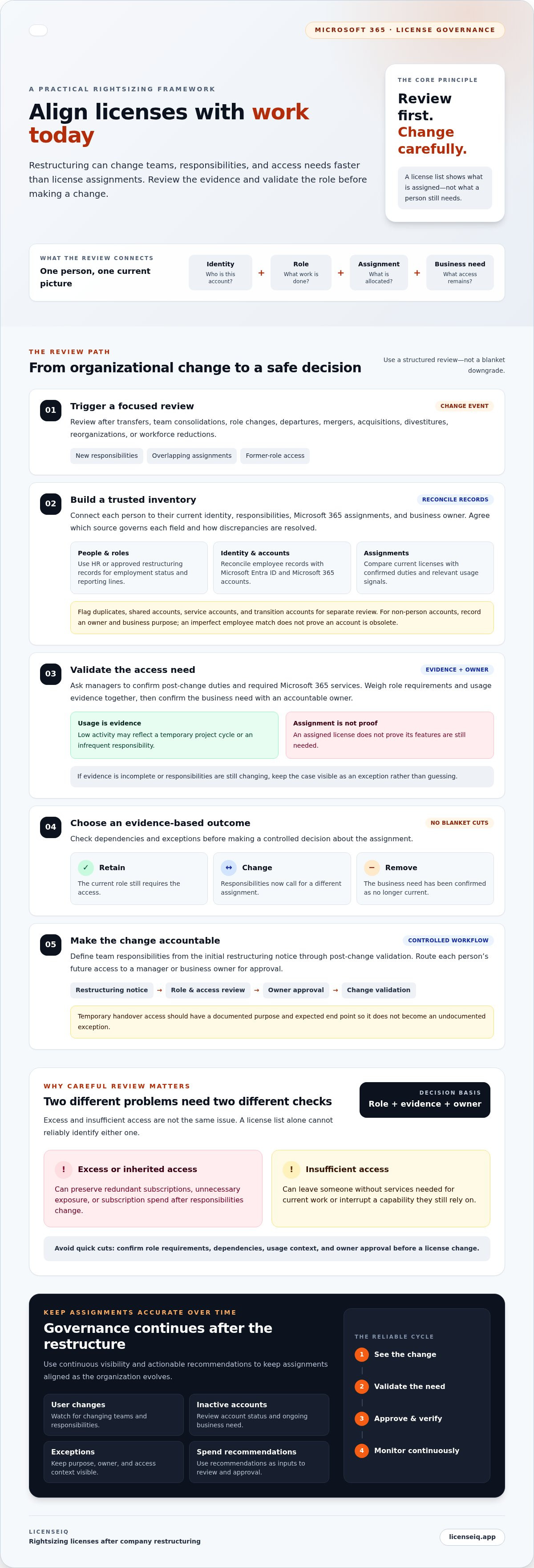
Turn the restructuring review into an accountable license-change workflow
A consistent workflow turns restructuring decisions into controlled, traceable license changes. Start when HR or leadership confirms an organizational change, then move through inventory, role review, approval, implementation, and validation. Keep unresolved users and temporary access in a review queue with an assigned owner and checkpoint, rather than letting open questions disappear into email.
- HR confirms employment status, transfers, departures, and approved role changes.
- Managers verify current responsibilities and the services each person needs.
- Application and data owners identify dependencies and confirm whether access can change safely.
- Finance reviews subscription and spend implications.
- IT reconciles identities, assesses assignments, applies approved changes, and validates outcomes.
Define who can approve each decision before changes begin. A manager can confirm job requirements, for example, while an application owner checks a dependency and IT confirms the proposed change is technically workable. Finance can review cost impact without deciding whether a user needs access. Clear ownership prevents approvals from being assumed or bypassed.
What approvals and records should each change include?
Maintain a concise decision log for each affected user or account. Capture identity, former and current role, proposed decision, supporting evidence, approver, implementation outcome, and validation result. If an assignment stays in place as an exception, record why, who owns it, and when it should be reviewed again. Keep organizational security, retention, and audit requirements in scope, and follow approved recordkeeping practices.
This record supports future reviews and makes the reasoning behind a decision visible. It also helps teams distinguish a deliberate exception from an assignment that simply carried over from the former structure.
How should teams manage transition access and exceptions?
Label transition access as temporary and connect it to a business purpose, such as supporting a handover or completing project work. Assign an accountable owner to shared, service, and project accounts; don’t leave responsibility attached to a team that no longer exists. At agreed checkpoints, confirm the access is still needed, extend it with a recorded rationale, or close it when the work is complete.
For departure-specific steps, use the organization’s approved offboarding checklist alongside this workflow. As restructuring creates recurring review activity, explore LicenseIQ’s automated governance workflows to support ongoing visibility into license decisions.
Maintain license accuracy after restructuring with continuous governance
A post-restructuring cleanup is only a snapshot. Teams evolve, employees move, accounts become inactive, and temporary access can linger. Without ongoing review, license assignments can drift away from current responsibilities again. Continuous governance keeps those changes visible and gives IT, finance, and business owners a consistent way to revisit decisions.
Which indicators help keep assignments aligned?
Monitor signals that point to a change worth reviewing, not an automatic instruction to remove access:
- User and license changes: Compare account status and assignment changes with approved organizational updates.
- Inactive-user signals: Investigate accounts with little or no activity, then confirm status and business need with the owner.
- Open exceptions: Track temporary access and unresolved cases, including the owner and next review point.
- Review completion: Check that decisions have been approved, documented, and validated.
- Spend recommendations: Assess potential redundancies against current roles and service needs before acting.
A License Health Score can help surface assignments that may need attention. Treat it as an assessment signal, not a substitute for manager or owner approval. Connect each recommendation to a documented decision, then record whether the approved change worked as intended.
How can automated governance support recurring reviews?
Automated governance workflows can support a repeatable review by helping teams surface changes and organize follow-up decisions. Before enabling any automated action, confirm the platform’s integrations, permissions, data access, and automation scope. Keep human approval and post-change validation in the process wherever the organization requires them.
LicenseIQ is a Microsoft 365 software intelligence platform, not a license reseller. It connects to a tenant in minutes to scan users and licenses, identify inactive users and redundant licenses, and provide actionable recommendations. Its License Health Score and Spend Recovery Dashboard give teams visibility into license health and potential spend recovery. LicenseIQ says its insights can help businesses save up to 35% on software subscriptions; actual results depend on the organization’s environment.
For ongoing visibility into users, assignments, and recommendations, explore LicenseIQ’s Microsoft 365 license visibility. Continuous monitoring helps keep rightsizing licenses after company restructuring tied to current evidence, rather than relying on a one-time review. Review Microsoft 365 license governance with LicenseIQ.
Keep license decisions aligned as your organization evolves
Restructuring changes who does the work, so Microsoft 365 license decisions should follow verified changes in roles and access needs. A trusted inventory, clear approvals, and post-change validation help IT and finance reduce redundant assignments without removing access people still need.
Make the review repeatable. Track exceptions and account changes, then revisit assignments as responsibilities shift. That’s how rightsizing licenses after company restructuring becomes an ongoing governance practice rather than a one-time cleanup.
LicenseIQ supports this work with ongoing Microsoft 365 tenant monitoring, automated governance workflows, a License Health Score, and dollar-value optimization recommendations. These insights can help teams prioritize reviews while keeping approval and validation in the process.
Review Microsoft 365 license governance with LicenseIQ to build clearer oversight into future organizational changes. With the right process and visibility, your team can make careful decisions with greater confidence.
Frequently Asked Questions
How soon after a company restructuring should we review Microsoft 365 licenses?
Start the review when the new organization and role changes are documented well enough to assess affected users. For rightsizing licenses after company restructuring, review those users before or alongside approved access changes. Timing depends on transition needs, licensing agreements, and internal controls. Separate urgent security or departure actions from broader optimization. Assign an owner and review checkpoint to every unresolved account; don’t rely on a universal deadline.
Can we reduce Microsoft 365 licenses without disrupting employee access?
Carefully validated changes can reduce disruption, but no change is risk-free. First confirm the employee’s current responsibilities, required Microsoft 365 services, connected applications, data needs, and owner approval. Apply approved changes in stages where practical, tell affected users or managers what to expect, and verify access afterward. License entitlements vary, so check current Microsoft documentation and your organization’s agreement before changing an assignment.
How do we decide which licenses employees need after roles change?
Match each employee’s confirmed responsibilities to the Microsoft 365 services and plan entitlements needed for their work. Ask the manager to validate duties, then use relevant usage signals as supporting evidence, not as an automatic verdict. For rightsizing licenses after company restructuring, check current plan capabilities and organizational requirements before changing an assignment. Record the decision, approver, and rationale. Route unclear cases to the appropriate business or application owner as a documented exception.
Should we remove licenses from inactive users during a restructuring?
No. Treat inactivity as a prompt to investigate, not proof that an account or license is unnecessary. Confirm employment status and distinguish a former employee from someone on leave or a temporary assignment. Check account ownership, application and service dependencies, data needs, and applicable retention obligations before taking action. For departures, follow approved offboarding and security procedures for that account. Ask the relevant owner to confirm any remaining business need.
What information should a post-restructuring license audit include?
Connect each account to reconciled identity records, current and future roles, assigned plans, relevant usage signals, and a responsible business owner. Include the proposed decision, approval, exceptions, and post-change validation result. Record when each decision was made and why, so reviewers can trace its basis. The exact evidence set depends on your organization’s licensing, security, and audit requirements. Handle personal or sensitive data under approved internal rules.
How can we keep license assignments accurate after the initial review?
Keep assignments accurate by linking license reviews to recurring identity and role changes, rather than treating the first cleanup as final. Monitor assignment changes, inactive-user signals, open exceptions, and review completion. Give each exception an owner and a future checkpoint. Governance workflows and tenant monitoring can surface cases for review, but accountable managers and service owners should confirm business requirements and approve changes. Revisit decisions whenever responsibilities shift.
Can automated license governance make license changes without manager approval?
Not necessarily. Automation may surface recommendations or route a review for approval, but its actions depend on platform configuration and permissions. Don’t assume it should make every entitlement decision or bypass manager approval. Before enabling automated changes, confirm the workflow scope, integrations, and permissions, along with your organization’s controls and applicable Microsoft requirements. Keep human approval where your process requires it, and validate approved changes.


