

Why are you paying for the same employee twice? Mergers and acquisitions are designed to create synergy, yet they often trigger a silent, monthly drain on your corporate capital. Most leadership teams realize too late that they are funding duplicate licenses across fragmented tenants. Effective microsoft 365 license management for smbs becomes nearly impossible when ghost users from the acquired company continue to consume high-tier subscriptions without oversight. You deserve total clarity into your digital estate to ensure every dollar spent drives actual productivity.
It's frustrating to manage a tech stack that feels like a black box during a transition. This guide reveals how to consolidate your M365 environment and recover up to 35% of your software budget immediately. We will explore how to use a Spend Recovery Dashboard to identify waste and implement automated governance workflows that prevent sprawl from returning. You'll learn to replace manual auditing with a proactive system that monitors your resources with precision. It's time to turn administrative disorder into a lean, high-performance operation that reflects the true scale and efficiency of your new organization.
Key Takeaways
- Identify and eliminate the "speed vs. cost" trap where over-licensing during a merger creates massive redundant spend.
- Execute a cross-tenant audit to spot duplicate seats and ghost users, a critical step for effective microsoft 365 license management for smbs.
- Map licenses to actual job requirements to downgrade underutilized E5 subscriptions and recover up to 35% of your budget.
- Implement a 90-day roadmap that uses a License Health Score to benchmark integration success and track reclamation progress.
- Deploy automated governance workflows to replace manual digital auditing and lock in your new, consolidated M365 environment.
The Invisible Cost of M&A: Why Post-Merger M365 Sprawl Happens
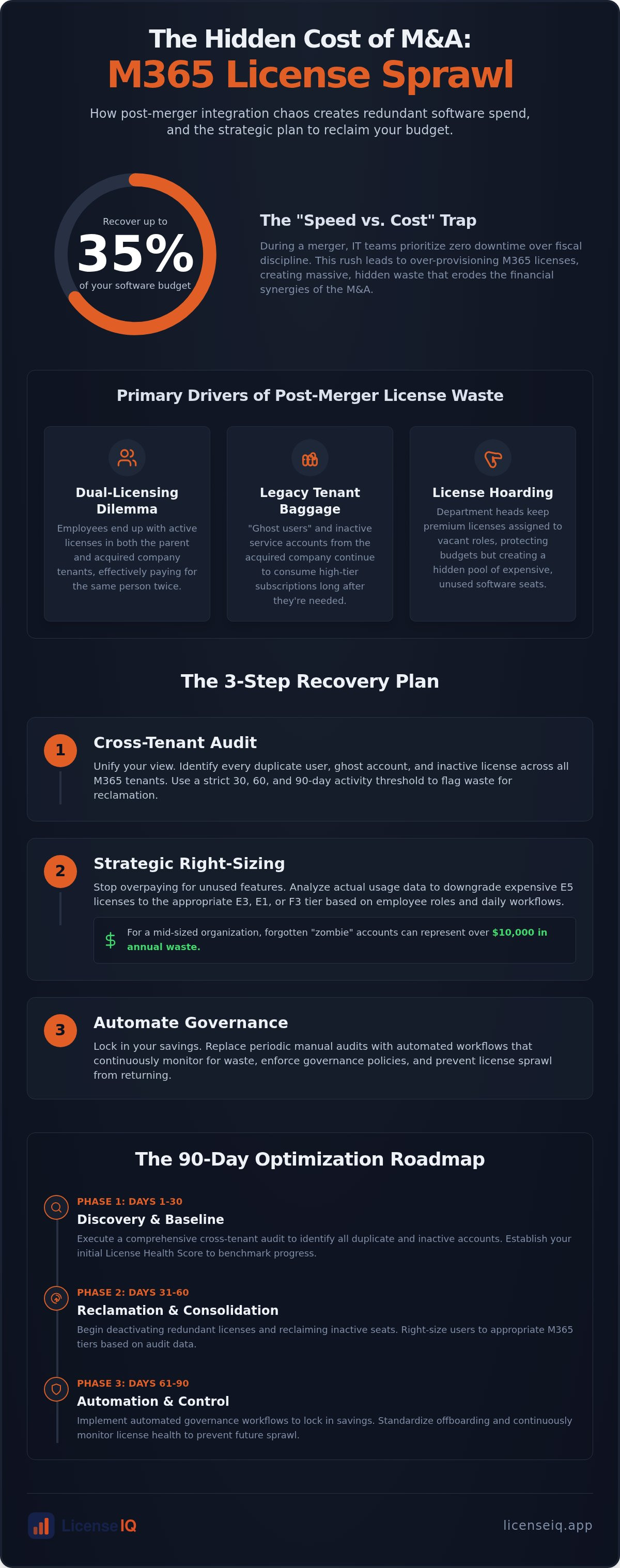
Post-merger M365 sprawl is the rapid, often unnoticed accumulation of redundant software licenses during corporate integration. It occurs when two distinct digital ecosystems collide without a unified oversight strategy. IT teams frequently fall into the "Speed vs. Cost Trap" during the high-pressure transition phase. They prioritize zero downtime and immediate connectivity over fiscal discipline. This results in over-provisioning licenses to ensure every new employee has access on day one, regardless of what they already hold in a legacy tenant.
Legacy tenant baggage is a primary driver of this waste. Acquired companies often bring "ghost users" and active service accounts that no longer serve a purpose but continue to consume high-tier subscriptions. This unoptimized SaaS spend does more than clutter your admin portal; it directly erodes the EBITDA synergies promised to stakeholders. Effective microsoft 365 license management for smbs requires moving past the "integration at any cost" mindset to protect the financial health of the new organization.
The Dual-Licensing Dilemma
Employees frequently end up with active E3 or E5 licenses in both the parent tenant and the acquired tenant simultaneously. The financial math is punishing. Double-paying for a single seat over a six-month integration period can quietly drain thousands from your recovery budget. Manual Entra ID checks rarely catch these overlaps. Differing UPN formats often hide the fact that a user in the acquired company is the same individual already provisioned in the parent system. Without a cross-tenant view, these duplicates remain invisible to standard administrative tools.
Cultural Governance Clashes
Merging two companies means merging two different sets of offboarding habits. If the acquired entity lacked strict lifecycle management, you likely inherited zombie accounts that haven't been accessed in months. Organizational uncertainty also triggers license hoarding. Department heads may keep premium licenses assigned to vacant roles to protect their budget or headcount for the following quarter. Standardizing these behaviors requires a centralized License Health Score. This metric provides a baseline of truth, allowing the transition team to act as a digital auditor and enforce a single standard of governance across the entire merged entity.
Identifying Redundancy: How to Spot Overlapping Entitlements
Cross-tenant auditing is the first tactical step in post-merger recovery. You must identify exactly where each user is active across multiple digital estates. This is where microsoft 365 license management for smbs often fails because legacy tools don't communicate across tenant boundaries. You must verify if an employee holds an E5 license in the parent company while still retaining a premium seat in the acquired organization. Identifying these duplicates allows you to kill the redundant spend without impacting user access.
Look beyond the Microsoft ecosystem. Many acquired companies bring redundant third-party SaaS stacks that overlap with your existing M365 entitlements. For instance, if you are also managing a complex CRM transition, Achieva provides AI-driven Salesforce solutions to help consolidate your customer data and services. If the new entity uses Teams, but the acquired team still pays for Slack or Zoom, you're leaking capital. An inactive user audit is your best defense. Establish a strict 30, 60, and 90-day activity threshold. If a seat hasn't been accessed in 30 days, flag it. If it hits 90 days, reclaim it immediately to stop the financial drain.
Many users sit on E5 licenses without ever touching advanced security features or Power BI. Right-sizing is the alignment of license cost to actual feature consumption. Use granular usage data to justify downgrading these seats to E1 or F3 functionality. If a user only checks email and uses basic Office apps, an E5 is a recurring financial error. You can monitor your license health to see exactly where these discrepancies exist and move users to the appropriate tier based on their actual daily workflow.
Unassigned vs. Inactive: The $10,000 Distinction
There's a massive difference between licenses sitting unassigned in your pool and those assigned to "zombie" users. Unassigned licenses are a visible surplus that you can easily stop paying for. Inactive licenses are hidden costs assigned to people who simply don't log in. Precision in microsoft 365 license management for smbs means knowing the difference between a license that is ready for a new hire and one that is simply wasting money. For a mid-sized organization, these forgotten seats can easily represent $10,000 or more in annual waste. Quantifying this dollar-value waste is the only way to get C-suite buy-in for a cleanup. For a deeper dive into these mechanics, read our post on Microsoft 365 License Optimization: The 2026 Guide to Automated Spend Recovery.
Strategic Consolidation: Mapping Usage to the New Corporate Identity
Successful integration requires a shift from reactive cleanup to proactive identity mapping. You must establish a new standard license profile for every job role within the merged entity. This ensures that every employee receives the exact tools they need, nothing more. Relying on "Last Sign-In" dates is a dangerous strategy for M&A cleanup. This metric is often triggered by background system syncs or mobile pings, making a dormant user appear active. To achieve precise microsoft 365 license management for smbs, you must track actual feature engagement across Word, Excel, and Teams instead of simple login timestamps.
Add-on sprawl is another silent budget killer during a merger. Specialized licenses for Visio, Project, or Copilot often hide in the acquired company's billing history, long after the original projects have ended. Automated Governance Workflows allow you to spot these redundant entitlements across both tenants instantly. By centralizing oversight, you prevent the specialized "license leaks" that typically occur when department heads operate in silos during a transition.
Role-Based Licensing Frameworks
Creating clear personas is the most efficient way to standardize your new organization. You should categorize the workforce into three primary groups:
- Frontline: Users requiring mobile access and basic email (F3 licenses).
- Knowledge Worker: Standard office staff requiring full desktop apps and collaboration tools (E3 licenses).
- Power User: Specialized staff requiring advanced analytics, Power BI, or enhanced security (E5 licenses).
The Danger of Premature Tenant Consolidation
It's a common mistake to rush into a technical tenant migration before optimizing your licenses. Most migration tools charge a per-seat fee. If you migrate 500 users before purging ghost accounts and inactive seats, you are paying to move digital trash. Reducing your data payload by deleting inactive users speeds up the migration timeline and slashes your third-party tool costs. You must ensure compliance and data retention by archiving necessary mailboxes before reclamation. This meticulous approach protects your corporate resources while ensuring that microsoft 365 license management for smbs remains lean and defensible during the final stages of the merger.
The 90-Day Post-Merger Optimization Roadmap
Speed is your greatest ally during a merger. Without a structured timeline, redundant costs become permanent line items in your budget. You must treat license reclamation as a financial recovery operation rather than a background IT task. Success in microsoft 365 license management for smbs is measured by how quickly you can stop the bleeding and report hard savings to the board. By following a 90-day roadmap, you turn chaotic integration into a disciplined, value-driven process that proves IT is a strategic partner in the merger's success.
Month 1: The Inventory Blast
The first 30 days focus on achieving total visibility across your new digital estate. You cannot manage what you cannot see. Connect all legacy tenants to a single Spend Recovery Dashboard to uncover every hidden subscription. Your priority is identifying the top 10% of users responsible for 50% of the financial waste. This phase uses the License Health Score to benchmark the current state of both organizations. For a deeper look at these initial steps, consult our How to Reduce M365 Subscription Costs: The 2026 Spend Recovery Playbook.
Month 2: Surgical Reclamation
Transition from observation to action. Use the data gathered in Month 1 to automate the offboarding of ghost users identified in the acquired tenant. This is the time to right-size double-licensed employees into a single, optimized seat. You must move aggressively to downgrade underutilized E5 licenses to more appropriate tiers. To ensure this process remains secure and compliant, implement the Office 365 Offboarding Checklist 2026. This prevents data leaks while you reclaim your capital.
Month 3: Continuous Governance
The final phase moves your organization from "Cleanup Mode" to "Continuous Efficiency Mode." Establish automated alerts that trigger when unassigned license counts exceed your specified thresholds. You should integrate the monthly Health Score review into your standard FinOps meetings. This ensures that the waste you just eliminated doesn't creep back in as the organization grows. Recovered spend should be reported as a primary success metric, showing exactly how much capital was returned to the business through diligent microsoft 365 license management for smbs.
Ready to start your 90-day recovery? Connect your tenants to LicenseIQ and get your first Health Score in minutes.
Automating Post-Merger Governance with LicenseIQ
Manual scripts and spreadsheets are a liability during the high-stakes environment of a merger. They are error-prone and fail to scale across multiple tenants. LicenseIQ eliminates this risk by connecting to all legacy environments in minutes, providing a single source of truth. This unified view is the foundation of modern microsoft 365 license management for smbs, allowing you to see the entire organization's spend on a single screen. You no longer have to guess which users are duplicates; the platform uncovers obscured details across fragmented estates automatically.
The Spend Recovery Dashboard provides immediate, actionable insights. It doesn't just show data. It tells you exactly which licenses to cut to stop the financial drain. The License Health Score serves as an instant benchmark for your M&A integration success. It gives leadership a clear, percentage-based metric to track the transition from fragmented disorder to a lean, consolidated environment. While enterprise-heavy SaaS Management Platforms (SMPs) require months of configuration and specialized training, LicenseIQ is built for the agility that SMBs require to see results on day one.
AI-Native Intelligence for Fast-Paced Mergers
Optimization isn't a one-time event. It's a permanent state of financial hygiene. Once you've reclaimed your initial 35% of spend, you must ensure waste doesn't return as the new company grows. Continuous monitoring through the LicenseIQ Platform acts as a digital auditor that never sleeps. It flags new instances of dual-licensing and unassigned license sprawl the moment they occur. By establishing this proactive governance, you protect your corporate resources and ensure that your microsoft 365 license management for smbs remains a pillar of operational efficiency.
See how LicenseIQ can recover your post-merger spend in minutes.
Turn Operational Chaos into Financial Recovery
Your merger shouldn't be defined by digital waste. Post-acquisition integration is the ultimate test of your corporate efficiency. By following a structured 90-day roadmap, you stop the silent drain of redundant licenses and ghost accounts. Effective microsoft 365 license management for smbs transforms a complex transition into a measurable victory for your bottom line. You've learned how to map roles to usage and why cross-tenant visibility is the only way to catch dual-licensing errors.
It's time to replace manual spreadsheets with a vigilant system of oversight. LicenseIQ provides a no-code, AI-native setup that connects to your tenants in minutes. You get a License Health Score for instant financial clarity and a Spend Recovery Dashboard that helps you recover up to 35% of wasted SaaS spend. Don't let unoptimized subscriptions erode your merger's projected synergies. Take control of your digital estate and prove the value of your integration strategy to the board immediately.
Start your 5-minute M365 audit with LicenseIQ and secure your organization's financial future today.
Frequently Asked Questions
How do I find redundant M365 licenses across two different tenants?
Use a cross-tenant auditing tool to map users by identity rather than just UPN. Standard admin centers don't offer a unified view. You must correlate employee names or HR data against active seats in both environments. This reveals where one person holds an E5 license in the parent company while keeping a legacy E3 seat in the acquired company. Automated platforms consolidate these views in minutes to stop double-paying.
Is it better to optimize licenses before or after a tenant migration?
Optimization must happen before the technical migration. Most migration tools charge on a per-seat basis. Migrating inactive or redundant accounts increases your tool costs and extends the data payload timeline. By purging ghost users and right-sizing tiers first, you reduce the scope of the migration. This ensures your microsoft 365 license management for smbs is lean and cost-effective before you move a single byte of data.
What is the most common source of M365 waste after a merger?
The primary source of waste is dual-licensing for the same workforce. Transition teams often provision new accounts in the parent tenant while legacy accounts remain active in the acquired tenant for email forwarding or data access. Other sources include zombie service accounts and departmental license hoarding. Without central oversight, these redundant subscriptions continue to bill monthly, quietly eroding the financial synergies expected from the corporate integration.
How can I identify ghost users in an acquired company tenant?
Track actual feature engagement rather than simple login timestamps. Ghost users often appear active because of background syncs or automated security scans. Analyze activity across specific apps like Teams, OneDrive, and Word. If a user hasn't created a document or sent a message in 90 days, they are likely a ghost. Identifying these dormant accounts allows you to reclaim high-tier licenses and reduce your monthly SaaS spend immediately.
Can I downgrade M365 licenses without losing user data during a merger?
Yes, you can downgrade tiers safely by verifying feature requirements first. Most core data like email and files remains intact when moving from E5 to E3 or Business Premium. However, you must check for dependencies on advanced security or Power BI features before the switch. Archiving data for inactive users before license reclamation ensures compliance. This precision prevents data loss while maintaining an efficient microsoft 365 license management for smbs strategy.
How much can a typical SMB save on M365 licenses after an M&A event?
SMBs typically recover up to 35% of their total M365 spend through diligent optimization. These savings come from eliminating duplicate seats, purging ghost users, and right-sizing employees to lower-cost tiers like F3. Post-merger environments are notoriously unoptimized because speed is prioritized over cost. Implementing a proactive recovery strategy allows you to reclaim this capital and reinvest it into critical integration tasks or other infrastructure needs.
What are the security risks of leaving legacy licenses active after a merger?
Active legacy licenses create unmonitored entry points for cyber threats. Ghost accounts are rarely protected by the same MFA policies as your primary tenant, making them prime targets for credential harvesting. Leaving these zombie accounts active increases your attack surface and complicates your compliance audits. Reclaiming these licenses doesn't just save money; it secures your digital perimeter by ensuring every active seat belongs to a verified, monitored employee.
How does LicenseIQ differ from manual M365 license auditing?
LicenseIQ replaces slow, error-prone spreadsheets with real-time AI-native visibility. Manual auditing requires weeks of data extraction and cross-referencing between tenants. Our platform connects in minutes to provide an instant License Health Score and dollar-value recovery recommendations. It automates governance workflows that prevent sprawl from returning. This proactive approach ensures your resources are monitored by a precise system, giving you immediate clarity that manual processes simply cannot provide.


