

What if the subscription you’re ready to cancel still supports a critical workflow? Avoiding auto-renewal of unnecessary M365 subscriptions takes more than switching off recurring billing. Renewal dates and license counts don’t show who relies on each plan, and a rushed change can disrupt access people still need.
It’s easy to put this review off. Terms vary, user activity changes, and a spreadsheet can become outdated before the next renewal. Meanwhile, unused or redundant licenses can remain on the bill simply because no one has reviewed them.
This guide walks through a practical renewal-control process: identify subscriptions that may be unnecessary, validate usage and business dependencies, and record a keep, reduce, or cancel decision for each one. You’ll also learn why cancellation steps depend on where a subscription was purchased and how LicenseIQ helps you build ongoing oversight so the next renewal isn’t a last-minute scramble. The aim is to make decisions using current information without removing access your team depends on.
Key Takeaways
- Identify subscriptions without a validated business need by comparing purchased quantities, assigned licenses, user activity, and current requirements.
- Use a consistent workflow: inventory subscriptions and renewal dates, assess impact, then record and track a decision.
- Treat low usage as a prompt to investigate, not proof that a subscription should be reduced or canceled.
- Protect access and billing continuity by assigning an owner, documenting evidence and approvals, and coordinating changes with affected teams.
- Make avoiding auto-renewal of unnecessary m369 subscriptions an ongoing governance process, not a one-time spreadsheet review.
Why unnecessary Microsoft 365 subscriptions keep renewing
An unnecessary Microsoft 365 subscription is a paid entitlement without a validated current or planned business need. It can keep renewing even after license assignments, user activity, or staffing needs change. Because recurring charges are part of the subscription business model, someone needs to review the need and take the appropriate action to change that default.
A renewal decision determines whether the paid subscription continues. A license-reclamation decision determines whether an individual user still needs an assigned license. The decisions are related, but they are not the same action.
What exactly renews in a Microsoft 365 subscription?
A subscription is the paid service arrangement. Its license quantity is the number of seats included, while an assigned user license gives a specific person access to eligible services. At renewal, the subscription and its billing terms continue according to the agreement unless its renewal settings or the subscription itself are changed. Removing a license assignment from one user does not necessarily reduce the paid quantity or stop recurring billing. Available controls can also depend on whether the subscription was purchased directly from Microsoft or through another provider.
Why a subscription can look unnecessary when it is not
Low recent activity is a reason to investigate, not proof that a subscription has no business value. Someone may use a service only during a seasonal role, a periodic reporting cycle, or an upcoming project. An account with little visible activity may also support a workflow other employees rely on.
Before changing an assignment or subscription, identify the user or service owner, confirm the intended business use, and consider dependencies. Removing a license can affect access to Microsoft 365 services and work stored in them. Canceling a subscription can have broader effects: Microsoft guidance notes that a canceled subscription can enter a Disabled state, and data access may be lost after the current billing period ends. Review the applicable agreement and operational impact before taking action.
That distinction is central to avoiding auto-renewal of unnecessary m369 subscriptions. Compare paid quantities with validated needs, then review individual license assignments separately. This helps uncover genuine waste without treating every inactive account as a reason to cut access.
How to review Microsoft 365 subscriptions before their renewal date
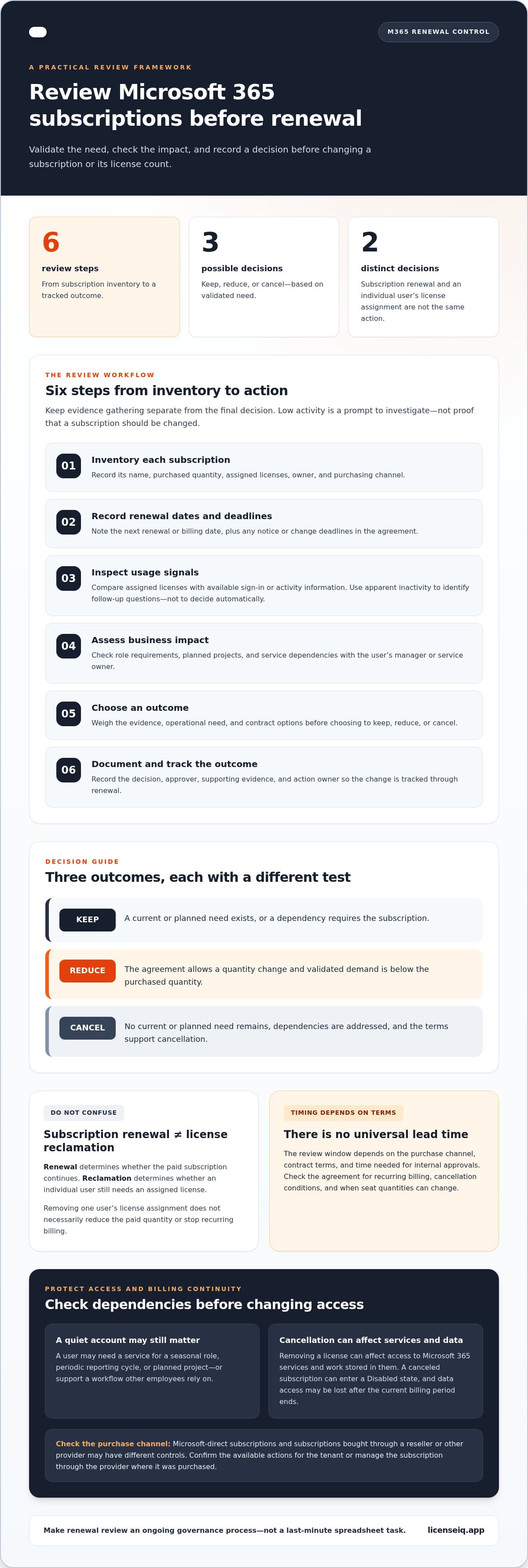
Use a consistent review process and start early enough to check the agreement and coordinate with affected people. There is no universal lead time: the review window depends on the purchase channel, contract terms, and time needed for internal approvals. Keep evidence gathering separate from the final decision so one low-activity signal does not trigger a premature cancellation.
- Inventory subscriptions. Record each subscription’s name, purchased quantity, assigned licenses, owner, and purchasing channel.
- Record renewal dates. Note the next renewal or billing date, along with any notice or change deadlines in the agreement.
- Inspect usage. Compare assigned licenses with available sign-in or activity signals. Use those signals to identify questions for follow-up, not to make the decision automatically.
- Assess business impact. Check role requirements, planned projects, and service dependencies with the user’s manager or service owner.
- Decide. Weigh the evidence, operational need, and contract options before choosing to keep, reduce, or cancel.
- Document the outcome. Record the decision, approver, supporting evidence, and action owner so the change can be tracked through renewal.
Build a renewal inventory and check the terms
Create one record for each subscription with its name, quantity, renewal date, business owner, and purchase channel. Review the applicable agreement for recurring billing, cancellation conditions, and when seat quantities can change. Microsoft-direct subscriptions and those purchased through a reseller or another provider may have different controls. For subscriptions purchased directly from Microsoft, review the subscription in the Microsoft 365 admin center and confirm the available actions for your tenant. Subscriptions purchased through another channel may need to be managed there.
Match license assignments to actual business need
Compare assignment records with activity signals, then validate apparent inactivity with the user’s manager or service owner. A quiet account may still support a seasonal role or upcoming project. For a broader review process, see this guide to Microsoft 365 license optimization.
| Decision | When it may fit |
|---|---|
| Keep | There’s a current or planned need, or a dependency that requires the subscription. |
| Reduce | The agreement allows a quantity change and validated demand is below the purchased quantity. |
| Cancel | No current or planned need remains, dependencies are addressed, and the terms support cancellation. |
For ongoing visibility beyond a one-time review, LicenseIQ’s license oversight platform surfaces usage signals and spend recommendations to inform renewal decisions.
Should you keep, reduce, or cancel an unnecessary M365 subscription?
Base the decision on four factors: validated business need, usage evidence, agreement terms, and operational impact. Low activity can point to a license worth investigating, but it does not prove the subscription should end. Confirm what the service supports and what changes the agreement allows before acting.
Decision rule: Retain access when validated business need outweighs evidenced renewal waste. If the evidence is incomplete, gather more information before committing to a reduction or cancellation.
When keeping or reducing the subscription is safer
Keep the subscription when it supports active users, an essential service, or an approved near-term requirement. If confirmed demand is below the purchased quantity, consider reducing seats only when the agreement permits it and the timing works. A low-usage signal should prompt validation with the relevant owner, not an automatic cut.
Separate seat quantity from license tier. Reducing the number of paid seats addresses how many entitlements the organization needs. Reviewing the tier addresses which capabilities those seats should include. Use a guide to Microsoft 365 license types to inform a tier review, then assess the renewal decision separately.
When cancellation may be appropriate
Cancellation may fit when the organization has confirmed there is no continuing or planned need, dependencies are resolved, and the agreement allows the change. Before proceeding, identify affected users and services, determine whether stored work or retention requirements need attention, and agree on a transition plan where needed. Check the purchase channel and contract conditions because cancellation controls and timing can vary.
Keep the decisions distinct:
- Keep: Current or planned business need justifies continuing the subscription.
- Reduce: Validated demand is below the purchased quantity, and the agreement supports a seat change.
- Cancel: No continuing need remains, impacts are addressed, and the terms allow cancellation.
Removing an individual user’s assigned license does not necessarily change the paid subscription quantity. Likewise, canceling the subscription is a broader decision than reclaiming one user’s license. Record the rationale, evidence, approver, and action date for either change. This makes avoiding auto-renewal of unnecessary m369 subscriptions a controlled business decision, rather than a reaction to an activity report.
How to prevent access, data, and billing surprises during renewal
A renewal change affects more than an invoice. It can change who can use a service, how users access shared workflows, and what happens to stored work. Outcomes depend on the subscription terms and tenant configuration, so review the applicable agreement and service impact before updating renewal controls.
Make every decision traceable. For each subscription, assign a named owner and record the supporting evidence, approver, decision, and intended action date. Coordinate with IT, finance, and affected service owners before making a change. IT can plan for continuity, finance can track the billing impact, and service owners can flag dependencies.
Protect users and business-critical services
Before reducing a subscription quantity or canceling, identify assigned users and connected services. Confirm which workflows depend on the subscription and whether users need continued access or a transition plan. Microsoft guidance notes that a canceled subscription can enter a Disabled state, and access to data may be lost after the current billing period ends. Treat this as a reason to review the specific terms and configuration, not as a universal outcome. For related access and license-reclamation controls, use this Microsoft 365 offboarding checklist.
Document renewal decisions and verify the outcome
Keep a concise record of the owner, evidence, approver, decision, intended effective date, and confirmation that the change was submitted. Then verify both sides of the outcome: check the subscription status and subsequent billing records, and confirm with affected teams that access and expected workflows remain intact.
Use this checklist before closing a renewal review:
- Ownership: Is one person accountable for the subscription and its review?
- Evidence: Are usage signals and business needs documented?
- Approval: Have IT, finance, and relevant service owners reviewed the impact?
- Action: Is the decision and intended date recorded, with confirmation of the submitted change?
- Verification: Have billing, subscription status, and user impact been checked after the change?
These controls make avoiding auto-renewal of unnecessary m369 subscriptions a managed process and reduce the risk of unintended disruption. For ongoing visibility into license use and spend opportunities, explore Microsoft 365 spend recovery.
Make Microsoft 365 renewal control an ongoing governance workflow
A renewal review captures one point in time. License demand changes as people join, change roles, leave, or begin new projects. Regular usage reviews can surface those changes before renewal, helping the organization act on current evidence rather than a spreadsheet snapshot that may no longer reflect the tenant.
From one-time renewal review to continuous oversight
Assign named owners and set review triggers for renewal dates, role changes, and accounts flagged as inactive. Track subscription quantities, usage signals, decisions, and follow-up actions in one consistent process. A spreadsheet can be a practical starting point, but fragmented records, outdated owners, and manual updates make it easier to miss changes or duplicate work. For a broader framework, see this guide to Microsoft 365 cost optimization.
Keep accountability clear: recurring reviews can identify potential issues and prompt an assessment, but the responsible owner and approver should validate business need before a license or subscription changes. That separation makes avoiding auto-renewal of unnecessary m369 subscriptions a repeatable control rather than a one-time cleanup effort.
Where LicenseIQ fits into the renewal workflow
LicenseIQ adds tenant-level visibility to the process. The platform connects to a Microsoft 365 tenant in minutes and scans licenses and users to surface inactive users, redundant licenses, a License Health Score, and specific dollar-value recommendations. These insights help teams prioritize what to review and ground renewal decisions in current usage.
Automated governance workflows support ongoing monitoring and follow-up, reducing reliance on manual spreadsheet updates. They inform the process but do not replace accountable review and approval. IT, finance, and service owners still assess operational impact and decide what action fits the organization’s requirements.
LicenseIQ can help businesses save up to 35% on software subscriptions by identifying inactive users and redundant licenses. Actual savings depend on the opportunities identified and the decisions made. See Microsoft 365 spend recovery insights to learn how ongoing license visibility can support renewal oversight.
Make your next Microsoft 365 renewal a deliberate decision
Strong renewal control starts with current evidence, not an automatic default. Review subscription terms and usage, confirm business needs with the people who depend on each service, and document whether to keep, reduce, or cancel. Then verify the change so billing and access match the approved decision.
Make avoiding auto-renewal of unnecessary m369 subscriptions an ongoing governance process. Regular visibility helps teams spot changing demand before renewal dates arrive and reduces dependence on spreadsheets that can quickly become outdated.
LicenseIQ connects to a Microsoft 365 tenant in minutes and provides a License Health Score and specific dollar-value recommendations to support that oversight. The platform can help businesses save up to 35% on software subscriptions by identifying inactive users and redundant licenses.
Explore Microsoft 365 spend recovery with LicenseIQ to bring clearer usage and spend insights into your renewal process. With consistent review and accountable decisions, you can protect essential access while keeping subscription spend aligned with real business needs.
Frequently Asked Questions
How do I stop a Microsoft 365 subscription from automatically renewing?
First identify how the subscription was purchased, then review its renewal terms and available controls. Options and cancellation timing can vary by purchase channel and agreement, so the same steps may not apply to every subscription. Record the intended change, confirm the responsible approver, and check the subscription status and billing records afterward. Removing a user’s assigned license alone does not necessarily stop the subscription from renewing.
Can I cancel a Microsoft 365 subscription without losing user data?
Do not assume cancellation has no effect on access or data. The outcome can depend on the subscription, agreement, tenant configuration, and timing. Before changing renewal settings, identify affected users and services, review the applicable Microsoft guidance and terms, and plan for continuity. If your goal is to reduce waste, examine user assignments and subscription quantity separately first. This helps determine whether cancellation is necessary or a narrower change could address the issue.
How can I tell whether Microsoft 365 subscriptions are unnecessary?
Compare purchased quantities and assigned licenses with recent usage signals, role requirements, service dependencies, and approved upcoming work. Low activity is a prompt to investigate, not proof that access is unnecessary. Ask the accountable manager or service owner to validate the business need, then document whether to keep, adjust, or cancel the subscription under its terms. This evidence-based review is central to avoiding auto-renewal of unnecessary m369 subscriptions without cutting needed access.
Does removing an assigned Microsoft 365 license stop automatic renewal?
Not necessarily. An assigned license connects a user to services, while the subscription represents the organization’s purchased entitlement and billing arrangement. Removing an assignment may change that user’s access or make a license available for reassignment, but it does not by itself confirm that the paid subscription will not renew. Review the subscription-level renewal controls and purchase terms separately, then verify the status and billing records after making an approved change.
When should I review Microsoft 365 subscriptions before renewal?
Begin early enough to review the terms, gather usage evidence, consult affected teams, and secure approval before any applicable change deadline. There is no single lead time that fits every agreement or purchase channel. Record renewal dates in a shared inventory and assign an owner to each subscription. Check the applicable terms for notice periods or quantity-change deadlines so the team has time to act and confirm the result.
Can automated tools help prevent unnecessary Microsoft 365 renewals?
Yes. Automated tools can surface license assignments, usage signals, inactive users, and potential spend waste for review. They work best within a governed process that includes business validation, approval, and follow-up; a low-activity signal should not trigger an unreviewed cancellation. LicenseIQ connects to a Microsoft 365 tenant and provides a License Health Score and specific dollar-value recommendations to support ongoing optimization decisions. Accountable teams still make and approve the final changes.


