

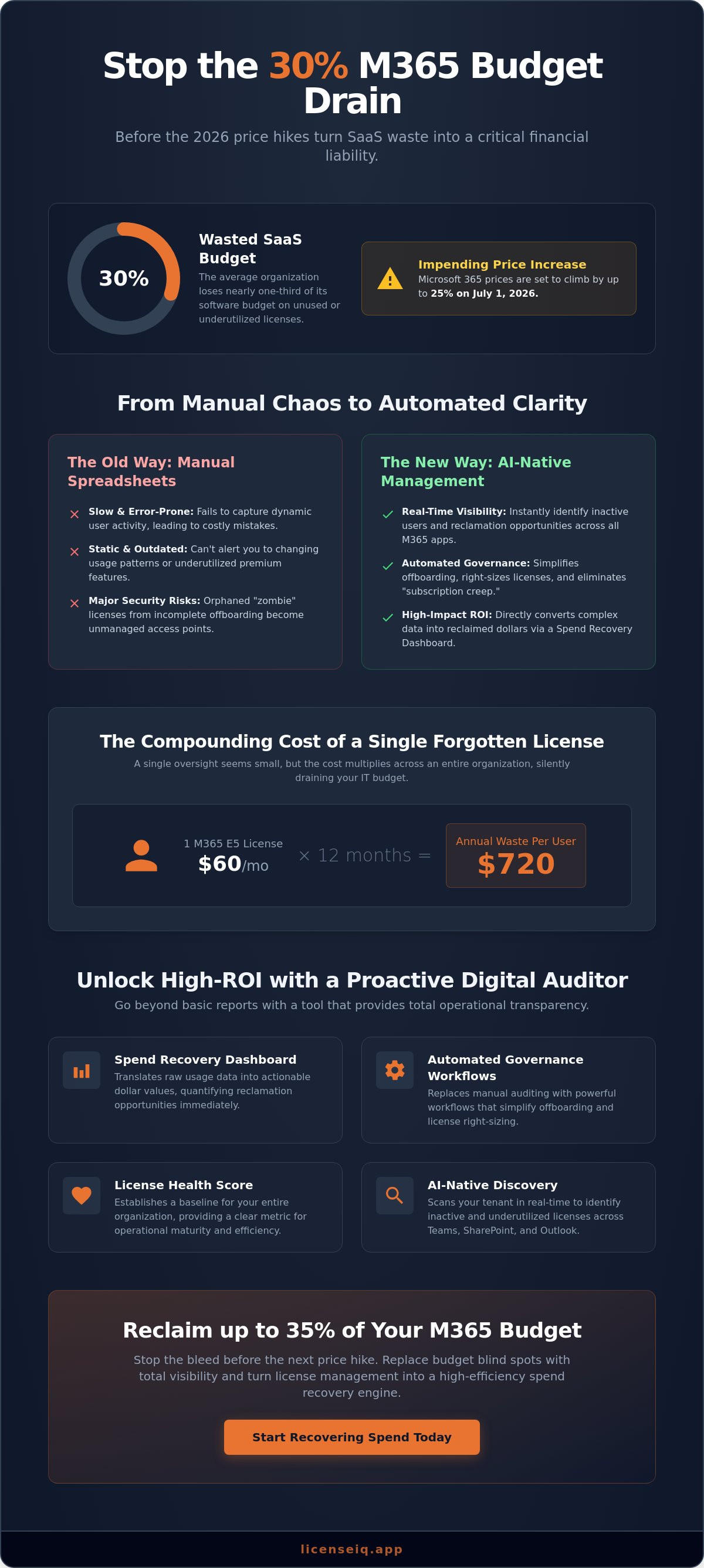
Did you know that the average organization currently wastes nearly 30% of its SaaS budget on unused or underutilized seats? With Microsoft 365 prices set to climb by as much as 25% on July 1, 2026, this inefficiency is no longer just a nuisance. It is a direct financial liability. Deploying a specialized microsoft 365 license management tool is the only way to stop the bleed before these price hikes impact your bottom line.
You likely already feel the strain of manual spreadsheet auditing. It's a slow, error-prone process that fails to capture the complexity of opaque licensing tiers and inactive users. It's nearly impossible to track every redundant Copilot seat or underutilized E5 license while managing a growing team. You need a system that acts as a vigilant digital auditor rather than a passive log.
This article shows you how to eliminate SaaS waste and reclaim up to 35% of your Microsoft 365 budget using AI-native management. We will explore how the LicenseIQ platform provides real-time visibility through a Spend Recovery Dashboard and utilizes automated governance workflows to secure your resources. Discover how a License Health Score can transform your operational transparency and turn license management into a high-efficiency spend recovery engine.
Key Takeaways
- Stop the 30% budget drain caused by unused licenses and opaque pricing tiers with proactive digital oversight.
- Leverage a specialized microsoft 365 license management tool to gain real-time visibility into tenant health and actual user activity.
- Quantify reclamation opportunities immediately through a Spend Recovery Dashboard that converts complex data into actionable dollar values.
- Replace manual spreadsheet auditing with Automated Governance Workflows that simplify offboarding and license right-sizing.
- Maintain long-term operational transparency by establishing a baseline License Health Score for your entire organization.
The Hidden Cost of Manual Microsoft 365 License Management
Organizations currently lose 30% of their SaaS budget to inefficiency. This isn't a rounding error; it's a systemic failure of oversight. Relying solely on the native Microsoft 365 Admin Center provides a list of assignments, but it lacks the depth required for true spend optimization. It doesn't highlight which users haven't touched their $21 monthly Copilot seat in thirty days or which accounts belong to employees who left last quarter. To bridge this gap, a dedicated microsoft 365 license management tool is required to provide the granular visibility necessary for financial health.
Inactive users, often called "zombie licenses," drain resources silently. These accounts persist because manual offboarding processes are frequently incomplete. Beyond the fiscal drain, these orphaned licenses represent significant security risks. Unmanaged access points are prime targets for unauthorized entry. Meticulous Software Asset Management (SAM) is a security priority as much as a fiscal one. Without automated oversight, your tenant becomes a cluttered landscape of unnecessary costs and vulnerabilities.
Why Spreadsheets Fail in the 2026 SaaS Ecosystem
Spreadsheets are static. User behavior is dynamic. A spreadsheet can't alert you when an employee stops using their premium features. For SMBs, manual cross-referencing between HR records and Microsoft 365 assignments is impossible at scale. These manual delays lead to "subscription creep." This occurs when licenses are added for new hires while old seats remain active. By the time an auditor catches the error, months of budget have already vanished. You can't manage 2026 pricing structures with 2010 tools.
The Financial Impact of Licensing Blind Spots
Quantifying the cost of oversight is straightforward. Following the July 1, 2026 price increases, a single Microsoft 365 E5 license costs $60 per month. One forgotten seat costs your company $720 annually. Multiply this by dozens of departments and the impact is devastating. License sprawl is the primary driver of IT budget inflation. It creates a compounding effect where forgotten offboarding and redundant assignments consume capital that should be invested in growth. Transitioning to a proactive system like the LicenseIQ Platform replaces these blind spots with total operational transparency.
Core Features of a High-ROI Microsoft 365 License Management Tool
A high-performance microsoft 365 license management tool must do more than list active seats. It needs to function as a proactive digital auditor. This starts with real-time tenant scanning. By monitoring user activity across the entire ecosystem, the tool identifies exactly where capital is being deployed without a return. It moves beyond the static reports of the native admin center to provide immediate clarity in complex operational environments.
The Spend Recovery Dashboard is the cornerstone of this efficiency. It translates raw usage data into actionable dollar values. You shouldn't have to guess the impact of your licensing decisions. Instead, the dashboard shows exactly how much you can reclaim by removing "zombie" accounts or right-sizing over-provisioned users. This results-first approach ensures that the core value proposition is never lost in technical complexity. It empowers leadership to make data-driven decisions that immediately impact the financial health of the organization.
Efficiency is further quantified through a License Health Score. This metric provides a snapshot of your operational maturity. It tracks how well you are managing your resources against industry benchmarks. High-ROI tools also integrate with the Model Context Protocol. This allows for intelligent automation that goes beyond simple scripts. It enables a system that stays one step ahead of waste, ensuring your environment remains lean and secure. For teams looking to implement these standards, the LicenseIQ Platform provides the necessary oversight to maintain a peak Health Score.
Identifying Inactive and Underutilized Users
Effective management requires granular tracking across Teams, SharePoint, and Outlook. There is a massive difference between an "assigned" license and an "active" one. A user might have an E5 seat assigned but only use basic email functions. An advanced microsoft 365 license management tool allows you to set custom thresholds for reclamation. For example, if a user hasn't logged into Teams for 45 days, the system flags the seat for recovery. This eliminates the "set and forget" mentality that leads to budget drain.
Automated Downgrade Recommendations
Not every employee requires a premium tier. Many users currently on E5 or E3 plans only utilize features found in lower-cost tiers. Intelligent tools analyze feature utilization to recommend downgrades. You might find that a significant portion of your workforce only needs F-series frontline licenses for mobile access and basic collaboration. Reviewing Microsoft 365 License Types helps clarify these distinctions. By right-sizing these tiers, organizations often see immediate spend reduction without impacting productivity.
AI-Native Discovery vs. Traditional IT Asset Management
Traditional IT Asset Management (ITAM) relies on historical data. It tells you what you spent last month, but it fails to address what you are wasting right now. In contrast, AI-native discovery provides immediate clarity on current utilization. By deploying a modern microsoft 365 license management tool, organizations shift from reactive tracking to proactive governance. This transition is critical for maintaining financial health in a complex operational environment.
AI identifies subtle patterns in user behavior that manual audits miss. It doesn't just record a login; it analyzes feature depth. If a user consistently ignores advanced security features or premium apps, the system predicts future waste. It flags these accounts before they drain next month's budget. This results-first approach ensures that your resources are always aligned with actual needs.
Legacy ITAM often requires weeks of manual configuration and agent deployment. AI-native platforms connect in minutes. This speed reduces the administrative burden on IT staff. Autonomous workflows handle the repetitive tasks of license reclamation. This allows specialized leadership to focus on strategic growth rather than digital housekeeping. You gain a vigilant system that is always one step ahead of organizational disorder.
The Power of Automated Governance Workflows
Manual approval cycles are a bottleneck. They introduce delays that lead to "subscription creep" and unnecessary spend. By implementing Automated License Governance, you ensure continuous financial accuracy. The system acts as an active participant in your company's growth. It removes human intervention from the reclamation process. This ensures that your License Health Score remains high without requiring daily oversight from your technical team.
Measuring the "Time to Value" (TTV)
In 2026, technical tools must deliver insights within the first 60 minutes. Waiting weeks for a comprehensive report is no longer an acceptable business practice. There is a fundamental difference between a one-time audit and continuous optimization. An audit is a snapshot; optimization is a permanent state of efficiency. AI-native discovery achieves this by connecting to your tenant via a secure, read-only API. This method ensures total transparency without compromising your security posture. It provides a direct flow of information, making the deployment of a microsoft 365 license management tool both manageable and straightforward.
Implementing Automated Governance for Your M365 Tenant
Deploying a microsoft 365 license management tool is a structured process that replaces fragile, manual scripts with resilient oversight. It moves your organization from a state of disorder to total transparency. This implementation is critical given the price increases effective July 1, 2026, which will see Microsoft 365 F3 plans jump by 25% and Business Basic by 16%. You can't afford to leave these costs unmanaged.
The first step is connecting your tenant via a secure, read-only API. This ensures the system monitors activity without risking unauthorized environment changes. Second, establish a baseline License Health Score. This metric quantifies your current efficiency and identifies immediate reclamation targets. Third, set policy-driven rules. Define exactly when a user is considered inactive, such as thirty days without a Teams login or Outlook activity. Fourth, automate the offboarding lifecycle to prevent the creation of "zombie" accounts. Finally, review monthly spend recovery reports. These documents provide stakeholders with concrete proof of ROI and financial health.
Optimizing the Offboarding Workflow
Successful governance requires integrating license reclamation directly into the HR exit process. When an employee leaves, the system must trigger an automated workflow to reclaim their seat immediately. This ensures you aren't paying for a $60 monthly E5 seat months after the user has departed. Utilize a comprehensive Office 365 Offboarding Checklist to ensure data retention remains intact while removing expensive licenses. This proactive step secures your resources and your budget simultaneously.
Managing Multi-Tenant Environments
Complex organizations often struggle with fragmented visibility across multiple tenants. A centralized microsoft 365 license management tool standardizes governance policies across the entire enterprise. It uses AI to identify redundant licenses across different business units, preventing you from paying for the same user in two separate environments. By consolidating this oversight, you eliminate organizational disorder and ensure a uniform standard of efficiency. You gain a single source of truth for your entire SaaS footprint.
Maintain total clarity over your SaaS environment and secure your 2026 budget by deploying the LicenseIQ Platform today.
LicenseIQ: The AI-Native Platform for M365 Spend Recovery
LicenseIQ is the definitive microsoft 365 license management tool for organizations that prioritize fiscal precision and operational clarity. While manual auditing remains a liability, this platform transforms license governance into an automated spend recovery engine. It eliminates the guesswork associated with the July 1, 2026 price increases by providing a vigilant system that monitors every seat in real-time. You don't just find waste; you eliminate it before it impacts your bottom line.
The setup process is engineered for speed. You can achieve up to 35% savings in under five minutes. This rapid time-to-value is a hallmark of the LicenseIQ platform. Once connected, the Spend Recovery Dashboard offers real-time visibility into wasted dollars. It provides a clear, dollar-denominated view of reclamation opportunities. This isn't a passive report. It's an active oversight tool that identifies exactly where your budget is being drained by inactive users or redundant assignments.
Maintaining efficiency requires constant vigilance. LicenseIQ provides continuous monitoring to ensure your License Health Score remains optimal. As your organization grows, the system scales with you. It ensures that new hires are provisioned correctly and departures are handled instantly. This persistent oversight acts as a guardian of corporate resources, turning a complex administrative burden into a streamlined, high-efficiency operation.
Designed for SMB Efficiency
You don't need an advanced IT degree to master your SaaS environment. LicenseIQ provides simple, actionable recommendations that any business manager can execute. The platform is built to remove technical complexity, focusing instead on financial outcomes. With tiered pricing that scales alongside your organization, it remains an accessible solution for SMBs looking to regain control. Access the LicenseIQ Homepage to see how the platform fits your current operational scale.
Future-Proofing Your SaaS Strategy
The 2026 landscape requires more than just reactive tracking. By leveraging the Model Context Protocol, LicenseIQ provides advanced software intelligence that predicts waste before it happens. This represents a fundamental shift in strategy. You move from simply "spending" on Microsoft 365 to strategically "investing" in the tools your team actually uses. This proactive approach ensures your organization remains lean, secure, and financially resilient against future industry shifts. We invite you to start your first 5-minute audit today and uncover the hidden capital within your tenant.
Securing Your Financial Health in the Microsoft Ecosystem
The 2026 pricing landscape demands a shift from passive observation to active digital guardianship. Relying on manual spreadsheets or native admin reports is a proven path to budget inflation. As we have explored, the transition to an AI-native microsoft 365 license management tool is the only way to maintain total operational transparency. By identifying "zombie" licenses and right-sizing underutilized tiers, your organization can pivot from wasteful spending to strategic investment.
Automated governance workflows and real-time Spend Recovery Dashboards are no longer optional luxuries. They are the essential tools of specialized leadership. You can secure your environment, reduce administrative burdens, and ensure your resources are always aligned with actual usage. The path to a leaner, more secure tenant starts with a single scan. Take control of your SaaS footprint and reclaim your budget today.
Start your 5-minute M365 audit with LicenseIQ to save up to 35% on M365 spend. With AI-native discovery that delivers results in minutes, you can establish a high License Health Score and protect your company's financial health permanently.
Frequently Asked Questions
How does a Microsoft 365 license management tool differ from the Admin Center?
A specialized microsoft 365 license management tool provides deep behavioral analytics that the native Admin Center lacks. While the Admin Center shows who has a seat, it doesn't quantify wasted spend. These tools use AI to monitor feature utilization, identifying users who don't need premium tiers like E5 or Copilot. This transparency allows you to convert raw data into actionable financial recovery immediately.
Can I automate the removal of licenses from inactive users safely?
Automated Governance Workflows allow you to reclaim licenses based on specific inactivity thresholds safely. You can set rules to flag or remove seats after thirty days of zero activity in Teams or Outlook. This proactive oversight prevents "subscription creep" without requiring constant manual intervention. It ensures your resources are always aligned with active personnel while maintaining your organization's security posture.
What is a typical ROI for a license optimization tool?
Most organizations see a return on investment within the first sixty minutes of deployment. With Microsoft 365 price increases effective July 1, 2026, including a 25% jump for F3 plans and 16% for Business Basic, the savings are substantial. Industry data shows that companies reclaim up to 35% of their M365 budget by eliminating unused seats and right-sizing tiers. This turns a technical tool into a high-efficiency spend recovery engine.
Does a management tool require Global Admin permissions?
The LicenseIQ platform does not require Global Admin status for scanning. It connects via a secure, read-only API to gather usage metrics and license data. This provides total transparency into your environment while adhering to the principle of least privilege. You gain the oversight of a meticulous digital auditor without introducing unnecessary security risks to your tenant's core configuration.
How do I identify unassigned licenses that I am still paying for?
Identifying unassigned seats is immediate with a Spend Recovery Dashboard. This interface highlights every license currently billed by Microsoft but not assigned to a user. It provides a specific dollar value for this waste. By visualizing these "zombie licenses," specialized leadership can take immediate action to cancel redundant subscriptions before the next monthly billing cycle begins.
What happens to user data when a license is reclaimed by an automated tool?
Reclaiming a license does not automatically delete user data if your retention policies are configured correctly. Automated workflows can trigger data preservation steps, such as converting a mailbox to a shared state, before the seat is recovered. This allows you to stop paying for expensive licenses while ensuring that critical corporate information remains accessible for compliance and legal requirements.
Is it possible to track M365 spend across multiple tenants in one view?
Centralizing visibility across multi-tenant environments is a core feature of advanced management platforms. You can view the financial health of every business unit in a single pane of glass. This prevents paying for redundant licenses when users move between departments or subsidiaries. It standardizes governance policies across the entire organization, replacing fragmented disorder with a single source of truth.
How often should I run a Microsoft 365 license audit?
Continuous monitoring is more effective than periodic audits. Relying on a quarterly or annual audit allows waste to accumulate for months. A microsoft 365 license management tool provides a real-time License Health Score that alerts you to inefficiencies as they occur. This persistent vigilance ensures that your organization remains lean and financially optimized every day of the year.


