

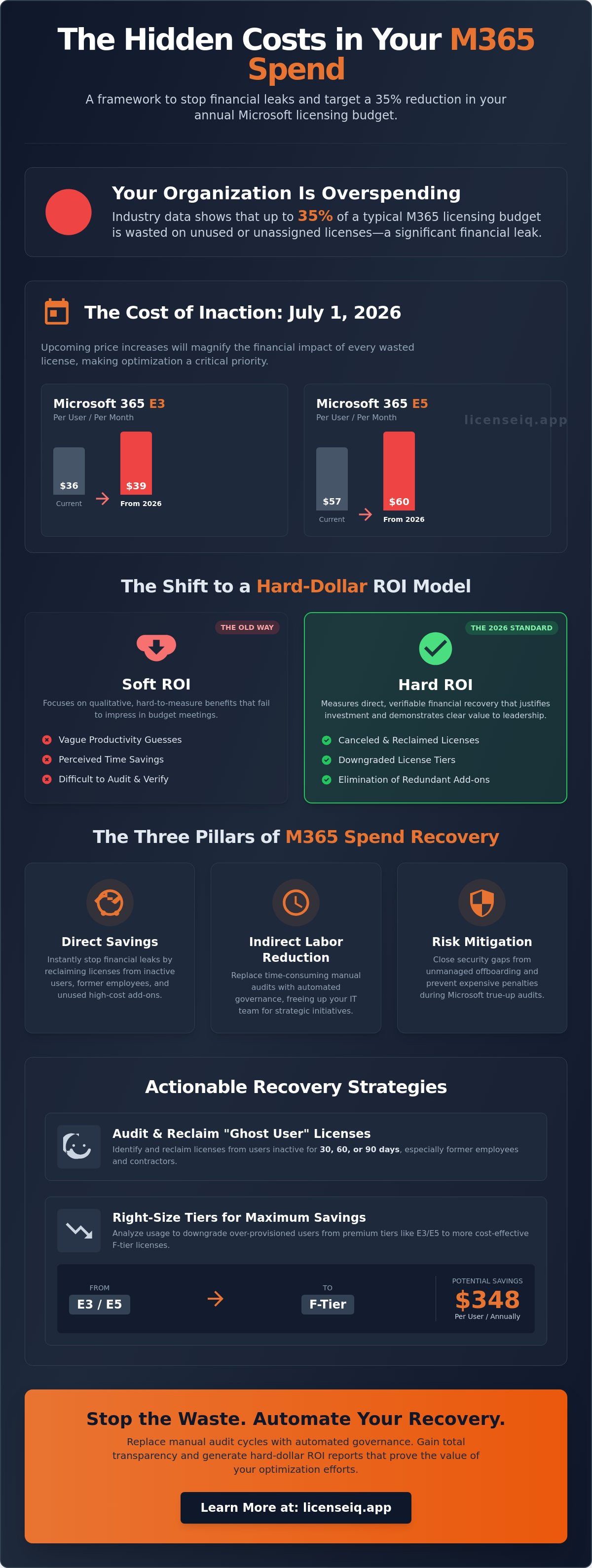
Your organization is likely wasting over 30% of its Microsoft licensing budget on features your team never uses. With the July 1, 2026 price increases pushing Microsoft 365 E3 to $39 per user, these invisible inefficiencies are no longer just administrative headaches; they're significant financial leaks. You've likely struggled to explain complex license tiers to finance or felt the exhaustion of manual audit cycles that yield little clarity. Calculating roi on m365 optimization shouldn't rely on vague productivity guesses or soft metrics that fail to move the needle in a budget meeting.
You deserve total transparency and a proactive system to protect your corporate resources. This article provides a definitive framework to stop the waste and start measuring tangible financial recovery. You'll learn how to automate license reclamation and target a 35% reduction in your annual M365 spend. We'll examine the specific impact of the 2026 pricing updates, identify high-value shifts to F-tier licenses that save $348 per user annually, and show you how to generate a clear dollar-value ROI report that proves the worth of your optimization efforts.
Key Takeaways
- Define ROI as net profit from license recovery rather than vague productivity gains.
- Uncover hidden waste by auditing "Ghost Users" and overlapping license assignments that inflate monthly costs.
- Implement a hard-dollar framework for calculating roi on m365 optimization to transform technical data into financial reports.
- Monitor tenant stability with a License Health Score to identify immediate recovery opportunities.
- Replace manual audit cycles with automated governance workflows that maintain a lean M365 environment.
What is M365 Optimization ROI?
Calculating roi on m365 optimization is no longer a theoretical exercise in productivity. In the 2026 fiscal environment, it's a rigorous financial audit designed to measure the net profit generated by stripping away subscription waste. Traditional metrics often fail because they focus on "usage" rather than "efficiency." True ROI compares the operational cost of optimization tools against the direct, recovered license spend. M365 ROI is the ratio of recovered subscription costs to the investment in governance tools. This calculation provides the baseline for any Return on Investment (ROI) analysis within a technical operations framework.
The 2026 standard for excellence has shifted. Leadership teams no longer accept vague promises of "better collaboration" as a justification for massive SaaS spend. They demand a hard-dollar recovery model. By focusing on the financial health of your tenant, you move from a reactive stance to a position of total oversight. This approach ensures that every dollar spent on the LicenseIQ Platform or similar governance systems is offset by a larger, measurable reduction in the monthly Microsoft bill.
Soft ROI vs. Hard ROI
Soft ROI centers on qualitative benefits like improved employee sentiment or perceived time savings. While these factors matter, they're nearly impossible to audit with precision. CFOs in 2026 prioritize Hard ROI for budget approvals because it's verifiable. Hard ROI consists of canceled licenses, downgraded tiers, and the total elimination of redundant add-ons. When a license is reclaimed, the savings appear immediately on the balance sheet. This direct financial recovery provides the security and clarity required to justify ongoing technical investments.
The Cost of Inaction
Delaying optimization is a choice to accept compounding losses. Industry data indicates that organizations waste up to 35% of their Microsoft licensing spend. This waste typically stems from unassigned or inactive accounts. With Microsoft 365 E5 prices rising to $60 per user and E3 increasing to $39 per user in July 2026, the cost of a single "ghost user" is significant. Over a fiscal year, a handful of unmanaged E5 licenses can leak thousands of dollars in capital that could be reinvested into growth.
Financial loss isn't the only risk. Inactive, unmanaged accounts represent a major security vulnerability. These dormant portals often lack the same level of scrutiny as active accounts, providing a quiet entry point for unauthorized access. A proactive strategy for calculating roi on m365 optimization doesn't just save money; it secures the environment. By identifying and removing these vulnerabilities, you maintain a lean, secure, and financially optimized tenant that reflects a meticulous approach to resource management.
The Three Pillars of M365 Spend Recovery
M365 optimization isn't a one-time project. It's a continuous cycle of monitoring and adjustment. To maximize these gains, organizations need a robust framework for calculating your ROI that accounts for both direct and indirect recovery. Without a structured approach, your organization remains vulnerable to the 35% waste typical in unmanaged environments. Recovery efforts must focus on three core areas: direct savings, indirect labor reduction, and risk mitigation.
Direct savings provide the most immediate impact on your bottom line. Every unassigned or inactive license is a direct drain on your operating budget. By identifying these stagnant resources, you stop the financial leak instantly. This is a core component when calculating roi on m365 optimization, as it yields hard-dollar results that finance teams can verify. Indirect savings focus on operational efficiency. Manual audits are slow and prone to human error. Automating these processes reduces the labor hours your IT team spends on administrative oversight, allowing specialized leadership to focus on strategic growth.
Risk mitigation completes the recovery framework. Unmanaged offboarding creates security gaps and leaves you vulnerable to expensive true-up penalties during Microsoft audits. A vigilant system ensures that licenses are revoked the moment a contractor or employee leaves the organization. Maintaining this level of oversight requires precision. The LicenseIQ Platform provides the transparency needed to execute these recovery pillars with surgical accuracy.
Direct License Reclamation
Identify users who haven't logged in for 30, 60, or 90 days. These accounts represent low-hanging fruit for immediate reclamation. Former employees and seasonal contractors often retain access long after their departure, costing your business every month. High-cost add-ons like Microsoft 365 Copilot should be removed from users with zero utilization to prevent unnecessary spend. Reclaiming these resources ensures your budget is spent only on active, contributing users.
Right-Sizing Tiers (E5 to E3 or F3)
Premium tiers like M365 E5 are often underutilized. Many users only require the core functionality found in E3 or even F3 plans. Moving a frontline worker from an E3 license at $39 per month to an F3 license at $10 per month saves $348 per user annually. This shift maintains productivity while significantly reducing overhead. For a detailed breakdown of these options, refer to our comprehensive 2026 reference guide on license types. Analyzing actual feature usage is the only way to ensure your license spend matches your operational needs.
Auditing the Waste: Identifying Recoverable Spend
Visibility is the only antidote to organizational disorder. When calculating roi on m365 optimization, you must first identify the three primary drivers of financial waste: ghost users, redundant assignments, and unassigned seats. Ghost users are a silent drain on your budget. These are licenses still attached to accounts that no longer exist in your active directory or belong to employees who left months ago. Redundant assignments occur when a user is granted multiple licenses with overlapping features, such as a standalone Visio plan alongside an enterprise bundle that already includes similar capabilities. Unassigned licenses represent idle capital; they're paid seats sitting in your tenant waiting for a user who may never arrive. Automated discovery uncovers obscured details that manual audits miss, providing the precision required to stop these leaks instantly.
The 2026 price increases, such as the 13% jump for Office 365 E3 to $26 per month, make these inefficiencies more expensive than ever. You can't afford to let 35% of your licensing budget evaporate into unused features. By shifting from reactive spreadsheets to a vigilant, automated system, you ensure that every license is tied to an active, productive user. This level of oversight is the cornerstone of the LicenseIQ Platform, which acts as an active participant in your company’s financial health by identifying waste in real-time.
The Inactive User Audit
Setting inactivity thresholds is essential for precise recovery. A marketing executive might need a 30-day threshold, while a field technician requires 90 days. Automating the offboarding process ensures that these licenses return to your available pool the moment they're no longer required. This proactive approach eliminates the manual fatigue associated with traditional audits. For a secure transition, follow the Office 365 Offboarding Checklist 2026 to reclaim spend without compromising data integrity.
Eliminating Redundancy
Spotting overlap between specialized tools like Project and standard M365 bundles is a high-impact recovery tactic. Many organizations "mix and match" licenses without realizing they're paying twice for the same functionality. Consolidating these assignments allows for better volume discounting and a cleaner tenant structure. Using AI to flag accounts with duplicate license assignments ensures that your budget isn't consumed by administrative oversight. This meticulous approach to resource management transforms your M365 environment from a cost center into a lean, optimized asset.
Step-by-Step: The Framework for Calculating Your ROI
A rigorous framework for calculating roi on m365 optimization transforms technical data into a compelling financial narrative. To secure budget approval in 2026, you must present hard-dollar recovery metrics that withstand CFO scrutiny. This process involves five distinct stages designed to uncover obscured waste and quantify the value of automated oversight.
- Step 1: Calculate Total Annual M365 Spend. Aggregate the cost of all base licenses, such as M365 E3 and E5, alongside standalone add-ons like Copilot, Visio, and Project. Use the July 2026 price points ($39 for E3; $60 for E5) to ensure your baseline reflects current market realities.
- Step 2: Identify Waste Percentages. Determine the volume of unassigned seats and inactive accounts. Industry data suggests that 35% of licensing spend is typically wasted on users who don't utilize their assigned tier's features.
- Step 3: Quantify IT Labor Hours. Document the time your team spends on manual license management, offboarding, and auditing. For a 500-user tenant, this often consumes 20 to 40 hours of specialized labor per audit cycle.
- Step 4: Account for Tool Investment. Subtract the annual cost of your governance platform from the total identified waste and labor savings. This step ensures your ROI remains grounded in net profit.
- Step 5: Project 12-Month Net Savings. Extrapolate your monthly recovery across the full fiscal year to demonstrate the long-term financial health of the organization.
Precision in these steps eliminates the guesswork that often plagues IT budget requests. By following this structured sequence, you demonstrate a meticulous approach to resource management. You can begin this process immediately by accessing your Spend Recovery Dashboard to visualize your current financial leaks.
The ROI Formula for Optimization
The standard formula for calculating roi on m365 optimization is: (Recovered Spend + Labor Savings - Tool Cost) / Tool Cost x 100. Consider an organization that recovers $50,000 in annual license waste using a tool that costs $10,000. This scenario yields a 400% ROI. LicenseIQ users typically achieve a 35% reduction in total M365 costs within the first 30 days of deployment. This rapid recovery provides the confidence and security needed to justify the transition from manual oversight to automated governance.
Manual vs. Automated ROI
Manual audits are a significant drain on technical operations. Spending 20 to 40 hours per month on spreadsheets is an inefficient use of specialized leadership. Automated tools like LicenseIQ connect and scan your entire tenant in under 5 minutes. This shift eliminates the opportunity cost of having IT staff focus on administrative audits instead of high-value strategic projects. Automation provides total clarity and allows your team to move at the pace of the business, ensuring that your M365 environment remains lean and fully optimized without constant manual intervention.
Scaling ROI with LicenseIQ: Automated Governance
One-time audits provide a temporary snapshot of your tenant, but they don't solve the underlying problem of recurring waste. Calculating roi on m365 optimization becomes a sustainable strategy only when you transition from reactive cleanup to proactive, automated governance. The LicenseIQ Platform serves as a vigilant digital auditor, providing a real-time License Health Score that benchmarks your tenant’s financial hygiene. This score gives specialized leadership immediate clarity on where resources are being underutilized and where immediate recovery is possible.
Manual management can't keep pace with the fluid nature of modern enterprise environments. As users join, move, or leave, your M365 environment naturally drifts toward disorder. Automated Governance Workflows eliminate this drift by enforcing your optimization policies in real-time. By positioning LicenseIQ as the cornerstone of your technical operations, you ensure that your environment remains lean even as your headcount scales. This continuous oversight is the only way to prevent "spend creep" from eroding the savings you've already secured.
AI-Native Spend Recovery
Modern governance requires modern tools. LicenseIQ utilizes the Model Context Protocol to automate the most tedious aspects of license management. This technology moves beyond simple reporting to provide actionable, dollar-value recommendations in minutes. Instead of sifting through raw data, you receive precise instructions on which licenses to reclaim or downgrade. To understand the full scope of these capabilities, explore our 2026 Guide to Automated Spend Recovery. This AI-driven approach ensures that your strategy for calculating roi on m365 optimization is always backed by the most current data.
The Continuous ROI Cycle
Static audits fail because your organization is dynamic. Headcount fluctuations and changing project requirements mean that a "clean" tenant today can be wasteful by next month. The continuous ROI cycle relies on automated alerts that trigger the moment a license seat sits idle or a high-cost add-on isn't being utilized. Setting these thresholds ensures 100% license utilization across your entire organization. You don't have to wait for a quarterly review to find savings; they're captured the moment they occur. This relentless focus on operational transparency protects your corporate resources and maintains the financial health of your Microsoft 365 investment year-round.
Eliminate Waste and Command Your M365 Budget
You've moved beyond the era of vague productivity estimates. The 2026 hard-dollar framework proves that your Microsoft 365 environment is either a source of hidden waste or a model of operational efficiency. By prioritizing hard ROI over soft metrics and implementing a continuous, automated audit cycle, you protect your organization’s capital from compounding price increases. Calculating roi on m365 optimization is the definitive way to transform technical oversight into a strategic financial asset that finance teams respect and approve.
Total transparency is now accessible in minutes. You don't have to wait for the next billing cycle or manual audit to identify your recovery opportunities. The LicenseIQ platform provides AI-native governance workflows that connect to your tenant in under 5 minutes. This level of visibility allows you to recover up to 35% of wasted spend almost instantly by identifying inactive users and right-sizing underutilized tiers. Stop guessing at your licensing health and start measuring your recovery with a vigilant, precise system.
Get your M365 Health Score and discover hidden savings with LicenseIQ. Take command of your tenant today and ensure every dollar spent on Microsoft 365 drives measurable value for your organization.
Frequently Asked Questions
How long does it take to see ROI from M365 optimization?
You can see initial results immediately after your first audit cycle. Most organizations identify and reclaim unassigned or inactive licenses within the first 30 days of deployment. This rapid recovery provides a near-instant reduction in monthly subscription costs. Because license reclamation stops the financial leak at the source, the payback period for optimization tools is often measured in weeks rather than months.
Can I calculate ROI manually using the Microsoft 365 Admin Center?
Manual calculation is possible but highly inefficient and prone to error. You must export usage reports, cross-reference active directory data, and manually identify inactive users across various services. This process consumes 20 to 40 hours of IT labor for mid-sized tenants. Calculating roi on m365 optimization manually often misses obscured details like overlapping license assignments, which leads to an incomplete financial picture.
What is a good ROI percentage for SaaS spend management tools?
A strong ROI for these tools typically ranges between 300% and 500%. This figure accounts for both the direct recovery of subscription fees and the indirect savings from reduced IT administrative labor. High-performance organizations aim for a ratio where the recovered waste is at least three times the cost of the governance platform. This ensures the tool is an active participant in the company's growth rather than a passive cost center.
Does license optimization impact end-user productivity or data?
Proper optimization has zero negative impact on user productivity or data integrity. The process focuses on reclaiming unassigned seats or downgrading users to tiers that match their actual feature usage. If a user primarily utilizes web and mobile apps, moving them to an F-tier license maintains their workflow while reducing costs. Data remains secure and accessible throughout the transition because the underlying service remains active.
How much does the average SMB waste on M365 licenses annually?
The average SMB wastes approximately 30% to 35% of their total Microsoft 365 budget. For an organization with 100 users on E3 plans, this represents thousands of dollars in lost capital every year. This waste stems from paying for premium features that employees never touch and maintaining licenses for users who no longer require access. These funds could be better utilized for strategic IT initiatives or infrastructure upgrades.
What are the hidden costs of manual M365 license management?
Hidden costs include the high price of specialized IT labor and the opportunity cost of delayed strategic projects. When senior engineers spend hours on manual audits, they aren't focusing on security or infrastructure improvements. Additionally, manual processes often result in "true-up" penalties because they lack the vigilance to catch unmanaged offboarding in real-time. These cumulative expenses often exceed the cost of the licenses themselves.
How does naivety about license tiers affect my ROI calculation?
Lack of clarity regarding license capabilities often leads to over-licensing. Many managers assign E5 plans by default because they don't understand which users can function effectively on E3 or F-series tiers. This results in a lower ROI because the organization pays for premium security or analytics features that are never deployed. Understanding the specific differences between tiers is vital for calculating roi on m365 optimization with financial precision.
Is Copilot for Microsoft 365 included in standard ROI models?
Copilot is a critical component of modern ROI models. Because it's a high-cost add-on, identifying users with zero utilization offers an immediate and significant boost to your recovery totals. Monitoring Copilot usage ensures that this advanced AI capability is only assigned to those who derive measurable value from it. Including these premium add-ons in your governance workflows prevents them from becoming major sources of unmanaged spend.


