

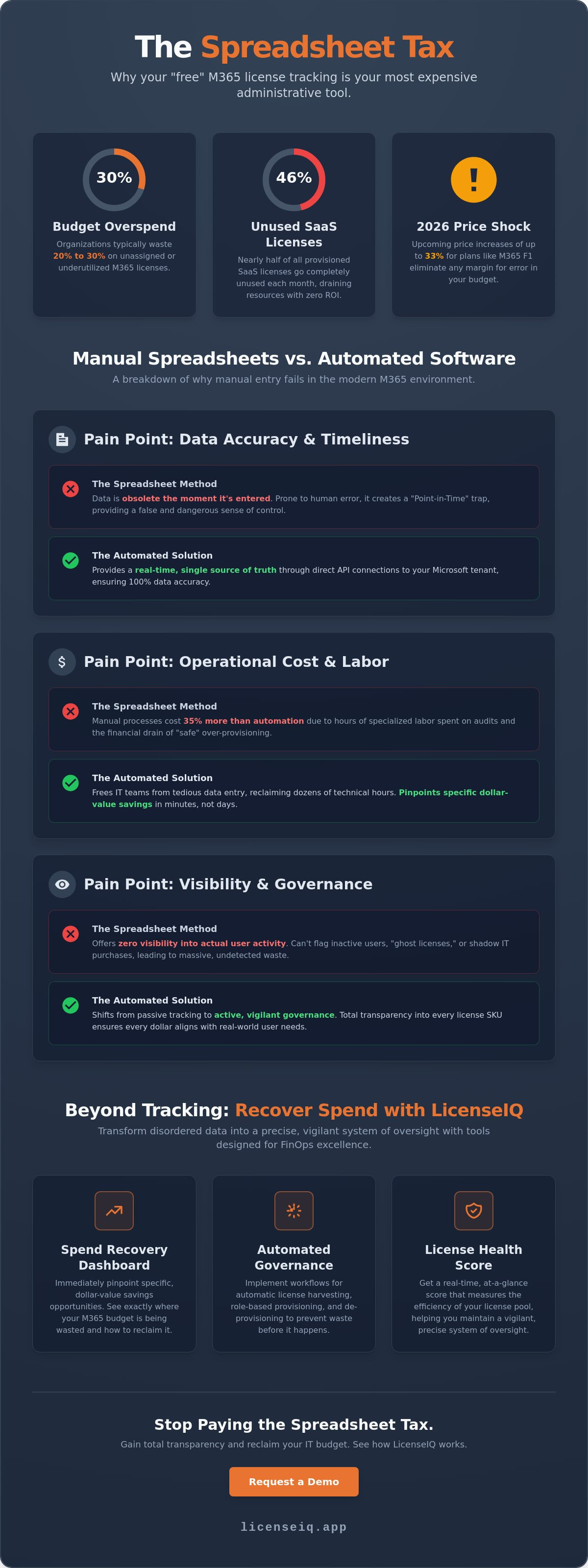
The "free" spreadsheet you use to manage Microsoft 365 licenses is likely your most expensive administrative tool. While manual tracking feels cost-effective, it hides a massive "spreadsheet tax" that erodes your IT budget. Industry benchmarks show that organizations typically overspend on M365 by 20 to 30 percent. With the July 2026 price increases hitting plans like M365 F1 with a 33 percent hike, the margin for error has vanished. When comparing m365 license tracking spreadsheet vs software, the data reveals a stark reality. Manual entry fails against 2026's aggressive policy shifts and the elimination of the 30-day license grace period.
You likely struggle with zero visibility into actual user activity or the dread of surprise true-up costs. Justifying spend to leadership is impossible when 46 percent of SaaS licenses often go unused. We'll show you why manual processes cost 35 percent more than automated solutions and how to reclaim your budget. This guide explores how to transition to automated governance workflows and utilize a Spend Recovery Dashboard for total transparency. You'll learn how the LicenseIQ platform and a real-time License Health Score transform disordered data into a precise, vigilant system of oversight.
Key Takeaways
- Identify the financial blind spots created by manual data entry as M365 transitions from static seats to complex, usage-based tiers.
- Evaluate the performance of m365 license tracking spreadsheet vs software by comparing error-prone manual audits against real-time API accuracy.
- Apply the "35% Rule" to determine when your mix of E3, E5, and F-series licenses requires a shift from passive tracking to active spend recovery.
- Discover how the LicenseIQ platform uses a Spend Recovery Dashboard to pinpoint specific dollar-value savings in minutes.
- Implement Automated Governance Workflows and a License Health Score to maintain a vigilant, precise system of corporate resource oversight.
The M365 License Tracking Dilemma in 2026
M365 licensing has evolved from a simple head-count exercise into a complex financial operation. In the past, IT managers tracked static seats. Today, you must manage intricate usage-based tiers and high-cost add-ons. If you rely on manual logs, you're operating with massive financial blind spots. Industry data confirms that organizations still lose over 30 percent of their budget on unassigned or underutilized seats. This waste happens because manual tracking is passive. It records what you bought, not what your employees use. Modern Software Asset Management (SAM) requires a shift from tracking to active governance.
In a FinOps context, governance means total oversight. It ensures every license aligns with a specific user's daily requirements. When analyzing m365 license tracking spreadsheet vs software, the primary differentiator is speed. Software provides immediate clarity. Spreadsheets provide history. With M365 price increases reaching up to 33 percent for certain plans in 2026, history is a luxury your budget can't afford. You need a system that acts as a vigilant digital auditor, uncovering obscured details before they become liabilities.
Why Spreadsheets Are Still the Default (And Why They Fail)
Most organizations start with Excel because the barrier to entry is zero. It's familiar and seemingly free. However, spreadsheets fall into the "Point-in-Time" trap. They're obsolete the second you finish an entry. Employees join, leave, or change roles every day. A manual list cannot keep pace with these movements. It lacks a direct connection to your actual Microsoft tenant data. This disconnection leads to "safe" over-provisioning. IT teams buy extra seats to avoid deployment delays, but these "ghost licenses" quietly drain your resources every month.
The 2026 Complexity Shift
Managing the current ecosystem manually is now impossible. The 2026 unbundling of Teams and the rollout of $30-per-month Copilot licenses have made the environment too volatile for manual entry. Shadow licenses often emerge when departments purchase add-ons without IT oversight. These hidden costs never appear on a static sheet. Understanding the nuances of microsoft 365 license types requires real-time monitoring to prevent waste. The choice between m365 license tracking spreadsheet vs software determines whether your IT team is proactive or merely reactive. Software eliminates organizational disorder by providing total transparency into every SKU in your environment.
The Hidden Costs of the 'Spreadsheet Tax'
Manual tracking creates a false sense of economy. While Excel doesn't require a monthly subscription fee, the operational drag it imposes is staggering. This "Spreadsheet Tax" is the total financial loss incurred through the combination of manual labor hours and the capital wasted on surplus licenses. When you choose an m365 license tracking spreadsheet vs software, you aren't just choosing a tool. You're choosing between high-precision oversight and expensive guesswork. Human error is inevitable in manual systems. IT managers often over-provision seats by 5 to 10 percent just to "play it safe," fearing they'll run out of licenses during a mid-month hire.
The most significant financial leak is the "Inactive User" problem. Industry data shows that 46 percent of SaaS licenses go unused every month. Spreadsheets are static. They don't flag a user who hasn't logged into the tenant for 90 days. Without automated software, these accounts remain active, quietly draining your budget while providing zero value. Your IT team's time is also a finite resource. Every hour spent updating VLOOKUPs or cleaning CSV files is an hour stolen from high-impact infrastructure projects. This opportunity cost often exceeds the price of an automated platform like LicenseIQ, which handles these audits in seconds.
Quantifying Manual Audit Labor
A typical manual audit requires hours of data extraction from the Microsoft Admin Center. You must pull usage reports, download active user lists, and then manually cross-reference this data with HR rosters to identify departures. This process is tedious and prone to transcription errors. In a complex environment, this cycle repeats monthly, consuming dozens of technical hours. We define the 'Spreadsheet Tax' as the combined cost of this specialized labor and the inevitable wasted spend resulting from outdated data. It's a high price to pay for a "free" tool.
The Security Risk of Manual Offboarding
Poor tracking is a security liability. When offboarding is handled via spreadsheet, "orphan accounts" often slip through the cracks. These are active licenses assigned to former employees who still have access to corporate data. This creates a massive hole in your security perimeter. Automated systems close these gaps by linking license reclamation directly to user status changes. To ensure your process is watertight, follow a structured office 365 offboarding checklist. Moving away from an m365 license tracking spreadsheet vs software isn't just about saving money. It's about securing your organization's digital assets through proactive, meticulous governance.
Automated Software vs. Manual Spreadsheets: A Comparative Framework
Spreadsheets are static records. Software is a dynamic engine. When comparing m365 license tracking spreadsheet vs software, the most critical factor is data integrity. Manual entry relies on human precision; one typo or missed line item compromises the entire audit. Automated software connects directly to your Microsoft tenant via real-time API. This ensures your view is 100 percent accurate at every moment. You don't just see a list; you see an actionable roadmap for spend recovery that updates as your organization moves.
Managing 50 users in Excel is tedious. Managing 500 across five departments is impossible. Spreadsheets eventually break under the weight of departmental cross-charges and hybrid license models. Scaling your m365 license tracking spreadsheet vs software approach reveals that only automation handles growth without increasing administrative headcount. You need more than raw seat counts. You need a License Health Score. This metric evaluates the ROI of every dollar spent, identifying specific opportunities to downgrade or reclaim seats based on actual usage patterns.
Feature Breakdown: Tracking vs. Intelligence
Tracking tells you what you bought. Intelligence tells you what you're actually using. Automated software identifies expensive redundancies that manual audits frequently miss. For instance, the system flags users who hold an E5 license but also carry a standalone Visio or Project subscription. These overlaps are invisible in a standard spreadsheet. Utilizing microsoft 365 license optimization allows you to forecast budgets with surgical precision. It transforms your IT department from a cost center into a strategic asset by providing clear ROI metrics for every SKU.
Implementation and Maintenance Effort
Setting up a comprehensive tracking spreadsheet takes hours of manual labor. It requires constant updates to remain even slightly relevant. In contrast, modern software connects to your tenant in under five minutes. There's no manual maintenance required after the initial scan. The system provides continuous monitoring, eliminating the "Quarterly Audit" headache forever. While spreadsheets require you to chase data, software delivers insights directly to your dashboard. This shift allows your team to focus on high-level infrastructure goals rather than repetitive administrative maintenance.
Identifying Your Breaking Point: When to Ditch the Spreadsheet
Waiting until your administrative process becomes "unmanageable" is a costly mistake. By the time a spreadsheet feels broken, you've likely already lost thousands of dollars in cumulative waste. To protect your budget, apply the "35% Rule." If you cannot immediately quantify your licensing waste with data, you're likely overpaying by a third. This threshold marks the definitive breaking point for manual processes. When M365 becomes a top-three line item in your IT budget, the choice between m365 license tracking spreadsheet vs software is no longer about preference. It's about fiscal responsibility.
Several triggers indicate it's time to move toward automation. Complexity is the primary driver. If you're mixing E3, E5, and F-series licenses, manual tracking cannot accurately map usage to cost. Compliance is another critical factor. Internal audits now require documented license governance that a static file simply cannot provide. You need a system that offers a vigilant, real-time audit trail to satisfy leadership and regulatory requirements. Automation replaces organizational disorder with total clarity.
The Complexity Threshold
Managing a single tenant with one license type is simple. The difficulty scales exponentially when you add business units or specialized add-ons. Tracking Microsoft 365 Copilot manually is a high-risk endeavor due to its $30-per-user monthly cost. If you manage multiple tenants or reconcile costs across different departments, spreadsheets will fail you. Manual entry cannot capture the nuances of "shadow licenses" or departmental cross-charges accurately. You need a system that uncovers these obscured details automatically.
The ROI of Switching
The transition to dedicated software is often cost-neutral within weeks. You can calculate your break-even point by looking at your current waste. Automated software pays for itself by reclaiming just two or three unused E5 licenses. This isn't just an administrative upgrade; it's a financial strategy. By implementing microsoft 365 cost optimization, you turn your IT department into a revenue-reclaiming engine. Rather than chasing data, you receive direct recommendations for spend recovery. To see exactly where your budget is leaking, connect your tenant to the LicenseIQ platform for an immediate audit. The shift from an m365 license tracking spreadsheet vs software ensures your resources remain under precise, expert oversight.
Beyond Tracking: Recovering Spend with LicenseIQ
Traditional asset management often stops at inventory. Knowing what you own is only half the battle. To reclaim your budget, you must move beyond passive observation. The LicenseIQ platform transforms technical data into financial clarity for SMBs. It replaces the static, error-prone nature of manual entries with a vigilant system of oversight. When evaluating m365 license tracking spreadsheet vs software, the primary advantage of automation is its ability to act. While a spreadsheet waits for you to find an error, LicenseIQ finds the savings for you.
The Spend Recovery Dashboard provides immediate transparency into your tenant's financial health. It identifies specific dollar-value savings in minutes by pinpointing licenses that offer zero ROI. This isn't a generic estimate. It's a precise calculation based on actual user activity. To maintain long-term hygiene, the platform generates a License Health Score. This single metric allows leadership to monitor resource efficiency at a glance. It ensures your organization remains lean and secure without requiring hours of manual auditing.
AI-Native Software Intelligence
Generic ITAM tools often fail because they don't understand the nuances of M365 usage patterns. LicenseIQ utilizes AI-native intelligence and the Model Context Protocol to provide deep tenant insights. The system scans every user and license to uncover obscured details, such as redundant subscriptions or inactive accounts that haven't been accessed in months. It doesn't just provide raw seat counts. It delivers actionable recommendations. For example, the platform might suggest downgrading a user from E5 to Business Premium based on their lack of advanced security feature usage. This level of precision is impossible to achieve when comparing m365 license tracking spreadsheet vs software.
Getting Started with the 5-Minute Audit
Transitioning from a manual microsoft 365 license management lifecycle to automated governance is straightforward. You don't need a complex implementation plan. Connecting your tenant to LicenseIQ takes less than five minutes. Once connected, the system performs an initial scan and provides your first Health Score immediately. Automated Governance Workflows then take over, ensuring that future waste is reclaimed before it impacts your bottom line. Stop letting your IT budget leak through unmonitored seats. Start your free M365 health check with LicenseIQ and secure your corporate resources with a system that's always one step ahead.
Take Control of Your M365 Financial Future
The choice between m365 license tracking spreadsheet vs software is a decision between organizational disorder and total clarity. Manual logs simply cannot keep pace with the 2026 price hikes or the increasing complexity of modern add-ons. You've already seen how the "spreadsheet tax" erodes your IT budget through hidden labor costs and unassigned seats. It's time to replace passive tracking with active governance that uncovers every obscured detail before it impacts your bottom line.
Transitioning to a vigilant, automated system protects your resources and secures your digital environment. Organizations can save up to 35 percent on M365 subscriptions by leveraging an AI-native Spend Recovery Dashboard to identify waste. Setup is straightforward and requires no IT degree to implement effectively. Discover your M365 Health Score and recover wasted spend in 5 minutes. Reclaiming your budget starts with immediate, data-driven oversight. You have the tools to turn your IT department into a high-efficiency recovery engine today.
Frequently Asked Questions
Is an M365 license tracking spreadsheet ever better than software?
A spreadsheet is only viable for organizations with fewer than 10 users and zero license complexity. For everyone else, the comparison of m365 license tracking spreadsheet vs software reveals that manual entry is a liability. Spreadsheets offer a static, point-in-time view that becomes obsolete the moment you hit save. Software provides the continuous monitoring required to manage modern, usage-based tiers effectively.
How much time can I save by switching to automated license management software?
Switching to automation saves your technical team between 10 and 20 hours of manual audit labor every month. It eliminates the need to manually export CSV files from the Microsoft Admin Center and clean data in Excel. This shift allows your IT staff to pivot from repetitive administrative tasks to strategic infrastructure projects that drive company growth.
Can license management software identify unused Copilot or Power BI add-ons?
Specialized platforms pinpoint exactly which users haven't touched their Copilot or Power BI Pro features in 90 days. This level of granular oversight is impossible to maintain manually. By identifying these unused $30-per-month add-ons, the system provides direct recommendations for downgrading or reclaiming seats. It ensures you only pay for tools your employees actually use.
What is a 'License Health Score' and why does it matter for my budget?
Your License Health Score acts as a vital guardian of corporate resources by quantifying subscription efficiency. It aggregates usage data across your entire tenant to show how much of your budget is actually driving value. Monitoring this score helps leadership justify M365 spend and ensures the organization remains one step ahead of waste.
Does LicenseIQ require a long implementation process or IT degree?
LicenseIQ is built for rapid comprehension and immediate results. The connection process takes five minutes and requires no technical certifications or long-term implementation plans. Once connected, the platform automatically generates your first Health Score and populates the Spend Recovery Dashboard. It’s a proactive solution for busy managers who value efficiency over technical complexity.
How does automated software handle M365 employee offboarding differently than Excel?
Automated software closes the gap between an employee's departure and license reclamation. In the m365 license tracking spreadsheet vs software debate, security is a key differentiator. Spreadsheets often leave "orphan accounts" active for weeks, creating security holes. Automated Governance Workflows reclaim these seats instantly, protecting your data and your budget simultaneously.
Is it safe to connect automated software to my Microsoft 365 tenant?
Connecting to your tenant through official Microsoft APIs is a secure, standard procedure. The system uses read-only access to monitor usage patterns without modifying your core configurations. This creates a secure, vigilant oversight layer that reassures leadership that resources are being monitored by a precise and meticulous digital auditor.
Can I still export data to a spreadsheet if I use management software?
You can export any report from the platform into Excel or CSV format. This feature supports internal reporting and departmental cross-charging. While the software provides the real-time intelligence and accuracy you need, the export option ensures your data remains accessible for general business managers and executive presentations.


