

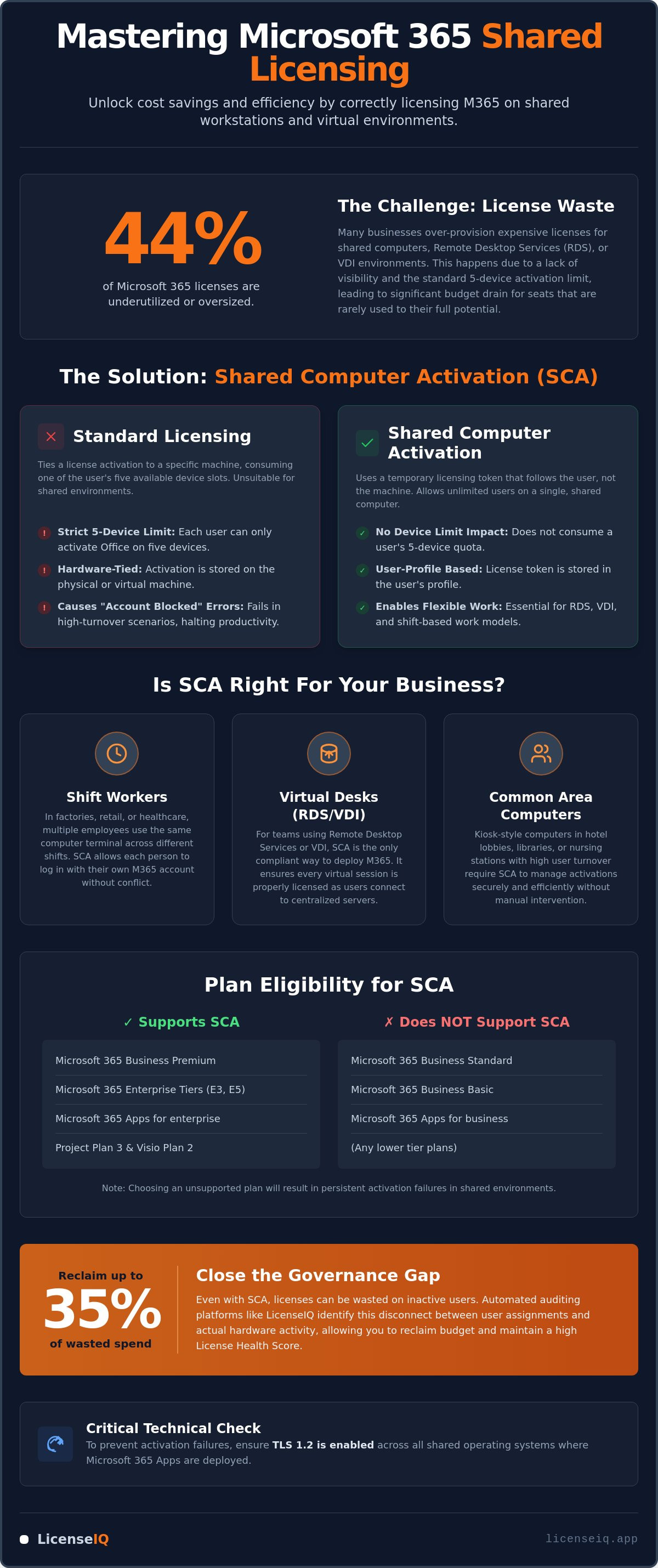
Approximately 44% of Microsoft 365 licenses are currently underutilized or oversized. For many organizations, this waste stems from a lack of visibility into shared environments where shift workers or remote teams overlap. Effective microsoft 365 license management for small business requires more than just assigning seats; it demands a precise deployment strategy that avoids the common five-device activation limit while securing your bottom line.
You likely recognize that over-provisioning for your shared workstations or RDS environments is draining your budget. Paying for premium tiers like the $22 Business Premium only to see seats sit idle is a common operational failure. This guide shows you how to master Shared Computer Activation (SCA) to enable multi-user environments legally and efficiently. We'll provide the technical roadmap to deploy M365 on shared hardware and introduce automated governance to identify hidden license waste. You'll learn to track usage patterns, reduce per-user costs, and maintain a high License Health Score through proactive digital auditing.
Key Takeaways
- Deploy Shared Computer Activation (SCA) to allow unlimited users on a single workstation without exhausting individual device limits.
- Verify subscription eligibility, as SCA remains exclusive to Microsoft 365 Business Premium and Enterprise tiers in 2026.
- Optimize microsoft 365 license management for small business by auditing the disconnect between user licenses and shared hardware activity.
- Leverage the LicenseIQ Platform to identify inactive users and reclaim up to 35% of wasted subscription spend.
- Maintain technical compliance by ensuring TLS 1.2 is enabled across all shared operating systems to prevent activation failures.
What is Microsoft 365 Shared Computer Activation (SCA)?
Shared Computer Activation (SCA) is a specialized deployment mode for Microsoft 365 Apps. It allows multiple users to access the same local installation of Office on a single machine without exhausting their individual activation quotas. In a standard setup, each user is limited to five device activations. SCA removes this barrier. This is critical for microsoft 365 license management for small business because it prevents productivity blocks in high-traffic environments where hardware is shared among teams.
The technical mechanism relies on temporary licensing tokens. When a user logs in, the software verifies the subscription and grants a short-term lease. This lease doesn't count as one of the user's five permanent device slots. It enables seamless transitions between shared hardware, ensuring that your workforce stays active without manual license reassignments. This infrastructure is essential for Remote Desktop Services (RDS) and Virtual Desktop Infrastructure (VDI), where users frequently hop between virtual instances that would otherwise trigger activation limits.
SCA vs. Standard User Licensing
Standard licensing models are rigid. They tie an activation to a specific user's five-device quota, which fails in high-density environments. SCA bypasses this by utilizing a unique token-based mechanism that stores licensing data within the user's profile rather than on the hardware itself. In 2026 environments, this token-based system ensures that a user's license remains valid across any shared hardware without consuming their primary device entitlements. It ensures that the license follows the person, not the machine, while keeping the user's primary device quota intact for their personal laptop or mobile device.
Core Scenarios for Shared Licensing
Deploying SCA is a strategic necessity for specific operational models. If your business relies on shared physical or virtual resources, standard licensing will lead to activation errors and administrative friction. Organizations that ignore this deployment mode often face "Account Blocked" messages that halt operations during critical shifts.
- The Shift Worker: In factories or retail hubs, multiple employees might use the same terminal across 24 hours. SCA allows every staff member to log in securely using their own credentials without hitting device limits.
- The Virtual Desk: For teams using Remote Desktop Services (RDS) or VDI, SCA is the only legal way to deploy M365. It ensures that every virtual instance is properly licensed as users cycle through centralized cloud-hosted Windows environments.
- The Common Area: Hospitality and healthcare settings often feature kiosk style computers in nursing stations or lobbies. SCA manages these high-turnover touchpoints with precision, ensuring security and compliance.
Effective microsoft 365 license management for small business depends on matching your deployment mode to your actual workflow. Without SCA, businesses often resort to ghost accounts or over-provisioning expensive licenses to bypass technical limits. This creates disorder. SCA provides the clarity needed to run multi-user environments without sacrificing account security or financial oversight.
Eligibility Check: Which M365 Plans Support Shared Licenses?
Choosing the wrong subscription tier is the fastest way to derail your deployment. For effective microsoft 365 license management for small business, you must distinguish between plans that include desktop apps and those that actually support multi-user environments. As of July 2026, Microsoft maintains strict boundaries on which licenses permit Shared Computer Activation. Deploying on the wrong plan results in persistent activation failures and licensing compliance risks. The 2026 price increases for lower tiers make the $22 Business Premium plan a higher value proposition than ever for shared environments.
Avoid the "Standard" trap. Microsoft 365 Business Standard ($14 per user) and Business Basic ($7 per user) do not support SCA. These tiers are designed for dedicated user devices; if your team shares hardware, these plans will fail to activate in a multi-user context. You can find a full breakdown of these limitations in our Microsoft 365 License Types guide. Specific desktop applications like Project Plan 3 or Visio Plan 2 also carry SCA entitlements, allowing specialists to use these tools on shared terminals without consuming their standard device count.
M365 Business Premium: The SMB Sweet Spot
Business Premium is the most efficient entry point for shared computer support. It's capped at 300 seats, making it ideal for growing firms. Beyond licensing flexibility, it bundles Intune and Defender for Business. These tools are vital for securing shared hardware. If you're managing shift workers on a budget, this plan provides the necessary legal framework for SCA without the enterprise price tag. It's the most cost-effective way to enable shared hardware while maintaining advanced security.
Enterprise Tiers: E3, E5, and Beyond
Large-scale operations require the heavy lifting of Enterprise tiers. Both Microsoft 365 E3 ($39 per user) and E5 ($60 per user) include full SCA support. There is no difference in SCA functionality between these two; the price gap reflects advanced security, voice, and analytics in E5. Government (G3/G5) and Education (A3/A5) plans follow the same logic. For those managing academic environments, you can also explore International Education and Career Placement Consulting to help students pursue global opportunities. You should upgrade to Enterprise when your seat count exceeds 300 or when you require advanced data governance. Before committing to an upgrade, run a scan with the LicenseIQ Platform to see if you can reclaim budget from underused E5 features.
Mastering microsoft 365 license management for small business starts with choosing the right foundation. Audit your current assignments to ensure you aren't paying for Enterprise features where a Business Premium license would suffice. Total clarity on your entitlements prevents the governance gap that leads to wasted spend.
How Shared Licensing Works: The Activation Process
Understanding the underlying licensing and activation logic is vital for operational stability. When a user launches an Office app on a shared machine, the system doesn't check for a local product key. Instead, it contacts the Office Licensing Service to verify the user's subscription status. This handshake is seamless but requires the user to have an active, eligible license assigned to their Entra ID (formerly Azure AD) account.
Once verified, a licensing token is generated and stored in the user’s local profile, specifically within the AppData folder. Because this token is temporary and tied to the specific shared environment, it preserves the user's standard five-device quota. This technical nuance is a cornerstone of efficient microsoft 365 license management for small business. It allows employees to remain productive on shared hardware without sacrificing their ability to work from home on their personal laptops or mobile devices.
These tokens aren't permanent. The system requires a consistent internet connection to renew the token, typically every 24 to 72 hours. If a terminal remains offline beyond this window, the apps enter reduced functionality mode, limiting the user to viewing and printing documents. This proactive check ensures licensing compliance but requires stable network oversight to prevent mid-shift productivity drops.
Deployment Options: ODT vs. Group Policy
You can enable SCA through three primary methods depending on your infrastructure scale. The Office Deployment Tool (ODT) is the standard for new installations; you simply add the SharedComputerLicensing property to your configuration.xml file. For existing environments, Group Policy (GPO) allows you to force SCA across entire RDS farms or VDI pools remotely. If you need a quick manual fix on a single machine, setting the SharedComputerLicensing registry key to 1 under the ClickToRun configuration path achieves the same result immediately.
Troubleshooting Common SCA Failures
Failures often manifest as "Product Unlicensed" errors, even when the user has a valid subscription. These usually stem from blocked communication with Microsoft’s activation servers or corrupted local tokens. Ensure your firewall whitelists the necessary M365 endpoints to allow the licensing handshake to complete. In 2026, ensuring your environment supports TLS 1.3 is mandatory for maintaining secure, high-speed activation handshakes with Microsoft’s updated licensing infrastructure. If activation issues persist, it often indicates a deeper configuration mismatch. Use the LicenseIQ Platform to audit your environment and confirm that your users are matched with the correct SCA-enabled subscriptions.
Precise activation management prevents the "Account Blocked" cycle that plagues poorly configured shared environments. By mastering the token flow, you ensure that microsoft 365 license management for small business remains a background process rather than a daily IT fire.
The Governance Gap: Why Shared Licenses Lead to Wasted Spend
Technical deployment is only half the battle. Many organizations fall into the "Set and Forget" trap. They configure SCA and never revisit the user assignments. This lack of oversight creates a massive governance gap. IT teams often prioritize connectivity over cost, leaving expensive subscriptions attached to users who no longer require them. Without consistent monitoring, your shared environment becomes a primary source of financial leakage.
Redundant assignments are common in multi-user settings. Users with premium E5 licenses often perform basic tasks on shared terminals. These users don't need full desktop suites or advanced Power BI features in that specific environment. An F3 license would often suffice for their actual usage patterns. This redundancy is a primary driver of wasted spend. You can learn more about reclaiming these funds in our guide on how to Reduce M365 Subscription Costs.
Inactive shift workers present another hidden cost. In high-turnover industries, licenses often remain attached to departed employees for months. This "ghost user" problem is a silent budget killer. Effective microsoft 365 license management for small business requires identifying these accounts before the next billing cycle. Automated oversight ensures that every dollar spent correlates with an active, productive user.
Identifying Redundant License Assignments
Many employees hold both a dedicated device license and a shared activation entitlement. This overlap is rarely necessary. In 2026, over-licensing in high-turnover sectors like retail or logistics leads to significant financial leakages. We use the License Health Score to measure this efficiency. A low score indicates that your license-to-usage ratio is out of balance, signaling immediate room for optimization. It provides the clarity needed to downgrade oversized plans without impacting user output.
The ROI of Automated Governance
Manual audits are reactive and often outdated by the time they're finished. Real-time software intelligence provides a proactive alternative. Organizations without automated oversight typically lose up to 35% of their SaaS budget to unmanaged seats. The LicenseIQ Platform acts as a vigilant auditor for your tenant. It uncovers obscured details that manual spreadsheets miss, turning organizational disorder into total clarity. By using our Spend Recovery Dashboard, you can visualize exactly where shared licensing waste occurs and take immediate corrective action.
Don't let unmanaged licenses erode your margins. Scan your tenant with LicenseIQ today to stop subscription waste and restore financial health to your operations. Precise microsoft 365 license management for small business is no longer optional; it's a competitive necessity.
Optimizing Shared Environments with LicenseIQ
Connect the LicenseIQ Platform to your tenant in minutes to initiate an instant SCA audit. Manual oversight is no longer sufficient for specialized leadership. You need a system that monitors resources with precision. Our platform identifies inactive users within your shared environments automatically. It provides immediate clarity where organizational disorder previously existed. This level of transparency is the cornerstone of effective microsoft 365 license management for small business.
The system detects redundant assignments that manual audits miss. If a shift worker hasn't logged into a shared terminal for 30 days, LicenseIQ flags the seat for recovery. You can then deploy one-click Automated Governance Workflows to reclaim that license. This proactive approach maintains a continuous License Health Score. It prevents the gradual return of SaaS sprawl that typically follows a manual cleanup effort. By maintaining this vigilance, you ensure your financial health remains protected against licensing decay.
AI-Native Discovery for Shared Terminals
LicenseIQ scans usage patterns to determine if a full license seat is justified. In shared environments, users often fluctuate between high-activity and low-activity periods. Our AI-native platform recognizes these shifts. It automates the offboarding process for seasonal or temporary shift workers. This ensures you aren't paying for licenses that sit idle. For a complete tactical guide on this process, review our Office 365 Offboarding Checklist. It provides the necessary steps to secure data while reclaiming every possible dollar.
Executing Spend Recovery Workflows
Transitioning from manual spreadsheets to automated governance is a financial imperative. Spreadsheets are static. They fail to capture the dynamic nature of shared computer activation. LicenseIQ provides a Spend Recovery Dashboard that offers real-time, dollar-value recommendations for license downgrades. It calculates the exact savings available by moving a user from an E5 to an F3 or Business Premium license based on actual terminal activity. This direct flow of data minimizes cognitive load for business managers. You no longer have to guess which licenses are redundant.
The system presents the solution, and you execute the recovery. Organizations using this model frequently save up to 35% on their software subscriptions. It transforms microsoft 365 license management for small business from a cost center into a strategic advantage. Start your 5-minute audit with LicenseIQ today to secure your corporate resources and eliminate operational waste immediately.
Secure Your Margins with Automated License Governance
Mastering Shared Computer Activation is essential for operational fluidity in 2026. However, technical deployment alone doesn't stop budget leaks. You must align your subscription tiers with actual hardware usage to avoid the traps of ineligible plans that lack SCA support. Effective microsoft 365 license management for small business requires a vigilant auditor to bridge the gap between user assignments and terminal activity. Relying on manual spreadsheets in a high-turnover environment leads to obscured details and significant financial waste.
LicenseIQ provides the precise oversight your organization needs to thrive. It connects in minutes to deliver an immediate Health Score and utilizes AI-native spend recovery to identify inactive seats across your shared terminals. You can save up to 35% on M365 spend by reclaiming underutilized resources through our automated governance workflows. This proactive approach turns organizational disorder into total clarity, ensuring your resources are monitored by a precise system. Take control of your digital infrastructure today. Stop wasting money on M365 licenses, get your Health Score now. Your organization deserves total transparency and a leaner, more efficient software stack.
Frequently Asked Questions
Does a Microsoft 365 shared license count against my 5-device limit?
No, Shared Computer Activation (SCA) doesn't count against your individual five-device activation quota. The system issues a temporary licensing token to the user profile on the shared hardware instead of a permanent activation. This token is unique to the environment and expires periodically. It allows you to maintain your primary desktop and mobile activations while remaining productive on shared terminals or RDS servers. It's a cornerstone of microsoft 365 license management for small business in multi-user settings.
Can I use Microsoft 365 Business Standard for shared computer activation?
No, Microsoft 365 Business Standard doesn't support Shared Computer Activation. You must use Microsoft 365 Business Premium or an Enterprise tier like E3 or E5 to enable this feature. Business Standard is restricted to dedicated user devices and lacks the token-based mechanism required for multi-user environments. If you attempt to use it on a shared terminal, users will face activation errors and blocked access to desktop applications.
What happens if a shared computer loses internet access?
If a shared computer loses internet access, the Office applications will eventually enter reduced functionality mode. The licensing token must be renewed every 24 to 72 hours via an active connection to the Office Licensing Service. Once the token expires, users can only view and print documents. They cannot create or edit files until the machine reconnects and re-verifies the user's subscription status through the cloud licensing service.
How do I check if shared computer activation is enabled on a PC?
You can verify the activation status by opening any Office application and navigating to File then Account. Look for the "Shared Computer Activation" label under the Product Information section. Alternatively, you can check the Windows Registry. Navigate to HKEY_LOCAL_MACHINE\SOFTWARE\Microsoft\Office\ClickToRun\Configuration and confirm that the SharedComputerLicensing value is set to 1. This ensures your deployment is configured correctly for multi-user access and compliance.
Is there a limit to how many users can share one computer with SCA?
Microsoft doesn't impose a specific numerical limit on how many users can share a single computer using SCA. However, every individual who logs into the machine must possess an eligible M365 license. Your primary constraints will be hardware performance and the capacity of your RDS or VDI infrastructure. Meticulous microsoft 365 license management for small business ensures that you only pay for active users regardless of how many people share the hardware.
Do I need a separate license for every user on a shared computer?
Yes, every user who accesses the Office apps on a shared computer must have their own assigned license. SCA is a deployment mode, not a way to share a single license among multiple people. Each user logs in with their unique credentials, and the system verifies their specific subscription entitlements. Assigning a single license to a generic account for multiple people violates Microsoft's licensing terms and creates significant security risks.
Can I mix shared and individual licenses in the same M365 tenant?
Yes, you can absolutely mix different license types within a single tenant. You might assign Business Premium to shift workers who need SCA and Business Standard to office staff with dedicated laptops. This flexibility is a key advantage, but it requires vigilant oversight to prevent over-provisioning. Using a Spend Recovery Dashboard helps you visualize these mixed environments and identify where users are assigned more expensive tiers than their actual usage patterns justify.
What is the best way to track wasted licenses in a shared environment?
The most efficient way to track license waste is through an automated platform like LicenseIQ. Manual audits are slow and often miss the ghost users who no longer log into shared terminals. By connecting your tenant to LicenseIQ, you get an immediate Health Score and real-time visibility into inactive accounts. This allows you to reclaim up to 35% of your subscription spend by identifying redundant assignments and automating the offboarding of departed staff.


