

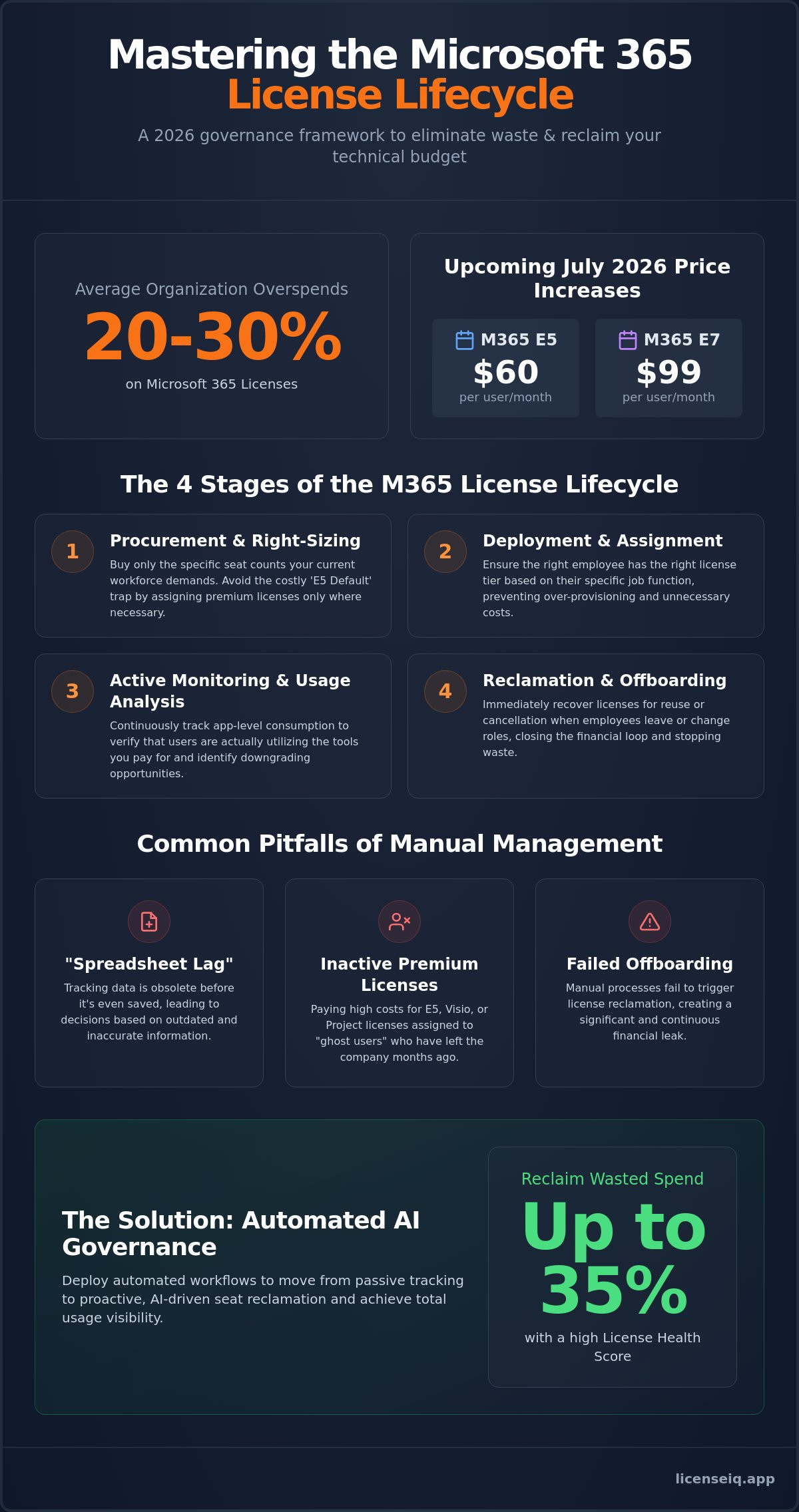
Did you know that the average organization currently overspends on Microsoft 365 by 20% to 30%? With the July 2026 price increases pushing Microsoft 365 E5 to $60 per user and the new E7 suite to $99, these hidden costs are no longer just administrative noise. They are a direct drain on your technical budget. Implementing rigorous microsoft 365 license lifecycle management is the only way to stop this financial bleed and reclaim control over your digital resources.
You likely recognize that manual offboarding and complex licensing tiers create a persistent transparency gap. It is nearly impossible to track every inactive seat or redundant add-on using outdated manual processes. This article provides a definitive roadmap to master the complete lifecycle of your licenses. You will learn how to eliminate waste and automate governance with AI-driven precision. We will examine the 2026 governance framework to help you achieve total visibility, recover wasted spend, and maintain a high License Health Score across your entire organization.
Key Takeaways
- Transition from passive seat tracking to active microsoft 365 license lifecycle management to protect your 2026 technical budget from rising costs.
- Master the four critical stages of the license lifecycle to ensure every seat is right-sized and assigned to the correct user tier.
- Identify the hidden financial risks of "spreadsheet lag" and the high cost of maintaining inactive premium licenses for E5, Visio, or Project.
- Learn how to connect your tenant to the LicenseIQ Platform in minutes to receive an immediate License Health Score and total usage visibility.
- Deploy Automated Governance Workflows to reclaim up to 35% of wasted spend through proactive, AI-driven seat reclamation.
What is Microsoft 365 License Lifecycle Management?
Effective microsoft 365 license lifecycle management is the continuous process of procuring, assigning, and reclaiming software seats to align technical resources with actual business needs. It is no longer enough to simply pay a monthly invoice. In 2026, the cost of Microsoft 365 has reached a critical threshold. With E5 plans now at $60 and the new E7 suite at $99 per user, every unassigned or underutilized seat represents a significant financial leak. Active governance ensures that your organization only pays for the value it actually consumes. It moves your strategy from reactive crisis management to proactive fiscal oversight.
You must distinguish between a subscription and a license to manage this effectively. A subscription is the overarching contract with Microsoft that defines your commitment level and pricing tier. A license is the individual seat assigned to a specific user. While IT handles the deployment of these seats, Finance must oversee the spend recovery. This partnership is vital. IT ensures operational continuity; Finance ensures fiscal health. Without this alignment, organizations often find themselves paying for ghost users who left the company months ago. A vigilant system bridges this gap by providing total transparency into every seat you own.
The Technical Status vs. The Business Lifecycle
Microsoft categorizes seats into four technical statuses: Active, Expired, Disabled, and Deleted. These are narrow, technical definitions. A seat might be Active in the admin center but Wasted in reality if the user has zero login activity. A true business lifecycle layers procurement, onboarding, usage monitoring, and reclamation onto these technical states. It's a proactive audit. You aren't just checking if a license works; you're verifying that it's necessary. By monitoring usage patterns, you can identify which users require premium tiers and which can be downgraded to save costs. This level of microsoft 365 license lifecycle management transforms your tenant from a cost center into an optimized resource.
Why Static Management Fails in 2026
The set and forget approach is a liability in a hybrid work environment. SaaS sprawl and shadow IT have made it difficult for administrators to maintain total oversight. When an employee leaves or changes roles, manual offboarding often fails to trigger license reclamation. This leads to spreadsheet lag, where your tracking data is obsolete before you even save it. Static management cannot keep pace with the 33% price increases seen in plans like Microsoft 365 F1. You need a system that identifies these obscured details in real time. For a deeper dive into modernizing these processes, consult our Microsoft 365 License Management Lifecycle guide. Automation is the only way to maintain a high Health Score in a complex operational environment.
The 4 Stages of the M365 License Lifecycle
A structured framework is the foundation of effective microsoft 365 license lifecycle management. It aligns your technical operations with the broader principles of Software Asset Management (SAM). Without a linear process, your tenant becomes an unorganized collection of expensive, underutilized assets. Following these four stages ensures every dollar spent translates into actual business value. It transforms your administration from a reactive task into a strategic financial advantage.
The lifecycle begins with Procurement and Right-Sizing. This stage requires you to buy only the specific seat counts your current workforce demands. Next is Deployment and Assignment. Here, you ensure that the right employee has the right license tier based on their specific job function. The third stage is Active Monitoring and Usage Analysis. You must track app-level consumption to see if users are actually opening the tools you pay for. Finally, Reclamation and Offboarding closes the loop. This stage recovers licenses for reuse or cancellation when employees leave or change roles. Failing at any single stage compromises the entire system.
For organizations looking to streamline the entire employee lifecycle, coordinating IT onboarding with HR timelines is key; understanding the turnaround times for services like SimpliVerified helps ensure that licenses are ready exactly when the new hire is cleared to start.
Procurement: Avoiding the 'E5 Default' Trap
Many organizations default to Microsoft 365 E5 to "future-proof" their environment. This is a costly mistake. As of July 2026, M365 E5 costs $60 per user, while M365 E3 sits at $39. That is a $21 monthly premium per person. If you have 500 users, you are spending an extra $10,500 every month for features like Advanced Analytics or Security Copilot. You must evaluate if these tools are active across your entire fleet. A mix and match strategy often yields better results. Assign E5 only to power users or high-risk departments. Everyone else can likely perform efficiently on E3 or even Business Premium. This granular approach prevents unnecessary spend before it even hits your invoice.
Reclamation: The Critical Final Step
Reclamation is where most organizations fail. This failure creates "zombie licenses." These are assigned seats for users who no longer work at the company. They sit in your tenant, invisible but active on your monthly bill. Unassigned licenses also pose a significant risk. If you have 50 spare E5 seats sitting in your pool, you are burning $3,000 monthly. You need a rigorous process to identify and harvest these licenses immediately. Following a structured Office 365 Offboarding Checklist prevents these financial leaks from persisting. You can automate this oversight to ensure your inventory remains lean and efficient at all times.
Common Pitfalls in Manual M365 Management
Manual microsoft 365 license lifecycle management is a recipe for fiscal disorder. Most organizations rely on static spreadsheets to track their seats. This "spreadsheet lag" is a critical failure point. The moment you save the file, it's obsolete. New hires join, employees depart, and roles change daily. Without real-time visibility, you're essentially guessing your license requirements. This lack of precision leads to two major outcomes: unnecessary spend and security vulnerabilities. You can't manage what you can't see, and manual tracking hides the very details you need to control.
Consider the risk of redundant assignments. It's common to find a single user holding both a premium seat and a standalone Visio or Project license they no longer use. These overlapping costs accumulate silently. Leaving licenses active for former employees is more than a financial drain; it's a massive security gap. A decommissioned user with an active license provides a persistent entry point for unauthorized access. Vigilant oversight requires moving beyond manual checks to a system that identifies these obscured details instantly. Efficiency starts with the elimination of human error.
Identifying Inactive and Underutilised Licenses
Inactivity is a primary driver of waste. We define inactivity as zero login activity for 30 consecutive days. If a user hasn't accessed their suite in a month, they shouldn't hold a premium seat. Often, users only require basic web applications but are assigned full desktop-tier licenses. This is where you lose the most margin. License Right-Sizing is the practice of matching specific license costs to actual user requirements. By downgrading underutilized premium seats to web-only or basic tiers, you can slash your monthly invoice without impacting productivity. Precision in assignment is the cornerstone of a healthy tenant.
The Hidden Cost of Unassigned Seats
Purchased licenses appear on your monthly bill regardless of their assignment status. If you have 20 unassigned E5 seats sitting in your pool, you're paying for resources that provide zero value. Finding these seats in the standard Microsoft 365 Admin Center is a high-friction task. It requires navigating multiple menus and manually cross-referencing lists. This complexity often leads IT managers to ignore the pool entirely. To prevent this, conduct a monthly review of the Microsoft 365 License Types you currently own. Eradicating these unassigned seats ensures your tenant remains lean and every dollar is accounted for.
Automating the Lifecycle with AI Governance
Manual oversight is a structural vulnerability. To achieve professional microsoft 365 license lifecycle management, you must transition to an AI-native governance model. This shift replaces guesswork with data-driven precision. The process begins by connecting your tenant via a secure API. This allows for a real-time scan of your entire environment in minutes. You gain immediate clarity into every active, inactive, and unassigned seat. It is the first step in reclaiming control over your corporate resources.
Once connected, you establish automated triggers for inactive user alerts. If a seat remains untouched for 30 days, the system flags it. You no longer need to hunt for waste; the waste finds you. Following this, implement Automated Governance Workflows for one-click reclamation. This removes the friction from offboarding and role changes. Finally, you monitor your License Health Score. This metric serves as your primary indicator of IT success. It ensures your tenant remains optimized as your organization grows. Continuous oversight is the only way to maintain a lean environment.
The Role of AI-Native Software Intelligence
Standard SaaS management tools often provide static data. AI-native intelligence goes further by identifying complex patterns in usage that manual audits miss. It recognizes when a user's behavior suggests they only need a basic web license despite holding a premium E7 seat. This level of insight relies on the Model Context Protocol. It allows the system to understand the specific operational context of your organization. It acts as a vigilant digital auditor, solving organizational disorder by uncovering obscured details. Automation isn't just a tool; it's an active participant in your company's fiscal growth.
Spend Recovery as a Continuous Process
Quarterly audits are insufficient in a fast-paced technical environment. You need to move toward real-time spend recovery to protect your margins. A Spend Recovery Dashboard provides a live view of potential savings. It quantifies the dollar value of every inactive license and redundant assignment. This transparency allows for immediate action. For a detailed strategy on reclaiming these funds, review our guide on How to Reduce M365 Subscription Costs. You can start your real-time tenant scan today to uncover up to 35% in wasted spend through automated governance.
Optimising Your Tenant with LicenseIQ
Manual oversight is a liability. Precision is the solution. The LicenseIQ Platform provides the final piece of the microsoft 365 license lifecycle management puzzle. It connects to your tenant in minutes, delivering an immediate License Health Score. This score serves as the definitive metric for your IT success. For specialized leadership, this visibility is the difference between organizational disorder and total operational clarity. You no longer have to guess where your budget is going. You see the facts in real time.
The Spend Recovery Dashboard provides total dollar-value visibility. It uncovers obscured details that manual audits inevitably miss. It's a results-first approach designed for high-velocity environments. SMBs choose this platform because it delivers expert-level insights without the need for a massive, dedicated IT department. You get the authority of a digital auditor that is always one step ahead. Every unassigned seat and redundant tier is exposed. This transparency ensures your resources are being monitored by a vigilant and precise system.
Achieving a 35% Reduction in M365 Spend
Waste is a silent drain on your technical budget. LicenseIQ identifies three primary categories of inefficiency: inactive users, redundant assignments, and unassigned seats. Our 5-Minute Audit promise ensures that time-strapped IT leaders get the data they need without delay. The system acts as a proactive participant in your company’s growth. It doesn't wait for a quarterly review to find savings. Automated Governance Workflows then reclaim that spend automatically. No manual IT intervention is required to harvest these resources. This level of automation is the only way to maintain professional microsoft 365 license lifecycle management in 2026.
Next Steps for Financial Accuracy
Continuous financial hygiene is the only way to stay ahead of rising Microsoft costs. A one-time audit provides temporary relief, but a vigilant system provides permanent security. You need a persistent guardian of your corporate resources. Getting your free Health Score is the first step toward reclaiming up to 35% of your wasted spend. This baseline allows you to implement governance with absolute confidence. Secure your budget and eliminate technical waste immediately. Start your M365 audit with LicenseIQ today and transform your tenant into an optimized financial asset.
Protect Your Tenant's Financial Health
The 2026 licensing landscape leaves no room for administrative oversight. You have seen how manual tracking creates spreadsheet lag and hidden costs from inactive premium seats. Professional microsoft 365 license lifecycle management requires a permanent shift toward persistent, AI-driven visibility. By treating the license lifecycle as a continuous financial audit, you protect your organization from the complexity tax of modern SaaS environments. Transparency is your most valuable asset in maintaining a lean and secure tenant.
You don't have to navigate these complexities alone. LicenseIQ offers a vigilant solution that connects to your environment in minutes to identify redundant seats. Our AI-native software intelligence uncovers obscured details to drive up to 35% spend recovery across your entire fleet. It is time to replace organizational disorder with total clarity and data-driven decision-making. Discover your M365 Health Score and recover wasted spend with LicenseIQ. Take control of your digital resources and ensure every dollar spent contributes directly to your company's growth.
Frequently Asked Questions
What is the difference between a subscription and a license lifecycle?
A subscription is your overarching contractual agreement with Microsoft that defines your pricing, terms, and available seat pool. The lifecycle is the active operational process of procuring, assigning, monitoring, and reclaiming those individual seats based on real-time user activity. Effective microsoft 365 license lifecycle management ensures you aren't just paying for a subscription, but actively optimizing every seat within it.
How long does Microsoft keep my data after a license is reclaimed?
Microsoft typically retains user data for a 30-day grace period after a license is removed. During this window, administrators can still access or migrate files before they are permanently deleted from the tenant. You must complete all data preservation tasks within these 30 days to prevent the permanent loss of corporate information and intellectual property. To ensure your files remain accessible and secure during transitions, you can learn more about how Box provides an AI-powered content management platform for professional collaboration.
Can I automate the removal of licenses for offboarded employees?
You can fully automate this process using Automated Governance Workflows. These systems connect to your identity provider to trigger immediate seat reclamation the moment an employee is marked as terminated. This removes the "spreadsheet lag" associated with manual offboarding and ensures you stop paying for "zombie licenses" the day a user leaves the organization.
What is a 'License Health Score' and why does it matter?
The License Health Score is a definitive metric that measures the overall efficiency and fiscal hygiene of your M365 tenant. It calculates the ratio of active, utilized licenses against inactive, redundant, or unassigned seats. A high score indicates a lean environment where resources are perfectly aligned with workforce needs, serving as a primary indicator of IT operational success.
Is it possible to mix different Microsoft 365 license tiers in one tenant?
Yes, you can mix and match various tiers like E3, E5, and Business Premium within a single environment. This strategy is essential for professional microsoft 365 license lifecycle management. It allows you to assign expensive E5 or E7 seats only to power users or high-security roles, while keeping general staff on more cost-effective tiers to maximize your budget efficiency.
How often should I conduct a Microsoft 365 license audit?
Quarterly audits are no longer sufficient to manage the 2026 price increases and NCE commitment terms. You should move to real-time monitoring or, at a minimum, conduct a comprehensive audit once per month. Continuous oversight is the only way to identify waste as it happens and prevent unassigned seats from appearing on your next monthly invoice.
Can LicenseIQ identify users who haven't logged in for 90 days?
The LicenseIQ Platform provides total visibility into usage patterns, including identifying users with zero activity over 90 days. The system scans your tenant via secure API to uncover these obscured details instantly. Once identified, you can use one-click workflows to reclaim these seats and stop the financial drain of maintaining inactive premium accounts.
Will reclaiming a license immediately reduce my monthly bill?
Reclaiming a license stops the waste immediately by making that seat available for a new hire, which avoids the cost of purchasing an additional license. Actual bill reduction for the total seat count depends on your New Commerce Experience (NCE) commitment. Monthly terms allow for seat reduction at the end of the month, while annual terms require waiting until the renewal window to lower the total count.


