

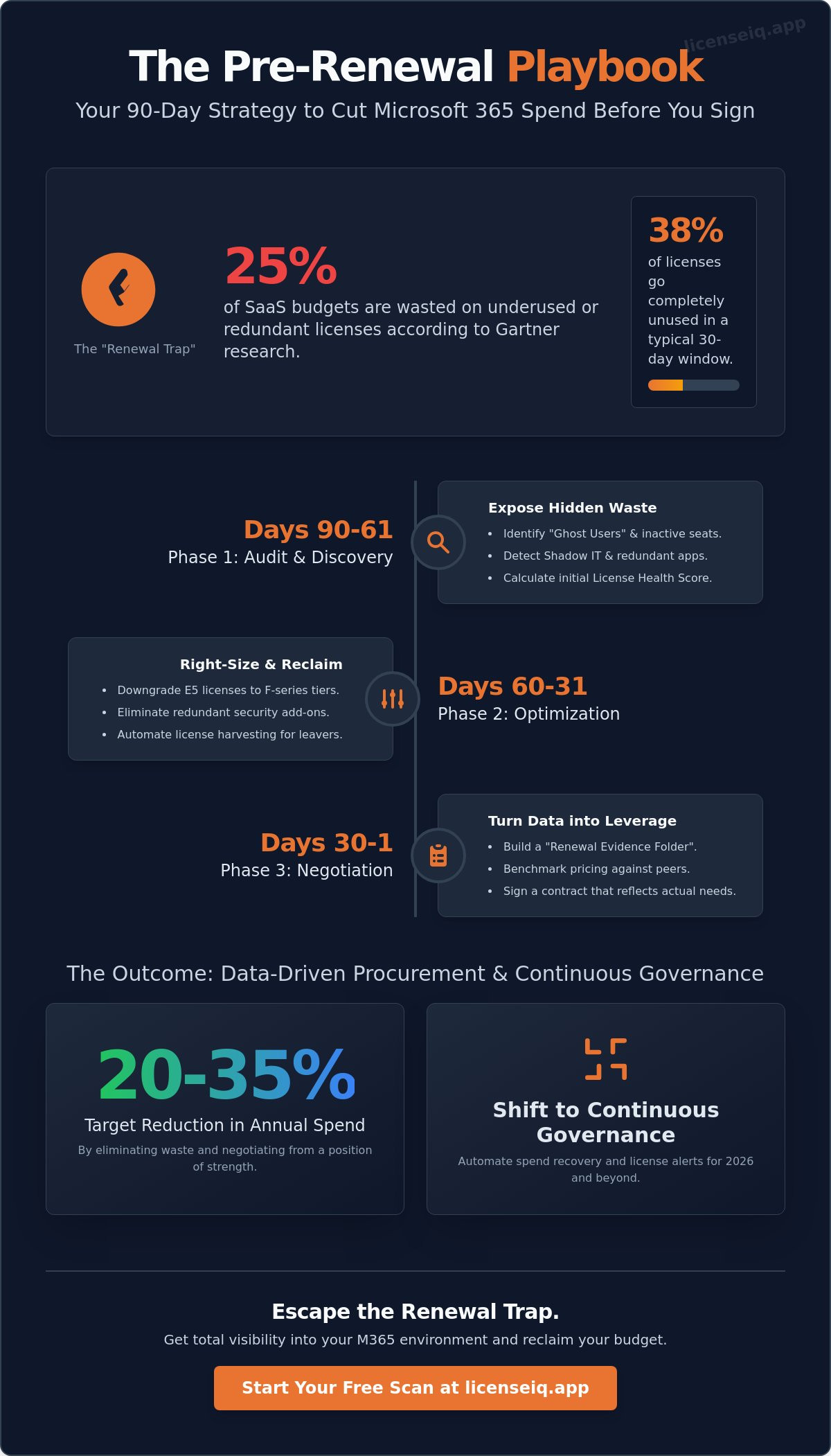
Gartner research indicates that organizations waste 25% of their SaaS budget on underused or redundant licenses. For an organization managing 500 seats, that's a significant financial leak that often goes unnoticed until the renewal deadline looms. You need a structured approach like The Pre-Renewal Playbook: 90 Days to Cut Your Microsoft 365 Spend Before You Sign to gain total visibility and reclaim your budget.
You've likely felt the frustration of manual audits and the persistent fear that downgrading a tier might lead to critical data loss. It's difficult to justify costs when inactive users hide in the shadows of your tenant, quietly draining resources while you lack the time to manually check every seat. We'll help you master the 90-day countdown with a data-driven strategy to eliminate waste and negotiate from a position of strength. This guide provides a clear roadmap to lower costs, automated identification of wasted licenses, and the evidence you need to secure a better deal.
Key Takeaways
- Escape the "Renewal Trap" by leveraging the critical 90-day window to secure procurement leverage before deprovisioning cycles lock in your costs.
- Uncover hidden waste by scanning your tenant for "Ghost Users" and inactive seats that drain your budget without providing value.
- Master The Pre-Renewal Playbook: 90 Days to Cut Your Microsoft 365 Spend Before You Sign to strategically downgrade underutilized E5 licenses to high-ROI F-series tiers.
- Transform raw utilization data into a "Renewal Evidence Folder" to benchmark your pricing and negotiate from a position of data-driven strength.
- Shift from reactive annual audits to a continuous governance model that automates spend recovery and license alerts for 2026 and beyond.
Why the 90-Day Window is Your High-Stakes Procurement Lever
Waiting until 30 days before your contract expires guarantees overpayment. By that point, your leverage is gone. You're forced into a defensive posture, reacting to Microsoft’s default terms rather than dictating your own. The Pre-Renewal Playbook: 90 Days to Cut Your Microsoft 365 Spend Before You Sign shifts the power back to your procurement team. This 90-day window is not just a calendar buffer; it's a high-stakes lever for financial recovery.
Modern FinOps principles demand a proactive approach to SaaS spend. In 2026, Microsoft's deprovisioning cycles and strict New Commerce Experience (NCE) windows will make early action mandatory for any organization seeking to avoid unnecessary lock-ins. If you don't act by day 90, you're essentially handing Microsoft a blank check. We target a 20-35% reduction in total annual spend by identifying waste that remains invisible to the untrained eye. Visibility is the only antidote to the chaos of unmanaged software stacks.
The Cost of Passive Renewals
Passive renewals are a silent profit killer. Auto-renew features hide zombie licenses and redundant tiers that provide zero value to your frontline staff. Industry data shows that 38% of SaaS licenses go unused in a typical 30-day window. Manual spreadsheets are the top enemy of accurate license counts. They're static, prone to human error, and fail to capture real-time utilization. This lack of transparency leads to "SaaS sprawl," where SMB budgets are drained by premium E5 features for users who only need basic email access. LicenseIQ eliminates this darkness by providing a single source of truth for your entire environment.
Mapping the 90-Day Timeline
Efficiency requires a structured rhythm. You must follow a logical sequence to ensure no cost-saving opportunity is missed. The Pre-Renewal Playbook: 90 Days to Cut Your Microsoft 365 Spend Before You Sign breaks the process into three distinct phases:
- Phase 1 (Days 90-61): Discovery and Health Assessment. You can't manage what you can't see. This phase applies core Software Asset Management principles to audit every seat. We uncover shadow IT and identify users who haven't logged in for 30 days or more.
- Phase 2 (Days 60-31): Optimization and Right-Sizing. This is the execution phase. We move users from expensive E5 licenses to Business Premium or F3 tiers based on actual usage data. We eliminate redundant security add-ons that are already covered by your existing stack.
- Phase 3 (Days 30-1): Negotiation and Execution. Armed with data, you enter negotiations from a position of strength. You sign a contract that reflects your actual needs, not your historical waste.
This disciplined approach ensures your software spend is monitored by a vigilant system. Don't let your budget be a victim of inertia. Take control of your procurement cycle today.
Days 90-61: The Audit Phase – Exposing Inactive Users and Redundant SKUs
You can't optimize what you can't see. The first 30 days of your strategy must focus on total visibility. Connect to your tenant immediately to scan for every active and inactive seat. Industry data indicates that 26% of SaaS spend is wasted on unused or underutilized licenses. This audit is the critical first step in The Pre-Renewal Playbook: 90 Days to Cut Your Microsoft 365 Spend Before You Sign. You must identify "Ghost Users" which include former employees and forgotten service accounts that continue to bill your department every month. These silent budget drains often hide in plain sight.
Shadow IT detection is equally vital. Many departments purchase redundant apps like Zoom, Slack, or Trello that directly overlap with features already included in your M365 stack. Finding these overlaps allows you to consolidate vendors and save. Once your scan is complete, calculate your initial License Health Score. This metric provides a benchmark to measure your optimization progress over the next two months. If you want to see where you stand today, you can benchmark your current utilization with a rapid scan.
Finding the Low-Hanging Fruit
Speed is essential during this phase. You can generate an inactive office 365 users report in minutes to pinpoint accounts with zero activity over the last 90 days. Spotting unassigned licenses is another quick win. These are seats you've already purchased but haven't allocated to any user. Finally, analyze usage depth. If your E5 users only utilize E3 features like basic email and document editing, you're overpaying by roughly 35% per seat for advanced security or analytics tools they don't touch.
The Security-Savings Connection
Financial waste isn't the only risk. Reclaiming licenses is a critical step in the office 365 offboarding checklist to protect your corporate data. Dormant accounts are prime targets for attackers because they're rarely monitored. By closing these accounts, you reduce your attack surface and eliminate unnecessary costs simultaneously. License Hygiene is a financial and security mandate that ensures every active seat is authorized, utilized, and accounted for. This disciplined approach transforms your M365 environment from a black box into a transparent, lean operation.
Days 60-31: The Optimization Phase – Right-Sizing Tiers and Downgrading
The middle 30 days of your renewal window represent the most critical period for cost extraction. During this phase, you move from observation to action. You must challenge the "standard seat" assumption that often inflates enterprise budgets. Many IT leaders default to a single tier for simplicity, but this convenience carries a high price tag. Executing this phase of The Pre-Renewal Playbook: 90 Days to Cut Your Microsoft 365 Spend Before You Sign ensures your contract reflects actual business needs rather than historical inertia.
The E3 vs. E5 debate is the primary driver of overspending. With a price gap of approximately $21 per user, an organization with 1,000 employees risks wasting $252,000 annually by over-provisioning E5 licenses. If your team doesn't utilize Power BI Pro, Phone System capabilities, or advanced eDiscovery, that premium delivers zero ROI. Analyze your telemetry data to identify users who haven't touched E5-exclusive features in the last 90 days. These are your primary candidates for a downgrade.
Strategic downgrading also involves moving "deskless" or frontline workers to F-series licenses. Workers in retail, manufacturing, or field services rarely require the full desktop suite. Transitioning these users to F1 or F3 tiers can reduce costs by over 60% per seat while still providing essential access to Teams and mobile productivity tools. Use this time to build a data-driven forecast for the next fiscal year based on these actual utilization patterns.
Right-Sizing Your License Tiers
For organizations with fewer than 300 users, Microsoft 365 Business Premium often provides better value than Enterprise tiers. It includes advanced security features like Intune and Azure AD Premium P1 at a lower price point. You should also segment your workforce by application needs. Users who only access email and basic documents can thrive on web-based apps, eliminating the need for expensive desktop install rights. For a detailed breakdown of these differences, consult this Microsoft 365 license types guide.
The ROI of Downgrading Without Data Loss
IT managers often fear that changing tiers will trigger data loss. This is a misconception. You can safely move users between E5, E3, and F-series licenses without impacting mailbox content or OneDrive files, provided you manage the storage limits correctly. For example, moving from E3 to F3 requires ensuring the mailbox size is under 2GB. Right-sizing is not downsizing but alignment. It ensures every dollar spent supports a specific business function. To maintain these gains, implement automated governance. This prevents "tier creep" where users are default-provisioned to the highest tier regardless of their actual role requirements. Focus on visibility to keep your stack lean and efficient.
Days 30-1: The Negotiation Phase – Turning Data into Leverage
The final 30 days are where your preparation meets the reality of the contract. You aren't just renewing; you're rightsizing. Following The Pre-Renewal Playbook: 90 Days to Cut Your Microsoft 365 Spend Before You Sign ensures you don't overpay for another three year cycle. Start by building a Renewal Evidence Folder. This digital dossier should contain specific reports showing exactly where money is leaking from your current tenant.
Benchmarking is your next critical step. In 2026, SMBs typically target 15% discounts by committing to specific growth tiers or annual prepayments. Don't accept the first price offered. Follow a strict 4-step sequence to maintain control. First, send your Intent to Renew early to avoid "emergency" pressure. Second, review the initial proposal against your internal audit. Third, present your counter-offer using your waste reports as proof. Finally, move to the signature only when the numbers align with your actual usage data.
Watch out for Microsoft Unified Support upsells. This service is a common addition that can add 12% to your total bill. Demand a report of your support ticket history from the previous 12 months. If your team only opened five tickets last year, a premium support tier is a waste of capital. Push back and keep your core licensing clean.
Negotiating with Hard Evidence
Your Health Score is your strongest weapon. Use it to prove that your current seat count is inflated by at least 10%. Present inactive user data as a non-negotiable deduction. Microsoft cannot justify charging for accounts that haven't logged in for 90 days. You can reduce M365 subscription costs by trading multi-year commitments for lower per-user rates. This strategy locks in 2026 pricing and protects your budget from mid-contract price hikes.
Closing the Deal
Review every line of the contract before signing. Look for hidden "Extended Period Term" fees that apply if you try to reduce seats mid-term. Ensure the final seat count matches your audit results exactly. If the vendor won't budge on pricing, remember your walk away power. Having a competitive quote from a secondary Cloud Solution Provider (CSP) gives you the leverage to demand better terms. Never sign a contract that includes "zombie" licenses you've already identified as waste.
Stop guessing and start saving. Audit your Microsoft 365 spend with LicenseIQ today.
Continuous Governance: Automating Spend Recovery for 2026 and Beyond
The once-a-year audit is a relic of the past. Waiting for your renewal window to identify waste is a strategy for losing money. Data indicates that enterprises often waste 30% of their SaaS budget on underutilized or redundant seats every month. Continuous governance replaces the panicked pre-renewal scramble with a steady, automated pulse of optimization. This shift ensures you maintain a lean environment every day, not just the day before you sign your next contract.
Automation is the only way to scale this efficiency. You need systems that flag inactive users the moment they cross a 30-day threshold of non-usage. You need immediate alerts for unassigned licenses that sit idle on your balance sheet. Integrating LicenseIQ into your monthly FinOps reporting turns passive data into active savings. This is the future of AI-native management. It provides real-time spend recovery that operates without human intervention, ensuring your Microsoft 365 environment is always right-sized and compliant.
Beyond the Spreadsheet
Spreadsheets are static and prone to error. They are outdated the second you hit save. Manual tracking relies on human memory and fragmented data exports that provide zero real-time value. In contrast, LicenseIQ’s automated platform uses AI to scan your entire tenant. It identifies overlapping features and shadow IT that human auditors frequently miss. AI-native tools uncover ghost accounts and redundant subscriptions instantly. This total visibility helps you establish a "Savings First" culture. It makes financial efficiency the default setting for your IT department rather than a once-a-year chore.
Your Next Steps to a 35% Saving
Stop guessing about your software costs. Start measuring them with precision. Your immediate action is to connect your tenant for a 5-minute health check. This provides instant visibility into your current waste levels and potential recovery zones. By implementing The Pre-Renewal Playbook: 90 Days to Cut Your Microsoft 365 Spend Before You Sign, you turn license management into a repeatable, high-yield process. This playbook ensures you never overpay for unused features again. Take control of your digital infrastructure today. Get your free M365 Health Score today and secure your budget for 2026 and beyond.
Stop Overpaying for Licenses You Don't Use
Your upcoming renewal isn't just a bill to be paid; it's a strategic opportunity to reclaim your budget. By following The Pre-Renewal Playbook: 90 Days to Cut Your Microsoft 365 Spend Before You Sign, you move from reactive purchasing to proactive governance. You've learned how to audit inactive accounts and right-size tiers before the final negotiation phase begins. These steps ensure you aren't subsidizing vendor bottom lines with redundant SKUs or unused features.
Visibility is the only way to eliminate waste. LicenseIQ provides the precision you need to identify these inefficiencies instantly. You can save up to 35% on M365 spend by automating the discovery of underutilized seats. The platform connects in minutes and requires no IT degree to operate, giving you immediate clarity through AI-native automated governance workflows. Don't leave your procurement leverage to chance when data-driven insights are a few clicks away.
Start your 5-minute M365 audit with LicenseIQ
Secure your organization's financial health and enter your next negotiation with total confidence.
Frequently Asked Questions
How far in advance should I start my Microsoft 365 renewal audit?
Start your audit 90 days before your contract expiration date. This timeline provides enough space to execute the strategies in The Pre-Renewal Playbook: 90 Days to Cut Your Microsoft 365 Spend Before You Sign without rushing. You need 30 days to gather usage data and 60 days to negotiate terms. Waiting until the final 30 days often results in an automatic renewal of expensive waste.
Can I downgrade M365 licenses mid-contract, or do I have to wait for renewal?
You must wait until your annual renewal date to reduce license counts or downgrade tiers under New Commerce Experience rules. Microsoft provides a 168-hour window after purchase to make changes; after that, you're committed for the full term. Planning ahead ensures you align your actual needs with the next billing cycle. This prevents paying for premium features that 40% of your staff doesn't use.
What is a "Ghost User" and how much are they costing my business?
A ghost user is an active license assigned to a former employee or an unmonitored service account. Industry data shows that up to 20% of SaaS licenses sit unused, directly inflating your monthly bill. These accounts pose a security risk and a financial drain. Identifying these users allows you to reclaim licenses instantly, potentially saving thousands of dollars before you sign your next contract.
Is it possible to mix different types of M365 licenses in one tenant?
You can mix and match E5, E3, and F3 licenses within a single tenant to optimize costs. Not every employee requires the $57 per month E5 tier for advanced security. By assigning F3 licenses to frontline workers and E3 to standard users, you eliminate over-provisioning. This granular approach is a core strategy within The Pre-Renewal Playbook: 90 Days to Cut Your Microsoft 365 Spend Before You Sign.
What happens to my data if I downgrade from M365 E5 to E3?
You lose access to advanced features like Power BI Pro and specific eDiscovery tools, but your core mailbox and file data remain intact. You must export or migrate data from E5-exclusive services before the downgrade takes effect. Microsoft typically holds data for 30 days after a license change. Failing to archive this information can lead to permanent loss of compliance records or analytics.
How does LicenseIQ identify unassigned licenses compared to the Microsoft Admin Center?
LicenseIQ provides a unified view of utilization rates across multiple tenants, whereas the Microsoft Admin Center requires manual, per-user inspection. Our system flags licenses that haven't been accessed in 30 days or more. This automation uncovers hidden waste that standard dashboards overlook. You get actionable intelligence instead of raw data, allowing for immediate seat reclamation and better financial health for your organization.
Does Microsoft offer discounts for multi-year license commitments in 2026?
Microsoft currently offers price protection for three-year commitments under the NCE framework, shielding you from annual price hikes through 2026. While the list price remains standard, committing to a longer term locks in current rates. This strategy is effective for stable workforces but requires 100% certainty in your headcount. Over-committing can lead to paying for shelfware if your team size fluctuates by 10% or more.
Can I remove licenses during the 90-day grace period without penalty?
You can only remove licenses during the specific 7-day window at the start of your new term, not the 90 days leading up to it. The 90-day period is your window for auditing and strategy, not for execution of cuts. Once that 168-hour post-renewal window closes, you're locked into that seat count for the duration of the contract. Precision in your pre-renewal audit is vital.


