

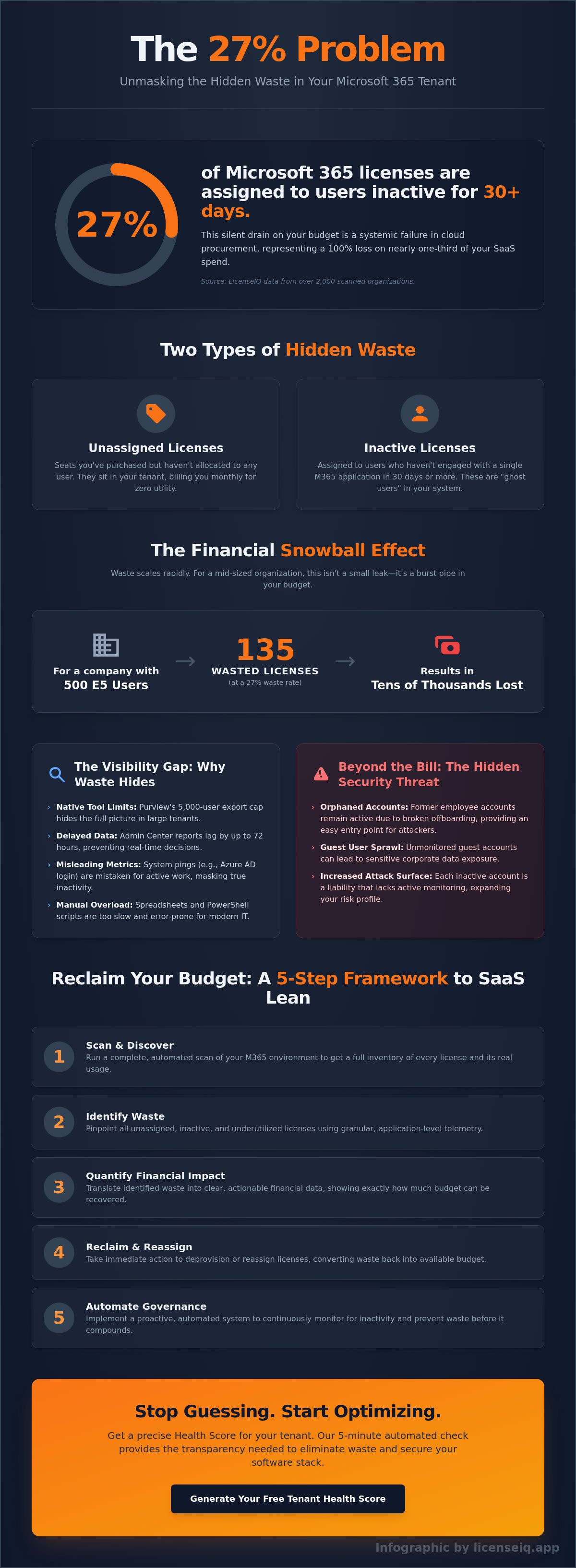
27% of Microsoft 365 licenses in the average enterprise tenant are currently assigned to users who haven't logged in for 30 days or more. This silent drain on your budget is the core of The 27% Problem: Why Most Microsoft 365 Tenants Are Paying for Inactive Users. You've likely noticed your monthly subscription costs creeping upward while your visibility into actual seat utilization remains clouded. It's a common struggle for IT leaders. Manual audits take hours of cross-referencing and are often obsolete by the time they reach finance for approval.
You deserve total transparency to protect your organization's financial health. We're going to show you how to reclaim that wasted spend in minutes. This article explains how to generate a precise Health Score for your tenant and implement an automated way to identify waste before it compounds. We'll explore the transition from manual spreadsheets to proactive, meticulous license management. By the end, you'll have a clear path to an immediate reduction in your monthly SaaS spend through precise, data-driven optimization.
Key Takeaways
- Quantify the financial impact of The 27% Problem: Why Most Microsoft 365 Tenants Are Paying for Inactive Users and why transitioning to a "SaaS Lean" model is essential for modern IT budgets.
- Uncover the visibility gaps in native Microsoft reporting tools that hide inactive accounts and prevent effective license optimization.
- Assess the critical security risks associated with orphaned accounts and guest user sprawl that expose sensitive corporate data to potential attackers.
- Learn a structured 5-step framework to scan your environment and identify spend recovery opportunities across all Microsoft 365 applications.
- Discover how a five-minute automated health check provides the transparency needed to eliminate waste and secure your software stack.
What is the 27% Problem? Unmasking M365 License Waste
The 27% Problem: Why Most Microsoft 365 Tenants Are Paying for Inactive Users represents a systemic failure in cloud procurement. Data from LicenseIQ, gathered across thousands of scanned tenants, confirms that nearly one-third of M365 licenses sit idle every month. This isn't just a minor oversight; it's a massive drain on corporate capital. As we approach 2026, SMBs and mid-market companies are entering the year of "SaaS Lean." This movement prioritizes aggressive spend recovery and the elimination of software bloat to protect margins.
LicenseIQ identified this trend by analyzing over 2,000 organizations. The results were consistent regardless of industry. Most IT leaders estimate their waste at less than 5%, yet the data shows the reality is five times higher. Distinguishing between different types of waste is the first step toward recovery:
- Unassigned Licenses: These are seats you've purchased but haven't allocated to any user. They sit in your tenant, billing you monthly for zero utility.
- Inactive Licenses: These are assigned to users who haven't engaged with a single M365 application in 30 days or more.
Both categories represent a 100% loss of investment. Implementing a rigorous Software asset management (SAM) framework is the only way to stop this leakage. Without automated visibility, these costs remain hidden in your monthly Microsoft invoice, masked by the complexity of the tenant portal.
The Financial Impact of Inactivity
Financial waste scales rapidly with your organization. If you manage 500 users on an E5 license stack, a 27% waste rate means 135 licenses are generating no value. Over a 12-month contract, this results in tens of thousands of dollars in evaporated budget. Shadow IT and broken offboarding workflows are the primary drivers of this cost. When an employee leaves, their license often remains active because the IT ticket was never closed or the automated deprovisioning failed. The 27% Problem is the definitive benchmark for modern FinOps that quantifies the delta between licensed capacity and actual user engagement.
Why Inactive Users are the Hardest to Track
Identifying a "Ghost User" is more complex than checking a simple login date. A user might log into their Windows machine, which triggers an Azure AD login event, but they may never open Teams, Outlook, or Word. Traditional reporting often mistakes these system pings for active usage. You need granular, application-level telemetry to see if the license is actually being utilized for work. Without this data, you're making renewal decisions in the dark. To fix this, companies must adopt a how to reduce M365 subscription costs strategy that focuses on actual app engagement rather than superficial login stats. The 27% Problem: Why Most Microsoft 365 Tenants Are Paying for Inactive Users will continue to plague organizations that rely on manual spreadsheets instead of real-time auditing tools.
Why Inactive Users Hide: The Visibility Gap in Microsoft Purview
Microsoft Purview serves as a compliance cornerstone, yet it creates a dangerous blind spot for license optimization. The platform's 5,000-user export limit means enterprise admins often see only a fraction of their environment at once. This visibility gap directly fuels The 27% Problem: Why Most Microsoft 365 Tenants Are Paying for Inactive Users, as thousands of accounts remain hidden in the shadows of large datasets. When you can't see the full picture, waste becomes a permanent fixture of your balance sheet.
IT teams frequently fall into the "Just in Case" trap during employee offboarding. They leave licenses active to ensure data remains accessible, unaware that they're paying for features no one uses. This practice does more than drain budgets; it creates security risks of unmanaged inactive accounts that lack active monitoring. While some teams attempt to bridge this gap with manual PowerShell reporting, the technical friction is high. These scripts require constant maintenance and significant time, which busy IT departments simply don't have.
Limitations of the Microsoft 365 Admin Center
Native usage reports in the Admin Center are notoriously delayed, often lagging 72 hours behind real-time activity. This delay makes it impossible to identify accounts that went dark yesterday. Furthermore, these reports struggle to distinguish between external guest users and internal employees, leading to inflated seat counts. Manual audits are obsolete and inaccurate by the time the final spreadsheet reaches the CFO's desk.
The Hidden Pitfalls of Retention Policies
Litigation holds and retention tags often mask inactivity. A mailbox can be technically "Inactive" but still consume a paid license because the retention policy prevents its deletion. Many organizations continue paying for premium E5 features on these dormant accounts when they only need basic data preservation. You can consult this Microsoft 365 license types guide to see how specific tiers contribute to this hidden waste. Without a way to decouple data retention from active licensing, you're subsidizing Microsoft for users who haven't logged in for months.
Eliminating this waste requires moving beyond static reports. You need a system that identifies these patterns automatically. You can audit your tenant visibility to uncover exactly where your licenses are hiding.
Beyond the Bill: The Security Risks of Unmanaged Inactive Accounts
Financial waste is only the visible surface of the issue. Beneath the monthly bill lies a structural vulnerability that most IT leaders overlook. Every dollar spent on an unused license represents a door left unlocked in your digital perimeter. Solving The 27% Problem: Why Most Microsoft 365 Tenants Are Paying for Inactive Users isn't just a budget exercise; it's a mandatory security protocol. When you pay for what you don't use, you're subsidizing your own risk.
The Danger of Orphaned Identities
Attackers prioritize accounts with zero recent activity. Accounts that haven't been logged into for 90 days or more are prime targets for credential stuffing. Because these mailboxes aren't monitored, a successful breach can go undetected for months, giving hackers a quiet base to escalate privileges. IT teams must implement a rigorous office 365 offboarding checklist to ensure identities are deactivated the moment a role ends. Licensing is security. If a user doesn't have a business reason to access the tenant, their identity shouldn't exist. Removing the license is the first step in shrinking your attack surface.
Inactive Guests and Data Oversharing
External collaboration is essential, but it often leads to "Guest User Sprawl." Former contractors, vendors, and partners frequently retain "Forever Access" to sensitive SharePoint folders and Teams channels. Industry data shows that up to 40% of guest accounts in typical enterprise tenants haven't interacted with the environment in over a year. These accounts are ticking time bombs for data exfiltration. You can't secure what you can't see. Using LicenseIQ allows you to automate the discovery of these high-risk inactive accounts, providing the visibility needed to revoke access before a leak occurs.
Compliance and Tenant Hardening
Unmanaged data and dormant accounts are a direct path to compliance failures. Regulatory frameworks like GDPR and SOC2 require strict data minimization and access control policies. Keeping inactive user data without a documented retention policy violates the principle of least privilege. Cleaning up this waste naturally hardens your M365 tenant security by ensuring only active, verified users have access to corporate resources.
- Visibility: Identify accounts with zero login activity in the last 30, 60, or 90 days.
- Automation: Replace manual audits with precise, data-driven identification of orphaned licenses.
- Risk Mitigation: Close the gap between HR offboarding and IT license reclamation.
Addressing The 27% Problem: Why Most Microsoft 365 Tenants Are Paying for Inactive Users turns a financial drain into a security win. It replaces the darkness of unknown spend with total visibility, ensuring your tenant is lean, compliant, and defended.
5 Steps to Identify and Recover Wasted M365 Spend
Stopping the financial leak requires a systematic approach. You can't manage what you can't see. Start by connecting your tenant to an AI-native scanner. This provides an immediate Health Score, revealing the depth of The 27% Problem: Why Most Microsoft 365 Tenants Are Paying for Inactive Users within your specific environment. Visibility is the first step toward recovery.
- Step 1: Baseline your health. Use an automated tool to scan your entire tenant footprint for immediate visibility.
- Step 2: Analyze activity deep-dives. Filter users by "Last Activity Date" across the entire suite, including Teams, OneDrive, and SharePoint. Logins alone are deceptive; actual engagement is the only metric that matters.
- Step 3: Categorize your findings. Group inactive accounts into three actionable buckets: Delete, Reclaim, or Downgrade.
- Step 4: Automate the offboarding process. Build workflows that trigger license removal the moment an employee departs or an account goes dark for 90 days.
- Step 5: Standardize monthly audits. Financial hygiene is a continuous process, not a one-time project.
Auditing Your Tenant Like a Specialist
Specialists look beyond simple seat counts. They analyze usage metadata to identify "single-app users" who might only open Outlook once a month. These users don't need a full-stack license. Implementing a "License Right-Sizing" strategy allows you to move inactive E5 users to F-series or E1 plans, which can slash costs by 60% per seat. Automated discovery replaces 40 hours of manual spreadsheet work with a single, real-time dashboard. This efficiency is the only way to solve The 27% Problem: Why Most Microsoft 365 Tenants Are Paying for Inactive Users without ballooning your IT overhead.
Reclaiming Licenses Without Data Loss
Many IT managers fear data loss during cleanup. It's a common misconception. You must distinguish between removing a license and deleting a user identity. Removing the license stops the billing; keeping the identity preserves the history. For departed employees, convert their accounts into Shared Mailboxes. This preserves all email data for free without requiring an active subscription. For a deeper dive into these technical maneuvers, read our M365 license optimization guide.
Stop overpaying for unused software today. Use LicenseIQ to identify and recover wasted M365 spend automatically.
Automated Governance: How LicenseIQ Solves the Inactivity Crisis
Manual license management is a reactive trap. It relies on human memory and periodic spot checks that fail to keep pace with employee turnover. LicenseIQ transforms this process into a proactive strategy. You can connect your tenant and receive a comprehensive health check in under 5 minutes. This rapid assessment provides the immediate clarity required to solve The 27% Problem: Why Most Microsoft 365 Tenants Are Paying for Inactive Users.
The Spend Recovery Dashboard removes the guesswork from your software budget. It doesn't just display seat counts; it identifies the exact dollar amount leaking from your organization every month. This visibility allows IT and Finance leaders to see where optimization is needed most. LicenseIQ uses Automated Governance Workflows to handle the heavy lifting. You set the rules once, and the AI manages the reclamation of licenses from inactive users. While enterprise tools often require months of configuration, SMBs choose LicenseIQ for its streamlined, results-first approach to SaaS management.
Continuous Monitoring vs. One-Time Audits
A one-time audit is a static snapshot that loses value the moment it's completed. SaaS sprawl is dynamic, and your monitoring must be too. Monthly scans are the only reliable way to stay ahead of license waste. LicenseIQ generates a proprietary Health Score that serves as a benchmark for efficiency. This score keeps IT teams accountable to Finance by providing a transparent metric for software utilization. It's time to gain total visibility. You can get your free Health Score at LicenseIQ to see exactly where your tenant stands today.
The ROI of Automated Spend Management
Automation delivers measurable financial returns that manual processes cannot match. In recent deployments, organizations have saved 35% on their M365 costs by automating the resolution of The 27% Problem: Why Most Microsoft 365 Tenants Are Paying for Inactive Users. This isn't just about the bottom line. It's about efficiency. Automated workflows reduce the administrative burden on IT staff, freeing them from the tedious cycle of license housekeeping.
- Eliminate payment for licenses held by former employees.
- Identify underutilized premium tiers that should be downgraded.
- Reclaim unused seats to avoid purchasing new ones during growth phases.
Stop paying for software that nobody uses. LicenseIQ provides the precision tools you need to secure your budget and optimize your digital workspace. Efficiency is no longer optional; it's a financial necessity.
Secure Your Tenant and Reclaim Your Budget
Inactive accounts are more than just a line item on your monthly invoice. They represent a significant visibility gap that compromises your budget and your security posture. Most organizations fail to track license utilization accurately, which leads directly to The 27% Problem: Why Most Microsoft 365 Tenants Are Paying for Inactive Users. By unmasking these hidden costs, IT leaders can reclaim wasted spend and close critical security loopholes. You don't have to settle for manual audits that are outdated the moment they're finished.
Modern SaaS management requires a proactive, AI-native approach to governance. LicenseIQ provides the immediate clarity needed to eliminate waste and optimize your software stack. Our system acts as a vigilant digital auditor, ensuring your financial health remains a top priority. It's time to transition from the chaos of unmanaged software to total operational transparency.
Stop wasting 27% of your budget; get your M365 Health Score now at LicenseIQ.app. You can scan your tenant in under 5 minutes and identify up to 35% in immediate savings. Take the first step toward total visibility and data-driven decision-making right now.
Frequently Asked Questions
What is considered an inactive user in Microsoft 365?
An inactive user is an account that hasn't registered a login or activity across M365 services like Teams, Outlook, or OneDrive for 30, 60, or 90 days. These accounts often belong to former employees or contractors whose offboarding was incomplete. Identifying these users is the first step toward reclaiming wasted budget and securing your digital perimeter against unauthorized access.
How much can I realistically save by removing inactive M365 users?
Organizations typically reduce their licensing costs by 27% by identifying and reclaiming underutilized seats. This "The 27% Problem: Why Most Microsoft 365 Tenants Are Paying for Inactive Users" represents a major drain on IT budgets that compounds every month. For a company with 1,000 E5 licenses, eliminating inactive seats yields immediate savings that can be redirected to critical digital transformation projects.
Will deleting an inactive user also delete their OneDrive or Outlook data?
Yes, deleting a user account permanently removes their mailbox and OneDrive files after a 30-day grace period. To preserve data without paying for a license, you should convert the mailbox to a shared mailbox or apply a Litigation Hold. These methods ensure compliance and data retention while stopping the monthly billing cycle for that specific seat.
Can I see inactive users in the Microsoft 365 Admin Center for free?
You can view basic usage reports in the Microsoft 365 Admin Center under the Reports section at no extra cost. These native tools show activity over 7, 30, 90, or 180 days for various services. However, these reports often lack the granular financial context needed to link usage directly to specific license costs or complex enterprise bundling structures.
How often should I conduct a Microsoft 365 license audit?
You should perform a comprehensive license audit at least once every 30 days to stay ahead of billing cycles. Monthly reviews prevent "The 27% Problem: Why Most Microsoft 365 Tenants Are Paying for Inactive Users" from becoming a permanent fixture in your budget. Regular audits ensure that your seat count matches your actual headcount, eliminating waste before it impacts your annual financial performance.
What is the 5,000-user limit in Microsoft Purview?
Microsoft Purview limits certain audit log searches and retention policies to a maximum of 5,000 users per policy. For enterprises exceeding this headcount, managing inactive users through manual Purview queries becomes fragmented and prone to human error. This technical constraint makes it difficult for large organizations to maintain total visibility across their entire global tenant without automated management tools.
How does LicenseIQ identify inactive users differently than Microsoft?
LicenseIQ analyzes cross-platform telemetry and login patterns that native Microsoft reports often overlook. While Microsoft flags basic logins, LicenseIQ identifies "zombie" accounts that show activity but zero meaningful utilization of high-cost features. This precision allows IT leaders to distinguish between a user who checks email once a month and one who justifies a premium E5 subscription through active collaboration.
Can I downgrade a license instead of removing it entirely?
Downgrading is a highly effective strategy for users who only require basic functionality like email or document viewing. If an employee with an E5 license isn't using Power BI or advanced security features, moving them to an E1 or F3 plan cuts costs significantly. This optimization ensures that your software spend matches the actual value delivered to each specific business unit.


