

The average enterprise loses $18 million every year on software licenses that sit idle. With the July 1, 2026, price updates increasing Office 365 E3 costs to $26.00 per month, these inefficiencies are no longer just rounding errors. Most IT leaders feel the pressure of The Five Patterns That Quietly Inflate Every Microsoft 365 Invoice, yet they lack the visibility to stop the leak. You likely suspect your monthly bill doesn't reflect your actual headcount, especially when "zombie users" remain active for an average of three weeks after they leave the company.
It's difficult to justify premium E5 costs for every seat when utilization data is buried in manual spreadsheets. We'll show you how to stop the drain and reclaim up to 35% of your Microsoft 365 spend. This article provides a clear Health Score for your tenant and introduces automated workflows to identify wasted licenses instantly. You'll gain the actionable steps needed to right-size your tiers, eliminate redundant stacks, and lower your next invoice with total confidence. By the end of this guide, you'll have a roadmap to transform your license management from a manual burden into a precise financial asset.
Key Takeaways
- Define "M365 Invoice Bloat" and understand why manual tracking is no longer viable under the July 2026 pricing model.
- Identify The Five Patterns That Quietly Inflate Every Microsoft 365 Invoice, including zombie users and the "safety net" trap.
- Evaluate the financial impact of over-tiering and redundant stacks to right-size your environment for immediate savings.
- Transition from labor-intensive manual audits to Automated Governance Workflows for real-time spend recovery.
- Leverage the Spend Recovery Dashboard to maintain a high License Health Score and eliminate invisible operational leaks.
Why Your Microsoft 365 Invoice Keeps Growing (And It’s Not Just Price Hikes)
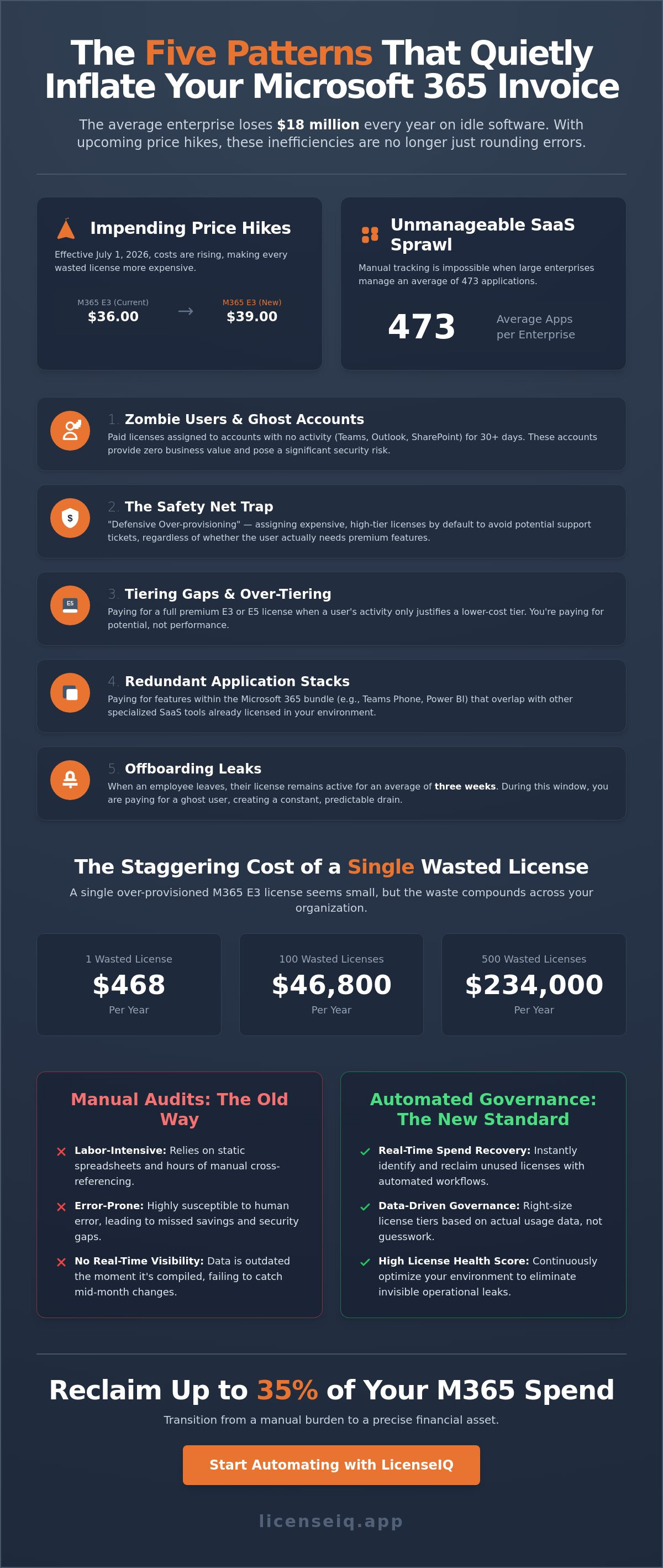
Microsoft 365 invoice bloat is the silent financial delta between the licenses you provision and the actual value your users extract. It's rarely the result of a single catastrophic error. Instead, it's a slow accumulation of small, unmonitored discrepancies. Identifying The Five Patterns That Quietly Inflate Every Microsoft 365 Invoice is the only way to stop this financial leak before it compounds. As of May 2026, the average enterprise loses roughly $18 million annually on unused licenses; a figure that will only climb as pricing structures evolve.
The July 1, 2026, price updates make manual tracking mathematically impossible for modern organizations. With Microsoft 365 E3 increasing to $39.00 per user and Office 365 E5 hitting $41.00, a 5% error rate in a 1,000-seat environment now costs tens of thousands of dollars in pure waste. This is exacerbated by "SaaS Sprawl" within the Microsoft ecosystem. Large enterprises now manage an average of 473 applications, making it nearly impossible for IT teams to maintain visibility without specialized tools. Adopting a rigorous approach to Software Asset Management (SAM) is no longer optional; it's a core requirement for fiscal health.
The Transparency Gap in Modern SaaS Billing
Microsoft often performs a "renewal dance," where cost increases are masked behind new feature bundles or AI integrations like Copilot. This creates a dangerous gap between purchased seats and active users. Your ERP system likely tracks the total invoice amount, but it fails to flag mid-month provisioning changes or licenses assigned to "zombie" accounts. If you aren't auditing the specific utilization of every assigned seat, you're paying for potential rather than performance. As we explore these trends, you'll see how The Five Patterns That Quietly Inflate Every Microsoft 365 Invoice often hide in plain sight within your monthly billing statement.
The Financial Impact of "Set It and Forget It" IT
A single Microsoft 365 E3 license wasted at the new $39.00 rate costs your company $468 per year. When multiplied across hundreds of employees, the lack of visibility leads to "defensive over-provisioning." IT teams often assign high-tier licenses by default to avoid support tickets, regardless of the user's actual needs. This habit destroys your License Health Score, which is the ratio of utilized software value to your total monthly spend. Achieving a score near 100% requires moving away from static spreadsheets and toward real-time, data-driven governance.
Patterns 1 & 2: The Silent Cost of Zombie Users and The Safety Net Trap
Most IT leaders focus on the top-line number of their Microsoft invoice without questioning the underlying user activity. This lack of granular visibility allows The Five Patterns That Quietly Inflate Every Microsoft 365 Invoice to persist month after month. The first two patterns, Zombie Users and the Safety Net Trap, represent the most immediate opportunities for spend recovery. These aren't just technical glitches; they're operational leaks that drain your budget while providing zero business value.
A "Zombie User" is an account assigned a paid license that has shown no activity across Teams, Outlook, or SharePoint for 30 days or more. Research shows that when an employee leaves an organization, their license remains active for an average of three weeks before deactivation. During this window, you're paying for a ghost. At the July 2026 rate of $39.00 for a Microsoft 365 E3 seat, even a small handful of these accounts creates a significant financial delta. You can identify these anomalies quickly by generating an inactive office 365 users report to pinpoint exactly where your capital is being parked.
Identifying and Reclaiming Zombie Licenses
Inactivity isn't just a failure to log in. It's a failure to utilize the specific tools within the bundle. A user might check their email once a month but never touch the advanced security or analytics features you're paying for. These "Ghost Accounts" also present a major security vulnerability. An active license on an unmonitored account is a primary target for unauthorized access. Automating the reclamation process ensures that as soon as a user stops providing value, their license is returned to the pool, protecting both your perimeter and your bottom line.
Optimizing the Unassigned License Pool
The "Safety Net" trap is born from a psychological fear. IT managers often worry about "running out" of seats during a busy week, so they maintain a buffer of unassigned licenses. This "Just-in-Case" model is expensive and unnecessary. In a modern environment, a 0% unassigned rate should be the goal for financial hygiene. Holding a 5% buffer in a 500-seat company means wasting nearly $1,000 every month on licenses that aren't even assigned to a user. Moving to a "Just-in-Time" provisioning model allows you to scale instantly without pre-paying for idle capacity. The LicenseIQ platform discovers these unassigned licenses in under five minutes, giving you the data needed to reduce your next purchase order immediately.
Patterns 3, 4, & 5: Tiering Gaps, Redundant Stacks, and Offboarding Leaks
While zombie users represent obvious waste, the structural elements of The Five Patterns That Quietly Inflate Every Microsoft 365 Invoice are often harder to detect without deep utilization data. These leaks occur when your licensing strategy doesn't align with actual operational needs. Pattern 5, the offboarding leak, is particularly damaging. It occurs when broken HR-to-IT workflows leave licenses active for months after an employee departs. This doesn't just drain your budget; it leaves your data exposed. Following a rigorous office 365 offboarding checklist is the only way to ensure seats are reclaimed and secured within hours of a departure.
E3 vs. E5: The Billion Dollar Feature Gap
Microsoft 365 E5 is the most comprehensive plan, but it's also the most expensive. Starting July 1, 2026, the price will rise to $60.00 per user. Many organizations default to E5 for their entire workforce, yet only a small percentage of staff actually utilize Power BI Pro or Advanced eDiscovery. If your team only needs core productivity tools and basic security, you're paying a massive premium for nothing. You can reclaim significant spend by downgrading non-specialized users to F-series or Business Premium plans. It's essential that microsoft 365 license types are matched to specific job functions rather than applied as a blanket policy across the enterprise.
The Hidden Cost of Overlapping SaaS Subscriptions
Redundant stacks occur when departments purchase "Shadow IT" solutions like Slack, Zoom, or Dropbox while you're already paying for their Microsoft equivalents. This creates a double-billing scenario that quietly erodes your IT budget. Large enterprises use an average of 473 applications, and many of these replicate native Microsoft 365 functionality. Consolidating your stack into the M365 ecosystem isn't just about saving money; it's about centralizing security and compliance. Our automated governance workflows flag these overlaps instantly, allowing you to identify redundant software spend and eliminate The Five Patterns That Quietly Inflate Every Microsoft 365 Invoice before they compound. By focusing on total stack visibility, you move from passive paying to active spend management.
Manual Audits vs. Automated Spend Recovery: A Financial Comparison
Many IT leaders rely on manual spreadsheets to track their SaaS spend, but this approach is fundamentally broken in a modern cloud environment. Relying on human oversight to catch The Five Patterns That Quietly Inflate Every Microsoft 365 Invoice is a strategy destined for failure. Manual audits consume dozens of hours from high-paid IT specialists; yet they rarely find the deepest leaks. By the time a manual report is finished, Microsoft's dynamic billing cycles have already moved on, rendering your data obsolete. Statistics show that 27% of cloud spending is wasted on average, a figure that persists because manual tracking cannot keep pace with the speed of provisioning.
Why Manual Audits Fail in 2026
Static spreadsheets are dead on arrival. Microsoft’s prorated billing and mid-term license changes create a level of complexity that human auditors cannot handle at scale. Human error in offboarding remains the primary driver of "zombie" spend. Even a single missed step in a manual workflow leaves a $60.00 E5 license active for an empty desk. This creates a cycle of "Audit Fatigue." Teams often give up on optimization after one exhausting attempt, allowing waste to accumulate for the rest of the fiscal year. Without real-time visibility, you're always looking at the financial past rather than managing the financial present.
The ROI of Automated Governance
True spend recovery requires continuous, real-time monitoring. While a manual audit might happen once a year, automated governance identifies waste as it occurs. Calculating the "Time to Recovery" for a wasted seat reveals the true cost of delay. Every day a $39.00 E3 license sits idle is a direct hit to your EBITDA. AI-native platforms scan entire tenants in minutes, flagging anomalies that a human eye would miss. This shift allows your IT team to move from reactive cost-cutting to proactive financial hygiene.
Stopping The Five Patterns That Quietly Inflate Every Microsoft 365 Invoice requires a system that acts as a vigilant digital auditor. Implementing a strategy for reducing M365 subscription costs ensures your budget supports growth rather than subsidizing idle software. You don't need more meetings; you need more data. Stop wasting technical talent on administrative data entry and start reclaiming your budget. Get your License Health Score today to turn total visibility into a permanent competitive advantage.
Mastering Automated Governance with LicenseIQ
Visibility is the only permanent cure for unmanaged software spend. While identifying the leaks is a critical first step, maintaining a lean environment requires a system that operates faster than your billing cycle. LicenseIQ provides the infrastructure to neutralize The Five Patterns That Quietly Inflate Every Microsoft 365 Invoice through a zero-friction, five-minute connection process. Our platform performs a deep-tenant scan without requiring complex integrations or manual data entry. By translating raw Microsoft usage logs into actionable financial insights, the Spend Recovery Dashboard visualizes every wasted dollar with surgical precision.
The transition from chaos to clarity begins with your initial scan. This process uncovers the specific "zombie" accounts and redundant tiers discussed earlier, presenting them as immediate recovery opportunities. By automating these governance workflows, you ensure that your IT resources are spent on innovation rather than administrative auditing. It is time to stop guessing your utilization rates and start managing them with the authority of a specialist.
Getting Your License Health Score
For a high-performing SMB, a "Good" License Health Score sits at 90% or higher. If your score falls below this benchmark, the LicenseIQ scan provides a prioritized list of recommendations to bridge the gap. These findings are designed for immediate impact; they give IT leaders the concrete data needed to present a clear financial case to the CFO. When you can prove that 35% of your spend is recoverable through specific, automated actions, budget approval for optimization becomes a formality. You aren't just asking for a tool; you're presenting a roadmap for corporate resource protection.
Continuous Accuracy: The New Standard
One-off cleanups are insufficient in a dynamic hiring environment. LicenseIQ establishes a new standard of continuous accuracy by setting up automated alerts for new "Zombie" patterns as they emerge. If a departing employee isn't offboarded correctly, the system flags the active license within 24 hours. This proactive approach ensures every new hire is provisioned at the optimal tier from day one, preventing the "set it and forget it" mentality that leads to invoice bloat. Join the forward-thinking companies already saving up to 35% on their M365 licenses by turning total visibility into your strongest financial asset. Stop the quiet inflation of your costs and start your journey toward a perfect Health Score today.
Secure Your Budget Against SaaS Sprawl
The July 1, 2026, price increases have transformed license management from a routine task into a critical financial priority. You've seen how The Five Patterns That Quietly Inflate Every Microsoft 365 Invoice can drain hundreds of thousands of dollars through simple operational oversight. Manual spreadsheets and "defensive provisioning" are no longer viable strategies for modern IT leaders. True fiscal health requires moving beyond the "renewal dance" and embracing total visibility into every assigned seat across your organization.
By implementing AI-native Automated Governance Workflows, you eliminate the gap between what you pay for and what your team actually uses. You can scan your tenant in under five minutes and begin reclaiming up to 35% of your M365 spend immediately. This isn't just about cutting costs; it's about ensuring your software stack serves as an efficient engine for growth. Discover your wasted spend in minutes with LicenseIQ and secure a perfect License Health Score for your organization. You've identified the leaks, now it's time to plug them for good.
Frequently Asked Questions
How can I identify unused Microsoft 365 licenses quickly?
The fastest method is to connect your tenant to an automated scanning platform like LicenseIQ. While manual checks in the Admin Center are possible, they're labor-intensive and prone to error. Automated tools scan activity logs across Teams, SharePoint, and Outlook in under five minutes, flagging any seat with zero activity over the last 30 days for immediate reclamation.
What is the difference between an unassigned license and an inactive user?
Unassigned licenses are seats you've purchased but haven't assigned to any user, often held as a "safety net" buffer. Inactive users, or "zombies," are accounts that have a license assigned but haven't logged in or utilized apps for 30 days or more. Both are core components of The Five Patterns That Quietly Inflate Every Microsoft 365 Invoice and represent pure financial waste.
Is it worth upgrading to Microsoft 365 E5 for an SMB?
It's only worth the $60.00 per user monthly cost if your team actively utilizes advanced analytics like Power BI Pro or high-end security features. Many SMBs over-tier their entire workforce when only 15% of employees actually require E5 functionality. Right-sizing your tiers based on job roles is a more efficient way to manage your IT budget.
How do I stop paying for licenses for former employees?
You must implement Automated Governance Workflows that trigger license revocation the moment an employee is offboarded in HR systems. Research indicates licenses often remain active for 21 days after a departure. Automation ensures these seats return to your available pool within 24 hours, preventing the "Offboarding Leak" from appearing on your next invoice.
What is a good benchmark for Microsoft 365 license waste?
Organizations should aim for a License Health Score above 90%, meaning less than 10% of spend is unutilized. Currently, the average enterprise wastes 46% of its SaaS licenses. For a 100-person company, reducing this waste to under 5% can save between $15,000 and $20,000 annually, depending on the specific license mix and current July 2026 pricing.
Can automated tools really save more than a manual audit?
Yes, because automated tools eliminate the "Audit Fatigue" and human error inherent in manual processes. Manual audits are often "dead on arrival" because they can't track mid-month provisioning or prorated billing changes. Automated systems provide the real-time visibility needed to catch The Five Patterns That Quietly Inflate Every Microsoft 365 Invoice before they compound over several billing cycles.
How often should I conduct a Microsoft 365 license audit?
You should move away from periodic audits in favor of continuous, real-time monitoring. Quarterly or annual reviews allow "zombie" spend to accumulate for months. Continuous monitoring through a Spend Recovery Dashboard ensures you identify and de-provision idle seats the moment they stop providing value, maintaining a lean and efficient software stack year-round.
What are the security risks of having 'Zombie' users in my tenant?
Active licenses on unmonitored accounts are primary targets for unauthorized access and data breaches. These "zombies" often have active sessions on personal devices or third-party apps that remain open after an employee departs. Promptly revoking these licenses is a critical security protocol that prevents former staff or external actors from accessing sensitive corporate data through forgotten accounts.


