

Up to 27% of Microsoft 365 licenses are currently assigned to users who have been inactive for 30 days or more, according to 2026 research from LicenseIQ. This represents a massive financial leak, yet security teams frequently block auditing tools because of permission creep. You need to stop the waste, but you cannot risk granting access to sensitive PII or private email content. It's a frustrating standoff between financial optimization and tenant security that often leaves money on the table.
We understand that over-permissioning is a non-starter for modern IT leaders. This article identifies the exact Microsoft Graph Permissions for License Auditing: The Minimum Viable Set required to gain visibility without overstepping. You don't need broad administrative roles or risky write access to find hidden costs. Instead, you can achieve total transparency using a lean, CISO-approved configuration that focuses on metadata rather than private data.
We will show you how to use four specific, read-only application permissions to automate your governance and improve your License Health Score. You'll learn how to distinguish between necessary discovery scopes and high-risk access, ensuring your audit remains secure, efficient, and focused on spend recovery.
Key Takeaways
- Define the Minimum Viable Set (MVS) as the narrowest group of scopes needed to identify license waste without compromising tenant security.
- Identify the specific Microsoft Graph Permissions for License Auditing: The Minimum Viable Set to ensure your security team approves your audit tools without delay.
- Learn why application permissions provide the safest, most efficient path for automated license governance compared to manual, delegated access.
- Recognize "red flag" scopes like Mail.Read or Chat.Read that aren't necessary for auditing and should trigger an immediate security review.
- Streamline your discovery process by focusing on metadata visibility to improve your License Health Score without accessing sensitive employee content.
What is the Minimum Viable Set (MVS) for M365 Auditing?
The Minimum Viable Set (MVS) represents the leanest possible configuration required to uncover license waste. It is the tactical middle ground between total blindness and excessive risk. By defining Microsoft Graph Permissions for License Auditing: The Minimum Viable Set, organizations can separate technical access from actionable business intelligence. You don't need to see what an employee is writing in their emails to know they haven't logged in for 45 days. The MVS focuses on the metadata that drives financial decisions, leaving sensitive content untouched.
Modern FinOps in 2026 relies on the principle of least privilege. Security teams are increasingly vigilant, often blocking optimization projects that demand broad administrative rights. Using an MVS approach removes this roadblock. It provides a clear, defensible list of requirements that CISO offices can approve quickly. This speed is vital for reclaiming spend before the next renewal cycle. Efficiency in security approval leads directly to efficiency in the balance sheet.
Understanding Microsoft Graph is essential for this transition. It acts as the unified gateway to your tenant data. Rather than using legacy APIs or manual exports, the MVS utilizes the Graph to pull precise data points. This ensures your audit is based on real-time utilization rather than static, outdated reports.
The Shift from Global Admin to Granular Scopes
Using a Global Admin account for auditing is a legacy risk that no longer has a place in a secure tenant. It creates a single point of failure and provides far more power than a discovery tool requires. Modern governance uses Service Principals to enable surgical data extraction. By moving away from "all-or-nothing" security models, you can grant specific, read-only access to the data you need. This transition ensures that your automated governance is both precise and audit-ready, satisfying even the most stringent compliance requirements.
Discovery vs. Remediation: Why the MVS Changes
License management is a two-step process: discovery and remediation. The discovery phase is purely observational. During this stage, you use the Microsoft Graph Permissions for License Auditing: The Minimum Viable Set to calculate your License Health Score. This score reveals the 27% of licenses typically assigned to inactive users or the 12% held by departed employees. It is a read-only exercise designed to uncover hidden costs.
Remediation is a separate event. Write permissions only become necessary when you decide to take action, such as de-provisioning a seat or downgrading a plan. By keeping these phases distinct, you maintain a "stay clean" workflow. You avoid the trap of permanent elevated access. This ensures your governance tools only have the power they need at the exact moment they need it.
The 4 Essential Microsoft Graph Permissions for License Discovery
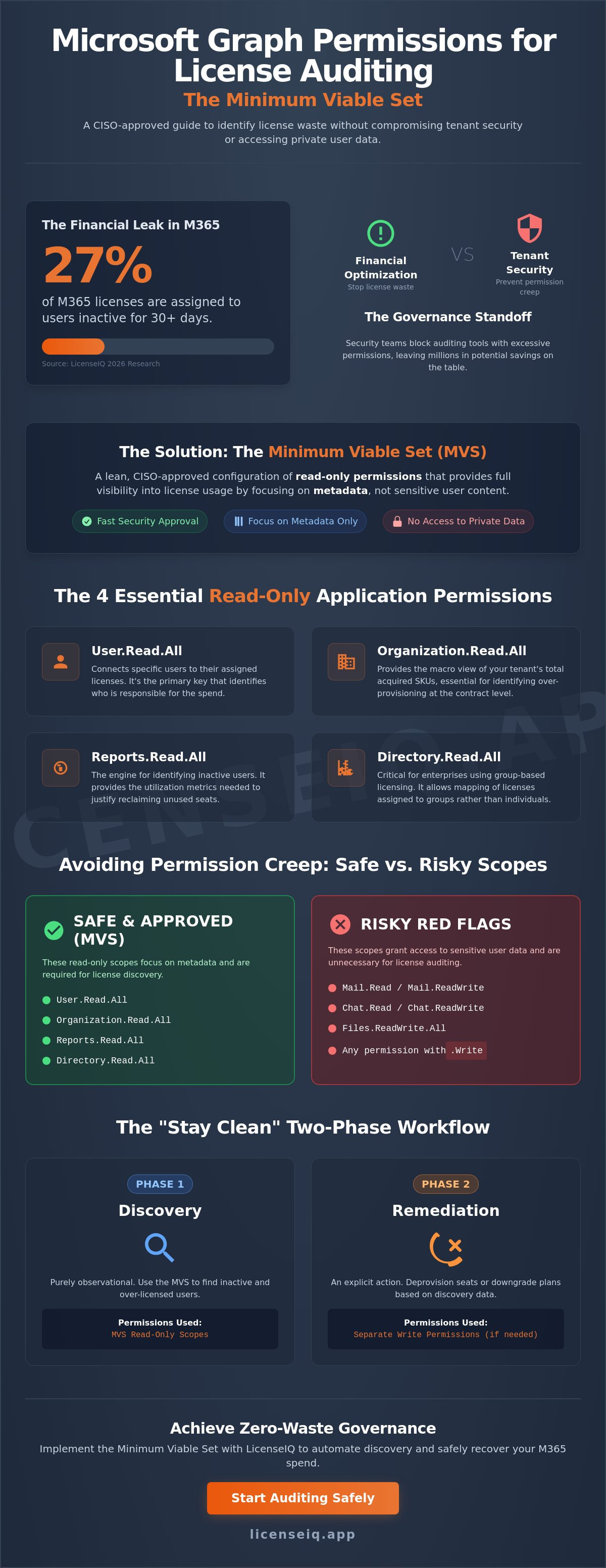
Microsoft lists over 900 permissions in its documentation, but a successful FinOps audit relies on just four. Adhering to the principle of least privilege is the only way to satisfy security requirements while maintaining visibility. These specific scopes constitute the Microsoft Graph Permissions for License Auditing: The Minimum Viable Set, providing a comprehensive map of your SaaS environment without exposing sensitive data.
- User.Read.All: This acts as the primary key for your audit. It connects specific humans to their assigned seats. Without this, you have a list of licenses but no way to identify who is responsible for the spend.
- Organization.Read.All: This provides the macro view of your tenant. It allows you to see the total pool of acquired SKUs, which is essential for identifying over-provisioning at the contract level.
- Reports.Read.All: This is the engine for identifying inactive Office 365 users. It provides the utilization metrics needed to justify seat reclamation.
- Directory.Read.All: Large enterprises often assign licenses via groups rather than individual users. This scope uncovers those relationships, ensuring no hidden costs escape your notice.
By limiting your tool's access to these four read-only scopes, you eliminate the risk of accidental data modification. This lean approach ensures that your Microsoft Graph Permissions for License Auditing: The Minimum Viable Set remains CISO-approved and audit-ready.
Decoding Reports.Read.All
Usage metadata is fundamentally different from content metadata. Reports.Read.All allows an auditor to see the "Last Activity Date" for a user without ever touching the body of an email or a private chat log. It provides the "when" of software use without needing the "what." In 2026, Reports.Read.All is the primary scope for identifying ROI across the entire Microsoft 365 ecosystem. It reveals exactly which premium features are being ignored, allowing you to downgrade users to more cost-effective tiers based on actual behavior.
User.Read.All vs. User.ReadBasic.All
Security teams often suggest User.ReadBasic.All as a safer alternative, but this often backfires during a financial audit. Basic access frequently fails to expose the specific license properties required to map complex E5 or F3 assignments. While Basic might shield more profile data, it creates blind spots that lead to missed recovery opportunities. Moving to User.Read.All is necessary for audit accuracy. When managed through a dedicated automated governance platform, this scope remains fully compliant with GDPR and local data protection laws by focusing strictly on administrative attributes.
Application vs. Delegated Permissions: Which is Safer for Auditing?
Choosing between Application and Delegated permissions is a critical security decision. Delegated permissions act on behalf of a signed-in user. They are useful for one-time manual audits by an administrator. However, they are limited by that user's own permissions and require an active session. For automated license governance, Application permissions are the standard. They allow a tool to run securely in the background without human intervention. This distinction is vital when configuring Microsoft Graph Permissions for License Auditing: The Minimum Viable Set, as it ensures your monitoring remains consistent and independent of individual staff changes.
Application permissions offer a smaller blast radius because they are tied to a Service Principal rather than a human identity. You can define exactly what the application sees by consulting the Microsoft Graph Permissions Reference. This prevents the tool from inheriting unnecessary administrative powers. It turns the auditor into a precise, digital observer with restricted, read-only access. It's a proactive way to maintain visibility without opening the door to content-level risks.
The Case for Service Principals
Service Principals eliminate the friction of MFA-challenged service accounts. Unlike traditional accounts, they don't require password resets or multi-factor prompts that frequently break automation. You can further secure these identities using Entra ID conditional access to restrict where the API calls originate. By monitoring API call logs, you ensure the auditor stays within the MVS boundaries. This provides a transparent trail of every data request, proving the system only accesses what is necessary for spend recovery and utilization analysis.
Comparison: Audit Contexts
The choice of scope depends on the frequency and goal of your audit. For modern IT leaders, the App-Only model provides the best balance of security and utility.
| Context | Scope Type | Risk Level | Best Use Case |
|---|---|---|---|
| Manual Audit | Delegated | Medium | One-time ad-hoc checks |
| Continuous Monitoring | Application | Low (MVS) | Automated governance platforms |
| Full Admin | Global Admin | Critical | Emergency tenant recovery only |
App-only access is the baseline for LicenseIQ-style platforms. It provides the persistent visibility needed to catch shadow IT and license waste as it happens. To maintain a high security posture in 2026, we recommend rotating application secrets every 90 days. This practice minimizes the window of opportunity for credential compromise while ensuring your Microsoft Graph Permissions for License Auditing: The Minimum Viable Set remains the only door open to your financial data.
Avoiding 'Permission Creep' and Redundant Scopes
Permission creep is the silent killer of tenant security. It happens when applications gradually accumulate access rights that exceed their original purpose. When establishing Microsoft Graph Permissions for License Auditing: The Minimum Viable Set, you must remain vigilant against scopes that provide zero financial value but introduce massive security risks. A discovery tool should never be a trojan horse for sensitive data access. If an auditing solution requests more than the four core read-only permissions, it's a red flag that demands immediate scrutiny.
Content access is the primary boundary you must defend. Scopes like Mail.Read, Files.Read, and Chat.Read are never required for license auditing. These permissions allow an application to read private communications and document contents, which has no bearing on whether a user is utilizing their assigned SKU. Similarly, any request for 'ReadWrite.All' in a discovery-only tool is a critical risk. Granting write access to a platform that only needs to visualize waste creates an unnecessary blast radius that no CISO should accept. You can verify any application's requests by using the Microsoft Graph Permissions Explorer to see exactly which data points the API will return.
Auditing the Auditor: A 3-Step Checklist
Security teams should follow a structured process to ensure any third-party tool respects the MVS. This keeps your optimization projects compliant and your data secure.
- Step 1: Review the Manifest. Check the 'RequiredResourceAccess' section in the Entra ID app registration. Ensure it aligns strictly with the read-only metadata scopes discussed in this guide.
- Step 2: Verify Consent. Review who authorized the application and when. Use the 'Enterprise Applications' blade to confirm that admin consent was granted only for the specific MVS scopes.
- Step 3: Monitor Activity. Use Entra ID Audit Logs to inspect the service principal's behavior. Look for the specific API operations being called to ensure the tool isn't probing areas outside its authorized discovery zone.
Common Misconceptions about 'Directory.Read.All'
The suffix 'Read.All' often triggers alarm bells during security reviews, particularly with Directory.Read.All. It's vital to clarify that 'Directory' in this context refers to the Entra ID object directory, not a file directory like SharePoint or OneDrive. This scope allows the auditor to see group memberships and basic object properties, which is essential for identifying licenses assigned via group-based licensing. It does not grant access to the corporate file system. Explaining this distinction to your security team helps mitigate concerns and speeds up the approval of your License Health Score assessment. By maintaining this level of transparency, you can safely audit your tenant security while uncovering the 20% of premium features that typically go unused in E5 environments.
Implementing the MVS with LicenseIQ for Zero-Waste Governance
Establishing a secure auditing posture shouldn't take months of negotiation. LicenseIQ is built to connect in minutes, utilizing only the Microsoft Graph Permissions for License Auditing: The Minimum Viable Set to provide immediate financial clarity. We don't believe in "black box" access. Our Permission Transparency dashboard shows you exactly what data we pull, ensuring your security team remains confident in our read-only approach. By focusing on metadata rather than content, we eliminate the friction that typically stalls optimization projects.
Once your tenant is connected, the platform moves beyond simple discovery. You can transition from identifying waste to active recovery by enabling automated governance workflows. These workflows target the inefficiencies uncovered during the audit, such as the 12% of licenses typically held by departed employees. You achieve a high License Health Score without ever compromising your tenant's security or data privacy standards.
The 5-Minute Connection Process
LicenseIQ leverages the Model Context Protocol (MCP) to streamline how permissions are handled and verified. This protocol allows for surgical precision in API requests, ensuring the system never overreaches. One of our core advantages is real-time visibility without the need for massive data ingestion. We analyze the utilization metrics where they live, providing a Spend Recovery Dashboard that reflects your current reality. LicenseIQ recovers up to 35% of spend using only MVS data, proving that you don't need invasive access to achieve significant financial results.
Securing Your Future SaaS Stack
The principles of the Microsoft Graph Permissions for License Auditing: The Minimum Viable Set shouldn't stop at Microsoft 365. You can apply this lean, MVS-driven approach to your entire SaaS stack to eliminate shadow IT and redundant subscriptions. Moving to a model of continuous monitoring beats the annual "audit panic" that plagues most IT departments. Instead of a once-a-year scramble to find savings before a renewal, you maintain a vigilant, automated system that identifies waste as it occurs. This proactive stance turns license management from a reactive chore into a strategic advantage for your organization's financial health.
Start your 5-minute license audit with LicenseIQ today.
Secure Your Tenant and Reclaim Your Budget
Visibility does not require vulnerability. You now have the roadmap to eliminate the standoff between security teams and finance leaders. By adopting the Microsoft Graph Permissions for License Auditing: The Minimum Viable Set, you ensure that your audit remains lean and CISO-approved. You can identify inactive users and redundant SKUs using read-only metadata without ever touching sensitive private content. This surgical approach to data access protects your organization while highlighting immediate recovery opportunities.
LicenseIQ simplifies this transition through a Zero Trust MVS permission model. Our Service Principal-based automated governance provides the persistent monitoring needed to catch waste as it happens. With AI-native discovery that identifies up to 35% in wasted spend, you move from manual guesswork to data-driven precision. It is the most efficient way to maintain a high License Health Score without compromising your security posture.
Take the first step toward total transparency today. Connect your tenant and find wasted spend in 5 minutes. Stop overpaying for underutilized seats and start optimizing your M365 environment with confidence.
Frequently Asked Questions
Is it safe to grant 'Directory.Read.All' to a third-party license tool?
Directory.Read.All is safe for auditing because it only accesses metadata within Entra ID. It doesn't grant access to SharePoint or OneDrive file contents. This scope is essential for identifying group-based license assignments that otherwise remain hidden from your spend recovery efforts.
What is the difference between Delegated and Application permissions in Graph?
Delegated permissions act on behalf of a signed-in user, while Application permissions allow services to run independently in the background. Application permissions are the standard for automated governance. They provide a more secure, auditable trail through a dedicated Service Principal that doesn't rely on individual user sessions.
Can I audit Microsoft 365 licenses using only 'ReadBasic.All'?
You cannot perform a complete audit with only 'ReadBasic.All'. This limited scope lacks the depth required to view specific license properties and complex SKU assignments. Using Microsoft Graph Permissions for License Auditing: The Minimum Viable Set ensures you see the granular data necessary for accurate spend recovery.
Do I need 'Global Admin' rights to connect an auditing platform?
You don't need to grant Global Admin rights to the auditing tool itself. A Global Admin is only required for the one-time task of providing admin consent during the initial connection. Once authorized, the platform operates using only its restricted, read-only Service Principal identity.
How often should I review the Graph permissions granted to external apps?
We recommend reviewing permissions every 90 days. This quarterly audit ensures that your external applications haven't accumulated "permission creep" over time. Regular reviews maintain the integrity of your security posture while keeping your License Health Score accurate and reliable.
What happens if an app requests 'ReadWrite.All' for a license audit?
Requesting 'ReadWrite.All' for a discovery task is a critical red flag. Discovery tools only need to visualize waste, not modify your environment. Granting write access creates an unnecessary security risk that contradicts the principle of least privilege and should be avoided in discovery-only scenarios.
Can I restrict an app to only see specific users or groups?
You can restrict access using application access policies, but this often leads to incomplete audit results. For a comprehensive Spend Recovery Dashboard, the tool needs tenant-wide visibility into metadata. This allows it to find every inactive seat across the entire organization without missing hidden costs.
How does LicenseIQ protect my tenant data during a scan?
LicenseIQ protects your data by adhering strictly to Microsoft Graph Permissions for License Auditing: The Minimum Viable Set. We focus on administrative metadata and never request access to private email bodies or chat content. Our system acts as a vigilant guardian, ensuring your financial health without touching sensitive PII.


