

With Microsoft 365 E5 prices climbing to $60 per user as of July 1, 2026, every idle account represents a significant financial leak. You've likely felt the exhaustion of manual audits and the constant fear that reclaiming a license might break a critical workflow. Relying on basic "last login" timestamps from the M365 Admin Center is often inaccurate. It leads to missed savings or accidental service disruptions. It's a high-stakes guessing game that modern IT leaders can no longer afford to play.
In this guide, Inactive Users Explained: How LicenseIQ Decides Who's Really Idle, we reveal the precise data points and AI-driven logic used to distinguish true inactivity from silent productivity. You'll learn how our platform analyzes multi-dimensional telemetry across Teams, OneDrive, and SharePoint to recover up to 35% of your annual spend. We'll preview the automated governance workflows that replace manual PowerShell scripts, providing your CFO with clear ROI reporting and total visibility into your software stack. This is the risk-free path to a leaner, more secure digital environment.
Key Takeaways
- Stop relying on flawed "last login" data that often mistakes background system processes for actual human productivity.
- Explore Inactive Users Explained: How LicenseIQ Decides Who's Really Idle to see how multi-layered telemetry across Teams and SharePoint ensures risk-free license recovery.
- Identify the hidden security risks of orphaned identities and how reclaiming idle seats prevents credential stuffing and lateral movement.
- Leverage the License Health Score to pinpoint exactly where you can downgrade premium E5 seats to more appropriate tiers like F3.
- Deploy automated governance workflows in under five minutes to enforce custom inactivity thresholds and maintain permanent financial visibility.
The 'Last Login' Myth: Why Native Microsoft Reporting Fails
In the context of SaaS FinOps, an inactive user is defined as any identity that incurs a recurring cost without delivering measurable utility to the organization. Identifying these users is the first step toward reclaiming your budget. However, most IT teams rely on the "Last Sign-in" date found in Entra ID or the Microsoft 365 Admin Center. This metric is a dangerous distraction. It often tracks system-level noise rather than actual human productivity. This guide, Inactive Users Explained: How LicenseIQ Decides Who's Really Idle, breaks down why those native timestamps lead to wasted spend.
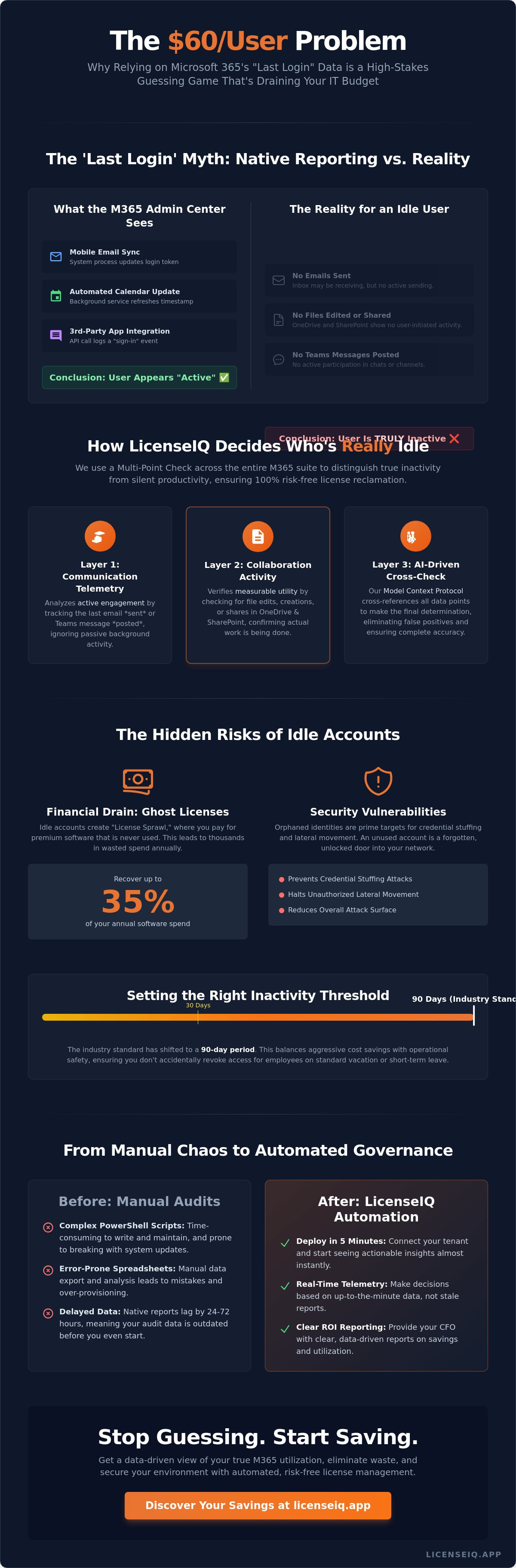
A "Sign-in" event is frequently triggered by background processes. Mobile devices syncing email, automated calendar updates, or third-party integrations can all refresh a token and update the "Last Sign-in" date. A user could be on a three-month leave of absence while their smartphone continues to ping the server every hour. To the Admin Center, that user looks active. To your bottom line, they represent a $60 monthly leak on an E5 plan. This discrepancy fuels "License Sprawl," where employees are assigned premium licenses for single-app needs that could be handled by a cheaper tier or no license at all.
Deciding on an inactivity threshold is a strategic choice. While some aggressive teams use a 30-day window, the industry standard in 2026 has shifted toward a 90-day period. This aligns with the policy for deleting inactive accounts adopted by many large-scale digital platforms to balance security risks with operational needs. Using a 90-day window ensures you don't accidentally revoke access for an employee on a standard vacation or short-term medical leave.
The Flaw in the Microsoft 365 Admin Center
Native Microsoft reports typically lag by 24 to 72 hours. This delay means your audit data is already outdated by the time you export it. Furthermore, Entra ID struggles to distinguish between a human user and a service account. Without granular telemetry, you risk "breaking" a critical automated workflow by reclaiming a license that appeared idle but was actually powering a backend process. Relying on these simple reports makes it impossible to achieve the precision required for modern spend recovery.
The Financial Risk of Inaccurate Audits
Ghost Licenses are seats that an organization pays for every month but are never actually touched by the assigned user. For SMBs, the compounding cost of "just in case" licensing can drain thousands of dollars from the IT budget annually. Manual errors in spreadsheets often lead to over-provisioning because there is no real-time link between usage and cost. The LicenseIQ Platform eliminates this guesswork by providing a clear, data-driven view of your true utilization rates.
How LicenseIQ Decides Who's Really Idle: The Multi-Point Check
Relying on a single timestamp to manage a $60 per month M365 E5 license is a high-risk strategy. True utilization isn't binary. It's a multi-dimensional lack of engagement across the entire application suite. The LicenseIQ Intelligence Engine moves beyond the limitations of native reporting by using the Model Context Protocol (MCP) for real-time tenant scanning. This advanced telemetry allows us to distinguish between users who are merely "Assigned" a seat and those who are truly "Active" and engaged. This section of Inactive Users Explained: How LicenseIQ Decides Who's Really Idle details the three layers of verification that ensure your license reclamation is 100% risk-free.
Our 'Cross-App Engagement' rule is the foundation of this process. Instead of looking at one data point, we check Exchange, Teams, OneDrive, and SharePoint simultaneously. If a user hasn't sent an email, posted a message, or edited a document in 90 days, they're a prime candidate for optimization. This level of precision boosts your bottom line by eliminating waste without disrupting actual work. You can explore the LicenseIQ Platform to see this multi-point check in action.
Layer 1: Communication Telemetry (Exchange & Teams)
Logins don't prove productivity. LicenseIQ analyzes active engagement by looking at when the last email was sent or a Teams message was posted. We distinguish between passive receiving, such as an inbox filling with automated alerts, and active sending. Our engine also tracks activity across both mobile and desktop apps. This ensures that a field employee who only uses Teams on their phone isn't accidentally flagged as idle.
Layer 2: Collaboration and Storage (OneDrive & SharePoint)
File edits serve as a high-intent signal of user activity. If an employee is actively modifying documents in SharePoint, they require their current license level. However, many users only view files. Viewing a document is often a "read-only" activity that doesn't justify a premium E5 seat. LicenseIQ identifies these users, allowing you to move them to lower-cost tiers like F3 while maintaining their access to necessary information.
Layer 3: The Exclusion Engine (Service Accounts & Legal Holds)
Automated reclamation shouldn't be blind. Our Exclusion Engine automatically identifies non-human service accounts and protects them from de-provisioning. It also respects Legal Holds and Retention Policies to keep your organization compliant with GDPR and HIPAA. The 'Smart Whitelist' feature allows IT leads to protect VIPs or critical infrastructure users, ensuring that automated workflows never touch essential accounts.
The Security Risks of 'Silent' Inactive Accounts
Managing idle seats is more than a cost-saving exercise. It's a critical security mandate. An inactive account is a goldmine for attackers because it provides a quiet entry point for credential stuffing and lateral movement. In 2025, stolen or compromised credentials were the most common breach vector, accounting for 29% of all incidents. When an account sits idle, unusual activity often goes unnoticed by standard monitoring tools. This guide, Inactive Users Explained: How LicenseIQ Decides Who's Really Idle, demonstrates how identifying these accounts hardens your environment against sophisticated threats.
The "Orphaned Identity" problem is particularly dangerous. This occurs when employees leave the company, but their licenses remain active. These accounts retain access to sensitive corporate data, creating a massive shadow access risk. With the average cost of a data breach in the US reaching $10.22 million in 2026, leaving these doors open is a liability no CFO or CISO should accept. LicenseIQ's License Health Score incorporates these security vulnerabilities directly, ensuring your optimization strategy prioritizes high-risk accounts alongside high-cost ones.
Orphaned Accounts and Shadow Access
Users possessing access to sensitive data months after their last login represent a failure in governance. Inactive accounts frequently bypass standard Multi-Factor Authentication (MFA) monitoring for several reasons:
- They aren't audited for "impossible travel" or suspicious geolocation alerts.
- They remain visible in global address lists, inviting targeted phishing attempts.
- They retain permissions to legacy applications that lack modern security controls.
This link between license waste and identity security is undeniable. HIPAA and SOC2 compliance frameworks demand the immediate removal of unused access to mitigate the 82% of breaches that involve a human element. If you don't know who is idle, you don't know who is a risk.
Hardening the Tenant via Automated Reclamation
Reducing your attack surface requires closing every "open door" in your M365 tenant. Automated reclamation ensures that no user is "forgotten" during organizational shifts or rapid scaling. By implementing a strict Office 365 offboarding checklist 2026, you ensure that licenses are revoked the moment they stop delivering utility. This proactive approach turns your license management into a security asset, preventing lateral movement before an attacker can gain a foothold in your network.
Calculating the ROI of Reclaiming Idle Seats
The financial impact of mismanaged licenses has never been higher. With Microsoft 365 E5 prices reaching $60 per user as of July 1, 2026, a single idle seat wastes $720 annually. This guide, Inactive Users Explained: How LicenseIQ Decides Who's Really Idle, moves beyond technical definitions to focus on the fiscal health of your organization. By converting telemetry into currency, we provide IT leaders with the data necessary to reclaim up to 35% of their M365 spend. This recovery isn't just about deleting accounts; it's about strategic reallocation of corporate resources.
Direct cost savings are achieved by moving users from premium E5 tiers to E3 ($39/month) or F3 ($10/month) based on their actual engagement patterns. If our Intelligence Engine detects that a user only accesses web-based versions of Office apps, maintaining an E5 license is a clear optimization failure. Beyond direct fees, organizations realize significant indirect savings by eliminating manual audit fatigue. Automated workflows replace the hours IT staff previously spent running PowerShell scripts and cross-referencing spreadsheets. This shift allows your team to focus on high-value infrastructure projects rather than administrative cleanup.
Consider the impact on a mid-sized organization. One SMB recently identified 50 truly idle users through our multi-layered scanning process. By reclaiming those licenses, they secured an immediate 35% reduction in their monthly subscription costs. This wasn't a guess; it was a data-driven decision backed by 90 days of cross-app telemetry. You can calculate your own potential recovery using our platform's automated assessment tools.
The LicenseIQ Health Score Framework
The License Health Score provides a single, authoritative metric to quantify your tenant's optimization potential. It aggregates three critical data points: utilization percentage, security risk levels, and total spend recovery value. This score serves as a powerful tool to justify a SaaS management budget to the CFO by showing exactly where capital is trapped in unused software. A Health Score below 70 indicates immediate spend recovery opportunities. Organizations with high scores demonstrate total visibility and a relentless focus on eliminating waste.
Right-Sizing vs. Deleting: The Nuanced Approach
Reclaiming a license doesn't always mean deleting a user. Right-sizing involves downgrading a user to a lower-cost tier that still meets their functional requirements. For seasonal workers or contractors, we recommend a "Parked License" strategy. This keeps the identity active for security and compliance purposes while removing the high-cost license attachment during periods of inactivity. For more detailed tactics, read our guide on how to reduce M365 subscription costs and start your spend recovery journey today.
Automating the Idle User Workflow with LicenseIQ
Connecting your M365 tenant to the LicenseIQ Platform takes under five minutes. Once authorized, the system utilizes the Model Context Protocol (MCP) to perform a deep, real-time scan of your entire user base. This protocol allows for a level of precision that static PowerShell scripts cannot match. While scripts provide a snapshot in time, MCP enables a continuous, live dialogue with your tenant data. This ensures that our guide, Inactive Users Explained: How LicenseIQ Decides Who's Really Idle, isn't just a theory but a functional blueprint for your organization.
Automation bridges the gap between identifying waste and actually stopping the financial leak. Most IT leaders hesitate to reclaim licenses because they fear disrupting a user's work. LicenseIQ solves this by introducing an 'Approval' step. The AI identifies the candidates for de-provisioning based on your specific criteria, but you retain the final say. This hybrid approach combines the speed of machine learning with the nuanced judgment of your IT team. It transforms license management from a monthly chore into a background process that runs with surgical precision.
Setting Up Your First Automated Governance Workflow
Your first step is defining the 'Idle' trigger. For many organizations in 2026, setting a threshold of 45 days of no cross-app activity provides the perfect balance between aggressive savings and operational safety. Once a user hits this mark, LicenseIQ can automatically notify their department manager. This notification serves as a final check to ensure the user isn't on a special project or extended leave. If no objection is raised, the license is reclaimed. The platform then automates the re-assignment of these licenses to new hires, preventing you from purchasing redundant seats and keeping your inventory lean.
Continuous Financial Accuracy
A one-time audit is a temporary fix for a permanent problem. Tenant environments are dynamic, with users joining, leaving, and changing roles every week. LicenseIQ provides continuous monitoring, scanning your environment 24/7 to catch waste the moment it occurs. This persistent vigilance ensures your Spend Recovery Dashboard always reflects the truth. You can generate monthly 'Spend Recovered' reports to demonstrate clear ROI to executive stakeholders, proving the value of your optimization efforts. Start your 5-minute M365 audit with LicenseIQ today.
Turn Visibility into Financial Velocity
Manual license management is a liability your organization can no longer afford in 2026. Relying on flawed "Last Login" data creates security gaps and drains your IT budget. This guide, Inactive Users Explained: How LicenseIQ Decides Who's Really Idle, has detailed how multi-layered telemetry across Teams, SharePoint, and Exchange provides the precision needed for risk-free reclamation. You now have the framework to eliminate orphaned identities and stop the compounding cost of ghost licenses.
Transitioning to AI-native automated governance workflows ensures your M365 environment remains lean and secure 24/7. You don't need to spend hours in spreadsheets or run complex PowerShell scripts to see results. A single scan can identify up to 35% in hidden savings while hardening your tenant against lateral movement. It's time to replace manual audit fatigue with proactive, data-driven decision-making. Discover your M365 Health Score and reclaim wasted spend with LicenseIQ. You can scan your tenant in 5 minutes and start optimizing your software spend today. Your bottom line deserves total transparency.
Frequently Asked Questions
What is considered an inactive user in Microsoft 365?
An inactive user is any identity that hasn't performed an intentional, active task across the M365 suite for a specific period, typically 90 days. This excludes passive background processes like mobile email syncing or automated calendar updates. True inactivity means zero sent emails, zero Teams messages, and zero file modifications in SharePoint or OneDrive. Our guide, Inactive Users Explained: How LicenseIQ Decides Who's Really Idle, details how we filter out this system noise to find real savings.
How often should I audit my M365 licenses for inactivity?
In 2026, the industry standard has moved from quarterly manual audits to continuous, real-time monitoring. Waiting 90 days to perform a manual check allows thousands of dollars in waste to accumulate. Automated systems catch idle licenses the moment they cross your defined inactivity threshold. This persistent approach ensures your tenant remains optimized without requiring hours of manual labor from your IT team every month.
Can LicenseIQ distinguish between a human user and a service account?
Yes, the platform uses a specialized Exclusion Engine to identify and protect non-human identities. Service accounts often show login activity without traditional engagement signals like sending Teams messages. LicenseIQ recognizes these patterns and automatically whitelists them. This prevents the accidental de-provisioning of critical infrastructure accounts that power backend automations or legacy integrations, ensuring your operations remain stable while you recover spend.
Will reclaiming a license delete the user's data or emails?
Reclaiming a license only removes the paid subscription attachment, not the underlying user data. Microsoft typically retains mailbox and OneDrive data for a 30-day grace period after a license is removed. However, LicenseIQ respects your specific retention policies and Legal Holds. We recommend right-sizing users to lower-cost tiers like F3 to maintain data access while reducing monthly costs from the $60 E5 peak price.
How much can the average SMB save by removing inactive users?
The average SMB recovers up to 35% of their annual M365 spend by identifying and reclaiming truly idle seats. With premium licenses like M365 E5 costing $60 per user as of July 1, 2026, even a small pool of 20 inactive users represents $14,400 in annual waste. This is why Inactive Users Explained: How LicenseIQ Decides Who's Really Idle focuses on converting telemetry into direct, measurable ROI for the CFO.
Does LicenseIQ use PowerShell scripts that I have to manage?
No, LicenseIQ eliminates the need for manual scripting. Instead of fragile PowerShell scripts that require constant updates, our platform uses the Model Context Protocol (MCP) for direct, real-time tenant scanning. This provides a more secure and reliable connection to your data. You get the benefits of deep telemetry and automated governance without the administrative burden of maintaining custom code or managing API permissions yourself.
What happens if an inactive user returns to the company?
LicenseIQ automates the re-assignment process to ensure a seamless experience for returning users or new hires. When the system detects a need for a new license, it first checks your pool of recovered, unassigned seats. This "internal recycling" of licenses prevents you from purchasing redundant subscriptions. The workflow is designed to be frictionless, allowing IT to approve re-assignments in seconds through the Spend Recovery Dashboard.
How does the LicenseIQ Health Score differ from Microsoft's Secure Score?
Microsoft's Secure Score focuses exclusively on your security configuration and threat posture. In contrast, the License Health Score is a comprehensive financial and operational metric. It combines utilization data, security risks associated with orphaned identities, and total spend recovery potential. This provides a holistic view of your tenant's health, allowing you to prioritize optimization efforts based on both safety and fiscal efficiency.


