

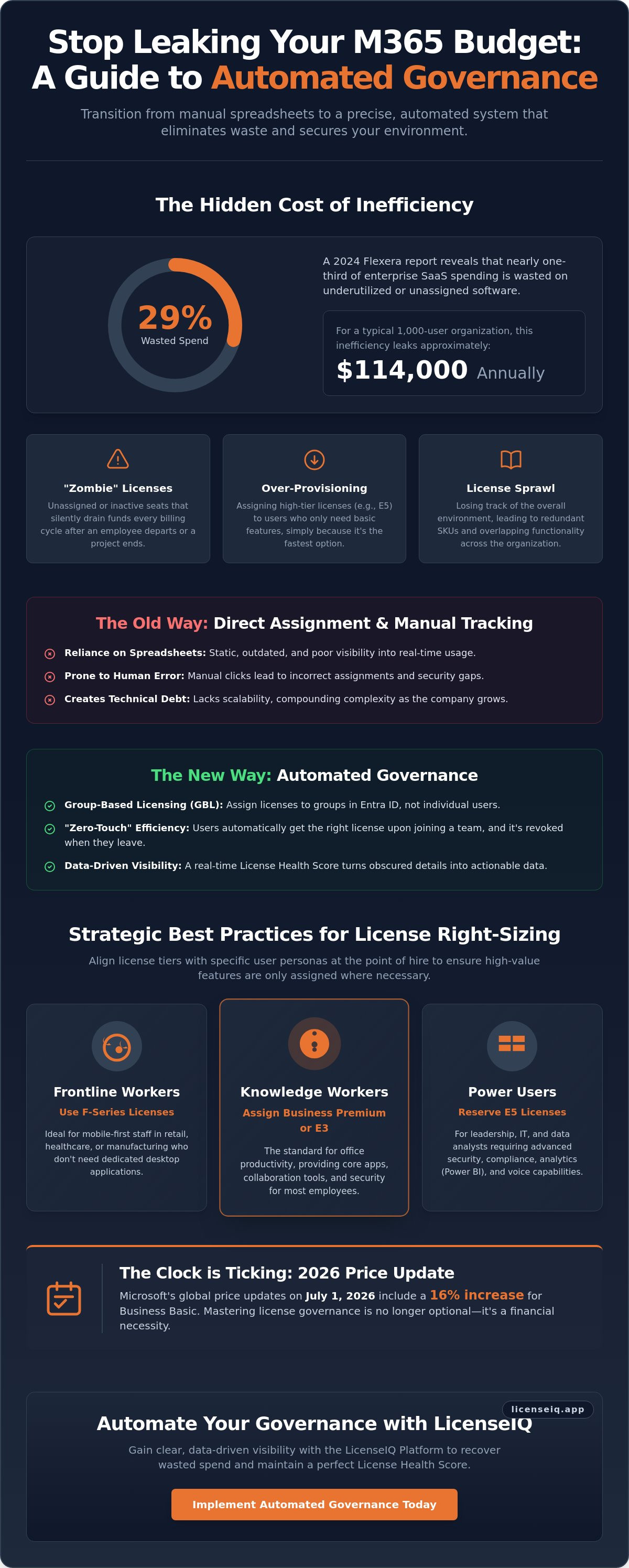
A 2024 Flexera report reveals that 29% of enterprise SaaS spending is wasted on underutilized software. For a typical 1,000-user organization, this inefficiency leaks approximately $114,000 annually. As Microsoft implements global price updates on July 1, 2026, including a 16% jump for Business Basic, mastering microsoft 365 license assignment best practices is no longer optional. It's a financial necessity for specialized leadership.
You recognize that manual spreadsheets are failing your team. Tracking seats in a static document leads to overlooked unassigned licenses and unnecessary budget drain. You want a clean, automated system, but the fear of disrupting user access during a transition often stalls progress. We're here to eliminate that uncertainty. This guide will show you how to transition from manual oversight to automated governance, securing your environment while slashing monthly bills. You'll learn to leverage group-based licensing in Microsoft Entra ID and use the LicenseIQ Platform to gain clear visibility. We'll outline a step-by-step path to recover your spend, implement Automated Governance Workflows, and maintain a perfect License Health Score.
Key Takeaways
- Eliminate budget leaks by replacing manual spreadsheets with a precise, data-driven visibility system.
- Master microsoft 365 license assignment best practices by leveraging Group-Based Licensing in Entra ID for automated, error-free provisioning.
- Align license tiers with specific user personas at the point of hire to ensure high-value features are only assigned where necessary.
- Execute a "mix and match" strategy to optimize costs, particularly when navigating the 300-user ceiling for Business plans.
- Secure your digital environment and recover wasted spend using the LicenseIQ Platform’s real-time License Health Score.
The Hidden Cost of Manual Microsoft 365 License Assignment
License assignment serves as the critical bridge between procurement and user productivity. It's the precise moment your financial investment becomes an active operational tool. However, relying on manual processes creates an invisible drain on your capital. When administrators assign licenses one by one, they often lose sight of the broader environment. This lack of oversight leads to "license sprawl," where organizations pay for more seats than they actually utilize. The disorder isn't just an administrative headache. It's a direct leak in your monthly budget.
Manual methods frequently result in the "zombie license" problem. These are unassigned or inactive seats that sit dormant in your Microsoft 365 tenant, silently draining funds every billing cycle. Without a centralized system to monitor these gaps, your organization’s financial health suffers. Adopting microsoft 365 license assignment best practices requires a shift from reactive clicking to proactive oversight. This is where a License Health Score becomes vital. It provides a real-time metric of your assignment efficiency, turning obscured details into actionable data for leadership.
Why Direct Assignment is a Technical Debt
Direct assignment is a trap for growing SMBs. It lacks the scalability required for rapid expansion. Every new hire adds a layer of manual labor that invites human error. Administrators often resort to over-provisioning, assigning a high-tier E5 license to a user who only needs E3 features, simply because it's the fastest path in the moment. This technical debt compounds as departments change and roles evolve. Complexity increases exponentially. It makes it nearly impossible to maintain a lean environment without automated intervention. You end up with a fragmented system that is difficult to audit and even harder to secure.
The Financial Impact of Poor Governance
The financial stakes are high. A 2024 Flexera report found that 29% of enterprise SaaS spending is wasted on underutilized software. For many organizations, this waste is hidden in the Billing tab of the admin center, obscured by layers of technical complexity. Unassigned licenses are often forgotten after a project ends or an employee departs. Redundant spending also occurs when users hold multiple overlapping SKUs, such as having a standalone Visio license alongside a suite that already provides similar functionality. You can't fix what you can't see. Implementing microsoft 365 license assignment best practices through the LicenseIQ Platform allows you to uncover these obscured costs immediately. You ensure your resources remain focused on growth rather than waste.
Group-Based Licensing: The Foundation of Modern Governance
Group-Based Licensing (GBL) transforms the way organizations handle identity and access. Instead of assigning individual seats via the Microsoft 365 admin center, you assign licenses to a security group in Microsoft Entra ID. When a user joins the group, they inherit the license. When they leave, the license returns to the pool. This is the core of microsoft 365 license assignment best practices. It eliminates the need for complex PowerShell scripts or manual entry. It ensures that your IT department operates with "zero-touch" efficiency, freeing up specialized leadership to focus on higher-value tasks.
Leakage often happens during departmental transfers. An employee moves from Sales to Marketing but keeps their old, expensive CRM add-on. GBL prevents this. By tying licenses to functional groups, the transfer process automatically strips old entitlements and provisions new ones. This level of oversight is essential for maintaining a clean Spend Recovery Dashboard. It ensures that your financial resources are always aligned with your current operational structure.
Mapping Licenses to User Personas
Effective governance starts with categorization. Don't give every user the same license. Categorize your staff into functional personas to optimize costs:
- Frontline Workers: Use F-series licenses for mobile-first staff who don't need desktop apps.
- Knowledge Workers: Assign Business Premium or E3 for standard office productivity.
- Power Users: Reserve E5 licenses for those requiring advanced security or Power BI.
This granular approach ensures you aren't overpaying for unused features. It's a proactive way to manage your digital environment with precision.
Setting Up Automated Assignment Groups
Success with GBL depends on structure. Standardize your naming conventions, such as "LIC-M365-E3-Sales," to ensure clarity across the organization. This is a pillar of microsoft 365 license assignment best practices that prevents administrative confusion. Use dynamic membership rules based on user attributes like "Department" or "Job Title." This automates the trigger for license assignment. You must also monitor for group errors. If you run out of seats, Entra ID will flag a "license assignment failed" state. Regular audits through Automated Governance Workflows help you catch these bottlenecks before they disrupt operations.
The 2026 M365 License Assignment Lifecycle
Governance is not a static event. It's a dynamic, continuous loop that requires relentless oversight. We define this as the license lifecycle. It begins the moment a new hire is entered into your system and ends only when their access is fully reclaimed. Adhering to microsoft 365 license assignment best practices means managing every stage of this journey with precision. You cannot afford to let licenses drift into states of underutilization or neglect. Every seat must justify its cost through active, documented usage.
The lifecycle consists of five critical phases. Provisioning ensures the correct tier is assigned immediately upon hire. Monitoring follows, where you track active feature usage against the assigned SKU. If the data shows a mismatch, right-sizing allows you to downgrade the user to a more cost-effective plan. Reclamation harvests licenses from offboarded or inactive staff. Finally, optimization uses AI-native tools to scan for wasted spend across the entire tenant. This structured approach, powered by the LicenseIQ Platform, ensures your financial resources remain focused on productivity rather than waste.
Automating the Offboarding Workflow
Manual offboarding is the primary cause of wasted SaaS spend in modern organizations. When an employee departs, their license often remains active in the background for weeks or even months. This oversight creates a "zombie license" that drains your budget with zero return. Immediate license revocation is the only secure solution. You need a system that triggers revocation the moment a termination is finalized in your HR system. For a comprehensive roadmap on this process, refer to our Office 365 offboarding checklist. Implementing Automated Governance Workflows ensures this transition happens without human error, securing your data while reclaiming your spend.
Managing Inactive Users and Dormant Licenses
Dormant accounts are silent budget killers. To stop the leak, you must define "inactive" using specific activity thresholds. Most efficient organizations use 30, 60, or 90-day windows. If a user hasn't logged in or utilized their assigned apps within this timeframe, the license should be flagged for removal. Establish a firm policy for automated license revocation for these dormant accounts. This ensures you aren't paying for access that isn't being used. Always confirm that your internal data retention policies are satisfied before unassigning the seat. These microsoft 365 license assignment best practices keep your environment lean. They ensure your Spend Recovery Dashboard remains clear of unnecessary expenses.
Strategic Best Practices for License Right-Sizing
Optimizing your tenant requires more than just technical setup. It demands a strategic audit of your "Mix and Match" approach. Microsoft explicitly supports combining various license tiers within a single environment, which is a core component of microsoft 365 license assignment best practices. For organizations with fewer than 300 users, the choice between Business Premium and E3 is pivotal. Business Premium often provides superior value by including advanced security features that E3 lacks, despite the lower entry point. You should consult our Microsoft 365 license types reference guide to map specific features to your operational costs.
High-tier licenses like E5 and Microsoft 365 Copilot carry significant monthly premiums. These shouldn't be part of your default provisioning groups. Instead, implement a "Request-Based" system for these assets. This ensures that every high-cost seat is backed by a specific business case and approved by leadership. You can manage these requests through Automated Governance Workflows to maintain speed without sacrificing financial control. This proactive stance prevents budget bloat before it begins.
Identifying Over-Licensed Users
Waste is often hidden in plain sight. Many organizations discover users assigned to E5 plans who only utilize Outlook and Teams. This mismatch represents a significant budget leak that compounds every month. You must also scan for redundant "Add-on" licenses. It's common to find standalone security or analytics SKUs assigned to users who already have those features bundled in their primary suite. Right-sizing is the alignment of license cost with actual feature utilization. By identifying these gaps, you can immediately recover spend and improve your License Health Score. Audit your tenant today with the LicenseIQ Platform to uncover every obscured cost.
The Role of Self-Service Purchase Governance
Self-service purchases are the gateway to Shadow IT. When individual departments or users buy licenses independently, you lose centralized financial control. This fragmentation prevents you from leveraging volume discounts and creates security blind spots. You should disable self-service purchase capabilities across your tenant using PowerShell. Consolidate all individual subscriptions into your corporate agreement. This oversight ensures that every dollar spent is visible on your Spend Recovery Dashboard. Centralization is a vital guardian of your corporate resources. It allows you to negotiate renewals from a position of total clarity and data-driven strength.
Automate Your Governance with LicenseIQ
Transitioning from manual oversight to automated precision is the final step in mastering microsoft 365 license assignment best practices. Manual audits are static snapshots. They decay the moment they're finished. The LicenseIQ Platform provides a permanent solution to this organizational disorder. It performs a tenant-wide scan to discover wasted spend in minutes. You gain immediate oversight of every SKU and every user without the friction of complex software installations or long-winded setup phases. This digital auditor stays one step ahead, ensuring your environment remains lean and secure.
The License Health Score serves as your primary metric for operational efficiency. It benchmarks your current state against optimized industry standards, providing a clear contrast between your current spend and your potential savings. You don't just get generic data. You receive specific dollar-value recommendations for every user. These insights pinpoint exactly where to downgrade a plan or reclaim a seat based on actual usage patterns. By executing Automated Governance Workflows, you move from observation to action. You secure your environment while protecting your capital from unnecessary leaks.
From Insight to Action in 5 Minutes
Speed is a competitive advantage in technical operations. You connect your tenant securely and visualize your Spend Recovery Dashboard immediately. Traditional IT teams often skip manual audits because they're tedious and prone to human error. Automation removes this bottleneck. It uncovers the obscured details that manual tracking misses, such as duplicate licenses or unassigned premium add-ons that have been forgotten in the admin portal. You achieve total clarity without the administrative overhead. This proactive approach ensures that your resources are always monitored by a vigilant and precise system.
Maintaining Continuous Financial Accuracy
Meticulous governance is a daily requirement, not an annual event. Shifting from reactive audits to proactive daily monitoring ensures that your budget never leaks. This level of transparency empowers finance teams. They gain clear visibility into IT spending, allowing for data-driven decision-making during contract renewals. By adhering to microsoft 365 license assignment best practices through continuous automation, you act as a vital guardian of corporate resources. You ensure every assigned license drives actual value. This relentless focus on data-driven oversight distinguishes your organization as a leader in operational efficiency. Start your free M365 health check with LicenseIQ today.
Secure Your Financial Health Through Automated Oversight
Manual license management is a liability you can no longer afford. Transitioning to group-based licensing and persona-driven provisioning ensures your environment remains lean and audit-ready. By implementing microsoft 365 license assignment best practices, you transform a complex administrative burden into a streamlined, data-driven workflow. You eliminate zombie licenses and stop the budget leaks that compromise your organizational growth. The contrast between organizational disorder and total clarity is yours to define. A vigilant, precise system is the only way to safeguard your financial health against upcoming price increases and shifting license tiers.
Organizations often waste significant capital on redundant subscriptions. You can save up to 35% on M365 subscriptions by identifying underutilized seats and right-sizing your tenant. The LicenseIQ Platform connects in minutes, providing instant insights through an AI-native spend recovery dashboard. It's time to replace guesswork with total clarity and professional oversight. Automate your M365 governance and recover wasted spend with LicenseIQ. Secure your resources and drive operational efficiency today.
Frequently Asked Questions
What is the best way to assign Microsoft 365 licenses?
Group-Based Licensing (GBL) through Microsoft Entra ID is the industry standard for efficiency. This method automates the provisioning process by linking licenses to specific security groups. When you add a user to a group, they receive the license immediately. Removing them reclaims the seat. This approach eliminates manual errors and ensures your microsoft 365 license assignment best practices remain scalable as your organization grows.
What happens to user data when I unassign a Microsoft 365 license?
Microsoft retains user data for a grace period of 30 days after a license is unassigned. During this window, administrators can reassign the license to regain access to the user’s mailbox and OneDrive files. Once this 30-day period expires, the data is permanently deleted. You must ensure all critical data is backed up or moved to a shared mailbox before the license is revoked to prevent permanent loss.
Can I automate M365 license assignment without Entra ID P1?
Native Group-Based Licensing requires a Microsoft Entra ID P1 or P2 license. Organizations on lower tiers must rely on manual assignments or custom PowerShell scripts. These manual methods often lead to "license sprawl" and obscured costs. If you lack P1 licensing, the LicenseIQ Platform can bridge the gap by providing the oversight needed to manage assignments without complex scripting.
How do I find unassigned Microsoft 365 licenses?
You can locate unassigned seats by navigating to the Billing > Licenses section within the Microsoft 365 Admin Center. The "Available" column displays the number of licenses you're paying for but not using. For a more detailed financial view, use a Spend Recovery Dashboard. This tool highlights exactly how much capital is being wasted on dormant seats across your entire tenant.
Is it better to use group-based or direct license assignment?
Group-based assignment is superior for almost every operational environment. Direct assignment creates technical debt because it requires manual intervention for every new hire or role change. Group-based logic ensures consistency and security. It's a vital pillar of microsoft 365 license assignment best practices that prevents "zombie licenses" from draining your budget during employee turnover.
How often should I audit my M365 license assignments?
Perform a comprehensive audit at least once per month, though real-time monitoring is the ideal state. Monthly reviews allow you to catch unassigned seats before the next billing cycle. Organizations that use Automated Governance Workflows benefit from daily oversight. This proactive approach ensures that your License Health Score remains high and your spending stays aligned with actual usage.
What is a good M365 License Health Score?
A score of 95% or higher represents an optimized environment. This indicates that nearly every license you pay for is actively utilized by a user who requires those specific features. Scores below 80% suggest significant budget leaks, often caused by over-provisioning or forgotten inactive accounts. Maintaining a high score ensures your resources are focused on productivity rather than waste.
Can I mix different license types in the same group?
No, a single security group should be dedicated to a specific license SKU or bundle to maintain clarity. Mixing E3 and E5 assignments in one group creates administrative confusion and makes auditing difficult. Create distinct groups for different user personas. This structure allows you to manage your "Mix and Match" strategy with precision and ensures that high-cost licenses are only assigned to those who need them.


