

The average organization overspends on Microsoft 365 licenses by 30% to 40% every single year. With the July 2026 price increases pushing E5 seats to $60 and E3 to $39 per month, this invisible waste is a direct threat to your department's budget. Implementing automated m365 license management is no longer a luxury; it's a financial necessity for leadership that values operational efficiency and fiscal precision.
You likely recognize the frustration of manual offboarding processes that leave licenses unassigned for weeks, or the confusion of over-provisioning users on premium tiers they don't actually use. It's difficult to maintain oversight when your environment is constantly shifting. We'll show you how to eliminate this waste and automate your license governance in minutes using AI-native intelligence. This article provides a roadmap to gain real-time visibility into your license health, reclaim unused seats automatically, and generate a clear ROI report that proves your strategic value to the CFO.
Key Takeaways
- Identify the financial drain of license sprawl and why manual tracking fails to protect your bottom line in 2026.
- Transition from reactive reporting to automated m365 license management to gain proactive oversight of your entire tenant.
- Quantify your operational hygiene using the License Health Score to isolate inactive users and redundant license tiers immediately.
- Implement Automated Governance Workflows to reclaim unused seats and stop paying for resources your team no longer needs.
- Deploy the LicenseIQ Platform in minutes to generate total visibility and provide the CFO with a definitive spend recovery report.
The Hidden Cost of M365 License Sprawl in 2026
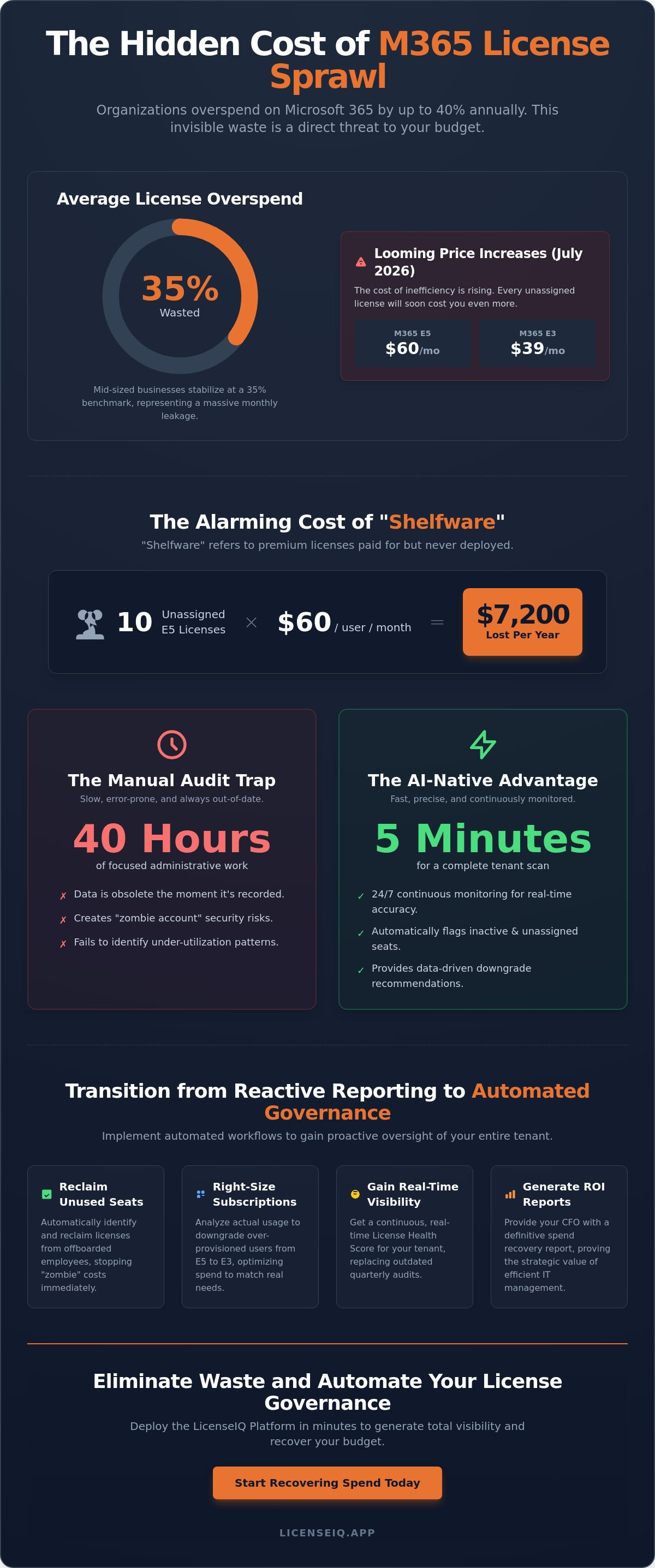
M365 license sprawl is the silent accumulation of unassigned or underutilized subscriptions within your tenant. It's an operational byproduct of rapid growth, employee turnover, and the sheer complexity of Microsoft's SKU bundling. Recent research indicates that organizations overspend on Microsoft 365 by an average of 30% to 40%. For mid-sized businesses, this waste often stabilizes at a 35% benchmark, representing a massive monthly leakage. The July 2026 price increases have amplified this issue. With E5 seats rising to $60 and E3 to $39, the cost of inefficiency has never been higher. Without automated m365 license management, these costs remain obscured behind the admin center's dense interface.
Why Spreadsheets Are No Longer Sufficient
Manual tracking relies on point-in-time audits. By the time an admin updates a spreadsheet, the data is already obsolete. This data lag creates a dangerous oversight gap that compromises your budget. Beyond the financial loss, "zombie" accounts pose a severe security risk. These are active licenses assigned to former employees that remain unmonitored long after offboarding. A proactive approach moves beyond basic record-keeping into the professional discipline of Software Asset Management (SAM). SaaS sprawl is a silent drain on corporate EBITDA. AI-native vigilance identifies these vulnerabilities in real-time. It provides a level of precision that manual oversight simply cannot match in a modern, fast-paced technical environment.
The Financial Impact of "Shelfware"
"Shelfware" refers to premium licenses paid for but never actually deployed to a user. The compounding cost of a single unassigned E5 license is significant. At $60 per user each month, just ten forgotten seats cost your organization $7,200 every fiscal year. This problem scales rapidly when you factor in redundant add-ons. High-value tools like Microsoft 365 Copilot or Visio often sit idle because of manual offboarding failures. Many SMBs pay for high-tier E5 features when an E3 seat at $39 would suffice for the user's actual activity. License hygiene is a direct indicator of organizational financial health. Every unused seat represents capital that should be reinvested into strategic growth. Transitioning to automated m365 license management ensures that your subscription spend aligns perfectly with actual usage patterns, protecting your bottom line from unnecessary inflation. You can begin identifying these recovery opportunities immediately with the LicenseIQ Platform.
Transitioning to Automated M365 License Management
Reactive reporting is a liability. By the time an admin generates a manual usage report, the waste has already occurred. Transitioning to automated m365 license management replaces this outdated guesswork with mathematical certainty. Modern platforms don't rely on cumbersome PowerShell scripts or manual CSV exports. Instead, they connect directly to your Microsoft 365 tenant via secure APIs. This connection happens in minutes, allowing the system to ingest data with total precision. These platforms leverage the Model Context Protocol (MCP) to integrate software intelligence with your specific environment. This technical standard ensures that the AI understands the context of your license assignments, not just the raw numbers. It performs a single-pass scan of every user, license, and add-on to provide immediate clarity.
AI-Native Discovery vs. Manual Auditing
The difference in efficiency is stark. A traditional manual audit often requires 40 hours of focused administrative work to cross-reference activity across multiple applications. An AI-native scan completes this task in 5 minutes. Speed is only half the benefit. Human auditors often miss subtle patterns in user behavior. AI identifies "partial inactivity" where a user might log in to Outlook but never touches Teams or SharePoint. These patterns indicate an opportunity to downgrade from E5 to E3 or Business Premium. Automation provides dollar-value recommendations based on actual usage, removing the emotional bias from licensing decisions. This shift highlights the strategic business value of SAM by turning IT oversight into a profit-recovery engine.
Continuous Monitoring for Real-Time Accuracy
Quarterly "check-ins" are insufficient in a dynamic technical environment. You need 24/7 tenant surveillance to maintain license health. Continuous monitoring identifies unassigned seats the moment a user is offboarded, preventing them from becoming "zombie" costs. It provides real-time insights that eliminate budget surprises during M365 renewal cycles. You gain the ability to right-size your environment daily rather than once a year. This proactive vigilance ensures your resources are always optimized for current needs. If you want to stop the bleed immediately, you can start with a free scan on the LicenseIQ Platform. Maintaining this level of oversight ensures your organization remains lean and agile. Implementing automated m365 license management is the only way to guarantee that your SaaS spend is working as hard as your team.
The Metrics of Waste: Redundant Licenses and Inactive Users
Visibility is the first step toward recovery. Most organizations confuse "assigned licenses" with "active users." A license is assigned when it's allocated in the Admin Center; it's active only when the user generates meaningful data. Recent industry data shows that 29% of SaaS licenses are underutilized. This gap represents the primary target for automated m365 license management. Waste typically falls into three categories: unassigned seats sitting in inventory, inactive users who haven't logged in for 30 days, and "zombie" licenses belonging to former employees. These zombies are particularly dangerous. They drain your budget while creating security holes. Identifying them requires cross-referencing HR records with M365 login timestamps, a task far too complex for manual oversight.
Understanding Your License Health Score
Effective governance requires a standardized benchmark. The License Health Score provides this by aggregating your tenant's hygiene into a single, actionable metric. A high-performing score reflects zero unassigned licenses and a 95% or higher utilization rate across premium tiers. It's the most powerful tool for justifying IT budget requests to Finance. When you can show the CFO a real-time score of 65%, you have the data needed to demand change. For a deeper dive into improving these numbers, consult our Microsoft 365 License Optimization Guide. This score isn't just a number. It's a measure of your operational efficiency.
Identifying Underutilized Premium Tiers
The "E3 vs. E5" trap is a common financial drain. Organizations often default to E5 for its advanced security and analytics features, yet many users never touch them. If a user only needs basic Office apps and email, an E5 seat at $60 is a waste when E3 at $39 or Business Premium at $22 suffices. Automated m365 license management analyzes feature consumption at a granular level. It identifies users who have E5 licenses but don't utilize Power BI Pro, Teams Phone, or advanced Entra ID features. Right-sizing these users based on actual consumption can recover thousands of dollars monthly. You can compare the specific features of each tier in our Microsoft 365 License Types guide. Stop paying for potential. Start paying for performance.
Operationalizing Automated Governance Workflows
Static group-based licensing is a reactive tool. It fails to account for the fluid shifts in user behavior that define a modern workforce. To achieve consistent spend recovery, you must deploy Automated Governance Workflows. These workflows serve as the primary engine for your automated m365 license management strategy. They translate raw usage data into immediate fiscal action. The process begins by connecting your tenant to an AI-native intelligence platform using secure, read-only APIs. This ensures total data integrity without compromising security. Next, you define inactivity thresholds; 30 days of zero login activity typically serves as the primary trigger for reclamation. The system then executes automated alerts or direct seat removal for "zombie" accounts. Finally, the platform provides right-sizing recommendations. This allows you to downgrade users from E5 to E3 or Business Premium based on actual feature consumption, creating a defensible ROI report for your financial leadership.
Automating Employee Offboarding
Manual offboarding is prone to error and delay. It's common for high-cost licenses to remain active for weeks after an employee departs. By syncing your HR system triggers with license reclamation, you close this gap immediately. This process ensures that seats are recovered the moment an employee is deactivated in your primary directory. Beyond the financial recovery, this provides critical security benefits by revoking access to sensitive corporate data instantly. It's a vital step in maintaining a lean and secure environment. You can follow our Office 365 Offboarding Checklist to ensure your process is both secure and fiscally responsible.
Right-Sizing as a Continuous Process
Optimization isn't a one-time event. It's a continuous cycle of monitoring and adjustment. Automated workflows identify users who consistently underutilize premium features, allowing you to downgrade them without impacting their productivity. This "re-harvesting" strategy is vital for sustainable growth. Instead of purchasing new seats for every new hire, you reallocate recovered licenses from inactive or over-provisioned accounts. This internal recycling of resources keeps your overhead low and your Health Score high. For a comprehensive strategy on managing these cycles, read our guide on Mastering the M365 License Management Lifecycle. You can deploy these Automated Governance Workflows today to start securing your budget and eliminating waste.
LicenseIQ: AI-Native Spend Recovery for Modern SMBs
LicenseIQ acts as a proactive guardian of your corporate resources. It doesn't just monitor; it intervenes. Implementing automated m365 license management shouldn't be a months-long project. Our setup takes exactly 5 minutes. You connect your tenant via secure API and receive an immediate License Health Score. This diagnostic tool uncovers obscured details that manual audits consistently miss, such as forgotten Project licenses or redundant Visio seats. It provides the clarity needed to manage a complex environment with total precision. We remove the guesswork from your software spend.
The Spend Recovery Dashboard provides total transparency for specialized leadership. It translates technical inactivity into direct financial impact. You see exactly how many dollars you've reclaimed in real-time. We prioritize actionable insights over generic data. While standard reporting tools offer vague charts, we deliver specific instructions on which licenses to harvest or downgrade. This results-first approach ensures that your core value proposition is never lost in technical complexity. You gain a clear ROI report that's ready for the CFO's desk at any moment.
Why LicenseIQ Wins for SMBs
Most SMBs don't have the luxury of a dedicated IT team for continuous license auditing. LicenseIQ fills this gap with an AI-native architecture designed for speed and precision. It maintains your organization's financial hygiene 24/7. It identifies patterns of waste that human eyes overlook, such as "partial inactivity" in premium E5 features. This vigilance ensures that your M365 environment remains lean without constant manual intervention. Our platform acts as a digital auditor that's always one step ahead. It's an active participant in your company's fiscal growth, ensuring that no resource is left unmonitored. We provide the oversight you need to scale efficiently.
Start Your 5-Minute Audit Today
Move from organizational disorder to total clarity. You shouldn't have to guess if you're overpaying for your SaaS stack. With LicenseIQ, you'll know. Our platform provides the confidence and security that every dollar in your budget is working toward your goals. We eliminate the invisible waste and the "zombie" accounts that drain your EBITDA. It's time to take control of your resources with a system that values efficiency as much as you do. Don't let your budget leak for another month. You can secure your environment and reclaim your spend immediately. Get your M365 Health Score with LicenseIQ and start your journey toward automated m365 license management today.
Secure Your Corporate Resources with AI-Native Precision
Manual license management is a financial liability your organization can't afford. We've detailed how "zombie" accounts and redundant tiers contribute to the 35% waste benchmark. Transitioning to automated m365 license management replaces this disorder with a vigilant, AI-native system. You gain total oversight of your tenant's health while reclaiming capital that belongs back in your budget. Our AI-native intelligence platform connects in minutes to uncover the obscured details draining your resources. It's time to move from reactive reporting to proactive recovery. You'll see exactly how your resources are utilized and where every dollar goes. Take the first step toward a lean, optimized environment today. Confidence comes from knowing every seat is working toward your growth. Connect your tenant and get your M365 Health Score in 5 minutes.
Frequently Asked Questions
What is automated M365 license management?
Automated m365 license management is the process of using software intelligence to monitor, assign, and reclaim subscriptions without manual administrative work. It connects directly to your tenant to analyze usage patterns and execute governance workflows automatically. This ensures your organization only pays for the resources currently in use by active employees.
How much can I save with an automated license governance tool?
Organizations typically recover 30% to 40% of their annual Microsoft 365 spend by eliminating waste. This is achieved by identifying unassigned licenses, reclaiming seats from inactive users, and right-sizing over-provisioned tiers. For a mid-sized organization, this recovery often amounts to thousands of dollars in monthly savings.
Is automated license reclamation safe for my data?
Yes, automated license reclamation is safe and follows established Microsoft security protocols. The system uses secure, read-only APIs to analyze usage and only modifies license assignments based on your predefined governance rules. It doesn't delete user data or mailboxes; it simply manages the subscription state to stop unnecessary billing.
How does LicenseIQ identify inactive users?
LicenseIQ identifies inactive users by cross-referencing login timestamps and granular activity data across the entire M365 suite. It looks for users who haven't accessed core services like Teams, SharePoint, or Outlook within a specific timeframe, such as 30 days. This provides a precise view of who is actually utilizing their assigned resources.
Can I use automation to manage E3 vs. E5 license upgrades?
You can use automated m365 license management to handle the transition between E3 and E5 tiers with precision. The system identifies users who have premium E5 licenses but don't utilize high-value features like Power BI Pro or advanced security tools. It then recommends a downgrade to E3 to eliminate the price gap while maintaining necessary productivity.
How long does it take to set up automated M365 governance?
Setting up automated M365 governance takes exactly 5 minutes with the LicenseIQ platform. You connect your tenant via a secure API, and the system immediately begins scanning your environment. You'll receive your first set of actionable recovery insights and your License Health Score shortly after the scan completes.
Does LicenseIQ replace the Microsoft 365 Admin Center?
No, LicenseIQ doesn't replace the Microsoft 365 Admin Center; it serves as an intelligence layer on top of it. While the Admin Center is a manual management tool, LicenseIQ provides the proactive oversight and automated workflows needed for spend recovery. It handles the complex analysis and execution that the standard interface leaves to manual labor.
What is a License Health Score?
A License Health Score is a single metric that quantifies the efficiency of your M365 environment. It factors in your percentage of unassigned licenses, the number of inactive users, and the alignment of premium tiers with actual usage. This score gives leadership an immediate benchmark for their software hygiene and fiscal performance.


