

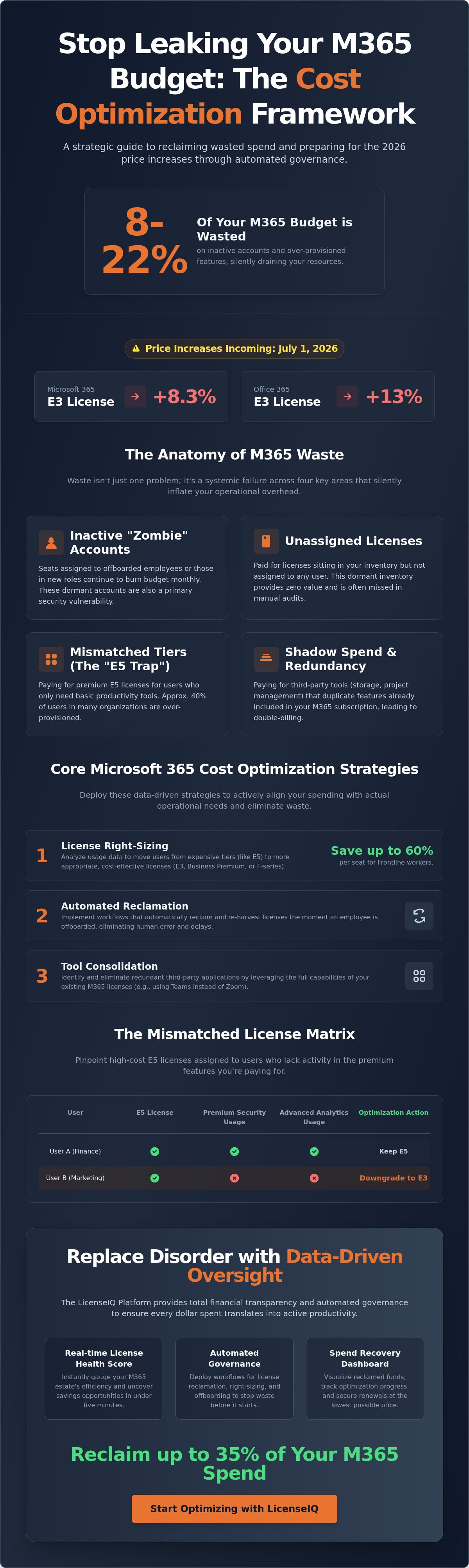
Between 8% and 22% of your Microsoft 365 budget is currently funding inactive accounts and over-provisioned features. With the July 1, 2026, price increases scheduled to hike E3 costs by 8.3% and Office 365 E3 by 13%, this waste is a direct threat to your margins. You know that manual spreadsheets can't track SaaS sprawl or decode opaque billing structures. The fear of cutting a license an active employee needs often forces expensive, "safe" over-provisioning. It's time to stop the leak.
This guide delivers the executive framework to implement microsoft 365 cost optimization strategies that slash waste by up to 35% through automated governance. You'll learn to establish a definitive License Health Score and deploy automated reclamation workflows. We'll show you how to secure your renewal at the lowest possible price point before the July deadline. This system replaces administrative disorder with precise, data-driven oversight and total financial transparency.
Key Takeaways
- Identify the hidden pillars of license waste, including inactive users and unassigned seats, that silently inflate your operational overhead.
- Deploy advanced microsoft 365 cost optimization strategies like role-based right-sizing to ensure you only pay for the features your team actually uses.
- Master the "Mismatched License Matrix" to pinpoint high-cost E5 accounts that lack activity in premium security and analytics tools.
- Replace manual spreadsheet audits with automated governance workflows that instantly reclaim licenses during employee offboarding.
- Leverage the LicenseIQ Platform to generate a real-time License Health Score and uncover recovery opportunities in under five minutes.
The Anatomy of Microsoft 365 Waste in 2026
License waste isn't just a minor accounting discrepancy. It's a systemic failure in resource allocation. In the current fiscal environment, waste is defined as the fiscal gap between paid entitlements and actual functional usage. Most enterprises operate with a significant surplus of licenses that provide zero operational value. To execute effective microsoft 365 cost optimization strategies, you must first identify exactly where your capital is leaking. Research indicates that between 8% and 22% of the average Microsoft 365 estate is wasted on inactive accounts or over-provisioned features.
The three pillars of waste are inactive users, unassigned licenses, and mismatched tiers. These elements create a fog of operational disorder that obscures the true cost of your digital workplace. Manual tracking fails in 2026 because the velocity of employee turnover and role changes exceeds the update frequency of any spreadsheet. By the time a manual audit is finished, the data is already obsolete. You need a real-time License Health Score to maintain SaaS financial hygiene and ensure every dollar spent translates into active productivity.
The Cost of Inactivity and Unassigned Seats
"Zombie" accounts represent a constant, silent monthly burn rate. These are seats assigned to employees who have offboarded or moved to roles that no longer require specific access. Unassigned licenses often go unnoticed because the Microsoft Admin Center doesn't proactively alert you to paid but dormant inventory. You're paying for potential, not performance.
Beyond the financial drain, these accounts represent a critical security risk. Inactive accounts are often neglected by standard monitoring, making them primary entry points for credential-based breaches. A proactive microsoft 365 cost optimization strategies framework treats license reclamation as both a financial and security necessity. High-performing organizations use automated oversight to purge these vulnerabilities the moment a user becomes inactive.
Shadow Spend and Redundant Add-ons
Waste often hides in redundant feature sets and overlapping software subscriptions. Organizations frequently pay for premium M365 tiers while simultaneously funding third-party tools that perform identical functions. This double-billing often occurs in document storage, project management, and video conferencing. SaaS sprawl is the silent killer of IT budgets in 2026. Identifying these overlaps allows you to consolidate your stack and eliminate unnecessary external costs.
Forgotten add-ons like Visio, Project, and premium storage tiers often persist long after a specific project concludes. These micro-costs aggregate into a massive annual deficit if left unmonitored. By utilizing the LicenseIQ Platform, you gain the visibility required to uncover these obscured details and recover your spend instantly. Total transparency is the only cure for organizational disorder.
Core Microsoft 365 Cost Optimization Strategies
Strategic oversight requires more than just identifying waste. You must deploy active microsoft 365 cost optimization strategies that operate in real time. Static quarterly reviews are insufficient for the dynamic nature of modern technical operations. Instead, focus on four core pillars: license right-sizing, automated reclamation, tier downgrading, and tool consolidation. These frameworks ensure your financial resources align perfectly with your operational requirements.
The most immediate gains come from consolidating redundant security and compliance tools into your existing stack. Many organizations pay for third-party endpoint protection or data loss prevention tools while already owning equivalent capabilities through their Microsoft subscriptions. Eliminating these overlaps provides immediate spend recovery. You can track these opportunities via a Spend Recovery Dashboard to visualize exactly where your budget is being duplicated.
Right-Sizing: Moving Beyond E5 for Everyone
Executive leadership often falls into the "E5 Trap." This occurs when an organization defaults to the most expensive tier for all employees to simplify administration. It's a costly mistake. Paying for advanced analytics, voice capabilities, and premium security is a waste for approximately 40% of users who only require basic productivity tools. You must implement a downgrade office 365 license framework to move low-intensity users to E3 or Business Premium tiers.
Identify "Frontline" candidates within your workforce. Employees who primarily use mobile devices or browser-based apps don't need full desktop installations. Transitioning these users to F1 or F3 licenses can save up to 60% per seat. This granular approach to microsoft 365 cost optimization strategies ensures you only pay for the functional capacity your team actually utilizes.
Reharvesting Inactive Licenses
Manual license management is a recipe for fiscal leakage. To stop the drain, establish a 30-day inactivity threshold for automatic license removal. If an account shows zero activity across Exchange, Teams, and OneDrive for a month, the system should reclaim that seat. This proactive stance prevents "license hoarding" by departments that over-request resources. License reharvesting can recover 15% of spend within the first 48 hours.
Precision is vital during this process. You must differentiate between "Guest" access, which is often free, and paid licensed seats. Many organizations accidentally assign full licenses to external collaborators who only need basic document access. Automated governance workflows remove this human error. By maintaining a vigilant and precise system, you ensure that your License Health Score remains high while your operational costs stay low. This is the transition from organizational disorder to total financial clarity.
The Mismatched License Matrix: E3 vs. E5
The price gap between Microsoft 365 E3 and E5 is the single largest source of potential recovery in your tenant. Effective July 1, 2026, E3 costs $39 per user while E5 reaches $60 per user. This $21 monthly premium represents a significant investment that must be justified by functional output. Organizations often default to E5 for its advanced security and compliance features, yet they fail to monitor whether those features are actually utilized. Implementing successful microsoft 365 cost optimization strategies requires a granular analysis of this cost-to-value ratio.
Low-usage indicators provide the data necessary to justify a tier reduction without impacting productivity. If a user shows zero Power BI activity, has not been involved in an eDiscovery case for 90 days, and generates no Defender for Endpoint logs, the E5 premium is wasted. Mixing and matching tiers across a single tenant allows you to reserve E5 for high-risk or high-utility roles while moving the remainder of the workforce to more economical options. This targeted approach eliminates organizational disorder and protects your bottom line.
When is E5 Actually Necessary?
E5 is a specialized tool, not a universal requirement. It's necessary for users who manage complex data governance, require advanced identity protection, or utilize the full Power BI Pro suite for daily analytics. You must differentiate between theoretical compliance requirements and actual feature utilization. Understanding the nuances of various microsoft 365 license types is essential for determining your true organizational spend. Only the "Power User" segment justifies the E5 cost; everyone else is likely over-provisioned.
The Downgrade Decision Framework
Optimizing your ROI requires a structured transition process. Follow this three-step framework to safely reallocate your resources:
- Step 1: Audit security feature usage. Monitor logs for Defender, Purview, and Entra ID P2 features over a 90-day period. If these tools aren't active, the license isn't working.
- Step 2: Identify core productivity users. Pinpoint employees who only utilize core Office apps, Outlook, and Teams. These users are prime candidates for a downgrade.
- Step 3: Transition to E3 or Business Premium. Execute the tier reduction. For organizations with fewer than 300 users, Business Premium often provides the best balance of security and cost.
By utilizing data-driven microsoft 365 cost optimization strategies, you can confidently reduce tiers without disrupting operations. This meticulous oversight ensures that your License Health Score reflects a lean, efficient digital estate. Total transparency is your best defense against rising subscription costs.
Implementing Automated Governance Workflows
Manual oversight is the primary driver of organizational disorder. You cannot manage a 2026 digital estate using 2010 methodologies. Implementing microsoft 365 cost optimization strategies requires a shift from periodic audits to persistent governance. This transition begins by connecting an AI-native intelligence platform directly to your tenant. Once integrated, you can establish Automated Governance Workflows that monitor user behavior and license allocation 24/7. This proactive system ensures that your resources are always aligned with actual operational needs.
Follow this execution path to secure your tenant and eliminate fiscal leakage:
- Step 1: Integration. Connect your environment to an AI-native intelligence platform for total visibility.
- Step 2: Workflow Definition. Standardize onboarding and offboarding protocols to eliminate manual intervention.
- Step 3: Trigger Activation. Set strict inactivity triggers. We recommend a 20-day threshold for license reclamation to maximize recovery.
- Step 4: Weekly Oversight. Review your Spend Recovery Dashboard every Monday to identify and act on new savings opportunities.
- Step 5: Zero-Day Recovery. Automate the "Leaver" process to reclaim licenses the moment an employee's status changes in your HRIS.
From Manual Audits to Continuous Compliance
A manual office 365 offboarding checklist is only as reliable as the human administrator executing it. Humans miss details; automation does not. The Microsoft Admin Center provides basic tools, but it lacks the cross-tenant visibility and automated enforcement required for modern multi-tenant governance. Through microsoft 365 license optimization, your financial hygiene becomes a persistent state rather than a quarterly project. This shift ensures you never pay for a seat that isn't actively generating value.
Leveraging AI for Spend Recovery
AI-native platforms use the Model Context Protocol (MCP) to scan license health with surgical precision. These systems identify subtle patterns of waste, such as users who possess premium features but only engage with core applications. Human auditors often overlook these nuances. AI identifies them instantly. By leveraging real-time spend recovery insights, you maintain total financial accuracy across your entire SaaS portfolio. You can begin this process immediately by deploying Automated Governance Workflows to protect your corporate resources and restore operational clarity.
Reclaim 35% of Your M365 Spend with LicenseIQ
Stop guessing and start recovering. LicenseIQ is the AI-native engine designed specifically for SMB software intelligence. It transforms microsoft 365 cost optimization strategies from theoretical frameworks into immediate financial results. Most organizations struggle with the complexity of license tiers and usage logs. LicenseIQ eliminates this friction. The setup process is efficient and direct. You connect your tenant, initiate the scan, and begin recovering your spend in under five minutes. It's a proactive solution for a complex operational challenge.
The platform provides specific dollar-value recommendations for every optimization opportunity. It doesn't just identify a "low-usage" user; it calculates exactly how much capital you reclaim by moving that user to a lower tier or removing the seat entirely. This precision allows leadership to make data-driven decisions with total confidence. By maintaining a high License Health Score, you ensure your organization stays ahead of the microsoft 365 license management lifecycle and avoids the trap of recurring waste.
The 5-Minute Audit: Instant Visibility
Visibility is the first step toward total clarity. LicenseIQ utilizes the Model Context Protocol (MCP) to perform deep-tenant scanning that manual auditors simply cannot replicate. This AI-native approach uncovers inactive users and redundant licenses within minutes. It scans every user against their paid entitlements to generate your comprehensive Health Score. This metric serves as a vital guardian of your corporate resources. It reveals the obscured details of your SaaS spend, moving you from raw data points to actionable dollar-value savings instantly. You'll see exactly where the 8% to 22% waste discussed earlier is hiding in your specific environment.
Automated Governance for Long-Term Savings
Recovery is only half the battle. You must prevent waste from returning. LicenseIQ uses Automated Governance Workflows to maintain your financial hygiene. These workflows allow you to customize reclamation triggers that fit your organization’s specific HR and IT policies. If a user leaves the company or changes roles, the system reacts immediately. This ensures zero-day license recovery without manual intervention. It's a vigilant and precise system that monitors your resources 24/7. You can discover your M365 Health Score with LicenseIQ today and secure your digital estate against rising subscription costs. Stop the leak and restore operational transparency now.
Secure Your Financial Health Through Automated Oversight
Subscription costs are rising, but your expenditure doesn't have to follow. You've identified the specific pillars of waste and mastered the E3 vs. E5 decision matrix. Implementing microsoft 365 cost optimization strategies is now a requirement for maintaining operational transparency. By shifting from manual spreadsheets to a real-time governance model, you transform IT from a cost center into a lean, value-driven department. This evolution ensures your resources align perfectly with your functional needs.
Total clarity is only five minutes away. LicenseIQ provides the AI-native software intelligence required to uncover hidden redundancies and over-provisioned seats. Our platform connects to your tenant in minutes, allowing you to save up to 35% on your annual spend without disrupting user productivity. This proactive approach replaces organizational disorder with definitive oversight and secure, data-driven results. You no longer need to fear cutting licenses that employees might need; the data provides the security you require.
Get Your Free M365 Health Score in 5 Minutes and take command of your digital workplace today. You have the framework; now execute the recovery and protect your corporate resources.
Frequently Asked Questions
How much can I realistically save on Microsoft 365 licenses?
Organizations typically recover up to 35% of their annual spend by eliminating systemic waste. This figure is achievable through the reclamation of inactive accounts and the right-sizing of over-provisioned tiers. Most estates harbor between 8% and 22% waste in dormant seats alone. Implementing automated microsoft 365 cost optimization strategies ensures these savings are captured immediately and sustained over time.
Is it safe to downgrade a Microsoft 365 license without losing user data?
Yes, downgrading is safe provided you verify the feature requirements of the target tier. Core data in Exchange, OneDrive, and SharePoint remains intact when moving between Enterprise tiers like E5 to E3. However, you must ensure the user doesn't rely on specific E5-only security or compliance features that would be disabled. A structured audit of feature usage over 90 days prevents any functional disruption during the transition.
What is the most common type of M365 license waste?
Inactive accounts and unassigned licenses represent the most prevalent forms of waste. These "zombie" seats often belong to offboarded employees or users who have shifted roles but retained their original entitlements. Another major driver is the "E5 Trap," where premium licenses are assigned to users who only require basic productivity tools. Total transparency into these obscured details is the only way to eliminate this organizational disorder.
How does an automated governance workflow differ from a manual audit?
Automated workflows provide real-time oversight, whereas manual audits are static snapshots that become obsolete quickly. Automation uses triggers, such as 20 days of inactivity, to reclaim licenses the moment waste is detected. This persistent state of governance eliminates the human error and administrative lag associated with spreadsheets. It ensures your microsoft 365 cost optimization strategies operate with surgical precision without requiring constant manual intervention.
Can I mix and match different Microsoft 365 license tiers in one tenant?
You can and should mix tiers to align costs with actual user behavior. A single tenant can support a combination of E5, E3, Business Premium, and Frontline licenses. This granular approach allows you to reserve expensive tiers for high-risk users while providing cost-effective alternatives for the rest of the workforce. It's a fundamental tactic for reducing renewal costs and improving your overall License Health Score.
How often should I conduct a Microsoft 365 license audit?
You should move away from periodic audits in favor of continuous, automated monitoring. Quarterly or annual reviews are insufficient because they allow waste to accumulate for months. By implementing a system that scans your tenant daily, you maintain a persistent state of compliance and financial hygiene. This proactive oversight ensures that your resources are always optimized, regardless of the velocity of employee turnover.
What features should I look for in an M365 license optimization tool?
Look for a platform that offers a real-time Spend Recovery Dashboard and an automated License Health Score. The tool must provide AI-native scanning capabilities to identify subtle usage patterns that human auditors miss. Crucially, it should include automated governance workflows that can execute reclamation tasks based on your specific HR policies. These features provide the clarity and momentum needed to manage complex operational environments efficiently.


