

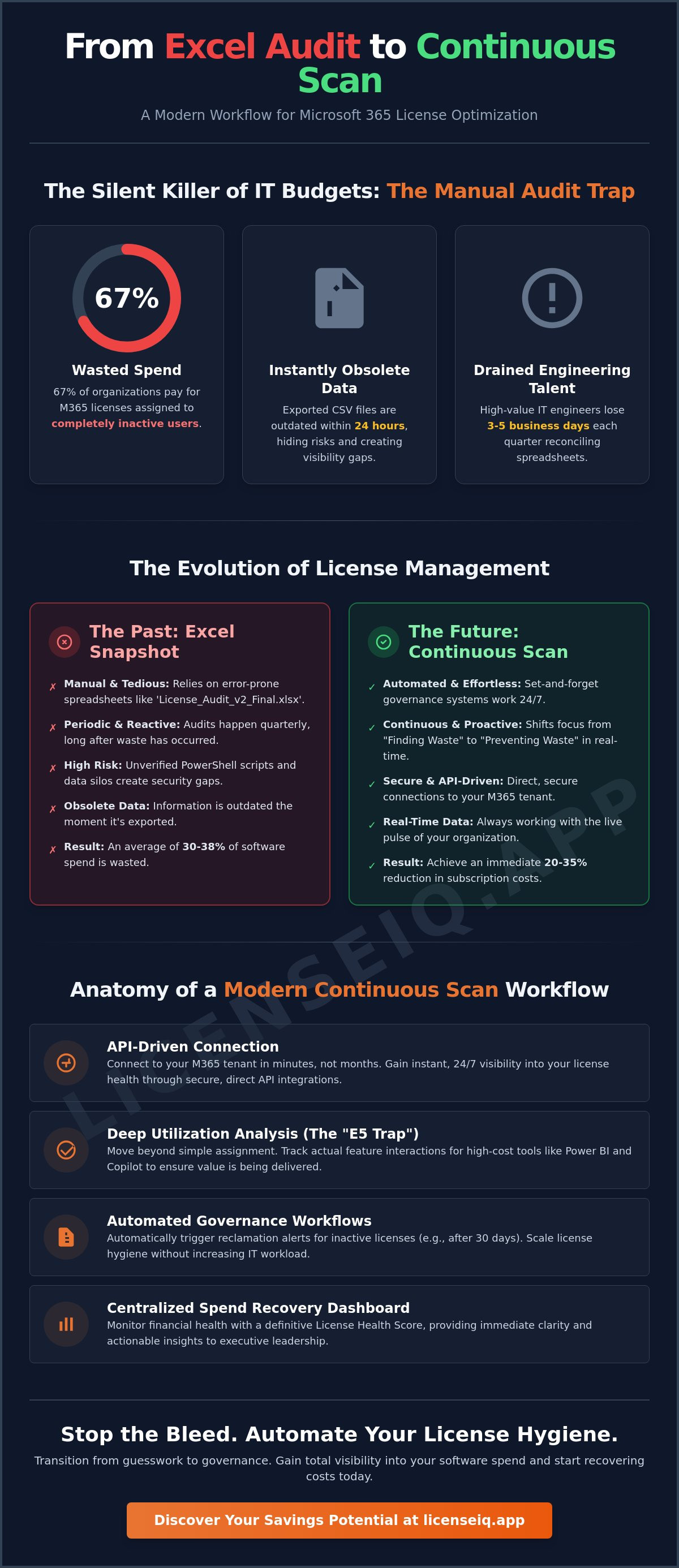
Did you know that 67% of organizations are currently paying for Microsoft 365 licenses assigned to completely inactive users? It's a staggering figure that highlights a fundamental flaw in traditional IT management. If you're still relying on manual spreadsheets, your data is obsolete the moment you click export. You've likely spent hours reconciling E3 and E5 tiers only to realize the snapshot you captured doesn't reflect your actual utilization. With Microsoft announcing price increases for Business Basic and Standard plans effective July 1, 2026, the cost of this inefficiency is higher than ever.
Transitioning From Excel Audit to Continuous Scan: A Modern Microsoft 365 License Workflow is the only way to stop the bleed. This article teaches you how to replace manual audits with an AI-native, set and forget governance system that eliminates waste in real-time. This approach doesn't just clear the clutter; it delivers an immediate 20-35% reduction in subscription costs. We'll walk through the steps to automate license hygiene, reclaim idle seats, and generate a definitive Health Score that gives your executive leadership total visibility into your software spend.
Key Takeaways
- Eliminate the 30% waste caused by stale data in manual spreadsheets. Learn why exported CSV files are obsolete within 24 hours and how they hide shadow IT risks.
- Transitioning From Excel Audit to Continuous Scan: A Modern Microsoft 365 License Workflow provides 24/7 visibility into your tenant health using API-driven automation.
- Identify the "E5 Trap" by moving beyond simple license assignment to deep utilization analysis. Track actual feature interactions for high-cost tools like Power BI and Copilot.
- Implement automated governance workflows to reclaim inactive licenses instantly. Scale your license hygiene without increasing the manual workload of your IT team.
- Monitor your financial health through a centralized Spend Recovery Dashboard. Use a definitive License Health Score to provide immediate clarity to executive leadership.
The Failure of the Snapshot: Why Excel Audits Cost You 30% More
Static audits are the silent killers of IT budgets. When you export a CSV from the Microsoft 365 Admin Center, you aren't looking at your current environment; you're looking at a historical artifact. In a modern enterprise, data is obsolete within 24 hours of extraction. Employees join, leave, or change roles daily. This constant movement makes manual tracking impossible to maintain. Transitioning From Excel Audit to Continuous Scan: A Modern Microsoft 365 License Workflow is no longer a luxury for large firms. It's a financial necessity for any organization looking to reclaim the 38% of software spend typically wasted on unused seats.
Manual tracking invites human error and creates massive visibility gaps. Shadow IT thrives in the dark corners of a spreadsheet. Forgotten trial licenses for premium add-ons often convert to paid subscriptions without anyone noticing until the next quarterly review. Perhaps the highest cost is the drain on your talent. High-value IT engineers often spend three to five business days every quarter reconciling rows in Excel. This is a poor use of specialized skills that should be focused on security or infrastructure projects. This manual approach fails to address the critical gap between license assignment and actual utilization. Effective Software asset management (SAM) requires knowing if a user actually opened the app, not just that they have the right to do so.
The Hidden Friction of Version Control
Version control in license management is a recipe for governance failure. When your team relies on files like "License_Audit_v2_Final.xlsx," you create data silos that lead to expensive mistakes. Manually cross-referencing HR records with M365 data is tedious and prone to oversight. Data decay in SaaS management is the rapid loss of accuracy in license records as user status and application activity change in real-time. Without a single source of truth, your upcoming renewal negotiations will be based on guesswork rather than hard data.
Why PowerShell is No Longer Enough in 2026
The complexity of Microsoft 365 tiers in 2026 has outpaced the capabilities of simple scripts. Managing the nuances between E3, E5, and the new E7 Frontier Suite requires more than a basic data dump. Running unverified PowerShell scripts for data extraction also introduces significant security risks into your tenant. Raw script output lacks the actionable financial insights needed for spend recovery. It tells you what you have, but it doesn't tell you how much money you're losing or how to fix it instantly.
The Anatomy of a Modern Continuous Scan Workflow
A continuous scan is an automated, API-driven process that monitors your Microsoft 365 tenant health 24/7. It replaces the periodic, manual labor of the past with a persistent digital auditor that never sleeps. This shift From Excel Audit to Continuous Scan: A Modern Microsoft 365 License Workflow represents the evolution of IT operations from reactive to proactive. By connecting directly to Microsoft’s APIs, these systems identify discrepancies in real-time. You aren't looking at a snapshot from last week; you're looking at the pulse of your organization right now.
The 'Connect in Minutes' philosophy is central to this modern approach. Traditional software asset management often required months of implementation and complex consulting engagements. Today, visibility is instant. Modern platforms leverage the Model Context Protocol to provide deeper insights into user behavior and license distribution. This allows AI-native tools to identify complex patterns that a human eye would miss in a spreadsheet. It ensures that every license assigned is actually contributing to your bottom line.
The primary goal shifts from 'Finding Waste' to 'Preventing Waste.' Instead of discovering thousands of dollars in losses during a quarterly review, the system issues proactive alerts the moment a seat becomes redundant. If a user remains inactive for 30 days, the workflow triggers a reclamation alert immediately. According to the U.S. Government Accountability Office, implementing rigorous management practices can lead to significant savings across an organization's software portfolio. This vigilance turns license management into a competitive advantage.
Real-Time Data vs. Batch Processing
API-first connections ensure you are always looking at the current state of your tenant. Unlike batch processing, which relies on scheduled data dumps, real-time scanning catches changes as they happen. This includes the automated discovery of unassigned but active licenses that are often overlooked in manual counts. The LicenseIQ platform serves as the industry benchmark for this high-velocity workflow, providing the speed necessary to manage dynamic workforces. To see how your current stack measures up, you can audit your tenant health in seconds.
The License Health Score: Your New North Star
The License Health Score is a single, quantifiable metric designed for executive reporting. It distills complex utilization data into a clear percentage that anyone can understand. A continuous scan updates this score daily based on actual user activity, not just logins. This transparency is vital when justifying IT budget requests to the CFO. When you can prove that 95% of your licenses are fully utilized, you build the confidence needed for high-stakes renewal negotiations and avoid the anxiety of unmanaged spend.
Beyond Assignment: Analyzing Real-World Utilization
Assignment is a static event, but utilization is a dynamic behavior. Many IT leaders fall into the "E5 Trap," paying $60 per user for the full Microsoft 365 suite when the user's actual activity only warrants an E3 tier at $39. That’s a $21 monthly loss per seat that adds up quickly across a large workforce. By moving From Excel Audit to Continuous Scan: A Modern Microsoft 365 License Workflow, you stop guessing and start measuring. This transition reveals exactly which advanced security, analytics, and AI features remain untouched by your staff.
Data from May 2026 shows that 67% of organizations currently pay for "Zombie Accounts." These are licenses assigned to users who haven't logged in for 30, 60, or 90 days. However, even active users can be a source of significant waste. Activity-based auditing tracks specific interactions with high-cost tools like Power BI or Copilot. If a user hasn't engaged with AI agents in 30 days, there is no reason to pay the $30 monthly premium for Copilot. You must differentiate between individual waste and shared licenses to protect your bottom line. A continuous scan identifies these patterns before they become permanent budget leaks.
The E3 vs. E5 Utilization Gap
SMBs often over-provision licenses to avoid compliance risks, but this "safety first" approach is expensive. Continuous scanning flags users who are candidates for downgrades without risking data loss or security gaps. For example, if a user never touches Power BI Pro or advanced eDiscovery, they don't need an E5 license. You can consult our Guide to M365 License Types to understand exactly which features your users can live without. This visibility allows you to negotiate your next renewal with confidence and precision.
Right-Sizing: The Data-Driven Approach
Right-sizing is the strategic alignment of software costs with the actual value delivered to the business. Using continuous telemetry data, you can distinguish between "Power Users" who require full desktop apps and "Casual Users" who only need web-based access. This workflow often involves moving frontline workers to F-series licenses or Office 365 E1 plans, which cost significantly less than full enterprise suites. By basing these moves on real-world activity rather than job titles, you ensure that every dollar spent on your Microsoft 365 environment is justified by actual usage.
Implementing Automated Governance Workflows
Visibility is useless without velocity. Once you've moved From Excel Audit to Continuous Scan: A Modern Microsoft 365 License Workflow, your next priority is closing the loop between detection and remediation. An automated governance workflow transforms your license environment from a static expense into a dynamic asset. This system doesn't just flag waste; it provides a "one-click" path to spend recovery. By automating the reclamation loop, you ensure that identified savings actually hit your bottom line rather than sitting in a report for another quarter.
Establishing a "Zero-Waste" policy becomes achievable when supported by automated reporting. You can set specific threshold alerts that notify your team the moment unassigned license costs exceed a set dollar value, such as $500 per month. This prevents small leaks from becoming massive financial drains over time. Consistent, automated hygiene reduces the "SaaS Tax" that plagues unmanaged tenants, ensuring you only pay for the capacity you actually use. To start reclaiming your budget, you can deploy automated governance workflows in under five minutes.
The Offboarding Reclamation Loop
Employee turnover is a primary driver of license waste. When a user is disabled in Active Directory, a modern scan workflow triggers an immediate reclamation alert. This process follows a precise sequence to ensure security and financial efficiency. First, the system detects the account status change in real-time. Next, it verifies data retention requirements, such as converting the mailbox to a shared status. Finally, it frees up the license seat for immediate reuse or cancellation. This ensures you don't keep paying for an E5 seat for months after an employee departs. For a detailed breakdown of this process, consult our Office 365 Offboarding Checklist.
Continuous Financial Accuracy for CFOs
Automated workflows provide audit-ready data for monthly financial closings, eliminating the frantic end-of-month spreadsheet scramble. This level of precision is vital for annual contract renewal negotiations with Microsoft. When you approach your reseller with 12 months of utilization data, you negotiate from a position of strength. You can prove exactly which licenses are needed, preventing the over-buying that Microsoft’s July 1, 2026, price increases will otherwise amplify. Transitioning From Excel Audit to Continuous Scan: A Modern Microsoft 365 License Workflow ensures that your financial reporting is always based on reality, not a stale export from three weeks ago.
Spend Recovery: The Logical Conclusion of Modern Workflows
Recovery is the ultimate proof of a successful governance strategy. The transition From Excel Audit to Continuous Scan: A Modern Microsoft 365 License Workflow leads to one inevitable destination: the reclamation of wasted capital. Identifying waste is a diagnostic step, but spend recovery is the cure. By moving away from static snapshots, you ensure that every dollar identified as redundant is actually returned to your budget. This isn't a one-time event; it's a continuous financial optimization that keeps your organization lean and resilient.
The ROI of this automation is immediate and quantifiable. When you compare the cost of a specialized platform to the cost of unmanaged waste, the decision becomes a simple financial calculation. Data shows that 56% of Microsoft 365 licenses are underutilized, inactive, or unassigned. For a mid-sized enterprise, this represents thousands of dollars in monthly "leakage." SMBs frequently save up to 35% on their annual commitment by switching from manual tracking to the LicenseIQ platform. This recovery pays for the system itself while providing a significant surplus to the bottom line.
Visualizing Your Savings with LicenseIQ
The Spend Recovery Dashboard provides the immediate clarity that finance leaders demand. It visualizes the gap between your current spend and your optimized potential, offering specific dollar-value recommendations for every license tier. The platform scans your entire stack to find redundant licenses, such as overlapping Project or Visio add-ons that often go unnoticed in a CSV export. You don't have to guess where the waste is; the system highlights it for you. You can get started with a scan today to see exactly how much capital you can recover before your next billing cycle.
Strategic Spend Recovery as a Competitive Advantage
Reclaiming 35% of your Microsoft 365 spend isn't just a budget win; it's a competitive advantage. These recovered funds can be reallocated to innovation, new hires, or critical security infrastructure. With global cloud spending expected to reach $1 trillion by 2026, efficiency is no longer optional. Total visibility into your software expenditure provides the peace of mind that your resources are being guarded by a precise, vigilant system. You move from the chaos of reactive audits to the security of proactive governance. Your first step is connecting your tenant and generating your initial License Health Score to see the light where there was once only hidden cost.
Secure Your Budget with Continuous Governance
The era of the manual spreadsheet audit is over. Relying on stale data isn't just inefficient; it's a direct threat to your bottom line. By adopting the shift From Excel Audit to Continuous Scan: A Modern Microsoft 365 License Workflow, you replace guesswork with precision. You've seen how automated governance and real-time utilization tracking can uncover the "E5 Trap" and eliminate zombie accounts before they drain your resources. This transition ensures your software spend remains aligned with actual business value 24/7.
It's time to take control of your SaaS spend. You can save up to 35% on your M365 subscriptions by moving to a proactive model. Our AI-native Spend Recovery Dashboard gives you the visibility you need to make data-driven decisions during your next renewal. Stop wasting money and start your first M365 scan today with LicenseIQ. You can connect your tenant in under 5 minutes and generate your first Health Score immediately. Operational transparency is the hallmark of a modern IT leader. Start your journey toward total visibility today.
Frequently Asked Questions
How long does it take to switch from a manual audit to a continuous scan workflow?
It takes less than 5 minutes to connect your tenant and begin the transition. Unlike manual audits that require days of PowerShell scripting and spreadsheet reconciliation, the LicenseIQ platform provides instant visibility. You can move From Excel Audit to Continuous Scan: A Modern Microsoft 365 License Workflow almost immediately after granting API permissions. The system then populates your dashboard with actionable data in real-time.
Is it safe to connect an AI-native tool like LicenseIQ to my Microsoft 365 tenant?
Connection is highly secure because the platform uses official Microsoft Graph APIs with limited, specific permissions. You don't need to share global admin credentials or run unverified third-party scripts. The system operates as a vigilant digital auditor, ensuring your data remains protected within the Microsoft security boundary while providing the transparency needed for spend recovery. It's a read-only connection designed for optimization, not data modification.
Can a continuous scan workflow help with Microsoft 365 contract renewals?
Yes, it provides a year of historical utilization data to strengthen your negotiation position. Instead of guessing your needs 30 days before a renewal, you can present 100% accurate usage reports to your reseller. This data prevents over-buying and helps you avoid the price increases announced for July 1, 2026. Having a clear audit trail of actual usage ensures you only pay for what your team uses.
What is a good License Health Score for an SMB?
A healthy target for an SMB is a License Health Score of 90% or higher. This score indicates that 90% of your assigned licenses are actively used and correctly sized for the user's role. Scores below 70% typically signal significant waste, often due to "Zombie Accounts" or users stuck in the "E5 Trap" without using advanced security features. Monitoring this score daily keeps your financial health in check.
How much can I realistically save by automating my M365 license governance?
Organizations realistically save between 20% and 35% on their annual Microsoft 365 subscription costs. These savings come from reclaiming inactive seats and right-sizing users from premium tiers to more affordable plans like F3 or E1. With 38% of enterprise software spend currently wasted, automation provides a high-velocity path to reclaiming those lost dollars. This optimization directly offsets the rising costs of cloud services.
Does the continuous scan workflow require a dedicated IT person to manage?
No, the workflow is designed as a "set and forget" system that significantly reduces the IT workload. While a manual audit might consume 40 hours of an engineer's time per quarter, the automated platform runs autonomously in the background. It only requires intervention when a threshold alert is triggered or a reclamation action needs a final human approval. This allows your team to focus on innovation rather than spreadsheets.
What happens to user data when a license is reclaimed through an automated workflow?
User data is fully preserved during the reclamation process through integrated safety protocols. The workflow includes steps to convert mailboxes to shared status or move OneDrive files before the license is unassigned. This ensures you maintain compliance and data retention standards while immediately stopping the billing for that specific seat. It's a precise process that eliminates waste without risking corporate information.
Can LicenseIQ identify waste in specialized licenses like Copilot or Windows 365?
Yes, the platform tracks utilization for high-cost add-ons including Microsoft 365 Copilot and Windows 365. Since Copilot costs $30 per user monthly, identifying users who haven't engaged with AI agents in 30 days is a top priority for spend recovery. This granular visibility ensures you aren't over-provisioning specialized tools that carry a premium price tag. You get a clear view of every dollar spent across your entire stack.


