

Did you know that 46% of all SaaS applications are currently underutilized, leading to an average annual waste of $19.8 million per organization? This systemic inefficiency is the catalyst for The Unused Copilot Problem: Six Figures Hiding in Plain Sight. At $360 per user every year, a stalled AI rollout doesn't just represent a missed opportunity; it creates a massive financial leak that manual spreadsheets can't plug. You're likely facing intense pressure to prove AI ROI while navigating opaque billing structures that hide your true utilization rates.
We recognize the challenge of managing budget bloat without the right tools for visibility. You need a proactive way to ensure your software spend translates into actual productivity. This guide will teach you how to identify, quantify, and recover the hidden costs of underutilized Microsoft 365 Copilot licenses. We'll outline a precise, actionable plan to move from digital chaos to automated governance, using the LicenseIQ Platform to restore your financial health and eliminate waste for good.
Key Takeaways
- Quantify the $360 annual cost per user to understand how silent inactivity drains your IT budget.
- Address The Unused Copilot Problem: Six Figures Hiding in Plain Sight by closing the gap between assigned licenses and active daily usage.
- Execute a precision audit using a 90-day activity threshold to identify exactly which seats to reclaim or reallocate.
- Differentiate between HR adoption goals and hard utilization metrics to ensure your AI investment delivers measurable ROI.
- Leverage the License Health Score and the LicenseIQ Platform to automate governance and maintain total visibility over software spend.
The $360 Annual Tax: Understanding the Unused Copilot Problem
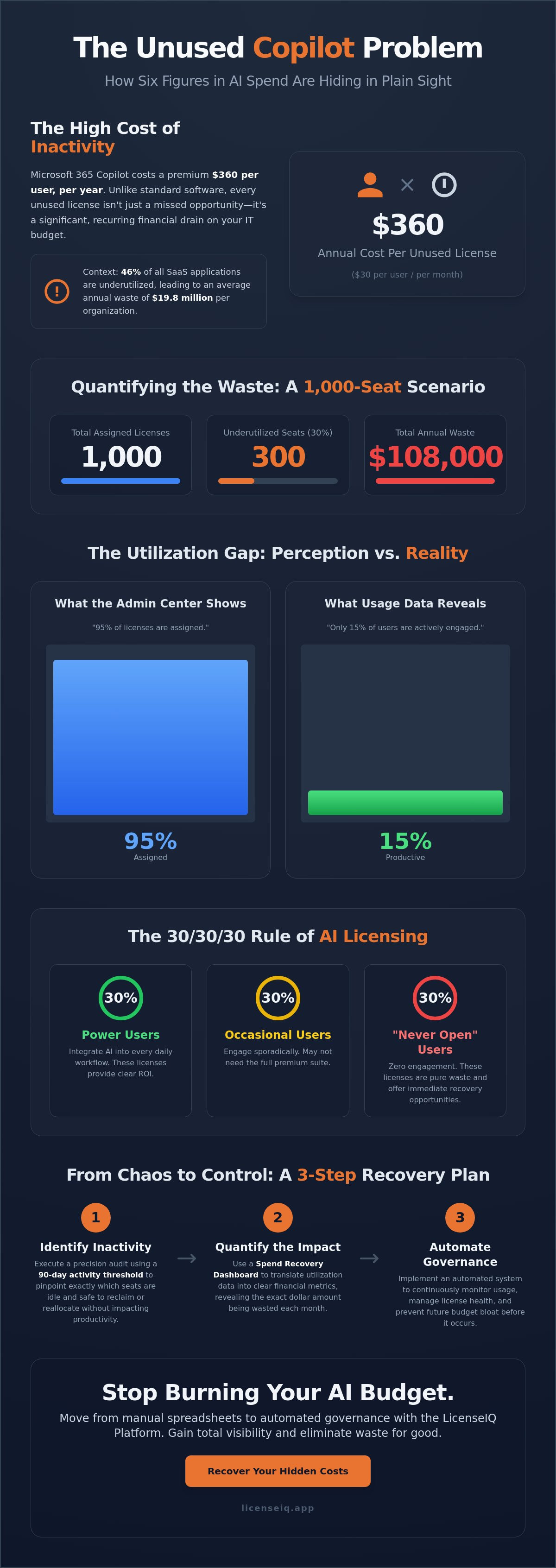
The Unused Copilot Problem: Six Figures Hiding in Plain Sight is the measurable discrepancy between licenses assigned by IT and the actual daily engagement of employees. While a standard Microsoft 365 E3 license costs significantly less, Copilot carries a fixed $30 per user monthly fee. This equates to $360 per user annually. Every idle seat is a direct drain on your bottom line. If your organization manages 1,000 seats and 30% are underutilized, you're burning $108,000 per year on a single line item.
Standard license waste is a nuisance, but Copilot waste is a crisis. The stakes are three times higher than traditional M365 waste because the price point is a premium add-on, not a baseline utility. A "set it and forget it" deployment strategy is a CFO's nightmare. It treats high-cost AI like a low-cost commodity, ignoring the fact that AI adoption requires active behavioral shifts. Without automated oversight, these costs remain buried in your annual true-up, eroding your IT budget with every passing month.
The High Cost of the AI "Land Grab"
During the 2024 and 2025 AI hype, many organizations over-provisioned licenses to avoid falling behind the curve. By May 2026, the market has shifted from speculative innovation budgets to strict operational scrutiny. Yesterday's "shelfware" has evolved into expensive "AI-ware." IT leaders now face the pressure of justifying $360 per seat for users who rarely open the tool. You can't afford to let experimental spend become a permanent operational burden that lacks a clear return on investment.
Visibility: The First Casualty of SaaS Sprawl
The Microsoft 365 Admin Center often obscures the full story of your investment. It tells you who is "Licensed" or "Enabled," but it doesn't highlight who is actually "Productive." You might see 95% of licenses assigned while only 15% of users engage with Copilot daily within Word, Teams, or Outlook. This lack of transparency leads to budget bloat that is impossible to track in manual spreadsheets. The Utilization Gap is the delta between purchased seats and users who derive measurable value from the tool, serving as the primary driver of wasted SaaS spend. To regain control, you need a Spend Recovery Dashboard that surfaces these hidden costs in real time.
Quantifying the Waste: How Inactive Licenses Reach Six Figures
The financial impact of underutilization is often underestimated until it's visualized as a line item. Consider a mid-sized organization with 500 Copilot seats. Current 2026 data indicates that 46% of SaaS applications go underutilized; applying a conservative 40% inactivity rate to this scenario reveals a stark reality. You're paying for 200 licenses that provide zero return. At $30 per user monthly, that's a $6,000 monthly leak. Over a single fiscal year, this specific instance of The Unused Copilot Problem: Six Figures Hiding in Plain Sight results in $72,000 of pure waste.
For mid-market companies with 1,000 employees, these numbers double. A $144,000 annual loss isn't just a budget oversight; it's a significant misallocation of capital. This capital could otherwise fund critical security infrastructure or offset the upcoming July 2026 price increases for M365 Business plans. The waste compounds when you factor in redundant licensing. Many organizations pay for premium E5 features while stacking Copilot add-ons for users who don't utilize either. This "double-stacking" of unused features turns a standard subscription into a massive financial anchor.
The 30/30/30 Rule of AI Licensing
Usage patterns typically fall into three distinct buckets. Approximately 30% of your staff are power users who integrate AI into every workflow. Another 30% are occasional users who might only need basic AI features rather than the full $30 premium suite. The final 30% represent the "Never Open" segment. These users have never clicked the sidebar or generated a single summary. Identifying this last group offers an immediate opportunity for spend recovery. You can reclaim these licenses instantly to stop the bleeding without impacting organizational productivity.
Compounding Costs Over the Fiscal Year
Annual commitments create a dangerous "set it and forget it" environment. Without monthly usage audits, a $100k leak stays hidden within a multi-million dollar Microsoft agreement. This lack of oversight is why mid-market firms often struggle with budget bloat. Implementing aggressive M365 cost reduction strategies is the only way to ensure your AI investment remains sustainable. You need a system that doesn't just track seats, but evaluates the health of every dollar spent. Using a Spend Recovery Dashboard allows you to catch The Unused Copilot Problem: Six Figures Hiding in Plain Sight before it finalizes in your annual true-up.
Adoption Metrics vs. License Utilization: The Governance Gap
Many leaders confuse adoption with utilization. Adoption measures if people know how to use a tool; utilization measures if they actually do. This distinction is central to solving The Unused Copilot Problem: Six Figures Hiding in Plain Sight. HR-led prompt engineering courses are popular, but they don't fix a bloated budget in May 2026. Training takes months to show results. License reclamation takes minutes. You shouldn't wait for an entire workforce to become AI-ready while paying $30 per user for those who haven't logged in for 30 days.
The most common pushback to optimization is the fear of future need. Managers often claim they might need those licenses for a project next month. However, paying for "maybe" is poor fiscal management. Automated Governance Workflows solve this by instantly re-provisioning seats only when a specific project triggers the need. This ensures you don't pay for idle time between initiatives. It transforms your software stack from a static cost center into a dynamic, responsive resource.
The Myth of the "Universal User"
Departments don't benefit from AI equally. Sales and Legal teams often see much higher ROI compared to back-office functions because their workflows are text-heavy and repetitive. Blanket deployments across the entire company are inherently inefficient. You should adopt persona-based licensing to ensure high-cost tools go where they generate the most value. This strategy also prevents Shadow AI. Frustrated power users often pay for personal $20 Copilot Pro accounts because the corporate rollout is too slow, even while corporate seats sit empty in other departments.
Governance as a Continuous Process
Quarterly audits are a relic of a slower era. At $30 per month, a license that sits idle for 90 days has already wasted $90. If you wait for a quarterly review to fix The Unused Copilot Problem: Six Figures Hiding in Plain Sight, you've already lost the opportunity for significant spend recovery. The industry is shifting from manual spreadsheets to real-time metrics like the License Health Score. True governance is about right-sizing your environment to match actual demand, not just cutting costs blindly. By using the LicenseIQ Platform, you can maintain total visibility and ensure every dollar of your AI budget works toward your growth.
How to Execute a High-Precision Copilot License Audit
Execution is the only cure for The Unused Copilot Problem: Six Figures Hiding in Plain Sight. To stop the financial leak, you must move beyond high-level usage reports and perform a granular analysis of your tenant. Follow this five-step protocol to identify waste and reclaim your budget.
- Step 1: Export Data. Access the Microsoft 365 Admin Center and pull the Active User report. Filter specifically for users assigned the "Microsoft 365 Copilot" license tag.
- Step 2: Filter by Activity. Cross-reference your list with the "Last Activity Date" column. Focus on users who haven't engaged with the service in 90 days.
- Step 3: Verify Interactions. Look for zero "Copilot interactions" across core applications like Word, Excel, and Teams. If the interaction count is zero, the license provides no value.
- Step 4: Execute Reclamation. Trigger a workflow to revoke licenses from inactive users. Manual removal is slow; use Automated Governance Workflows to handle this at scale.
- Step 5: Reallocate Capital. Move the recovered funds into high-impact IT initiatives, such as improving data hygiene or preparing for the July 2026 price increases.
Setting Your Inactivity Thresholds
Choosing the right window is critical for balancing cost and user experience. A 30-day threshold is often too aggressive. It doesn't account for vacations or temporary project lulls. Conversely, a 180-day threshold is too expensive. It results in $180 of waste per inactive user before you take action. A 90-day window serves as the industry gold standard for identifying true shelfware. For new hires, implement a 60-day "Grace Period" to allow for onboarding and training. Ensure your process includes a robust Office 365 Offboarding Checklist to capture licenses from departing employees immediately.
The Communication Plan
Removing a license from a high-level executive or department head requires a data-driven approach. You don't tell a VP you're taking their tool away; you show them the 12% utilization rate across their department. Use specific usage data to justify the removal and explain how the budget is being redirected to more productive areas. To minimize friction, implement a "Request-on-Demand" portal. This allows users to regain access instantly if their workflow changes. This ensures that governance doesn't become a barrier to productivity. You can automate your license reclamation today to transform your AI spend into a lean, high-ROI operation.
Beyond Manual Audits: Automated Governance with LicenseIQ
Manual spreadsheets are the enemy of efficiency. They are outdated the moment you save them. To solve The Unused Copilot Problem: Six Figures Hiding in Plain Sight, you need a system that operates at the speed of your business. The LicenseIQ Platform connects to your Microsoft 365 tenant in minutes. It performs a deep scan of your environment to expose every dollar of Copilot waste. You don't have to wait for a monthly report to see where your money is going. Our system acts as a 24/7 digital auditor, monitoring your M365 stack with relentless precision.
The License Health Score provides a single, clear metric for your AI investment. If your score drops, it means your utilization is lagging behind your spend. This visibility allows IT and finance leaders to make data-driven decisions instantly. You can automate the reclamation of inactive Copilot seats without any manual labor from your IT team. This automation frees your staff to focus on strategic growth rather than administrative cleanup. We provide the antidote to the chaos of unmanaged software stacks by delivering total visibility into your utilization rates.
Real-Time Spend Recovery
The platform doesn't just show you data. It provides specific dollar-value recommendations for recovery. In a recent May 2026 implementation, a mid-market organization moved from 40% license waste to just 5% waste in a single billing cycle. This rapid optimization saved them six figures before their next annual true-up. For a deeper look at these capabilities, consult our M365 License Optimization Guide. We help you transition from the darkness of unknown spend into total financial clarity using our Spend Recovery Dashboard.
Future-Proofing Your AI Budget
AI adoption isn't linear. Your needs will fluctuate as projects start and finish. LicenseIQ allows you to scale Copilot licenses up and down based on real-time demand. This ensures 100% compliance and eliminates the risk of "ghost" licenses that haunt your budget for months. You gain the agility to support innovation without the fear of uncontrolled costs. It's time to stop guessing and start governing. You can recover your wasted Copilot spend with LicenseIQ and secure your organization's financial health today. By addressing The Unused Copilot Problem: Six Figures Hiding in Plain Sight, you turn a hidden liability into a strategic advantage.
Reclaim Your AI Budget and Drive Real ROI
Managing premium AI licenses shouldn't feel like a guessing game. You've seen how the $360 annual cost per user quickly compounds into a massive financial leak. By shifting from passive adoption metrics to active utilization audits, you protect your organization’s financial health. Solving The Unused Copilot Problem: Six Figures Hiding in Plain Sight requires a move away from static spreadsheets and toward real-time visibility. Every inactive seat you reclaim is capital you can redirect toward strategic growth and technical innovation.
LicenseIQ provides the meticulous oversight you need to eliminate waste for good. Our AI-native governance platform connects to your tenant in minutes to deliver specific dollar-value recovery insights across your entire environment. You can save up to 35% on your M365 subscriptions by identifying and removing inactive seats before your next annual true-up or monthly billing cycle. It's time to replace the darkness of unknown spend with a vigilant and precise monitoring system that stays one step ahead of budget bloat. Take control of your software stack and ensure every dollar of your AI investment delivers measurable results.
Stop wasting money on unused licenses—Get your Health Score at LicenseIQ
Frequently Asked Questions
How do I see which users are actually using their Copilot license?
You must access the Microsoft 365 Admin Center and navigate to the Usage Reports section. Locate the Copilot for Microsoft 365 usage report to track active users and their specific interactions across applications like Teams, Word, and Outlook. For deeper visibility, the LicenseIQ Platform provides a real-time Spend Recovery Dashboard. It highlights exactly which users have recorded zero interactions over your chosen 90-day threshold, making waste impossible to ignore.
Can I get a refund from Microsoft for unused Copilot licenses?
Microsoft typically doesn't offer retroactive refunds for unused licenses once the billing period has started. Most enterprise Copilot licenses require an annual commitment at $360 per user, which makes proactive optimization essential. You can only reduce your seat count during your next renewal or annual true-up window. This lack of flexibility is why identifying The Unused Copilot Problem: Six Figures Hiding in Plain Sight early is vital for your budget protection.
What is the average adoption rate for Microsoft 365 Copilot in 2026?
Current data from Q1 2026 indicates that while Microsoft reports over 20 million paid seats, actual daily active usage lags behind. General SaaS industry reports show that 46% of all applications are underutilized or go completely unused within the average organization. Many enterprises currently operate in limited pilot phases rather than full-scale deployment. This creates a substantial utilization gap that drives up unnecessary costs for IT departments.
What happens to user data if I remove their Copilot license?
Removing a Copilot license doesn't delete the user's primary Microsoft 365 data, such as Outlook emails or OneDrive documents. The user simply loses access to AI-powered features like meeting summarization and automated drafting within those applications. Any AI-generated content already saved into their files remains completely intact. This makes license reclamation a low-risk strategy for recovering IT spend without impacting the organization’s data integrity or security posture.
Is there a way to automate the reclamation of unused AI licenses?
Yes, you can use the LicenseIQ Platform to implement Automated Governance Workflows. These workflows monitor real-time usage data and automatically revoke licenses from users who fall below a specific activity threshold. This eliminates the need for manual IT labor and ensures your AI budget is always right-sized. Automation prevents the "set it and forget it" mentality that often leads to significant budget bloat in large software stacks.
Can I reassign a Copilot license from one user to another instantly?
You can reassign licenses through the Microsoft 365 Admin Center or via automated scripts. Once you unassign a license from an inactive user, it returns to your pool of available seats and can be assigned to a new employee immediately. This allows you to support high-impact projects without purchasing additional licenses. Using a dynamic pool of seats ensures you maximize the value of every $30 monthly investment you've already made.
What is the difference between a Copilot license and a standard M365 license in terms of billing?
Standard M365 licenses like E3 or E5 are foundational utilities, but Copilot is a premium add-on billed at a fixed $30 per user monthly rate. Unlike some base plans that offer monthly flexibility, enterprise Copilot often requires an annual commitment paid upfront. This fixed cost structure means that every idle seat represents a direct, recurring loss. These losses are significantly more expensive than traditional software waste found in lower-tier applications.
How much can a typical SMB save by auditing their Copilot seats?
An organization with 500 seats and a 40% inactivity rate can save $72,000 annually by addressing The Unused Copilot Problem: Six Figures Hiding in Plain Sight. Smaller firms with under 300 users still see thousands in annual waste even at promotional $18 or $21 rates. Auditing ensures you only pay for active, productive seats. This allows you to reallocate funds toward other critical IT priorities or the upcoming July 2026 price increases.


