

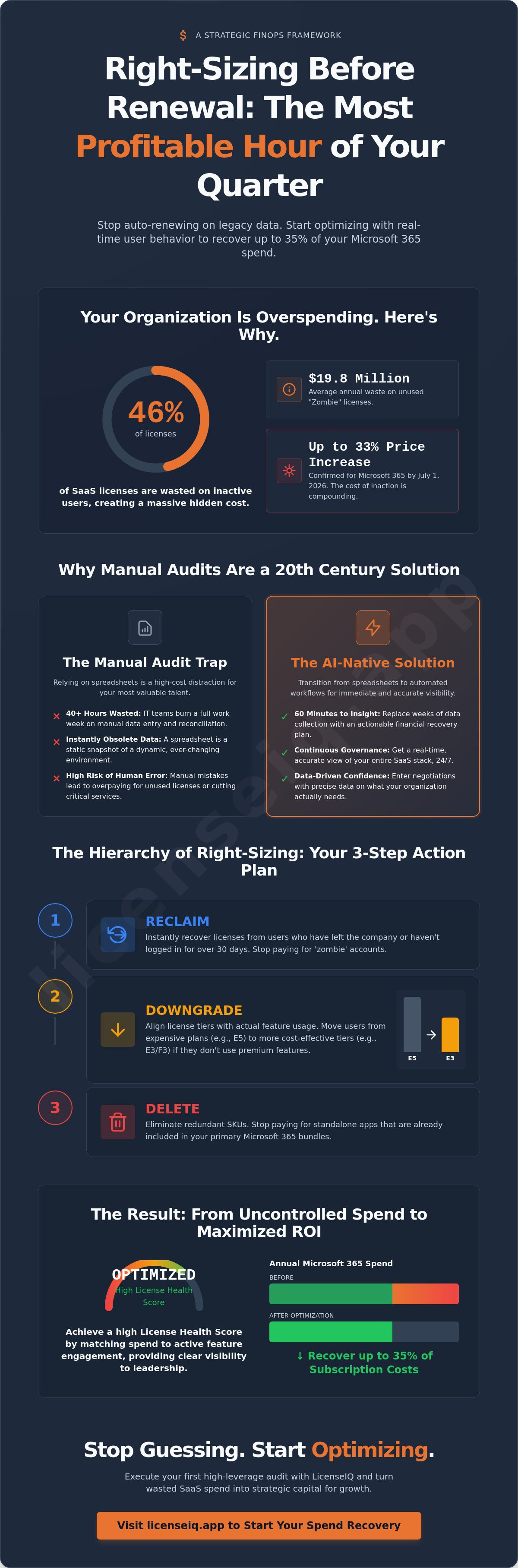
Your organization likely wastes 46% of its SaaS licenses, effectively burning $19.8 million on unused seats every year. With Microsoft 365 prices set to increase by up to 33% on July 1, 2026, treating Right-Sizing Before Renewal: The Single Most Profitable Hour of Your Quarter as a strategic priority is the only way to protect your bottom line. You've likely felt the mounting pressure of an approaching deadline while trapped in a spreadsheet nightmare, lacking the visibility to prove which licenses your team actually uses.
It's time to stop guessing and start optimizing. We'll show you how to execute a high-leverage Microsoft 365 license audit in 60 minutes to recover up to 35% of your subscription spend. You'll learn how to replace manual audits with automated governance workflows and the LicenseIQ Spend Recovery Dashboard. We'll provide a clear roadmap to uncover hidden costs and enter your next negotiation with total data-driven confidence that your stack is optimized for actual need, not just history.
Key Takeaways
- Break the cycle of "auto-pilot" renewals by aligning license allocation with real-time user behavior instead of historical data.
- Execute the framework for Right-Sizing Before Renewal: The Single Most Profitable Hour of Your Quarter to recover up to 35% of your Microsoft 365 spend.
- Transition from manual spreadsheet tracking to automated governance workflows for immediate and accurate visibility into your SaaS stack.
- Leverage the License Health Score to provide leadership with a clear dollar-value list of exactly where to eliminate waste.
- Implement a high-leverage 60-minute audit process that replaces weeks of data collection with actionable financial insights.
The Renewal Trap: Why 'Auto-Pilot' is Killing Your SaaS Margins
Most organizations renew their SaaS contracts on auto-pilot. They assume last year's seat count reflects next year's needs. This strategy creates a massive hidden cost that erodes your margins every month. With Microsoft 365 prices confirmed to increase by up to 33% on July 1, 2026, the cost of inaction has never been higher. Every unused seat becomes a compounding liability. Executing Right-Sizing Before Renewal: The Single Most Profitable Hour of Your Quarter allows you to reclaim that capital before it disappears into a vendor's pocket.
SMBs are particularly vulnerable to this trap. They often over-provision licenses to avoid service interruptions, yet they lack the visibility to see the 46% of licenses that sit idle across their organization. The psychological friction of starting an audit often feels greater than the pain of the monthly bill; however, the financial reality is clear. You're paying for software that provides zero value to your users.
The True Cost of Inactive Users and Redundant Licenses
A 'Zombie License' is a seat assigned to an inactive user, a service account, or a former employee. These licenses represent a significant portion of the $19.8 million that organizations waste annually on unused software. Effective Software Asset Management requires more than just counting seats; it requires analyzing actual utilization. Over-licensing doesn't just hurt your budget. It creates security gaps. Every unmonitored, active license is a potential entry point for unauthorized access, complicating your compliance posture and increasing your risk profile in an era of strict data regulations.
Why Manual Audits are a 20th Century Solution to a 21st Century Problem
Manual audits are a legacy approach to a modern problem. A spreadsheet is obsolete the moment you hit save. It provides a static snapshot of a dynamic environment where users join, move, or leave every week. IT managers often spend over 40 hours on manual data entry, attempting to map licenses to users across disparate systems. This is a high-cost distraction for your most valuable talent. Human error in these manual sheets leads to two outcomes: you either pay for licenses you don't need or you accidentally cut a critical service. The opportunity cost of having your IT staff perform data entry instead of strategic optimization is a hidden tax on your business growth.
What is License Right-Sizing? A Strategic FinOps Framework
Right-sizing isn't a blunt instrument. It's a surgical alignment of license allocation with actual user behavior and feature requirements. While simple cost-cutting focuses on reducing the total bill, right-sizing focuses on maximizing the value of every dollar spent. This distinction is the core of a mature FinOps framework. To successfully control SaaS and cloud spend, you must look beyond the invoice. You need to distinguish between allocation, which is the number of licenses you've purchased, and utilization, which represents the features your employees actually engage with daily.
Bridging this gap turns a routine administrative task into Right-Sizing Before Renewal: The Single Most Profitable Hour of Your Quarter. Automated Governance Workflows ensure this alignment isn't a one-time event. They provide a continuous loop of data that keeps your stack lean and your budget protected. By automating the discovery of unused seats, you remove the manual burden from your IT team and replace it with precision data.
The Hierarchy of Right-Sizing: Reclaim, Downgrade, or Delete
Strategic optimization follows a three-step hierarchy to eliminate waste. First, you reclaim licenses from users who have left the company or haven't logged in for 30 days. Second, you downgrade. If an employee has an E5 license but never uses advanced security features or Power BI, they should move to an E3 or F3 tier based on their actual feature data. Finally, you delete redundant SKUs. Organizations often pay for standalone apps that are already included in their primary Microsoft bundles. This hierarchy ensures that every license serves a specific, documented business purpose.
Identifying the 'Health Score' of Your Microsoft 365 Tenant
Visibility is the only effective antidote to SaaS sprawl. You can't manage what you can't see. A License Health Score is a quantitative measure of subscription efficiency that compares your total spend against active feature engagement. If your activity rates are low but your costs are high, your health score will drop. This metric provides IT and finance leaders with immediate clarity. It transforms complex usage logs into a single, actionable number. Monitoring this score through the LicenseIQ platform ensures you're always prepared for a negotiation, backed by data rather than assumptions. This transparency is the cornerstone of a healthy, optimized software stack.
Manual vs. AI-Native Audits: Why Time is Your Most Valuable Asset
Manual audits are a resource drain that most IT departments can no longer afford. Collecting data from multiple portals, exporting CSV files, and cross-referencing user activity takes an average of 40 hours for a mid-sized organization. This labor-intensive process relies on human intuition, which is prone to error. In contrast, an AI-native approach reduces this burden to 60 minutes. By choosing Right-Sizing Before Renewal: The Single Most Profitable Hour of Your Quarter, you shift from reactive data entry to proactive financial strategy. You stop being a clerk and start being an architect of efficiency.
Accuracy is the primary differentiator. Human audits suffer from point-in-time blindness; a spreadsheet is static the moment it's saved. Model Context Protocol automation allows for real-time data ingestion, ensuring your license mapping is 100% accurate. When you compare the Total Cost of Ownership (TCO), the manual method is significantly more expensive. Consider a Senior IT Manager earning $150,000 annually. Forty hours of their time costs the company roughly $2,800 in direct wages alone. When you multiply this by four quarters, the annual manual audit cost exceeds $11,000. You aren't just paying for the hours; you're paying the opportunity cost of stalling high-value IT projects.
The Failure of Legacy Software Asset Management (SAM)
Traditional SAM tools were built for the era of on-premise perpetual licenses. They're often too heavy and complex for modern SMB needs. These legacy systems suffer from an "Implementation Gap," frequently requiring three to six months of configuration before they deliver a single insight. You need a solution that connects in minutes, not months. The LicenseIQ Platform serves as the agile alternative, providing immediate visibility into your M365 tenant without the enterprise bloat. It eliminates the need for expensive consultants and long setup times, delivering value on day one.
Automated Governance: The Future of Continuous Optimization
Quarterly audits are no longer sufficient in a fast-paced SaaS environment. Automated Governance Workflows move your organization toward real-time spend recovery. AI identifies subtle patterns in user activity that humans consistently miss. For example, it can flag a user who has an E5 license but only accesses web-based versions of apps. AI goes beyond simple login data to analyze feature-level engagement. It can even detect if a user's premium security needs are already met by a different corporate tool. There's also a critical security benefit. Automated systems ensure license reclamation happens instantly during offboarding, closing potential access gaps that manual processes often overlook for weeks.
The 60-Minute Pre-Renewal Checklist: Your Action Plan
Efficiency is the difference between a bloated budget and a lean operation. You don't need days of manual data entry to prepare for a contract negotiation. By following a structured sprint, you can execute Right-Sizing Before Renewal: The Single Most Profitable Hour of Your Quarter and secure immediate savings. This 60-minute framework transforms raw tenant data into a tactical negotiation weapon.
- Minute 0-10: Connect and Scan. Establish your baseline by connecting the LicenseIQ Platform to your M365 tenant. A secure OAuth connection provides a total view of your environment in under ten minutes.
- Minute 10-30: Analyze the Spend Recovery Dashboard. Identify low-hanging fruit. This includes unassigned licenses, duplicate SKUs, and users who haven't logged in for over 30 days.
- Minute 30-50: Execute Automated Governance Workflows. Trigger automated sequences to reclaim seats from inactive users. This removes the manual burden and ensures your data is current.
- Minute 50-60: Finalize the SKU list. Compile your findings into a precise list of required licenses. You now have a data-driven blueprint for your renewal contract, ensuring you only pay for what you actually use.
Prioritizing High-Value Targets: The E5 to E3 Pivot
Significant savings often hide in top-tier licenses. Many organizations default to E5 for the entire staff, yet only 15% of users typically utilize the advanced analytics or telephony features included in that tier. By comparing Microsoft 365 E3 vs. E5, you can identify users paying for security features they never configure. You can handle 'Executive Exceptions' by applying specific tags within the platform. This allows for a rigorous audit that respects organizational hierarchy while still capturing massive savings from the general population.
Offboarding and Reclamation: Cleaning the Slate
Ghost users represent a security risk and a total financial waste. Cross-referencing HR data with actual M365 activity reveals licenses still assigned to employees who left months ago. Using a dedicated Office 365 offboarding checklist ensures you secure company data while instantly reclaiming spend. This process shouldn't be a one-time event. Setting up 'Continuous Hygiene' via automated workflows prevents waste from returning after the renewal ink is dry. Stop overpaying for licenses you don't need and start your 60-minute audit with LicenseIQ today to gain total visibility.
Maximizing Your ROI with LicenseIQ: Spend Recovery in Minutes
The transition from visibility to actual savings happens the moment you connect your tenant to the LicenseIQ Platform. While manual audits leave you guessing, our system provides immediate dollar-value insights. You don't have to wait weeks for a report. Within minutes of a secure connection, the Spend Recovery Dashboard identifies exactly where your capital is trapped. This speed turns Right-Sizing Before Renewal: The Single Most Profitable Hour of Your Quarter into a repeatable, high-impact financial event. It moves your IT department from a cost center to a value driver.
Executive leadership requires clarity, not complexity. The License Health Score serves as the ultimate reporting tool for CFOs and IT directors. It distills thousands of data points into a single metric of subscription efficiency. This score aligns perfectly with the updated March 2026 FinOps Framework, which emphasizes executive strategy alignment. When you show that your M365 environment is 95% optimized, you build trust. You prove that every dollar in the budget is mapped to a specific business need. SMBs using this automated approach consistently see a 35% reduction in their annual M365 spend by eliminating the waste legacy tools miss.
From Discovery to Recovery: Actionable Insights
Knowing you have waste is only the first step. True recovery requires moving from "knowing" to "stopping." Our platform doesn't just flag an inactive user; it provides the automated governance workflows to reclaim that license instantly. AI plays a critical role here by forecasting your M365 budget for the next fiscal year based on historical trends and upcoming vendor price shifts. This predictive power allows you to enter negotiations with a proactive stance. You can Calculate the ROI of a SaaS Spend Management Tool today to see how much your specific organization stands to gain by moving away from spreadsheets.
Your Next Step: The 5-Minute Audit
The path to a leaner budget starts with a single scan. We invite you to run a free audit to uncover your potential savings before your next renewal deadline passes. This isn't a commitment; it's a discovery phase that provides total transparency into your software stack. Closing your Right-Sizing Before Renewal: The Single Most Profitable Hour of Your Quarter with a clear, data-backed SKU list ensures you never pay for "auto-pilot" waste again. You have the tools to reclaim your margins. Start your M365 Spend Recovery with LicenseIQ and turn your next renewal into your most profitable financial milestone of the year.
Secure Your Margins Before the Next Renewal Deadline
The era of manual spreadsheets and auto-pilot renewals has ended. Automated discovery and real-time utilization data transform a routine administrative task into Right-Sizing Before Renewal: The Single Most Profitable Hour of Your Quarter. By prioritizing total visibility and using the 60-minute checklist, you eliminate the 46% waste that typically plagues modern organizations. You move from a state of unknown spend to total financial transparency.
LicenseIQ provides the precision you need to recover up to 35% of your M365 subscription costs. Our AI-native discovery connects in minutes; it delivers specific dollar-value recommendations for every user in your tenant. You don't have to guess which licenses to cut or downgrade. You enter your next negotiation with the authority of a specialist, backed by your unique License Health Score.
Discover your M365 Health Score and recover wasted spend today with LicenseIQ. Take control of your SaaS stack and ensure your technology budget fuels growth rather than waste.
Frequently Asked Questions
How much can a typical SMB save through license right-sizing?
A typical organization can recover up to 35% of its Microsoft 365 subscription spend. Research shows that 46% of SaaS licenses sit unused or wasted in the average company. By identifying these idle seats and redundant SKUs, SMBs can reclaim thousands of dollars every month. This process directly addresses the $19.8 million wasted annually on unused software by organizations globally.
Is it safe to downgrade M365 licenses right before a renewal?
Yes, downgrading is safe when you base the decision on precise utilization data. If an employee hasn't engaged with advanced E5 security features or Power BI in 90 days, moving them to an E3 tier is a low-risk decision. Data-driven right-sizing ensures you don't disrupt critical workflows. You're simply aligning the cost of the seat with the actual features the user requires for their role.
What happens to user data when I reclaim an inactive license?
User data remains in the Microsoft tenant for a standard 30-day retention period after a license is removed. To preserve data permanently without paying for a seat, you can convert mailboxes to shared mailboxes or use external backups. This allows you to stop the monthly spend on inactive users while maintaining full access to historical emails and documents for compliance purposes.
How often should I perform a license right-sizing audit?
You should perform a comprehensive audit at least 60 days before your contract renewal. However, relying on a one-time event creates a "point-in-time" failure. Implementing automated governance workflows allows for monthly optimization. This continuous hygiene prevents waste from compounding over the fiscal year and ensures you're always prepared for a negotiation with accurate, real-time data.
Can LicenseIQ help with E3 vs E5 comparison for my specific users?
The platform analyzes feature-level engagement to identify which users actually engage with premium E5 tools. This visibility is essential for Right-Sizing Before Renewal: The Single Most Profitable Hour of Your Quarter. Instead of guessing, you get a definitive list of users who can move to E3 or F3 tiers. This granular data allows you to optimize your SKU mix based on verified behavior rather than assumptions.
What is the difference between license management and spend recovery?
License management is the administrative process of assigning seats to users; spend recovery is the strategic act of reclaiming wasted capital. While management focuses on access, spend recovery focuses on the financial health of the organization. It uses the Spend Recovery Dashboard to convert unused licenses into immediate bottom-line profit, ensuring your software stack is a lean, high-performing asset.
How long does it take to see results from an automated audit?
You can see actionable results in under 10 minutes. Connecting your tenant to the LicenseIQ Platform via a secure OAuth connection triggers an immediate scan of your environment. Within minutes, the system populates your License Health Score and provides a clear dollar-value list of what to cut. This replaces the 40-hour manual audit process with a single hour of high-leverage decision-making.
Do I need global admin permissions to run a license audit?
You need Global Admin or Reports Reader permissions to authorize the initial connection. These permissions allow the system to securely ingest usage and assignment logs from your tenant. Once the initial scan is complete, you can manage access for other team members within the platform. This ensures your finance and IT leaders have the visibility they need without granting unnecessary administrative rights across your entire Microsoft environment.


